

Library location - OpenSCAD on Windows

Windows 11, OpenSCAD shapshot 2026.07.20
When I used the file/Show Library Folder menu command earlier today, I
got an error message apparently arising from a mismatch between the
contents of my OPENSCADPATH environment variable and the directory that
OpenSCAD tried to use. OpenSCAD then 'helpfully' created the OpenSCAD
file hierarchy that it couldn't find, but actually I don't want any of
my files to be in the location it chose (the OneDrive directory.)
The directory path shown in the error message was
C:/Users/steve/OneDrive/Documents/OpenSCAD/libraries whereas my
OPENSCADPATH is set to C:\Users\steve\Documents\OpenSCAD\libraries
I notice that there is a switch between / and \ for directory
separators in the two paths but I assume that the bigger issue relates
to the OpenSCAD thinking it needs a /OneDrive/ element that I didn't
specify in the OPENSCADPATH.
What's going on?
Thanks,
Steve
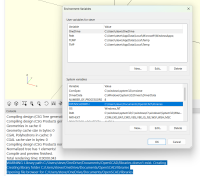

On 7/23/2026 4:45 PM, Steve Lelievre via Discuss wrote:
I assume that the bigger issue relates to the OpenSCAD thinking it
needs a /OneDrive/ element that I didn't specify in the OPENSCADPATH.
OpenSCAD doesn't know beans about OneDrive. It asks Windows where your
Documents folder is, Windows tells it, and it creates an OpenSCAD
hierarchy under your Documents folder if it doesn't exist, and then
looks for libraries there. It seems that your Windows is (as many are)
configured to have your Documents folder on OneDrive.
One likely point of confusion: OpenSCAD does not have a library
folder. It searches two or more:
- The folders that your $OPENSCADPATH specifies.
- (your Documents folder)\OpenSCAD\libraries.
- (the installation directory)\libraries.
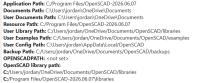
Look at Help/Library Info, under the heading "OpenSCAD library path".
Here's the relevant piece of Help/Library Info on my system. I don't
have $OPENSCADPATH set, so it doesn't end up in the final search list:
On 7/23/2026 5:00 PM, Jordan Brown via Discuss wrote:
OpenSCAD doesn't know beans about OneDrive. It asks Windows where
your Documents folder is, Windows tells it, and it creates an OpenSCAD
hierarchy under your Documents folder if it doesn't exist,
In case it wasn't obvious: the "it" in "it creates" is OpenSCAD (not
Windows).
Also: I hadn't ever noticed that the initial creation of that hierarchy
yields a warning message. That seems wrong; it's absolutely normal. At
most it should be some sort of "note", not a "warning", and having it be
totally silent would be fine with me.
Jordan,
Thanks for your reply. It prompted me to try to change my default
document folder location to be where I actually store my documents. I
found instructions for that through Google but got bogged down with some
kind of permissions issue.
It's all a bit above my pay grade, so I'll take the easy way out and use
the directory under OneDrive after all.
Steve
On 2026-07-23 5:00 PM, Jordan Brown wrote:
On 7/23/2026 4:45 PM, Steve Lelievre via Discuss wrote:
I assume that the bigger issue relates to the OpenSCAD thinking it
needs a /OneDrive/ element that I didn't specify in the OPENSCADPATH.
OpenSCAD doesn't know beans about OneDrive. It asks Windows where
your Documents folder is, Windows tells it, and it creates an OpenSCAD
hierarchy under your Documents folder if it doesn't exist, and then
looks for libraries there. It seems that your Windows is (as many
are) configured to have your Documents folder on OneDrive.
One likely point of confusion: OpenSCAD does not have a library
folder. It searches two or more:
- The folders that your $OPENSCADPATH specifies.
- (your Documents folder)\OpenSCAD\libraries.
- (the installation directory)\libraries.
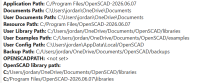
Look at Help/Library Info, under the heading "OpenSCAD library path".
Here's the relevant piece of Help/Library Info on my system. I don't
have $OPENSCADPATH set, so it doesn't end up in the final search list:
On 7/23/2026 6:03 PM, Steve Lelievre wrote:
It's all a bit above my pay grade, so I'll take the easy way out and
use the directory under OneDrive after all.
Or set $OPENSCADPATH, put your libraries there, and ignore
Documents/OpenSCAD/libraries.