

extending MCAD with an example for rotation

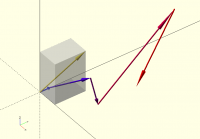
Rotating something into the direction of a vector is a common problem.
It only requires high school math.
But to get the rotation into the right order is often tricky.
I feel this would be a good addition to the MCAD library.
Please have a look at the following code:
// rotation.scad - Basic example of rotation to draw a vector as an arrow
vect1=[2,3,4];
%cube(vect1);
vector(vect1);
chain=[
[0,0,0],
[0,1,0],
[4,2,3],
[5,2,1],
[7,8,9],
[6,5,2],
];
vector_chain();
//
// Draw an arrow from the origin to the position of the vector v.
// To do this draw an arrow with the length of the length of the vector v.
// Then rotate this arrow into the correct direction.
//
module vector(v){
// radius of the arrow
r=.05;
// number of sides of the arrow
fn_vector=16; //change this to: 3, 4, 16, 32, or 100 (set to 4 makes it
square, set to higher number to make it rounder. But be aware: high numbers
lead to (excessively) long render times.
// length of the arrow
l=norm(v);
// rotate the projection of the vector onto the x-y-plane around the z-axis
// rotate(scalar)=rotate(scalar*[0,0,1])=rotation around the z-axis
rotate(atan2(v[1],v[0]))
// rotate from out of the x-y-plane into the z-direction
rotate([0,-atan2(v[2],norm([v[0],v[1]])),0])
// rotate the cylinder into the plus x-direction
rotate([0,90,0]){
// make an arrow, the tip is 20% of the total length
// shaft
cylinder(h=l*.8,r1=r,r2=r,$fn=fn_vector);
// tip
translate([0,0,l*.8])cylinder(h=l*.2,r1=3*r,r2=0,$fn=fn_vector);
}
}
// Draw a chain of vectors along an array of points
module vector_chain(){
// iterate over all elements of the chain
// ( len(array) gives the number of elements in the array )
for(i=[0:len(chain)-2]){
// translate to the starting point of the vector
translate(chain[i])
// change the color [r,g,b] of the vector
// The first one is blue:[0,0,1], the last one is red:[1,0,0].
color([i/(len(chain)-2),0,1-i/(len(chain)-2)])
// draw the vector from point chain[i] to chain[i+1]
vector(chain[i+1]-chain[i]);
}
}
echo(version=version());
// Written by: TakeItAndRun
// 2015
//
// To the extent possible under law, the author(s) have dedicated all
// copyright and related and neighboring rights to this software to the
// public domain worldwide. This software is distributed without any
// warranty.
//
// You should have received a copy of the CC0 Public Domain
// Dedication along with this software.
// If not, see http://creativecommons.org/publicdomain/zero/1.0/.

Hey Peter this is really nice.
-I agree, rotations are very useful and tricky to get right. A function to
do this would be very helpful.
-I like how you show the steps with vectors. I'm not sure if frameworks like
this have been implemented/distributed already, but reference features like
these really help the design process.
-I didn't realize it was so easy to make a transparency ('%' prefix) - I'm
going to start using this all the time. It's helpful to see what is going on
inside complex shapes and what primitives compose them.
This reminds me of David's MOCAD kit -
http://forum.openscad.org/Introduction-and-presentation-of-the-Mocad-Library-for-comment-td12175.html
Further, I'd like to see implementation of multiple callable coordinate
frames. (does this exist?)
Mitch
--
View this message in context: http://forum.openscad.org/extending-MCAD-with-an-example-for-rotation-tp12290p12291.html
Sent from the OpenSCAD mailing list archive at Nabble.com.
I made a variant of your code to create coordinate systems relative to one
another, drawing axes at each origin. Check it out below, maybe you will
find it useful, or be able to point to similar work.
Thanks,
Mitch
http://forum.openscad.org/file/n12335/DemoLeg.demoleg
http://forum.openscad.org/file/n12335/BranchingDemo.branchingdemo
//ex_leg();
ex_branching();
//example: multiple "branches"
module ex_branching(){
v0=[0,0,0,0,0,0];
v1=[10,-15,5,0,30,0];
v2=[0,-40,15,0,160,0];
v3=[30,30,30,0,0,45];
axes(v1) {cube(4);
    axes(v1){
    axes(v3){
        translate([4,4,4]) sphere(4,center=true);
    }
        axes(v2){
            axes(v2);
            axes(v1){
                difference(){
                    cube(10);
                    cube(10,center=true);
                }
            }
        }
    };
}
}
//example: leg
module ex_leg(){
v0=[0,0,0,0,0,0];
foot_width=6;foot_length=20;foot_height=4;
joint_radius=3;
leg_width=4;leg_length=60;
a_ankle_x=10;
a_ankle_y=0;
a_ankle_z=0;
a_knee_x=-15;
a_knee_y=0;
a_knee_z=0;
thigh_length=40;
thigh_width=6;
v_foot_leg=[foot_width/2,foot_length+joint_radius,foot_height/2,a_ankle_x,a_ankle_y,a_ankle_z];
v_leg_thigh=[0,0,leg_length+2*joint_radius,a_knee_x,a_knee_y,a_knee_z];
axes(v0){
    %cube([foot_width,foot_length,foot_height]);
    axes(v_foot_leg){
        sphere(joint_radius,center=true);
        translate([0,0,leg_length/2+joint_radius])
        %cube([leg_width,leg_width,leg_length],center=true);
        axes(v_leg_thigh){
            sphere(joint_radius,center=true);
            translate([0,0,thigh_length/2+joint_radius])
            %cube([thigh_width,thigh_width,thigh_length],center=true);

        }
    }
}
}
//axes reference geometry
module axes(coords){
//represent axes in a particular position and orientation.
x=coords[0];
y=coords[1];
z=coords[2];
rx=coords[3];
ry=coords[4];
rz=coords[5];
h=10;
w=1;
length=sqrt(pow(x,2)+pow(y,2)+pow(z,2));
echo(length);
b=sqrt(pow(x,2)+pow(y,2));

color([0,0,0,1]) rotate(atan2(y,x)) rotate([0,-atan2(z,norm([x,y])),0])
translate([length/2,0,0]) cube([length,.2,.2],center=true);
translate([x,y,z]) rotate([rx,ry,rz]) {
color([1,0,0,1]) translate([h/2,0,0]) cube([h,w,w],center=true);
color([0,1,0,1]) translate([0,h/2,0]) cube([w,h,w],center=true);
color([0,0,1,1]) translate([0,0,h/2]) cube([w,w,h],center=true);
color([0,0,0,1]) cube(2*w,center=true);
children();
}
}
--
View this message in context: http://forum.openscad.org/extending-MCAD-with-an-example-for-rotation-tp12290p12335.html
Sent from the OpenSCAD mailing list archive at Nabble.com.