

How do I render (F6) multiple polyhedrons?

Hello,
I was trying to make a Customizer for Thingiverse. I couldn't import STL
files on Customizer, so I made a C++ program to convert STL files to
polyhedron()s. However, my renderer gives me errors whenever I try to show
two polyhedrons()s in the same file.
If you look at the file I uploaded, you will see there are two modules with
polyhedrons in them, both of which are called. If you call only one of
them, it renders as it should. But if you try to render both of them, it
renders nothing. How do I render them both at once?
In the meantime, I decided to throw everything into one polyhedron()
https://www.thingiverse.com/thing:4422840 , with variables to control
placement and size and all that. I had my C++ program assist me in this
though, as I don't have the skill to do it entirely by hand
--
Sent from: http://forum.openscad.org/

Can you render at your computer the import of the two stl ?
If no, that is the problem. If yes, your conversion code may have a bug.

Not rendering multiple objects is generally an indicator of cgal errors in
the stl. If there is only one object, it doesn't go through cgal
On Sat, 6 Jun 2020, 16:57 Ronaldo Persiano, rcmpersiano@gmail.com wrote:
Can you render at your computer the import of the two stl ?
If no, that is the problem. If yes, your conversion code may have a bug.
OpenSCAD mailing list
Discuss@lists.openscad.org
http://lists.openscad.org/mailman/listinfo/discuss_lists.openscad.org
Okay. I am typing this from my phone. As soon as I am back at my computer,
I will try to make two simple polyhedron() cubes (manually and from STL
conversion), and render them side by side. Also trying two manual cubes,
two cubes converted from STL, and one of each. My models do pass inspection
in the thrown together view (yellow always faces out).
--
Sent from: http://forum.openscad.org/
Oh, and some clarification. I am new to OpenSCAD, and do not understand what
can cause CGAL errors.
--
Sent from: http://forum.openscad.org/

CGAL errors are usually a bad STL (non manifold and/or self intersections -
google these terms) or similarly badly formed polygon/polyhedron.
You will generally NOT get a CGAL error if you render one object, because
CGAL gets called to union() defference() etc.
A good test is to add cube(1); to the object you have issues with, that
forces a union() so CGAL gets called.
Admin - email* me if you need anything, or if I've done something stupid...
- click on my MichaelAtOz label, there is a link to email me.
Unless specifically shown otherwise above, my contribution is in the Public Domain; to the extent possible under law, I have waived all copyright and related or neighbouring rights to this work. Obviously inclusion of works of previous authors is not included in the above.
--
Sent from: http://forum.openscad.org/
adding a cube(1) F5 then View/Thrown-together shows:
Purple is an inverted face. The rest of the object looks OK.
-----Original Message-----
From: Discuss [mailto:discuss-bounces@lists.openscad.org] On Behalf Of MichaelAtOz
Sent: Sun, 7 Jun 2020 10:02
Subject: Re: [OpenSCAD] How do I render (F6) multiple polyhedrons?
CGAL errors are usually a bad STL (non manifold and/or self intersections -
google these terms) or similarly badly formed polygon/polyhedron.
You will generally NOT get a CGAL error if you render one object, because
CGAL gets called to union() defference() etc.
A good test is to add cube(1); to the object you have issues with, that
forces a union() so CGAL gets called.
Admin - email* me if you need anything, or if I've done something stupid...
- click on my MichaelAtOz label, there is a link to email me.
Unless specifically shown otherwise above, my contribution is in the Public Domain; to the extent
possible under law, I have waived all copyright and related or neighbouring rights to this work.
Obviously inclusion of works of previous authors is not included in the above.
--
Sent from: http://forum.openscad.org/
OpenSCAD mailing list
--
This email has been checked for viruses by AVG.
https://www.avg.com
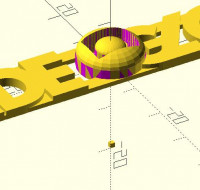
Thanks! I tried rendering two manually programmed cubes side by side, and I
had no CGAL errors. I even checked my models in Blender for non-manifold
geometry. It only had the non-manifold in the pic above. I also repaired
the geometry and reuploaded the Thingiverse file.
From now on, I will always use Blender to check if my objects are manifold
before importing them into OpenSCAD
--
Sent from: http://forum.openscad.org/