RW
Raymond West
Mon, Dec 8, 2025 7:28 PM
Hi,
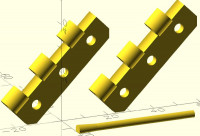
Here is a simple hinge, parametric, of course.
The code that I have attached, would be fairly easy to translate into
openscad, if interested.
This prints well, and the 45 degree angle means no supports and improved
strength. The year old, open spool of petg, was a bit wet, hence the
high tolerance value, but it printed fine with a couple of mouse
ears. compared to printing vertically .
Hi,
Here is a simple hinge, parametric, of course.
The code that I have attached, would be fairly easy to translate into
openscad, if interested.
This prints well, and the 45 degree angle means no supports and improved
strength. The year old, open spool of petg, was a bit wet, hence the
high tolerance value, but it printed fine with a couple of mouse
ears. compared to printing vertically .

GS
Guenther Sohler
Mon, Dec 8, 2025 8:09 PM
Which language is that ? it has .cad extension
On Mon, Dec 8, 2025 at 8:29 PM Raymond West via Discuss <
discuss@lists.openscad.org> wrote:
Hi,
Here is a simple hinge, parametric, of course.
The code that I have attached, would be fairly easy to translate into
openscad, if interested.
This prints well, and the 45 degree angle means no supports and improved
strength. The year old, open spool of petg, was a bit wet, hence the high
tolerance value, but it printed fine with a couple of mouse ears. compared
to printing vertically .
OpenSCAD mailing list
To unsubscribe send an email to discuss-leave@lists.openscad.org
Which language is that ? it has .cad extension
On Mon, Dec 8, 2025 at 8:29 PM Raymond West via Discuss <
discuss@lists.openscad.org> wrote:
> Hi,
>
> Here is a simple hinge, parametric, of course.
>
> The code that I have attached, would be fairly easy to translate into
> openscad, if interested.
>
> This prints well, and the 45 degree angle means no supports and improved
> strength. The year old, open spool of petg, was a bit wet, hence the high
> tolerance value, but it printed fine with a couple of mouse ears. compared
> to printing vertically .
> _______________________________________________
> OpenSCAD mailing list
> To unsubscribe send an email to discuss-leave@lists.openscad.org
RW
Raymond West
Tue, Dec 9, 2025 11:02 AM
Hi Guenther,
The language is 'my own invention' (description below, see that earlier
post if you want it's attachments). It is handled as a text file by the
parser, and the file extension can be anything, but generally I use .Cs
, since I use the vs code editor, so it looks pretty, but that would
probably confuse even more. You can probably discern my earlier days of
Fortran IV short names and 80 column punched cards, but the parser is
happy with camelBack, whatever, and other newfangled concepts.
So far it is about 612MB of code, plus libraries for cgal, manifold
meshlab server, and others There are many rabbit holes in the patches of
weeds.
Best wishes,
Ray
On 08/12/2025 20:09, Guenther Sohler via Discuss wrote:
Which language is that ? it has .cad extension
-------- Forwarded Message --------
Subject: [OpenSCAD] Fwd: OFF TOPIC - usability/mutability- to be, or
not to be!
Date: Tue, 25 Nov 2025 10:27:26 +0000
From: Raymond West via Discuss discuss@lists.openscad.org
Reply-To: OpenSCAD general discussion Mailing-list
discuss@lists.openscad.org
To: OpenSCAD general discussion Discuss@lists.openscad.org
CC: Raymond West raywest@raywest.com
Hi,
I've been developing my own cad. Why? because I can, with help from
AI. Having dabbled with Python, I decided that is not for me. The
implementation of the Manifold library is not yet complete in python,
or it wasn't when I started into this, a month or two ago, so I
decided to use C++ (Cpp) and a parser for my code. C# would have been
easier, but that needs .net, afaik. I know very little about Cpp, and
I forced co-pilot to write all the code. At the moment, the LLM
versions of AI are little more than glorified search engines. They
work well for Python, where most of the difficulty is in finding
blocks of code/existing libraries, to do what you want, but I wonder
whatever they were smoking when the decision was made to make spaces
significant in Python, although that concept would have been OK for
coding forms, I suppose... so, I've had to hack together a parser, for
my home brew, simple cad language.
Fundamentally, In my cad world every object relates to the physical
world and has three dimensions, excluding time and whatever else. 2d
objects do not exist, other than as thin 3d objects. Object names can
can mutate - a value, one moment, a shape the next. All calculation in
fixed decimal point.
So, how far have I and AI got? I'm pretty pleased, and I've attached
some code and results below. This only shows a fragment. My latest
effort is to show_view to a gui screen, so that I can manually select
points, and enter them into the code. this will be needed to easily
select specific, individual edges to be filleted, and also I think
that may be useful for pinpointing mismatched triangles. The code
example (demo.cad) attached, shows the errors that verify can pick up,
for example. Because my cad does all it's calculations using manifold
parameters, then the result should be manifold (watertight), but it
may have small defects.
I've designed it so that a useful help is built in, and a verbose mode
that can print out the calculation steps, if I have a problem with a
particular function, although the more recent functions do not have
that (AI memory is worse than mine.). I simply have to say to
copilot,' write the help for xyz function', then spend an hour or two
reminding it how it organised it three hours earlier. I've used my cad
a few times to create 'useful' 3d printed items, but I want to see if
the mutable names becomes a problem with more advanced items.
I use meshlab to automatically show the .obj and .ply files, openscad
for the scad files. I much prefer the openscad viewer, but it is
slower to render.
Not shown, but I have subroutines, for/next, if's etc, the versions
that I grew up with, and, as well as the manifold simplify, i have my
own point reduction methodology, which sometimes behaves in a more
predictable manner - (but sometimes not), my own Minkowski type
function (which also operates inside the base shape), paths, etc.
For demo.cad, you can view the code by dragging it into the openscad
editor, or if you want it pretty, use vs code, and set to c#. the
other image files should be self explanatory.
Best wishes,
Ray
because of the 1500kb size limit, I'll send the other ply and obj
files seperately
Hi Guenther,
The language is 'my own invention' (description below, see that earlier
post if you want it's attachments). It is handled as a text file by the
parser, and the file extension can be anything, but generally I use .Cs
, since I use the vs code editor, so it looks pretty, but that would
probably confuse even more. You can probably discern my earlier days of
Fortran IV short names and 80 column punched cards, but the parser is
happy with camelBack, whatever, and other newfangled concepts.
So far it is about 612MB of code, plus libraries for cgal, manifold
meshlab server, and others There are many rabbit holes in the patches of
weeds.
Best wishes,
Ray
On 08/12/2025 20:09, Guenther Sohler via Discuss wrote:
> Which language is that ? it has .cad extension
>
>
>
>
> -------- Forwarded Message --------
> Subject: [OpenSCAD] Fwd: OFF TOPIC - usability/mutability- to be, or
> not to be!
> Date: Tue, 25 Nov 2025 10:27:26 +0000
> From: Raymond West via Discuss <discuss@lists.openscad.org>
> Reply-To: OpenSCAD general discussion Mailing-list
> <discuss@lists.openscad.org>
> To: OpenSCAD general discussion <Discuss@lists.openscad.org>
> CC: Raymond West <raywest@raywest.com>
>
>
>
> Hi,
>
> I've been developing my own cad. Why? because I can, with help from
> AI. Having dabbled with Python, I decided that is not for me. The
> implementation of the Manifold library is not yet complete in python,
> or it wasn't when I started into this, a month or two ago, so I
> decided to use C++ (Cpp) and a parser for my code. C# would have been
> easier, but that needs .net, afaik. I know very little about Cpp, and
> I forced co-pilot to write all the code. At the moment, the LLM
> versions of AI are little more than glorified search engines. They
> work well for Python, where most of the difficulty is in finding
> blocks of code/existing libraries, to do what you want, but I wonder
> whatever they were smoking when the decision was made to make spaces
> significant in Python, although that concept would have been OK for
> coding forms, I suppose... so, I've had to hack together a parser, for
> my home brew, simple cad language.
>
> Fundamentally, In my cad world every object relates to the physical
> world and has three dimensions, excluding time and whatever else. 2d
> objects do not exist, other than as thin 3d objects. Object names can
> can mutate - a value, one moment, a shape the next. All calculation in
> fixed decimal point.
>
> So, how far have I and AI got? I'm pretty pleased, and I've attached
> some code and results below. This only shows a fragment. My latest
> effort is to show_view to a gui screen, so that I can manually select
> points, and enter them into the code. this will be needed to easily
> select specific, individual edges to be filleted, and also I think
> that may be useful for pinpointing mismatched triangles. The code
> example (demo.cad) attached, shows the errors that verify can pick up,
> for example. Because my cad does all it's calculations using manifold
> parameters, then the result should be manifold (watertight), but it
> may have small defects.
>
> I've designed it so that a useful help is built in, and a verbose mode
> that can print out the calculation steps, if I have a problem with a
> particular function, although the more recent functions do not have
> that (AI memory is worse than mine.). I simply have to say to
> copilot,' write the help for xyz function', then spend an hour or two
> reminding it how it organised it three hours earlier. I've used my cad
> a few times to create 'useful' 3d printed items, but I want to see if
> the mutable names becomes a problem with more advanced items.
>
> I use meshlab to automatically show the .obj and .ply files, openscad
> for the scad files. I much prefer the openscad viewer, but it is
> slower to render.
>
> Not shown, but I have subroutines, for/next, if's etc, the versions
> that I grew up with, and, as well as the manifold simplify, i have my
> own point reduction methodology, which sometimes behaves in a more
> predictable manner - (but sometimes not), my own Minkowski type
> function (which also operates inside the base shape), paths, etc.
>
> For demo.cad, you can view the code by dragging it into the openscad
> editor, or if you want it pretty, use vs code, and set to c#. the
> other image files should be self explanatory.
>
> Best wishes,
>
> Ray
> because of the 1500kb size limit, I'll send the other ply and obj
> files seperately
>
>
RW
Raymond West
Thu, May 14, 2026 12:18 PM
HI,
Last November, I started developing my own cad program, written in cpp,
using AI (co-pilot in visual studio code). It has now got to the stage
that I can not remember all the function details, and I have used
copilot to generate an html helper sheet. It also has a short list of
pseudonyms, since if you don't know the exact word, you will not
normally find its functionality. So, for example, if you want to 'add'
a couple of shapes, and do not know that it is a boolean union
operation, then a search on 'add' will bring up the union operation
description. If more detail is required, then in the program editor I
can enter '? union full', to get a full description and example of
'union'. If, in the editor, I enter '?', then on the console I get a
full list of functions, or I can select select just the parameters,
examples or the algorithm.
Furthermore, there is a verbose flag that can be set in the code, that
gives the details of each calculation within any selected function, as
the program runs, which is useful for debugging.
I can also ask copilot to generate code in my cad language. I've not
tested if it can translate openscad to my cad, or vice versa. One
problem is, not to fall into the x/y problem situation, which I often
do, and continuously see on fora/elsewhere.
I think, since I make many typos, that I may need it to create a
pre-parser, but already it is 1.8 GB of code, which needs considerable
re-factoring.
I've attached the html helper below, if anybody wants to play with it.
Best wishers,
Ray
HI,
Last November, I started developing my own cad program, written in cpp,
using AI (co-pilot in visual studio code). It has now got to the stage
that I can not remember all the function details, and I have used
copilot to generate an html helper sheet. It also has a short list of
pseudonyms, since if you don't know the exact word, you will not
normally find its functionality. So, for example, if you want to 'add'
a couple of shapes, and do not know that it is a boolean union
operation, then a search on 'add' will bring up the union operation
description. If more detail is required, then in the program editor I
can enter '? union full', to get a full description and example of
'union'. If, in the editor, I enter '?', then on the console I get a
full list of functions, or I can select select just the parameters,
examples or the algorithm.
Furthermore, there is a verbose flag that can be set in the code, that
gives the details of each calculation within any selected function, as
the program runs, which is useful for debugging.
I can also ask copilot to generate code in my cad language. I've not
tested if it can translate openscad to my cad, or vice versa. One
problem is, not to fall into the x/y problem situation, which I often
do, and continuously see on fora/elsewhere.
I think, since I make many typos, that I may need it to create a
pre-parser, but already it is 1.8 GB of code, which needs considerable
re-factoring.
I've attached the html helper below, if anybody wants to play with it.
Best wishers,
Ray

JB
Jon Bondy
Thu, May 14, 2026 12:50 PM
Ray:
What an interesting effort! I wish you luck. What are you trying to
achieve, with your new CAD software, that is not available, or
convenient, in other contexts?
1.8 GB of code sounds at least 3 orders of magnitude larger than
necessary. I found this figure to be astonishingly large.
What is the "x/y problem" please?
:)
Jon
On 5/14/2026 8:18 AM, Raymond West via Discuss wrote:
HI,
Last November, I started developing my own cad program, written in
cpp, using AI (co-pilot in visual studio code). It has now got to the
stage that I can not remember all the function details, and I have
used copilot to generate an html helper sheet. It also has a short
list of pseudonyms, since if you don't know the exact word, you will
not normally find its functionality. So, for example, if you want to
'add' a couple of shapes, and do not know that it is a boolean union
operation, then a search on 'add' will bring up the union operation
description. If more detail is required, then in the program editor I
can enter '? union full', to get a full description and example of
'union'. If, in the editor, I enter '?', then on the console I get a
full list of functions, or I can select select just the parameters,
examples or the algorithm.
Furthermore, there is a verbose flag that can be set in the code, that
gives the details of each calculation within any selected function, as
the program runs, which is useful for debugging.
I can also ask copilot to generate code in my cad language. I've not
tested if it can translate openscad to my cad, or vice versa. One
problem is, not to fall into the x/y problem situation, which I often
do, and continuously see on fora/elsewhere.
I think, since I make many typos, that I may need it to create a
pre-parser, but already it is 1.8 GB of code, which needs considerable
re-factoring.
I've attached the html helper below, if anybody wants to play with it.
Best wishers,
Ray
OpenSCAD mailing list
To unsubscribe send an email to discuss-leave@lists.openscad.org
--
This email has been checked for viruses by AVG antivirus software.
www.avg.com
Ray:
What an interesting effort! I wish you luck. What are you trying to
achieve, with your new CAD software, that is not available, or
convenient, in other contexts?
1.8 GB of code sounds at least 3 orders of magnitude larger than
necessary. I found this figure to be astonishingly large.
What is the "x/y problem" please?
:)
Jon
On 5/14/2026 8:18 AM, Raymond West via Discuss wrote:
> HI,
>
> Last November, I started developing my own cad program, written in
> cpp, using AI (co-pilot in visual studio code). It has now got to the
> stage that I can not remember all the function details, and I have
> used copilot to generate an html helper sheet. It also has a short
> list of pseudonyms, since if you don't know the exact word, you will
> not normally find its functionality. So, for example, if you want to
> 'add' a couple of shapes, and do not know that it is a boolean union
> operation, then a search on 'add' will bring up the union operation
> description. If more detail is required, then in the program editor I
> can enter '? union full', to get a full description and example of
> 'union'. If, in the editor, I enter '?', then on the console I get a
> full list of functions, or I can select select just the parameters,
> examples or the algorithm.
>
> Furthermore, there is a verbose flag that can be set in the code, that
> gives the details of each calculation within any selected function, as
> the program runs, which is useful for debugging.
>
> I can also ask copilot to generate code in my cad language. I've not
> tested if it can translate openscad to my cad, or vice versa. One
> problem is, not to fall into the x/y problem situation, which I often
> do, and continuously see on fora/elsewhere.
>
> I think, since I make many typos, that I may need it to create a
> pre-parser, but already it is 1.8 GB of code, which needs considerable
> re-factoring.
>
> I've attached the html helper below, if anybody wants to play with it.
>
> Best wishers,
>
> Ray
>
>
> _______________________________________________
> OpenSCAD mailing list
> To unsubscribe send an email to discuss-leave@lists.openscad.org
--
This email has been checked for viruses by AVG antivirus software.
www.avg.com

KE
Karl Exler
Thu, May 14, 2026 1:02 PM
Hi Ray
How can I "play arround with a cheat cheat"? Don´t I need the whole
program for that?
Sorry, if this is a stupid question...
I am only user and not developer.
yours
Karl
Am 14.05.26 um 14:18 schrieb Raymond West via Discuss:
HI,
Last November, I started developing my own cad program, written in
cpp, using AI (co-pilot in visual studio code). It has now got to the
stage that I can not remember all the function details, and I have
used copilot to generate an html helper sheet. It also has a short
list of pseudonyms, since if you don't know the exact word, you will
not normally find its functionality. So, for example, if you want to
'add' a couple of shapes, and do not know that it is a boolean union
operation, then a search on 'add' will bring up the union operation
description. If more detail is required, then in the program editor I
can enter '? union full', to get a full description and example of
'union'. If, in the editor, I enter '?', then on the console I get a
full list of functions, or I can select select just the parameters,
examples or the algorithm.
Furthermore, there is a verbose flag that can be set in the code, that
gives the details of each calculation within any selected function, as
the program runs, which is useful for debugging.
I can also ask copilot to generate code in my cad language. I've not
tested if it can translate openscad to my cad, or vice versa. One
problem is, not to fall into the x/y problem situation, which I often
do, and continuously see on fora/elsewhere.
I think, since I make many typos, that I may need it to create a
pre-parser, but already it is 1.8 GB of code, which needs considerable
re-factoring.
I've attached the html helper below, if anybody wants to play with it.
Best wishers,
Ray
OpenSCAD mailing list
To unsubscribe send an email to discuss-leave@lists.openscad.org
Hi Ray
How can I "play arround with a cheat cheat"? Don´t I need the whole
program for that?
Sorry, if this is a stupid question...
I am only user and not developer.
yours
Karl
Am 14.05.26 um 14:18 schrieb Raymond West via Discuss:
> HI,
>
> Last November, I started developing my own cad program, written in
> cpp, using AI (co-pilot in visual studio code). It has now got to the
> stage that I can not remember all the function details, and I have
> used copilot to generate an html helper sheet. It also has a short
> list of pseudonyms, since if you don't know the exact word, you will
> not normally find its functionality. So, for example, if you want to
> 'add' a couple of shapes, and do not know that it is a boolean union
> operation, then a search on 'add' will bring up the union operation
> description. If more detail is required, then in the program editor I
> can enter '? union full', to get a full description and example of
> 'union'. If, in the editor, I enter '?', then on the console I get a
> full list of functions, or I can select select just the parameters,
> examples or the algorithm.
>
> Furthermore, there is a verbose flag that can be set in the code, that
> gives the details of each calculation within any selected function, as
> the program runs, which is useful for debugging.
>
> I can also ask copilot to generate code in my cad language. I've not
> tested if it can translate openscad to my cad, or vice versa. One
> problem is, not to fall into the x/y problem situation, which I often
> do, and continuously see on fora/elsewhere.
>
> I think, since I make many typos, that I may need it to create a
> pre-parser, but already it is 1.8 GB of code, which needs considerable
> re-factoring.
>
> I've attached the html helper below, if anybody wants to play with it.
>
> Best wishers,
>
> Ray
>
>
> _______________________________________________
> OpenSCAD mailing list
> To unsubscribe send an email to discuss-leave@lists.openscad.org
RW
Raymond West
Thu, May 14, 2026 6:17 PM
Hi Karl,
Thanks for your interest.
Openscad has a proper cheat sheet. It is one sheet, that can be printed,
that links to the wiki. It has been maintained by good folk who have the
time and knowledge to keep it up to date. Once you've written a few
scad scripts, you find that cheat sheet sufficient, usually, just as a
reminder of the syntax, say.
My cad has no documentation separate from the code within the program
itself, so I got AI to go through the code, pull out commands from the
parser, and get details from the built in help. (I had got it to
generate a cheat sheet, similar to the openscad one, but it was not much
use to me, since it did not refer to any documents, since none were
available, although AI said it could write a manual, about 80 pages,iirc.)
So, instead I got it to write the html that I attached previously. I
then realised, that any cheat sheet is only of use, if you know the word
you are looking for. How do you do know the correct word? For example,
even if you know the word, the openscad sheet is not in alphabetical
order, and you also need to know which group the word is in. So, I got
my helper to also add in pseudonyms. The playing around was referring to
the fact that you could think of a word that may or may not exist as a
function, and it will find the cad equivalent, if the word appears in
the pseudonym list. If you want to use what you find, then you do need
the whole program, but the concept may or may not be useful.
Best wishes,
Ray
On 14/05/2026 14:02, Karl Exler via Discuss wrote:
Hi Ray
How can I "play arround with a cheat cheat"? Don´t I need the whole
program for that?
Sorry, if this is a stupid question...
I am only user and not developer.
yours
Karl
Am 14.05.26 um 14:18 schrieb Raymond West via Discuss:
HI,
Last November, I started developing my own cad program, written in
cpp, using AI (co-pilot in visual studio code). It has now got to the
stage that I can not remember all the function details, and I have
used copilot to generate an html helper sheet. It also has a short
list of pseudonyms, since if you don't know the exact word, you will
not normally find its functionality. So, for example, if you want to
'add' a couple of shapes, and do not know that it is a boolean union
operation, then a search on 'add' will bring up the union operation
description. If more detail is required, then in the program editor I
can enter '? union full', to get a full description and example of
'union'. If, in the editor, I enter '?', then on the console I get a
full list of functions, or I can select select just the parameters,
examples or the algorithm.
Furthermore, there is a verbose flag that can be set in the code,
that gives the details of each calculation within any selected
function, as the program runs, which is useful for debugging.
I can also ask copilot to generate code in my cad language. I've not
tested if it can translate openscad to my cad, or vice versa. One
problem is, not to fall into the x/y problem situation, which I often
do, and continuously see on fora/elsewhere.
I think, since I make many typos, that I may need it to create a
pre-parser, but already it is 1.8 GB of code, which needs
considerable re-factoring.
I've attached the html helper below, if anybody wants to play with it.
Best wishers,
Ray
OpenSCAD mailing list
To unsubscribe send an email to discuss-leave@lists.openscad.org
OpenSCAD mailing list
To unsubscribe send an email to discuss-leave@lists.openscad.org
Hi Karl,
Thanks for your interest.
Openscad has a proper cheat sheet. It is one sheet, that can be printed,
that links to the wiki. It has been maintained by good folk who have the
time and knowledge to keep it up to date. Once you've written a few
scad scripts, you find that cheat sheet sufficient, usually, just as a
reminder of the syntax, say.
My cad has no documentation separate from the code within the program
itself, so I got AI to go through the code, pull out commands from the
parser, and get details from the built in help. (I had got it to
generate a cheat sheet, similar to the openscad one, but it was not much
use to me, since it did not refer to any documents, since none were
available, although AI said it could write a manual, about 80 pages,iirc.)
So, instead I got it to write the html that I attached previously. I
then realised, that any cheat sheet is only of use, if you know the word
you are looking for. How do you do know the correct word? For example,
even if you know the word, the openscad sheet is not in alphabetical
order, and you also need to know which group the word is in. So, I got
my helper to also add in pseudonyms. The playing around was referring to
the fact that you could think of a word that may or may not exist as a
function, and it will find the cad equivalent, if the word appears in
the pseudonym list. If you want to use what you find, then you do need
the whole program, but the concept may or may not be useful.
Best wishes,
Ray
On 14/05/2026 14:02, Karl Exler via Discuss wrote:
> Hi Ray
>
> How can I "play arround with a cheat cheat"? Don´t I need the whole
> program for that?
> Sorry, if this is a stupid question...
>
> I am only user and not developer.
>
> yours
> Karl
>
> Am 14.05.26 um 14:18 schrieb Raymond West via Discuss:
>> HI,
>>
>> Last November, I started developing my own cad program, written in
>> cpp, using AI (co-pilot in visual studio code). It has now got to the
>> stage that I can not remember all the function details, and I have
>> used copilot to generate an html helper sheet. It also has a short
>> list of pseudonyms, since if you don't know the exact word, you will
>> not normally find its functionality. So, for example, if you want to
>> 'add' a couple of shapes, and do not know that it is a boolean union
>> operation, then a search on 'add' will bring up the union operation
>> description. If more detail is required, then in the program editor I
>> can enter '? union full', to get a full description and example of
>> 'union'. If, in the editor, I enter '?', then on the console I get a
>> full list of functions, or I can select select just the parameters,
>> examples or the algorithm.
>>
>> Furthermore, there is a verbose flag that can be set in the code,
>> that gives the details of each calculation within any selected
>> function, as the program runs, which is useful for debugging.
>>
>> I can also ask copilot to generate code in my cad language. I've not
>> tested if it can translate openscad to my cad, or vice versa. One
>> problem is, not to fall into the x/y problem situation, which I often
>> do, and continuously see on fora/elsewhere.
>>
>> I think, since I make many typos, that I may need it to create a
>> pre-parser, but already it is 1.8 GB of code, which needs
>> considerable re-factoring.
>>
>> I've attached the html helper below, if anybody wants to play with it.
>>
>> Best wishers,
>>
>> Ray
>>
>>
>> _______________________________________________
>> OpenSCAD mailing list
>> To unsubscribe send an email to discuss-leave@lists.openscad.org
> _______________________________________________
> OpenSCAD mailing list
> To unsubscribe send an email to discuss-leave@lists.openscad.org
JB
Jon Bondy
Thu, May 14, 2026 10:42 PM
"the openscad sheet is not in alphabetical order, and you also need to
know which group the word is in"
I use Find in my browser (<ctrl>-F) and type in the command I seek.
That bypasses any structure the document has.
Jon
On 5/14/2026 2:17 PM, Raymond West via Discuss wrote:
Hi Karl,
Thanks for your interest.
Openscad has a proper cheat sheet. It is one sheet, that can be
printed, that links to the wiki. It has been maintained by good folk
who have the time and knowledge to keep it up to date. Once you've
written a few scad scripts, you find that cheat sheet sufficient,
usually, just as a reminder of the syntax, say.
My cad has no documentation separate from the code within the program
itself, so I got AI to go through the code, pull out commands from the
parser, and get details from the built in help. (I had got it to
generate a cheat sheet, similar to the openscad one, but it was not
much use to me, since it did not refer to any documents, since none
were available, although AI said it could write a manual, about 80
pages,iirc.)
So, instead I got it to write the html that I attached previously. I
then realised, that any cheat sheet is only of use, if you know the
word you are looking for. How do you do know the correct word? For
example, even if you know the word, the openscad sheet is not in
alphabetical order, and you also need to know which group the word is
in. So, I got my helper to also add in pseudonyms. The playing around
was referring to the fact that you could think of a word that may or
may not exist as a function, and it will find the cad equivalent, if
the word appears in the pseudonym list. If you want to use what you
find, then you do need the whole program, but the concept may or may
not be useful.
Best wishes,
Ray
On 14/05/2026 14:02, Karl Exler via Discuss wrote:
Hi Ray
How can I "play arround with a cheat cheat"? Don´t I need the whole
program for that?
Sorry, if this is a stupid question...
I am only user and not developer.
yours
Karl
Am 14.05.26 um 14:18 schrieb Raymond West via Discuss:
HI,
Last November, I started developing my own cad program, written in
cpp, using AI (co-pilot in visual studio code). It has now got to
the stage that I can not remember all the function details, and I
have used copilot to generate an html helper sheet. It also has a
short list of pseudonyms, since if you don't know the exact word,
you will not normally find its functionality. So, for example, if
you want to 'add' a couple of shapes, and do not know that it is a
boolean union operation, then a search on 'add' will bring up the
union operation description. If more detail is required, then in the
program editor I can enter '? union full', to get a full description
and example of 'union'. If, in the editor, I enter '?', then on the
console I get a full list of functions, or I can select select just
the parameters, examples or the algorithm.
Furthermore, there is a verbose flag that can be set in the code,
that gives the details of each calculation within any selected
function, as the program runs, which is useful for debugging.
I can also ask copilot to generate code in my cad language. I've
not tested if it can translate openscad to my cad, or vice versa.
One problem is, not to fall into the x/y problem situation, which I
often do, and continuously see on fora/elsewhere.
I think, since I make many typos, that I may need it to create a
pre-parser, but already it is 1.8 GB of code, which needs
considerable re-factoring.
I've attached the html helper below, if anybody wants to play with it.
Best wishers,
Ray
OpenSCAD mailing list
To unsubscribe send an email to discuss-leave@lists.openscad.org
--
This email has been checked for viruses by AVG antivirus software.
www.avg.com
"the openscad sheet is not in alphabetical order, and you also need to
know which group the word is in"
I use Find in my browser (<ctrl>-F) and type in the command I seek.
That bypasses any structure the document has.
Jon
On 5/14/2026 2:17 PM, Raymond West via Discuss wrote:
> Hi Karl,
>
> Thanks for your interest.
>
> Openscad has a proper cheat sheet. It is one sheet, that can be
> printed, that links to the wiki. It has been maintained by good folk
> who have the time and knowledge to keep it up to date. Once you've
> written a few scad scripts, you find that cheat sheet sufficient,
> usually, just as a reminder of the syntax, say.
>
> My cad has no documentation separate from the code within the program
> itself, so I got AI to go through the code, pull out commands from the
> parser, and get details from the built in help. (I had got it to
> generate a cheat sheet, similar to the openscad one, but it was not
> much use to me, since it did not refer to any documents, since none
> were available, although AI said it could write a manual, about 80
> pages,iirc.)
>
> So, instead I got it to write the html that I attached previously. I
> then realised, that any cheat sheet is only of use, if you know the
> word you are looking for. How do you do know the correct word? For
> example, even if you know the word, the openscad sheet is not in
> alphabetical order, and you also need to know which group the word is
> in. So, I got my helper to also add in pseudonyms. The playing around
> was referring to the fact that you could think of a word that may or
> may not exist as a function, and it will find the cad equivalent, if
> the word appears in the pseudonym list. If you want to use what you
> find, then you do need the whole program, but the concept may or may
> not be useful.
>
> Best wishes,
>
> Ray
>
> On 14/05/2026 14:02, Karl Exler via Discuss wrote:
>> Hi Ray
>>
>> How can I "play arround with a cheat cheat"? Don´t I need the whole
>> program for that?
>> Sorry, if this is a stupid question...
>>
>> I am only user and not developer.
>>
>> yours
>> Karl
>>
>> Am 14.05.26 um 14:18 schrieb Raymond West via Discuss:
>>> HI,
>>>
>>> Last November, I started developing my own cad program, written in
>>> cpp, using AI (co-pilot in visual studio code). It has now got to
>>> the stage that I can not remember all the function details, and I
>>> have used copilot to generate an html helper sheet. It also has a
>>> short list of pseudonyms, since if you don't know the exact word,
>>> you will not normally find its functionality. So, for example, if
>>> you want to 'add' a couple of shapes, and do not know that it is a
>>> boolean union operation, then a search on 'add' will bring up the
>>> union operation description. If more detail is required, then in the
>>> program editor I can enter '? union full', to get a full description
>>> and example of 'union'. If, in the editor, I enter '?', then on the
>>> console I get a full list of functions, or I can select select just
>>> the parameters, examples or the algorithm.
>>>
>>> Furthermore, there is a verbose flag that can be set in the code,
>>> that gives the details of each calculation within any selected
>>> function, as the program runs, which is useful for debugging.
>>>
>>> I can also ask copilot to generate code in my cad language. I've
>>> not tested if it can translate openscad to my cad, or vice versa.
>>> One problem is, not to fall into the x/y problem situation, which I
>>> often do, and continuously see on fora/elsewhere.
>>>
>>> I think, since I make many typos, that I may need it to create a
>>> pre-parser, but already it is 1.8 GB of code, which needs
>>> considerable re-factoring.
>>>
>>> I've attached the html helper below, if anybody wants to play with it.
>>>
>>> Best wishers,
>>>
>>> Ray
>>>
>>>
>>> _______________________________________________
>>> OpenSCAD mailing list
>>> To unsubscribe send an email to discuss-leave@lists.openscad.org
>> _______________________________________________
>> OpenSCAD mailing list
>> To unsubscribe send an email to discuss-leave@lists.openscad.org
> _______________________________________________
> OpenSCAD mailing list
> To unsubscribe send an email to discuss-leave@lists.openscad.org
--
This email has been checked for viruses by AVG antivirus software.
www.avg.com