

discuss@lists.openscad.org

OpenSCAD general discussion Mailing-list

View all threads

Semi transparent object behind transparent window isn't visible.

NH
nop head
Mon, Jul 24, 2017 11:50 AM

If I have a semi transparent object I can see objects behind it as long as
I draw it later. I.e. I can see through it and the objects behind look
lighter. If one of those objects is itself semitransparent it becomes
invisible.

Is this a bug or just a limitation in the rendering operation?

If I have a semi transparent object I can see objects behind it as long as I draw it later. I.e. I can see through it and the objects behind look lighter. If one of those objects is itself semitransparent it becomes invisible. Is this a bug or just a limitation in the rendering operation?
M
MichaelAtOz
Wed, Aug 16, 2017 10:36 PM

See https://github.com/openscad/openscad/issues/310


Admin - PM me if you need anything, or if I've done something stupid...

Unless specifically shown otherwise above, my contribution is in the Public Domain; to the extent possible under law, I have waived all copyright and related or neighbouring rights to this work. Obviously inclusion of works of previous authors is not included in the above.

The TPP is no simple “trade agreement.”  Fight it! http://www.ourfairdeal.org/  time is running out!

View this message in context: http://forum.openscad.org/Semi-transparent-object-behind-transparent-window-isn-t-visible-tp21930p22076.html
Sent from the OpenSCAD mailing list archive at Nabble.com.

See https://github.com/openscad/openscad/issues/310 ----- Admin - PM me if you need anything, or if I've done something stupid... Unless specifically shown otherwise above, my contribution is in the Public Domain; to the extent possible under law, I have waived all copyright and related or neighbouring rights to this work. Obviously inclusion of works of previous authors is not included in the above. The TPP is no simple “trade agreement.” Fight it! http://www.ourfairdeal.org/ time is running out! -- View this message in context: http://forum.openscad.org/Semi-transparent-object-behind-transparent-window-isn-t-visible-tp21930p22076.html Sent from the OpenSCAD mailing list archive at Nabble.com.
NH
nop head
Thu, Aug 17, 2017 9:36 PM

I don't think it is that issue. The rendering order isn't the problem. The
problem is the alpha blend applied twice doesn't look any different from it
applied once.

On 16 August 2017 at 23:36, MichaelAtOz oz.at.michael@gmail.com wrote:

See https://github.com/openscad/openscad/issues/310


Admin - PM me if you need anything, or if I've done something stupid...

Unless specifically shown otherwise above, my contribution is in the
Public Domain; to the extent possible under law, I have waived all
copyright and related or neighbouring rights to this work. Obviously
inclusion of works of previous authors is not included in the above.

The TPP is no simple “trade agreement.”  Fight it!
http://www.ourfairdeal.org/  time is running out!

View this message in context: http://forum.openscad.org/
Semi-transparent-object-behind-transparent-window-isn-
t-visible-tp21930p22076.html
Sent from the OpenSCAD mailing list archive at Nabble.com.


OpenSCAD mailing list
Discuss@lists.openscad.org
http://lists.openscad.org/mailman/listinfo/discuss_lists.openscad.org
I don't think it is that issue. The rendering order isn't the problem. The problem is the alpha blend applied twice doesn't look any different from it applied once. On 16 August 2017 at 23:36, MichaelAtOz <oz.at.michael@gmail.com> wrote: > See https://github.com/openscad/openscad/issues/310 > > > > > ----- > Admin - PM me if you need anything, or if I've done something stupid... > > Unless specifically shown otherwise above, my contribution is in the > Public Domain; to the extent possible under law, I have waived all > copyright and related or neighbouring rights to this work. Obviously > inclusion of works of previous authors is not included in the above. > > The TPP is no simple “trade agreement.” Fight it! > http://www.ourfairdeal.org/ time is running out! > -- > View this message in context: http://forum.openscad.org/ > Semi-transparent-object-behind-transparent-window-isn- > t-visible-tp21930p22076.html > Sent from the OpenSCAD mailing list archive at Nabble.com. > > _______________________________________________ > OpenSCAD mailing list > Discuss@lists.openscad.org > http://lists.openscad.org/mailman/listinfo/discuss_lists.openscad.org >
M
MichaelAtOz
Thu, Aug 17, 2017 9:44 PM

a. > I can see through it and the objects behind look lighter. If one of
those objects is itself semitransparent it becomes invisible.
b. > The problem is the alpha blend applied twice doesn't look any different
from it applied once.

Umm, perhaps a concrete example may help.


Admin - PM me if you need anything, or if I've done something stupid...

Unless specifically shown otherwise above, my contribution is in the Public Domain; to the extent possible under law, I have waived all copyright and related or neighbouring rights to this work. Obviously inclusion of works of previous authors is not included in the above.

The TPP is no simple “trade agreement.”  Fight it! http://www.ourfairdeal.org/  time is running out!

View this message in context: http://forum.openscad.org/Semi-transparent-object-behind-transparent-window-isn-t-visible-tp21930p22118.html
Sent from the OpenSCAD mailing list archive at Nabble.com.

a. > I can see through it and the objects behind look lighter. If one of those objects is itself semitransparent it becomes invisible. b. > The problem is the alpha blend applied twice doesn't look any different from it applied once. Umm, perhaps a concrete example may help. ----- Admin - PM me if you need anything, or if I've done something stupid... Unless specifically shown otherwise above, my contribution is in the Public Domain; to the extent possible under law, I have waived all copyright and related or neighbouring rights to this work. Obviously inclusion of works of previous authors is not included in the above. The TPP is no simple “trade agreement.” Fight it! http://www.ourfairdeal.org/ time is running out! -- View this message in context: http://forum.openscad.org/Semi-transparent-object-behind-transparent-window-isn-t-visible-tp21930p22118.html Sent from the OpenSCAD mailing list archive at Nabble.com.
NH
nop head
Fri, Aug 18, 2017 10:20 AM

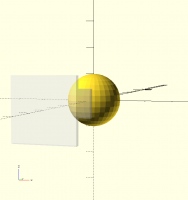
I made a small example and found it only goes wrong if the transparency is
created by the % operator. If it is made with the color module it works.

sphere(10);

translate([0, -20, 0])
%cube([10, 2, 10], center = true);

translate([0, -50, 0])
color("white", 0.5)
cube([20, 2, 20], center = true);

If both transparencies are created with % then it works. So I think it is
an order issue after all. It looks like the % operator trees are rendered
later than the rest. That works if you don't have any other transparent
objects but not if you have any made with color that are in front.

On 17 August 2017 at 22:44, MichaelAtOz oz.at.michael@gmail.com wrote:

a. > I can see through it and the objects behind look lighter. If one of
those objects is itself semitransparent it becomes invisible.
b. > The problem is the alpha blend applied twice doesn't look any
different
from it applied once.

Umm, perhaps a concrete example may help.


Admin - PM me if you need anything, or if I've done something stupid...

Unless specifically shown otherwise above, my contribution is in the
Public Domain; to the extent possible under law, I have waived all
copyright and related or neighbouring rights to this work. Obviously
inclusion of works of previous authors is not included in the above.

The TPP is no simple “trade agreement.”  Fight it!
http://www.ourfairdeal.org/  time is running out!

View this message in context: http://forum.openscad.org/
Semi-transparent-object-behind-transparent-window-isn-
t-visible-tp21930p22118.html
Sent from the OpenSCAD mailing list archive at Nabble.com.


OpenSCAD mailing list
Discuss@lists.openscad.org
http://lists.openscad.org/mailman/listinfo/discuss_lists.openscad.org

I made a small example and found it only goes wrong if the transparency is created by the % operator. If it is made with the color module it works. sphere(10); translate([0, -20, 0]) %cube([10, 2, 10], center = true); translate([0, -50, 0]) color("white", 0.5) cube([20, 2, 20], center = true); If both transparencies are created with % then it works. So I think it is an order issue after all. It looks like the % operator trees are rendered later than the rest. That works if you don't have any other transparent objects but not if you have any made with color that are in front. ​ On 17 August 2017 at 22:44, MichaelAtOz <oz.at.michael@gmail.com> wrote: > a. > I can see through it and the objects behind look lighter. If one of > those objects is itself semitransparent it becomes invisible. > b. > The problem is the alpha blend applied twice doesn't look any > different > from it applied once. > > Umm, perhaps a concrete example may help. > > > > ----- > Admin - PM me if you need anything, or if I've done something stupid... > > Unless specifically shown otherwise above, my contribution is in the > Public Domain; to the extent possible under law, I have waived all > copyright and related or neighbouring rights to this work. Obviously > inclusion of works of previous authors is not included in the above. > > The TPP is no simple “trade agreement.” Fight it! > http://www.ourfairdeal.org/ time is running out! > -- > View this message in context: http://forum.openscad.org/ > Semi-transparent-object-behind-transparent-window-isn- > t-visible-tp21930p22118.html > Sent from the OpenSCAD mailing list archive at Nabble.com. > > _______________________________________________ > OpenSCAD mailing list > Discuss@lists.openscad.org > http://lists.openscad.org/mailman/listinfo/discuss_lists.openscad.org >