

Re: Problem with "Difference" and F5 ... (from Empathy)

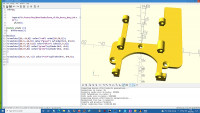
Not sure what you need or expect, but this is what you get. If you're
looking for colours , the hull obliterates them, afaik. This is the f5
quick render, - the stl looks the same. Make the red hole a bit bigger
than 6, as shown here (6 gives a thin edge). If you have room, it may be
worth while giving more space around the countersunk holes, and remove
the sharp edges. jpg attached.
On 19/02/2022 20:16, Dave wrote:
Sadly, none of the suggestions achieve what I need :-(
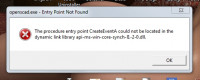
I tried downloading the latest x64 dev snapshot and it failed with :-
... so, going back to the last stable.
I am running under Win 7 x64 Pro with 8G of memory.
The fact that the output STL file is OK wont stop me proceeding but
the lack of a reliable preview is very irritating.
Dave
On 19/02/2022 17:32, Bryan Lee wrote:
Similar.
Does anyone have a good workflow to ensure that your meshes are closed
before importing into OpenSCAD?
I was thinking yesterday about writing a script that calls MeshLab to
convert an STL into an OBJ, and then calls it again to convert back into an
STL, possibly unifying/dissolving points that were really close together.
And using this script to prep any models before importing them.
Thus Sanjeev Prabhakar hast written on Sat, Feb 19, 2022 at 10:54:21PM +0530, and, according to prophecy, it shall come to pass that:
stl file is not attached.
I have found that doing boolean operations on stls is a little tricky.
Many times it fails, complaining that the mesh is not closed.
OpenSCAD mailing list
To unsubscribe send an email todiscuss-leave@lists.openscad.org
OpenSCAD mailing list
To unsubscribe send an email todiscuss-leave@lists.openscad.org

OK Thanks for all the input, that is now sorted.
On a similar matter ... how is one supposed to subtract from an imported
.stl file ??
If I do an include() from within a difference() it mangles the import in
preview as before.
The only place I seem to be able to import an stl file and get a correct
preview is outside the difference.
Regards,
Dave

If preview is "mangled" meaning that parts seem to be missing there
are two possible causes. One is that you need a convexity argument,
(on import, or perhaps difference?), which is required whenever
objects are more complex than spheres. The other is that you have
objects in the model that are larger than the viewport. There's no
solution for the second one other than zooming out. Note that it
doesn't matter if the object is shown: if you subtract a huge cube it
will create a preview problem.
On Sun, Feb 20, 2022 at 7:35 AM Dave softfoot@hotmail.com wrote:
OK Thanks for all the input, that is now sorted.
On a similar matter ... how is one supposed to subtract from an imported
.stl file ??
If I do an include() from within a difference() it mangles the import in
preview as before.
The only place I seem to be able to import an stl file and get a correct
preview is outside the difference.
Regards,
Dave
OpenSCAD mailing list
To unsubscribe send an email to discuss-leave@lists.openscad.org

If preview is "mangled" meaning that parts seem to be missing there
are two possible causes. One is that you need a convexity argument,
(on import, or perhaps difference?), which is required whenever
objects are more complex than spheres. The other is that you have
objects in the model that are larger than the viewport.
Thirdly, the stl is malformed.
Your originally posted stl had a couple of degenerate faces.
Sometimes that is not a major problem, sometimes it can be fatal.
I used your stl and your modifications and exported it.
The exported stl had degenerate faces.
It depends on what tool you use next with the stl as to whether it is an issue.
--
This email has been checked for viruses by AVG.
https://www.avg.com

On 2/20/2022 5:20 AM, Adrian Mariano wrote:
If preview is "mangled" meaning that parts seem to be missing there
are two possible causes.
I would say that parts appear transparent. I think, but am not sure,
that the actual behavior is that any point where there are more "front"
faces than the convexity parameter is affected.
One is that you need a convexity argument, (on import, or perhaps difference?), which is required whenever objects are more complex than spheres.
Oooh... the cheat sheet doesn't show a convexity argument on "import".
It's wrong.
The operations that can need a convexity argument are those that, well,
accept a convexity argument: polyhedron, linear_extrude,
rotate_extrude, surface, resize, minkowski, render.
My mental model is that they are the operations that can produce a
concave polyhedron that is not a simple (union, intersection,
difference) combination of basic shapes (cube, sphere, cylinder). They
are all "fancy" operations that return arbitrary polyhedra that aren't
easily predicted from their arguments. (Render and resize are a bit
special there, in that on the surface they are easily predictable, but
under the covers the processing is hidden from the previewer.)
Here's a simple demonstration of the "convexity" problem. Become
familiar with the behavior - pieces of the model are transparent - and
when you see it you'll know that you need to add a "convexity" setting.
Theoretically the value of convexity is the number of times that a line
from your eye would enter and exit the object. Practically, it's rare
to have an object with convexity more than 2 or 3, and the performance
impact of a large convexity value is usually difficult to measure, so
setting it to 10 is usually a fine answer.