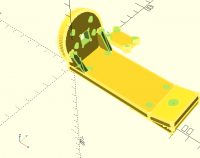
(F5)Preview the object has lines on all edges in (F9)Preview mode.
Previously, it had no lines on the edges.
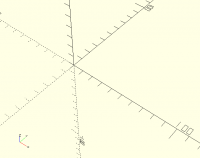
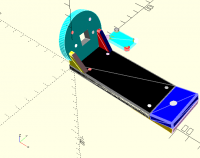
(F6)Rendering it goes to F10(Surfaces), if I hit F9(Preview) the
display is blank. It used to show what you'd see in Slic3r PE on the
platter.
About week ago it didn't do that.
Windows 10 64bit
ASUS ROG STRIX X399-E Gaming
AMD Threadripper 1950X
32GB
ASUS GTX1080Ti running 425.31 (4/11/19), same with the one released on
(3/25/19)
Hard drives, the smallest free space is 95GB on C:
Currently running OpenScad 2019.01-RC4
RC2 and 2015.03-02 all do the same.
The F5/F6/F9/F10 in the filenames are the keys or menu selection to
get the image shown.
--
Stephen
. . . . File not found. Should I fake it? Y/N
This email has been checked for viruses by AVG.
https://www.avg.com
(F5)Preview the object has lines on all edges in (F9)Preview mode.
Previously, it had no lines on the edges.
(F6)Rendering it goes to F10(Surfaces), if I hit F9(Preview) the
display is blank. It used to show what you'd see in Slic3r PE on the
platter.
About week ago it didn't do that.
Windows 10 64bit
ASUS ROG STRIX X399-E Gaming
AMD Threadripper 1950X
32GB
ASUS GTX1080Ti running 425.31 (4/11/19), same with the one released on
(3/25/19)
Hard drives, the smallest free space is 95GB on C:
Currently running OpenScad 2019.01-RC4
RC2 and 2015.03-02 all do the same.
The F5/F6/F9/F10 in the filenames are the keys or menu selection to
get the image shown.
--
Stephen
. . . . File not found. Should I fake it? Y/N
---
This email has been checked for viruses by AVG.
https://www.avg.com