

discuss@lists.openscad.org

OpenSCAD general discussion Mailing-list

View all threads

Save folder is not remembered (Issue #6277)

RW
Raymond West
Tue, Oct 14, 2025 7:31 PM

maybe in file explorer - right click on file - pin to quick access

On 14/10/2025 18:53, Jon Bondy via Discuss wrote:

I could not find this mechanism, Jordan.

On 10/14/2025 12:09 PM, Jordan Brown via Discuss wrote:

In Windows, the Open dialog already has a system-wide favorite-places
mechanism.


OpenSCAD mailing list
To unsubscribe send an email to discuss-leave@lists.openscad.org

maybe in file explorer - right click on file - pin to quick access On 14/10/2025 18:53, Jon Bondy via Discuss wrote: > I could not find this mechanism, Jordan. > > > On 10/14/2025 12:09 PM, Jordan Brown via Discuss wrote: >> >> In Windows, the Open dialog already has a system-wide favorite-places >> mechanism. >> >> >> _______________________________________________ >> OpenSCAD mailing list >> To unsubscribe send an email to discuss-leave@lists.openscad.org >
JB
Jordan Brown
Tue, Oct 14, 2025 11:03 PM

On 10/14/2025 10:53 AM, Jon Bondy wrote:

In Windows, the Open dialog already has a system-wide favorite-places
mechanism.

I could not find this mechanism, Jordan.

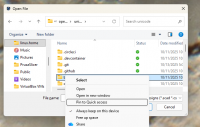
Here's what I get when I say "File/Open", shrunk uncomfortably small for
e-mail:

I'm not sure what all of the stuff in the left sidebar is exactly, but
it includes the Quick Access section.

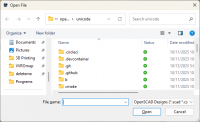
If you don't have that left sidebar:

then try Organize / Layout / Navigation pane.

That's where Quick Access stuff ends up.  To add something to that list,
find it (in either the navigation pane or the main window), right click
it, and select "Pin to Quick Access".

This feature is available from both the full-powered Windows Explorer
and the mini-Explorer that's used for Open and Save.

On 10/14/2025 10:53 AM, Jon Bondy wrote: >> In Windows, the Open dialog already has a system-wide favorite-places >> mechanism. > I could not find this mechanism, Jordan. Here's what I get when I say "File/Open", shrunk uncomfortably small for e-mail: I'm not sure what all of the stuff in the left sidebar is exactly, but it includes the Quick Access section. If you don't have that left sidebar: then try Organize / Layout / Navigation pane. That's where Quick Access stuff ends up.  To add something to that list, find it (in either the navigation pane or the main window), right click it, and select "Pin to Quick Access". This feature is available from both the full-powered Windows Explorer and the mini-Explorer that's used for Open and Save.
JJ
jon jonbondy.com
Thu, Oct 16, 2025 2:00 AM

Thanks, Jordan!  I've used Windows for decades, and never know about this feature!

On 10/14/2025 7:03 PM, Jordan Brown wrote:
On 10/14/2025 10:53 AM, Jon Bondy wrote:
In Windows, the Open dialog already has a system-wide favorite-places mechanism.
I could not find this mechanism, Jordan.

Here's what I get when I say "File/Open", shrunk uncomfortably small for e-mail:

[cid:part1.MbF4SOC0.J5Wypl2H@jonbondy.com]

I'm not sure what all of the stuff in the left sidebar is exactly, but it includes the Quick Access section.

If you don't have that left sidebar:
[cid:part2.2X0wCd0T.7JVrcrTM@jonbondy.com]
then try Organize / Layout / Navigation pane.

That's where Quick Access stuff ends up.  To add something to that list, find it (in either the navigation pane or the main window), right click it, and select "Pin to Quick Access".

[cid:part3.tUA8SgPv.6yK0uH6f@jonbondy.com]

This feature is available from both the full-powered Windows Explorer and the mini-Explorer that's used for Open and Save.

Thanks, Jordan! I've used Windows for decades, and never know about this feature! On 10/14/2025 7:03 PM, Jordan Brown wrote: On 10/14/2025 10:53 AM, Jon Bondy wrote: In Windows, the Open dialog already has a system-wide favorite-places mechanism. I could not find this mechanism, Jordan. Here's what I get when I say "File/Open", shrunk uncomfortably small for e-mail: [cid:part1.MbF4SOC0.J5Wypl2H@jonbondy.com] I'm not sure what all of the stuff in the left sidebar is exactly, but it includes the Quick Access section. If you don't have that left sidebar: [cid:part2.2X0wCd0T.7JVrcrTM@jonbondy.com] then try Organize / Layout / Navigation pane. That's where Quick Access stuff ends up. To add something to that list, find it (in either the navigation pane or the main window), right click it, and select "Pin to Quick Access". [cid:part3.tUA8SgPv.6yK0uH6f@jonbondy.com] This feature is available from both the full-powered Windows Explorer and the mini-Explorer that's used for Open and Save.
JH
Jeffrey Hayes
Wed, Oct 22, 2025 8:37 PM

I am trying to use that Quick Access feature that Jordan revealed . .. Me Too .. i never knew windows had the same thing that Mac OS has had like, for ever but when i right click and try to "Add to Quick Access" i get "Parameter is Incorrect" .. and this saving a file in any app (well .. in the three i have actually tried) anyone else have this? i am too tired to google about this tonight .. i will get to this in tomorrow -- jeff is vulcan_ in the cloud

I am trying to use that Quick Access feature that Jordan revealed . .. Me Too .. i never knew windows had the same thing that Mac OS has had like, for ever but when i right click and try to "Add to Quick Access" i get "Parameter is Incorrect" .. and this saving a file in any app (well .. in the three i have actually tried) anyone else have this? i am too tired to google about this tonight .. i will get to this in tomorrow -- jeff is vulcan_ in the cloud
JB
Jordan Brown
Mon, Dec 1, 2025 4:23 PM

On 10/13/2025 6:57 AM, Michael Marx (spintel) via Discuss wrote:

(Of note is, do we really need yet another option, when Operating
System solutions exist to tell OpenSCAD where you want to have the
working directory)

On Windows, for normal human beings, there are no such mechanisms.

Yes, you can create shortcuts.  Normal human beings don't know what
shortcuts are.

There's a lot of established practice in where a Windows application
will save a file by default.  "Program Files" is not it.

(I have no real opinion on behavior on UNIX-y systems, and no knowledge
whatsoever of standard MacOS behavior.)

On 10/13/2025 6:57 AM, Michael Marx (spintel) via Discuss wrote: > > (Of note is, do we really need yet another option, when Operating > System solutions exist to tell OpenSCAD where you want to have the > working directory) > On Windows, for normal human beings, there are no such mechanisms. Yes, you can create shortcuts.  Normal human beings don't know what shortcuts are. There's a lot of established practice in where a Windows application will save a file by default.  "Program Files" is not it. (I have no real opinion on behavior on UNIX-y systems, and no knowledge whatsoever of standard MacOS behavior.)
JB
Jon Bondy
Mon, Dec 1, 2025 4:37 PM

I am a little confused.

In Preferences under 3D Print we find an OctoPrint URL, which is a
location (albeit on the web).  So, we have a way to save a string and
use it later on.

Why can't the user type in a location on their computer (in my case
"D:\Jon") where the program should attempt to find the first file, and
save the first file.  Once the user overrides that value for the
session, then the program uses that updated value.

Jon

On 12/1/2025 11:23 AM, Jordan Brown via Discuss wrote:

On 10/13/2025 6:57 AM, Michael Marx (spintel) via Discuss wrote:

(Of note is, do we really need yet another option, when Operating
System solutions exist to tell OpenSCAD where you want to have the
working directory)

On Windows, for normal human beings, there are no such mechanisms.

Yes, you can create shortcuts.  Normal human beings don't know what
shortcuts are.

There's a lot of established practice in where a Windows application
will save a file by default.  "Program Files" is not it.

(I have no real opinion on behavior on UNIX-y systems, and no
knowledge whatsoever of standard MacOS behavior.)


OpenSCAD mailing list
To unsubscribe send an email todiscuss-leave@lists.openscad.org

--
This email has been checked for viruses by AVG antivirus software.
www.avg.com

I am a little confused. In Preferences under 3D Print we find an OctoPrint URL, which is a location (albeit on the web).  So, we have a way to save a string and use it later on. Why can't the user type in a location on their computer (in my case "D:\Jon") where the program should attempt to find the first file, and save the first file.  Once the user overrides that value for the session, then the program uses that updated value. Jon On 12/1/2025 11:23 AM, Jordan Brown via Discuss wrote: > On 10/13/2025 6:57 AM, Michael Marx (spintel) via Discuss wrote: >> >> (Of note is, do we really need yet another option, when Operating >> System solutions exist to tell OpenSCAD where you want to have the >> working directory) >> > > On Windows, for normal human beings, there are no such mechanisms. > > Yes, you can create shortcuts.  Normal human beings don't know what > shortcuts are. > > There's a lot of established practice in where a Windows application > will save a file by default.  "Program Files" is not it. > > (I have no real opinion on behavior on UNIX-y systems, and no > knowledge whatsoever of standard MacOS behavior.) > > > _______________________________________________ > OpenSCAD mailing list > To unsubscribe send an email todiscuss-leave@lists.openscad.org -- This email has been checked for viruses by AVG antivirus software. www.avg.com