discuss@lists.openscad.org

OpenSCAD general discussion Mailing-list

View all threads

Volumetric color/material

JB
Jordan Brown
Tue, Feb 8, 2022 6:52 AM

One of the areas where OpenSCAD is weak is in multicolor / multimaterial
support.  (In a lot of ways the two are the same problem, so I use
"color" and "material" almost interchangeably.)

OpenSCAD's native color support is for preview only; it does not affect
the exported files at all and so cannot directly drive multimaterial
printers.  It is certainly possible to roll your own support, generating
multiple STL files for the different materials, but that's not very
user-friendly.

I have long wondered how possible it would be to teach OpenSCAD to have
true multi-material support, so that you would write a straightforward
OpenSCAD program that would include markup for what material each
component is to be made of.  The boolean operators, and in particular
union, would need to learn more complex rules that would track the
material through the various operations that are applied to the model.

Union is the most interesting.  When I mentioned this a while back,
somebody suggested using the same model that a 2D paint program uses: 
the last paint wins.  If you paint something red, and then you paint
over it with blue, it's blue.  OK, that's as reasonable a mental model
as any.  Using arithmetic notation, if you union two objects A and B,
the result is A-B colored like A, and B colored like B.

Intersection is a bit interesting; the resulting object is the volume in
common between the two inputs, so which one should win?  Again, "last
paint wins" seems like an OK answer; the result is a normal intersection
that ignores the first object's colors and retains the second object's
colors.

Difference is easy, since only one input actually supplies material.

I've been thinking of trying to implement this in OpenSCAD proper, and
that's where it belongs, but it's a lot of work.  It occurred to me the
other day that it might be practical to build something in OpenSCAD
"user space" that would have the same basic behavior, that could be used
to play with it.

So I did.  It seems to mostly work, though it's affected by some preview
artifacts that make the colors wrong in some cases.

As everybody knows, there's no way to inspect the OpenSCAD model as you
create it, so I couldn't operate directly on OpenSCAD constructs. 
Instead, I build up my own CSG tree, with my own operators, and then
after the model is ready I evaluate it and execute the underlying
OpenSCAD operators.

Here's a program using it:

c1 = cube([10,10,10], "red");
c2 = translate([5,5,5], cube([10,10,10], "blue"));
eval(union([c1, c2]));

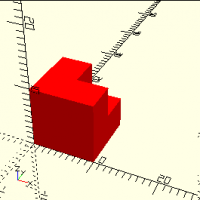
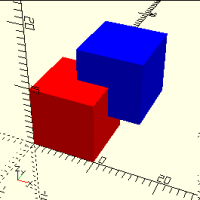
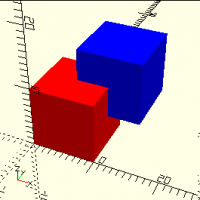
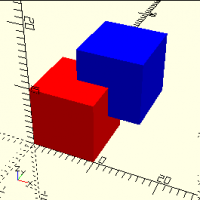
Remembering the "last paint wins" rule, this sequence generates a red
cube with a notch cut out of it, and a blue cube.

As shown, it's unexciting:

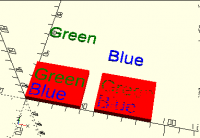
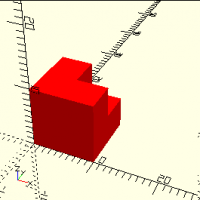
It gets more interesting if you set $color="red":

I haven't done it, but since it knows the color of the components and
has a function to report the list of colors used, it would be
straightforward to wrap a script around OpenSCAD invocations that would
retrieve the list of colors and then invoke OpenSCAD multiple times to
generate one STL for each color.

I must emphasize that this is a toy, a proof of concept.  It has enough
functionality to demonstrate the operations, and not much more.  As an
example, the only geometric object that it can create is a cube.  It
uses a polyhedron structure internally, so it would be easy to extend to
other shapes, but that's not the point.  I have no intent to turn this
into a production OpenSCAD library; rather, it's a testbed for playing
with this multi-material strategy without the work involved in changing
OpenSCAD proper.  A real implementation would operate differently; where
this implementation builds the entire model for one color, then the
next, and so on, a real implementation should process all of the colors
in parallel instead of recalculating large parts of the model repeatedly
for the cases where color isn't needed.  A real implementation would
allow export to multi-material-capable formats like 3MF, and would emit
multiple STLs from a single run.

All that said, here it is.  I'd be interested in any comments, either on
the implementation or on the concepts.  I think that the processing is
all correct, that it produces the desired shapes, but some of it hurts
my head and it's possible that I've missed something.  I also don't have
a lot of practice in writing the recursive algorithms required for some
of this work, and may not have done them in the best way.

// Node data structure
// Note that node[1] is a list of the child nodes, if any.
// [ POLY, undef, color, vertices[][], faces[][] ]
// [ UNION, nodes[] ]
// [ TRANSLATE, [node], [x,y,z] ]

POLY = "POLY";
UNION = "UNION";
INTERSECTION = "INTERSECTION";
DIFFERENCE = "DIFFERENCE";
TRANSLATE = "TRANSLATE";
ROTATE = "ROTATE";
SCALE = "SCALE";

// Build a CSG tree of objects and operations.
function cube(d, color) = [ POLY, undef, color, [[0,0,0], [0,0,d.z], [0,d.y,0], [0,d.y,d.z], [d.x,0,0], [d.x,0,d.z], [d.x,d.y,0], [d.x,d.y,d.z]], [[0,4,6,2],[2,3,1,0],[2,6,7,3],[4,5,7,6],[0,1,5,4],[1,3,7,5]]];

function op(op, nodes, n) =
let(n = is_undef(n) ? len(nodes) : n)
n == 1
? nodes[0]
: [ op, [op(op, nodes, n-1), nodes[n-1]]];
function union(nodes) = op(UNION, nodes);
function intersection(nodes) = op(INTERSECTION, nodes);
function difference(nodes) = op(DIFFERENCE, nodes);
function translate(vec, n) = [ TRANSLATE, [n], vec ];
function rotate(vec, n) = [ ROTATE, [n], vec ];
function scale(vec, n) = [ SCALE, [n], vec ];

// Evaluate a CSG model, for the color in $color.  Note that we apply the
// color at the top level, not the bottom, so as to achieve volumetric color
// behavior on intersection and difference.
// Note:  this strategy doesn't actually work, at least not in all cases.
// Ref https://github.com/openscad/openscad/issues/1000#issuecomment-1031065259
module eval(node) {
if (is_undef($color)) {
for ($color = nodecolors(node)) color($color) eval1(node);
} else {
color($color) eval1(node);
}
}

// Evaluate a node with respect to a particular $color.
// With $color equal to undef, returns a solid containing the results of the
// entire subtree.
// Otherwise, returns just the specified color.
module eval1(node) {
op = node[0];
childnodes = node[1];
if (op == POLY) {
color = node[2];
vertices = node[3];
faces = node[4];
if (is_undef($color) || $color == color) {
polyhedron(points=vertices, faces=faces);
}
} else if (op == UNION) {
n1 = childnodes[0];
n2 = childnodes[1];
// Last paint wins, so n1's colors show through
// only where it is not in common with n2.
union() {
difference() {
eval1(n1);
eval1(n2, $color=undef);
}
eval1(n2);
}
} else if (op == INTERSECTION) {
n1 = childnodes[0];
n2 = childnodes[1];
// Last paint wins, so n1's colors are ignored;
// n2's colors always win.
intersection() {
eval1(n1, $color=undef);
eval1(n2);
}
} else if (op == DIFFERENCE) {
n1 = childnodes[0];
n2 = childnodes[1];
// Last-paint-wins is not exactly relevant here,
// because n2 is negative-space that does not
// contribute to the final object.
// Thus n1's colors win.
difference() {
eval1(n1);
eval1(n2, $color=undef);
}
} else if (op == TRANSLATE) {
n = childnodes[0];
vec = node[2];
translate(vec) eval1(n);
} else if (op == ROTATE) {
n = childnodes[0];
vec = node[2];
rotate(vec) eval1(n);
} else if (op == SCALE) {
n = childnodes[0];
vec = node[2];
scale(vec) eval1(n);
}
}

// Given a list of strings, remove duplicates.
function dedup(v, res=[], i=0) =
i >= len(v)
? res
: let(found=search([v[i]], res, 0))
len(found[0]) == 0
? dedup(v, concat(res, v[i]), i+1)
: dedup(v, res, i+1);

// Given a node, return the list of colors used by the node.
function nodecolors(n) =
dedup(
let(nodes = n[1])
is_undef(nodes)
? [ n[2] ]
: [ for (node=nodes) each nodecolors(node) ]
);

// ------
// Make some test objects.
c1 = cube([10,10,10], "red");
c2 = translate([5,5,5], cube([10,10,10], "blue"));
c3a = translate([-2,-2,-2], cube([5,5,5], "blue"));
c3b = translate([-5,-5,-5], cube([5,5,5], "red"));
c3 = union([c3a, c3b]);
u = union([c2, c1, c3]);

c4 = translate([2.5,2.5,2.5], cube([10,10,10], "green"));

//$color = "red";
//eval(u);
//eval(intersection([c4, union([c1, c2])]));
//eval(intersection([c4, c1]));
eval(union([c1, c2]), $color="red");
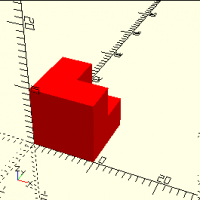
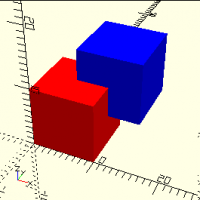
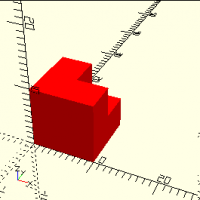
One of the areas where OpenSCAD is weak is in multicolor / multimaterial support.  (In a lot of ways the two are the same problem, so I use "color" and "material" almost interchangeably.) OpenSCAD's native color support is for preview only; it does not affect the exported files at all and so cannot directly drive multimaterial printers.  It is certainly possible to roll your own support, generating multiple STL files for the different materials, but that's not very user-friendly. I have long wondered how possible it would be to teach OpenSCAD to have true multi-material support, so that you would write a straightforward OpenSCAD program that would include markup for what material each component is to be made of.  The boolean operators, and in particular union, would need to learn more complex rules that would track the material through the various operations that are applied to the model. Union is the most interesting.  When I mentioned this a while back, somebody suggested using the same model that a 2D paint program uses:  the last paint wins.  If you paint something red, and then you paint over it with blue, it's blue.  OK, that's as reasonable a mental model as any.  Using arithmetic notation, if you union two objects A and B, the result is A-B colored like A, and B colored like B. Intersection is a bit interesting; the resulting object is the volume in common between the two inputs, so which one should win?  Again, "last paint wins" seems like an OK answer; the result is a normal intersection that ignores the first object's colors and retains the second object's colors. Difference is easy, since only one input actually supplies material. I've been thinking of trying to implement this in OpenSCAD proper, and that's where it belongs, but it's a lot of work.  It occurred to me the other day that it might be practical to build something in OpenSCAD "user space" that would have the same basic behavior, that could be used to play with it. So I did.  It seems to mostly work, though it's affected by some preview artifacts that make the colors wrong in some cases. As everybody knows, there's no way to inspect the OpenSCAD model as you create it, so I couldn't operate directly on OpenSCAD constructs.  Instead, I build up my own CSG tree, with my own operators, and then after the model is ready I evaluate it and execute the underlying OpenSCAD operators. Here's a program using it: c1 = cube([10,10,10], "red"); c2 = translate([5,5,5], cube([10,10,10], "blue")); eval(union([c1, c2])); Remembering the "last paint wins" rule, this sequence generates a red cube with a notch cut out of it, and a blue cube. As shown, it's unexciting: It gets more interesting if you set $color="red": I haven't done it, but since it knows the color of the components and has a function to report the list of colors used, it would be straightforward to wrap a script around OpenSCAD invocations that would retrieve the list of colors and then invoke OpenSCAD multiple times to generate one STL for each color. I must emphasize that this is a toy, a proof of concept.  It has enough functionality to demonstrate the operations, and not much more.  As an example, the only geometric object that it can create is a cube.  It uses a polyhedron structure internally, so it would be easy to extend to other shapes, but that's not the point.  I have no intent to turn this into a production OpenSCAD library; rather, it's a testbed for playing with this multi-material strategy without the work involved in changing OpenSCAD proper.  A real implementation would operate differently; where this implementation builds the entire model for one color, then the next, and so on, a real implementation should process all of the colors in parallel instead of recalculating large parts of the model repeatedly for the cases where color isn't needed.  A real implementation would allow export to multi-material-capable formats like 3MF, and would emit multiple STLs from a single run. All that said, here it is.  I'd be interested in any comments, either on the implementation or on the concepts.  I *think* that the processing is all correct, that it produces the desired shapes, but some of it hurts my head and it's possible that I've missed something.  I also don't have a lot of practice in writing the recursive algorithms required for some of this work, and may not have done them in the best way. // Node data structure // Note that node[1] is a list of the child nodes, if any. // [ POLY, undef, color, vertices[][], faces[][] ] // [ UNION, nodes[] ] // [ TRANSLATE, [node], [x,y,z] ] POLY = "POLY"; UNION = "UNION"; INTERSECTION = "INTERSECTION"; DIFFERENCE = "DIFFERENCE"; TRANSLATE = "TRANSLATE"; ROTATE = "ROTATE"; SCALE = "SCALE"; // Build a CSG tree of objects and operations. function cube(d, color) = [ POLY, undef, color, [[0,0,0], [0,0,d.z], [0,d.y,0], [0,d.y,d.z], [d.x,0,0], [d.x,0,d.z], [d.x,d.y,0], [d.x,d.y,d.z]], [[0,4,6,2],[2,3,1,0],[2,6,7,3],[4,5,7,6],[0,1,5,4],[1,3,7,5]]]; function op(op, nodes, n) = let(n = is_undef(n) ? len(nodes) : n) n == 1 ? nodes[0] : [ op, [op(op, nodes, n-1), nodes[n-1]]]; function union(nodes) = op(UNION, nodes); function intersection(nodes) = op(INTERSECTION, nodes); function difference(nodes) = op(DIFFERENCE, nodes); function translate(vec, n) = [ TRANSLATE, [n], vec ]; function rotate(vec, n) = [ ROTATE, [n], vec ]; function scale(vec, n) = [ SCALE, [n], vec ]; // Evaluate a CSG model, for the color in $color. Note that we apply the // color at the top level, not the bottom, so as to achieve volumetric color // behavior on intersection and difference. // Note: this strategy doesn't actually work, at least not in all cases. // Ref https://github.com/openscad/openscad/issues/1000#issuecomment-1031065259 module eval(node) { if (is_undef($color)) { for ($color = nodecolors(node)) color($color) eval1(node); } else { color($color) eval1(node); } } // Evaluate a node with respect to a particular $color. // With $color equal to undef, returns a solid containing the results of the // entire subtree. // Otherwise, returns just the specified color. module eval1(node) { op = node[0]; childnodes = node[1]; if (op == POLY) { color = node[2]; vertices = node[3]; faces = node[4]; if (is_undef($color) || $color == color) { polyhedron(points=vertices, faces=faces); } } else if (op == UNION) { n1 = childnodes[0]; n2 = childnodes[1]; // Last paint wins, so n1's colors show through // only where it is not in common with n2. union() { difference() { eval1(n1); eval1(n2, $color=undef); } eval1(n2); } } else if (op == INTERSECTION) { n1 = childnodes[0]; n2 = childnodes[1]; // Last paint wins, so n1's colors are ignored; // n2's colors always win. intersection() { eval1(n1, $color=undef); eval1(n2); } } else if (op == DIFFERENCE) { n1 = childnodes[0]; n2 = childnodes[1]; // Last-paint-wins is not exactly relevant here, // because n2 is negative-space that does not // contribute to the final object. // Thus n1's colors win. difference() { eval1(n1); eval1(n2, $color=undef); } } else if (op == TRANSLATE) { n = childnodes[0]; vec = node[2]; translate(vec) eval1(n); } else if (op == ROTATE) { n = childnodes[0]; vec = node[2]; rotate(vec) eval1(n); } else if (op == SCALE) { n = childnodes[0]; vec = node[2]; scale(vec) eval1(n); } } // Given a list of strings, remove duplicates. function dedup(v, res=[], i=0) = i >= len(v) ? res : let(found=search([v[i]], res, 0)) len(found[0]) == 0 ? dedup(v, concat(res, v[i]), i+1) : dedup(v, res, i+1); // Given a node, return the list of colors used by the node. function nodecolors(n) = dedup( let(nodes = n[1]) is_undef(nodes) ? [ n[2] ] : [ for (node=nodes) each nodecolors(node) ] ); // ------ // Make some test objects. c1 = cube([10,10,10], "red"); c2 = translate([5,5,5], cube([10,10,10], "blue")); c3a = translate([-2,-2,-2], cube([5,5,5], "blue")); c3b = translate([-5,-5,-5], cube([5,5,5], "red")); c3 = union([c3a, c3b]); u = union([c2, c1, c3]); c4 = translate([2.5,2.5,2.5], cube([10,10,10], "green")); //$color = "red"; //eval(u); //eval(intersection([c4, union([c1, c2])])); //eval(intersection([c4, c1])); eval(union([c1, c2]), $color="red");
J
jon
Tue, Feb 8, 2022 1:09 PM

I imagine that what I am about to say is very naive, but here goes.

What if you wrote a new module/function called Color() [not color()]. 
Could Color() know both the current color (because you specified it as a
parameter) as well as a global variable that knew the desired color, so
that Color() would only return geometry if the two colors matched?  This
would act as a switch to enable and disable geometry automatically,
creating all of the "blue" geometry or all of the "red" geometry as needed.

I will wait to hear why this will not work.

Jon

On 2/8/2022 1:52 AM, Jordan Brown wrote:

One of the areas where OpenSCAD is weak is in multicolor /
multimaterial support.  (In a lot of ways the two are the same
problem, so I use "color" and "material" almost interchangeably.)

OpenSCAD's native color support is for preview only; it does not
affect the exported files at all and so cannot directly drive
multimaterial printers.  It is certainly possible to roll your own
support, generating multiple STL files for the different materials,
but that's not very user-friendly.

I have long wondered how possible it would be to teach OpenSCAD to
have true multi-material support, so that you would write a
straightforward OpenSCAD program that would include markup for what
material each component is to be made of.  The boolean operators, and
in particular union, would need to learn more complex rules that would
track the material through the various operations that are applied to
the model.

Union is the most interesting.  When I mentioned this a while back,
somebody suggested using the same model that a 2D paint program uses: 
the last paint wins.  If you paint something red, and then you paint
over it with blue, it's blue.  OK, that's as reasonable a mental model
as any.  Using arithmetic notation, if you union two objects A and B,
the result is A-B colored like A, and B colored like B.

Intersection is a bit interesting; the resulting object is the volume
in common between the two inputs, so which one should win? Again,
"last paint wins" seems like an OK answer; the result is a normal
intersection that ignores the first object's colors and retains the
second object's colors.

Difference is easy, since only one input actually supplies material.

I've been thinking of trying to implement this in OpenSCAD proper, and
that's where it belongs, but it's a lot of work.  It occurred to me
the other day that it might be practical to build something in
OpenSCAD "user space" that would have the same basic behavior, that
could be used to play with it.

So I did.  It seems to mostly work, though it's affected by some
preview artifacts that make the colors wrong in some cases.

As everybody knows, there's no way to inspect the OpenSCAD model as
you create it, so I couldn't operate directly on OpenSCAD constructs. 
Instead, I build up my own CSG tree, with my own operators, and then
after the model is ready I evaluate it and execute the underlying
OpenSCAD operators.

Here's a program using it:

 c1 = cube([10,10,10], "red");
 c2 = translate([5,5,5], cube([10,10,10], "blue"));
 eval(union([c1, c2]));

Remembering the "last paint wins" rule, this sequence generates a red
cube with a notch cut out of it, and a blue cube.

As shown, it's unexciting:

It gets more interesting if you set $color="red":

I haven't done it, but since it knows the color of the components and
has a function to report the list of colors used, it would be
straightforward to wrap a script around OpenSCAD invocations that
would retrieve the list of colors and then invoke OpenSCAD multiple
times to generate one STL for each color.

I must emphasize that this is a toy, a proof of concept.  It has
enough functionality to demonstrate the operations, and not much
more.  As an example, the only geometric object that it can create is
a cube.  It uses a polyhedron structure internally, so it would be
easy to extend to other shapes, but that's not the point.  I have no
intent to turn this into a production OpenSCAD library; rather, it's a
testbed for playing with this multi-material strategy without the work
involved in changing OpenSCAD proper.  A real implementation would
operate differently; where this implementation builds the entire model
for one color, then the next, and so on, a real implementation should
process all of the colors in parallel instead of recalculating large
parts of the model repeatedly for the cases where color isn't needed. 
A real implementation would allow export to multi-material-capable
formats like 3MF, and would emit multiple STLs from a single run.

All that said, here it is.  I'd be interested in any comments, either
on the implementation or on the concepts.  I think that the
processing is all correct, that it produces the desired shapes, but
some of it hurts my head and it's possible that I've missed
something.  I also don't have a lot of practice in writing the
recursive algorithms required for some of this work, and may not have
done them in the best way.

// Node data structure
// Note that node[1] is a list of the child nodes, if any.
// [ POLY, undef, color, vertices[][], faces[][] ]
// [ UNION, nodes[] ]
// [ TRANSLATE, [node], [x,y,z] ]

POLY = "POLY";
UNION = "UNION";
INTERSECTION = "INTERSECTION";
DIFFERENCE = "DIFFERENCE";
TRANSLATE = "TRANSLATE";
ROTATE = "ROTATE";
SCALE = "SCALE";

// Build a CSG tree of objects and operations.
function cube(d, color) = [ POLY, undef, color, [[0,0,0], [0,0,d.z], [0,d.y,0], [0,d.y,d.z], [d.x,0,0], [d.x,0,d.z], [d.x,d.y,0], [d.x,d.y,d.z]], [[0,4,6,2],[2,3,1,0],[2,6,7,3],[4,5,7,6],[0,1,5,4],[1,3,7,5]]];

function op(op, nodes, n) =
let(n = is_undef(n) ? len(nodes) : n)
n == 1
? nodes[0]
: [ op, [op(op, nodes, n-1), nodes[n-1]]];
function union(nodes) = op(UNION, nodes);
function intersection(nodes) = op(INTERSECTION, nodes);
function difference(nodes) = op(DIFFERENCE, nodes);
function translate(vec, n) = [ TRANSLATE, [n], vec ];
function rotate(vec, n) = [ ROTATE, [n], vec ];
function scale(vec, n) = [ SCALE, [n], vec ];

// Evaluate a CSG model, for the color in $color.  Note that we apply the
// color at the top level, not the bottom, so as to achieve volumetric color
// behavior on intersection and difference.
// Note:  this strategy doesn't actually work, at least not in all cases.
// Refhttps://github.com/openscad/openscad/issues/1000#issuecomment-1031065259
module eval(node) {
if (is_undef($color)) {
for ($color = nodecolors(node)) color($color) eval1(node);
} else {
color($color) eval1(node);
}
}

// Evaluate a node with respect to a particular $color.
// With $color equal to undef, returns a solid containing the results of the
// entire subtree.
// Otherwise, returns just the specified color.
module eval1(node) {
op = node[0];
childnodes = node[1];
if (op == POLY) {
color = node[2];
vertices = node[3];
faces = node[4];
if (is_undef($color) || $color == color) {
polyhedron(points=vertices, faces=faces);
}
} else if (op == UNION) {
n1 = childnodes[0];
n2 = childnodes[1];
// Last paint wins, so n1's colors show through
// only where it is not in common with n2.
union() {
difference() {
eval1(n1);
eval1(n2, $color=undef);
}
eval1(n2);
}
} else if (op == INTERSECTION) {
n1 = childnodes[0];
n2 = childnodes[1];
// Last paint wins, so n1's colors are ignored;
// n2's colors always win.
intersection() {
eval1(n1, $color=undef);
eval1(n2);
}
} else if (op == DIFFERENCE) {
n1 = childnodes[0];
n2 = childnodes[1];
// Last-paint-wins is not exactly relevant here,
// because n2 is negative-space that does not
// contribute to the final object.
// Thus n1's colors win.
difference() {
eval1(n1);
eval1(n2, $color=undef);
}
} else if (op == TRANSLATE) {
n = childnodes[0];
vec = node[2];
translate(vec) eval1(n);
} else if (op == ROTATE) {
n = childnodes[0];
vec = node[2];
rotate(vec) eval1(n);
} else if (op == SCALE) {
n = childnodes[0];
vec = node[2];
scale(vec) eval1(n);
}
}

// Given a list of strings, remove duplicates.
function dedup(v, res=[], i=0) =
i >= len(v)
? res
: let(found=search([v[i]], res, 0))
len(found[0]) == 0
? dedup(v, concat(res, v[i]), i+1)
: dedup(v, res, i+1);

// Given a node, return the list of colors used by the node.
function nodecolors(n) =
dedup(
let(nodes = n[1])
is_undef(nodes)
? [ n[2] ]
: [ for (node=nodes) each nodecolors(node) ]
);

// ------
// Make some test objects.
c1 = cube([10,10,10], "red");
c2 = translate([5,5,5], cube([10,10,10], "blue"));
c3a = translate([-2,-2,-2], cube([5,5,5], "blue"));
c3b = translate([-5,-5,-5], cube([5,5,5], "red"));
c3 = union([c3a, c3b]);
u = union([c2, c1, c3]);

c4 = translate([2.5,2.5,2.5], cube([10,10,10], "green"));

//$color = "red";
//eval(u);
//eval(intersection([c4, union([c1, c2])]));
//eval(intersection([c4, c1]));
eval(union([c1, c2]), $color="red");


OpenSCAD mailing list
To unsubscribe send an email todiscuss-leave@lists.openscad.org
I imagine that what I am about to say is very naive, but here goes. What if you wrote a new module/function called Color() [not color()].  Could Color() know both the current color (because you specified it as a parameter) as well as a global variable that knew the desired color, so that Color() would only return geometry if the two colors matched?  This would act as a switch to enable and disable geometry automatically, creating all of the "blue" geometry or all of the "red" geometry as needed. I will wait to hear why this will not work. Jon On 2/8/2022 1:52 AM, Jordan Brown wrote: > One of the areas where OpenSCAD is weak is in multicolor / > multimaterial support.  (In a lot of ways the two are the same > problem, so I use "color" and "material" almost interchangeably.) > > OpenSCAD's native color support is for preview only; it does not > affect the exported files at all and so cannot directly drive > multimaterial printers.  It is certainly possible to roll your own > support, generating multiple STL files for the different materials, > but that's not very user-friendly. > > I have long wondered how possible it would be to teach OpenSCAD to > have true multi-material support, so that you would write a > straightforward OpenSCAD program that would include markup for what > material each component is to be made of.  The boolean operators, and > in particular union, would need to learn more complex rules that would > track the material through the various operations that are applied to > the model. > > Union is the most interesting.  When I mentioned this a while back, > somebody suggested using the same model that a 2D paint program uses:  > the last paint wins.  If you paint something red, and then you paint > over it with blue, it's blue.  OK, that's as reasonable a mental model > as any.  Using arithmetic notation, if you union two objects A and B, > the result is A-B colored like A, and B colored like B. > > Intersection is a bit interesting; the resulting object is the volume > in common between the two inputs, so which one should win? Again, > "last paint wins" seems like an OK answer; the result is a normal > intersection that ignores the first object's colors and retains the > second object's colors. > > Difference is easy, since only one input actually supplies material. > > I've been thinking of trying to implement this in OpenSCAD proper, and > that's where it belongs, but it's a lot of work.  It occurred to me > the other day that it might be practical to build something in > OpenSCAD "user space" that would have the same basic behavior, that > could be used to play with it. > > So I did.  It seems to mostly work, though it's affected by some > preview artifacts that make the colors wrong in some cases. > > As everybody knows, there's no way to inspect the OpenSCAD model as > you create it, so I couldn't operate directly on OpenSCAD constructs.  > Instead, I build up my own CSG tree, with my own operators, and then > after the model is ready I evaluate it and execute the underlying > OpenSCAD operators. > > Here's a program using it: > > c1 = cube([10,10,10], "red"); > c2 = translate([5,5,5], cube([10,10,10], "blue")); > eval(union([c1, c2])); > > Remembering the "last paint wins" rule, this sequence generates a red > cube with a notch cut out of it, and a blue cube. > > As shown, it's unexciting: > > It gets more interesting if you set $color="red": > > I haven't done it, but since it knows the color of the components and > has a function to report the list of colors used, it would be > straightforward to wrap a script around OpenSCAD invocations that > would retrieve the list of colors and then invoke OpenSCAD multiple > times to generate one STL for each color. > > > I must emphasize that this is a toy, a proof of concept.  It has > enough functionality to demonstrate the operations, and not much > more.  As an example, the only geometric object that it can create is > a cube.  It uses a polyhedron structure internally, so it would be > easy to extend to other shapes, but that's not the point.  I have no > intent to turn this into a production OpenSCAD library; rather, it's a > testbed for playing with this multi-material strategy without the work > involved in changing OpenSCAD proper.  A real implementation would > operate differently; where this implementation builds the entire model > for one color, then the next, and so on, a real implementation should > process all of the colors in parallel instead of recalculating large > parts of the model repeatedly for the cases where color isn't needed.  > A real implementation would allow export to multi-material-capable > formats like 3MF, and would emit multiple STLs from a single run. > > > All that said, here it is.  I'd be interested in any comments, either > on the implementation or on the concepts.  I *think* that the > processing is all correct, that it produces the desired shapes, but > some of it hurts my head and it's possible that I've missed > something.  I also don't have a lot of practice in writing the > recursive algorithms required for some of this work, and may not have > done them in the best way. > > > // Node data structure > // Note that node[1] is a list of the child nodes, if any. > // [ POLY, undef, color, vertices[][], faces[][] ] > // [ UNION, nodes[] ] > // [ TRANSLATE, [node], [x,y,z] ] > > POLY = "POLY"; > UNION = "UNION"; > INTERSECTION = "INTERSECTION"; > DIFFERENCE = "DIFFERENCE"; > TRANSLATE = "TRANSLATE"; > ROTATE = "ROTATE"; > SCALE = "SCALE"; > > // Build a CSG tree of objects and operations. > function cube(d, color) = [ POLY, undef, color, [[0,0,0], [0,0,d.z], [0,d.y,0], [0,d.y,d.z], [d.x,0,0], [d.x,0,d.z], [d.x,d.y,0], [d.x,d.y,d.z]], [[0,4,6,2],[2,3,1,0],[2,6,7,3],[4,5,7,6],[0,1,5,4],[1,3,7,5]]]; > > function op(op, nodes, n) = > let(n = is_undef(n) ? len(nodes) : n) > n == 1 > ? nodes[0] > : [ op, [op(op, nodes, n-1), nodes[n-1]]]; > function union(nodes) = op(UNION, nodes); > function intersection(nodes) = op(INTERSECTION, nodes); > function difference(nodes) = op(DIFFERENCE, nodes); > function translate(vec, n) = [ TRANSLATE, [n], vec ]; > function rotate(vec, n) = [ ROTATE, [n], vec ]; > function scale(vec, n) = [ SCALE, [n], vec ]; > > // Evaluate a CSG model, for the color in $color. Note that we apply the > // color at the top level, not the bottom, so as to achieve volumetric color > // behavior on intersection and difference. > // Note: this strategy doesn't actually work, at least not in all cases. > // Refhttps://github.com/openscad/openscad/issues/1000#issuecomment-1031065259 > module eval(node) { > if (is_undef($color)) { > for ($color = nodecolors(node)) color($color) eval1(node); > } else { > color($color) eval1(node); > } > } > > // Evaluate a node with respect to a particular $color. > // With $color equal to undef, returns a solid containing the results of the > // entire subtree. > // Otherwise, returns just the specified color. > module eval1(node) { > op = node[0]; > childnodes = node[1]; > if (op == POLY) { > color = node[2]; > vertices = node[3]; > faces = node[4]; > if (is_undef($color) || $color == color) { > polyhedron(points=vertices, faces=faces); > } > } else if (op == UNION) { > n1 = childnodes[0]; > n2 = childnodes[1]; > // Last paint wins, so n1's colors show through > // only where it is not in common with n2. > union() { > difference() { > eval1(n1); > eval1(n2, $color=undef); > } > eval1(n2); > } > } else if (op == INTERSECTION) { > n1 = childnodes[0]; > n2 = childnodes[1]; > // Last paint wins, so n1's colors are ignored; > // n2's colors always win. > intersection() { > eval1(n1, $color=undef); > eval1(n2); > } > } else if (op == DIFFERENCE) { > n1 = childnodes[0]; > n2 = childnodes[1]; > // Last-paint-wins is not exactly relevant here, > // because n2 is negative-space that does not > // contribute to the final object. > // Thus n1's colors win. > difference() { > eval1(n1); > eval1(n2, $color=undef); > } > } else if (op == TRANSLATE) { > n = childnodes[0]; > vec = node[2]; > translate(vec) eval1(n); > } else if (op == ROTATE) { > n = childnodes[0]; > vec = node[2]; > rotate(vec) eval1(n); > } else if (op == SCALE) { > n = childnodes[0]; > vec = node[2]; > scale(vec) eval1(n); > } > } > > // Given a list of strings, remove duplicates. > function dedup(v, res=[], i=0) = > i >= len(v) > ? res > : let(found=search([v[i]], res, 0)) > len(found[0]) == 0 > ? dedup(v, concat(res, v[i]), i+1) > : dedup(v, res, i+1); > > // Given a node, return the list of colors used by the node. > function nodecolors(n) = > dedup( > let(nodes = n[1]) > is_undef(nodes) > ? [ n[2] ] > : [ for (node=nodes) each nodecolors(node) ] > ); > > > // ------ > // Make some test objects. > c1 = cube([10,10,10], "red"); > c2 = translate([5,5,5], cube([10,10,10], "blue")); > c3a = translate([-2,-2,-2], cube([5,5,5], "blue")); > c3b = translate([-5,-5,-5], cube([5,5,5], "red")); > c3 = union([c3a, c3b]); > u = union([c2, c1, c3]); > > c4 = translate([2.5,2.5,2.5], cube([10,10,10], "green")); > > //$color = "red"; > //eval(u); > //eval(intersection([c4, union([c1, c2])])); > //eval(intersection([c4, c1])); > eval(union([c1, c2]), $color="red"); > > > _______________________________________________ > OpenSCAD mailing list > To unsubscribe send an email todiscuss-leave@lists.openscad.org
JW
Jim Witte
Tue, Feb 8, 2022 2:57 PM

What kind of "standardized" support is there for multicolor support in
output files though?  OpenSCAD exports STL, which doesn't have color
support.  There might be some way to "hack" in with a color attribute
assigned to each triangle - but that would be both non-standard and
probably increase file size by at least a third.  Other formats support
color (OBJ etc), but OpenSCAD doesn't do them.

That raises another question - could the OpenSCAD code be extended to
export something like a DWG file (or whatever the "semi-open" version is -
I forget)?

On Tue, Feb 8, 2022 at 1:52 AM Jordan Brown openscad@jordan.maileater.net
wrote:

One of the areas where OpenSCAD is weak is in multicolor / multimaterial
support.  (In a lot of ways the two are the same problem, so I use "color"
and "material" almost interchangeably.)

OpenSCAD's native color support is for preview only; it does not affect
the exported files at all and so cannot directly drive multimaterial
printers.  It is certainly possible to roll your own support, generating
multiple STL files for the different materials, but that's not very
user-friendly.

I have long wondered how possible it would be to teach OpenSCAD to have
true multi-material support, so that you would write a straightforward
OpenSCAD program that would include markup for what material each component
is to be made of.  The boolean operators, and in particular union, would
need to learn more complex rules that would track the material through the
various operations that are applied to the model.

Union is the most interesting.  When I mentioned this a while back,
somebody suggested using the same model that a 2D paint program uses:  the
last paint wins.  If you paint something red, and then you paint over it
with blue, it's blue.  OK, that's as reasonable a mental model as any.
Using arithmetic notation, if you union two objects A and B, the result is
A-B colored like A, and B colored like B.

Intersection is a bit interesting; the resulting object is the volume in
common between the two inputs, so which one should win?  Again, "last paint
wins" seems like an OK answer; the result is a normal intersection that
ignores the first object's colors and retains the second object's colors.

Difference is easy, since only one input actually supplies material.

I've been thinking of trying to implement this in OpenSCAD proper, and
that's where it belongs, but it's a lot of work.  It occurred to me the
other day that it might be practical to build something in OpenSCAD "user
space" that would have the same basic behavior, that could be used to play
with it.

So I did.  It seems to mostly work, though it's affected by some preview
artifacts that make the colors wrong in some cases.

As everybody knows, there's no way to inspect the OpenSCAD model as you
create it, so I couldn't operate directly on OpenSCAD constructs.  Instead,
I build up my own CSG tree, with my own operators, and then after the model
is ready I evaluate it and execute the underlying OpenSCAD operators.

Here's a program using it:

c1 = cube([10,10,10], "red");
c2 = translate([5,5,5], cube([10,10,10], "blue"));
eval(union([c1, c2]));

Remembering the "last paint wins" rule, this sequence generates a red cube
with a notch cut out of it, and a blue cube.

As shown, it's unexciting:

It gets more interesting if you set $color="red":

I haven't done it, but since it knows the color of the components and has
a function to report the list of colors used, it would be straightforward
to wrap a script around OpenSCAD invocations that would retrieve the list
of colors and then invoke OpenSCAD multiple times to generate one STL for
each color.

I must emphasize that this is a toy, a proof of concept.  It has enough
functionality to demonstrate the operations, and not much more.  As an
example, the only geometric object that it can create is a cube.  It uses a
polyhedron structure internally, so it would be easy to extend to other
shapes, but that's not the point.  I have no intent to turn this into a
production OpenSCAD library; rather, it's a testbed for playing with this
multi-material strategy without the work involved in changing OpenSCAD
proper.  A real implementation would operate differently; where this
implementation builds the entire model for one color, then the next, and so
on, a real implementation should process all of the colors in parallel
instead of recalculating large parts of the model repeatedly for the cases
where color isn't needed.  A real implementation would allow export to
multi-material-capable formats like 3MF, and would emit multiple STLs from
a single run.

All that said, here it is.  I'd be interested in any comments, either on
the implementation or on the concepts.  I think that the processing is
all correct, that it produces the desired shapes, but some of it hurts my
head and it's possible that I've missed something.  I also don't have a lot
of practice in writing the recursive algorithms required for some of this
work, and may not have done them in the best way.

// Node data structure
// Note that node[1] is a list of the child nodes, if any.
// [ POLY, undef, color, vertices[][], faces[][] ]
// [ UNION, nodes[] ]
// [ TRANSLATE, [node], [x,y,z] ]

POLY = "POLY";
UNION = "UNION";
INTERSECTION = "INTERSECTION";
DIFFERENCE = "DIFFERENCE";
TRANSLATE = "TRANSLATE";
ROTATE = "ROTATE";
SCALE = "SCALE";

// Build a CSG tree of objects and operations.
function cube(d, color) = [ POLY, undef, color, [[0,0,0], [0,0,d.z], [0,d.y,0], [0,d.y,d.z], [d.x,0,0], [d.x,0,d.z], [d.x,d.y,0], [d.x,d.y,d.z]], [[0,4,6,2],[2,3,1,0],[2,6,7,3],[4,5,7,6],[0,1,5,4],[1,3,7,5]]];

function op(op, nodes, n) =
let(n = is_undef(n) ? len(nodes) : n)
n == 1
? nodes[0]
: [ op, [op(op, nodes, n-1), nodes[n-1]]];
function union(nodes) = op(UNION, nodes);
function intersection(nodes) = op(INTERSECTION, nodes);
function difference(nodes) = op(DIFFERENCE, nodes);
function translate(vec, n) = [ TRANSLATE, [n], vec ];
function rotate(vec, n) = [ ROTATE, [n], vec ];
function scale(vec, n) = [ SCALE, [n], vec ];

// Evaluate a CSG model, for the color in $color.  Note that we apply the
// color at the top level, not the bottom, so as to achieve volumetric color
// behavior on intersection and difference.
// Note:  this strategy doesn't actually work, at least not in all cases.
// Ref https://github.com/openscad/openscad/issues/1000#issuecomment-1031065259
module eval(node) {
if (is_undef($color)) {
for ($color = nodecolors(node)) color($color) eval1(node);
} else {
color($color) eval1(node);
}
}

// Evaluate a node with respect to a particular $color.
// With $color equal to undef, returns a solid containing the results of the
// entire subtree.
// Otherwise, returns just the specified color.
module eval1(node) {
op = node[0];
childnodes = node[1];
if (op == POLY) {
color = node[2];
vertices = node[3];
faces = node[4];
if (is_undef($color) || $color == color) {
polyhedron(points=vertices, faces=faces);
}
} else if (op == UNION) {
n1 = childnodes[0];
n2 = childnodes[1];
// Last paint wins, so n1's colors show through
// only where it is not in common with n2.
union() {
difference() {
eval1(n1);
eval1(n2, $color=undef);
}
eval1(n2);
}
} else if (op == INTERSECTION) {
n1 = childnodes[0];
n2 = childnodes[1];
// Last paint wins, so n1's colors are ignored;
// n2's colors always win.
intersection() {
eval1(n1, $color=undef);
eval1(n2);
}
} else if (op == DIFFERENCE) {
n1 = childnodes[0];
n2 = childnodes[1];
// Last-paint-wins is not exactly relevant here,
// because n2 is negative-space that does not
// contribute to the final object.
// Thus n1's colors win.
difference() {
eval1(n1);
eval1(n2, $color=undef);
}
} else if (op == TRANSLATE) {
n = childnodes[0];
vec = node[2];
translate(vec) eval1(n);
} else if (op == ROTATE) {
n = childnodes[0];
vec = node[2];
rotate(vec) eval1(n);
} else if (op == SCALE) {
n = childnodes[0];
vec = node[2];
scale(vec) eval1(n);
}
}

// Given a list of strings, remove duplicates.
function dedup(v, res=[], i=0) =
i >= len(v)
? res
: let(found=search([v[i]], res, 0))
len(found[0]) == 0
? dedup(v, concat(res, v[i]), i+1)
: dedup(v, res, i+1);

// Given a node, return the list of colors used by the node.
function nodecolors(n) =
dedup(
let(nodes = n[1])
is_undef(nodes)
? [ n[2] ]
: [ for (node=nodes) each nodecolors(node) ]
);

// ------
// Make some test objects.
c1 = cube([10,10,10], "red");
c2 = translate([5,5,5], cube([10,10,10], "blue"));
c3a = translate([-2,-2,-2], cube([5,5,5], "blue"));
c3b = translate([-5,-5,-5], cube([5,5,5], "red"));
c3 = union([c3a, c3b]);
u = union([c2, c1, c3]);

c4 = translate([2.5,2.5,2.5], cube([10,10,10], "green"));

//$color = "red";
//eval(u);
//eval(intersection([c4, union([c1, c2])]));
//eval(intersection([c4, c1]));
eval(union([c1, c2]), $color="red");


OpenSCAD mailing list
To unsubscribe send an email to discuss-leave@lists.openscad.org
What kind of "standardized" support is there for multicolor support in output files though? OpenSCAD exports STL, which doesn't have color support. There might be some way to "hack" in with a color attribute assigned to each triangle - but that would be both non-standard and probably increase file size by at least a third. Other formats support color (OBJ etc), but OpenSCAD doesn't do them. That raises another question - could the OpenSCAD code be extended to export something like a DWG file (or whatever the "semi-open" version is - I forget)? On Tue, Feb 8, 2022 at 1:52 AM Jordan Brown <openscad@jordan.maileater.net> wrote: > One of the areas where OpenSCAD is weak is in multicolor / multimaterial > support. (In a lot of ways the two are the same problem, so I use "color" > and "material" almost interchangeably.) > > OpenSCAD's native color support is for preview only; it does not affect > the exported files at all and so cannot directly drive multimaterial > printers. It is certainly possible to roll your own support, generating > multiple STL files for the different materials, but that's not very > user-friendly. > > I have long wondered how possible it would be to teach OpenSCAD to have > true multi-material support, so that you would write a straightforward > OpenSCAD program that would include markup for what material each component > is to be made of. The boolean operators, and in particular union, would > need to learn more complex rules that would track the material through the > various operations that are applied to the model. > > Union is the most interesting. When I mentioned this a while back, > somebody suggested using the same model that a 2D paint program uses: the > last paint wins. If you paint something red, and then you paint over it > with blue, it's blue. OK, that's as reasonable a mental model as any. > Using arithmetic notation, if you union two objects A and B, the result is > A-B colored like A, and B colored like B. > > Intersection is a bit interesting; the resulting object is the volume in > common between the two inputs, so which one should win? Again, "last paint > wins" seems like an OK answer; the result is a normal intersection that > ignores the first object's colors and retains the second object's colors. > > Difference is easy, since only one input actually supplies material. > > I've been thinking of trying to implement this in OpenSCAD proper, and > that's where it belongs, but it's a lot of work. It occurred to me the > other day that it might be practical to build something in OpenSCAD "user > space" that would have the same basic behavior, that could be used to play > with it. > > So I did. It seems to mostly work, though it's affected by some preview > artifacts that make the colors wrong in some cases. > > As everybody knows, there's no way to inspect the OpenSCAD model as you > create it, so I couldn't operate directly on OpenSCAD constructs. Instead, > I build up my own CSG tree, with my own operators, and then after the model > is ready I evaluate it and execute the underlying OpenSCAD operators. > > Here's a program using it: > > c1 = cube([10,10,10], "red"); > c2 = translate([5,5,5], cube([10,10,10], "blue")); > eval(union([c1, c2])); > > Remembering the "last paint wins" rule, this sequence generates a red cube > with a notch cut out of it, and a blue cube. > > As shown, it's unexciting: > > It gets more interesting if you set $color="red": > > I haven't done it, but since it knows the color of the components and has > a function to report the list of colors used, it would be straightforward > to wrap a script around OpenSCAD invocations that would retrieve the list > of colors and then invoke OpenSCAD multiple times to generate one STL for > each color. > > > I must emphasize that this is a toy, a proof of concept. It has enough > functionality to demonstrate the operations, and not much more. As an > example, the only geometric object that it can create is a cube. It uses a > polyhedron structure internally, so it would be easy to extend to other > shapes, but that's not the point. I have no intent to turn this into a > production OpenSCAD library; rather, it's a testbed for playing with this > multi-material strategy without the work involved in changing OpenSCAD > proper. A real implementation would operate differently; where this > implementation builds the entire model for one color, then the next, and so > on, a real implementation should process all of the colors in parallel > instead of recalculating large parts of the model repeatedly for the cases > where color isn't needed. A real implementation would allow export to > multi-material-capable formats like 3MF, and would emit multiple STLs from > a single run. > > > All that said, here it is. I'd be interested in any comments, either on > the implementation or on the concepts. I *think* that the processing is > all correct, that it produces the desired shapes, but some of it hurts my > head and it's possible that I've missed something. I also don't have a lot > of practice in writing the recursive algorithms required for some of this > work, and may not have done them in the best way. > > > // Node data structure > // Note that node[1] is a list of the child nodes, if any. > // [ POLY, undef, color, vertices[][], faces[][] ] > // [ UNION, nodes[] ] > // [ TRANSLATE, [node], [x,y,z] ] > > POLY = "POLY"; > UNION = "UNION"; > INTERSECTION = "INTERSECTION"; > DIFFERENCE = "DIFFERENCE"; > TRANSLATE = "TRANSLATE"; > ROTATE = "ROTATE"; > SCALE = "SCALE"; > > // Build a CSG tree of objects and operations. > function cube(d, color) = [ POLY, undef, color, [[0,0,0], [0,0,d.z], [0,d.y,0], [0,d.y,d.z], [d.x,0,0], [d.x,0,d.z], [d.x,d.y,0], [d.x,d.y,d.z]], [[0,4,6,2],[2,3,1,0],[2,6,7,3],[4,5,7,6],[0,1,5,4],[1,3,7,5]]]; > > function op(op, nodes, n) = > let(n = is_undef(n) ? len(nodes) : n) > n == 1 > ? nodes[0] > : [ op, [op(op, nodes, n-1), nodes[n-1]]]; > function union(nodes) = op(UNION, nodes); > function intersection(nodes) = op(INTERSECTION, nodes); > function difference(nodes) = op(DIFFERENCE, nodes); > function translate(vec, n) = [ TRANSLATE, [n], vec ]; > function rotate(vec, n) = [ ROTATE, [n], vec ]; > function scale(vec, n) = [ SCALE, [n], vec ]; > > // Evaluate a CSG model, for the color in $color. Note that we apply the > // color at the top level, not the bottom, so as to achieve volumetric color > // behavior on intersection and difference. > // Note: this strategy doesn't actually work, at least not in all cases. > // Ref https://github.com/openscad/openscad/issues/1000#issuecomment-1031065259 > module eval(node) { > if (is_undef($color)) { > for ($color = nodecolors(node)) color($color) eval1(node); > } else { > color($color) eval1(node); > } > } > > // Evaluate a node with respect to a particular $color. > // With $color equal to undef, returns a solid containing the results of the > // entire subtree. > // Otherwise, returns just the specified color. > module eval1(node) { > op = node[0]; > childnodes = node[1]; > if (op == POLY) { > color = node[2]; > vertices = node[3]; > faces = node[4]; > if (is_undef($color) || $color == color) { > polyhedron(points=vertices, faces=faces); > } > } else if (op == UNION) { > n1 = childnodes[0]; > n2 = childnodes[1]; > // Last paint wins, so n1's colors show through > // only where it is not in common with n2. > union() { > difference() { > eval1(n1); > eval1(n2, $color=undef); > } > eval1(n2); > } > } else if (op == INTERSECTION) { > n1 = childnodes[0]; > n2 = childnodes[1]; > // Last paint wins, so n1's colors are ignored; > // n2's colors always win. > intersection() { > eval1(n1, $color=undef); > eval1(n2); > } > } else if (op == DIFFERENCE) { > n1 = childnodes[0]; > n2 = childnodes[1]; > // Last-paint-wins is not exactly relevant here, > // because n2 is negative-space that does not > // contribute to the final object. > // Thus n1's colors win. > difference() { > eval1(n1); > eval1(n2, $color=undef); > } > } else if (op == TRANSLATE) { > n = childnodes[0]; > vec = node[2]; > translate(vec) eval1(n); > } else if (op == ROTATE) { > n = childnodes[0]; > vec = node[2]; > rotate(vec) eval1(n); > } else if (op == SCALE) { > n = childnodes[0]; > vec = node[2]; > scale(vec) eval1(n); > } > } > > // Given a list of strings, remove duplicates. > function dedup(v, res=[], i=0) = > i >= len(v) > ? res > : let(found=search([v[i]], res, 0)) > len(found[0]) == 0 > ? dedup(v, concat(res, v[i]), i+1) > : dedup(v, res, i+1); > > // Given a node, return the list of colors used by the node. > function nodecolors(n) = > dedup( > let(nodes = n[1]) > is_undef(nodes) > ? [ n[2] ] > : [ for (node=nodes) each nodecolors(node) ] > ); > > > // ------ > // Make some test objects. > c1 = cube([10,10,10], "red"); > c2 = translate([5,5,5], cube([10,10,10], "blue")); > c3a = translate([-2,-2,-2], cube([5,5,5], "blue")); > c3b = translate([-5,-5,-5], cube([5,5,5], "red")); > c3 = union([c3a, c3b]); > u = union([c2, c1, c3]); > > c4 = translate([2.5,2.5,2.5], cube([10,10,10], "green")); > > //$color = "red"; > //eval(u); > //eval(intersection([c4, union([c1, c2])])); > //eval(intersection([c4, c1])); > eval(union([c1, c2]), $color="red"); > > > _______________________________________________ > OpenSCAD mailing list > To unsubscribe send an email to discuss-leave@lists.openscad.org >
SP
Sanjeev Prabhakar
Tue, Feb 8, 2022 4:27 PM

Step file

On Tue, 8 Feb 2022, 20:28 Jim Witte, jim.witte@gmail.com wrote:

What kind of "standardized" support is there for multicolor support in
output files though?  OpenSCAD exports STL, which doesn't have color
support.  There might be some way to "hack" in with a color attribute
assigned to each triangle - but that would be both non-standard and
probably increase file size by at least a third.  Other formats support
color (OBJ etc), but OpenSCAD doesn't do them.

That raises another question - could the OpenSCAD code be extended to
export something like a DWG file (or whatever the "semi-open" version is -
I forget)?

On Tue, Feb 8, 2022 at 1:52 AM Jordan Brown openscad@jordan.maileater.net
wrote:

One of the areas where OpenSCAD is weak is in multicolor / multimaterial
support.  (In a lot of ways the two are the same problem, so I use "color"
and "material" almost interchangeably.)

OpenSCAD's native color support is for preview only; it does not affect
the exported files at all and so cannot directly drive multimaterial
printers.  It is certainly possible to roll your own support, generating
multiple STL files for the different materials, but that's not very
user-friendly.

I have long wondered how possible it would be to teach OpenSCAD to have
true multi-material support, so that you would write a straightforward
OpenSCAD program that would include markup for what material each component
is to be made of.  The boolean operators, and in particular union, would
need to learn more complex rules that would track the material through the
various operations that are applied to the model.

Union is the most interesting.  When I mentioned this a while back,
somebody suggested using the same model that a 2D paint program uses:  the
last paint wins.  If you paint something red, and then you paint over it
with blue, it's blue.  OK, that's as reasonable a mental model as any.
Using arithmetic notation, if you union two objects A and B, the result is
A-B colored like A, and B colored like B.

Intersection is a bit interesting; the resulting object is the volume in
common between the two inputs, so which one should win?  Again, "last paint
wins" seems like an OK answer; the result is a normal intersection that
ignores the first object's colors and retains the second object's colors.

Difference is easy, since only one input actually supplies material.

I've been thinking of trying to implement this in OpenSCAD proper, and
that's where it belongs, but it's a lot of work.  It occurred to me the
other day that it might be practical to build something in OpenSCAD "user
space" that would have the same basic behavior, that could be used to play
with it.

So I did.  It seems to mostly work, though it's affected by some preview
artifacts that make the colors wrong in some cases.

As everybody knows, there's no way to inspect the OpenSCAD model as you
create it, so I couldn't operate directly on OpenSCAD constructs.  Instead,
I build up my own CSG tree, with my own operators, and then after the model
is ready I evaluate it and execute the underlying OpenSCAD operators.

Here's a program using it:

c1 = cube([10,10,10], "red");
c2 = translate([5,5,5], cube([10,10,10], "blue"));
eval(union([c1, c2]));

Remembering the "last paint wins" rule, this sequence generates a red
cube with a notch cut out of it, and a blue cube.

As shown, it's unexciting:

It gets more interesting if you set $color="red":

I haven't done it, but since it knows the color of the components and has
a function to report the list of colors used, it would be straightforward
to wrap a script around OpenSCAD invocations that would retrieve the list
of colors and then invoke OpenSCAD multiple times to generate one STL for
each color.

I must emphasize that this is a toy, a proof of concept.  It has enough
functionality to demonstrate the operations, and not much more.  As an
example, the only geometric object that it can create is a cube.  It uses a
polyhedron structure internally, so it would be easy to extend to other
shapes, but that's not the point.  I have no intent to turn this into a
production OpenSCAD library; rather, it's a testbed for playing with this
multi-material strategy without the work involved in changing OpenSCAD
proper.  A real implementation would operate differently; where this
implementation builds the entire model for one color, then the next, and so
on, a real implementation should process all of the colors in parallel
instead of recalculating large parts of the model repeatedly for the cases
where color isn't needed.  A real implementation would allow export to
multi-material-capable formats like 3MF, and would emit multiple STLs from
a single run.

All that said, here it is.  I'd be interested in any comments, either on
the implementation or on the concepts.  I think that the processing is
all correct, that it produces the desired shapes, but some of it hurts my
head and it's possible that I've missed something.  I also don't have a lot
of practice in writing the recursive algorithms required for some of this
work, and may not have done them in the best way.

// Node data structure
// Note that node[1] is a list of the child nodes, if any.
// [ POLY, undef, color, vertices[][], faces[][] ]
// [ UNION, nodes[] ]
// [ TRANSLATE, [node], [x,y,z] ]

POLY = "POLY";
UNION = "UNION";
INTERSECTION = "INTERSECTION";
DIFFERENCE = "DIFFERENCE";
TRANSLATE = "TRANSLATE";
ROTATE = "ROTATE";
SCALE = "SCALE";

// Build a CSG tree of objects and operations.
function cube(d, color) = [ POLY, undef, color, [[0,0,0], [0,0,d.z], [0,d.y,0], [0,d.y,d.z], [d.x,0,0], [d.x,0,d.z], [d.x,d.y,0], [d.x,d.y,d.z]], [[0,4,6,2],[2,3,1,0],[2,6,7,3],[4,5,7,6],[0,1,5,4],[1,3,7,5]]];

function op(op, nodes, n) =
let(n = is_undef(n) ? len(nodes) : n)
n == 1
? nodes[0]
: [ op, [op(op, nodes, n-1), nodes[n-1]]];
function union(nodes) = op(UNION, nodes);
function intersection(nodes) = op(INTERSECTION, nodes);
function difference(nodes) = op(DIFFERENCE, nodes);
function translate(vec, n) = [ TRANSLATE, [n], vec ];
function rotate(vec, n) = [ ROTATE, [n], vec ];
function scale(vec, n) = [ SCALE, [n], vec ];

// Evaluate a CSG model, for the color in $color.  Note that we apply the
// color at the top level, not the bottom, so as to achieve volumetric color
// behavior on intersection and difference.
// Note:  this strategy doesn't actually work, at least not in all cases.
// Ref https://github.com/openscad/openscad/issues/1000#issuecomment-1031065259
module eval(node) {
if (is_undef($color)) {
for ($color = nodecolors(node)) color($color) eval1(node);
} else {
color($color) eval1(node);
}
}

// Evaluate a node with respect to a particular $color.
// With $color equal to undef, returns a solid containing the results of the
// entire subtree.
// Otherwise, returns just the specified color.
module eval1(node) {
op = node[0];
childnodes = node[1];
if (op == POLY) {
color = node[2];
vertices = node[3];
faces = node[4];
if (is_undef($color) || $color == color) {
polyhedron(points=vertices, faces=faces);
}
} else if (op == UNION) {
n1 = childnodes[0];
n2 = childnodes[1];
// Last paint wins, so n1's colors show through
// only where it is not in common with n2.
union() {
difference() {
eval1(n1);
eval1(n2, $color=undef);
}
eval1(n2);
}
} else if (op == INTERSECTION) {
n1 = childnodes[0];
n2 = childnodes[1];
// Last paint wins, so n1's colors are ignored;
// n2's colors always win.
intersection() {
eval1(n1, $color=undef);
eval1(n2);
}
} else if (op == DIFFERENCE) {
n1 = childnodes[0];
n2 = childnodes[1];
// Last-paint-wins is not exactly relevant here,
// because n2 is negative-space that does not
// contribute to the final object.
// Thus n1's colors win.
difference() {
eval1(n1);
eval1(n2, $color=undef);
}
} else if (op == TRANSLATE) {
n = childnodes[0];
vec = node[2];
translate(vec) eval1(n);
} else if (op == ROTATE) {
n = childnodes[0];
vec = node[2];
rotate(vec) eval1(n);
} else if (op == SCALE) {
n = childnodes[0];
vec = node[2];
scale(vec) eval1(n);
}
}

// Given a list of strings, remove duplicates.
function dedup(v, res=[], i=0) =
i >= len(v)
? res
: let(found=search([v[i]], res, 0))
len(found[0]) == 0
? dedup(v, concat(res, v[i]), i+1)
: dedup(v, res, i+1);

// Given a node, return the list of colors used by the node.
function nodecolors(n) =
dedup(
let(nodes = n[1])
is_undef(nodes)
? [ n[2] ]
: [ for (node=nodes) each nodecolors(node) ]
);

// ------
// Make some test objects.
c1 = cube([10,10,10], "red");
c2 = translate([5,5,5], cube([10,10,10], "blue"));
c3a = translate([-2,-2,-2], cube([5,5,5], "blue"));
c3b = translate([-5,-5,-5], cube([5,5,5], "red"));
c3 = union([c3a, c3b]);
u = union([c2, c1, c3]);

c4 = translate([2.5,2.5,2.5], cube([10,10,10], "green"));

//$color = "red";
//eval(u);
//eval(intersection([c4, union([c1, c2])]));
//eval(intersection([c4, c1]));
eval(union([c1, c2]), $color="red");


OpenSCAD mailing list
To unsubscribe send an email to discuss-leave@lists.openscad.org

OpenSCAD mailing list
To unsubscribe send an email to discuss-leave@lists.openscad.org

Step file On Tue, 8 Feb 2022, 20:28 Jim Witte, <jim.witte@gmail.com> wrote: > What kind of "standardized" support is there for multicolor support in > output files though? OpenSCAD exports STL, which doesn't have color > support. There might be some way to "hack" in with a color attribute > assigned to each triangle - but that would be both non-standard and > probably increase file size by at least a third. Other formats support > color (OBJ etc), but OpenSCAD doesn't do them. > > That raises another question - could the OpenSCAD code be extended to > export something like a DWG file (or whatever the "semi-open" version is - > I forget)? > > On Tue, Feb 8, 2022 at 1:52 AM Jordan Brown <openscad@jordan.maileater.net> > wrote: > >> One of the areas where OpenSCAD is weak is in multicolor / multimaterial >> support. (In a lot of ways the two are the same problem, so I use "color" >> and "material" almost interchangeably.) >> >> OpenSCAD's native color support is for preview only; it does not affect >> the exported files at all and so cannot directly drive multimaterial >> printers. It is certainly possible to roll your own support, generating >> multiple STL files for the different materials, but that's not very >> user-friendly. >> >> I have long wondered how possible it would be to teach OpenSCAD to have >> true multi-material support, so that you would write a straightforward >> OpenSCAD program that would include markup for what material each component >> is to be made of. The boolean operators, and in particular union, would >> need to learn more complex rules that would track the material through the >> various operations that are applied to the model. >> >> Union is the most interesting. When I mentioned this a while back, >> somebody suggested using the same model that a 2D paint program uses: the >> last paint wins. If you paint something red, and then you paint over it >> with blue, it's blue. OK, that's as reasonable a mental model as any. >> Using arithmetic notation, if you union two objects A and B, the result is >> A-B colored like A, and B colored like B. >> >> Intersection is a bit interesting; the resulting object is the volume in >> common between the two inputs, so which one should win? Again, "last paint >> wins" seems like an OK answer; the result is a normal intersection that >> ignores the first object's colors and retains the second object's colors. >> >> Difference is easy, since only one input actually supplies material. >> >> I've been thinking of trying to implement this in OpenSCAD proper, and >> that's where it belongs, but it's a lot of work. It occurred to me the >> other day that it might be practical to build something in OpenSCAD "user >> space" that would have the same basic behavior, that could be used to play >> with it. >> >> So I did. It seems to mostly work, though it's affected by some preview >> artifacts that make the colors wrong in some cases. >> >> As everybody knows, there's no way to inspect the OpenSCAD model as you >> create it, so I couldn't operate directly on OpenSCAD constructs. Instead, >> I build up my own CSG tree, with my own operators, and then after the model >> is ready I evaluate it and execute the underlying OpenSCAD operators. >> >> Here's a program using it: >> >> c1 = cube([10,10,10], "red"); >> c2 = translate([5,5,5], cube([10,10,10], "blue")); >> eval(union([c1, c2])); >> >> Remembering the "last paint wins" rule, this sequence generates a red >> cube with a notch cut out of it, and a blue cube. >> >> As shown, it's unexciting: >> >> It gets more interesting if you set $color="red": >> >> I haven't done it, but since it knows the color of the components and has >> a function to report the list of colors used, it would be straightforward >> to wrap a script around OpenSCAD invocations that would retrieve the list >> of colors and then invoke OpenSCAD multiple times to generate one STL for >> each color. >> >> >> I must emphasize that this is a toy, a proof of concept. It has enough >> functionality to demonstrate the operations, and not much more. As an >> example, the only geometric object that it can create is a cube. It uses a >> polyhedron structure internally, so it would be easy to extend to other >> shapes, but that's not the point. I have no intent to turn this into a >> production OpenSCAD library; rather, it's a testbed for playing with this >> multi-material strategy without the work involved in changing OpenSCAD >> proper. A real implementation would operate differently; where this >> implementation builds the entire model for one color, then the next, and so >> on, a real implementation should process all of the colors in parallel >> instead of recalculating large parts of the model repeatedly for the cases >> where color isn't needed. A real implementation would allow export to >> multi-material-capable formats like 3MF, and would emit multiple STLs from >> a single run. >> >> >> All that said, here it is. I'd be interested in any comments, either on >> the implementation or on the concepts. I *think* that the processing is >> all correct, that it produces the desired shapes, but some of it hurts my >> head and it's possible that I've missed something. I also don't have a lot >> of practice in writing the recursive algorithms required for some of this >> work, and may not have done them in the best way. >> >> >> // Node data structure >> // Note that node[1] is a list of the child nodes, if any. >> // [ POLY, undef, color, vertices[][], faces[][] ] >> // [ UNION, nodes[] ] >> // [ TRANSLATE, [node], [x,y,z] ] >> >> POLY = "POLY"; >> UNION = "UNION"; >> INTERSECTION = "INTERSECTION"; >> DIFFERENCE = "DIFFERENCE"; >> TRANSLATE = "TRANSLATE"; >> ROTATE = "ROTATE"; >> SCALE = "SCALE"; >> >> // Build a CSG tree of objects and operations. >> function cube(d, color) = [ POLY, undef, color, [[0,0,0], [0,0,d.z], [0,d.y,0], [0,d.y,d.z], [d.x,0,0], [d.x,0,d.z], [d.x,d.y,0], [d.x,d.y,d.z]], [[0,4,6,2],[2,3,1,0],[2,6,7,3],[4,5,7,6],[0,1,5,4],[1,3,7,5]]]; >> >> function op(op, nodes, n) = >> let(n = is_undef(n) ? len(nodes) : n) >> n == 1 >> ? nodes[0] >> : [ op, [op(op, nodes, n-1), nodes[n-1]]]; >> function union(nodes) = op(UNION, nodes); >> function intersection(nodes) = op(INTERSECTION, nodes); >> function difference(nodes) = op(DIFFERENCE, nodes); >> function translate(vec, n) = [ TRANSLATE, [n], vec ]; >> function rotate(vec, n) = [ ROTATE, [n], vec ]; >> function scale(vec, n) = [ SCALE, [n], vec ]; >> >> // Evaluate a CSG model, for the color in $color. Note that we apply the >> // color at the top level, not the bottom, so as to achieve volumetric color >> // behavior on intersection and difference. >> // Note: this strategy doesn't actually work, at least not in all cases. >> // Ref https://github.com/openscad/openscad/issues/1000#issuecomment-1031065259 >> module eval(node) { >> if (is_undef($color)) { >> for ($color = nodecolors(node)) color($color) eval1(node); >> } else { >> color($color) eval1(node); >> } >> } >> >> // Evaluate a node with respect to a particular $color. >> // With $color equal to undef, returns a solid containing the results of the >> // entire subtree. >> // Otherwise, returns just the specified color. >> module eval1(node) { >> op = node[0]; >> childnodes = node[1]; >> if (op == POLY) { >> color = node[2]; >> vertices = node[3]; >> faces = node[4]; >> if (is_undef($color) || $color == color) { >> polyhedron(points=vertices, faces=faces); >> } >> } else if (op == UNION) { >> n1 = childnodes[0]; >> n2 = childnodes[1]; >> // Last paint wins, so n1's colors show through >> // only where it is not in common with n2. >> union() { >> difference() { >> eval1(n1); >> eval1(n2, $color=undef); >> } >> eval1(n2); >> } >> } else if (op == INTERSECTION) { >> n1 = childnodes[0]; >> n2 = childnodes[1]; >> // Last paint wins, so n1's colors are ignored; >> // n2's colors always win. >> intersection() { >> eval1(n1, $color=undef); >> eval1(n2); >> } >> } else if (op == DIFFERENCE) { >> n1 = childnodes[0]; >> n2 = childnodes[1]; >> // Last-paint-wins is not exactly relevant here, >> // because n2 is negative-space that does not >> // contribute to the final object. >> // Thus n1's colors win. >> difference() { >> eval1(n1); >> eval1(n2, $color=undef); >> } >> } else if (op == TRANSLATE) { >> n = childnodes[0]; >> vec = node[2]; >> translate(vec) eval1(n); >> } else if (op == ROTATE) { >> n = childnodes[0]; >> vec = node[2]; >> rotate(vec) eval1(n); >> } else if (op == SCALE) { >> n = childnodes[0]; >> vec = node[2]; >> scale(vec) eval1(n); >> } >> } >> >> // Given a list of strings, remove duplicates. >> function dedup(v, res=[], i=0) = >> i >= len(v) >> ? res >> : let(found=search([v[i]], res, 0)) >> len(found[0]) == 0 >> ? dedup(v, concat(res, v[i]), i+1) >> : dedup(v, res, i+1); >> >> // Given a node, return the list of colors used by the node. >> function nodecolors(n) = >> dedup( >> let(nodes = n[1]) >> is_undef(nodes) >> ? [ n[2] ] >> : [ for (node=nodes) each nodecolors(node) ] >> ); >> >> >> // ------ >> // Make some test objects. >> c1 = cube([10,10,10], "red"); >> c2 = translate([5,5,5], cube([10,10,10], "blue")); >> c3a = translate([-2,-2,-2], cube([5,5,5], "blue")); >> c3b = translate([-5,-5,-5], cube([5,5,5], "red")); >> c3 = union([c3a, c3b]); >> u = union([c2, c1, c3]); >> >> c4 = translate([2.5,2.5,2.5], cube([10,10,10], "green")); >> >> //$color = "red"; >> //eval(u); >> //eval(intersection([c4, union([c1, c2])])); >> //eval(intersection([c4, c1])); >> eval(union([c1, c2]), $color="red"); >> >> >> _______________________________________________ >> OpenSCAD mailing list >> To unsubscribe send an email to discuss-leave@lists.openscad.org >> > _______________________________________________ > OpenSCAD mailing list > To unsubscribe send an email to discuss-leave@lists.openscad.org >
DM
Doug Moen
Tue, Feb 8, 2022 5:21 PM

The 3MF file format supports multi-colour/multi-material for FDM printers (eg, ones with multiple extruders). This is what Jordan means by "volumetric colour". If OpenSCAD gets volumetric colour support, 3MF would be the logical choice.

Applying colours to triangles on the surface of the object is not the same as volumetric colour. In the past, I've used X3D format for this (my Curv language supports this format). Full colour 3D printers that support surface colouring tend to be expensive, so I've used service bureaus like Shapeways for this kind of printing.

The other kind of volumetric colour is where you use a "voxel printer" that can apply a different colour, and sometimes a different material, to each voxel in the printed object. The file format contains a 3D voxel grid, with an RGB colour and/or material assigned to each voxel. In the past, the only 3D printing file format like this was SVX, but it's effectively a dead format (the only support I know is from Shapeways, AbFab3D (software), and Curv). There is also "prerelease" support for full volumetric colour (per-voxel colour) in 3MF. The standard was just announced Nov 17, and is at version 0.6.0 (prerelease), and I assume it is still unstable. This is the format I hope to be using in the future for high end full volumetric colour, since it has support from 3D printer vendors.

Doug Moen.

On Tue, Feb 8, 2022, at 9:57 AM, Jim Witte wrote:

What kind of "standardized" support is there for multicolor support in output files though?  OpenSCAD exports STL, which doesn't have color support.  There might be some way to "hack" in with a color attribute assigned to each triangle - but that would be both non-standard and probably increase file size by at least a third.  Other formats support color (OBJ etc), but OpenSCAD doesn't do them.

That raises another question - could the OpenSCAD code be extended to export something like a DWG file (or whatever the "semi-open" version is - I forget)?

On Tue, Feb 8, 2022 at 1:52 AM Jordan Brown openscad@jordan.maileater.net wrote:

One of the areas where OpenSCAD is weak is in multicolor / multimaterial support.  (In a lot of ways the two are the same problem, so I use "color" and "material" almost interchangeably.)

OpenSCAD's native color support is for preview only; it does not affect the exported files at all and so cannot directly drive multimaterial printers.  It is certainly possible to roll your own support, generating multiple STL files for the different materials, but that's not very user-friendly.

I have long wondered how possible it would be to teach OpenSCAD to have true multi-material support, so that you would write a straightforward OpenSCAD program that would include markup for what material each component is to be made of.  The boolean operators, and in particular union, would need to learn more complex rules that would track the material through the various operations that are applied to the model.

Union is the most interesting.  When I mentioned this a while back, somebody suggested using the same model that a 2D paint program uses:  the last paint wins.  If you paint something red, and then you paint over it with blue, it's blue.  OK, that's as reasonable a mental model as any.  Using arithmetic notation, if you union two objects A and B, the result is A-B colored like A, and B colored like B.

Intersection is a bit interesting; the resulting object is the volume in common between the two inputs, so which one should win?  Again, "last paint wins" seems like an OK answer; the result is a normal intersection that ignores the first object's colors and retains the second object's colors.

Difference is easy, since only one input actually supplies material.

I've been thinking of trying to implement this in OpenSCAD proper, and that's where it belongs, but it's a lot of work.  It occurred to me the other day that it might be practical to build something in OpenSCAD "user space" that would have the same basic behavior, that could be used to play with it.

So I did.  It seems to mostly work, though it's affected by some preview artifacts that make the colors wrong in some cases.

As everybody knows, there's no way to inspect the OpenSCAD model as you create it, so I couldn't operate directly on OpenSCAD constructs.  Instead, I build up my own CSG tree, with my own operators, and then after the model is ready I evaluate it and execute the underlying OpenSCAD operators.

Here's a program using it:

c1 = cube([10,10,10], "red");
c2 = translate([5,5,5], cube([10,10,10], "blue"));
eval(union([c1, c2]));

Remembering the "last paint wins" rule, this sequence generates a red cube with a notch cut out of it, and a blue cube.

As shown, it's unexciting:

It gets more interesting if you set $color="red":

I haven't done it, but since it knows the color of the components and has a function to report the list of colors used, it would be straightforward to wrap a script around OpenSCAD invocations that would retrieve the list of colors and then invoke OpenSCAD multiple times to generate one STL for each color.

I must emphasize that this is a toy, a proof of concept.  It has enough functionality to demonstrate the operations, and not much more.  As an example, the only geometric object that it can create is a cube.  It uses a polyhedron structure internally, so it would be easy to extend to other shapes, but that's not the point.  I have no intent to turn this into a production OpenSCAD library; rather, it's a testbed for playing with this multi-material strategy without the work involved in changing OpenSCAD proper.  A real implementation would operate differently; where this implementation builds the entire model for one color, then the next, and so on, a real implementation should process all of the colors in parallel instead of recalculating large parts of the model repeatedly for the cases where color isn't needed.  A real implementation would allow export to multi-material-capable formats like 3MF, and would emit multiple STLs from a single run.

All that said, here it is.  I'd be interested in any comments, either on the implementation or on the concepts.  I think that the processing is all correct, that it produces the desired shapes, but some of it hurts my head and it's possible that I've missed something.  I also don't have a lot of practice in writing the recursive algorithms required for some of this work, and may not have done them in the best way.

// Node data structure
// Note that node[1] is a list of the child nodes, if any.
// [ POLY, undef, color, vertices[][], faces[][] ]
// [ UNION, nodes[] ]
// [ TRANSLATE, [node], [x,y,z] ]

POLY = "POLY";
UNION = "UNION";
INTERSECTION = "INTERSECTION";
DIFFERENCE = "DIFFERENCE";
TRANSLATE = "TRANSLATE";
ROTATE = "ROTATE";
SCALE = "SCALE";

// Build a CSG tree of objects and operations.
function cube(d, color) = [ POLY, undef, color, [[0,0,0], [0,0,d.z], [0,d.y,0], [0,d.y,d.z], [d.x,0,0], [d.x,0,d.z], [d.x,d.y,0], [d.x,d.y,d.z]], [[0,4,6,2],[2,3,1,0],[2,6,7,3],[4,5,7,6],[0,1,5,4],[1,3,7,5]]];

function op(op, nodes, n) =
let(n = is_undef(n) ? len(nodes) : n)
n == 1
? nodes[0]
: [ op, [op(op, nodes, n-1), nodes[n-1]]];
function union(nodes) = op(UNION, nodes);
function intersection(nodes) = op(INTERSECTION, nodes);
function difference(nodes) = op(DIFFERENCE, nodes);
function translate(vec, n) = [ TRANSLATE, [n], vec ];
function rotate(vec, n) = [ ROTATE, [n], vec ];
function scale(vec, n) = [ SCALE, [n], vec ];

// Evaluate a CSG model, for the color in $color.  Note that we apply the
// color at the top level, not the bottom, so as to achieve volumetric color
// behavior on intersection and difference.
// Note:  this strategy doesn't actually work, at least not in all cases.
// Ref https://github.com/openscad/openscad/issues/1000#issuecomment-1031065259
module eval(node) {
if (is_undef($color)) {
for ($color = nodecolors(node)) color($color) eval1(node);
} else {
color($color) eval1(node);
}
}

// Evaluate a node with respect to a particular $color.
// With $color equal to undef, returns a solid containing the results of the
// entire subtree.
// Otherwise, returns just the specified color.
module eval1(node) {
op = node[0];
childnodes = node[1];
if (op == POLY) {
color = node[2];
vertices = node[3];
faces = node[4];
if (is_undef($color) || $color == color) {
polyhedron(points=vertices, faces=faces);
}
} else if (op == UNION) {
n1 = childnodes[0];
n2 = childnodes[1];
// Last paint wins, so n1's colors show through
// only where it is not in common with n2.
union() {
difference() {
eval1(n1);
eval1(n2, $color=undef);
}
eval1(n2);
}
} else if (op == INTERSECTION) {
n1 = childnodes[0];
n2 = childnodes[1];
// Last paint wins, so n1's colors are ignored;
// n2's colors always win.
intersection() {
eval1(n1, $color=undef);
eval1(n2);
}
} else if (op == DIFFERENCE) {
n1 = childnodes[0];
n2 = childnodes[1];
// Last-paint-wins is not exactly relevant here,
// because n2 is negative-space that does not
// contribute to the final object.
// Thus n1's colors win.
difference() {
eval1(n1);
eval1(n2, $color=undef);
}
} else if (op == TRANSLATE) {
n = childnodes[0];
vec = node[2];
translate(vec) eval1(n);
} else if (op == ROTATE) {
n = childnodes[0];
vec = node[2];
rotate(vec) eval1(n);
} else if (op == SCALE) {
n = childnodes[0];
vec = node[2];
scale(vec) eval1(n);
}
}

// Given a list of strings, remove duplicates.
function dedup(v, res=[], i=0) =
i >= len(v)
? res
: let(found=search([v[i]], res, 0))
len(found[0]) == 0
? dedup(v, concat(res, v[i]), i+1)
: dedup(v, res, i+1);

// Given a node, return the list of colors used by the node.
function nodecolors(n) =
dedup(
let(nodes = n[1])
is_undef(nodes)
? [ n[2] ]
: [ for (node=nodes) each nodecolors(node) ]
);

// ------
// Make some test objects.
c1 = cube([10,10,10], "red");
c2 = translate([5,5,5], cube([10,10,10], "blue"));
c3a = translate([-2,-2,-2], cube([5,5,5], "blue"));
c3b = translate([-5,-5,-5], cube([5,5,5], "red"));
c3 = union([c3a, c3b]);
u = union([c2, c1, c3]);

c4 = translate([2.5,2.5,2.5], cube([10,10,10], "green"));

//$color = "red";
//eval(u);
//eval(intersection([c4, union([c1, c2])]));
//eval(intersection([c4, c1]));
eval(union([c1, c2]), $color="red");


OpenSCAD mailing list
To unsubscribe send an email to discuss-leave@lists.openscad.org


OpenSCAD mailing list
To unsubscribe send an email to discuss-leave@lists.openscad.org
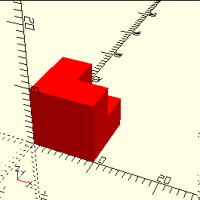
The 3MF file format supports multi-colour/multi-material for FDM printers (eg, ones with multiple extruders). This is what Jordan means by "volumetric colour". If OpenSCAD gets volumetric colour support, 3MF would be the logical choice. Applying colours to triangles on the surface of the object is not the same as volumetric colour. In the past, I've used X3D format for this (my Curv language supports this format). Full colour 3D printers that support surface colouring tend to be expensive, so I've used service bureaus like Shapeways for this kind of printing. The other kind of volumetric colour is where you use a "voxel printer" that can apply a different colour, and sometimes a different material, to each voxel in the printed object. The file format contains a 3D voxel grid, with an RGB colour and/or material assigned to each voxel. In the past, the only 3D printing file format like this was SVX, but it's effectively a dead format (the only support I know is from Shapeways, AbFab3D (software), and Curv). There is also "prerelease" support for full volumetric colour (per-voxel colour) in 3MF. The standard was just announced Nov 17, and is at version 0.6.0 (prerelease), and I assume it is still unstable. This is the format I hope to be using in the future for high end full volumetric colour, since it has support from 3D printer vendors. Doug Moen. On Tue, Feb 8, 2022, at 9:57 AM, Jim Witte wrote: > What kind of "standardized" support is there for multicolor support in output files though? OpenSCAD exports STL, which doesn't have color support. There might be some way to "hack" in with a color attribute assigned to each triangle - but that would be both non-standard and probably increase file size by at least a third. Other formats support color (OBJ etc), but OpenSCAD doesn't do them. > > That raises another question - could the OpenSCAD code be extended to export something like a DWG file (or whatever the "semi-open" version is - I forget)? > > On Tue, Feb 8, 2022 at 1:52 AM Jordan Brown <openscad@jordan.maileater.net> wrote: >> One of the areas where OpenSCAD is weak is in multicolor / multimaterial support. (In a lot of ways the two are the same problem, so I use "color" and "material" almost interchangeably.) >> >> OpenSCAD's native color support is for preview only; it does not affect the exported files at all and so cannot directly drive multimaterial printers. It is certainly possible to roll your own support, generating multiple STL files for the different materials, but that's not very user-friendly. >> >> I have long wondered how possible it would be to teach OpenSCAD to have true multi-material support, so that you would write a straightforward OpenSCAD program that would include markup for what material each component is to be made of. The boolean operators, and in particular union, would need to learn more complex rules that would track the material through the various operations that are applied to the model. >> >> Union is the most interesting. When I mentioned this a while back, somebody suggested using the same model that a 2D paint program uses: the last paint wins. If you paint something red, and then you paint over it with blue, it's blue. OK, that's as reasonable a mental model as any. Using arithmetic notation, if you union two objects A and B, the result is A-B colored like A, and B colored like B. >> >> Intersection is a bit interesting; the resulting object is the volume in common between the two inputs, so which one should win? Again, "last paint wins" seems like an OK answer; the result is a normal intersection that ignores the first object's colors and retains the second object's colors. >> >> Difference is easy, since only one input actually supplies material. >> >> I've been thinking of trying to implement this in OpenSCAD proper, and that's where it belongs, but it's a lot of work. It occurred to me the other day that it might be practical to build something in OpenSCAD "user space" that would have the same basic behavior, that could be used to play with it. >> >> So I did. It seems to mostly work, though it's affected by some preview artifacts that make the colors wrong in some cases. >> >> As everybody knows, there's no way to inspect the OpenSCAD model as you create it, so I couldn't operate directly on OpenSCAD constructs. Instead, I build up my own CSG tree, with my own operators, and then after the model is ready I evaluate it and execute the underlying OpenSCAD operators. >> >> Here's a program using it: >> >>> c1 = cube([10,10,10], "red"); >>> c2 = translate([5,5,5], cube([10,10,10], "blue")); >>> eval(union([c1, c2])); >>> >> Remembering the "last paint wins" rule, this sequence generates a red cube with a notch cut out of it, and a blue cube. >> >> As shown, it's unexciting: >> >> It gets more interesting if you set $color="red": >> >> >> >> I haven't done it, but since it knows the color of the components and has a function to report the list of colors used, it would be straightforward to wrap a script around OpenSCAD invocations that would retrieve the list of colors and then invoke OpenSCAD multiple times to generate one STL for each color. >> >> >> >> I must emphasize that this is a toy, a proof of concept. It has enough functionality to demonstrate the operations, and not much more. As an example, the only geometric object that it can create is a cube. It uses a polyhedron structure internally, so it would be easy to extend to other shapes, but that's not the point. I have no intent to turn this into a production OpenSCAD library; rather, it's a testbed for playing with this multi-material strategy without the work involved in changing OpenSCAD proper. A real implementation would operate differently; where this implementation builds the entire model for one color, then the next, and so on, a real implementation should process all of the colors in parallel instead of recalculating large parts of the model repeatedly for the cases where color isn't needed. A real implementation would allow export to multi-material-capable formats like 3MF, and would emit multiple STLs from a single run. >> >> >> >> All that said, here it is. I'd be interested in any comments, either on the implementation or on the concepts. I *think* that the processing is all correct, that it produces the desired shapes, but some of it hurts my head and it's possible that I've missed something. I also don't have a lot of practice in writing the recursive algorithms required for some of this work, and may not have done them in the best way. >> >> >> >> // Node data structure >> // Note that node[1] is a list of the child nodes, if any. >> // [ POLY, undef, color, vertices[][], faces[][] ] >> // [ UNION, nodes[] ] >> // [ TRANSLATE, [node], [x,y,z] ] >> >> POLY = "POLY"; >> UNION = "UNION"; >> INTERSECTION = "INTERSECTION"; >> DIFFERENCE = "DIFFERENCE"; >> TRANSLATE = "TRANSLATE"; >> ROTATE = "ROTATE"; >> SCALE = "SCALE"; >> >> // Build a CSG tree of objects and operations. >> function cube(d, color) = [ POLY, undef, color, [[0,0,0], [0,0,d.z], [0,d.y,0], [0,d.y,d.z], [d.x,0,0], [d.x,0,d.z], [d.x,d.y,0], [d.x,d.y,d.z]], [[0,4,6,2],[2,3,1,0],[2,6,7,3],[4,5,7,6],[0,1,5,4],[1,3,7,5]]]; >> >> function op(op, nodes, n) = >> let(n = is_undef(n) ? len(nodes) : n) >> n == 1 >> ? nodes[0] >> : [ op, [op(op, nodes, n-1), nodes[n-1]]]; >> function union(nodes) = op(UNION, nodes); >> function intersection(nodes) = op(INTERSECTION, nodes); >> function difference(nodes) = op(DIFFERENCE, nodes); >> function translate(vec, n) = [ TRANSLATE, [n], vec ]; >> function rotate(vec, n) = [ ROTATE, [n], vec ]; >> function scale(vec, n) = [ SCALE, [n], vec ]; >> >> // Evaluate a CSG model, for the color in $color. Note that we apply the >> // color at the top level, not the bottom, so as to achieve volumetric color >> // behavior on intersection and difference. >> // Note: this strategy doesn't actually work, at least not in all cases. >> // Ref https://github.com/openscad/openscad/issues/1000#issuecomment-1031065259 >> module eval(node) { >> if (is_undef($color)) { >> for ($color = nodecolors(node)) color($color) eval1(node); >> } else { >> color($color) eval1(node); >> } >> } >> >> // Evaluate a node with respect to a particular $color. >> // With $color equal to undef, returns a solid containing the results of the >> // entire subtree. >> // Otherwise, returns just the specified color. >> module eval1(node) { >> op = node[0]; >> childnodes = node[1]; >> if (op == POLY) { >> color = node[2]; >> vertices = node[3]; >> faces = node[4]; >> if (is_undef($color) || $color == color) { >> polyhedron(points=vertices, faces=faces); >> } >> } else if (op == UNION) { >> n1 = childnodes[0]; >> n2 = childnodes[1]; >> // Last paint wins, so n1's colors show through >> // only where it is not in common with n2. >> union() { >> difference() { >> eval1(n1); >> eval1(n2, $color=undef); >> } >> eval1(n2); >> } >> } else if (op == INTERSECTION) { >> n1 = childnodes[0]; >> n2 = childnodes[1]; >> // Last paint wins, so n1's colors are ignored; >> // n2's colors always win. >> intersection() { >> eval1(n1, $color=undef); >> eval1(n2); >> } >> } else if (op == DIFFERENCE) { >> n1 = childnodes[0]; >> n2 = childnodes[1]; >> // Last-paint-wins is not exactly relevant here, >> // because n2 is negative-space that does not >> // contribute to the final object. >> // Thus n1's colors win. >> difference() { >> eval1(n1); >> eval1(n2, $color=undef); >> } >> } else if (op == TRANSLATE) { >> n = childnodes[0]; >> vec = node[2]; >> translate(vec) eval1(n); >> } else if (op == ROTATE) { >> n = childnodes[0]; >> vec = node[2]; >> rotate(vec) eval1(n); >> } else if (op == SCALE) { >> n = childnodes[0]; >> vec = node[2]; >> scale(vec) eval1(n); >> } >> } >> >> // Given a list of strings, remove duplicates. >> function dedup(v, res=[], i=0) = >> i >= len(v) >> ? res >> : let(found=search([v[i]], res, 0)) >> len(found[0]) == 0 >> ? dedup(v, concat(res, v[i]), i+1) >> : dedup(v, res, i+1); >> >> // Given a node, return the list of colors used by the node. >> function nodecolors(n) = >> dedup( >> let(nodes = n[1]) >> is_undef(nodes) >> ? [ n[2] ] >> : [ for (node=nodes) each nodecolors(node) ] >> ); >> >> >> // ------ >> // Make some test objects. >> c1 = cube([10,10,10], "red"); >> c2 = translate([5,5,5], cube([10,10,10], "blue")); >> c3a = translate([-2,-2,-2], cube([5,5,5], "blue")); >> c3b = translate([-5,-5,-5], cube([5,5,5], "red")); >> c3 = union([c3a, c3b]); >> u = union([c2, c1, c3]); >> >> c4 = translate([2.5,2.5,2.5], cube([10,10,10], "green")); >> >> //$color = "red"; >> //eval(u); >> //eval(intersection([c4, union([c1, c2])])); >> //eval(intersection([c4, c1])); >> eval(union([c1, c2]), $color="red"); >> >> >> _______________________________________________ >> OpenSCAD mailing list >> To unsubscribe send an email to discuss-leave@lists.openscad.org > _______________________________________________ > OpenSCAD mailing list > To unsubscribe send an email to discuss-leave@lists.openscad.org >
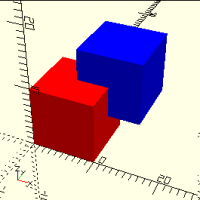
TP
Torsten Paul
Tue, Feb 8, 2022 5:26 PM

Both 3MF and WRL format have color support.

Technically AMF has too, but I would declare this as dead, so I'm
not seeing much sense in extending the exporter.

STEP, while difficult, is an option. It's never going to match
perfectly (e.g. in case hull() or minkowski() is used) but as
the FreeCAD import shows, there's some useful way to do this.

There's currently some discussion on improving the integration
between OpenSCAD and FreeCAD as Google Summer of Code project.
In case this would happen, it could also help a possible future
STEP export.

DWG or any of the proprietary formats are unlikely to be supported.

ciao,
Torsten.

Both 3MF and WRL format have color support. Technically AMF has too, but I would declare this as dead, so I'm not seeing much sense in extending the exporter. STEP, while difficult, is an option. It's never going to match perfectly (e.g. in case hull() or minkowski() is used) but as the FreeCAD import shows, there's some useful way to do this. There's currently some discussion on improving the integration between OpenSCAD and FreeCAD as Google Summer of Code project. In case this would happen, it could also help a possible future STEP export. DWG or any of the proprietary formats are unlikely to be supported. ciao, Torsten.
JB
Jordan Brown
Tue, Feb 8, 2022 5:52 PM

On 2/8/2022 6:57 AM, Jim Witte wrote:

What kind of "standardized" support is there for multicolor support in
output files though?  OpenSCAD exports STL, which doesn't have color
support.  There might be some way to "hack" in with a color attribute
assigned to each triangle - but that would be both non-standard and
probably increase file size by at least a third.  Other formats
support color (OBJ etc), but OpenSCAD doesn't do them.

I don't know what multi-color slicers take as input, but they exist so
they must have an input format.

[ A few experiments later... ] PrusaSlicer seems to like either AMF or
sets of STLs.

Indeed, any real multi-material support would necessarily involve work
on the exports to generate multi-material files.  For STL I'd expect it
to generate N files, probably with a base name and the material name.

On 2/8/2022 6:57 AM, Jim Witte wrote: > What kind of "standardized" support is there for multicolor support in > output files though?  OpenSCAD exports STL, which doesn't have color > support.  There might be some way to "hack" in with a color attribute > assigned to each triangle - but that would be both non-standard and > probably increase file size by at least a third.  Other formats > support color (OBJ etc), but OpenSCAD doesn't do them. I don't know what multi-color slicers take as input, but they exist so they must have an input format. [ A few experiments later... ] PrusaSlicer seems to like either AMF or sets of STLs. Indeed, any real multi-material support would necessarily involve work on the exports to generate multi-material files.  For STL I'd expect it to generate N files, probably with a base name and the material name.
JB
Jordan Brown
Tue, Feb 8, 2022 6:46 PM

On 2/8/2022 5:09 AM, jon wrote:

I imagine that what I am about to say is very naive, but here goes. 

What if you wrote a new module/function called Color() [not color()]. 
Could Color() know both the current color (because you specified it as
a parameter) as well as a global variable that knew the desired color,
so that Color() would only return geometry if the two colors matched? 
This would act as a switch to enable and disable geometry
automatically, creating all of the "blue" geometry or all of the "red"
geometry as needed.

I will wait to hear why this will not work.

My first thoughts were along those lines, and I thought it wouldn't
work.  I thought I needed to know the colors of the children, but as I
think about it now and play with it, it does work.

It can't deduplicate a list of materials, but that can be done externally.

And it's way, way simpler.  Excellent!

Further experiments show that both schemes have real rendering problems
with coincident faces.  That's nothing new, given the techniques used,
but in multi-color work correcting for it in the model would be even
harder than usual.  It's possible to correct for it by slathering
render() all over it, but of course that kills performance, and so far I
haven't found a combination that doesn't require knowing the list of
colors at the top level.

This is simple enough that it would be tempting to just solve the
problem this way, rather than adding direct support to OpenSCAD. 
However, I think that would be the wrong answer:

  • Preview really needs help.  (But that would probably be an issue for
    a naïve internal implementation too.)
  • Requiring external scripting is neither user-friendly nor portable.
  • Can't generate single-file multi-color models.
  • Given caching I'm not sure of all of the performance implications,
    but there's a lot of redundant construction that could be eliminated
    in a scheme that processed all colors at once.

Here's an example.  Intersection and difference are left as an exercise
for the reader.

module Color(color) {
    if (is_undef($color) || $color == color) {
        color(color) children();
    }
}

module Union() {
    // More than two children is left as an exercise for the reader.
    assert($children == 2);
    union() {
        difference() {
            children(0);
            children(1, $color=undef);
        }
        children(1);
    }
}

module m() {
    Union() {
        Union() {
            Color("red") cube([40,30,5]);
            Color("blue") translate([1,2,4]) linear_extrude(height=1) text("Blue");
        }
        Color("green") translate([1,15,4]) linear_extrude(height=1) text("Green");
    }
}

translate([0,0,0]) m();
translate([50,0,0]) m($color="red");
translate([0,40,0]) m($color="green");
translate([50,40,0]) m($color="blue");

Previews as (notice the Z-fighting):

Renders as:
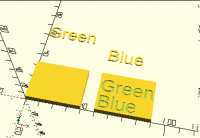
On 2/8/2022 5:09 AM, jon wrote: > > I imagine that what I am about to say is very naive, but here goes.  > > What if you wrote a new module/function called Color() [not color()].  > Could Color() know both the current color (because you specified it as > a parameter) as well as a global variable that knew the desired color, > so that Color() would only return geometry if the two colors matched?  > This would act as a switch to enable and disable geometry > automatically, creating all of the "blue" geometry or all of the "red" > geometry as needed. > > I will wait to hear why this will not work. > My first thoughts were along those lines, and I thought it wouldn't work.  I thought I needed to know the colors of the children, but as I think about it now and play with it, it does work. It can't deduplicate a list of materials, but that can be done externally. And it's way, way simpler.  Excellent! Further experiments show that both schemes have real rendering problems with coincident faces.  That's nothing new, given the techniques used, but in multi-color work correcting for it in the model would be even harder than usual.  It's possible to correct for it by slathering render() all over it, but of course that kills performance, and so far I haven't found a combination that doesn't require knowing the list of colors at the top level. This is simple enough that it would be tempting to just solve the problem this way, rather than adding direct support to OpenSCAD.  However, I think that would be the wrong answer: * Preview really needs help.  (But that would probably be an issue for a naïve internal implementation too.) * Requiring external scripting is neither user-friendly nor portable. * Can't generate single-file multi-color models. * Given caching I'm not sure of all of the performance implications, but there's a lot of redundant construction that could be eliminated in a scheme that processed all colors at once. Here's an example.  Intersection and difference are left as an exercise for the reader. module Color(color) { if (is_undef($color) || $color == color) { color(color) children(); } } module Union() { // More than two children is left as an exercise for the reader. assert($children == 2); union() { difference() { children(0); children(1, $color=undef); } children(1); } } module m() { Union() { Union() { Color("red") cube([40,30,5]); Color("blue") translate([1,2,4]) linear_extrude(height=1) text("Blue"); } Color("green") translate([1,15,4]) linear_extrude(height=1) text("Green"); } } translate([0,0,0]) m(); translate([50,0,0]) m($color="red"); translate([0,40,0]) m($color="green"); translate([50,40,0]) m($color="blue"); Previews as (notice the Z-fighting): Renders as: