

discuss@lists.openscad.org

OpenSCAD general discussion Mailing-list

View all threads

Bezier stretch

M
mikeonenine@web.de
Tue, Apr 21, 2026 2:02 AM

Not very constructive comments. Not helpful.

Adrian Mariano wrote:

Also, cutting and pasting answers from your code back into the code is
never the answer.  Imagine if you had to do that 1000 times to get to the
solution you wanted---just not practical.

That’s not at all what I had in mind.

I said …using a function or whatever…

Not very constructive comments. Not helpful. Adrian Mariano wrote: > Also, cutting and pasting answers from your code back into the code is > never the answer. Imagine if you had to do that 1000 times to get to the > solution you wanted---just not practical. That’s not at all what I had in mind. I said …using a function or whatever…
NH
nop head
Tue, Apr 21, 2026 8:40 AM

I calculate beziers of a specific length or minimum z value to model cable
strips for a 3D printer. The code is here:
https://github.com/nophead/NopSCADlib/blob/master/utils/bezier.scad.

The code is specific for U shaped curves but the technique could probably
be adapted for other shapes.

To get the length I just evaluate 100 points and sum the distances between
them.

To change the length I move the inner two control points up or down using
Newton Raphson.

On Tue, 21 Apr 2026 at 03:02, Caddiy via Discuss discuss@lists.openscad.org
wrote:

Not very constructive comments. Not helpful.

Adrian Mariano wrote:

Also, cutting and pasting answers from your code back into the code is
never the answer. Imagine if you had to do that 1000 times to get to the
solution you wanted---just not practical.

That’s not at all what I had in mind.

I said …using a function or whatever…


OpenSCAD mailing list
To unsubscribe send an email to discuss-leave@lists.openscad.org

I calculate beziers of a specific length or minimum z value to model cable strips for a 3D printer. The code is here: https://github.com/nophead/NopSCADlib/blob/master/utils/bezier.scad. The code is specific for U shaped curves but the technique could probably be adapted for other shapes. To get the length I just evaluate 100 points and sum the distances between them. To change the length I move the inner two control points up or down using Newton Raphson. On Tue, 21 Apr 2026 at 03:02, Caddiy via Discuss <discuss@lists.openscad.org> wrote: > Not very constructive comments. Not helpful. > > Adrian Mariano wrote: > > Also, cutting and pasting answers from your code back into the code is > never the answer. Imagine if you had to do that 1000 times to get to the > solution you wanted---just not practical. > > That’s not at all what I had in mind. > > I said …using a function or whatever… > > > _______________________________________________ > OpenSCAD mailing list > To unsubscribe send an email to discuss-leave@lists.openscad.org
SP
Sanjeev Prabhakar
Tue, Apr 21, 2026 5:22 PM

revised one
Change in the length is negligible.
[image: Screenshot 2026-04-21 at 10.26.54 PM.png]
But it's not an openscad code. Hard coded openscad file attached

python code:

from openscad4 import *

a=arc(30,20,70)
b=rot2d(90,a)

center cam driving the piston rods, there are 21 positions defined

s1=[ [a[i],b[i],[0,0]] for i in range(len(a))]

defining control points for bezier "cp2" are control points and "cp3" is

bezier
cp1=[mirror_line(c23([a[i],b[i]]),c23(line_as_axis([a[i],b[i]])),a[i]+[0])
for i in range(len(s1))]
cp2=[p+[[100,19,0],[120,19,0],[200,19,0]] for p in cp1]
cp3=[ bezier(p,20) for p in cp2]

center line of cylinder

l1=[[-200,19],[200,19]]

length of the piston rod 157 (starts at 3 and ends at 160) with 51 points

l2=m_points1_o([[0,3],[0,160]],50)

super-imposing the line l2 over beziers

cp4=[ wrap_around(l2,p) for p in cp3]

same is repeated for the left side

cp5=[mirror_line(c23([b[i],a[i]]),c23(line_as_axis([a[i],b[i]])),b[i]+[0])
for i in range(len(s1))]
cp6=[p+[[-100,19,0],[-120,19,0],[-200,19,0]] for p in cp5]
cp7=[ bezier(p,20) for p in cp6]
cp8=[ wrap_around(l2,p) for p in cp7]

calculation for length and end point position

lx=[l_lenv_o(p) for p in cp4] # length of the rod
xv=[ p[-1][0] for p in cp4] # end point of the rod for 51 different
positions
fo(f'''
//center line of cylinder
%color("grey",.3) p_line3d({l1},.3);

//cam
color("blue") for(p=[s1[abs(round(20sin($t180)))]])p_line3dc(p,1);

//initial bezier on which the line l2 is super-imposed
//color("magenta") for(p=[cp3[abs(round(20sin($t180)))]])p_line3d(p,1);

//right side piston rod
color("black") for(p=[cp4[abs(round(20sin($t180)))]])p_line3d(p,1.1);

// left side piston rod
color("black") for(p=[cp8[abs(round(20sin($t180)))]])p_line3d(p,1.1);

// text for line length
color("magenta") translate([30,50,0])rotate([0,0,0])linear_extrude(0.05)
text(str("line_length : ",lx[abs(round(20sin($t180)))]),10);

// text for end point position
color("magenta") translate([30,70,0])rotate([0,0,0])linear_extrude(0.05)
text(str("end_point : ",xv[abs(round(20sin($t180)))]),10);

// calculation in python and hard coded points in openSCAD
s1={s1}; //center cam
cp3={cp3}; //original bezier
cp4={cp4}; // super-imposed piston rod on bezier rhs
cp8={cp8}; // super-imposed piston rod on bezier lhs
lx={lx}; // line lengths
xv={xv}; // end positons
''')

On Mon, 20 Apr 2026 at 20:33, Sanjeev Prabhakar sprabhakar2006@gmail.com
wrote:

Code can be written in more comprehensive manner later.

First point is whether this is the correct understanding of the problem.

If this is correct, exact bezier length can be modeled as per me.

Now does it stop here, only in 1 plane e.g. this is in x-z plane or the
entire thing has to be rotated around x-axis as well.

More interesting would be to understand the purpose,  it feels like an NVH
(Noise Vibration and Harshness) simulation of a beam.

Thanks

On Mon, 20 Apr, 2026, 10:37 am Caddiy via Discuss, <
discuss@lists.openscad.org> wrote:

Sanjeev Prabhakar wrote:

Maybe this comes closer[image: Screenshot 2026-04-20 at 8.18.59 AM.png]

How do you get all those numbers? Could be useful for complex 3D surfaces.

Nice constant-length bezier, but the code is beyond me!

It would be nice to be able to get the difference between the actual
length of the bezier, and what it should be, and feed that as a correction
back into the bezier. But I think it would make the computer go round and
round in ever-decreasing circles.

However, it could be done with two identical beziers, a “real” one and a
“dummy”. The dummy calculates the correction and that is fed not back into
the dummy but into the real bezier, using a function or whatever. I’m just
wondering whether both beziers can be obtained from a single module, or
whether the dummy would have to be cut and pasted from the real one. Is
that mathematically permissible?

I’ll try it out tomorrow.


OpenSCAD mailing list
To unsubscribe send an email to discuss-leave@lists.openscad.org
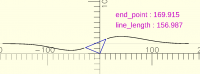
revised one Change in the length is negligible. [image: Screenshot 2026-04-21 at 10.26.54 PM.png] But it's not an openscad code. Hard coded openscad file attached python code: from openscad4 import * a=arc(30,20,70) b=rot2d(90,a) # center cam driving the piston rods, there are 21 positions defined s1=[ [a[i],b[i],[0,0]] for i in range(len(a))] # defining control points for bezier "cp2" are control points and "cp3" is bezier cp1=[mirror_line(c23([a[i],b[i]]),c23(line_as_axis([a[i],b[i]])),a[i]+[0]) for i in range(len(s1))] cp2=[p+[[100,19,0],[120,19,0],[200,19,0]] for p in cp1] cp3=[ bezier(p,20) for p in cp2] # center line of cylinder l1=[[-200,19],[200,19]] # length of the piston rod 157 (starts at 3 and ends at 160) with 51 points l2=m_points1_o([[0,3],[0,160]],50) # super-imposing the line l2 over beziers cp4=[ wrap_around(l2,p) for p in cp3] # same is repeated for the left side cp5=[mirror_line(c23([b[i],a[i]]),c23(line_as_axis([a[i],b[i]])),b[i]+[0]) for i in range(len(s1))] cp6=[p+[[-100,19,0],[-120,19,0],[-200,19,0]] for p in cp5] cp7=[ bezier(p,20) for p in cp6] cp8=[ wrap_around(l2,p) for p in cp7] # calculation for length and end point position lx=[l_lenv_o(p) for p in cp4] # length of the rod xv=[ p[-1][0] for p in cp4] # end point of the rod for 51 different positions fo(f''' //center line of cylinder %color("grey",.3) p_line3d({l1},.3); //cam color("blue") for(p=[s1[abs(round(20*sin($t*180)))]])p_line3dc(p,1); //initial bezier on which the line l2 is super-imposed //color("magenta") for(p=[cp3[abs(round(20*sin($t*180)))]])p_line3d(p,1); //right side piston rod color("black") for(p=[cp4[abs(round(20*sin($t*180)))]])p_line3d(p,1.1); // left side piston rod color("black") for(p=[cp8[abs(round(20*sin($t*180)))]])p_line3d(p,1.1); // text for line length color("magenta") translate([30,50,0])rotate([0,0,0])linear_extrude(0.05) text(str("line_length : ",lx[abs(round(20*sin($t*180)))]),10); // text for end point position color("magenta") translate([30,70,0])rotate([0,0,0])linear_extrude(0.05) text(str("end_point : ",xv[abs(round(20*sin($t*180)))]),10); // calculation in python and hard coded points in openSCAD s1={s1}; //center cam cp3={cp3}; //original bezier cp4={cp4}; // super-imposed piston rod on bezier rhs cp8={cp8}; // super-imposed piston rod on bezier lhs lx={lx}; // line lengths xv={xv}; // end positons ''') On Mon, 20 Apr 2026 at 20:33, Sanjeev Prabhakar <sprabhakar2006@gmail.com> wrote: > Code can be written in more comprehensive manner later. > > First point is whether this is the correct understanding of the problem. > > If this is correct, exact bezier length can be modeled as per me. > > Now does it stop here, only in 1 plane e.g. this is in x-z plane or the > entire thing has to be rotated around x-axis as well. > > More interesting would be to understand the purpose, it feels like an NVH > (Noise Vibration and Harshness) simulation of a beam. > > Thanks > > > > > > On Mon, 20 Apr, 2026, 10:37 am Caddiy via Discuss, < > discuss@lists.openscad.org> wrote: > >> Sanjeev Prabhakar wrote: >> >> Maybe this comes closer[image: Screenshot 2026-04-20 at 8.18.59 AM.png] >> >> How do you get all those numbers? Could be useful for complex 3D surfaces. >> >> Nice constant-length bezier, but the code is beyond me! >> >> It would be nice to be able to get the difference between the actual >> length of the bezier, and what it should be, and feed that as a correction >> back into the bezier. But I think it would make the computer go round and >> round in ever-decreasing circles. >> >> However, it could be done with two identical beziers, a “real” one and a >> “dummy”. The dummy calculates the correction and that is fed not back into >> the dummy but into the real bezier, using a function or whatever. I’m just >> wondering whether both beziers can be obtained from a single module, or >> whether the dummy would have to be cut and pasted from the real one. Is >> that mathematically permissible? >> >> I’ll try it out tomorrow. >> _______________________________________________ >> OpenSCAD mailing list >> To unsubscribe send an email to discuss-leave@lists.openscad.org > >