WA
William Adams
Tue, Apr 23, 2019 2:39 PM
Okay, managed to puzzle things out. Quick start:
- install Java
- double-click on the .jar file:
NodeGraphInterface-master\dist\NodeGraphInterface.jar
- right-click to create nodes (e.g., Node | Geometry | Cube)
- output is handled by the object Node | Output | SCADOutput ---
right-click on the "f" to get a file dialog which will allow you to send
the output to a .scad file which OpenSCAD will open
One thing which seems a bit odd to me is that everything collapses to the
most concise possible expression, and no structure is preserved, so the
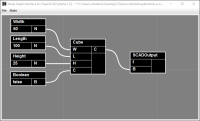
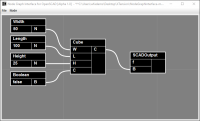
graph:
[image: Capture.PNG]
is presented as:
cube([50, 100, 25], center = false );
It would be much more useful for my purposes if the parameter values and
names were preserved and presented at the top of the file so that they
would work in the Customizer in OpenSCAD. c.f., https://www.blockscad3d.com/
I can definitely see myself using it to work up code to include in modules
in other projects.
William
On Mon, Apr 22, 2019 at 3:19 PM William Adams will.adams@frycomm.com
wrote:
My apologies, managed to find:
NodeGraphInterface-master\dist\NodeGraphInterface.jar
and
README.TXT
On Mon, Apr 22, 2019 at 2:43 PM William Adams will.adams@frycomm.com
wrote:
What I meant by language was taking this software and having it support
something else in addition to OpenSCAD, say METAPOST.
How would one begin using it? Do you have to download NetBeans? Is there
some command line command to either compile things or get them started?
William
On Mon, Apr 22, 2019 at 2:04 PM Tom Copple studio.tom.copple@gmail.com
wrote:
No, I wanted a UI project for myself. Half the fun was working that out.
On Mon, Apr 22, 2019 at 6:31 AM William Adams will.adams@frycomm.com
wrote:
How does this compare to:
https://graphscad.blogspot.com/
If one puts together a file and then opens it in OpenSCAD would the
Customizer work as expected? (that's the major failing in graphscad for me
at the moment)
Could this be adopted to other languages?
As a naïve user not accustomed to working with Java source, how would
one start with this?
I've downloaded it and found \NodeGraphInterface-master\build.xml ---
a brief search indicates this is usually an ant build script? Is that the
case here?
William
On Sat, Apr 20, 2019 at 7:01 PM Kevin Toppenberg kdtop3@gmail.com
wrote:
This is very cool Anything that can appeal to more persons is a good
thing.
But for me, already being comfortable with the typing aspect, the
node interface looks intimidating! :-)
Thanks
Kevin
On Sat, Apr 20, 2019 at 1:58 PM Tom Copple <
studio.tom.copple@gmail.com> wrote:
Hi,
I made a Node Graph Interface for OpenSCAD as a hobby project
(written in Java). I have it working the way I imagined and thought I'd
throw it out into the wild. The concept was to make Nodes that are
elemental parts of the language. There are Nodes for atomic parts like
numbers and variables and Nodes for typical statements like sphere,
translate, union, etc... It doesn't cover the complete language, but there
is a "hack" for the rest. The README.md at the project page should get you
started.
Project Source:
https://github.com/studiotc/NodeGraphInterface
You can pull the jar file from here:
https://github.com/studiotc/NodeGraphInterface/tree/master/dist
I started this project after reading a Hackaday article about
choosing CAD software. OpenSCAD got mentions in the comments, but I think
people are intimidated by the typing part... Like others, I have always
wanted CAD on Linux and have looked into OpenSCAD (I'm only a windows
person because I'm a Rhino user & ex AutoDesk user). So, the thought
struck me: what would a Node Graph interface like Rhino's Grasshopper or
Maya's Shader Network look like in OpenSCAD? This was my musing on that
thought...
Cheers,
Tom
OpenSCAD mailing list
Discuss@lists.openscad.org
http://lists.openscad.org/mailman/listinfo/discuss_lists.openscad.org
Okay, managed to puzzle things out. Quick start:
- install Java
- double-click on the .jar file:
NodeGraphInterface-master\dist\NodeGraphInterface.jar
- right-click to create nodes (e.g., Node | Geometry | Cube)
- output is handled by the object Node | Output | SCADOutput ---
right-click on the "f" to get a file dialog which will allow you to send
the output to a .scad file which OpenSCAD will open
One thing which seems a bit odd to me is that everything collapses to the
most concise possible expression, and no structure is preserved, so the
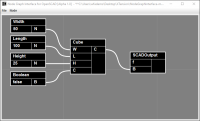
graph:
[image: Capture.PNG]
is presented as:
cube([50, 100, 25], center = false );
It would be much more useful for my purposes if the parameter values and
names were preserved and presented at the top of the file so that they
would work in the Customizer in OpenSCAD. c.f., https://www.blockscad3d.com/
I can definitely see myself using it to work up code to include in modules
in other projects.
William
On Mon, Apr 22, 2019 at 3:19 PM William Adams <will.adams@frycomm.com>
wrote:
> My apologies, managed to find:
>
> NodeGraphInterface-master\dist\NodeGraphInterface.jar
>
> and
> README.TXT
>
>
>
>
> On Mon, Apr 22, 2019 at 2:43 PM William Adams <will.adams@frycomm.com>
> wrote:
>
>> What I meant by language was taking this software and having it support
>> something else in addition to OpenSCAD, say METAPOST.
>>
>> How would one begin using it? Do you have to download NetBeans? Is there
>> some command line command to either compile things or get them started?
>>
>> William
>>
>>
>> On Mon, Apr 22, 2019 at 2:04 PM Tom Copple <studio.tom.copple@gmail.com>
>> wrote:
>>
>>> No, I wanted a UI project for myself. Half the fun was working that out.
>>>
>>> On Mon, Apr 22, 2019 at 6:31 AM William Adams <will.adams@frycomm.com>
>>> wrote:
>>>
>>>> Also, did you consider implementing this using an existing tool?
>>>>
>>>> Blockly seems a likely option, or Drakon?
>>>>
>>>> William
>>>>
>>>> https://developers.google.com/blockly/
>>>> http://drakon-editor.sourceforge.net/
>>>>
>>>>
>>>> On Mon, Apr 22, 2019 at 8:28 AM William Adams <will.adams@frycomm.com>
>>>> wrote:
>>>>
>>>>> How does this compare to:
>>>>>
>>>>> https://graphscad.blogspot.com/
>>>>>
>>>>> If one puts together a file and then opens it in OpenSCAD would the
>>>>> Customizer work as expected? (that's the major failing in graphscad for me
>>>>> at the moment)
>>>>>
>>>>> Could this be adopted to other languages?
>>>>>
>>>>> As a naïve user not accustomed to working with Java source, how would
>>>>> one start with this?
>>>>>
>>>>> I've downloaded it and found \NodeGraphInterface-master\build.xml ---
>>>>> a brief search indicates this is usually an ant build script? Is that the
>>>>> case here?
>>>>>
>>>>>
>>>>> William
>>>>>
>>>>> On Sat, Apr 20, 2019 at 7:01 PM Kevin Toppenberg <kdtop3@gmail.com>
>>>>> wrote:
>>>>>
>>>>>> This is very cool Anything that can appeal to more persons is a good
>>>>>> thing.
>>>>>>
>>>>>> But for me, already being comfortable with the typing aspect, the
>>>>>> node interface looks intimidating! :-)
>>>>>>
>>>>>> Thanks
>>>>>> Kevin
>>>>>>
>>>>>> On Sat, Apr 20, 2019 at 1:58 PM Tom Copple <
>>>>>> studio.tom.copple@gmail.com> wrote:
>>>>>>
>>>>>>> Hi,
>>>>>>> I made a Node Graph Interface for OpenSCAD as a hobby project
>>>>>>> (written in Java). I have it working the way I imagined and thought I'd
>>>>>>> throw it out into the wild. The concept was to make Nodes that are
>>>>>>> elemental parts of the language. There are Nodes for atomic parts like
>>>>>>> numbers and variables and Nodes for typical statements like sphere,
>>>>>>> translate, union, etc... It doesn't cover the complete language, but there
>>>>>>> is a "hack" for the rest. The README.md at the project page should get you
>>>>>>> started.
>>>>>>>
>>>>>>> Project Source:
>>>>>>> https://github.com/studiotc/NodeGraphInterface
>>>>>>>
>>>>>>> You can pull the jar file from here:
>>>>>>> https://github.com/studiotc/NodeGraphInterface/tree/master/dist
>>>>>>>
>>>>>>> I started this project after reading a Hackaday article about
>>>>>>> choosing CAD software. OpenSCAD got mentions in the comments, but I think
>>>>>>> people are intimidated by the typing part... Like others, I have always
>>>>>>> wanted CAD on Linux and have looked into OpenSCAD (I'm only a windows
>>>>>>> person because I'm a Rhino user & ex AutoDesk user). So, the thought
>>>>>>> struck me: what would a Node Graph interface like Rhino's Grasshopper or
>>>>>>> Maya's Shader Network look like in OpenSCAD? This was my musing on that
>>>>>>> thought...
>>>>>>>
>>>>>>> Cheers,
>>>>>>> Tom
>>>>>>> _______________________________________________
>>>>>>> OpenSCAD mailing list
>>>>>>> Discuss@lists.openscad.org
>>>>>>> http://lists.openscad.org/mailman/listinfo/discuss_lists.openscad.org
>>>>>>>
>>>>>> _______________________________________________
>>>>>> OpenSCAD mailing list
>>>>>> Discuss@lists.openscad.org
>>>>>> http://lists.openscad.org/mailman/listinfo/discuss_lists.openscad.org
>>>>>>
>>>>> _______________________________________________
>>>> OpenSCAD mailing list
>>>> Discuss@lists.openscad.org
>>>> http://lists.openscad.org/mailman/listinfo/discuss_lists.openscad.org
>>>>
>>> _______________________________________________
>>> OpenSCAD mailing list
>>> Discuss@lists.openscad.org
>>> http://lists.openscad.org/mailman/listinfo/discuss_lists.openscad.org
>>>
>>

TC
Tom Copple
Wed, Apr 24, 2019 1:16 AM
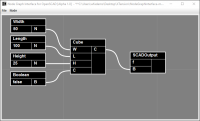
Oh, I think all you want to do is explicitly declare variables - just a few
extra nodes... :)
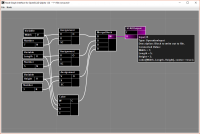
The attached image produces this:
Width = 7;
Length = 5;
Height = 3;
cube([Width, Length, Height], center = true );
HTH,
Tom
On Tue, Apr 23, 2019 at 7:40 AM William Adams will.adams@frycomm.com
wrote:
Okay, managed to puzzle things out. Quick start:
- install Java
- double-click on the .jar file:
NodeGraphInterface-master\dist\NodeGraphInterface.jar
- right-click to create nodes (e.g., Node | Geometry | Cube)
- output is handled by the object Node | Output | SCADOutput ---
right-click on the "f" to get a file dialog which will allow you to send
the output to a .scad file which OpenSCAD will open
One thing which seems a bit odd to me is that everything collapses to the
most concise possible expression, and no structure is preserved, so the
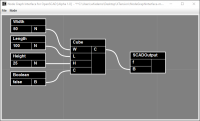
graph:
[image: Capture.PNG]
is presented as:
cube([50, 100, 25], center = false );
It would be much more useful for my purposes if the parameter values and
names were preserved and presented at the top of the file so that they
would work in the Customizer in OpenSCAD. c.f.,
https://www.blockscad3d.com/
I can definitely see myself using it to work up code to include in modules
in other projects.
William
On Mon, Apr 22, 2019 at 3:19 PM William Adams will.adams@frycomm.com
wrote:
My apologies, managed to find:
NodeGraphInterface-master\dist\NodeGraphInterface.jar
and
README.TXT
On Mon, Apr 22, 2019 at 2:43 PM William Adams will.adams@frycomm.com
wrote:
What I meant by language was taking this software and having it support
something else in addition to OpenSCAD, say METAPOST.
How would one begin using it? Do you have to download NetBeans? Is there
some command line command to either compile things or get them started?
William
On Mon, Apr 22, 2019 at 2:04 PM Tom Copple studio.tom.copple@gmail.com
wrote:
No, I wanted a UI project for myself. Half the fun was working that
out.
On Mon, Apr 22, 2019 at 6:31 AM William Adams will.adams@frycomm.com
wrote:
How does this compare to:
https://graphscad.blogspot.com/
If one puts together a file and then opens it in OpenSCAD would the
Customizer work as expected? (that's the major failing in graphscad for me
at the moment)
Could this be adopted to other languages?
As a naïve user not accustomed to working with Java source, how would
one start with this?
I've downloaded it and found \NodeGraphInterface-master\build.xml ---
a brief search indicates this is usually an ant build script? Is that the
case here?
William
On Sat, Apr 20, 2019 at 7:01 PM Kevin Toppenberg kdtop3@gmail.com
wrote:
This is very cool Anything that can appeal to more persons is a
good thing.
But for me, already being comfortable with the typing aspect, the
node interface looks intimidating! :-)
Thanks
Kevin
On Sat, Apr 20, 2019 at 1:58 PM Tom Copple <
studio.tom.copple@gmail.com> wrote:
Hi,
I made a Node Graph Interface for OpenSCAD as a hobby project
(written in Java). I have it working the way I imagined and thought I'd
throw it out into the wild. The concept was to make Nodes that are
elemental parts of the language. There are Nodes for atomic parts like
numbers and variables and Nodes for typical statements like sphere,
translate, union, etc... It doesn't cover the complete language, but there
is a "hack" for the rest. The README.md at the project page should get you
started.
Project Source:
https://github.com/studiotc/NodeGraphInterface
You can pull the jar file from here:
https://github.com/studiotc/NodeGraphInterface/tree/master/dist
I started this project after reading a Hackaday article about
choosing CAD software. OpenSCAD got mentions in the comments, but I think
people are intimidated by the typing part... Like others, I have always
wanted CAD on Linux and have looked into OpenSCAD (I'm only a windows
person because I'm a Rhino user & ex AutoDesk user). So, the thought
struck me: what would a Node Graph interface like Rhino's Grasshopper or
Maya's Shader Network look like in OpenSCAD? This was my musing on that
thought...
Cheers,
Tom
OpenSCAD mailing list
Discuss@lists.openscad.org
http://lists.openscad.org/mailman/listinfo/discuss_lists.openscad.org
Oh, I think all you want to do is explicitly declare variables - just a few
extra nodes... :)
The attached image produces this:
Width = 7;
Length = 5;
Height = 3;
cube([Width, Length, Height], center = true );
HTH,
Tom
On Tue, Apr 23, 2019 at 7:40 AM William Adams <will.adams@frycomm.com>
wrote:
> Okay, managed to puzzle things out. Quick start:
>
> - install Java
> - double-click on the .jar file:
> NodeGraphInterface-master\dist\NodeGraphInterface.jar
> - right-click to create nodes (e.g., Node | Geometry | Cube)
> - output is handled by the object Node | Output | SCADOutput ---
> right-click on the "f" to get a file dialog which will allow you to send
> the output to a .scad file which OpenSCAD will open
>
> One thing which seems a bit odd to me is that everything collapses to the
> most concise possible expression, and no structure is preserved, so the
> graph:
>
> [image: Capture.PNG]
>
> is presented as:
>
> cube([50, 100, 25], center = false );
>
> It would be much more useful for my purposes if the parameter values and
> names were preserved and presented at the top of the file so that they
> would work in the Customizer in OpenSCAD. c.f.,
> https://www.blockscad3d.com/
>
> I can definitely see myself using it to work up code to include in modules
> in other projects.
>
> William
>
> On Mon, Apr 22, 2019 at 3:19 PM William Adams <will.adams@frycomm.com>
> wrote:
>
>> My apologies, managed to find:
>>
>> NodeGraphInterface-master\dist\NodeGraphInterface.jar
>>
>> and
>> README.TXT
>>
>>
>>
>>
>> On Mon, Apr 22, 2019 at 2:43 PM William Adams <will.adams@frycomm.com>
>> wrote:
>>
>>> What I meant by language was taking this software and having it support
>>> something else in addition to OpenSCAD, say METAPOST.
>>>
>>> How would one begin using it? Do you have to download NetBeans? Is there
>>> some command line command to either compile things or get them started?
>>>
>>> William
>>>
>>>
>>> On Mon, Apr 22, 2019 at 2:04 PM Tom Copple <studio.tom.copple@gmail.com>
>>> wrote:
>>>
>>>> No, I wanted a UI project for myself. Half the fun was working that
>>>> out.
>>>>
>>>> On Mon, Apr 22, 2019 at 6:31 AM William Adams <will.adams@frycomm.com>
>>>> wrote:
>>>>
>>>>> Also, did you consider implementing this using an existing tool?
>>>>>
>>>>> Blockly seems a likely option, or Drakon?
>>>>>
>>>>> William
>>>>>
>>>>> https://developers.google.com/blockly/
>>>>> http://drakon-editor.sourceforge.net/
>>>>>
>>>>>
>>>>> On Mon, Apr 22, 2019 at 8:28 AM William Adams <will.adams@frycomm.com>
>>>>> wrote:
>>>>>
>>>>>> How does this compare to:
>>>>>>
>>>>>> https://graphscad.blogspot.com/
>>>>>>
>>>>>> If one puts together a file and then opens it in OpenSCAD would the
>>>>>> Customizer work as expected? (that's the major failing in graphscad for me
>>>>>> at the moment)
>>>>>>
>>>>>> Could this be adopted to other languages?
>>>>>>
>>>>>> As a naïve user not accustomed to working with Java source, how would
>>>>>> one start with this?
>>>>>>
>>>>>> I've downloaded it and found \NodeGraphInterface-master\build.xml ---
>>>>>> a brief search indicates this is usually an ant build script? Is that the
>>>>>> case here?
>>>>>>
>>>>>>
>>>>>> William
>>>>>>
>>>>>> On Sat, Apr 20, 2019 at 7:01 PM Kevin Toppenberg <kdtop3@gmail.com>
>>>>>> wrote:
>>>>>>
>>>>>>> This is very cool Anything that can appeal to more persons is a
>>>>>>> good thing.
>>>>>>>
>>>>>>> But for me, already being comfortable with the typing aspect, the
>>>>>>> node interface looks intimidating! :-)
>>>>>>>
>>>>>>> Thanks
>>>>>>> Kevin
>>>>>>>
>>>>>>> On Sat, Apr 20, 2019 at 1:58 PM Tom Copple <
>>>>>>> studio.tom.copple@gmail.com> wrote:
>>>>>>>
>>>>>>>> Hi,
>>>>>>>> I made a Node Graph Interface for OpenSCAD as a hobby project
>>>>>>>> (written in Java). I have it working the way I imagined and thought I'd
>>>>>>>> throw it out into the wild. The concept was to make Nodes that are
>>>>>>>> elemental parts of the language. There are Nodes for atomic parts like
>>>>>>>> numbers and variables and Nodes for typical statements like sphere,
>>>>>>>> translate, union, etc... It doesn't cover the complete language, but there
>>>>>>>> is a "hack" for the rest. The README.md at the project page should get you
>>>>>>>> started.
>>>>>>>>
>>>>>>>> Project Source:
>>>>>>>> https://github.com/studiotc/NodeGraphInterface
>>>>>>>>
>>>>>>>> You can pull the jar file from here:
>>>>>>>> https://github.com/studiotc/NodeGraphInterface/tree/master/dist
>>>>>>>>
>>>>>>>> I started this project after reading a Hackaday article about
>>>>>>>> choosing CAD software. OpenSCAD got mentions in the comments, but I think
>>>>>>>> people are intimidated by the typing part... Like others, I have always
>>>>>>>> wanted CAD on Linux and have looked into OpenSCAD (I'm only a windows
>>>>>>>> person because I'm a Rhino user & ex AutoDesk user). So, the thought
>>>>>>>> struck me: what would a Node Graph interface like Rhino's Grasshopper or
>>>>>>>> Maya's Shader Network look like in OpenSCAD? This was my musing on that
>>>>>>>> thought...
>>>>>>>>
>>>>>>>> Cheers,
>>>>>>>> Tom
>>>>>>>> _______________________________________________
>>>>>>>> OpenSCAD mailing list
>>>>>>>> Discuss@lists.openscad.org
>>>>>>>>
>>>>>>>> http://lists.openscad.org/mailman/listinfo/discuss_lists.openscad.org
>>>>>>>>
>>>>>>> _______________________________________________
>>>>>>> OpenSCAD mailing list
>>>>>>> Discuss@lists.openscad.org
>>>>>>> http://lists.openscad.org/mailman/listinfo/discuss_lists.openscad.org
>>>>>>>
>>>>>> _______________________________________________
>>>>> OpenSCAD mailing list
>>>>> Discuss@lists.openscad.org
>>>>> http://lists.openscad.org/mailman/listinfo/discuss_lists.openscad.org
>>>>>
>>>> _______________________________________________
>>>> OpenSCAD mailing list
>>>> Discuss@lists.openscad.org
>>>> http://lists.openscad.org/mailman/listinfo/discuss_lists.openscad.org
>>>>
>>> _______________________________________________
> OpenSCAD mailing list
> Discuss@lists.openscad.org
> http://lists.openscad.org/mailman/listinfo/discuss_lists.openscad.org
>
WA
William Adams
Wed, Apr 24, 2019 2:45 PM
Thank you!
I see how that works, and I think I can grasp the logic of it, but it's not
something I ever would've worked up from playing with the interface --- is
there way to combine the Variable/Assignment/MergeBlock into a single node
(which ideally also shows the value as I had in my previous example? I see
that you can add a 4th Node for a Number to expose that value, but that
gets even more spread out.
William
On Tue, Apr 23, 2019 at 9:17 PM Tom Copple studio.tom.copple@gmail.com
wrote:
Oh, I think all you want to do is explicitly declare variables - just a
few extra nodes... :)
The attached image produces this:
Width = 7;
Length = 5;
Height = 3;
cube([Width, Length, Height], center = true );
HTH,
Tom
On Tue, Apr 23, 2019 at 7:40 AM William Adams will.adams@frycomm.com
wrote:
Okay, managed to puzzle things out. Quick start:
- install Java
- double-click on the .jar file:
NodeGraphInterface-master\dist\NodeGraphInterface.jar
- right-click to create nodes (e.g., Node | Geometry | Cube)
- output is handled by the object Node | Output | SCADOutput ---
right-click on the "f" to get a file dialog which will allow you to send
the output to a .scad file which OpenSCAD will open
One thing which seems a bit odd to me is that everything collapses to the
most concise possible expression, and no structure is preserved, so the
graph:
[image: Capture.PNG]
is presented as:
cube([50, 100, 25], center = false );
It would be much more useful for my purposes if the parameter values and
names were preserved and presented at the top of the file so that they
would work in the Customizer in OpenSCAD. c.f.,
https://www.blockscad3d.com/
I can definitely see myself using it to work up code to include in
modules in other projects.
William
On Mon, Apr 22, 2019 at 3:19 PM William Adams will.adams@frycomm.com
wrote:
My apologies, managed to find:
NodeGraphInterface-master\dist\NodeGraphInterface.jar
and
README.TXT
On Mon, Apr 22, 2019 at 2:43 PM William Adams will.adams@frycomm.com
wrote:
What I meant by language was taking this software and having it support
something else in addition to OpenSCAD, say METAPOST.
How would one begin using it? Do you have to download NetBeans? Is
there some command line command to either compile things or get them
started?
William
On Mon, Apr 22, 2019 at 2:04 PM Tom Copple studio.tom.copple@gmail.com
wrote:
No, I wanted a UI project for myself. Half the fun was working that
out.
On Mon, Apr 22, 2019 at 6:31 AM William Adams will.adams@frycomm.com
wrote:
How does this compare to:
https://graphscad.blogspot.com/
If one puts together a file and then opens it in OpenSCAD would the
Customizer work as expected? (that's the major failing in graphscad for me
at the moment)
Could this be adopted to other languages?
As a naïve user not accustomed to working with Java source, how
would one start with this?
I've downloaded it and found \NodeGraphInterface-master\build.xml
--- a brief search indicates this is usually an ant build script? Is that
the case here?
William
On Sat, Apr 20, 2019 at 7:01 PM Kevin Toppenberg kdtop3@gmail.com
wrote:
This is very cool Anything that can appeal to more persons is a
good thing.
But for me, already being comfortable with the typing aspect, the
node interface looks intimidating! :-)
Thanks
Kevin
On Sat, Apr 20, 2019 at 1:58 PM Tom Copple <
studio.tom.copple@gmail.com> wrote:
Hi,
I made a Node Graph Interface for OpenSCAD as a hobby project
(written in Java). I have it working the way I imagined and thought I'd
throw it out into the wild. The concept was to make Nodes that are
elemental parts of the language. There are Nodes for atomic parts like
numbers and variables and Nodes for typical statements like sphere,
translate, union, etc... It doesn't cover the complete language, but there
is a "hack" for the rest. The README.md at the project page should get you
started.
Project Source:
https://github.com/studiotc/NodeGraphInterface
You can pull the jar file from here:
https://github.com/studiotc/NodeGraphInterface/tree/master/dist
I started this project after reading a Hackaday article about
choosing CAD software. OpenSCAD got mentions in the comments, but I think
people are intimidated by the typing part... Like others, I have always
wanted CAD on Linux and have looked into OpenSCAD (I'm only a windows
person because I'm a Rhino user & ex AutoDesk user). So, the thought
struck me: what would a Node Graph interface like Rhino's Grasshopper or
Maya's Shader Network look like in OpenSCAD? This was my musing on that
thought...
Cheers,
Tom
OpenSCAD mailing list
Discuss@lists.openscad.org
http://lists.openscad.org/mailman/listinfo/discuss_lists.openscad.org
Thank you!
I see how that works, and I think I can grasp the logic of it, but it's not
something I ever would've worked up from playing with the interface --- is
there way to combine the Variable/Assignment/MergeBlock into a single node
(which ideally also shows the value as I had in my previous example? I see
that you can add a 4th Node for a Number to expose that value, but that
gets even more spread out.
William
On Tue, Apr 23, 2019 at 9:17 PM Tom Copple <studio.tom.copple@gmail.com>
wrote:
> Oh, I think all you want to do is explicitly declare variables - just a
> few extra nodes... :)
>
> The attached image produces this:
> Width = 7;
> Length = 5;
> Height = 3;
> cube([Width, Length, Height], center = true );
>
>
> HTH,
> Tom
>
>
> On Tue, Apr 23, 2019 at 7:40 AM William Adams <will.adams@frycomm.com>
> wrote:
>
>> Okay, managed to puzzle things out. Quick start:
>>
>> - install Java
>> - double-click on the .jar file:
>> NodeGraphInterface-master\dist\NodeGraphInterface.jar
>> - right-click to create nodes (e.g., Node | Geometry | Cube)
>> - output is handled by the object Node | Output | SCADOutput ---
>> right-click on the "f" to get a file dialog which will allow you to send
>> the output to a .scad file which OpenSCAD will open
>>
>> One thing which seems a bit odd to me is that everything collapses to the
>> most concise possible expression, and no structure is preserved, so the
>> graph:
>>
>> [image: Capture.PNG]
>>
>> is presented as:
>>
>> cube([50, 100, 25], center = false );
>>
>> It would be much more useful for my purposes if the parameter values and
>> names were preserved and presented at the top of the file so that they
>> would work in the Customizer in OpenSCAD. c.f.,
>> https://www.blockscad3d.com/
>>
>> I can definitely see myself using it to work up code to include in
>> modules in other projects.
>>
>> William
>>
>> On Mon, Apr 22, 2019 at 3:19 PM William Adams <will.adams@frycomm.com>
>> wrote:
>>
>>> My apologies, managed to find:
>>>
>>> NodeGraphInterface-master\dist\NodeGraphInterface.jar
>>>
>>> and
>>> README.TXT
>>>
>>>
>>>
>>>
>>> On Mon, Apr 22, 2019 at 2:43 PM William Adams <will.adams@frycomm.com>
>>> wrote:
>>>
>>>> What I meant by language was taking this software and having it support
>>>> something else in addition to OpenSCAD, say METAPOST.
>>>>
>>>> How would one begin using it? Do you have to download NetBeans? Is
>>>> there some command line command to either compile things or get them
>>>> started?
>>>>
>>>> William
>>>>
>>>>
>>>> On Mon, Apr 22, 2019 at 2:04 PM Tom Copple <studio.tom.copple@gmail.com>
>>>> wrote:
>>>>
>>>>> No, I wanted a UI project for myself. Half the fun was working that
>>>>> out.
>>>>>
>>>>> On Mon, Apr 22, 2019 at 6:31 AM William Adams <will.adams@frycomm.com>
>>>>> wrote:
>>>>>
>>>>>> Also, did you consider implementing this using an existing tool?
>>>>>>
>>>>>> Blockly seems a likely option, or Drakon?
>>>>>>
>>>>>> William
>>>>>>
>>>>>> https://developers.google.com/blockly/
>>>>>> http://drakon-editor.sourceforge.net/
>>>>>>
>>>>>>
>>>>>> On Mon, Apr 22, 2019 at 8:28 AM William Adams <will.adams@frycomm.com>
>>>>>> wrote:
>>>>>>
>>>>>>> How does this compare to:
>>>>>>>
>>>>>>> https://graphscad.blogspot.com/
>>>>>>>
>>>>>>> If one puts together a file and then opens it in OpenSCAD would the
>>>>>>> Customizer work as expected? (that's the major failing in graphscad for me
>>>>>>> at the moment)
>>>>>>>
>>>>>>> Could this be adopted to other languages?
>>>>>>>
>>>>>>> As a naïve user not accustomed to working with Java source, how
>>>>>>> would one start with this?
>>>>>>>
>>>>>>> I've downloaded it and found \NodeGraphInterface-master\build.xml
>>>>>>> --- a brief search indicates this is usually an ant build script? Is that
>>>>>>> the case here?
>>>>>>>
>>>>>>>
>>>>>>> William
>>>>>>>
>>>>>>> On Sat, Apr 20, 2019 at 7:01 PM Kevin Toppenberg <kdtop3@gmail.com>
>>>>>>> wrote:
>>>>>>>
>>>>>>>> This is very cool Anything that can appeal to more persons is a
>>>>>>>> good thing.
>>>>>>>>
>>>>>>>> But for me, already being comfortable with the typing aspect, the
>>>>>>>> node interface looks intimidating! :-)
>>>>>>>>
>>>>>>>> Thanks
>>>>>>>> Kevin
>>>>>>>>
>>>>>>>> On Sat, Apr 20, 2019 at 1:58 PM Tom Copple <
>>>>>>>> studio.tom.copple@gmail.com> wrote:
>>>>>>>>
>>>>>>>>> Hi,
>>>>>>>>> I made a Node Graph Interface for OpenSCAD as a hobby project
>>>>>>>>> (written in Java). I have it working the way I imagined and thought I'd
>>>>>>>>> throw it out into the wild. The concept was to make Nodes that are
>>>>>>>>> elemental parts of the language. There are Nodes for atomic parts like
>>>>>>>>> numbers and variables and Nodes for typical statements like sphere,
>>>>>>>>> translate, union, etc... It doesn't cover the complete language, but there
>>>>>>>>> is a "hack" for the rest. The README.md at the project page should get you
>>>>>>>>> started.
>>>>>>>>>
>>>>>>>>> Project Source:
>>>>>>>>> https://github.com/studiotc/NodeGraphInterface
>>>>>>>>>
>>>>>>>>> You can pull the jar file from here:
>>>>>>>>> https://github.com/studiotc/NodeGraphInterface/tree/master/dist
>>>>>>>>>
>>>>>>>>> I started this project after reading a Hackaday article about
>>>>>>>>> choosing CAD software. OpenSCAD got mentions in the comments, but I think
>>>>>>>>> people are intimidated by the typing part... Like others, I have always
>>>>>>>>> wanted CAD on Linux and have looked into OpenSCAD (I'm only a windows
>>>>>>>>> person because I'm a Rhino user & ex AutoDesk user). So, the thought
>>>>>>>>> struck me: what would a Node Graph interface like Rhino's Grasshopper or
>>>>>>>>> Maya's Shader Network look like in OpenSCAD? This was my musing on that
>>>>>>>>> thought...
>>>>>>>>>
>>>>>>>>> Cheers,
>>>>>>>>> Tom
>>>>>>>>> _______________________________________________
>>>>>>>>> OpenSCAD mailing list
>>>>>>>>> Discuss@lists.openscad.org
>>>>>>>>>
>>>>>>>>> http://lists.openscad.org/mailman/listinfo/discuss_lists.openscad.org
>>>>>>>>>
>>>>>>>> _______________________________________________
>>>>>>>> OpenSCAD mailing list
>>>>>>>> Discuss@lists.openscad.org
>>>>>>>>
>>>>>>>> http://lists.openscad.org/mailman/listinfo/discuss_lists.openscad.org
>>>>>>>>
>>>>>>> _______________________________________________
>>>>>> OpenSCAD mailing list
>>>>>> Discuss@lists.openscad.org
>>>>>> http://lists.openscad.org/mailman/listinfo/discuss_lists.openscad.org
>>>>>>
>>>>> _______________________________________________
>>>>> OpenSCAD mailing list
>>>>> Discuss@lists.openscad.org
>>>>> http://lists.openscad.org/mailman/listinfo/discuss_lists.openscad.org
>>>>>
>>>> _______________________________________________
>> OpenSCAD mailing list
>> Discuss@lists.openscad.org
>> http://lists.openscad.org/mailman/listinfo/discuss_lists.openscad.org
>>
> _______________________________________________
> OpenSCAD mailing list
> Discuss@lists.openscad.org
> http://lists.openscad.org/mailman/listinfo/discuss_lists.openscad.org
>
TC
Tom Copple
Thu, Apr 25, 2019 1:00 AM
I think this is as good as it gets for what you are trying to do. I'm not
sure what you are describing when you want to combine the nodes (you are
still going to need to tie into a MergeBlock if you need generate multiple
lines of code). They are all separate for a reason and used for different
contexts, i.e.: Assignment node is also used for Function and Module
definitions when you want to specify an input with a default value (hence
the semi-colon toggle). I don't have any immediate plans to address the
displaying of static values in all nodes - it would take some tweaking of
things (I've looked into it before).
On Wed, Apr 24, 2019 at 7:46 AM William Adams will.adams@frycomm.com
wrote:
Thank you!
I see how that works, and I think I can grasp the logic of it, but it's
not something I ever would've worked up from playing with the interface ---
is there way to combine the Variable/Assignment/MergeBlock into a single
node (which ideally also shows the value as I had in my previous example? I
see that you can add a 4th Node for a Number to expose that value, but that
gets even more spread out.
William
On Tue, Apr 23, 2019 at 9:17 PM Tom Copple studio.tom.copple@gmail.com
wrote:
Oh, I think all you want to do is explicitly declare variables - just a
few extra nodes... :)
The attached image produces this:
Width = 7;
Length = 5;
Height = 3;
cube([Width, Length, Height], center = true );
HTH,
Tom
On Tue, Apr 23, 2019 at 7:40 AM William Adams will.adams@frycomm.com
wrote:
Okay, managed to puzzle things out. Quick start:
- install Java
- double-click on the .jar file:
NodeGraphInterface-master\dist\NodeGraphInterface.jar
- right-click to create nodes (e.g., Node | Geometry | Cube)
- output is handled by the object Node | Output | SCADOutput ---
right-click on the "f" to get a file dialog which will allow you to send
the output to a .scad file which OpenSCAD will open
One thing which seems a bit odd to me is that everything collapses to
the most concise possible expression, and no structure is preserved, so the
graph:
[image: Capture.PNG]
is presented as:
cube([50, 100, 25], center = false );
It would be much more useful for my purposes if the parameter values and
names were preserved and presented at the top of the file so that they
would work in the Customizer in OpenSCAD. c.f.,
https://www.blockscad3d.com/
I can definitely see myself using it to work up code to include in
modules in other projects.
William
On Mon, Apr 22, 2019 at 3:19 PM William Adams will.adams@frycomm.com
wrote:
My apologies, managed to find:
NodeGraphInterface-master\dist\NodeGraphInterface.jar
and
README.TXT
On Mon, Apr 22, 2019 at 2:43 PM William Adams will.adams@frycomm.com
wrote:
What I meant by language was taking this software and having it
support something else in addition to OpenSCAD, say METAPOST.
How would one begin using it? Do you have to download NetBeans? Is
there some command line command to either compile things or get them
started?
William
On Mon, Apr 22, 2019 at 2:04 PM Tom Copple <
studio.tom.copple@gmail.com> wrote:
No, I wanted a UI project for myself. Half the fun was working that
out.
On Mon, Apr 22, 2019 at 6:31 AM William Adams will.adams@frycomm.com
wrote:
How does this compare to:
https://graphscad.blogspot.com/
If one puts together a file and then opens it in OpenSCAD would the
Customizer work as expected? (that's the major failing in graphscad for me
at the moment)
Could this be adopted to other languages?
As a naïve user not accustomed to working with Java source, how
would one start with this?
I've downloaded it and found \NodeGraphInterface-master\build.xml
--- a brief search indicates this is usually an ant build script? Is that
the case here?
William
On Sat, Apr 20, 2019 at 7:01 PM Kevin Toppenberg kdtop3@gmail.com
wrote:
This is very cool Anything that can appeal to more persons is a
good thing.
But for me, already being comfortable with the typing aspect, the
node interface looks intimidating! :-)
Thanks
Kevin
On Sat, Apr 20, 2019 at 1:58 PM Tom Copple <
studio.tom.copple@gmail.com> wrote:
Hi,
I made a Node Graph Interface for OpenSCAD as a hobby project
(written in Java). I have it working the way I imagined and thought I'd
throw it out into the wild. The concept was to make Nodes that are
elemental parts of the language. There are Nodes for atomic parts like
numbers and variables and Nodes for typical statements like sphere,
translate, union, etc... It doesn't cover the complete language, but there
is a "hack" for the rest. The README.md at the project page should get you
started.
Project Source:
https://github.com/studiotc/NodeGraphInterface
You can pull the jar file from here:
https://github.com/studiotc/NodeGraphInterface/tree/master/dist
I started this project after reading a Hackaday article about
choosing CAD software. OpenSCAD got mentions in the comments, but I think
people are intimidated by the typing part... Like others, I have always
wanted CAD on Linux and have looked into OpenSCAD (I'm only a windows
person because I'm a Rhino user & ex AutoDesk user). So, the thought
struck me: what would a Node Graph interface like Rhino's Grasshopper or
Maya's Shader Network look like in OpenSCAD? This was my musing on that
thought...
Cheers,
Tom
OpenSCAD mailing list
Discuss@lists.openscad.org
http://lists.openscad.org/mailman/listinfo/discuss_lists.openscad.org
I think this is as good as it gets for what you are trying to do. I'm not
sure what you are describing when you want to combine the nodes (you are
still going to need to tie into a MergeBlock if you need generate multiple
lines of code). They are all separate for a reason and used for different
contexts, i.e.: Assignment node is also used for Function and Module
definitions when you want to specify an input with a default value (hence
the semi-colon toggle). I don't have any immediate plans to address the
displaying of static values in all nodes - it would take some tweaking of
things (I've looked into it before).
On Wed, Apr 24, 2019 at 7:46 AM William Adams <will.adams@frycomm.com>
wrote:
> Thank you!
>
> I see how that works, and I think I can grasp the logic of it, but it's
> not something I ever would've worked up from playing with the interface ---
> is there way to combine the Variable/Assignment/MergeBlock into a single
> node (which ideally also shows the value as I had in my previous example? I
> see that you can add a 4th Node for a Number to expose that value, but that
> gets even more spread out.
>
> William
>
>
> On Tue, Apr 23, 2019 at 9:17 PM Tom Copple <studio.tom.copple@gmail.com>
> wrote:
>
>> Oh, I think all you want to do is explicitly declare variables - just a
>> few extra nodes... :)
>>
>> The attached image produces this:
>> Width = 7;
>> Length = 5;
>> Height = 3;
>> cube([Width, Length, Height], center = true );
>>
>>
>> HTH,
>> Tom
>>
>>
>> On Tue, Apr 23, 2019 at 7:40 AM William Adams <will.adams@frycomm.com>
>> wrote:
>>
>>> Okay, managed to puzzle things out. Quick start:
>>>
>>> - install Java
>>> - double-click on the .jar file:
>>> NodeGraphInterface-master\dist\NodeGraphInterface.jar
>>> - right-click to create nodes (e.g., Node | Geometry | Cube)
>>> - output is handled by the object Node | Output | SCADOutput ---
>>> right-click on the "f" to get a file dialog which will allow you to send
>>> the output to a .scad file which OpenSCAD will open
>>>
>>> One thing which seems a bit odd to me is that everything collapses to
>>> the most concise possible expression, and no structure is preserved, so the
>>> graph:
>>>
>>> [image: Capture.PNG]
>>>
>>> is presented as:
>>>
>>> cube([50, 100, 25], center = false );
>>>
>>> It would be much more useful for my purposes if the parameter values and
>>> names were preserved and presented at the top of the file so that they
>>> would work in the Customizer in OpenSCAD. c.f.,
>>> https://www.blockscad3d.com/
>>>
>>> I can definitely see myself using it to work up code to include in
>>> modules in other projects.
>>>
>>> William
>>>
>>> On Mon, Apr 22, 2019 at 3:19 PM William Adams <will.adams@frycomm.com>
>>> wrote:
>>>
>>>> My apologies, managed to find:
>>>>
>>>> NodeGraphInterface-master\dist\NodeGraphInterface.jar
>>>>
>>>> and
>>>> README.TXT
>>>>
>>>>
>>>>
>>>>
>>>> On Mon, Apr 22, 2019 at 2:43 PM William Adams <will.adams@frycomm.com>
>>>> wrote:
>>>>
>>>>> What I meant by language was taking this software and having it
>>>>> support something else in addition to OpenSCAD, say METAPOST.
>>>>>
>>>>> How would one begin using it? Do you have to download NetBeans? Is
>>>>> there some command line command to either compile things or get them
>>>>> started?
>>>>>
>>>>> William
>>>>>
>>>>>
>>>>> On Mon, Apr 22, 2019 at 2:04 PM Tom Copple <
>>>>> studio.tom.copple@gmail.com> wrote:
>>>>>
>>>>>> No, I wanted a UI project for myself. Half the fun was working that
>>>>>> out.
>>>>>>
>>>>>> On Mon, Apr 22, 2019 at 6:31 AM William Adams <will.adams@frycomm.com>
>>>>>> wrote:
>>>>>>
>>>>>>> Also, did you consider implementing this using an existing tool?
>>>>>>>
>>>>>>> Blockly seems a likely option, or Drakon?
>>>>>>>
>>>>>>> William
>>>>>>>
>>>>>>> https://developers.google.com/blockly/
>>>>>>> http://drakon-editor.sourceforge.net/
>>>>>>>
>>>>>>>
>>>>>>> On Mon, Apr 22, 2019 at 8:28 AM William Adams <
>>>>>>> will.adams@frycomm.com> wrote:
>>>>>>>
>>>>>>>> How does this compare to:
>>>>>>>>
>>>>>>>> https://graphscad.blogspot.com/
>>>>>>>>
>>>>>>>> If one puts together a file and then opens it in OpenSCAD would the
>>>>>>>> Customizer work as expected? (that's the major failing in graphscad for me
>>>>>>>> at the moment)
>>>>>>>>
>>>>>>>> Could this be adopted to other languages?
>>>>>>>>
>>>>>>>> As a naïve user not accustomed to working with Java source, how
>>>>>>>> would one start with this?
>>>>>>>>
>>>>>>>> I've downloaded it and found \NodeGraphInterface-master\build.xml
>>>>>>>> --- a brief search indicates this is usually an ant build script? Is that
>>>>>>>> the case here?
>>>>>>>>
>>>>>>>>
>>>>>>>> William
>>>>>>>>
>>>>>>>> On Sat, Apr 20, 2019 at 7:01 PM Kevin Toppenberg <kdtop3@gmail.com>
>>>>>>>> wrote:
>>>>>>>>
>>>>>>>>> This is very cool Anything that can appeal to more persons is a
>>>>>>>>> good thing.
>>>>>>>>>
>>>>>>>>> But for me, already being comfortable with the typing aspect, the
>>>>>>>>> node interface looks intimidating! :-)
>>>>>>>>>
>>>>>>>>> Thanks
>>>>>>>>> Kevin
>>>>>>>>>
>>>>>>>>> On Sat, Apr 20, 2019 at 1:58 PM Tom Copple <
>>>>>>>>> studio.tom.copple@gmail.com> wrote:
>>>>>>>>>
>>>>>>>>>> Hi,
>>>>>>>>>> I made a Node Graph Interface for OpenSCAD as a hobby project
>>>>>>>>>> (written in Java). I have it working the way I imagined and thought I'd
>>>>>>>>>> throw it out into the wild. The concept was to make Nodes that are
>>>>>>>>>> elemental parts of the language. There are Nodes for atomic parts like
>>>>>>>>>> numbers and variables and Nodes for typical statements like sphere,
>>>>>>>>>> translate, union, etc... It doesn't cover the complete language, but there
>>>>>>>>>> is a "hack" for the rest. The README.md at the project page should get you
>>>>>>>>>> started.
>>>>>>>>>>
>>>>>>>>>> Project Source:
>>>>>>>>>> https://github.com/studiotc/NodeGraphInterface
>>>>>>>>>>
>>>>>>>>>> You can pull the jar file from here:
>>>>>>>>>> https://github.com/studiotc/NodeGraphInterface/tree/master/dist
>>>>>>>>>>
>>>>>>>>>> I started this project after reading a Hackaday article about
>>>>>>>>>> choosing CAD software. OpenSCAD got mentions in the comments, but I think
>>>>>>>>>> people are intimidated by the typing part... Like others, I have always
>>>>>>>>>> wanted CAD on Linux and have looked into OpenSCAD (I'm only a windows
>>>>>>>>>> person because I'm a Rhino user & ex AutoDesk user). So, the thought
>>>>>>>>>> struck me: what would a Node Graph interface like Rhino's Grasshopper or
>>>>>>>>>> Maya's Shader Network look like in OpenSCAD? This was my musing on that
>>>>>>>>>> thought...
>>>>>>>>>>
>>>>>>>>>> Cheers,
>>>>>>>>>> Tom
>>>>>>>>>> _______________________________________________
>>>>>>>>>> OpenSCAD mailing list
>>>>>>>>>> Discuss@lists.openscad.org
>>>>>>>>>>
>>>>>>>>>> http://lists.openscad.org/mailman/listinfo/discuss_lists.openscad.org
>>>>>>>>>>
>>>>>>>>> _______________________________________________
>>>>>>>>> OpenSCAD mailing list
>>>>>>>>> Discuss@lists.openscad.org
>>>>>>>>>
>>>>>>>>> http://lists.openscad.org/mailman/listinfo/discuss_lists.openscad.org
>>>>>>>>>
>>>>>>>> _______________________________________________
>>>>>>> OpenSCAD mailing list
>>>>>>> Discuss@lists.openscad.org
>>>>>>> http://lists.openscad.org/mailman/listinfo/discuss_lists.openscad.org
>>>>>>>
>>>>>> _______________________________________________
>>>>>> OpenSCAD mailing list
>>>>>> Discuss@lists.openscad.org
>>>>>> http://lists.openscad.org/mailman/listinfo/discuss_lists.openscad.org
>>>>>>
>>>>> _______________________________________________
>>> OpenSCAD mailing list
>>> Discuss@lists.openscad.org
>>> http://lists.openscad.org/mailman/listinfo/discuss_lists.openscad.org
>>>
>> _______________________________________________
>> OpenSCAD mailing list
>> Discuss@lists.openscad.org
>> http://lists.openscad.org/mailman/listinfo/discuss_lists.openscad.org
>>
> _______________________________________________
> OpenSCAD mailing list
> Discuss@lists.openscad.org
> http://lists.openscad.org/mailman/listinfo/discuss_lists.openscad.org
>

T
Troberg
Thu, Apr 25, 2019 7:24 AM
While I don't think I'd ever use this in my typical programming, I can still
see two great uses:
-
Teaching tool. I would never be able to get, say, my wife to start writing
code, but this is something I could get her started on. Once the graphical
method gets restrictive, the transition is trivial, because the
understanding is already there, it just needs to be mapped to text instead.
-
Debugging tool. If it could be made so that it can import a script as
well, it makes it very much more visible where I've messed up. Example: A
missed closing bracket can be hard to spot, but in the graph, it would be
obvious.
Keep going, it's a great project!
--
Sent from: http://forum.openscad.org/
While I don't think I'd ever use this in my typical programming, I can still
see two great uses:
* Teaching tool. I would never be able to get, say, my wife to start writing
code, but this is something I could get her started on. Once the graphical
method gets restrictive, the transition is trivial, because the
understanding is already there, it just needs to be mapped to text instead.
* Debugging tool. If it could be made so that it can import a script as
well, it makes it very much more visible where I've messed up. Example: A
missed closing bracket can be hard to spot, but in the graph, it would be
obvious.
Keep going, it's a great project!
--
Sent from: http://forum.openscad.org/
WA
William Adams
Thu, Apr 25, 2019 12:56 PM
Even if there was some mechanism to group things together that would help a
lot.
Currently I'm using Blockly/blockscad3d and it seems to be working well,
but I'll certainly circle around to nodegraphinterface and graphscad when I
run into limitations in it.
William
On Wed, Apr 24, 2019 at 9:01 PM Tom Copple studio.tom.copple@gmail.com
wrote:
I think this is as good as it gets for what you are trying to do. I'm not
sure what you are describing when you want to combine the nodes (you are
still going to need to tie into a MergeBlock if you need generate multiple
lines of code). They are all separate for a reason and used for different
contexts, i.e.: Assignment node is also used for Function and Module
definitions when you want to specify an input with a default value (hence
the semi-colon toggle). I don't have any immediate plans to address the
displaying of static values in all nodes - it would take some tweaking of
things (I've looked into it before).
On Wed, Apr 24, 2019 at 7:46 AM William Adams will.adams@frycomm.com
wrote:
Thank you!
I see how that works, and I think I can grasp the logic of it, but it's
not something I ever would've worked up from playing with the interface ---
is there way to combine the Variable/Assignment/MergeBlock into a single
node (which ideally also shows the value as I had in my previous example? I
see that you can add a 4th Node for a Number to expose that value, but that
gets even more spread out.
William
On Tue, Apr 23, 2019 at 9:17 PM Tom Copple studio.tom.copple@gmail.com
wrote:
Oh, I think all you want to do is explicitly declare variables - just a
few extra nodes... :)
The attached image produces this:
Width = 7;
Length = 5;
Height = 3;
cube([Width, Length, Height], center = true );
HTH,
Tom
On Tue, Apr 23, 2019 at 7:40 AM William Adams will.adams@frycomm.com
wrote:
Okay, managed to puzzle things out. Quick start:
- install Java
- double-click on the .jar file:
NodeGraphInterface-master\dist\NodeGraphInterface.jar
- right-click to create nodes (e.g., Node | Geometry | Cube)
- output is handled by the object Node | Output | SCADOutput ---
right-click on the "f" to get a file dialog which will allow you to send
the output to a .scad file which OpenSCAD will open
One thing which seems a bit odd to me is that everything collapses to
the most concise possible expression, and no structure is preserved, so the
graph:
[image: Capture.PNG]
is presented as:
cube([50, 100, 25], center = false );
It would be much more useful for my purposes if the parameter values
and names were preserved and presented at the top of the file so that they
would work in the Customizer in OpenSCAD. c.f.,
https://www.blockscad3d.com/
I can definitely see myself using it to work up code to include in
modules in other projects.
William
On Mon, Apr 22, 2019 at 3:19 PM William Adams will.adams@frycomm.com
wrote:
My apologies, managed to find:
NodeGraphInterface-master\dist\NodeGraphInterface.jar
and
README.TXT
On Mon, Apr 22, 2019 at 2:43 PM William Adams will.adams@frycomm.com
wrote:
What I meant by language was taking this software and having it
support something else in addition to OpenSCAD, say METAPOST.
How would one begin using it? Do you have to download NetBeans? Is
there some command line command to either compile things or get them
started?
William
On Mon, Apr 22, 2019 at 2:04 PM Tom Copple <
studio.tom.copple@gmail.com> wrote:
No, I wanted a UI project for myself. Half the fun was working that
out.
On Mon, Apr 22, 2019 at 6:31 AM William Adams <
will.adams@frycomm.com> wrote:
How does this compare to:
https://graphscad.blogspot.com/
If one puts together a file and then opens it in OpenSCAD would
the Customizer work as expected? (that's the major failing in graphscad for
me at the moment)
Could this be adopted to other languages?
As a naïve user not accustomed to working with Java source, how
would one start with this?
I've downloaded it and found \NodeGraphInterface-master\build.xml
--- a brief search indicates this is usually an ant build script? Is that
the case here?
William
On Sat, Apr 20, 2019 at 7:01 PM Kevin Toppenberg kdtop3@gmail.com
wrote:
This is very cool Anything that can appeal to more persons is a
good thing.
But for me, already being comfortable with the typing aspect, the
node interface looks intimidating! :-)
Thanks
Kevin
On Sat, Apr 20, 2019 at 1:58 PM Tom Copple <
studio.tom.copple@gmail.com> wrote:
Hi,
I made a Node Graph Interface for OpenSCAD as a hobby project
(written in Java). I have it working the way I imagined and thought I'd
throw it out into the wild. The concept was to make Nodes that are
elemental parts of the language. There are Nodes for atomic parts like
numbers and variables and Nodes for typical statements like sphere,
translate, union, etc... It doesn't cover the complete language, but there
is a "hack" for the rest. The README.md at the project page should get you
started.
Project Source:
https://github.com/studiotc/NodeGraphInterface
You can pull the jar file from here:
https://github.com/studiotc/NodeGraphInterface/tree/master/dist
I started this project after reading a Hackaday article about
choosing CAD software. OpenSCAD got mentions in the comments, but I think
people are intimidated by the typing part... Like others, I have always
wanted CAD on Linux and have looked into OpenSCAD (I'm only a windows
person because I'm a Rhino user & ex AutoDesk user). So, the thought
struck me: what would a Node Graph interface like Rhino's Grasshopper or
Maya's Shader Network look like in OpenSCAD? This was my musing on that
thought...
Cheers,
Tom
OpenSCAD mailing list
Discuss@lists.openscad.org
http://lists.openscad.org/mailman/listinfo/discuss_lists.openscad.org
Even if there was some mechanism to group things together that would help a
lot.
Currently I'm using Blockly/blockscad3d and it seems to be working well,
but I'll certainly circle around to nodegraphinterface and graphscad when I
run into limitations in it.
William
On Wed, Apr 24, 2019 at 9:01 PM Tom Copple <studio.tom.copple@gmail.com>
wrote:
> I think this is as good as it gets for what you are trying to do. I'm not
> sure what you are describing when you want to combine the nodes (you are
> still going to need to tie into a MergeBlock if you need generate multiple
> lines of code). They are all separate for a reason and used for different
> contexts, i.e.: Assignment node is also used for Function and Module
> definitions when you want to specify an input with a default value (hence
> the semi-colon toggle). I don't have any immediate plans to address the
> displaying of static values in all nodes - it would take some tweaking of
> things (I've looked into it before).
>
> On Wed, Apr 24, 2019 at 7:46 AM William Adams <will.adams@frycomm.com>
> wrote:
>
>> Thank you!
>>
>> I see how that works, and I think I can grasp the logic of it, but it's
>> not something I ever would've worked up from playing with the interface ---
>> is there way to combine the Variable/Assignment/MergeBlock into a single
>> node (which ideally also shows the value as I had in my previous example? I
>> see that you can add a 4th Node for a Number to expose that value, but that
>> gets even more spread out.
>>
>> William
>>
>>
>> On Tue, Apr 23, 2019 at 9:17 PM Tom Copple <studio.tom.copple@gmail.com>
>> wrote:
>>
>>> Oh, I think all you want to do is explicitly declare variables - just a
>>> few extra nodes... :)
>>>
>>> The attached image produces this:
>>> Width = 7;
>>> Length = 5;
>>> Height = 3;
>>> cube([Width, Length, Height], center = true );
>>>
>>>
>>> HTH,
>>> Tom
>>>
>>>
>>> On Tue, Apr 23, 2019 at 7:40 AM William Adams <will.adams@frycomm.com>
>>> wrote:
>>>
>>>> Okay, managed to puzzle things out. Quick start:
>>>>
>>>> - install Java
>>>> - double-click on the .jar file:
>>>> NodeGraphInterface-master\dist\NodeGraphInterface.jar
>>>> - right-click to create nodes (e.g., Node | Geometry | Cube)
>>>> - output is handled by the object Node | Output | SCADOutput ---
>>>> right-click on the "f" to get a file dialog which will allow you to send
>>>> the output to a .scad file which OpenSCAD will open
>>>>
>>>> One thing which seems a bit odd to me is that everything collapses to
>>>> the most concise possible expression, and no structure is preserved, so the
>>>> graph:
>>>>
>>>> [image: Capture.PNG]
>>>>
>>>> is presented as:
>>>>
>>>> cube([50, 100, 25], center = false );
>>>>
>>>> It would be much more useful for my purposes if the parameter values
>>>> and names were preserved and presented at the top of the file so that they
>>>> would work in the Customizer in OpenSCAD. c.f.,
>>>> https://www.blockscad3d.com/
>>>>
>>>> I can definitely see myself using it to work up code to include in
>>>> modules in other projects.
>>>>
>>>> William
>>>>
>>>> On Mon, Apr 22, 2019 at 3:19 PM William Adams <will.adams@frycomm.com>
>>>> wrote:
>>>>
>>>>> My apologies, managed to find:
>>>>>
>>>>> NodeGraphInterface-master\dist\NodeGraphInterface.jar
>>>>>
>>>>> and
>>>>> README.TXT
>>>>>
>>>>>
>>>>>
>>>>>
>>>>> On Mon, Apr 22, 2019 at 2:43 PM William Adams <will.adams@frycomm.com>
>>>>> wrote:
>>>>>
>>>>>> What I meant by language was taking this software and having it
>>>>>> support something else in addition to OpenSCAD, say METAPOST.
>>>>>>
>>>>>> How would one begin using it? Do you have to download NetBeans? Is
>>>>>> there some command line command to either compile things or get them
>>>>>> started?
>>>>>>
>>>>>> William
>>>>>>
>>>>>>
>>>>>> On Mon, Apr 22, 2019 at 2:04 PM Tom Copple <
>>>>>> studio.tom.copple@gmail.com> wrote:
>>>>>>
>>>>>>> No, I wanted a UI project for myself. Half the fun was working that
>>>>>>> out.
>>>>>>>
>>>>>>> On Mon, Apr 22, 2019 at 6:31 AM William Adams <
>>>>>>> will.adams@frycomm.com> wrote:
>>>>>>>
>>>>>>>> Also, did you consider implementing this using an existing tool?
>>>>>>>>
>>>>>>>> Blockly seems a likely option, or Drakon?
>>>>>>>>
>>>>>>>> William
>>>>>>>>
>>>>>>>> https://developers.google.com/blockly/
>>>>>>>> http://drakon-editor.sourceforge.net/
>>>>>>>>
>>>>>>>>
>>>>>>>> On Mon, Apr 22, 2019 at 8:28 AM William Adams <
>>>>>>>> will.adams@frycomm.com> wrote:
>>>>>>>>
>>>>>>>>> How does this compare to:
>>>>>>>>>
>>>>>>>>> https://graphscad.blogspot.com/
>>>>>>>>>
>>>>>>>>> If one puts together a file and then opens it in OpenSCAD would
>>>>>>>>> the Customizer work as expected? (that's the major failing in graphscad for
>>>>>>>>> me at the moment)
>>>>>>>>>
>>>>>>>>> Could this be adopted to other languages?
>>>>>>>>>
>>>>>>>>> As a naïve user not accustomed to working with Java source, how
>>>>>>>>> would one start with this?
>>>>>>>>>
>>>>>>>>> I've downloaded it and found \NodeGraphInterface-master\build.xml
>>>>>>>>> --- a brief search indicates this is usually an ant build script? Is that
>>>>>>>>> the case here?
>>>>>>>>>
>>>>>>>>>
>>>>>>>>> William
>>>>>>>>>
>>>>>>>>> On Sat, Apr 20, 2019 at 7:01 PM Kevin Toppenberg <kdtop3@gmail.com>
>>>>>>>>> wrote:
>>>>>>>>>
>>>>>>>>>> This is very cool Anything that can appeal to more persons is a
>>>>>>>>>> good thing.
>>>>>>>>>>
>>>>>>>>>> But for me, already being comfortable with the typing aspect, the
>>>>>>>>>> node interface looks intimidating! :-)
>>>>>>>>>>
>>>>>>>>>> Thanks
>>>>>>>>>> Kevin
>>>>>>>>>>
>>>>>>>>>> On Sat, Apr 20, 2019 at 1:58 PM Tom Copple <
>>>>>>>>>> studio.tom.copple@gmail.com> wrote:
>>>>>>>>>>
>>>>>>>>>>> Hi,
>>>>>>>>>>> I made a Node Graph Interface for OpenSCAD as a hobby project
>>>>>>>>>>> (written in Java). I have it working the way I imagined and thought I'd
>>>>>>>>>>> throw it out into the wild. The concept was to make Nodes that are
>>>>>>>>>>> elemental parts of the language. There are Nodes for atomic parts like
>>>>>>>>>>> numbers and variables and Nodes for typical statements like sphere,
>>>>>>>>>>> translate, union, etc... It doesn't cover the complete language, but there
>>>>>>>>>>> is a "hack" for the rest. The README.md at the project page should get you
>>>>>>>>>>> started.
>>>>>>>>>>>
>>>>>>>>>>> Project Source:
>>>>>>>>>>> https://github.com/studiotc/NodeGraphInterface
>>>>>>>>>>>
>>>>>>>>>>> You can pull the jar file from here:
>>>>>>>>>>> https://github.com/studiotc/NodeGraphInterface/tree/master/dist
>>>>>>>>>>>
>>>>>>>>>>> I started this project after reading a Hackaday article about
>>>>>>>>>>> choosing CAD software. OpenSCAD got mentions in the comments, but I think
>>>>>>>>>>> people are intimidated by the typing part... Like others, I have always
>>>>>>>>>>> wanted CAD on Linux and have looked into OpenSCAD (I'm only a windows
>>>>>>>>>>> person because I'm a Rhino user & ex AutoDesk user). So, the thought
>>>>>>>>>>> struck me: what would a Node Graph interface like Rhino's Grasshopper or
>>>>>>>>>>> Maya's Shader Network look like in OpenSCAD? This was my musing on that
>>>>>>>>>>> thought...
>>>>>>>>>>>
>>>>>>>>>>> Cheers,
>>>>>>>>>>> Tom
>>>>>>>>>>> _______________________________________________
>>>>>>>>>>> OpenSCAD mailing list
>>>>>>>>>>> Discuss@lists.openscad.org
>>>>>>>>>>>
>>>>>>>>>>> http://lists.openscad.org/mailman/listinfo/discuss_lists.openscad.org
>>>>>>>>>>>
>>>>>>>>>> _______________________________________________
>>>>>>>>>> OpenSCAD mailing list
>>>>>>>>>> Discuss@lists.openscad.org
>>>>>>>>>>
>>>>>>>>>> http://lists.openscad.org/mailman/listinfo/discuss_lists.openscad.org
>>>>>>>>>>
>>>>>>>>> _______________________________________________
>>>>>>>> OpenSCAD mailing list
>>>>>>>> Discuss@lists.openscad.org
>>>>>>>>
>>>>>>>> http://lists.openscad.org/mailman/listinfo/discuss_lists.openscad.org
>>>>>>>>
>>>>>>> _______________________________________________
>>>>>>> OpenSCAD mailing list
>>>>>>> Discuss@lists.openscad.org
>>>>>>> http://lists.openscad.org/mailman/listinfo/discuss_lists.openscad.org
>>>>>>>
>>>>>> _______________________________________________
>>>> OpenSCAD mailing list
>>>> Discuss@lists.openscad.org
>>>> http://lists.openscad.org/mailman/listinfo/discuss_lists.openscad.org
>>>>
>>> _______________________________________________
>>> OpenSCAD mailing list
>>> Discuss@lists.openscad.org
>>> http://lists.openscad.org/mailman/listinfo/discuss_lists.openscad.org
>>>
>> _______________________________________________
>> OpenSCAD mailing list
>> Discuss@lists.openscad.org
>> http://lists.openscad.org/mailman/listinfo/discuss_lists.openscad.org
>>
> _______________________________________________
> OpenSCAD mailing list
> Discuss@lists.openscad.org
> http://lists.openscad.org/mailman/listinfo/discuss_lists.openscad.org
>