CF
Carsten Fuchs
Wed, Feb 9, 2022 8:47 AM
Dear group,
please consider:
include <BOSL2/std.scad>
include <BOSL2/rounding.scad>
module test() {
rect(
[200, 100],
rounding=20,
anchor=LEFT+FRONT
);
}
test();
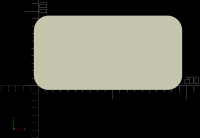
and the result in the attached image.
Note how the position of the rect depends on the rounding radius and how it differs from anchor=LEFT alone and anchor=FRONT alone and what one might expect from that for anchor=LEFT+FRONT.
Is there a simple way to position the rect at LEFT+FRONT as if rounding was 0?
Best regards,
Carsten
Dear group,
please consider:
include <BOSL2/std.scad>
include <BOSL2/rounding.scad>
module test() {
rect(
[200, 100],
rounding=20,
anchor=LEFT+FRONT
);
}
test();
and the result in the attached image.
Note how the position of the rect depends on the rounding radius and how it differs from anchor=LEFT alone and anchor=FRONT alone and what one might expect from that for anchor=LEFT+FRONT.
Is there a *simple* way to position the rect at LEFT+FRONT as if rounding was 0?
Best regards,
Carsten

AM
Adrian Mariano
Wed, Feb 9, 2022 11:27 AM
In most cases the anchor points are on the shape, not located off the
shape in space. So if you attach an object it will be on the shape.
There is no anchor point located at the position you are asking for.
Why do you need that? What is your larger application for such an
anchor point?
On Wed, Feb 9, 2022 at 3:48 AM Carsten Fuchs carsten.fuchs@cafu.de wrote:
Dear group,
please consider:
include <BOSL2/std.scad>
include <BOSL2/rounding.scad>
module test() {
rect(
[200, 100],
rounding=20,
anchor=LEFT+FRONT
);
}
test();
and the result in the attached image.
Note how the position of the rect depends on the rounding radius and how it differs from anchor=LEFT alone and anchor=FRONT alone and what one might expect from that for anchor=LEFT+FRONT.
Is there a simple way to position the rect at LEFT+FRONT as if rounding was 0?
Best regards,
Carsten_______________________________________________
OpenSCAD mailing list
To unsubscribe send an email to discuss-leave@lists.openscad.org
In most cases the anchor points are on the shape, not located off the
shape in space. So if you attach an object it will be on the shape.
There is no anchor point located at the position you are asking for.
Why do you need that? What is your larger application for such an
anchor point?
On Wed, Feb 9, 2022 at 3:48 AM Carsten Fuchs <carsten.fuchs@cafu.de> wrote:
>
> Dear group,
>
> please consider:
>
>
> include <BOSL2/std.scad>
> include <BOSL2/rounding.scad>
>
> module test() {
> rect(
> [200, 100],
> rounding=20,
> anchor=LEFT+FRONT
> );
> }
>
> test();
>
>
> and the result in the attached image.
>
> Note how the position of the rect depends on the rounding radius and how it differs from anchor=LEFT alone and anchor=FRONT alone and what one might expect from that for anchor=LEFT+FRONT.
>
> Is there a *simple* way to position the rect at LEFT+FRONT as if rounding was 0?
>
> Best regards,
> Carsten_______________________________________________
> OpenSCAD mailing list
> To unsubscribe send an email to discuss-leave@lists.openscad.org
CF
Carsten Fuchs
Wed, Feb 9, 2022 12:28 PM
I'm making a case for the Raspberry Pi's touchscreen:
https://datasheets.raspberrypi.com/display/7-inch-display-mechanical-drawing.pdf
As a first step, I'm building a simple hull of the touchscreen that I'll use to cut holes into the actual case body. I'm modelling the touchscreen as a sandwich of
a) the front frame (thin glass, "lens" in the spec),
b) the metal backplate that houses the LCD and
c) a box for the circuit boards.
In the spec, parts b) and c) are laterally aligned with respect to one of the corners of a), so I wanted part a) aligned to the coordinate axes with minimal code and effort. Just like square(), but with rounded corners.
I can of course use square() along with round_corners(), but I was surprised that I couldn't use rect() for a quicker, simpler result and was wondering if I was missing a simpler, more straightforward solution, i.e. something like square(size, rounding=5)
Best regards,
Carsten
Am 09.02.22 um 12:27 schrieb Adrian Mariano:
In most cases the anchor points are on the shape, not located off the
shape in space. So if you attach an object it will be on the shape.
There is no anchor point located at the position you are asking for.
Why do you need that? What is your larger application for such an
anchor point?
On Wed, Feb 9, 2022 at 3:48 AM Carsten Fuchs carsten.fuchs@cafu.de wrote:
Dear group,
please consider:
include <BOSL2/std.scad>
include <BOSL2/rounding.scad>
module test() {
rect(
[200, 100],
rounding=20,
anchor=LEFT+FRONT
);
}
test();
and the result in the attached image.
Note how the position of the rect depends on the rounding radius and how it differs from anchor=LEFT alone and anchor=FRONT alone and what one might expect from that for anchor=LEFT+FRONT.
Is there a simple way to position the rect at LEFT+FRONT as if rounding was 0?
Best regards,
Carsten_______________________________________________
OpenSCAD mailing list
I'm making a case for the Raspberry Pi's touchscreen:
https://datasheets.raspberrypi.com/display/7-inch-display-mechanical-drawing.pdf
As a first step, I'm building a simple hull of the touchscreen that I'll use to cut holes into the actual case body. I'm modelling the touchscreen as a sandwich of
a) the front frame (thin glass, "lens" in the spec),
b) the metal backplate that houses the LCD and
c) a box for the circuit boards.
In the spec, parts b) and c) are laterally aligned with respect to one of the corners of a), so I wanted part a) aligned to the coordinate axes with minimal code and effort. Just like square(), but with rounded corners.
I can of course use square() along with round_corners(), but I was surprised that I couldn't use rect() for a quicker, simpler result and was wondering if I was missing a simpler, more straightforward solution, i.e. something like square(size, rounding=5)
Best regards,
Carsten
Am 09.02.22 um 12:27 schrieb Adrian Mariano:
> In most cases the anchor points are on the shape, not located off the
> shape in space. So if you attach an object it will be on the shape.
> There is no anchor point located at the position you are asking for.
> Why do you need that? What is your larger application for such an
> anchor point?
>
> On Wed, Feb 9, 2022 at 3:48 AM Carsten Fuchs <carsten.fuchs@cafu.de> wrote:
>>
>> Dear group,
>>
>> please consider:
>>
>>
>> include <BOSL2/std.scad>
>> include <BOSL2/rounding.scad>
>>
>> module test() {
>> rect(
>> [200, 100],
>> rounding=20,
>> anchor=LEFT+FRONT
>> );
>> }
>>
>> test();
>>
>>
>> and the result in the attached image.
>>
>> Note how the position of the rect depends on the rounding radius and how it differs from anchor=LEFT alone and anchor=FRONT alone and what one might expect from that for anchor=LEFT+FRONT.
>>
>> Is there a *simple* way to position the rect at LEFT+FRONT as if rounding was 0?
>>
>> Best regards,
>> Carsten_______________________________________________
>> OpenSCAD mailing list
AM
Adrian Mariano
Wed, Feb 9, 2022 12:54 PM
I would say that the simplest solution is to align parts relative to
the centers rather than edges, but that won't directly correspond to
the spec. (I couldn't quite figure out the spec, which has lots of
different things marked, but maybe you can position relative to front
or left edge and then center in the other direction.)
An important question to ask is whether BOSL2 has made the right
design choices. A lot of this is hard to figure out until people use
it and see whether things work well in actual design contexts. Should
there be a way to position rounded objects relative to their imaginary
corners? We could for example add named anchors for the four
imaginary corners of rect(). But then do we also need similar anchors
for all the other rounded objects? It is potentially messy.
On Wed, Feb 9, 2022 at 7:28 AM Carsten Fuchs carsten.fuchs@cafu.de wrote:
I'm making a case for the Raspberry Pi's touchscreen:
https://datasheets.raspberrypi.com/display/7-inch-display-mechanical-drawing.pdf
As a first step, I'm building a simple hull of the touchscreen that I'll use to cut holes into the actual case body. I'm modelling the touchscreen as a sandwich of
a) the front frame (thin glass, "lens" in the spec),
b) the metal backplate that houses the LCD and
c) a box for the circuit boards.
In the spec, parts b) and c) are laterally aligned with respect to one of the corners of a), so I wanted part a) aligned to the coordinate axes with minimal code and effort. Just like square(), but with rounded corners.
I can of course use square() along with round_corners(), but I was surprised that I couldn't use rect() for a quicker, simpler result and was wondering if I was missing a simpler, more straightforward solution, i.e. something like square(size, rounding=5)
Best regards,
Carsten
Am 09.02.22 um 12:27 schrieb Adrian Mariano:
In most cases the anchor points are on the shape, not located off the
shape in space. So if you attach an object it will be on the shape.
There is no anchor point located at the position you are asking for.
Why do you need that? What is your larger application for such an
anchor point?
On Wed, Feb 9, 2022 at 3:48 AM Carsten Fuchs carsten.fuchs@cafu.de wrote:
Dear group,
please consider:
include <BOSL2/std.scad>
include <BOSL2/rounding.scad>
module test() {
rect(
[200, 100],
rounding=20,
anchor=LEFT+FRONT
);
}
test();
and the result in the attached image.
Note how the position of the rect depends on the rounding radius and how it differs from anchor=LEFT alone and anchor=FRONT alone and what one might expect from that for anchor=LEFT+FRONT.
Is there a simple way to position the rect at LEFT+FRONT as if rounding was 0?
Best regards,
Carsten_______________________________________________
OpenSCAD mailing list
OpenSCAD mailing list
To unsubscribe send an email to discuss-leave@lists.openscad.org
I would say that the simplest solution is to align parts relative to
the centers rather than edges, but that won't directly correspond to
the spec. (I couldn't quite figure out the spec, which has lots of
different things marked, but maybe you can position relative to front
or left edge and then center in the other direction.)
An important question to ask is whether BOSL2 has made the right
design choices. A lot of this is hard to figure out until people use
it and see whether things work well in actual design contexts. Should
there be a way to position rounded objects relative to their imaginary
corners? We could for example add named anchors for the four
imaginary corners of rect(). But then do we also need similar anchors
for all the other rounded objects? It is potentially messy.
On Wed, Feb 9, 2022 at 7:28 AM Carsten Fuchs <carsten.fuchs@cafu.de> wrote:
>
> I'm making a case for the Raspberry Pi's touchscreen:
> https://datasheets.raspberrypi.com/display/7-inch-display-mechanical-drawing.pdf
>
> As a first step, I'm building a simple hull of the touchscreen that I'll use to cut holes into the actual case body. I'm modelling the touchscreen as a sandwich of
>
> a) the front frame (thin glass, "lens" in the spec),
> b) the metal backplate that houses the LCD and
> c) a box for the circuit boards.
>
> In the spec, parts b) and c) are laterally aligned with respect to one of the corners of a), so I wanted part a) aligned to the coordinate axes with minimal code and effort. Just like square(), but with rounded corners.
>
> I can of course use square() along with round_corners(), but I was surprised that I couldn't use rect() for a quicker, simpler result and was wondering if I was missing a simpler, more straightforward solution, i.e. something like square(size, rounding=5)
>
> Best regards,
> Carsten
>
>
> Am 09.02.22 um 12:27 schrieb Adrian Mariano:
> > In most cases the anchor points are on the shape, not located off the
> > shape in space. So if you attach an object it will be on the shape.
> > There is no anchor point located at the position you are asking for.
> > Why do you need that? What is your larger application for such an
> > anchor point?
> >
> > On Wed, Feb 9, 2022 at 3:48 AM Carsten Fuchs <carsten.fuchs@cafu.de> wrote:
> >>
> >> Dear group,
> >>
> >> please consider:
> >>
> >>
> >> include <BOSL2/std.scad>
> >> include <BOSL2/rounding.scad>
> >>
> >> module test() {
> >> rect(
> >> [200, 100],
> >> rounding=20,
> >> anchor=LEFT+FRONT
> >> );
> >> }
> >>
> >> test();
> >>
> >>
> >> and the result in the attached image.
> >>
> >> Note how the position of the rect depends on the rounding radius and how it differs from anchor=LEFT alone and anchor=FRONT alone and what one might expect from that for anchor=LEFT+FRONT.
> >>
> >> Is there a *simple* way to position the rect at LEFT+FRONT as if rounding was 0?
> >>
> >> Best regards,
> >> Carsten_______________________________________________
> >> OpenSCAD mailing list
> _______________________________________________
> OpenSCAD mailing list
> To unsubscribe send an email to discuss-leave@lists.openscad.org
CF
Carsten Fuchs
Wed, Feb 9, 2022 4:54 PM
Am 09.02.22 um 13:54 schrieb Adrian Mariano:
I would say that the simplest solution is to align parts relative to
the centers rather than edges, but that won't directly correspond to
the spec. (I couldn't quite figure out the spec, which has lots of
different things marked, but maybe you can position relative to front
or left edge and then center in the other direction.)
While certainly possible and mathematically easy, this also adds a lot of code (note that the panels in the spec are not centered on each other!) when all that is wanted is „position rectangle B shifted by (x, y) relative to rectangle A“.
An important question to ask is whether BOSL2 has made the right
design choices. A lot of this is hard to figure out until people use
it and see whether things work well in actual design contexts.
It is entirely incredible and a pure joy to see what math, OpenSCAD and the BOSL2 authors manage to achieve. While I too have spent a lot of time with 3D math in the past, some of the example images and objects in the BOSL2 docs I've never seen before.
But, to be honest: I'm afraid that I will never be able to use even 10 % of what's in BOSL2. Counting the number of functions, probably not even 1 %. I'm not sure why that is so, but maybe because I feel that features like rounded rectangles are very helpful, convenient, easy to understand and easy to use – but I would have fully expected to need to compute the anchor point of "LEFT+FRONT" myself.
Should
there be a way to position rounded objects relative to their imaginary
corners? We could for example add named anchors for the four
imaginary corners of rect(). But then do we also need similar anchors
for all the other rounded objects? It is potentially messy.
Yes, there is probably not a straightforward solution that can well be generalized, unfortunately. For rectangles, besides the existing solution and anchor points at the bounding box corners also anchor points at the centers of the rounding circles would be conceivable…
Of course I can only speak for myself, but for me it feels problematic that with rect():
- the "left" alignment (position) depends on the value of
rounding,
- that anchor=LEFT gives a different left alignment than anchor=LEFT+FRONT, and
- that this is inconsistent with
square(),
- for my own work, I see use cases like the one described here, but I cannot imagine one where the current TOP+FRONT anchor would help (especially as I cannot learn its coordinates to used them in custom paths etc.)
Best regards,
Carsten
On Wed, Feb 9, 2022 at 7:28 AM Carsten Fuchs carsten.fuchs@cafu.de wrote:
I'm making a case for the Raspberry Pi's touchscreen:
https://datasheets.raspberrypi.com/display/7-inch-display-mechanical-drawing.pdf
As a first step, I'm building a simple hull of the touchscreen that I'll use to cut holes into the actual case body. I'm modelling the touchscreen as a sandwich of
a) the front frame (thin glass, "lens" in the spec),
b) the metal backplate that houses the LCD and
c) a box for the circuit boards.
In the spec, parts b) and c) are laterally aligned with respect to one of the corners of a), so I wanted part a) aligned to the coordinate axes with minimal code and effort. Just like square(), but with rounded corners.
I can of course use square() along with round_corners(), but I was surprised that I couldn't use rect() for a quicker, simpler result and was wondering if I was missing a simpler, more straightforward solution, i.e. something like square(size, rounding=5)
Best regards,
Carsten
Am 09.02.22 um 12:27 schrieb Adrian Mariano:
In most cases the anchor points are on the shape, not located off the
shape in space. So if you attach an object it will be on the shape.
There is no anchor point located at the position you are asking for.
Why do you need that? What is your larger application for such an
anchor point?
On Wed, Feb 9, 2022 at 3:48 AM Carsten Fuchs carsten.fuchs@cafu.de wrote:
Dear group,
please consider:
include <BOSL2/std.scad>
include <BOSL2/rounding.scad>
module test() {
rect(
[200, 100],
rounding=20,
anchor=LEFT+FRONT
);
}
test();
and the result in the attached image.
Note how the position of the rect depends on the rounding radius and how it differs from anchor=LEFT alone and anchor=FRONT alone and what one might expect from that for anchor=LEFT+FRONT.
Is there a simple way to position the rect at LEFT+FRONT as if rounding was 0?
Best regards,
Carsten_______________________________________________
Am 09.02.22 um 13:54 schrieb Adrian Mariano:
> I would say that the simplest solution is to align parts relative to
> the centers rather than edges, but that won't directly correspond to
> the spec. (I couldn't quite figure out the spec, which has lots of
> different things marked, but maybe you can position relative to front
> or left edge and then center in the other direction.)
While certainly possible and mathematically easy, this also adds a lot of code (note that the panels in the spec are *not* centered on each other!) when all that is wanted is „position rectangle B shifted by (x, y) relative to rectangle A“.
> An important question to ask is whether BOSL2 has made the right
> design choices. A lot of this is hard to figure out until people use
> it and see whether things work well in actual design contexts.
It is entirely incredible and a pure joy to see what math, OpenSCAD and the BOSL2 authors manage to achieve. While I too have spent a lot of time with 3D math in the past, some of the example images and objects in the BOSL2 docs I've never seen before.
But, to be honest: I'm afraid that I will never be able to use even 10 % of what's in BOSL2. Counting the number of functions, probably not even 1 %. I'm not sure why that is so, but maybe because I feel that features like rounded rectangles are very helpful, convenient, easy to understand and easy to use – but I would have fully expected to need to compute the anchor point of "LEFT+FRONT" myself.
> Should
> there be a way to position rounded objects relative to their imaginary
> corners? We could for example add named anchors for the four
> imaginary corners of rect(). But then do we also need similar anchors
> for all the other rounded objects? It is potentially messy.
Yes, there is probably not a straightforward solution that can well be generalized, unfortunately. For rectangles, besides the existing solution and anchor points at the bounding box corners also anchor points at the centers of the rounding circles would be conceivable…
Of course I can only speak for myself, but for me it feels problematic that with rect():
- the "left" alignment (position) depends on the value of `rounding`,
- that anchor=LEFT gives a different left alignment than anchor=LEFT+FRONT, and
- that this is inconsistent with `square()`,
- for my own work, I see use cases like the one described here, but I cannot imagine one where the current TOP+FRONT anchor would help (especially as I cannot learn its coordinates to used them in custom paths etc.)
Best regards,
Carsten
> On Wed, Feb 9, 2022 at 7:28 AM Carsten Fuchs <carsten.fuchs@cafu.de> wrote:
>>
>> I'm making a case for the Raspberry Pi's touchscreen:
>> https://datasheets.raspberrypi.com/display/7-inch-display-mechanical-drawing.pdf
>>
>> As a first step, I'm building a simple hull of the touchscreen that I'll use to cut holes into the actual case body. I'm modelling the touchscreen as a sandwich of
>>
>> a) the front frame (thin glass, "lens" in the spec),
>> b) the metal backplate that houses the LCD and
>> c) a box for the circuit boards.
>>
>> In the spec, parts b) and c) are laterally aligned with respect to one of the corners of a), so I wanted part a) aligned to the coordinate axes with minimal code and effort. Just like square(), but with rounded corners.
>>
>> I can of course use square() along with round_corners(), but I was surprised that I couldn't use rect() for a quicker, simpler result and was wondering if I was missing a simpler, more straightforward solution, i.e. something like square(size, rounding=5)
>>
>> Best regards,
>> Carsten
>>
>>
>> Am 09.02.22 um 12:27 schrieb Adrian Mariano:
>>> In most cases the anchor points are on the shape, not located off the
>>> shape in space. So if you attach an object it will be on the shape.
>>> There is no anchor point located at the position you are asking for.
>>> Why do you need that? What is your larger application for such an
>>> anchor point?
>>>
>>> On Wed, Feb 9, 2022 at 3:48 AM Carsten Fuchs <carsten.fuchs@cafu.de> wrote:
>>>>
>>>> Dear group,
>>>>
>>>> please consider:
>>>>
>>>>
>>>> include <BOSL2/std.scad>
>>>> include <BOSL2/rounding.scad>
>>>>
>>>> module test() {
>>>> rect(
>>>> [200, 100],
>>>> rounding=20,
>>>> anchor=LEFT+FRONT
>>>> );
>>>> }
>>>>
>>>> test();
>>>>
>>>>
>>>> and the result in the attached image.
>>>>
>>>> Note how the position of the rect depends on the rounding radius and how it differs from anchor=LEFT alone and anchor=FRONT alone and what one might expect from that for anchor=LEFT+FRONT.
>>>>
>>>> Is there a *simple* way to position the rect at LEFT+FRONT as if rounding was 0?
>>>>
>>>> Best regards,
>>>> Carsten_______________________________________________
AM
Adrian Mariano
Wed, Feb 9, 2022 5:45 PM
Revar's vision for how anchor points work is that LEFT should be the
center left side of the object, and LEFT+FRONT is the corner----on the
surface of the object so that it makes sense to put a child object
there. Now to be quite honest, I am not sure when you want to attach
an object to the rounded corner of an object. But if you consider an
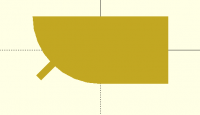
example like this:
include <BOSL2/std.scad>
include <BOSL2/rounding.scad>
module test() {
R=100;
rect(
[200, 100],
rounding=[0,0,R,0]
)
attach(FRONT+LEFT) fwd(1)rect([10,30],anchor=FWD);
}
test();
then the current behavior seems to make more sense. The attached
small rectangle is touching the parent object as seen in the picture.
Having it appear at the imaginary corner doesn't seem to make sense.
If you just look at that object where does it seem like the LEFT+FRONT
anchor should be?
You say it's unexpected that LEFT+FRONT is different from LEFT, but
what about the case where the rounding of a square is so large that
the square becomes a circle? It seems in this case intuitive that
LEFT+FRONT is not the same as LEFT. For your application, though, I
think your expectation is reasonable that there ought to be some way
to control the position of the rounded rectangle relative to its
bounding box. You can shift the object by R*(1-1/sqrt(2)), but
that's hardly obvious in your code, and I had an idea that does
generalize of adding some flag like "box_anchor=true" that would force
anchors onto the bounding box. Or maybe even it should work the other
way that the default is on the bounding box. I'll see what Revar has
to say about this. As I noted above, I don't think I know of an
application for the anchor at the end of the roundover. I also can't
think of a reason to want an anchor at the centerpoint of the rounding
circle. Did you have a specific idea there? That point is easier to
find since it's just inset by the rounding radius.
On Wed, Feb 9, 2022 at 11:55 AM Carsten Fuchs carsten.fuchs@cafu.de wrote:
Am 09.02.22 um 13:54 schrieb Adrian Mariano:
I would say that the simplest solution is to align parts relative to
the centers rather than edges, but that won't directly correspond to
the spec. (I couldn't quite figure out the spec, which has lots of
different things marked, but maybe you can position relative to front
or left edge and then center in the other direction.)
While certainly possible and mathematically easy, this also adds a lot of code (note that the panels in the spec are not centered on each other!) when all that is wanted is „position rectangle B shifted by (x, y) relative to rectangle A“.
An important question to ask is whether BOSL2 has made the right
design choices. A lot of this is hard to figure out until people use
it and see whether things work well in actual design contexts.
It is entirely incredible and a pure joy to see what math, OpenSCAD and the BOSL2 authors manage to achieve. While I too have spent a lot of time with 3D math in the past, some of the example images and objects in the BOSL2 docs I've never seen before.
But, to be honest: I'm afraid that I will never be able to use even 10 % of what's in BOSL2. Counting the number of functions, probably not even 1 %. I'm not sure why that is so, but maybe because I feel that features like rounded rectangles are very helpful, convenient, easy to understand and easy to use – but I would have fully expected to need to compute the anchor point of "LEFT+FRONT" myself.
Should
there be a way to position rounded objects relative to their imaginary
corners? We could for example add named anchors for the four
imaginary corners of rect(). But then do we also need similar anchors
for all the other rounded objects? It is potentially messy.
Yes, there is probably not a straightforward solution that can well be generalized, unfortunately. For rectangles, besides the existing solution and anchor points at the bounding box corners also anchor points at the centers of the rounding circles would be conceivable…
Of course I can only speak for myself, but for me it feels problematic that with rect():
- the "left" alignment (position) depends on the value of
rounding,
- that anchor=LEFT gives a different left alignment than anchor=LEFT+FRONT, and
- that this is inconsistent with
square(),
- for my own work, I see use cases like the one described here, but I cannot imagine one where the current TOP+FRONT anchor would help (especially as I cannot learn its coordinates to used them in custom paths etc.)
Best regards,
Carsten
I'm making a case for the Raspberry Pi's touchscreen:
https://datasheets.raspberrypi.com/display/7-inch-display-mechanical-drawing.pdf
As a first step, I'm building a simple hull of the touchscreen that I'll use to cut holes into the actual case body. I'm modelling the touchscreen as a sandwich of
a) the front frame (thin glass, "lens" in the spec),
b) the metal backplate that houses the LCD and
c) a box for the circuit boards.
In the spec, parts b) and c) are laterally aligned with respect to one of the corners of a), so I wanted part a) aligned to the coordinate axes with minimal code and effort. Just like square(), but with rounded corners.
I can of course use square() along with round_corners(), but I was surprised that I couldn't use rect() for a quicker, simpler result and was wondering if I was missing a simpler, more straightforward solution, i.e. something like square(size, rounding=5)
Best regards,
Carsten
Am 09.02.22 um 12:27 schrieb Adrian Mariano:
In most cases the anchor points are on the shape, not located off the
shape in space. So if you attach an object it will be on the shape.
There is no anchor point located at the position you are asking for.
Why do you need that? What is your larger application for such an
anchor point?
On Wed, Feb 9, 2022 at 3:48 AM Carsten Fuchs carsten.fuchs@cafu.de wrote:
Dear group,
please consider:
include <BOSL2/std.scad>
include <BOSL2/rounding.scad>
module test() {
rect(
[200, 100],
rounding=20,
anchor=LEFT+FRONT
);
}
test();
and the result in the attached image.
Note how the position of the rect depends on the rounding radius and how it differs from anchor=LEFT alone and anchor=FRONT alone and what one might expect from that for anchor=LEFT+FRONT.
Is there a simple way to position the rect at LEFT+FRONT as if rounding was 0?
Best regards,
Carsten_______________________________________________
Revar's vision for how anchor points work is that LEFT should be the
center left side of the object, and LEFT+FRONT is the corner----on the
surface of the object so that it makes sense to put a child object
there. Now to be quite honest, I am not sure when you want to attach
an object to the rounded corner of an object. But if you consider an
example like this:
include <BOSL2/std.scad>
include <BOSL2/rounding.scad>
module test() {
R=100;
rect(
[200, 100],
rounding=[0,0,R,0]
)
attach(FRONT+LEFT) fwd(1)rect([10,30],anchor=FWD);
}
test();
then the current behavior seems to make more sense. The attached
small rectangle is touching the parent object as seen in the picture.
Having it appear at the imaginary corner doesn't seem to make sense.
If you just look at that object where does it seem like the LEFT+FRONT
anchor should be?
You say it's unexpected that LEFT+FRONT is different from LEFT, but
what about the case where the rounding of a square is so large that
the square becomes a circle? It seems in this case intuitive that
LEFT+FRONT is not the same as LEFT. For your application, though, I
think your expectation is reasonable that there ought to be some way
to control the position of the rounded rectangle relative to its
bounding box. You can shift the object by R*(1-1/sqrt(2)), but
that's hardly obvious in your code, and I had an idea that does
generalize of adding some flag like "box_anchor=true" that would force
anchors onto the bounding box. Or maybe even it should work the other
way that the default is on the bounding box. I'll see what Revar has
to say about this. As I noted above, I don't think I know of an
application for the anchor at the end of the roundover. I also can't
think of a reason to want an anchor at the centerpoint of the rounding
circle. Did you have a specific idea there? That point is easier to
find since it's just inset by the rounding radius.
On Wed, Feb 9, 2022 at 11:55 AM Carsten Fuchs <carsten.fuchs@cafu.de> wrote:
>
> Am 09.02.22 um 13:54 schrieb Adrian Mariano:
> > I would say that the simplest solution is to align parts relative to
> > the centers rather than edges, but that won't directly correspond to
> > the spec. (I couldn't quite figure out the spec, which has lots of
> > different things marked, but maybe you can position relative to front
> > or left edge and then center in the other direction.)
>
> While certainly possible and mathematically easy, this also adds a lot of code (note that the panels in the spec are *not* centered on each other!) when all that is wanted is „position rectangle B shifted by (x, y) relative to rectangle A“.
>
> > An important question to ask is whether BOSL2 has made the right
> > design choices. A lot of this is hard to figure out until people use
> > it and see whether things work well in actual design contexts.
>
> It is entirely incredible and a pure joy to see what math, OpenSCAD and the BOSL2 authors manage to achieve. While I too have spent a lot of time with 3D math in the past, some of the example images and objects in the BOSL2 docs I've never seen before.
> But, to be honest: I'm afraid that I will never be able to use even 10 % of what's in BOSL2. Counting the number of functions, probably not even 1 %. I'm not sure why that is so, but maybe because I feel that features like rounded rectangles are very helpful, convenient, easy to understand and easy to use – but I would have fully expected to need to compute the anchor point of "LEFT+FRONT" myself.
>
> > Should
> > there be a way to position rounded objects relative to their imaginary
> > corners? We could for example add named anchors for the four
> > imaginary corners of rect(). But then do we also need similar anchors
> > for all the other rounded objects? It is potentially messy.
>
> Yes, there is probably not a straightforward solution that can well be generalized, unfortunately. For rectangles, besides the existing solution and anchor points at the bounding box corners also anchor points at the centers of the rounding circles would be conceivable…
>
> Of course I can only speak for myself, but for me it feels problematic that with rect():
>
> - the "left" alignment (position) depends on the value of `rounding`,
> - that anchor=LEFT gives a different left alignment than anchor=LEFT+FRONT, and
> - that this is inconsistent with `square()`,
> - for my own work, I see use cases like the one described here, but I cannot imagine one where the current TOP+FRONT anchor would help (especially as I cannot learn its coordinates to used them in custom paths etc.)
>
> Best regards,
> Carsten
>
>
>
> > On Wed, Feb 9, 2022 at 7:28 AM Carsten Fuchs <carsten.fuchs@cafu.de> wrote:
> >>
> >> I'm making a case for the Raspberry Pi's touchscreen:
> >> https://datasheets.raspberrypi.com/display/7-inch-display-mechanical-drawing.pdf
> >>
> >> As a first step, I'm building a simple hull of the touchscreen that I'll use to cut holes into the actual case body. I'm modelling the touchscreen as a sandwich of
> >>
> >> a) the front frame (thin glass, "lens" in the spec),
> >> b) the metal backplate that houses the LCD and
> >> c) a box for the circuit boards.
> >>
> >> In the spec, parts b) and c) are laterally aligned with respect to one of the corners of a), so I wanted part a) aligned to the coordinate axes with minimal code and effort. Just like square(), but with rounded corners.
> >>
> >> I can of course use square() along with round_corners(), but I was surprised that I couldn't use rect() for a quicker, simpler result and was wondering if I was missing a simpler, more straightforward solution, i.e. something like square(size, rounding=5)
> >>
> >> Best regards,
> >> Carsten
> >>
> >>
> >> Am 09.02.22 um 12:27 schrieb Adrian Mariano:
> >>> In most cases the anchor points are on the shape, not located off the
> >>> shape in space. So if you attach an object it will be on the shape.
> >>> There is no anchor point located at the position you are asking for.
> >>> Why do you need that? What is your larger application for such an
> >>> anchor point?
> >>>
> >>> On Wed, Feb 9, 2022 at 3:48 AM Carsten Fuchs <carsten.fuchs@cafu.de> wrote:
> >>>>
> >>>> Dear group,
> >>>>
> >>>> please consider:
> >>>>
> >>>>
> >>>> include <BOSL2/std.scad>
> >>>> include <BOSL2/rounding.scad>
> >>>>
> >>>> module test() {
> >>>> rect(
> >>>> [200, 100],
> >>>> rounding=20,
> >>>> anchor=LEFT+FRONT
> >>>> );
> >>>> }
> >>>>
> >>>> test();
> >>>>
> >>>>
> >>>> and the result in the attached image.
> >>>>
> >>>> Note how the position of the rect depends on the rounding radius and how it differs from anchor=LEFT alone and anchor=FRONT alone and what one might expect from that for anchor=LEFT+FRONT.
> >>>>
> >>>> Is there a *simple* way to position the rect at LEFT+FRONT as if rounding was 0?
> >>>>
> >>>> Best regards,
> >>>> Carsten_______________________________________________
> _______________________________________________
> OpenSCAD mailing list
> To unsubscribe send an email to discuss-leave@lists.openscad.org
CF
Carsten Fuchs
Thu, Feb 10, 2022 8:21 AM
Am 09.02.22 um 18:45 schrieb Adrian Mariano:
Revar's vision for how anchor points work is that LEFT should be the
center left side of the object, and LEFT+FRONT is the corner----on the
surface of the object so that it makes sense to put a child object
there. [...] The attached
small rectangle is touching the parent object as seen in the picture.
Having it appear at the imaginary corner doesn't seem to make sense.
If you just look at that object where does it seem like the LEFT+FRONT
anchor should be?
Note how you need fwd(1) in your example. If the anchor was at the bounding box corner, it would just have to be a different value.
If I wanted to place an object as in your example, I would just rotate by 45° and move appropriately. This involves more complexity, but it is also a lot more flexible, e.g. for cases other than 45°. While this is exactly the kind of complexity that I wanted to avoid with my original question, it probably reduces to the question of use cases: Are the most frequent use cases the most simple ones or the scarcely used ones?
You say it's unexpected that LEFT+FRONT is different from LEFT, but
what about the case where the rounding of a square is so large that
the square becomes a circle?
Yes, I agree that this is difficult, especially when generalized to other geometry shapes.
Personally, I would expect even a circle to be positioned by its bounding box. (And if I may express a wish: If I wanted to move a circle that is centered on the origin so that its circumference was then on the origin, a method like move_in_direction(degrees, distance) with distance=radius would be more intuitive and more general. This doesn't help with rounded rectangles of course. Hmm, well, it does, if the rectangle is moved to the center of one of the corner circles first.)
I had an idea that does
generalize of adding some flag like "box_anchor=true" that would force
anchors onto the bounding box. Or maybe even it should work the other
way that the default is on the bounding box.
Personally, I approached BOSL2 with the mindset of the features built into OpenSCAD. Maybe its the built-in square() that made me expect the bounding-box behavior. When your are still unfamiliar, while feasible, it is quite a lot to learn when anchors must be understood before placing a rect(size, rounding=5) .
I also can't
think of a reason to want an anchor at the centerpoint of the rounding
circle. Did you have a specific idea there? That point is easier to
find since it's just inset by the rounding radius.
No, I just intentionally wanted to add another possible point that I found reasonable and which might be considered. However, my intention was rather to point out and acknowledge how many possibilities exist, all reasonable, and that a single solution that accounts for all might be difficult to impossible to find. This is why I said that I'll probably never come to explore the full feature set of BOSL2, because I'll always prefer simple composites such as with the move_in_direction mentioned above over the – useful as they are – both complex and limited feature set of anchors.
Best regards,
Carsten
On Wed, Feb 9, 2022 at 11:55 AM Carsten Fuchs carsten.fuchs@cafu.de wrote:
Am 09.02.22 um 13:54 schrieb Adrian Mariano:
I would say that the simplest solution is to align parts relative to
the centers rather than edges, but that won't directly correspond to
the spec. (I couldn't quite figure out the spec, which has lots of
different things marked, but maybe you can position relative to front
or left edge and then center in the other direction.)
While certainly possible and mathematically easy, this also adds a lot of code (note that the panels in the spec are not centered on each other!) when all that is wanted is „position rectangle B shifted by (x, y) relative to rectangle A“.
An important question to ask is whether BOSL2 has made the right
design choices. A lot of this is hard to figure out until people use
it and see whether things work well in actual design contexts.
It is entirely incredible and a pure joy to see what math, OpenSCAD and the BOSL2 authors manage to achieve. While I too have spent a lot of time with 3D math in the past, some of the example images and objects in the BOSL2 docs I've never seen before.
But, to be honest: I'm afraid that I will never be able to use even 10 % of what's in BOSL2. Counting the number of functions, probably not even 1 %. I'm not sure why that is so, but maybe because I feel that features like rounded rectangles are very helpful, convenient, easy to understand and easy to use – but I would have fully expected to need to compute the anchor point of "LEFT+FRONT" myself.
Should
there be a way to position rounded objects relative to their imaginary
corners? We could for example add named anchors for the four
imaginary corners of rect(). But then do we also need similar anchors
for all the other rounded objects? It is potentially messy.
Yes, there is probably not a straightforward solution that can well be generalized, unfortunately. For rectangles, besides the existing solution and anchor points at the bounding box corners also anchor points at the centers of the rounding circles would be conceivable…
Of course I can only speak for myself, but for me it feels problematic that with rect():
- the "left" alignment (position) depends on the value of
rounding,
- that anchor=LEFT gives a different left alignment than anchor=LEFT+FRONT, and
- that this is inconsistent with
square(),
- for my own work, I see use cases like the one described here, but I cannot imagine one where the current TOP+FRONT anchor would help (especially as I cannot learn its coordinates to used them in custom paths etc.)
Best regards,
Carsten
On Wed, Feb 9, 2022 at 7:28 AM Carsten Fuchs carsten.fuchs@cafu.de wrote:
I'm making a case for the Raspberry Pi's touchscreen:
https://datasheets.raspberrypi.com/display/7-inch-display-mechanical-drawing.pdf
As a first step, I'm building a simple hull of the touchscreen that I'll use to cut holes into the actual case body. I'm modelling the touchscreen as a sandwich of
a) the front frame (thin glass, "lens" in the spec),
b) the metal backplate that houses the LCD and
c) a box for the circuit boards.
In the spec, parts b) and c) are laterally aligned with respect to one of the corners of a), so I wanted part a) aligned to the coordinate axes with minimal code and effort. Just like square(), but with rounded corners.
I can of course use square() along with round_corners(), but I was surprised that I couldn't use rect() for a quicker, simpler result and was wondering if I was missing a simpler, more straightforward solution, i.e. something like square(size, rounding=5)
Best regards,
Carsten
Am 09.02.22 um 12:27 schrieb Adrian Mariano:
In most cases the anchor points are on the shape, not located off the
shape in space. So if you attach an object it will be on the shape.
There is no anchor point located at the position you are asking for.
Why do you need that? What is your larger application for such an
anchor point?
On Wed, Feb 9, 2022 at 3:48 AM Carsten Fuchs carsten.fuchs@cafu.de wrote:
Dear group,
please consider:
include <BOSL2/std.scad>
include <BOSL2/rounding.scad>
module test() {
rect(
[200, 100],
rounding=20,
anchor=LEFT+FRONT
);
}
test();
and the result in the attached image.
Note how the position of the rect depends on the rounding radius and how it differs from anchor=LEFT alone and anchor=FRONT alone and what one might expect from that for anchor=LEFT+FRONT.
Is there a simple way to position the rect at LEFT+FRONT as if rounding was 0?
Best regards,
Carsten_______________________________________________
Am 09.02.22 um 18:45 schrieb Adrian Mariano:
> Revar's vision for how anchor points work is that LEFT should be the
> center left side of the object, and LEFT+FRONT is the corner----on the
> surface of the object so that it makes sense to put a child object
> there. [...] The attached
> small rectangle is touching the parent object as seen in the picture.
> Having it appear at the imaginary corner doesn't seem to make sense.
> If you just look at that object where does it seem like the LEFT+FRONT
> anchor should be?
Note how you need `fwd(1)` in your example. If the anchor was at the bounding box corner, it would just have to be a different value.
If I wanted to place an object as in your example, I would just rotate by 45° and move appropriately. This involves more complexity, but it is also a lot more flexible, e.g. for cases other than 45°. While this is exactly the kind of complexity that I wanted to avoid with my original question, it probably reduces to the question of use cases: Are the most frequent use cases the most simple ones or the scarcely used ones?
> You say it's unexpected that LEFT+FRONT is different from LEFT, but
> what about the case where the rounding of a square is so large that
> the square becomes a circle?
Yes, I agree that this is difficult, especially when generalized to other geometry shapes.
Personally, I would expect even a circle to be positioned by its bounding box. (And if I may express a wish: If I wanted to move a circle that is centered on the origin so that its circumference was then on the origin, a method like `move_in_direction(degrees, distance)` with distance=radius would be more intuitive and more general. This doesn't help with rounded rectangles of course. Hmm, well, it does, if the rectangle is moved to the center of one of the corner circles first.)
> I had an idea that does
> generalize of adding some flag like "box_anchor=true" that would force
> anchors onto the bounding box. Or maybe even it should work the other
> way that the default is on the bounding box.
Personally, I approached BOSL2 with the mindset of the features built into OpenSCAD. Maybe its the built-in square() that made me expect the bounding-box behavior. When your are still unfamiliar, while feasible, it is quite a lot to learn when anchors must be understood before placing a `rect(size, rounding=5)` .
> I also can't
> think of a reason to want an anchor at the centerpoint of the rounding
> circle. Did you have a specific idea there? That point is easier to
> find since it's just inset by the rounding radius.
No, I just intentionally wanted to add another possible point that I found reasonable and which might be considered. However, my intention was rather to point out and acknowledge how many possibilities exist, all reasonable, and that a single solution that accounts for all might be difficult to impossible to find. This is why I said that I'll probably never come to explore the full feature set of BOSL2, because I'll always prefer simple composites such as with the `move_in_direction` mentioned above over the – useful as they are – both complex and limited feature set of anchors.
Best regards,
Carsten
> On Wed, Feb 9, 2022 at 11:55 AM Carsten Fuchs <carsten.fuchs@cafu.de> wrote:
>>
>> Am 09.02.22 um 13:54 schrieb Adrian Mariano:
>>> I would say that the simplest solution is to align parts relative to
>>> the centers rather than edges, but that won't directly correspond to
>>> the spec. (I couldn't quite figure out the spec, which has lots of
>>> different things marked, but maybe you can position relative to front
>>> or left edge and then center in the other direction.)
>>
>> While certainly possible and mathematically easy, this also adds a lot of code (note that the panels in the spec are *not* centered on each other!) when all that is wanted is „position rectangle B shifted by (x, y) relative to rectangle A“.
>>
>>> An important question to ask is whether BOSL2 has made the right
>>> design choices. A lot of this is hard to figure out until people use
>>> it and see whether things work well in actual design contexts.
>>
>> It is entirely incredible and a pure joy to see what math, OpenSCAD and the BOSL2 authors manage to achieve. While I too have spent a lot of time with 3D math in the past, some of the example images and objects in the BOSL2 docs I've never seen before.
>> But, to be honest: I'm afraid that I will never be able to use even 10 % of what's in BOSL2. Counting the number of functions, probably not even 1 %. I'm not sure why that is so, but maybe because I feel that features like rounded rectangles are very helpful, convenient, easy to understand and easy to use – but I would have fully expected to need to compute the anchor point of "LEFT+FRONT" myself.
>>
>>> Should
>>> there be a way to position rounded objects relative to their imaginary
>>> corners? We could for example add named anchors for the four
>>> imaginary corners of rect(). But then do we also need similar anchors
>>> for all the other rounded objects? It is potentially messy.
>>
>> Yes, there is probably not a straightforward solution that can well be generalized, unfortunately. For rectangles, besides the existing solution and anchor points at the bounding box corners also anchor points at the centers of the rounding circles would be conceivable…
>>
>> Of course I can only speak for myself, but for me it feels problematic that with rect():
>>
>> - the "left" alignment (position) depends on the value of `rounding`,
>> - that anchor=LEFT gives a different left alignment than anchor=LEFT+FRONT, and
>> - that this is inconsistent with `square()`,
>> - for my own work, I see use cases like the one described here, but I cannot imagine one where the current TOP+FRONT anchor would help (especially as I cannot learn its coordinates to used them in custom paths etc.)
>>
>> Best regards,
>> Carsten
>>
>>
>>
>>> On Wed, Feb 9, 2022 at 7:28 AM Carsten Fuchs <carsten.fuchs@cafu.de> wrote:
>>>>
>>>> I'm making a case for the Raspberry Pi's touchscreen:
>>>> https://datasheets.raspberrypi.com/display/7-inch-display-mechanical-drawing.pdf
>>>>
>>>> As a first step, I'm building a simple hull of the touchscreen that I'll use to cut holes into the actual case body. I'm modelling the touchscreen as a sandwich of
>>>>
>>>> a) the front frame (thin glass, "lens" in the spec),
>>>> b) the metal backplate that houses the LCD and
>>>> c) a box for the circuit boards.
>>>>
>>>> In the spec, parts b) and c) are laterally aligned with respect to one of the corners of a), so I wanted part a) aligned to the coordinate axes with minimal code and effort. Just like square(), but with rounded corners.
>>>>
>>>> I can of course use square() along with round_corners(), but I was surprised that I couldn't use rect() for a quicker, simpler result and was wondering if I was missing a simpler, more straightforward solution, i.e. something like square(size, rounding=5)
>>>>
>>>> Best regards,
>>>> Carsten
>>>>
>>>>
>>>> Am 09.02.22 um 12:27 schrieb Adrian Mariano:
>>>>> In most cases the anchor points are on the shape, not located off the
>>>>> shape in space. So if you attach an object it will be on the shape.
>>>>> There is no anchor point located at the position you are asking for.
>>>>> Why do you need that? What is your larger application for such an
>>>>> anchor point?
>>>>>
>>>>> On Wed, Feb 9, 2022 at 3:48 AM Carsten Fuchs <carsten.fuchs@cafu.de> wrote:
>>>>>>
>>>>>> Dear group,
>>>>>>
>>>>>> please consider:
>>>>>>
>>>>>>
>>>>>> include <BOSL2/std.scad>
>>>>>> include <BOSL2/rounding.scad>
>>>>>>
>>>>>> module test() {
>>>>>> rect(
>>>>>> [200, 100],
>>>>>> rounding=20,
>>>>>> anchor=LEFT+FRONT
>>>>>> );
>>>>>> }
>>>>>>
>>>>>> test();
>>>>>>
>>>>>>
>>>>>> and the result in the attached image.
>>>>>>
>>>>>> Note how the position of the rect depends on the rounding radius and how it differs from anchor=LEFT alone and anchor=FRONT alone and what one might expect from that for anchor=LEFT+FRONT.
>>>>>>
>>>>>> Is there a *simple* way to position the rect at LEFT+FRONT as if rounding was 0?
>>>>>>
>>>>>> Best regards,
>>>>>> Carsten_______________________________________________
AM
Adrian Mariano
Thu, Feb 10, 2022 11:52 AM
The reason I need fwd(1) in my example is so the object sinks below
the surface rather than touching at a single tangent point. This is
not the same as needing to use fwd(1+r*(1-1/sqrt(r)) where I have to
compute something
I think you are possibly missing the point here: the anchor points
have two different uses. One of them is for putting the object
somewhere. The other one is for attaching a second object to the
first object. I think that this ability to attach objects to other
objects is incredibly useful and makes my modeling enormously easier
to do and easier to understand. When you say you would "just rotate
by 45 and move appropriately" that means you're rejecting the use of
this attachment feature. Have you read the Attachments tutorial?
https://github.com/revarbat/BOSL2/wiki/Tutorial-Attachments
With regards to circles, right now circle(R, anchor=[3,5]) will put a
circle with its circumference at the origin. I think that your
move_in_direction idea is too easy to do directly to need its own
function. If dir is a direction vector then move(distunit(dir),...).
The unit() is only needed if your direction vector isn't normalized.
Note that if you positioned a rectangle based on a rounding circle
center then you'd have to move by a distance of Rsqrt(2) which also
requires a computation. I don't actually see much application for
moving a distance in an arbitrary direction.
I agree with you about use cases and the question of whether the most
frequent use cases are the defaults. I've suggested that for
polygonal objects with rounded corners, bounding box should be an
anchoring option and should perhaps be the default anchor. Note that
when you have specific suggestions about BOSL2 you should consider
posting an issue on the BOSL2 github page instead of posting here. If
you have some argument that circle centers are in fact a really useful
reference point, they could be added somehow. But I don't see that
it's the case.
On Thu, Feb 10, 2022 at 3:21 AM Carsten Fuchs carsten.fuchs@cafu.de wrote:
Am 09.02.22 um 18:45 schrieb Adrian Mariano:
Revar's vision for how anchor points work is that LEFT should be the
center left side of the object, and LEFT+FRONT is the corner----on the
surface of the object so that it makes sense to put a child object
there. [...] The attached
small rectangle is touching the parent object as seen in the picture.
Having it appear at the imaginary corner doesn't seem to make sense.
If you just look at that object where does it seem like the LEFT+FRONT
anchor should be?
Note how you need fwd(1) in your example. If the anchor was at the bounding box corner, it would just have to be a different value.
If I wanted to place an object as in your example, I would just rotate by 45° and move appropriately. This involves more complexity, but it is also a lot more flexible, e.g. for cases other than 45°. While this is exactly the kind of complexity that I wanted to avoid with my original question, it probably reduces to the question of use cases: Are the most frequent use cases the most simple ones or the scarcely used ones?
You say it's unexpected that LEFT+FRONT is different from LEFT, but
what about the case where the rounding of a square is so large that
the square becomes a circle?
Yes, I agree that this is difficult, especially when generalized to other geometry shapes.
Personally, I would expect even a circle to be positioned by its bounding box. (And if I may express a wish: If I wanted to move a circle that is centered on the origin so that its circumference was then on the origin, a method like move_in_direction(degrees, distance) with distance=radius would be more intuitive and more general. This doesn't help with rounded rectangles of course. Hmm, well, it does, if the rectangle is moved to the center of one of the corner circles first.)
I had an idea that does
generalize of adding some flag like "box_anchor=true" that would force
anchors onto the bounding box. Or maybe even it should work the other
way that the default is on the bounding box.
Personally, I approached BOSL2 with the mindset of the features built into OpenSCAD. Maybe its the built-in square() that made me expect the bounding-box behavior. When your are still unfamiliar, while feasible, it is quite a lot to learn when anchors must be understood before placing a rect(size, rounding=5) .
I also can't
think of a reason to want an anchor at the centerpoint of the rounding
circle. Did you have a specific idea there? That point is easier to
find since it's just inset by the rounding radius.
No, I just intentionally wanted to add another possible point that I found reasonable and which might be considered. However, my intention was rather to point out and acknowledge how many possibilities exist, all reasonable, and that a single solution that accounts for all might be difficult to impossible to find. This is why I said that I'll probably never come to explore the full feature set of BOSL2, because I'll always prefer simple composites such as with the move_in_direction mentioned above over the – useful as they are – both complex and limited feature set of anchors.
Best regards,
Carsten
On Wed, Feb 9, 2022 at 11:55 AM Carsten Fuchs carsten.fuchs@cafu.de wrote:
Am 09.02.22 um 13:54 schrieb Adrian Mariano:
I would say that the simplest solution is to align parts relative to
the centers rather than edges, but that won't directly correspond to
the spec. (I couldn't quite figure out the spec, which has lots of
different things marked, but maybe you can position relative to front
or left edge and then center in the other direction.)
While certainly possible and mathematically easy, this also adds a lot of code (note that the panels in the spec are not centered on each other!) when all that is wanted is „position rectangle B shifted by (x, y) relative to rectangle A“.
An important question to ask is whether BOSL2 has made the right
design choices. A lot of this is hard to figure out until people use
it and see whether things work well in actual design contexts.
It is entirely incredible and a pure joy to see what math, OpenSCAD and the BOSL2 authors manage to achieve. While I too have spent a lot of time with 3D math in the past, some of the example images and objects in the BOSL2 docs I've never seen before.
But, to be honest: I'm afraid that I will never be able to use even 10 % of what's in BOSL2. Counting the number of functions, probably not even 1 %. I'm not sure why that is so, but maybe because I feel that features like rounded rectangles are very helpful, convenient, easy to understand and easy to use – but I would have fully expected to need to compute the anchor point of "LEFT+FRONT" myself.
Should
there be a way to position rounded objects relative to their imaginary
corners? We could for example add named anchors for the four
imaginary corners of rect(). But then do we also need similar anchors
for all the other rounded objects? It is potentially messy.
Yes, there is probably not a straightforward solution that can well be generalized, unfortunately. For rectangles, besides the existing solution and anchor points at the bounding box corners also anchor points at the centers of the rounding circles would be conceivable…
Of course I can only speak for myself, but for me it feels problematic that with rect():
- the "left" alignment (position) depends on the value of
rounding,
- that anchor=LEFT gives a different left alignment than anchor=LEFT+FRONT, and
- that this is inconsistent with
square(),
- for my own work, I see use cases like the one described here, but I cannot imagine one where the current TOP+FRONT anchor would help (especially as I cannot learn its coordinates to used them in custom paths etc.)
Best regards,
Carsten
On Wed, Feb 9, 2022 at 7:28 AM Carsten Fuchs carsten.fuchs@cafu.de wrote:
I'm making a case for the Raspberry Pi's touchscreen:
https://datasheets.raspberrypi.com/display/7-inch-display-mechanical-drawing.pdf
As a first step, I'm building a simple hull of the touchscreen that I'll use to cut holes into the actual case body. I'm modelling the touchscreen as a sandwich of
a) the front frame (thin glass, "lens" in the spec),
b) the metal backplate that houses the LCD and
c) a box for the circuit boards.
In the spec, parts b) and c) are laterally aligned with respect to one of the corners of a), so I wanted part a) aligned to the coordinate axes with minimal code and effort. Just like square(), but with rounded corners.
I can of course use square() along with round_corners(), but I was surprised that I couldn't use rect() for a quicker, simpler result and was wondering if I was missing a simpler, more straightforward solution, i.e. something like square(size, rounding=5)
Best regards,
Carsten
Am 09.02.22 um 12:27 schrieb Adrian Mariano:
In most cases the anchor points are on the shape, not located off the
shape in space. So if you attach an object it will be on the shape.
There is no anchor point located at the position you are asking for.
Why do you need that? What is your larger application for such an
anchor point?
On Wed, Feb 9, 2022 at 3:48 AM Carsten Fuchs carsten.fuchs@cafu.de wrote:
Dear group,
please consider:
include <BOSL2/std.scad>
include <BOSL2/rounding.scad>
module test() {
rect(
[200, 100],
rounding=20,
anchor=LEFT+FRONT
);
}
test();
and the result in the attached image.
Note how the position of the rect depends on the rounding radius and how it differs from anchor=LEFT alone and anchor=FRONT alone and what one might expect from that for anchor=LEFT+FRONT.
Is there a simple way to position the rect at LEFT+FRONT as if rounding was 0?
Best regards,
Carsten_______________________________________________
OpenSCAD mailing list
To unsubscribe send an email to discuss-leave@lists.openscad.org
The reason I need fwd(1) in my example is so the object sinks below
the surface rather than touching at a single tangent point. This is
not the same as needing to use fwd(1+r*(1-1/sqrt(r)) where I have to
compute something
I think you are possibly missing the point here: the anchor points
have two different uses. One of them is for putting the object
somewhere. The other one is for attaching a second object to the
first object. I think that this ability to attach objects to other
objects is incredibly useful and makes my modeling enormously easier
to do and easier to understand. When you say you would "just rotate
by 45 and move appropriately" that means you're rejecting the use of
this attachment feature. Have you read the Attachments tutorial?
https://github.com/revarbat/BOSL2/wiki/Tutorial-Attachments
With regards to circles, right now circle(R, anchor=[3,5]) will put a
circle with its circumference at the origin. I think that your
move_in_direction idea is too easy to do directly to need its own
function. If dir is a direction vector then move(dist*unit(dir),...).
The unit() is only needed if your direction vector isn't normalized.
Note that if you positioned a rectangle based on a rounding circle
center then you'd have to move by a distance of R*sqrt(2) which also
requires a computation. I don't actually see much application for
moving a distance in an arbitrary direction.
I agree with you about use cases and the question of whether the most
frequent use cases are the defaults. I've suggested that for
polygonal objects with rounded corners, bounding box should be an
anchoring option and should perhaps be the default anchor. Note that
when you have specific suggestions about BOSL2 you should consider
posting an issue on the BOSL2 github page instead of posting here. If
you have some argument that circle centers are in fact a really useful
reference point, they could be added somehow. But I don't see that
it's the case.
On Thu, Feb 10, 2022 at 3:21 AM Carsten Fuchs <carsten.fuchs@cafu.de> wrote:
>
> Am 09.02.22 um 18:45 schrieb Adrian Mariano:
> > Revar's vision for how anchor points work is that LEFT should be the
> > center left side of the object, and LEFT+FRONT is the corner----on the
> > surface of the object so that it makes sense to put a child object
> > there. [...] The attached
> > small rectangle is touching the parent object as seen in the picture.
> > Having it appear at the imaginary corner doesn't seem to make sense.
> > If you just look at that object where does it seem like the LEFT+FRONT
> > anchor should be?
>
> Note how you need `fwd(1)` in your example. If the anchor was at the bounding box corner, it would just have to be a different value.
>
> If I wanted to place an object as in your example, I would just rotate by 45° and move appropriately. This involves more complexity, but it is also a lot more flexible, e.g. for cases other than 45°. While this is exactly the kind of complexity that I wanted to avoid with my original question, it probably reduces to the question of use cases: Are the most frequent use cases the most simple ones or the scarcely used ones?
>
> > You say it's unexpected that LEFT+FRONT is different from LEFT, but
> > what about the case where the rounding of a square is so large that
> > the square becomes a circle?
>
> Yes, I agree that this is difficult, especially when generalized to other geometry shapes.
>
> Personally, I would expect even a circle to be positioned by its bounding box. (And if I may express a wish: If I wanted to move a circle that is centered on the origin so that its circumference was then on the origin, a method like `move_in_direction(degrees, distance)` with distance=radius would be more intuitive and more general. This doesn't help with rounded rectangles of course. Hmm, well, it does, if the rectangle is moved to the center of one of the corner circles first.)
>
> > I had an idea that does
> > generalize of adding some flag like "box_anchor=true" that would force
> > anchors onto the bounding box. Or maybe even it should work the other
> > way that the default is on the bounding box.
>
> Personally, I approached BOSL2 with the mindset of the features built into OpenSCAD. Maybe its the built-in square() that made me expect the bounding-box behavior. When your are still unfamiliar, while feasible, it is quite a lot to learn when anchors must be understood before placing a `rect(size, rounding=5)` .
>
> > I also can't
> > think of a reason to want an anchor at the centerpoint of the rounding
> > circle. Did you have a specific idea there? That point is easier to
> > find since it's just inset by the rounding radius.
>
> No, I just intentionally wanted to add another possible point that I found reasonable and which might be considered. However, my intention was rather to point out and acknowledge how many possibilities exist, all reasonable, and that a single solution that accounts for all might be difficult to impossible to find. This is why I said that I'll probably never come to explore the full feature set of BOSL2, because I'll always prefer simple composites such as with the `move_in_direction` mentioned above over the – useful as they are – both complex and limited feature set of anchors.
>
> Best regards,
> Carsten
>
>
>
> > On Wed, Feb 9, 2022 at 11:55 AM Carsten Fuchs <carsten.fuchs@cafu.de> wrote:
> >>
> >> Am 09.02.22 um 13:54 schrieb Adrian Mariano:
> >>> I would say that the simplest solution is to align parts relative to
> >>> the centers rather than edges, but that won't directly correspond to
> >>> the spec. (I couldn't quite figure out the spec, which has lots of
> >>> different things marked, but maybe you can position relative to front
> >>> or left edge and then center in the other direction.)
> >>
> >> While certainly possible and mathematically easy, this also adds a lot of code (note that the panels in the spec are *not* centered on each other!) when all that is wanted is „position rectangle B shifted by (x, y) relative to rectangle A“.
> >>
> >>> An important question to ask is whether BOSL2 has made the right
> >>> design choices. A lot of this is hard to figure out until people use
> >>> it and see whether things work well in actual design contexts.
> >>
> >> It is entirely incredible and a pure joy to see what math, OpenSCAD and the BOSL2 authors manage to achieve. While I too have spent a lot of time with 3D math in the past, some of the example images and objects in the BOSL2 docs I've never seen before.
> >> But, to be honest: I'm afraid that I will never be able to use even 10 % of what's in BOSL2. Counting the number of functions, probably not even 1 %. I'm not sure why that is so, but maybe because I feel that features like rounded rectangles are very helpful, convenient, easy to understand and easy to use – but I would have fully expected to need to compute the anchor point of "LEFT+FRONT" myself.
> >>
> >>> Should
> >>> there be a way to position rounded objects relative to their imaginary
> >>> corners? We could for example add named anchors for the four
> >>> imaginary corners of rect(). But then do we also need similar anchors
> >>> for all the other rounded objects? It is potentially messy.
> >>
> >> Yes, there is probably not a straightforward solution that can well be generalized, unfortunately. For rectangles, besides the existing solution and anchor points at the bounding box corners also anchor points at the centers of the rounding circles would be conceivable…
> >>
> >> Of course I can only speak for myself, but for me it feels problematic that with rect():
> >>
> >> - the "left" alignment (position) depends on the value of `rounding`,
> >> - that anchor=LEFT gives a different left alignment than anchor=LEFT+FRONT, and
> >> - that this is inconsistent with `square()`,
> >> - for my own work, I see use cases like the one described here, but I cannot imagine one where the current TOP+FRONT anchor would help (especially as I cannot learn its coordinates to used them in custom paths etc.)
> >>
> >> Best regards,
> >> Carsten
> >>
> >>
> >>
> >>> On Wed, Feb 9, 2022 at 7:28 AM Carsten Fuchs <carsten.fuchs@cafu.de> wrote:
> >>>>
> >>>> I'm making a case for the Raspberry Pi's touchscreen:
> >>>> https://datasheets.raspberrypi.com/display/7-inch-display-mechanical-drawing.pdf
> >>>>
> >>>> As a first step, I'm building a simple hull of the touchscreen that I'll use to cut holes into the actual case body. I'm modelling the touchscreen as a sandwich of
> >>>>
> >>>> a) the front frame (thin glass, "lens" in the spec),
> >>>> b) the metal backplate that houses the LCD and
> >>>> c) a box for the circuit boards.
> >>>>
> >>>> In the spec, parts b) and c) are laterally aligned with respect to one of the corners of a), so I wanted part a) aligned to the coordinate axes with minimal code and effort. Just like square(), but with rounded corners.
> >>>>
> >>>> I can of course use square() along with round_corners(), but I was surprised that I couldn't use rect() for a quicker, simpler result and was wondering if I was missing a simpler, more straightforward solution, i.e. something like square(size, rounding=5)
> >>>>
> >>>> Best regards,
> >>>> Carsten
> >>>>
> >>>>
> >>>> Am 09.02.22 um 12:27 schrieb Adrian Mariano:
> >>>>> In most cases the anchor points are on the shape, not located off the
> >>>>> shape in space. So if you attach an object it will be on the shape.
> >>>>> There is no anchor point located at the position you are asking for.
> >>>>> Why do you need that? What is your larger application for such an
> >>>>> anchor point?
> >>>>>
> >>>>> On Wed, Feb 9, 2022 at 3:48 AM Carsten Fuchs <carsten.fuchs@cafu.de> wrote:
> >>>>>>
> >>>>>> Dear group,
> >>>>>>
> >>>>>> please consider:
> >>>>>>
> >>>>>>
> >>>>>> include <BOSL2/std.scad>
> >>>>>> include <BOSL2/rounding.scad>
> >>>>>>
> >>>>>> module test() {
> >>>>>> rect(
> >>>>>> [200, 100],
> >>>>>> rounding=20,
> >>>>>> anchor=LEFT+FRONT
> >>>>>> );
> >>>>>> }
> >>>>>>
> >>>>>> test();
> >>>>>>
> >>>>>>
> >>>>>> and the result in the attached image.
> >>>>>>
> >>>>>> Note how the position of the rect depends on the rounding radius and how it differs from anchor=LEFT alone and anchor=FRONT alone and what one might expect from that for anchor=LEFT+FRONT.
> >>>>>>
> >>>>>> Is there a *simple* way to position the rect at LEFT+FRONT as if rounding was 0?
> >>>>>>
> >>>>>> Best regards,
> >>>>>> Carsten_______________________________________________
> _______________________________________________
> OpenSCAD mailing list
> To unsubscribe send an email to discuss-leave@lists.openscad.org
CF
Carsten Fuchs
Thu, Feb 10, 2022 12:23 PM
Many thanks for your detailed reply!
Will do as you suggested.
Github issues: Some projects use the isses for development only, some also for user support. I was not sure what goes where. But in fact I have another minor suggestion that I'll post there in a minute.
Best regards,
Carsten
Am 10.02.22 um 12:52 schrieb Adrian Mariano:
The reason I need fwd(1) in my example is so the object sinks below
the surface rather than touching at a single tangent point. This is
not the same as needing to use fwd(1+r*(1-1/sqrt(r)) where I have to
compute something
I think you are possibly missing the point here: the anchor points
have two different uses. One of them is for putting the object
somewhere. The other one is for attaching a second object to the
first object. I think that this ability to attach objects to other
objects is incredibly useful and makes my modeling enormously easier
to do and easier to understand. When you say you would "just rotate
by 45 and move appropriately" that means you're rejecting the use of
this attachment feature. Have you read the Attachments tutorial?
https://github.com/revarbat/BOSL2/wiki/Tutorial-Attachments
With regards to circles, right now circle(R, anchor=[3,5]) will put a
circle with its circumference at the origin. I think that your
move_in_direction idea is too easy to do directly to need its own
function. If dir is a direction vector then move(distunit(dir),...).
The unit() is only needed if your direction vector isn't normalized.
Note that if you positioned a rectangle based on a rounding circle
center then you'd have to move by a distance of Rsqrt(2) which also
requires a computation. I don't actually see much application for
moving a distance in an arbitrary direction.
I agree with you about use cases and the question of whether the most
frequent use cases are the defaults. I've suggested that for
polygonal objects with rounded corners, bounding box should be an
anchoring option and should perhaps be the default anchor. Note that
when you have specific suggestions about BOSL2 you should consider
posting an issue on the BOSL2 github page instead of posting here. If
you have some argument that circle centers are in fact a really useful
reference point, they could be added somehow. But I don't see that
it's the case.
On Thu, Feb 10, 2022 at 3:21 AM Carsten Fuchs carsten.fuchs@cafu.de wrote:
Am 09.02.22 um 18:45 schrieb Adrian Mariano:
Revar's vision for how anchor points work is that LEFT should be the
center left side of the object, and LEFT+FRONT is the corner----on the
surface of the object so that it makes sense to put a child object
there. [...] The attached
small rectangle is touching the parent object as seen in the picture.
Having it appear at the imaginary corner doesn't seem to make sense.
If you just look at that object where does it seem like the LEFT+FRONT
anchor should be?
Note how you need fwd(1) in your example. If the anchor was at the bounding box corner, it would just have to be a different value.
If I wanted to place an object as in your example, I would just rotate by 45° and move appropriately. This involves more complexity, but it is also a lot more flexible, e.g. for cases other than 45°. While this is exactly the kind of complexity that I wanted to avoid with my original question, it probably reduces to the question of use cases: Are the most frequent use cases the most simple ones or the scarcely used ones?
You say it's unexpected that LEFT+FRONT is different from LEFT, but
what about the case where the rounding of a square is so large that
the square becomes a circle?
Yes, I agree that this is difficult, especially when generalized to other geometry shapes.
Personally, I would expect even a circle to be positioned by its bounding box. (And if I may express a wish: If I wanted to move a circle that is centered on the origin so that its circumference was then on the origin, a method like move_in_direction(degrees, distance) with distance=radius would be more intuitive and more general. This doesn't help with rounded rectangles of course. Hmm, well, it does, if the rectangle is moved to the center of one of the corner circles first.)
I had an idea that does
generalize of adding some flag like "box_anchor=true" that would force
anchors onto the bounding box. Or maybe even it should work the other
way that the default is on the bounding box.
Personally, I approached BOSL2 with the mindset of the features built into OpenSCAD. Maybe its the built-in square() that made me expect the bounding-box behavior. When your are still unfamiliar, while feasible, it is quite a lot to learn when anchors must be understood before placing a rect(size, rounding=5) .
I also can't
think of a reason to want an anchor at the centerpoint of the rounding
circle. Did you have a specific idea there? That point is easier to
find since it's just inset by the rounding radius.
No, I just intentionally wanted to add another possible point that I found reasonable and which might be considered. However, my intention was rather to point out and acknowledge how many possibilities exist, all reasonable, and that a single solution that accounts for all might be difficult to impossible to find. This is why I said that I'll probably never come to explore the full feature set of BOSL2, because I'll always prefer simple composites such as with the move_in_direction mentioned above over the – useful as they are – both complex and limited feature set of anchors.
Best regards,
Carsten
On Wed, Feb 9, 2022 at 11:55 AM Carsten Fuchs carsten.fuchs@cafu.de wrote:
Am 09.02.22 um 13:54 schrieb Adrian Mariano:
I would say that the simplest solution is to align parts relative to
the centers rather than edges, but that won't directly correspond to
the spec. (I couldn't quite figure out the spec, which has lots of
different things marked, but maybe you can position relative to front
or left edge and then center in the other direction.)
While certainly possible and mathematically easy, this also adds a lot of code (note that the panels in the spec are not centered on each other!) when all that is wanted is „position rectangle B shifted by (x, y) relative to rectangle A“.
An important question to ask is whether BOSL2 has made the right
design choices. A lot of this is hard to figure out until people use
it and see whether things work well in actual design contexts.
It is entirely incredible and a pure joy to see what math, OpenSCAD and the BOSL2 authors manage to achieve. While I too have spent a lot of time with 3D math in the past, some of the example images and objects in the BOSL2 docs I've never seen before.
But, to be honest: I'm afraid that I will never be able to use even 10 % of what's in BOSL2. Counting the number of functions, probably not even 1 %. I'm not sure why that is so, but maybe because I feel that features like rounded rectangles are very helpful, convenient, easy to understand and easy to use – but I would have fully expected to need to compute the anchor point of "LEFT+FRONT" myself.
Should
there be a way to position rounded objects relative to their imaginary
corners? We could for example add named anchors for the four
imaginary corners of rect(). But then do we also need similar anchors
for all the other rounded objects? It is potentially messy.
Yes, there is probably not a straightforward solution that can well be generalized, unfortunately. For rectangles, besides the existing solution and anchor points at the bounding box corners also anchor points at the centers of the rounding circles would be conceivable…
Of course I can only speak for myself, but for me it feels problematic that with rect():
- the "left" alignment (position) depends on the value of
rounding,
- that anchor=LEFT gives a different left alignment than anchor=LEFT+FRONT, and
- that this is inconsistent with
square(),
- for my own work, I see use cases like the one described here, but I cannot imagine one where the current TOP+FRONT anchor would help (especially as I cannot learn its coordinates to used them in custom paths etc.)
Best regards,
Carsten
On Wed, Feb 9, 2022 at 7:28 AM Carsten Fuchs carsten.fuchs@cafu.de wrote:
I'm making a case for the Raspberry Pi's touchscreen:
https://datasheets.raspberrypi.com/display/7-inch-display-mechanical-drawing.pdf
As a first step, I'm building a simple hull of the touchscreen that I'll use to cut holes into the actual case body. I'm modelling the touchscreen as a sandwich of
a) the front frame (thin glass, "lens" in the spec),
b) the metal backplate that houses the LCD and
c) a box for the circuit boards.
In the spec, parts b) and c) are laterally aligned with respect to one of the corners of a), so I wanted part a) aligned to the coordinate axes with minimal code and effort. Just like square(), but with rounded corners.
I can of course use square() along with round_corners(), but I was surprised that I couldn't use rect() for a quicker, simpler result and was wondering if I was missing a simpler, more straightforward solution, i.e. something like square(size, rounding=5)
Best regards,
Carsten
Am 09.02.22 um 12:27 schrieb Adrian Mariano:
In most cases the anchor points are on the shape, not located off the
shape in space. So if you attach an object it will be on the shape.
There is no anchor point located at the position you are asking for.
Why do you need that? What is your larger application for such an
anchor point?
On Wed, Feb 9, 2022 at 3:48 AM Carsten Fuchs carsten.fuchs@cafu.de wrote:
Dear group,
please consider:
include <BOSL2/std.scad>
include <BOSL2/rounding.scad>
module test() {
rect(
[200, 100],
rounding=20,
anchor=LEFT+FRONT
);
}
test();
and the result in the attached image.
Note how the position of the rect depends on the rounding radius and how it differs from anchor=LEFT alone and anchor=FRONT alone and what one might expect from that for anchor=LEFT+FRONT.
Is there a simple way to position the rect at LEFT+FRONT as if rounding was 0?
Many thanks for your detailed reply!
Will do as you suggested.
Github issues: Some projects use the isses for development only, some also for user support. I was not sure what goes where. But in fact I have another minor suggestion that I'll post there in a minute.
Best regards,
Carsten
Am 10.02.22 um 12:52 schrieb Adrian Mariano:
> The reason I need fwd(1) in my example is so the object sinks below
> the surface rather than touching at a single tangent point. This is
> not the same as needing to use fwd(1+r*(1-1/sqrt(r)) where I have to
> compute something
>
> I think you are possibly missing the point here: the anchor points
> have two different uses. One of them is for putting the object
> somewhere. The other one is for attaching a second object to the
> first object. I think that this ability to attach objects to other
> objects is incredibly useful and makes my modeling enormously easier
> to do and easier to understand. When you say you would "just rotate
> by 45 and move appropriately" that means you're rejecting the use of
> this attachment feature. Have you read the Attachments tutorial?
> https://github.com/revarbat/BOSL2/wiki/Tutorial-Attachments
>
> With regards to circles, right now circle(R, anchor=[3,5]) will put a
> circle with its circumference at the origin. I think that your
> move_in_direction idea is too easy to do directly to need its own
> function. If dir is a direction vector then move(dist*unit(dir),...).
> The unit() is only needed if your direction vector isn't normalized.
> Note that if you positioned a rectangle based on a rounding circle
> center then you'd have to move by a distance of R*sqrt(2) which also
> requires a computation. I don't actually see much application for
> moving a distance in an arbitrary direction.
>
> I agree with you about use cases and the question of whether the most
> frequent use cases are the defaults. I've suggested that for
> polygonal objects with rounded corners, bounding box should be an
> anchoring option and should perhaps be the default anchor. Note that
> when you have specific suggestions about BOSL2 you should consider
> posting an issue on the BOSL2 github page instead of posting here. If
> you have some argument that circle centers are in fact a really useful
> reference point, they could be added somehow. But I don't see that
> it's the case.
>
> On Thu, Feb 10, 2022 at 3:21 AM Carsten Fuchs <carsten.fuchs@cafu.de> wrote:
>>
>> Am 09.02.22 um 18:45 schrieb Adrian Mariano:
>>> Revar's vision for how anchor points work is that LEFT should be the
>>> center left side of the object, and LEFT+FRONT is the corner----on the
>>> surface of the object so that it makes sense to put a child object
>>> there. [...] The attached
>>> small rectangle is touching the parent object as seen in the picture.
>>> Having it appear at the imaginary corner doesn't seem to make sense.
>>> If you just look at that object where does it seem like the LEFT+FRONT
>>> anchor should be?
>>
>> Note how you need `fwd(1)` in your example. If the anchor was at the bounding box corner, it would just have to be a different value.
>>
>> If I wanted to place an object as in your example, I would just rotate by 45° and move appropriately. This involves more complexity, but it is also a lot more flexible, e.g. for cases other than 45°. While this is exactly the kind of complexity that I wanted to avoid with my original question, it probably reduces to the question of use cases: Are the most frequent use cases the most simple ones or the scarcely used ones?
>>
>>> You say it's unexpected that LEFT+FRONT is different from LEFT, but
>>> what about the case where the rounding of a square is so large that
>>> the square becomes a circle?
>>
>> Yes, I agree that this is difficult, especially when generalized to other geometry shapes.
>>
>> Personally, I would expect even a circle to be positioned by its bounding box. (And if I may express a wish: If I wanted to move a circle that is centered on the origin so that its circumference was then on the origin, a method like `move_in_direction(degrees, distance)` with distance=radius would be more intuitive and more general. This doesn't help with rounded rectangles of course. Hmm, well, it does, if the rectangle is moved to the center of one of the corner circles first.)
>>
>>> I had an idea that does
>>> generalize of adding some flag like "box_anchor=true" that would force
>>> anchors onto the bounding box. Or maybe even it should work the other
>>> way that the default is on the bounding box.
>>
>> Personally, I approached BOSL2 with the mindset of the features built into OpenSCAD. Maybe its the built-in square() that made me expect the bounding-box behavior. When your are still unfamiliar, while feasible, it is quite a lot to learn when anchors must be understood before placing a `rect(size, rounding=5)` .
>>
>>> I also can't
>>> think of a reason to want an anchor at the centerpoint of the rounding
>>> circle. Did you have a specific idea there? That point is easier to
>>> find since it's just inset by the rounding radius.
>>
>> No, I just intentionally wanted to add another possible point that I found reasonable and which might be considered. However, my intention was rather to point out and acknowledge how many possibilities exist, all reasonable, and that a single solution that accounts for all might be difficult to impossible to find. This is why I said that I'll probably never come to explore the full feature set of BOSL2, because I'll always prefer simple composites such as with the `move_in_direction` mentioned above over the – useful as they are – both complex and limited feature set of anchors.
>>
>> Best regards,
>> Carsten
>>
>>
>>
>>> On Wed, Feb 9, 2022 at 11:55 AM Carsten Fuchs <carsten.fuchs@cafu.de> wrote:
>>>>
>>>> Am 09.02.22 um 13:54 schrieb Adrian Mariano:
>>>>> I would say that the simplest solution is to align parts relative to
>>>>> the centers rather than edges, but that won't directly correspond to
>>>>> the spec. (I couldn't quite figure out the spec, which has lots of
>>>>> different things marked, but maybe you can position relative to front
>>>>> or left edge and then center in the other direction.)
>>>>
>>>> While certainly possible and mathematically easy, this also adds a lot of code (note that the panels in the spec are *not* centered on each other!) when all that is wanted is „position rectangle B shifted by (x, y) relative to rectangle A“.
>>>>
>>>>> An important question to ask is whether BOSL2 has made the right
>>>>> design choices. A lot of this is hard to figure out until people use
>>>>> it and see whether things work well in actual design contexts.
>>>>
>>>> It is entirely incredible and a pure joy to see what math, OpenSCAD and the BOSL2 authors manage to achieve. While I too have spent a lot of time with 3D math in the past, some of the example images and objects in the BOSL2 docs I've never seen before.
>>>> But, to be honest: I'm afraid that I will never be able to use even 10 % of what's in BOSL2. Counting the number of functions, probably not even 1 %. I'm not sure why that is so, but maybe because I feel that features like rounded rectangles are very helpful, convenient, easy to understand and easy to use – but I would have fully expected to need to compute the anchor point of "LEFT+FRONT" myself.
>>>>
>>>>> Should
>>>>> there be a way to position rounded objects relative to their imaginary
>>>>> corners? We could for example add named anchors for the four
>>>>> imaginary corners of rect(). But then do we also need similar anchors
>>>>> for all the other rounded objects? It is potentially messy.
>>>>
>>>> Yes, there is probably not a straightforward solution that can well be generalized, unfortunately. For rectangles, besides the existing solution and anchor points at the bounding box corners also anchor points at the centers of the rounding circles would be conceivable…
>>>>
>>>> Of course I can only speak for myself, but for me it feels problematic that with rect():
>>>>
>>>> - the "left" alignment (position) depends on the value of `rounding`,
>>>> - that anchor=LEFT gives a different left alignment than anchor=LEFT+FRONT, and
>>>> - that this is inconsistent with `square()`,
>>>> - for my own work, I see use cases like the one described here, but I cannot imagine one where the current TOP+FRONT anchor would help (especially as I cannot learn its coordinates to used them in custom paths etc.)
>>>>
>>>> Best regards,
>>>> Carsten
>>>>
>>>>
>>>>
>>>>> On Wed, Feb 9, 2022 at 7:28 AM Carsten Fuchs <carsten.fuchs@cafu.de> wrote:
>>>>>>
>>>>>> I'm making a case for the Raspberry Pi's touchscreen:
>>>>>> https://datasheets.raspberrypi.com/display/7-inch-display-mechanical-drawing.pdf
>>>>>>
>>>>>> As a first step, I'm building a simple hull of the touchscreen that I'll use to cut holes into the actual case body. I'm modelling the touchscreen as a sandwich of
>>>>>>
>>>>>> a) the front frame (thin glass, "lens" in the spec),
>>>>>> b) the metal backplate that houses the LCD and
>>>>>> c) a box for the circuit boards.
>>>>>>
>>>>>> In the spec, parts b) and c) are laterally aligned with respect to one of the corners of a), so I wanted part a) aligned to the coordinate axes with minimal code and effort. Just like square(), but with rounded corners.
>>>>>>
>>>>>> I can of course use square() along with round_corners(), but I was surprised that I couldn't use rect() for a quicker, simpler result and was wondering if I was missing a simpler, more straightforward solution, i.e. something like square(size, rounding=5)
>>>>>>
>>>>>> Best regards,
>>>>>> Carsten
>>>>>>
>>>>>>
>>>>>> Am 09.02.22 um 12:27 schrieb Adrian Mariano:
>>>>>>> In most cases the anchor points are on the shape, not located off the
>>>>>>> shape in space. So if you attach an object it will be on the shape.
>>>>>>> There is no anchor point located at the position you are asking for.
>>>>>>> Why do you need that? What is your larger application for such an
>>>>>>> anchor point?
>>>>>>>
>>>>>>> On Wed, Feb 9, 2022 at 3:48 AM Carsten Fuchs <carsten.fuchs@cafu.de> wrote:
>>>>>>>>
>>>>>>>> Dear group,
>>>>>>>>
>>>>>>>> please consider:
>>>>>>>>
>>>>>>>>
>>>>>>>> include <BOSL2/std.scad>
>>>>>>>> include <BOSL2/rounding.scad>
>>>>>>>>
>>>>>>>> module test() {
>>>>>>>> rect(
>>>>>>>> [200, 100],
>>>>>>>> rounding=20,
>>>>>>>> anchor=LEFT+FRONT
>>>>>>>> );
>>>>>>>> }
>>>>>>>>
>>>>>>>> test();
>>>>>>>>
>>>>>>>>
>>>>>>>> and the result in the attached image.
>>>>>>>>
>>>>>>>> Note how the position of the rect depends on the rounding radius and how it differs from anchor=LEFT alone and anchor=FRONT alone and what one might expect from that for anchor=LEFT+FRONT.
>>>>>>>>
>>>>>>>> Is there a *simple* way to position the rect at LEFT+FRONT as if rounding was 0?