

discuss@lists.openscad.org

OpenSCAD general discussion Mailing-list

View all threads

dxf and stl import/rendering issue

L
lalbers
Sat, Jan 30, 2016 2:04 PM

Hey everyone, I am building a model of a plasma table using hiwin linear
rails and bearings.

Hiwin provides CAD files of their stuff, so I grabbed a dxf of the front
profile of the rail I am using and
extruded it in OpenSCAD to my desired length.  This works fine.

I also grabbed an STL of the bearing block (its a more complex shape than
the rail - cant linear extrude), which by itself imports fine.

When I try to render both of these items at the same time, I only see the
rail and get this error in the console:

Rendering Polygon Mesh using CGAL...
ERROR: CGAL error in CGAL_Nef_polyhedron3(): CGAL ERROR: assertion
violation! Expr: pe_prev->is_border() ||
!internal::Plane_constructor::get_plane(pe_prev->facet(),pe_prev->facet()->plane()).is_degenerate()
File:
/opt/mxe/usr/x86_64-w64-mingw32.static/include/CGAL/Nef_3/polyhedron_3_to_nef_3.h
Line: 251
ERROR: CGAL error in CGAL_Nef_polyhedron3(): CGAL ERROR: assertion
violation! Expr: pe_prev->is_border() ||
!internal::Plane_constructor::get_plane(pe_prev->facet(),pe_prev->facet()->plane()).is_degenerate()
File:
/opt/mxe/usr/x86_64-w64-mingw32.static/include/CGAL/Nef_3/polyhedron_3_to_nef_3.h
Line: 251

Any suggestions?
Thanks

--
View this message in context: http://forum.openscad.org/dxf-and-stl-import-rendering-issue-tp15979.html
Sent from the OpenSCAD mailing list archive at Nabble.com.

Hey everyone, I am building a model of a plasma table using hiwin linear rails and bearings. Hiwin provides CAD files of their stuff, so I grabbed a dxf of the front profile of the rail I am using and extruded it in OpenSCAD to my desired length. This works fine. I also grabbed an STL of the bearing block (its a more complex shape than the rail - cant linear extrude), which by itself imports fine. When I try to render both of these items at the same time, I only see the rail and get this error in the console: Rendering Polygon Mesh using CGAL... ERROR: CGAL error in CGAL_Nef_polyhedron3(): CGAL ERROR: assertion violation! Expr: pe_prev->is_border() || !internal::Plane_constructor::get_plane(pe_prev->facet(),pe_prev->facet()->plane()).is_degenerate() File: /opt/mxe/usr/x86_64-w64-mingw32.static/include/CGAL/Nef_3/polyhedron_3_to_nef_3.h Line: 251 ERROR: CGAL error in CGAL_Nef_polyhedron3(): CGAL ERROR: assertion violation! Expr: pe_prev->is_border() || !internal::Plane_constructor::get_plane(pe_prev->facet(),pe_prev->facet()->plane()).is_degenerate() File: /opt/mxe/usr/x86_64-w64-mingw32.static/include/CGAL/Nef_3/polyhedron_3_to_nef_3.h Line: 251 Any suggestions? Thanks -- View this message in context: http://forum.openscad.org/dxf-and-stl-import-rendering-issue-tp15979.html Sent from the OpenSCAD mailing list archive at Nabble.com.
M
MichaelAtOz
Sat, Jan 30, 2016 8:36 PM

It helps if you can share your code. Also point to the STL & DXF.

Looks likely the STL has degenerate faces, you can check if with  Netfabb
Basic http://www.netfabb.com/downloadcenter.php?basic=1  .


Newly minted Admin - PM me if you need anything, or if I've done something stupid...

Unless specifically shown otherwise above, my contribution is in the Public Domain; to the extent possible under law, I have waived all copyright and related or neighbouring rights to this work. Obviously inclusion of works of previous authors is not included in the above.

The TPP is no simple “trade agreement.”  Fight it! http://www.ourfairdeal.org/  time is running out!

View this message in context: http://forum.openscad.org/dxf-and-stl-import-rendering-issue-tp15979p15983.html
Sent from the OpenSCAD mailing list archive at Nabble.com.

It helps if you can share your code. Also point to the STL & DXF. Looks likely the STL has degenerate faces, you can check if with Netfabb Basic <http://www.netfabb.com/downloadcenter.php?basic=1> . ----- Newly minted Admin - PM me if you need anything, or if I've done something stupid... Unless specifically shown otherwise above, my contribution is in the Public Domain; to the extent possible under law, I have waived all copyright and related or neighbouring rights to this work. Obviously inclusion of works of previous authors is not included in the above. The TPP is no simple “trade agreement.” Fight it! http://www.ourfairdeal.org/ time is running out! -- View this message in context: http://forum.openscad.org/dxf-and-stl-import-rendering-issue-tp15979p15983.html Sent from the OpenSCAD mailing list archive at Nabble.com.
L
lalbers
Sun, Jan 31, 2016 1:57 PM

Thank you for your reply.

I ran the analysis in netfabb and I don't notice any problems - I may be
missing something though.

I put all of the files for this, including a netfab screenshot here:

http://files.albersllc.com/cad/

this code is essentially what I have uploaded in the .scad file and has the
same issue:

import("HGH20CA_Z0_C_SS_1.stl");
translate([0,0,20])
rotate([90,0,0])
linear_extrude(height = 1500, center = true)
import (file = "HGR20_rail_front.dxf");

--
View this message in context: http://forum.openscad.org/dxf-and-stl-import-rendering-issue-tp15979p15990.html
Sent from the OpenSCAD mailing list archive at Nabble.com.

Thank you for your reply. I ran the analysis in netfabb and I don't notice any problems - I may be missing something though. I put all of the files for this, including a netfab screenshot here: http://files.albersllc.com/cad/ this code is essentially what I have uploaded in the .scad file and has the same issue: import("HGH20CA_Z0_C_SS_1.stl"); translate([0,0,20]) rotate([90,0,0]) linear_extrude(height = 1500, center = true) import (file = "HGR20_rail_front.dxf"); -- View this message in context: http://forum.openscad.org/dxf-and-stl-import-rendering-issue-tp15979p15990.html Sent from the OpenSCAD mailing list archive at Nabble.com.
JD
Jerry Davis
Sun, Jan 31, 2016 3:06 PM

running osx 2015.12.02 and see more than the rail.
no errors.

is this what I am supposed to see?

--
Extra Ham Operator: K7AZJ
Registered Linux User: 275424
Raspberry Pi and Arduino developer

The most exciting phrase to hear in science - the one that heralds new
discoveries - is not "Eureka!" but "That's funny...".
- Isaac. Asimov

I
*f you give someone a program, you will frustrate them for a day; if you
teach them how to program, you will frustrate them for a lifetime. *-
Anonymous

If writing good code requires very little comments, then writing really
excellent code requires no comments at all!
- Ken Thompson

On Sun, Jan 31, 2016 at 6:57 AM, lalbers luke.albers@gmail.com wrote:

Thank you for your reply.

I ran the analysis in netfabb and I don't notice any problems - I may be
missing something though.

I put all of the files for this, including a netfab screenshot here:

http://files.albersllc.com/cad/

this code is essentially what I have uploaded in the .scad file and has the
same issue:

import("HGH20CA_Z0_C_SS_1.stl");
translate([0,0,20])
rotate([90,0,0])
linear_extrude(height = 1500, center = true)
import (file = "HGR20_rail_front.dxf");

--
View this message in context:
http://forum.openscad.org/dxf-and-stl-import-rendering-issue-tp15979p15990.html
Sent from the OpenSCAD mailing list archive at Nabble.com.


OpenSCAD mailing list
Discuss@lists.openscad.org
http://lists.openscad.org/mailman/listinfo/discuss_lists.openscad.org
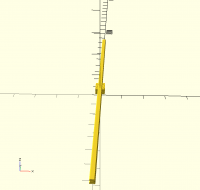
running osx 2015.12.02 and see more than the rail. no errors. is this what I am supposed to see? -- Extra Ham Operator: K7AZJ Registered Linux User: 275424 Raspberry Pi and Arduino developer *The most exciting phrase to hear in science - the one that heralds new discoveries - is not "Eureka!" but "That's funny...".*- Isaac. Asimov *I* *f you give someone a program, you will frustrate them for a day; if you teach them how to program, you will frustrate them for a lifetime. *- Anonymous *If writing good code requires very little comments, then writing really excellent code requires no comments at all!*- Ken Thompson On Sun, Jan 31, 2016 at 6:57 AM, lalbers <luke.albers@gmail.com> wrote: > Thank you for your reply. > > I ran the analysis in netfabb and I don't notice any problems - I may be > missing something though. > > I put all of the files for this, including a netfab screenshot here: > > http://files.albersllc.com/cad/ > > this code is essentially what I have uploaded in the .scad file and has the > same issue: > > import("HGH20CA_Z0_C_SS_1.stl"); > translate([0,0,20]) > rotate([90,0,0]) > linear_extrude(height = 1500, center = true) > import (file = "HGR20_rail_front.dxf"); > > > > > > -- > View this message in context: > http://forum.openscad.org/dxf-and-stl-import-rendering-issue-tp15979p15990.html > Sent from the OpenSCAD mailing list archive at Nabble.com. > > _______________________________________________ > OpenSCAD mailing list > Discuss@lists.openscad.org > http://lists.openscad.org/mailman/listinfo/discuss_lists.openscad.org >
J
jpmendes
Sun, Jan 31, 2016 4:18 PM

Hello

To me it seems this is a bug in OpenSCAD. When each part is exported as stl
one at a time and then imported it works well. In my opinion this is one
more reason to have an export() from the script, functionality.

jpmendes

--
View this message in context: http://forum.openscad.org/dxf-and-stl-import-rendering-issue-tp15979p15992.html
Sent from the OpenSCAD mailing list archive at Nabble.com.

Hello To me it seems this is a bug in OpenSCAD. When each part is exported as stl one at a time and then imported it works well. In my opinion this is one more reason to have an export() from the script, functionality. jpmendes -- View this message in context: http://forum.openscad.org/dxf-and-stl-import-rendering-issue-tp15979p15992.html Sent from the OpenSCAD mailing list archive at Nabble.com.
J
jpmendes
Sun, Jan 31, 2016 4:24 PM

Hi

Forget my previous message. I made some mistake during my tests. When
importing both .stl the same errors occur.
Sorry for this.

jpmendes

--
View this message in context: http://forum.openscad.org/dxf-and-stl-import-rendering-issue-tp15979p15993.html
Sent from the OpenSCAD mailing list archive at Nabble.com.

Hi Forget my previous message. I made some mistake during my tests. When importing both .stl the same errors occur. Sorry for this. jpmendes -- View this message in context: http://forum.openscad.org/dxf-and-stl-import-rendering-issue-tp15979p15993.html Sent from the OpenSCAD mailing list archive at Nabble.com.
L
lalbers
Sun, Jan 31, 2016 5:10 PM

That is what I expect to see (I hadn't got to the point where I could
position the bearing block on the rail yet but those are the parts)  - When
I get a chance maybe I will try on my girlfriend's mac to see if that makes
a difference.

--
View this message in context: http://forum.openscad.org/dxf-and-stl-import-rendering-issue-tp15979p15995.html
Sent from the OpenSCAD mailing list archive at Nabble.com.

That is what I expect to see (I hadn't got to the point where I could position the bearing block on the rail yet but those are the parts) - When I get a chance maybe I will try on my girlfriend's mac to see if that makes a difference. -- View this message in context: http://forum.openscad.org/dxf-and-stl-import-rendering-issue-tp15979p15995.html Sent from the OpenSCAD mailing list archive at Nabble.com.
J
jpmendes
Sun, Jan 31, 2016 6:19 PM

Hi

Meshlab doesn't report errors, however Kisslicer does. See pictures:
http://forum.openscad.org/file/n15996/Capture.png
http://forum.openscad.org/file/n15996/Capture3.png

After repairing the model using the online
https://modelrepair.azurewebsites.net/
https://modelrepair.azurewebsites.net/  service
Meshlab start reporting some errors:

http://forum.openscad.org/file/n15996/Capture4.png

Cheers
jpmendes

--
View this message in context: http://forum.openscad.org/dxf-and-stl-import-rendering-issue-tp15979p15996.html
Sent from the OpenSCAD mailing list archive at Nabble.com.

Hi Meshlab doesn't report errors, however Kisslicer does. See pictures: <http://forum.openscad.org/file/n15996/Capture.png> <http://forum.openscad.org/file/n15996/Capture3.png> After repairing the model using the online https://modelrepair.azurewebsites.net/ <https://modelrepair.azurewebsites.net/> service Meshlab start reporting some errors: <http://forum.openscad.org/file/n15996/Capture4.png> Cheers jpmendes -- View this message in context: http://forum.openscad.org/dxf-and-stl-import-rendering-issue-tp15979p15996.html Sent from the OpenSCAD mailing list archive at Nabble.com.
L
lalbers
Sun, Jan 31, 2016 6:25 PM

Thanks!!  I downloaded kisslicer and just opened and then saved the .stl from
there, using that file all is well.

I really appreciate all of you looking into this

--
View this message in context: http://forum.openscad.org/dxf-and-stl-import-rendering-issue-tp15979p15997.html
Sent from the OpenSCAD mailing list archive at Nabble.com.

Thanks!! I downloaded kisslicer and just opened and then saved the .stl from there, using that file all is well. I really appreciate all of you looking into this -- View this message in context: http://forum.openscad.org/dxf-and-stl-import-rendering-issue-tp15979p15997.html Sent from the OpenSCAD mailing list archive at Nabble.com.
C
cbernhardt
Sun, Jan 31, 2016 6:33 PM

I wrote a program in AutoCad (older version 14) that reads and draws STL
files. The triangle faces are colored according to the Z value of the normal
vectors.  Triangles with a normal vector value of z=0.0 are RED, z=1.0 are
yellow, z>0.0 are green, z<0.0 are cyan, and z=-1.0 are blue. In the AutoCad
rendering of your STL file there are some faces on the end of your model and
also in some of the holes that appear to be not exactly vertical, although I
doubt that is the cause of your error message.
http://forum.openscad.org/file/n15998/HGH20CA_Z0_C_SS_1.jpg

--
View this message in context: http://forum.openscad.org/dxf-and-stl-import-rendering-issue-tp15979p15998.html
Sent from the OpenSCAD mailing list archive at Nabble.com.

I wrote a program in AutoCad (older version 14) that reads and draws STL files. The triangle faces are colored according to the Z value of the normal vectors. Triangles with a normal vector value of z=0.0 are RED, z=1.0 are yellow, z>0.0 are green, z<0.0 are cyan, and z=-1.0 are blue. In the AutoCad rendering of your STL file there are some faces on the end of your model and also in some of the holes that appear to be not exactly vertical, although I doubt that is the cause of your error message. <http://forum.openscad.org/file/n15998/HGH20CA_Z0_C_SS_1.jpg> -- View this message in context: http://forum.openscad.org/dxf-and-stl-import-rendering-issue-tp15979p15998.html Sent from the OpenSCAD mailing list archive at Nabble.com.