

Living Hinges

These are living hinges:
http://www.thingiverse.com/thing:12708
http://blog.ponoko.com/2015/07/06/how-to-design-a-living-hinge/
http://www.deferredprocrastination.co.uk/blog/2011/laser-cut-lattice-living-hinges/
Is there an openscad library of these things? Anyone work with them before?
I'm thinking of some kind of module where you enter the width and height of
the pattern you want, and the thickness of the material, and poof, it
outputs a pattern of a living hinge.
Just trying to not reinvent the wheel.
Thanks,
Ari M Diacou

On 08-23-2016 2:17 PM, Ari Diacou wrote:
These are living hinges:
http://www.thingiverse.com/thing:12708
http://blog.ponoko.com/2015/07/06/how-to-design-a-living-hinge/
http://www.deferredprocrastination.co.uk/blog/2011/laser-cut-lattice-living-hinges/
Is there an openscad library of these things? Anyone work with them
before?
I'm thinking of some kind of module where you enter the width and
height of the pattern you want, and the thickness of the material, and
poof, it outputs a pattern of a living hinge.
Just trying to not reinvent the wheel.
Living hinges are pretty cool and very easy to make. I just difference
a cube on edge to chisel into into a flat sheet and they come out very
nice. Eg.:
w = 38 ;
d = 26 ;
h = 2 ;
cut = 1 ;
difference ()
{
cube ([w, d, h]) ;
translate ([-1, d / 2, cut])
rotate ([45, 0, 0])
   cube ([w + 2, 2, h]) ;
}
Polypropylene works very well for living hinges and is easy to work
with. I generally go for a 1 mm. hinge thickness. Smaller will give
you more flexible hinges, thicker makes them stronger but they still work.
- Michele

great links to the maths for torsional and spring calculations. Sounds like a great idea to work on for openSCAD
On 8/24/2016 6:17 AM, Ari Diacou wrote:
These are living hinges:
http://www.thingiverse.com/thing:12708
http://blog.ponoko.com/2015/07/06/how-to-design-a-living-hinge/
http://www.deferredprocrastination.co.uk/blog/2011/laser-cut-lattice-living-hinges/
Is there an openscad library of these things? Anyone work with them before?
I'm thinking of some kind of module where you enter the width and height of the pattern you want, and the thickness of the material, and poof, it outputs a pattern of a living hinge.
Just trying to not reinvent the wheel.
Thanks,
Ari M Diacou
<pre wrap="">_______________________________________________
OpenSCAD mailing list
<a class="moz-txt-link-abbreviated" href="mailto:Discuss@lists.openscad.org">Discuss@lists.openscad.org</a>
<a class="moz-txt-link-freetext" href="http://lists.openscad.org/mailman/listinfo/discuss_lists.openscad.org">http://lists.openscad.org/mailman/listinfo/discuss_lists.openscad.org</a>
No virus found in this message.
Checked by AVG - www.avg.com
Version: 2016.0.7752 / Virus Database: 4647/12863 - Release Date: 08/23/16
So I created it. Could you nerds give me any feedback? Any features you'd
want? Any settings that totally mess it up? I'll put it up on Thingiverse,
I think under a GNU license, once you give it a quick vetting.
Thanks,
--Ari M Diacou
Metis Industries
//Living Hinge
//Ari M Diacou
//Metis Industries
//August 2016
///////////////////////////////// Main()
//////////////////////////////////////
//Uncomment lines to see samples
hinge7();
//hinge7(d=6);
//hinge7(length=20,
width=40,d=6,hinge_length=2.5,hinges_across_length=2,minimum_thinness=3);
//hinge7(length=30,
width=20,d=2,hinge_length=2.5,hinges_across_length=2,minimum_thinness=3,center=true);
//hinge7(length=20,
width=40,d=3,hinge_length=4,hinges_across_length=0,minimum_thinness=1);
/////////////////////////////// Functions
/////////////////////////////////////
module
hinge7(length=30,width=20,d=3,minimum_thinness=3,hinge_length=3,hinges_across_length=2,center=false){
//moves difference(){ square(...) outside of if(m=0) statement,
compared to hinge6()
//length = the y dimension of the hinge, parallel to the laser cuts
//width = the x dimension of the hinge, transverse to laser cuts
//d=the distance between parallel laser cuts
//What is the minimum distance that two parallel lines can be apart
before the laser does something catastrophic? E.g. setting uncontrollable
fire to the work piece. This is "minimum_thinness"
//hinge_length=the distance between 2 colinear laser cuts
//hinges_across_length=the number of hinges across the length of the
hinge
//center is a boolean value, if true, place the center of the rectangle
at the origin, if false, put the bottom left corner at the origin (just
like square() and cube())
ep=.00101;//epsilon, a small number,=1.01 micron, a hack (for OpenSCAD
2015.03) used to make square()'s which look like lines (which OpenSCAD
doesn't support). Hopefully, your laser has a function which says something
like "ignore cuts less than THRESHOLD apart", set that to anything greater
than ep.
adjust=center?-[width,length]/2:[0,0];//a vector for adjusting the
center position
th=d/2<minimum_thinness?ep:d/2;//If the distance between lines is less
than the minimum thickness, just make linear cuts, specifically, set the
width=th=thickness of the squares to ep, which is just above 1 micron (for
1=1mm slicers)
n=floor(width/d);
m=floor(abs(hinges_across_length)); echo(str("Number of hinges
(m)=",m)); //input cleaning, ensures m ϵ {non-negative integers}
echo(str("The distance between parallel laser cuts (d) is: ",d," mm."));
//the length of the short lines
short=(length-mhinge_length)/(m+1);
//the length of the long lines
long=(length-(m+1)hinge_length)/(m);
echo(str("There should be n=",n," links in the hinge."));
translate(adjust) difference(){
square([width,length],center=false);
if(m==0)
//In the special case where |hinges_across_length|<1, the hinge
should look like:
// | --------------------------------------|
// |-------------------------------------- |
// | --------------------------------------|
// |-------------------------------------- |
for(i=[0:n])
translate([id,(pow(-1,i))hinge_length]) //
(-1)^i,{iϵZ} = {-1,+1,-1,+1,...}
square([th,length]);
else
//A hinge with hinges_across_length=2 should look like:
// |------------ ------------ ------------|
// | ----------------- ----------------- |
// |------------ ------------ ------------|
// | ----------------- ----------------- |
for(i=[0:n]){ //Iterating across x
translate([id1,0]){ //Do the x translation seperate from
the y translations
if(i%2==1) //For odd columns
for(j=[0:m-1]){
translate([0,hinge_length+j*(long+hinge_length)])
square([th,long]);
}
if(i%2==0) //For even columns
for(j=[0:m]){
translate([0,j*(short+hinge_length)])
square([th,short]);
}
}
}
}
}
On Tue, Aug 23, 2016 at 6:26 PM, Mark Schafer mschafer@wireframe.biz
wrote:
great links to the maths for torsional and spring calculations. Sounds
like a great idea to work on for openSCAD
On 8/24/2016 6:17 AM, Ari Diacou wrote:
These are living hinges:
http://www.thingiverse.com/thing:12708
http://blog.ponoko.com/2015/07/06/how-to-design-a-living-hinge/
http://www.deferredprocrastination.co.uk/blog/2011/laser-cut-lattice-
living-hinges/
Is there an openscad library of these things? Anyone work with them before?
I'm thinking of some kind of module where you enter the width and height
of the pattern you want, and the thickness of the material, and poof, it
outputs a pattern of a living hinge.
Just trying to not reinvent the wheel.
Thanks,
Ari M Diacou
OpenSCAD mailing listDiscuss@lists.openscad.orghttp://lists.openscad.org/mailman/listinfo/discuss_lists.openscad.org
No virus found in this message.
Checked by AVG - www.avg.com
Version: 2016.0.7752 / Virus Database: 4647/12863 - Release Date: 08/23/16
OpenSCAD mailing list
Discuss@lists.openscad.org
http://lists.openscad.org/mailman/listinfo/discuss_lists.openscad.org

Nice work, Ari. I did not dig your code enough but I think could be
beneficial to have a more general module that, instead of working with a
fixed rectangular cutting shape, operates over user defined shapes.
Something like:
hinge7(params...) my_losangle();
hinge7(params...) rounded_square();
I have no idea how you would control the minimum_thinness though.
2016-08-25 17:18 GMT-03:00 Ari Diacou ari.diacou@gmail.com:
So I created it. Could you nerds give me any feedback? Any features you'd
want? Any settings that totally mess it up? I'll put it up on Thingiverse,
I think under a GNU license, once you give it a quick vetting.
Thanks,
--Ari M Diacou
Metis Industries
//Living Hinge
//Ari M Diacou
//Metis Industries
//August 2016
///////////////////////////////// Main() //////////////////////////////
////////
//Uncomment lines to see samples
hinge7();
//hinge7(d=6);
//hinge7(length=20, width=40,d=6,hinge_length=2.5,hinges_across_length=2,
minimum_thinness=3);
//hinge7(length=30, width=20,d=2,hinge_length=2.5,hinges_across_length=2,
minimum_thinness=3,center=true);
//hinge7(length=20, width=40,d=3,hinge_length=4,hinges_across_length=0,
minimum_thinness=1);
/////////////////////////////// Functions //////////////////////////////
///////
module hinge7(length=30,width=20,d=3,minimum_thinness=3,hinge_
length=3,hinges_across_length=2,center=false){
//moves difference(){ square(...) outside of if(m=0) statement,
compared to hinge6()
//length = the y dimension of the hinge, parallel to the laser cuts
//width = the x dimension of the hinge, transverse to laser cuts
//d=the distance between parallel laser cuts
//What is the minimum distance that two parallel lines can be apart
before the laser does something catastrophic? E.g. setting uncontrollable
fire to the work piece. This is "minimum_thinness"
//hinge_length=the distance between 2 colinear laser cuts
//hinges_across_length=the number of hinges across the length of the
hinge
//center is a boolean value, if true, place the center of the
rectangle at the origin, if false, put the bottom left corner at the origin
(just like square() and cube())
ep=.00101;//epsilon, a small number,=1.01 micron, a hack (for OpenSCAD
2015.03) used to make square()'s which look like lines (which OpenSCAD
doesn't support). Hopefully, your laser has a function which says something
like "ignore cuts less than THRESHOLD apart", set that to anything greater
than ep.
adjust=center?-[width,length]/2:[0,0];//a vector for adjusting the
center position
th=d/2<minimum_thinness?ep:d/2;//If the distance between lines is
less than the minimum thickness, just make linear cuts, specifically, set
the width=th=thickness of the squares to ep, which is just above 1 micron
(for 1=1mm slicers)
n=floor(width/d);
m=floor(abs(hinges_across_length)); echo(str("Number of hinges
(m)=",m)); //input cleaning, ensures m ϵ {non-negative integers}
echo(str("The distance between parallel laser cuts (d) is: ",d,"
mm."));
//the length of the short lines
short=(length-mhinge_length)/(m+1);
//the length of the long lines
long=(length-(m+1)hinge_length)/(m);
echo(str("There should be n=",n," links in the hinge."));
translate(adjust) difference(){
square([width,length],center=false);
if(m==0)
//In the special case where |hinges_across_length|<1, the
hinge should look like:
// | --------------------------------------|
// |-------------------------------------- |
// | --------------------------------------|
// |-------------------------------------- |
for(i=[0:n])
translate([id,(pow(-1,i))hinge_length]) //
(-1)^i,{iϵZ} = {-1,+1,-1,+1,...}
square([th,length]);
else
//A hinge with hinges_across_length=2 should look like:
// |------------ ------------ ------------|
// | ----------------- ----------------- |
// |------------ ------------ ------------|
// | ----------------- ----------------- |
for(i=[0:n]){ //Iterating across x
translate([id1,0]){ //Do the x translation seperate from
the y translations
if(i%2==1) //For odd columns
for(j=[0:m-1]){
translate([0,hinge_length+j*(
long+hinge_length)])
square([th,long]);
}
if(i%2==0) //For even columns
for(j=[0:m]){
translate([0,j*(short+hinge_length)])
square([th,short]);
}
}
}
}
}
On Tue, Aug 23, 2016 at 6:26 PM, Mark Schafer mschafer@wireframe.biz
wrote:
great links to the maths for torsional and spring calculations. Sounds
like a great idea to work on for openSCAD
On 8/24/2016 6:17 AM, Ari Diacou wrote:
These are living hinges:
http://www.thingiverse.com/thing:12708
http://blog.ponoko.com/2015/07/06/how-to-design-a-living-hinge/
http://www.deferredprocrastination.co.uk/blog/2011/laser-
cut-lattice-living-hinges/
Is there an openscad library of these things? Anyone work with them
before?
I'm thinking of some kind of module where you enter the width and height
of the pattern you want, and the thickness of the material, and poof, it
outputs a pattern of a living hinge.
Just trying to not reinvent the wheel.
Thanks,
Ari M Diacou
OpenSCAD mailing listDiscuss@lists.openscad.orghttp://lists.openscad.org/mailman/listinfo/discuss_lists.openscad.org
No virus found in this message.
Checked by AVG - www.avg.com
Version: 2016.0.7752 / Virus Database: 4647/12863 - Release Date: 08/23/16
OpenSCAD mailing list
Discuss@lists.openscad.org
http://lists.openscad.org/mailman/listinfo/discuss_lists.openscad.org
Thanks Ronaldo for the feedback. I can give that a think...
I see 2 problems:
-
If I am calling children to make my module modify another module, I dont
(think I) have a way to get the dimensional information of the child
module, so hinge8() would not know what to set "length" and "width" to use,
which are called extensively in the code. -
When you want a hinge, dont you almost always want it to be rectangular
in profile? Under what conditions would you NOT want the profile of the
hinge to be rectangular?
Are you thinking something like: ?
module add_hinge(length,width,...){
union(){
hinge7(length,width,center=true,...);
difference(){
children();
square([length,width]);
}
}
}
On Thu, Aug 25, 2016 at 5:11 PM, Ronaldo Persiano rcmpersiano@gmail.com
wrote:
Nice work, Ari. I did not dig your code enough but I think could be
beneficial to have a more general module that, instead of working with a
fixed rectangular cutting shape, operates over user defined shapes.
Something like:
hinge7(params...) my_losangle();
hinge7(params...) rounded_square();
I have no idea how you would control the minimum_thinness though.
2016-08-25 17:18 GMT-03:00 Ari Diacou ari.diacou@gmail.com:
So I created it. Could you nerds give me any feedback? Any features you'd
want? Any settings that totally mess it up? I'll put it up on Thingiverse,
I think under a GNU license, once you give it a quick vetting.
Thanks,
--Ari M Diacou
Metis Industries
//Living Hinge
//Ari M Diacou
//Metis Industries
//August 2016
///////////////////////////////// Main() //////////////////////////////
////////
//Uncomment lines to see samples
hinge7();
//hinge7(d=6);
//hinge7(length=20, width=40,d=6,hinge_length=2.5,
hinges_across_length=2,minimum_thinness=3);
//hinge7(length=30, width=20,d=2,hinge_length=2.5,
hinges_across_length=2,minimum_thinness=3,center=true);
//hinge7(length=20, width=40,d=3,hinge_length=4,hi
nges_across_length=0,minimum_thinness=1);
/////////////////////////////// Functions //////////////////////////////
///////
module hinge7(length=30,width=20,d=3,minimum_thinness=3,hinge_lengt
h=3,hinges_across_length=2,center=false){
//moves difference(){ square(...) outside of if(m=0) statement,
compared to hinge6()
//length = the y dimension of the hinge, parallel to the laser cuts
//width = the x dimension of the hinge, transverse to laser cuts
//d=the distance between parallel laser cuts
//What is the minimum distance that two parallel lines can be apart
before the laser does something catastrophic? E.g. setting uncontrollable
fire to the work piece. This is "minimum_thinness"
//hinge_length=the distance between 2 colinear laser cuts
//hinges_across_length=the number of hinges across the length of the
hinge
//center is a boolean value, if true, place the center of the
rectangle at the origin, if false, put the bottom left corner at the origin
(just like square() and cube())
ep=.00101;//epsilon, a small number,=1.01 micron, a hack (for
OpenSCAD 2015.03) used to make square()'s which look like lines (which
OpenSCAD doesn't support). Hopefully, your laser has a function which says
something like "ignore cuts less than THRESHOLD apart", set that to
anything greater than ep.
adjust=center?-[width,length]/2:[0,0];//a vector for adjusting the
center position
th=d/2<minimum_thinness?ep:d/2;//If the distance between lines is
less than the minimum thickness, just make linear cuts, specifically, set
the width=th=thickness of the squares to ep, which is just above 1 micron
(for 1=1mm slicers)
n=floor(width/d);
m=floor(abs(hinges_across_length)); echo(str("Number of hinges
(m)=",m)); //input cleaning, ensures m ϵ {non-negative integers}
echo(str("The distance between parallel laser cuts (d) is: ",d,"
mm."));
//the length of the short lines
short=(length-mhinge_length)/(m+1);
//the length of the long lines
long=(length-(m+1)hinge_length)/(m);
echo(str("There should be n=",n," links in the hinge."));
translate(adjust) difference(){
square([width,length],center=false);
if(m==0)
//In the special case where |hinges_across_length|<1, the
hinge should look like:
// | --------------------------------------|
// |-------------------------------------- |
// | --------------------------------------|
// |-------------------------------------- |
for(i=[0:n])
translate([id,(pow(-1,i))hinge_length]) //
(-1)^i,{iϵZ} = {-1,+1,-1,+1,...}
square([th,length]);
else
//A hinge with hinges_across_length=2 should look like:
// |------------ ------------ ------------|
// | ----------------- ----------------- |
// |------------ ------------ ------------|
// | ----------------- ----------------- |
for(i=[0:n]){ //Iterating across x
translate([id1,0]){ //Do the x translation seperate
from the y translations
if(i%2==1) //For odd columns
for(j=[0:m-1]){
translate([0,hinge_length+j*(l
ong+hinge_length)])
square([th,long]);
}
if(i%2==0) //For even columns
for(j=[0:m]){
translate([0,j*(short+hinge_length)])
square([th,short]);
}
}
}
}
}
On Tue, Aug 23, 2016 at 6:26 PM, Mark Schafer mschafer@wireframe.biz
wrote:
great links to the maths for torsional and spring calculations. Sounds
like a great idea to work on for openSCAD
On 8/24/2016 6:17 AM, Ari Diacou wrote:
These are living hinges:
http://www.thingiverse.com/thing:12708
http://blog.ponoko.com/2015/07/06/how-to-design-a-living-hinge/
http://www.deferredprocrastination.co.uk/blog/2011/laser-cut
-lattice-living-hinges/
Is there an openscad library of these things? Anyone work with them
before?
I'm thinking of some kind of module where you enter the width and height
of the pattern you want, and the thickness of the material, and poof, it
outputs a pattern of a living hinge.
Just trying to not reinvent the wheel.
Thanks,
Ari M Diacou
OpenSCAD mailing listDiscuss@lists.openscad.orghttp://lists.openscad.org/mailman/listinfo/discuss_lists.openscad.org
No virus found in this message.
Checked by AVG - www.avg.com
Version: 2016.0.7752 / Virus Database: 4647/12863 - Release Date:
08/23/16
OpenSCAD mailing list
Discuss@lists.openscad.org
http://lists.openscad.org/mailman/listinfo/discuss_lists.openscad.org
The first problem: your code can assume or expect a* centered* standard
footprint for the shape. Let's say 1x1 or 10x10. The hinge module will
position and stretch the children shape to meet its parameters. Yes, you
may *inside *the hinge module crop the shape to the 1x1 standard if you
want to.
The second: you feed me with that ideas! The second reference of your first
message shows several very beautiful non rectangular cutting paterns. ;)
2016-08-25 18:38 GMT-03:00 Ari Diacou ari.diacou@gmail.com:
Thanks Ronaldo for the feedback. I can give that a think...
I see 2 problems:
-
If I am calling children to make my module modify another module, I
dont (think I) have a way to get the dimensional information of the child
module, so hinge8() would not know what to set "length" and "width" to use,
which are called extensively in the code. -
When you want a hinge, dont you almost always want it to be rectangular
in profile? Under what conditions would you NOT want the profile of the
hinge to be rectangular?
Are you thinking something like: ?
module add_hinge(length,width,...){
union(){
hinge7(length,width,center=true,...);
difference(){
children();
square([length,width]);
}
}
}
On Thu, Aug 25, 2016 at 5:11 PM, Ronaldo Persiano rcmpersiano@gmail.com
wrote:
Nice work, Ari. I did not dig your code enough but I think could be
beneficial to have a more general module that, instead of working with a
fixed rectangular cutting shape, operates over user defined shapes.
Something like:
hinge7(params...) my_losangle();
hinge7(params...) rounded_square();
I have no idea how you would control the minimum_thinness though.
2016-08-25 17:18 GMT-03:00 Ari Diacou ari.diacou@gmail.com:
So I created it. Could you nerds give me any feedback? Any features
you'd want? Any settings that totally mess it up? I'll put it up on
Thingiverse, I think under a GNU license, once you give it a quick vetting.
Thanks,
--Ari M Diacou
Metis Industries
//Living Hinge
//Ari M Diacou
//Metis Industries
//August 2016
///////////////////////////////// Main() //////////////////////////////
////////
//Uncomment lines to see samples
hinge7();
//hinge7(d=6);
//hinge7(length=20, width=40,d=6,hinge_length=2.5,
hinges_across_length=2,minimum_thinness=3);
//hinge7(length=30, width=20,d=2,hinge_length=2.5,
hinges_across_length=2,minimum_thinness=3,center=true);
//hinge7(length=20, width=40,d=3,hinge_length=4,hi
nges_across_length=0,minimum_thinness=1);
/////////////////////////////// Functions //////////////////////////////
///////
module hinge7(length=30,width=20,d=3,minimum_thinness=3,hinge_lengt
h=3,hinges_across_length=2,center=false){
//moves difference(){ square(...) outside of if(m=0) statement,
compared to hinge6()
//length = the y dimension of the hinge, parallel to the laser cuts
//width = the x dimension of the hinge, transverse to laser cuts
//d=the distance between parallel laser cuts
//What is the minimum distance that two parallel lines can be apart
before the laser does something catastrophic? E.g. setting uncontrollable
fire to the work piece. This is "minimum_thinness"
//hinge_length=the distance between 2 colinear laser cuts
//hinges_across_length=the number of hinges across the length of the
hinge
//center is a boolean value, if true, place the center of the
rectangle at the origin, if false, put the bottom left corner at the origin
(just like square() and cube())
ep=.00101;//epsilon, a small number,=1.01 micron, a hack (for
OpenSCAD 2015.03) used to make square()'s which look like lines (which
OpenSCAD doesn't support). Hopefully, your laser has a function which says
something like "ignore cuts less than THRESHOLD apart", set that to
anything greater than ep.
adjust=center?-[width,length]/2:[0,0];//a vector for adjusting the
center position
th=d/2<minimum_thinness?ep:d/2;//If the distance between lines is
less than the minimum thickness, just make linear cuts, specifically, set
the width=th=thickness of the squares to ep, which is just above 1 micron
(for 1=1mm slicers)
n=floor(width/d);
m=floor(abs(hinges_across_length)); echo(str("Number of hinges
(m)=",m)); //input cleaning, ensures m ϵ {non-negative integers}
echo(str("The distance between parallel laser cuts (d) is: ",d,"
mm."));
//the length of the short lines
short=(length-mhinge_length)/(m+1);
//the length of the long lines
long=(length-(m+1)hinge_length)/(m);
echo(str("There should be n=",n," links in the hinge."));
translate(adjust) difference(){
square([width,length],center=false);
if(m==0)
//In the special case where |hinges_across_length|<1, the
hinge should look like:
// | --------------------------------------|
// |-------------------------------------- |
// | --------------------------------------|
// |-------------------------------------- |
for(i=[0:n])
translate([id,(pow(-1,i))hinge_length]) //
(-1)^i,{iϵZ} = {-1,+1,-1,+1,...}
square([th,length]);
else
//A hinge with hinges_across_length=2 should look like:
// |------------ ------------ ------------|
// | ----------------- ----------------- |
// |------------ ------------ ------------|
// | ----------------- ----------------- |
for(i=[0:n]){ //Iterating across x
translate([id1,0]){ //Do the x translation seperate
from the y translations
if(i%2==1) //For odd columns
for(j=[0:m-1]){
translate([0,hinge_length+j*(l
ong+hinge_length)])
square([th,long]);
}
if(i%2==0) //For even columns
for(j=[0:m]){
translate([0,j*(short+hinge_length)])
square([th,short]);
}
}
}
}
}
On Tue, Aug 23, 2016 at 6:26 PM, Mark Schafer mschafer@wireframe.biz
wrote:
great links to the maths for torsional and spring calculations. Sounds
like a great idea to work on for openSCAD
On 8/24/2016 6:17 AM, Ari Diacou wrote:
These are living hinges:
http://www.thingiverse.com/thing:12708
http://blog.ponoko.com/2015/07/06/how-to-design-a-living-hinge/
http://www.deferredprocrastination.co.uk/blog/2011/laser-cut
-lattice-living-hinges/
Is there an openscad library of these things? Anyone work with them
before?
I'm thinking of some kind of module where you enter the width and
height of the pattern you want, and the thickness of the material, and
poof, it outputs a pattern of a living hinge.
Just trying to not reinvent the wheel.
Thanks,
Ari M Diacou
OpenSCAD mailing listDiscuss@lists.openscad.orghttp://lists.openscad.org/mailman/listinfo/discuss_lists.openscad.org
No virus found in this message.
Checked by AVG - www.avg.com
Version: 2016.0.7752 / Virus Database: 4647/12863 - Release Date:
08/23/16
OpenSCAD mailing list
Discuss@lists.openscad.org
http://lists.openscad.org/mailman/listinfo/discuss_lists.openscad.org
Okay Ronaldo, you got your wish. I think "add_hinge() circle()" works the
way you want it to:
//Living Hinge
//Ari M Diacou
//Metis Industries
//August 2016
//Thanks to Ronaldo Persiano for the inspiration for add_hinge()
///////////////////////////// Parameters
/////////////////////////////////////
// preview[view:north, tilt:top]
//The y dimension of the hinge, parallel to the laser cuts
length=30;
//The x dimension of the hinge, transverse to laser cuts
width=40;
//The distance between parallel laser cuts
d=6;
//The distance between 2 collinear laser cuts
hinge_length=3;
//The number of hinges across the length of the hinge
hinges_across_length=1;
//How thick do you want the hinge to be
height=5;
///////////////////////////////// Main()
//////////////////////////////////////
//linear_extrude(height)
hinge(length=length,width=width,d=d,minimum_thinness=.01,hinge_length=hinge_length,hinges_across_length=hinges_across_length);
////Uncomment lines to see samples (all flat for DXF exporting)
//hinge();
//hinge(d=6);
//hinge(length=20,
width=39,d=6,hinge_length=2.5,hinges_across_length=2,minimum_thinness=3);
//hinge(length=30,
width=20,d=2,hinge_length=2.5,hinges_across_length=2,minimum_thinness=3,center=true);
//hinge(length=20,
width=40,d=3,hinge_length=4,hinges_across_length=0,minimum_thinness=1);
//linear_extrude(height=5) hinge(length=20,
width=40,d=6,hinge_length=2.5,hinges_across_length=2,minimum_thinness=3);
//add_hinge(width=20,length=length,center=true)
square([3*length,length-1],center=true);
//add_hinge(width=20,length=90) translate([5,0]) circle(d=90);
//add_hinge(width=30,length=90,hinges_across_length=3) circle(d=90);
//add_hinge(width=30,length=90,hinges_across_length=3,center=false)
circle(d=90);
add_hinge(width=30,length=90,hinges_across_length=3,minimum_thinness=.1)
circle(d=90);
/////////////////////////////// Functions
/////////////////////////////////////
module
hinge(length=30,width=20,d=3,minimum_thinness=3,hinge_length=3,hinges_across_length=2,center=false){
//length = the y dimension of the hinge, parallel to the laser cuts
//width = the x dimension of the hinge, transverse to laser cuts
//d=the distance between parallel laser cuts
//What is the minimum distance that two parallel lines can be apart
before the laser does something catastrophic? E.g. setting uncontrollable
fire to the work piece. This is "minimum_thinness"
//hinge_length=the distance between 2 collinear laser cuts
//hinges_across_length=the number of hinges across the length of the
hinge
//center is a boolean value, if true, place the center of the rectangle
at the origin, if false, put the bottom left corner at the origin (just
like square() and cube())
ep=.00101;//epsilon, a small number,=1.01 micron, a hack (for OpenSCAD
2015.03) used to make square()'s which look like lines (which OpenSCAD
doesn't support). Hopefully, your laser has a function which says something
like "ignore cuts less than THRESHOLD apart", set that to anything greater
than ep.
adjust=center?-[width,length]/2:[0,0];//a vector for adjusting the
center position
th=d/2<minimum_thinness?ep:d/2;//If the distance between lines is less
than the minimum thickness, just make linear cuts, specifically, set the
width=th=thickness of the squares to ep, which is just above 1 micron (for
1=1mm slicers)
n=floor(width/d);
m=floor(abs(hinges_across_length)); echo(str("Number of hinges
(m)=",m)); //input cleaning, ensures m ϵ {non-negative integers}
echo(str("Suggested filename: Living
Hinge-",length,"x",width,"mm-h=",m,"x",hinge_length,"-th=",th));
echo(str("The distance between parallel laser cuts (d) is: ",d," mm."));
//the length of the short lines
short=(length-mhinge_length)/(m+1);
//the length of the long lines
long=(length-(m+1)hinge_length)/(m);
echo(str("There should be n=",n," links in the hinge."));
translate(adjust) difference(){
square([width,length],center=false);
if(m==0)
//In the special case where |hinges_across_length|<1, the hinge
should look like:
// | --------------------------------------|
// |-------------------------------------- |
// | --------------------------------------|
// |-------------------------------------- |
for(i=[0:n])
translate([id,(pow(-1,i))hinge_length]) //
(-1)^i,{iϵZ} = {-1,+1,-1,+1,...}
square([th,length]);
else
//A hinge with hinges_across_length=2 should look like:
// |------------ ------------ ------------|
// | ----------------- ----------------- |
// |------------ ------------ ------------|
// | ----------------- ----------------- |
for(i=[0:n]){ //Iterating across x
translate([id1,0]){ //Do the x translation separate from
the y translations
if(i%2==1) //For odd columns
for(j=[0:m-1]){
translate([0,hinge_length+j*(long+hinge_length)])
square([th,long]);
}
if(i%2==0) //For even columns
for(j=[0:m]){
translate([0,j*(short+hinge_length)])
square([th,short]);
}
}
}
}
}
module
add_hinge(length=30,width=20,d=3,minimum_thinness=3,hinge_length=3,hinges_across_length=2,center=true){
//add_hinge() modifies another 2D object, by adding a hinge which is
centered on the origin (by default, this can be changed to false, so that
the bottom left corner of the hinge is at the origin. It uses the same
parameters as hinge().
//First, difference() a rectangle the size of the hinge from the child
object (makes a hole for the hinge
//Second, union() a hinge with First (puts the hinge in the hole)
//Third, intersection() the child object with Second (cuts off any
extra hinge that sticks out past the child object)
intersection(){
children();
union(){
hinge(length=length,width=width,d=d,minimum_thinness=minimum_thinness,hinge_length=hinge_length,hinges_across_length=hinges_across_length,center=center);
difference(){
children();
square([width,length],center=center);
}
}
}
}
On Thu, Aug 25, 2016 at 6:21 PM, Ronaldo Persiano rcmpersiano@gmail.com
wrote:
The first problem: your code can assume or expect a* centered* standard
footprint for the shape. Let's say 1x1 or 10x10. The hinge module will
position and stretch the children shape to meet its parameters. Yes, you
may *inside *the hinge module crop the shape to the 1x1 standard if you
want to.
The second: you feed me with that ideas! The second reference of your
first message shows several very beautiful non rectangular cutting paterns.
;)
2016-08-25 18:38 GMT-03:00 Ari Diacou ari.diacou@gmail.com:
Thanks Ronaldo for the feedback. I can give that a think...
I see 2 problems:
-
If I am calling children to make my module modify another module, I
dont (think I) have a way to get the dimensional information of the child
module, so hinge8() would not know what to set "length" and "width" to use,
which are called extensively in the code. -
When you want a hinge, dont you almost always want it to be
rectangular in profile? Under what conditions would you NOT want the
profile of the hinge to be rectangular?
Are you thinking something like: ?
module add_hinge(length,width,...){
union(){
hinge7(length,width,center=true,...);
difference(){
children();
square([length,width]);
}
}
}
On Thu, Aug 25, 2016 at 5:11 PM, Ronaldo Persiano rcmpersiano@gmail.com
wrote:
Nice work, Ari. I did not dig your code enough but I think could be
beneficial to have a more general module that, instead of working with a
fixed rectangular cutting shape, operates over user defined shapes.
Something like:
hinge7(params...) my_losangle();
hinge7(params...) rounded_square();
I have no idea how you would control the minimum_thinness though.
2016-08-25 17:18 GMT-03:00 Ari Diacou ari.diacou@gmail.com:
So I created it. Could you nerds give me any feedback? Any features
you'd want? Any settings that totally mess it up? I'll put it up on
Thingiverse, I think under a GNU license, once you give it a quick vetting.
Thanks,
--Ari M Diacou
Metis Industries
//Living Hinge
//Ari M Diacou
//Metis Industries
//August 2016
///////////////////////////////// Main() //////////////////////////////
////////
//Uncomment lines to see samples
hinge7();
//hinge7(d=6);
//hinge7(length=20, width=40,d=6,hinge_length=2.5,
hinges_across_length=2,minimum_thinness=3);
//hinge7(length=30, width=20,d=2,hinge_length=2.5,
hinges_across_length=2,minimum_thinness=3,center=true);
//hinge7(length=20, width=40,d=3,hinge_length=4,hi
nges_across_length=0,minimum_thinness=1);
/////////////////////////////// Functions
/////////////////////////////////////
module hinge7(length=30,width=20,d=3,minimum_thinness=3,hinge_lengt
h=3,hinges_across_length=2,center=false){
//moves difference(){ square(...) outside of if(m=0) statement,
compared to hinge6()
//length = the y dimension of the hinge, parallel to the laser cuts
//width = the x dimension of the hinge, transverse to laser cuts
//d=the distance between parallel laser cuts
//What is the minimum distance that two parallel lines can be apart
before the laser does something catastrophic? E.g. setting uncontrollable
fire to the work piece. This is "minimum_thinness"
//hinge_length=the distance between 2 colinear laser cuts
//hinges_across_length=the number of hinges across the length of
the hinge
//center is a boolean value, if true, place the center of the
rectangle at the origin, if false, put the bottom left corner at the origin
(just like square() and cube())
ep=.00101;//epsilon, a small number,=1.01 micron, a hack (for
OpenSCAD 2015.03) used to make square()'s which look like lines (which
OpenSCAD doesn't support). Hopefully, your laser has a function which says
something like "ignore cuts less than THRESHOLD apart", set that to
anything greater than ep.
adjust=center?-[width,length]/2:[0,0];//a vector for adjusting the
center position
th=d/2<minimum_thinness?ep:d/2;//If the distance between lines is
less than the minimum thickness, just make linear cuts, specifically, set
the width=th=thickness of the squares to ep, which is just above 1 micron
(for 1=1mm slicers)
n=floor(width/d);
m=floor(abs(hinges_across_length)); echo(str("Number of hinges
(m)=",m)); //input cleaning, ensures m ϵ {non-negative integers}
echo(str("The distance between parallel laser cuts (d) is: ",d,"
mm."));
//the length of the short lines
short=(length-mhinge_length)/(m+1);
//the length of the long lines
long=(length-(m+1)hinge_length)/(m);
echo(str("There should be n=",n," links in the hinge."));
translate(adjust) difference(){
square([width,length],center=false);
if(m==0)
//In the special case where |hinges_across_length|<1, the
hinge should look like:
// | --------------------------------------|
// |-------------------------------------- |
// | --------------------------------------|
// |-------------------------------------- |
for(i=[0:n])
translate([id,(pow(-1,i))hinge_length]) //
(-1)^i,{iϵZ} = {-1,+1,-1,+1,...}
square([th,length]);
else
//A hinge with hinges_across_length=2 should look like:
// |------------ ------------ ------------|
// | ----------------- ----------------- |
// |------------ ------------ ------------|
// | ----------------- ----------------- |
for(i=[0:n]){ //Iterating across x
translate([id1,0]){ //Do the x translation seperate
from the y translations
if(i%2==1) //For odd columns
for(j=[0:m-1]){
translate([0,hinge_length+j*(l
ong+hinge_length)])
square([th,long]);
}
if(i%2==0) //For even columns
for(j=[0:m]){
translate([0,j*(short+hinge_length)])
square([th,short]);
}
}
}
}
}
On Tue, Aug 23, 2016 at 6:26 PM, Mark Schafer mschafer@wireframe.biz
wrote:
great links to the maths for torsional and spring calculations. Sounds
like a great idea to work on for openSCAD
On 8/24/2016 6:17 AM, Ari Diacou wrote:
These are living hinges:
http://www.thingiverse.com/thing:12708
http://blog.ponoko.com/2015/07/06/how-to-design-a-living-hinge/
http://www.deferredprocrastination.co.uk/blog/2011/laser-cut
-lattice-living-hinges/
Is there an openscad library of these things? Anyone work with them
before?
I'm thinking of some kind of module where you enter the width and
height of the pattern you want, and the thickness of the material, and
poof, it outputs a pattern of a living hinge.
Just trying to not reinvent the wheel.
Thanks,
Ari M Diacou
OpenSCAD mailing listDiscuss@lists.openscad.orghttp://lists.openscad.org/mailman/listinfo/discuss_lists.openscad.org
No virus found in this message.
Checked by AVG - www.avg.com
Version: 2016.0.7752 / Virus Database: 4647/12863 - Release Date:
08/23/16
OpenSCAD mailing list
Discuss@lists.openscad.org
http://lists.openscad.org/mailman/listinfo/discuss_lists.openscad.org
I think I have not made myself clear. I had called shape the hinge repeated
cutting shape. Your add_hinge has its own use but what I meant was:
that I got with the following ad hoc code:
module shape1(b,a) {
square([b/8,a], center=true);
translate([-b+b/16,a-a/2]) square([b,a/4]);
translate([-b/16,-a+a/4]) square([b,a/4]);
}
module shape2(s) {
square([s,s/2],center=true);
square([s/2,s],center=true);
}
module shape3(a,b) {
scale([a,b]) rotate(45) square();
}
module hinge(s1,s2,offset=true){
difference(){
square([200,170]);
translate([0,50])
for(i=[0:10], j=[0:5]) {
if ( (j%2) && offset ) {
translate([s1*(i+0.5),s2j]) children();
} else {
translate([s1i,s2*j]) children();
}
}
}
}
hinge(s1=26,s2=15,offset=false) shape1(20,6);
translate([220,0]) hinge(s1=21,s2=16) shape2(17);
translate([440,0]) hinge(s1=100,s2=12) shape3(60,12);
Note that I added one more parameter to allow patterns with no offset
between rows. As I said before, I don't know how you could deal with the "
minimum_thinness" in this case.
2016-08-26 11:23 GMT-03:00 Ari Diacou ari.diacou@gmail.com:
Okay Ronaldo, you got your wish. I think "add_hinge() circle()" works the
way you want it to:
//Living Hinge
//Ari M Diacou
//Metis Industries
//August 2016
//Thanks to Ronaldo Persiano for the inspiration for add_hinge()
///////////////////////////// Parameters //////////////////////////////
///////
// preview[view:north, tilt:top]
//The y dimension of the hinge, parallel to the laser cuts
length=30;
//The x dimension of the hinge, transverse to laser cuts
width=40;
//The distance between parallel laser cuts
d=6;
//The distance between 2 collinear laser cuts
hinge_length=3;
//The number of hinges across the length of the hinge
hinges_across_length=1;
//How thick do you want the hinge to be
height=5;
///////////////////////////////// Main() //////////////////////////////
////////
//linear_extrude(height) hinge(length=length,width=
width,d=d,minimum_thinness=.01,hinge_length=hinge_length,
hinges_across_length=hinges_across_length);
////Uncomment lines to see samples (all flat for DXF exporting)
//hinge();
//hinge(d=6);
//hinge(length=20, width=39,d=6,hinge_length=2.5,hinges_across_length=2,
minimum_thinness=3);
//hinge(length=30, width=20,d=2,hinge_length=2.5,hinges_across_length=2,
minimum_thinness=3,center=true);
//hinge(length=20, width=40,d=3,hinge_length=4,hinges_across_length=0,
minimum_thinness=1);
//linear_extrude(height=5) hinge(length=20, width=40,d=6,hinge_length=2.5,
hinges_across_length=2,minimum_thinness=3);
//add_hinge(width=20,length=length,center=true)
square([3*length,length-1],center=true);
//add_hinge(width=20,length=90) translate([5,0]) circle(d=90);
//add_hinge(width=30,length=90,hinges_across_length=3) circle(d=90);
//add_hinge(width=30,length=90,hinges_across_length=3,center=false)
circle(d=90);
add_hinge(width=30,length=90,hinges_across_length=3,minimum_thinness=.1)
circle(d=90);
/////////////////////////////// Functions //////////////////////////////
///////
module hinge(length=30,width=20,d=3,minimum_thinness=3,hinge_
length=3,hinges_across_length=2,center=false){
//length = the y dimension of the hinge, parallel to the laser cuts
//width = the x dimension of the hinge, transverse to laser cuts
//d=the distance between parallel laser cuts
//What is the minimum distance that two parallel lines can be apart
before the laser does something catastrophic? E.g. setting uncontrollable
fire to the work piece. This is "minimum_thinness"
//hinge_length=the distance between 2 collinear laser cuts
//hinges_across_length=the number of hinges across the length of the
hinge
//center is a boolean value, if true, place the center of the
rectangle at the origin, if false, put the bottom left corner at the origin
(just like square() and cube())
ep=.00101;//epsilon, a small number,=1.01 micron, a hack (for OpenSCAD
2015.03) used to make square()'s which look like lines (which OpenSCAD
doesn't support). Hopefully, your laser has a function which says something
like "ignore cuts less than THRESHOLD apart", set that to anything greater
than ep.
adjust=center?-[width,length]/2:[0,0];//a vector for adjusting the
center position
th=d/2<minimum_thinness?ep:d/2;//If the distance between lines is
less than the minimum thickness, just make linear cuts, specifically, set
the width=th=thickness of the squares to ep, which is just above 1 micron
(for 1=1mm slicers)
n=floor(width/d);
m=floor(abs(hinges_across_length)); echo(str("Number of hinges
(m)=",m)); //input cleaning, ensures m ϵ {non-negative integers}
echo(str("Suggested filename: Living Hinge-",length,"x",width,"mm-
h=",m,"x",hinge_length,"-th=",th));
echo(str("The distance between parallel laser cuts (d) is: ",d,"
mm."));
//the length of the short lines
short=(length-mhinge_length)/(m+1);
//the length of the long lines
long=(length-(m+1)hinge_length)/(m);
echo(str("There should be n=",n," links in the hinge."));
translate(adjust) difference(){
square([width,length],center=false);
if(m==0)
//In the special case where |hinges_across_length|<1, the
hinge should look like:
// | --------------------------------------|
// |-------------------------------------- |
// | --------------------------------------|
// |-------------------------------------- |
for(i=[0:n])
translate([id,(pow(-1,i))hinge_length]) //
(-1)^i,{iϵZ} = {-1,+1,-1,+1,...}
square([th,length]);
else
//A hinge with hinges_across_length=2 should look like:
// |------------ ------------ ------------|
// | ----------------- ----------------- |
// |------------ ------------ ------------|
// | ----------------- ----------------- |
for(i=[0:n]){ //Iterating across x
translate([id1,0]){ //Do the x translation separate from
the y translations
if(i%2==1) //For odd columns
for(j=[0:m-1]){
translate([0,hinge_length+j*(
long+hinge_length)])
square([th,long]);
}
if(i%2==0) //For even columns
for(j=[0:m]){
translate([0,j*(short+hinge_length)])
square([th,short]);
}
}
}
}
}
module add_hinge(length=30,width=20,d=3,minimum_thinness=3,hinge_
length=3,hinges_across_length=2,center=true){
//add_hinge() modifies another 2D object, by adding a hinge which is
centered on the origin (by default, this can be changed to false, so that
the bottom left corner of the hinge is at the origin. It uses the same
parameters as hinge().
//First, difference() a rectangle the size of the hinge from the child
object (makes a hole for the hinge
//Second, union() a hinge with First (puts the hinge in the hole)
//Third, intersection() the child object with Second (cuts off any
extra hinge that sticks out past the child object)
intersection(){
children();
union(){
hinge(length=length,width=width,d=d,minimum_thinness=
minimum_thinness,hinge_length=hinge_length,hinges_across_
length=hinges_across_length,center=center);
difference(){
children();
square([width,length],center=center);
}
}
}
}
On Thu, Aug 25, 2016 at 6:21 PM, Ronaldo Persiano rcmpersiano@gmail.com
wrote:
The first problem: your code can assume or expect a* centered* standard
footprint for the shape. Let's say 1x1 or 10x10. The hinge module will
position and stretch the children shape to meet its parameters. Yes, you
may *inside *the hinge module crop the shape to the 1x1 standard if you
want to.
The second: you feed me with that ideas! The second reference of your
first message shows several very beautiful non rectangular cutting paterns.
;)
2016-08-25 18:38 GMT-03:00 Ari Diacou ari.diacou@gmail.com:
Thanks Ronaldo for the feedback. I can give that a think...
I see 2 problems:
-
If I am calling children to make my module modify another module, I
dont (think I) have a way to get the dimensional information of the child
module, so hinge8() would not know what to set "length" and "width" to use,
which are called extensively in the code. -
When you want a hinge, dont you almost always want it to be
rectangular in profile? Under what conditions would you NOT want the
profile of the hinge to be rectangular?
Are you thinking something like: ?
module add_hinge(length,width,...){
union(){
hinge7(length,width,center=true,...);
difference(){
children();
square([length,width]);
}
}
}
On Thu, Aug 25, 2016 at 5:11 PM, Ronaldo Persiano <rcmpersiano@gmail.com
wrote:
Nice work, Ari. I did not dig your code enough but I think could be
beneficial to have a more general module that, instead of working with a
fixed rectangular cutting shape, operates over user defined shapes.
Something like:
hinge7(params...) my_losangle();
hinge7(params...) rounded_square();
I have no idea how you would control the minimum_thinness though.
2016-08-25 17:18 GMT-03:00 Ari Diacou ari.diacou@gmail.com:
So I created it. Could you nerds give me any feedback? Any features
you'd want? Any settings that totally mess it up? I'll put it up on
Thingiverse, I think under a GNU license, once you give it a quick vetting.
Thanks,
--Ari M Diacou
Metis Industries
//Living Hinge
//Ari M Diacou
//Metis Industries
//August 2016
///////////////////////////////// Main()
//////////////////////////////////////
//Uncomment lines to see samples
hinge7();
//hinge7(d=6);
//hinge7(length=20, width=40,d=6,hinge_length=2.5,
hinges_across_length=2,minimum_thinness=3);
//hinge7(length=30, width=20,d=2,hinge_length=2.5,
hinges_across_length=2,minimum_thinness=3,center=true);
//hinge7(length=20, width=40,d=3,hinge_length=4,hi
nges_across_length=0,minimum_thinness=1);
/////////////////////////////// Functions
/////////////////////////////////////
module hinge7(length=30,width=20,d=3,minimum_thinness=3,hinge_lengt
h=3,hinges_across_length=2,center=false){
//moves difference(){ square(...) outside of if(m=0) statement,
compared to hinge6()
//length = the y dimension of the hinge, parallel to the laser cuts
//width = the x dimension of the hinge, transverse to laser cuts
//d=the distance between parallel laser cuts
//What is the minimum distance that two parallel lines can be
apart before the laser does something catastrophic? E.g. setting
uncontrollable fire to the work piece. This is "minimum_thinness"
//hinge_length=the distance between 2 colinear laser cuts
//hinges_across_length=the number of hinges across the length of
the hinge
//center is a boolean value, if true, place the center of the
rectangle at the origin, if false, put the bottom left corner at the origin
(just like square() and cube())
ep=.00101;//epsilon, a small number,=1.01 micron, a hack (for
OpenSCAD 2015.03) used to make square()'s which look like lines (which
OpenSCAD doesn't support). Hopefully, your laser has a function which says
something like "ignore cuts less than THRESHOLD apart", set that to
anything greater than ep.
adjust=center?-[width,length]/2:[0,0];//a vector for adjusting
the center position
th=d/2<minimum_thinness?ep:d/2;//If the distance between lines is
less than the minimum thickness, just make linear cuts, specifically, set
the width=th=thickness of the squares to ep, which is just above 1 micron
(for 1=1mm slicers)
n=floor(width/d);
m=floor(abs(hinges_across_length)); echo(str("Number of hinges
(m)=",m)); //input cleaning, ensures m ϵ {non-negative integers}
echo(str("The distance between parallel laser cuts (d) is: ",d,"
mm."));
//the length of the short lines
short=(length-mhinge_length)/(m+1);
//the length of the long lines
long=(length-(m+1)hinge_length)/(m);
echo(str("There should be n=",n," links in the hinge."));
translate(adjust) difference(){
square([width,length],center=false);
if(m==0)
//In the special case where |hinges_across_length|<1, the
hinge should look like:
// | --------------------------------------|
// |-------------------------------------- |
// | --------------------------------------|
// |-------------------------------------- |
for(i=[0:n])
translate([id,(pow(-1,i))hinge_length]) //
(-1)^i,{iϵZ} = {-1,+1,-1,+1,...}
square([th,length]);
else
//A hinge with hinges_across_length=2 should look like:
// |------------ ------------ ------------|
// | ----------------- ----------------- |
// |------------ ------------ ------------|
// | ----------------- ----------------- |
for(i=[0:n]){ //Iterating across x
translate([id1,0]){ //Do the x translation seperate
from the y translations
if(i%2==1) //For odd columns
for(j=[0:m-1]){
translate([0,hinge_length+j*(l
ong+hinge_length)])
square([th,long]);
}
if(i%2==0) //For even columns
for(j=[0:m]){
translate([0,j*(short+hinge_length)])
square([th,short]);
}
}
}
}
}
On Tue, Aug 23, 2016 at 6:26 PM, Mark Schafer mschafer@wireframe.biz
wrote:
great links to the maths for torsional and spring calculations.
Sounds like a great idea to work on for openSCAD
On 8/24/2016 6:17 AM, Ari Diacou wrote:
These are living hinges:
http://www.thingiverse.com/thing:12708
http://blog.ponoko.com/2015/07/06/how-to-design-a-living-hinge/
http://www.deferredprocrastination.co.uk/blog/2011/laser-cut
-lattice-living-hinges/
Is there an openscad library of these things? Anyone work with them
before?
I'm thinking of some kind of module where you enter the width and
height of the pattern you want, and the thickness of the material, and
poof, it outputs a pattern of a living hinge.
Just trying to not reinvent the wheel.
Thanks,
Ari M Diacou
OpenSCAD mailing listDiscuss@lists.openscad.orghttp://lists.openscad.org/mailman/listinfo/discuss_lists.openscad.org
No virus found in this message.
Checked by AVG - www.avg.com
Version: 2016.0.7752 / Virus Database: 4647/12863 - Release Date:
08/23/16
OpenSCAD mailing list
Discuss@lists.openscad.org
http://lists.openscad.org/mailman/listinfo/discuss_lists.openscad.org
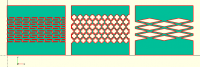
One more comment: I don't think it is a good idea to crop the shape to
constrain it to a rectangle [length, width]. The bounding boxes of shape1
of my code overlaps each other along a row.