

discuss@lists.openscad.org

OpenSCAD general discussion Mailing-list

View all threads

how to model this "spliny" shape

K
ken@volksswitch.org
Sun, Jan 27, 2019 1:59 AM

Any suggestions for how to model this shape:

https://drive.google.com/file/d/1dLyvvEzK3i3CQwC223ZVIVi2aXJT2E3K/view?usp=s
haring

It's purpose is to fit over the fingers of an individual and onto their palm
(before their thumb).  A stylus is attached via the dove-tail cuts in the
top.  This is for individuals with motor disabilities.  The goal would be to
make the palm outline scalable without affecting the mounting points on top
which have to be a standard size.  Also the thickness of the ring would need
to stay constant (or better yet be defined by a parameter).  Finally, it
should be possible to round or chamfer at least the inside edges of the ring
so as not to irritate the skin of the person wearing it unnecessarily.

Thoughts?

Thanks,

Ken

Any suggestions for how to model this shape: https://drive.google.com/file/d/1dLyvvEzK3i3CQwC223ZVIVi2aXJT2E3K/view?usp=s haring It's purpose is to fit over the fingers of an individual and onto their palm (before their thumb). A stylus is attached via the dove-tail cuts in the top. This is for individuals with motor disabilities. The goal would be to make the palm outline scalable without affecting the mounting points on top which have to be a standard size. Also the thickness of the ring would need to stay constant (or better yet be defined by a parameter). Finally, it should be possible to round or chamfer at least the inside edges of the ring so as not to irritate the skin of the person wearing it unnecessarily. Thoughts? Thanks, Ken
P
Parkinbot
Sun, Jan 27, 2019 2:24 AM
  • design it in 2D (e.g. with inkscape and import it as SVG or DXF),
  • linear extrude it
  • round it with minkowski() adding a sphere
  • to customize the size use scale factors

--
Sent from: http://forum.openscad.org/

- design it in 2D (e.g. with inkscape and import it as SVG or DXF), - linear extrude it - round it with minkowski() adding a sphere - to customize the size use scale factors -- Sent from: http://forum.openscad.org/

NH
nop head
Sun, Jan 27, 2019 8:53 AM

If you can handle it being a bit more regular you could model the inside
with four circle meeting tangentially. It is a bit of maths but I did it
for three to make a replacement glass for an Avo multimeter.

[image: avo_glass.png]

function sqr(x) = x * x;
$fs = 0.25;
$fa = 1;
width = 148;
h1 = 25.4;
h2 = 65;
r1 = 25.4;

h = h2 - h1;
l = width / 2 - r1;

r2 = 0.5 * (sqr(h) - sqr(r1) + sqr(width / 2 - r1)) / (h - r1);
w = l * r2 / (r2 - r1);

echo(r2);

offset = 0 *5.3 / 2;

linear_extrude(height = 3)
offset(-offset)
hull() {
translate([-width / 2, -offset])
square([width, 1]);

for(side = [-1, 1])
    translate([side * l, h1])
        #circle(r1);

intersection() {
    translate([0, h2 - r2, 1])
        #circle(r2);

    translate([-w, 0])
        square([2 * w, h2]);
}

}

Then you would use offset to make the outside edge and take the difference.
Then linear extrude it and round with minkowski.

You could also model it with Bezier splines for a more organic shape.

On Sun, 27 Jan 2019 at 02:26, Parkinbot rudolf@digitaldocument.de wrote:

  • design it in 2D (e.g. with inkscape and import it as SVG or DXF),
  • linear extrude it
  • round it with minkowski() adding a sphere
  • to customize the size use scale factors

--
Sent from: http://forum.openscad.org/


OpenSCAD mailing list
Discuss@lists.openscad.org
http://lists.openscad.org/mailman/listinfo/discuss_lists.openscad.org
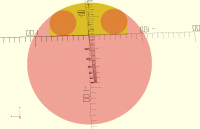
If you can handle it being a bit more regular you could model the inside with four circle meeting tangentially. It is a bit of maths but I did it for three to make a replacement glass for an Avo multimeter. [image: avo_glass.png] function sqr(x) = x * x; $fs = 0.25; $fa = 1; width = 148; h1 = 25.4; h2 = 65; r1 = 25.4; h = h2 - h1; l = width / 2 - r1; r2 = 0.5 * (sqr(h) - sqr(r1) + sqr(width / 2 - r1)) / (h - r1); w = l * r2 / (r2 - r1); echo(r2); offset = 0 *5.3 / 2; linear_extrude(height = 3) offset(-offset) hull() { translate([-width / 2, -offset]) square([width, 1]); for(side = [-1, 1]) translate([side * l, h1]) #circle(r1); intersection() { translate([0, h2 - r2, 1]) #circle(r2); translate([-w, 0]) square([2 * w, h2]); } } Then you would use offset to make the outside edge and take the difference. Then linear extrude it and round with minkowski. You could also model it with Bezier splines for a more organic shape. On Sun, 27 Jan 2019 at 02:26, Parkinbot <rudolf@digitaldocument.de> wrote: > - design it in 2D (e.g. with inkscape and import it as SVG or DXF), > - linear extrude it > - round it with minkowski() adding a sphere > - to customize the size use scale factors > > > > -- > Sent from: http://forum.openscad.org/ > > _______________________________________________ > OpenSCAD mailing list > Discuss@lists.openscad.org > http://lists.openscad.org/mailman/listinfo/discuss_lists.openscad.org >
FV
Frank van der Hulst
Sun, Jan 27, 2019 5:55 PM

Here's code for Bezier splines. See also
https://www.thingiverse.com/thing:8443

//
---====
// This is public Domain Code
// Contributed by: William A Adams
// 11 May 2011
//
// Removed modules to produce 3D objects and added module to create array
of points
// Changed "[steps:1]" to "[1:steps]" to avoid Deprecation warnings
// Frank van der Hulst 06 Sept 2016
//
---====

//
---======
// Functions
// The 4 blending functions for a cubic bezier curve
//
---======

/*
Bernstein Basis Functions

For Bezier curves, these functions give the weights per control point.

/
function BEZ03(u) = pow((1-u), 3);
function BEZ13(u) = 3
u*(pow((1-u),2));
function BEZ23(u) = 3*(pow(u,2))*(1-u);
function BEZ33(u) = pow(u,3);

// Calculate a singe point along a cubic bezier curve
// Given a set of 4 control points, and a parameter 0 <= 'u' <= 1
// These functions will return the exact point on the curve
function PointOnBezCubic2D(p0, p1, p2, p3, u) = [
BEZ03(u)*p0[0]+BEZ13(u)*p1[0]+BEZ23(u)*p2[0]+BEZ33(u)*p3[0],
BEZ03(u)*p0[1]+BEZ13(u)*p1[1]+BEZ23(u)*p2[1]+BEZ33(u)*p3[1]];

//
---======
// Modules
//
---======
// This function will generate points for a 2D bezier curve
// c - ControlPoints
//
function BezCubicPoints(c, steps) = [ for(step = [1:steps])
PointOnBezCubic2D(c[0], c[1], c[2],c[3], step/steps) ];

On Sun, Jan 27, 2019 at 9:54 PM nop head nop.head@gmail.com wrote:

If you can handle it being a bit more regular you could model the inside
with four circle meeting tangentially. It is a bit of maths but I did it
for three to make a replacement glass for an Avo multimeter.

[image: avo_glass.png]

function sqr(x) = x * x;
$fs = 0.25;
$fa = 1;
width = 148;
h1 = 25.4;
h2 = 65;
r1 = 25.4;

h = h2 - h1;
l = width / 2 - r1;

r2 = 0.5 * (sqr(h) - sqr(r1) + sqr(width / 2 - r1)) / (h - r1);
w = l * r2 / (r2 - r1);

echo(r2);

offset = 0 *5.3 / 2;

linear_extrude(height = 3)
offset(-offset)
hull() {
translate([-width / 2, -offset])
square([width, 1]);

 for(side = [-1, 1])
     translate([side * l, h1])
         #circle(r1);

 intersection() {
     translate([0, h2 - r2, 1])
         #circle(r2);

     translate([-w, 0])
         square([2 * w, h2]);
 }

}

Then you would use offset to make the outside edge and take the
difference. Then linear extrude it and round with minkowski.

You could also model it with Bezier splines for a more organic shape.

On Sun, 27 Jan 2019 at 02:26, Parkinbot rudolf@digitaldocument.de wrote:

  • design it in 2D (e.g. with inkscape and import it as SVG or DXF),
  • linear extrude it
  • round it with minkowski() adding a sphere
  • to customize the size use scale factors

--
Sent from: http://forum.openscad.org/


OpenSCAD mailing list
Discuss@lists.openscad.org
http://lists.openscad.org/mailman/listinfo/discuss_lists.openscad.org
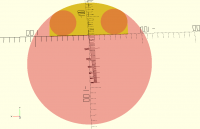
Here's code for Bezier splines. See also https://www.thingiverse.com/thing:8443 //===================================== // This is public Domain Code // Contributed by: William A Adams // 11 May 2011 // // Removed modules to produce 3D objects and added module to create array of points // Changed "[steps:1]" to "[1:steps]" to avoid Deprecation warnings // Frank van der Hulst 06 Sept 2016 //===================================== //======================================= // Functions // The 4 blending functions for a cubic bezier curve //======================================= /* Bernstein Basis Functions For Bezier curves, these functions give the weights per control point. */ function BEZ03(u) = pow((1-u), 3); function BEZ13(u) = 3*u*(pow((1-u),2)); function BEZ23(u) = 3*(pow(u,2))*(1-u); function BEZ33(u) = pow(u,3); // Calculate a singe point along a cubic bezier curve // Given a set of 4 control points, and a parameter 0 <= 'u' <= 1 // These functions will return the exact point on the curve function PointOnBezCubic2D(p0, p1, p2, p3, u) = [ BEZ03(u)*p0[0]+BEZ13(u)*p1[0]+BEZ23(u)*p2[0]+BEZ33(u)*p3[0], BEZ03(u)*p0[1]+BEZ13(u)*p1[1]+BEZ23(u)*p2[1]+BEZ33(u)*p3[1]]; //======================================= // Modules //======================================= // This function will generate points for a 2D bezier curve // c - ControlPoints // function BezCubicPoints(c, steps) = [ for(step = [1:steps]) PointOnBezCubic2D(c[0], c[1], c[2],c[3], step/steps) ]; On Sun, Jan 27, 2019 at 9:54 PM nop head <nop.head@gmail.com> wrote: > If you can handle it being a bit more regular you could model the inside > with four circle meeting tangentially. It is a bit of maths but I did it > for three to make a replacement glass for an Avo multimeter. > > [image: avo_glass.png] > > function sqr(x) = x * x; > $fs = 0.25; > $fa = 1; > width = 148; > h1 = 25.4; > h2 = 65; > r1 = 25.4; > > h = h2 - h1; > l = width / 2 - r1; > > r2 = 0.5 * (sqr(h) - sqr(r1) + sqr(width / 2 - r1)) / (h - r1); > w = l * r2 / (r2 - r1); > > echo(r2); > > offset = 0 *5.3 / 2; > > linear_extrude(height = 3) > offset(-offset) > hull() { > translate([-width / 2, -offset]) > square([width, 1]); > > for(side = [-1, 1]) > translate([side * l, h1]) > #circle(r1); > > intersection() { > translate([0, h2 - r2, 1]) > #circle(r2); > > translate([-w, 0]) > square([2 * w, h2]); > } > } > > Then you would use offset to make the outside edge and take the > difference. Then linear extrude it and round with minkowski. > > You could also model it with Bezier splines for a more organic shape. > > > On Sun, 27 Jan 2019 at 02:26, Parkinbot <rudolf@digitaldocument.de> wrote: > >> - design it in 2D (e.g. with inkscape and import it as SVG or DXF), >> - linear extrude it >> - round it with minkowski() adding a sphere >> - to customize the size use scale factors >> >> >> >> -- >> Sent from: http://forum.openscad.org/ >> >> _______________________________________________ >> OpenSCAD mailing list >> Discuss@lists.openscad.org >> http://lists.openscad.org/mailman/listinfo/discuss_lists.openscad.org >> > _______________________________________________ > OpenSCAD mailing list > Discuss@lists.openscad.org > http://lists.openscad.org/mailman/listinfo/discuss_lists.openscad.org >
S
shadowwynd
Mon, Jan 28, 2019 12:57 AM

Ken,

Most of my OpenSCAD use is developing equipment for disabilities.

Here is my take on it - if you use the Offset command in OpenSCAD, you can
have rounded shapes with concavity that you can't get with hull(), and the
results are a little more intuitive than spline, without having to draw it
in inkscape first (although I use Inkscape+OpenSCAD often).  Here is a rough
example:


height    = 20; // Height of part
thickness = 5;  // Wall Thickness
rounding  = 2;  // Diameter of rounding Circle
$fn          =20;  // Circle Smoothness

// The three data for each circle - center.x, center.y, diameter
circles = [
[-20, -0, 30],
[-10, 5, 30],
[0, 10, 30],
[15, 5, 25],
[30, 0, 20]
];

module profile()
{
x = 15;

offset (r=-x) offset (r=+x)
for (i=circles)
{
    translate ([i.x, i.y, 0]) circle (d=i.z);

}

}

module shape()
{
minkowski()
{
// Create the profile + thickness
// Subtract from it the profile
// Extrude shape, then round

    linear_extrude (height) 
        difference()
        {
            offset (r=thickness) profile();
            profile();
        }
    
    sphere (r=rounding, $fn=15);
}

// Mounting Bracket Goes Here
translate ([-10, 28, 0]) cube ([20, 10, height]);

}

// Create 3D Part
shape();

http://forum.openscad.org/file/t486/OpenSCAD_Example_-_Pen_Holder.png

--
Sent from: http://forum.openscad.org/

Ken, Most of my OpenSCAD use is developing equipment for disabilities. Here is my take on it - if you use the Offset command in OpenSCAD, you can have rounded shapes with concavity that you can't get with hull(), and the results are a little more intuitive than spline, without having to draw it in inkscape first (although I use Inkscape+OpenSCAD often). Here is a rough example: ------------------------ height = 20; // Height of part thickness = 5; // Wall Thickness rounding = 2; // Diameter of rounding Circle $fn =20; // Circle Smoothness // The three data for each circle - center.x, center.y, diameter circles = [ [-20, -0, 30], [-10, 5, 30], [0, 10, 30], [15, 5, 25], [30, 0, 20] ]; module profile() { x = 15; offset (r=-x) offset (r=+x) for (i=circles) { translate ([i.x, i.y, 0]) circle (d=i.z); } } module shape() { minkowski() { // Create the profile + thickness // Subtract from it the profile // Extrude shape, then round linear_extrude (height) difference() { offset (r=thickness) profile(); profile(); } sphere (r=rounding, $fn=15); } // Mounting Bracket Goes Here translate ([-10, 28, 0]) cube ([20, 10, height]); } // Create 3D Part shape(); <http://forum.openscad.org/file/t486/OpenSCAD_Example_-_Pen_Holder.png> -- Sent from: http://forum.openscad.org/