

discuss@lists.openscad.org

OpenSCAD general discussion Mailing-list

View all threads

Click-To-Code

J
jotweh
Fri, Apr 17, 2020 10:09 AM

Hey folks,

what'd you say about:

Click on the model to jump to related code.

I have taken a draft for mouse selection, and encountered some usability
questions.
There has been a bit of discussion on IRC on what the "right" behavior is,
so I hope for some more input here.

Possible behaviors:

  • Use ALL: when you click, the deepest identifiable object is selected,
    its corresponding file opened and the cursor moved to the declaration. This
    will traverse happily deep into library code.
  • Use ACTIVE: when you click, the deepest identifiable object is selected,
    and cursor is moved to the last call in the currently active file.
  • Use LOCAL: like ALL, but use only files that are accessible relative to
    the current file (not in library path)
  • Use OPEN: like ACTIVE, but use only files that are currently open in the
    editor

I have currently implemented that any file is opened. You can test it using:

It works in CSG Rendering and ThrownTogether.
If you find any problems or unexpected behavior please use the Pull Request
https://github.com/openscad/openscad/pull/3276

So my question is:

What of the above is the "right" behavior?
What would you expect to happen when you click on a part of the model?
where should the cursor end up?

best, jotweh

--
Sent from: http://forum.openscad.org/

Hey folks, what'd you say about: Click on the model to jump to related code. I have taken a draft for mouse selection, and encountered some usability questions. There has been a bit of discussion on IRC on what the "right" behavior is, so I hope for some more input here. Possible behaviors: * *Use ALL*: when you click, the deepest identifiable object is selected, its corresponding file opened and the cursor moved to the declaration. This will traverse happily deep into library code. * *Use ACTIVE*: when you click, the deepest identifiable object is selected, and cursor is moved to the last call in the currently active file. * *Use LOCAL*: like ALL, but use only files that are accessible relative to the current file (not in library path) * *Use OPEN*: like ACTIVE, but use only files that are currently open in the editor I have currently implemented that any file is opened. You can test it using: * Windows: https://circleci.com/gh/openscad/openscad/4881#artifacts * Linux AppImage: https://circleci.com/gh/openscad/openscad/4875#artifacts It works in CSG Rendering and ThrownTogether. If you find any problems or unexpected behavior please use the Pull Request https://github.com/openscad/openscad/pull/3276 So my question is: What of the above is the "right" behavior? What would you expect to happen when you click on a part of the model? where should the cursor end up? best, jotweh -- Sent from: http://forum.openscad.org/
NH
nop head
Fri, Apr 17, 2020 10:35 AM

I just get a completely white viewport. It doesn't even draw over the tool
bar when I resize it. However if I copy the viewport image I do get an
image with a black bar above it.

[image: image.png]

Win7 64 bit mxe build.

I also get this when I launch it.

[image: image.png]

On Fri, 17 Apr 2020 at 11:10, jotweh jw+openscad@stusta.de wrote:

Hey folks,

what'd you say about:

Click on the model to jump to related code.

I have taken a draft for mouse selection, and encountered some usability
questions.
There has been a bit of discussion on IRC on what the "right" behavior is,
so I hope for some more input here.

Possible behaviors:

  • Use ALL: when you click, the deepest identifiable object is selected,
    its corresponding file opened and the cursor moved to the declaration. This
    will traverse happily deep into library code.
  • Use ACTIVE: when you click, the deepest identifiable object is
    selected,
    and cursor is moved to the last call in the currently active file.
  • Use LOCAL: like ALL, but use only files that are accessible relative to
    the current file (not in library path)
  • Use OPEN: like ACTIVE, but use only files that are currently open in
    the
    editor

I have currently implemented that any file is opened. You can test it
using:

It works in CSG Rendering and ThrownTogether.
If you find any problems or unexpected behavior please use the Pull Request
https://github.com/openscad/openscad/pull/3276

So my question is:

What of the above is the "right" behavior?
What would you expect to happen when you click on a part of the model?
where should the cursor end up?

best, jotweh

--
Sent from: http://forum.openscad.org/


OpenSCAD mailing list
Discuss@lists.openscad.org
http://lists.openscad.org/mailman/listinfo/discuss_lists.openscad.org
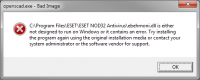
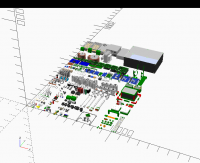
I just get a completely white viewport. It doesn't even draw over the tool bar when I resize it. However if I copy the viewport image I do get an image with a black bar above it. [image: image.png] Win7 64 bit mxe build. I also get this when I launch it. [image: image.png] On Fri, 17 Apr 2020 at 11:10, jotweh <jw+openscad@stusta.de> wrote: > Hey folks, > > what'd you say about: > > Click on the model to jump to related code. > > I have taken a draft for mouse selection, and encountered some usability > questions. > There has been a bit of discussion on IRC on what the "right" behavior is, > so I hope for some more input here. > > Possible behaviors: > > * *Use ALL*: when you click, the deepest identifiable object is selected, > its corresponding file opened and the cursor moved to the declaration. This > will traverse happily deep into library code. > * *Use ACTIVE*: when you click, the deepest identifiable object is > selected, > and cursor is moved to the last call in the currently active file. > * *Use LOCAL*: like ALL, but use only files that are accessible relative to > the current file (not in library path) > * *Use OPEN*: like ACTIVE, but use only files that are currently open in > the > editor > > I have currently implemented that any file is opened. You can test it > using: > > * Windows: https://circleci.com/gh/openscad/openscad/4881#artifacts > * Linux AppImage: https://circleci.com/gh/openscad/openscad/4875#artifacts > > It works in CSG Rendering and ThrownTogether. > If you find any problems or unexpected behavior please use the Pull Request > https://github.com/openscad/openscad/pull/3276 > > So my question is: > > What of the above is the "right" behavior? > What would you expect to happen when you click on a part of the model? > where should the cursor end up? > > best, jotweh > > > > -- > Sent from: http://forum.openscad.org/ > > _______________________________________________ > OpenSCAD mailing list > Discuss@lists.openscad.org > http://lists.openscad.org/mailman/listinfo/discuss_lists.openscad.org >
M
MichaelAtOz
Fri, Apr 17, 2020 11:01 PM

I downloaded the zip file.
I noticed it was significantly SMALLER than others I downloaded.
The difference is in openscad.exe 37,138 KB v's 40,746 KB.
AVG blocked it (as it usually does for new versions) sends it off for full
checking.
Returned as clean.

So I presume the build may have missed something.

I ran it, F5, clicked on the model, crash Exception Code: c0000005.


Admin - email* me if you need anything,  or if I've done something stupid...

  • click on my MichaelAtOz label, there is a link to email me.

Unless specifically shown otherwise above, my contribution is in the Public Domain; to the extent possible under law, I have waived all copyright and related or neighbouring rights to this work. Obviously inclusion of works of previous authors is not included in the above.

--
Sent from: http://forum.openscad.org/

I downloaded the zip file. I noticed it was significantly SMALLER than others I downloaded. The difference is in openscad.exe 37,138 KB v's 40,746 KB. AVG blocked it (as it usually does for new versions) sends it off for full checking. Returned as clean. So I presume the build may have missed something. I ran it, F5, clicked on the model, crash Exception Code: c0000005. ----- Admin - email* me if you need anything, or if I've done something stupid... * click on my MichaelAtOz label, there is a link to email me. Unless specifically shown otherwise above, my contribution is in the Public Domain; to the extent possible under law, I have waived all copyright and related or neighbouring rights to this work. Obviously inclusion of works of previous authors is not included in the above. -- Sent from: http://forum.openscad.org/
M
MichaelAtOz
Fri, Apr 17, 2020 11:03 PM

W7/64.


Admin - email* me if you need anything,  or if I've done something stupid...

  • click on my MichaelAtOz label, there is a link to email me.

Unless specifically shown otherwise above, my contribution is in the Public Domain; to the extent possible under law, I have waived all copyright and related or neighbouring rights to this work. Obviously inclusion of works of previous authors is not included in the above.

--
Sent from: http://forum.openscad.org/

W7/64. ----- Admin - email* me if you need anything, or if I've done something stupid... * click on my MichaelAtOz label, there is a link to email me. Unless specifically shown otherwise above, my contribution is in the Public Domain; to the extent possible under law, I have waived all copyright and related or neighbouring rights to this work. Obviously inclusion of works of previous authors is not included in the above. -- Sent from: http://forum.openscad.org/
P
pproj@posteo.de
Sun, Apr 19, 2020 8:06 AM

this is just great!  
i think the best option would be, to have some kind of "call stack"
displayed, just like stopping on a breakpoint, and being able to jump to
different levels of it.
i have not been able to try your program yet, but i will do. thanks a
lot for sharing! i had even proposed something similar to be implemented
in future versions.  i  think this is a hugely useful feature!

On 17.04.20 12:09, jotweh wrote:

Hey folks,

what'd you say about:

Click on the model to jump to related code.

I have taken a draft for mouse selection, and encountered some usability
questions.
There has been a bit of discussion on IRC on what the "right" behavior is,
so I hope for some more input here.

Possible behaviors:

  • Use ALL: when you click, the deepest identifiable object is selected,
    its corresponding file opened and the cursor moved to the declaration. This
    will traverse happily deep into library code.
  • Use ACTIVE: when you click, the deepest identifiable object is selected,
    and cursor is moved to the last call in the currently active file.
  • Use LOCAL: like ALL, but use only files that are accessible relative to
    the current file (not in library path)
  • Use OPEN: like ACTIVE, but use only files that are currently open in the
    editor

I have currently implemented that any file is opened. You can test it using:

It works in CSG Rendering and ThrownTogether.
If you find any problems or unexpected behavior please use the Pull Request
https://github.com/openscad/openscad/pull/3276

So my question is:

What of the above is the "right" behavior?
What would you expect to happen when you click on a part of the model?
where should the cursor end up?

best, jotweh

--
Sent from: http://forum.openscad.org/


OpenSCAD mailing list
Discuss@lists.openscad.org
http://lists.openscad.org/mailman/listinfo/discuss_lists.openscad.org

this is just great!   i think the best option would be, to have some kind of "call stack" displayed, just like stopping on a breakpoint, and being able to jump to different levels of it. i have not been able to try your program yet, but i will do. thanks a lot for sharing! i had even proposed something similar to be implemented in future versions.  i  think this is a hugely useful feature! On 17.04.20 12:09, jotweh wrote: > Hey folks, > > what'd you say about: > > Click on the model to jump to related code. > > I have taken a draft for mouse selection, and encountered some usability > questions. > There has been a bit of discussion on IRC on what the "right" behavior is, > so I hope for some more input here. > > Possible behaviors: > > * *Use ALL*: when you click, the deepest identifiable object is selected, > its corresponding file opened and the cursor moved to the declaration. This > will traverse happily deep into library code. > * *Use ACTIVE*: when you click, the deepest identifiable object is selected, > and cursor is moved to the last call in the currently active file. > * *Use LOCAL*: like ALL, but use only files that are accessible relative to > the current file (not in library path) > * *Use OPEN*: like ACTIVE, but use only files that are currently open in the > editor > > I have currently implemented that any file is opened. You can test it using: > > * Windows: https://circleci.com/gh/openscad/openscad/4881#artifacts > * Linux AppImage: https://circleci.com/gh/openscad/openscad/4875#artifacts > > It works in CSG Rendering and ThrownTogether. > If you find any problems or unexpected behavior please use the Pull Request > https://github.com/openscad/openscad/pull/3276 > > So my question is: > > What of the above is the "right" behavior? > What would you expect to happen when you click on a part of the model? > where should the cursor end up? > > best, jotweh > > > > -- > Sent from: http://forum.openscad.org/ > > _______________________________________________ > OpenSCAD mailing list > Discuss@lists.openscad.org > http://lists.openscad.org/mailman/listinfo/discuss_lists.openscad.org
J
jotweh
Sun, Apr 19, 2020 9:34 AM

So you think of a workflow like:

  • click on the model
  • cet a extra window/widget/console with the "call stack"
  • click on the element in this window which you'd like to access
  • cursor jumps there and opens the file in the tabbed editor if it is not
    open

and regarding testing the program - there seems to be a rendering issue on
windows machines. I am still creating a windows dev environment to
investigate and fix (current state: 22 hours of compiling). Testing on Linux
works like a charm :)

--
Sent from: http://forum.openscad.org/

So you think of a workflow like: - click on the model - cet a extra window/widget/console with the "call stack" - click on the element in this window which you'd like to access - cursor jumps there and opens the file in the tabbed editor if it is not open and regarding testing the program - there seems to be a rendering issue on windows machines. I am still creating a windows dev environment to investigate and fix (current state: 22 hours of compiling). Testing on Linux works like a charm :) -- Sent from: http://forum.openscad.org/
P
pproj@posteo.de
Wed, Apr 22, 2020 11:18 AM

Yes. in my opinionthat would almost ideal.
even more so would be a possibility of integration with an external text
editor like sublime, but ihave no idea howto acheive this, and it is
robably not needed for the most people anyways. but yes i mean a
workflow like you describe.

On 19.04.20 11:34, jotweh wrote:

So you think of a workflow like:

  • click on the model
  • cet a extra window/widget/console with the "call stack"
  • click on the element in this window which you'd like to access
  • cursor jumps there and opens the file in the tabbed editor if it is not
    open

and regarding testing the program - there seems to be a rendering issue on
windows machines. I am still creating a windows dev environment to
investigate and fix (current state: 22 hours of compiling). Testing on Linux
works like a charm :)

--
Sent from: http://forum.openscad.org/


OpenSCAD mailing list
Discuss@lists.openscad.org
http://lists.openscad.org/mailman/listinfo/discuss_lists.openscad.org

Yes. in my opinionthat would almost ideal. even more so would be a possibility of integration with an external text editor like sublime, but ihave no idea howto acheive this, and it is robably not needed for the most people anyways. but yes i mean a workflow like you describe. On 19.04.20 11:34, jotweh wrote: > So you think of a workflow like: > > - click on the model > - cet a extra window/widget/console with the "call stack" > - click on the element in this window which you'd like to access > - cursor jumps there and opens the file in the tabbed editor if it is not > open > > and regarding testing the program - there seems to be a rendering issue on > windows machines. I am still creating a windows dev environment to > investigate and fix (current state: 22 hours of compiling). Testing on Linux > works like a charm :) > > > > -- > Sent from: http://forum.openscad.org/ > > _______________________________________________ > OpenSCAD mailing list > Discuss@lists.openscad.org > http://lists.openscad.org/mailman/listinfo/discuss_lists.openscad.org