

About my PR and the discussion on github.

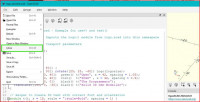
Another improvement would be to add the "close window" to one of the
menus. If it already exists: I couldn't find it.
File/Close

Yes, but there is a major differences.
Separating function "quit" in meaning "close all windows and exit" has
meaning only for applications that:
- It is a single instance application that own and control all its main
windows. This is the case of web browsers. When you start the browser
and there is another instance of the application running you get new
window in the running application instead of second application
instance.
Or:
- It is a multiple applications product that has a central coordinating
application. KiCAD is such an application. There is a project manager,
that coordinates and controls different sub-applications. And, notice,
that the "Quit" function exists only in the project manager, because
this is the application that controls and coordinates the whole suite.
For all other architectures of the application, existing "Quit" function
is meaningless at all.
OpenSCAD is neither of these. You can open multiple main windows, but
you also can start independently running instances of the program with
another set of main windows. And the user can't distinguish which
windows to which instance belongs. So the "Quit" in the context of the
OpenSCAD becomes a stochastic function that closes a random subset of
the main windows. The fact that the users avoid this behavior by
adjusting their workflow changes nothing.
There are several variants to fix this UX:
- Make only one main windows to exists per OpenSCAD instance. Fully
remove the cargo cult features: "New window", "Open in New window" and
"Close window". File|Quit closes the window and exits. If the user
wants new window - starts it exactly as it started the first one.
The docking window configuration is saved according the last closed
window.
- Make OpenSCAD real single instance application. On running new
instance, check whether there is another instance and if so - signal it
to open new main window and close.
In this case, as long as all main windows will belongs to one
application instance, the function "Quit" will work consistently and as
expected by the user. Opening the new windows from inside OpenSCAD and
from outside by the OS functions will end with the same result - new
main window of the running application.
In this case, on "Quit" the docking windows layout will be saved in
random order, and if you want some consistency, you should provide it
by special code.
Actually, I like the first variant. It is simple, it is consistent and
it astonishes the users less. And I definitely can't see any advantage
of the second approach in the context of OpenSCAD functionality.
Having a bunch of opening and closing functions in the menu makes the
code more complex, without adding any value for the user.
But well, if the second variant is what the dev team wants - fine. But
the current state of the application definitely if not neither of both
and need fixing.
Regards.
On Tue, 26 May 2026 08:32:52 -0600
Jordan Brown via Discuss discuss@lists.openscad.org wrote:
On 5/26/2026 7:54 AM, Michael Marx (spintel) via Discuss wrote:
John, the vast majority of application behave the way I described.
Try exploring them. File/quit(/exit) is NOT obscure or cryptic. It
has been THE normal way for decades. (please someone correct me if
I'm out dated - NO I don't' count android etc.)
Yep. Check any major browser; they all have a Quit/Exit that closes
all windows. I expect that for any application that has a Quit/Exit,
that's what it does. If you only want to close one window, use a
"Close" operation instead. Not all applications have a Quit/Exit;
current Office (365) tools do not.
And yes, it's a little confusing that there's no way to tell which
windows are associated with which processes, so if you have multiple
instances and they each have multiple windows, you can't readily tell
which set of windows will close when you File/Quit. I suggest that
users not do that; either run multiple processes or have multiple
windows from one process, not both. (Or don't use Quit.)
Perhaps we should have an option (option!) to behave as the browsers
and Office do: when asked to start a second instance, instead tell
the first instance to open a new window. Or perhaps we should have an
option that, when you ask OpenSCAD to open a new window, would start
a new process. There are advantages and disadvantages to both.
Any unconditional change here will break somebody's workflow
https://xkcd.com/1172/.

On Wed, May 27, 2026 at 09:54:22AM +0300, John Found via Discuss wrote:
Yes, but there is a major differences.
Separating function "quit" in meaning "close all windows and exit" has
meaning only for applications that:
- It is a single instance application that own and control all its main
windows. This is the case of web browsers. When you start the browser
and there is another instance of the application running you get new
window in the running application instead of second application
instance.
Or:
- It is a multiple applications product that has a central coordinating
application. KiCAD is such an application. There is a project manager,
that coordinates and controls different sub-applications. And, notice,
that the "Quit" function exists only in the project manager, because
this is the application that controls and coordinates the whole suite.
For all other architectures of the application, existing "Quit" function
is meaningless at all.
OpenSCAD is neither of these.
No. Openscad is just like a web browser. It shows different views of
different objects in different tabs-or-windows. (OK. fine, openscad
doesn't support the "tabs" yet).
I use "virtual desktops". I have 8 of them configured, and they have
specific desktops have different functions to me. 1: email 2: web
browsing 3: 3D design. 5-6-7: electronics design. 4,8: misc.
If I'd be working on two big 3D projects at the same time, I might use
3-4 for 3D design. And then I might use one openscad instance on 3 and
another on 4. In that scenario, "I'm done with the project on desktop
4: quit: Close all windows here" makes sense.
So I agree a "close window" option in the menu should be there, near
the quit option. But "quit" currently does exactly what it is supposed
to do and what everybody but you expects.
Roger.
--
** R.E.Wolff@BitWizard.nl ** https://www.BitWizard.nl/ ** +31-15-2049110 **
** Verl. Spiegelmakerstraat 37 2645 LZ Delfgauw, The Netherlands.
** KVK: 27239233 **
f equals m times a. When your f is steady, and your m is going down
your a** is going up. -- Chris Hadfield about flying up the space shuttle.
** 'a' for accelleration.

I run OpenSCAD under Windows, so all of my comments are about my
experience in this environment.
You said "You can open multiple main windows, but you also can start
independently running instances of the program with another set of main
windows. And the user can't distinguish which windows to which instance
belongs. So the "Quit" in the context of the OpenSCAD becomes a
stochastic function that closes a random subset of the main windows. The
fact that the users avoid this behavior by adjusting their workflow
changes nothing."
I can open an instance of OS and then open more than one tab in that
instance. I can open a 2nd instance and open more tabs in that
instance. I can tell exactly which tabs are in each instance. When I
Quit out of an instance, only that instance, and its tabs, are closed.
I am not clear what the problem is. This works fine for me.
Jon
On 5/27/2026 2:54 AM, John Found via Discuss wrote:
Yes, but there is a major differences.
Separating function "quit" in meaning "close all windows and exit" has
meaning only for applications that:
- It is a single instance application that own and control all its main
windows. This is the case of web browsers. When you start the browser
and there is another instance of the application running you get new
window in the running application instead of second application
instance.
Or:
- It is a multiple applications product that has a central coordinating
application. KiCAD is such an application. There is a project manager,
that coordinates and controls different sub-applications. And, notice,
that the "Quit" function exists only in the project manager, because
this is the application that controls and coordinates the whole suite.
For all other architectures of the application, existing "Quit" function
is meaningless at all.
OpenSCAD is neither of these. You can open multiple main windows, but
you also can start independently running instances of the program with
another set of main windows. And the user can't distinguish which
windows to which instance belongs. So the "Quit" in the context of the
OpenSCAD becomes a stochastic function that closes a random subset of
the main windows. The fact that the users avoid this behavior by
adjusting their workflow changes nothing.
There are several variants to fix this UX:
- Make only one main windows to exists per OpenSCAD instance. Fully
remove the cargo cult features: "New window", "Open in New window" and
"Close window". File|Quit closes the window and exits. If the user
wants new window - starts it exactly as it started the first one.
The docking window configuration is saved according the last closed
window.
- Make OpenSCAD real single instance application. On running new
instance, check whether there is another instance and if so - signal it
to open new main window and close.
In this case, as long as all main windows will belongs to one
application instance, the function "Quit" will work consistently and as
expected by the user. Opening the new windows from inside OpenSCAD and
from outside by the OS functions will end with the same result - new
main window of the running application.
In this case, on "Quit" the docking windows layout will be saved in
random order, and if you want some consistency, you should provide it
by special code.
Actually, I like the first variant. It is simple, it is consistent and
it astonishes the users less. And I definitely can't see any advantage
of the second approach in the context of OpenSCAD functionality.
Having a bunch of opening and closing functions in the menu makes the
code more complex, without adding any value for the user.
But well, if the second variant is what the dev team wants - fine. But
the current state of the application definitely if not neither of both
and need fixing.
Regards.
On Tue, 26 May 2026 08:32:52 -0600
Jordan Brown via Discussdiscuss@lists.openscad.org wrote:
On 5/26/2026 7:54 AM, Michael Marx (spintel) via Discuss wrote:
John, the vast majority of application behave the way I described.
Try exploring them. File/quit(/exit) is NOT obscure or cryptic. It
has been THE normal way for decades. (please someone correct me if
I'm out dated - NO I don't' count android etc.)
Yep. Check any major browser; they all have a Quit/Exit that closes
all windows. I expect that for any application that has a Quit/Exit,
that's what it does. If you only want to close one window, use a
"Close" operation instead. Not all applications have a Quit/Exit;
current Office (365) tools do not.
And yes, it's a little confusing that there's no way to tell which
windows are associated with which processes, so if you have multiple
instances and they each have multiple windows, you can't readily tell
which set of windows will close when you File/Quit. I suggest that
users not do that; either run multiple processes or have multiple
windows from one process, not both. (Or don't use Quit.)
Perhaps we should have an option (option!) to behave as the browsers
and Office do: when asked to start a second instance, instead tell
the first instance to open a new window. Or perhaps we should have an
option that, when you ask OpenSCAD to open a new window, would start
a new process. There are advantages and disadvantages to both.
Any unconditional change here will break somebody's workflow
https://urldefense.proofpoint.com/v2/url?u=https-3A__xkcd.com_1172_&d=DwICAg&c=euGZstcaTDllvimEN8b7jXrwqOf-v5A_CdpgnVfiiMM&r=AsrE-c7ZR7B2Kyr3qgfvvppkCEBVsNmwEMndcrRSuOI&m=pZkC-wxeqCVoB46TaUUJWD8wPrORL895xCucs5g0goO3QGj_q6yi87g6i6u4Tgyy&s=AzfyW7TKWyisO-OPxTyME3aO_lNTiEZvTJo-NsmD-2s&e=.
OpenSCAD mailing list
To unsubscribe send an email todiscuss-leave@lists.openscad.org
--
This email has been checked for viruses by AVG antivirus software.
www.avg.com
I can open an instance of OS and then open more than one tab in that
instance. I can open a 2nd instance and open more tabs in that
instance. I can tell exactly which tabs are in each instance. When
I Quit out of an instance, only that instance, and its tabs, are
closed.
I am not talking about the tabs at all. I am talking about the function
"File|New window" and "File|Open in new window" from the menu.
These functions opens another main window inside the already running
OpenSCAD. You can open any number of such windows and they still will
be part of the currently running OpenSCAD instance.
If you open another instance of OpenSCAD from the explorer, there will
be two instances of OpenSCAD with its own set of main windows.
Well, if you never use the File|New window or File|Open in new window,
then your OpenSCAD instances will have only one main window and you
will never hit this misbehavior I am talking about.
Regards.
On Wed, 27 May 2026 07:27:26 -0400
Jon Bondy via Discuss discuss@lists.openscad.org wrote:
I run OpenSCAD under Windows, so all of my comments are about my
experience in this environment.
You said "You can open multiple main windows, but you also can start
independently running instances of the program with another set of
main windows. And the user can't distinguish which windows to which
instance belongs. So the "Quit" in the context of the OpenSCAD
becomes a stochastic function that closes a random subset of the main
windows. The fact that the users avoid this behavior by adjusting
their workflow changes nothing."
I can open an instance of OS and then open more than one tab in that
instance. I can open a 2nd instance and open more tabs in that
instance. I can tell exactly which tabs are in each instance. When
I Quit out of an instance, only that instance, and its tabs, are
closed.
I am not clear what the problem is. This works fine for me.
Jon
On 5/27/2026 2:54 AM, John Found via Discuss wrote:
Yes, but there is a major differences.
Separating function "quit" in meaning "close all windows and exit"
has meaning only for applications that:
- It is a single instance application that own and control all its
main windows. This is the case of web browsers. When you start the
browser and there is another instance of the application running
you get new window in the running application instead of second
application instance.
Or:
- It is a multiple applications product that has a central
coordinating application. KiCAD is such an application. There is a
project manager, that coordinates and controls different
sub-applications. And, notice, that the "Quit" function exists only
in the project manager, because this is the application that
controls and coordinates the whole suite.
For all other architectures of the application, existing "Quit"
function is meaningless at all.
OpenSCAD is neither of these. You can open multiple main windows,
but you also can start independently running instances of the
program with another set of main windows. And the user can't
distinguish which windows to which instance belongs. So the "Quit"
in the context of the OpenSCAD becomes a stochastic function that
closes a random subset of the main windows. The fact that the users
avoid this behavior by adjusting their workflow changes nothing.
There are several variants to fix this UX:
- Make only one main windows to exists per OpenSCAD instance. Fully
remove the cargo cult features: "New window", "Open in New window"
and "Close window". File|Quit closes the window and exits. If the
user wants new window - starts it exactly as it started the first
one.
The docking window configuration is saved according the last closed
window.
- Make OpenSCAD real single instance application. On running new
instance, check whether there is another instance and if so -
signal it to open new main window and close.
In this case, as long as all main windows will belongs to one
application instance, the function "Quit" will work consistently
and as expected by the user. Opening the new windows from inside
OpenSCAD and from outside by the OS functions will end with the
same result - new main window of the running application.
In this case, on "Quit" the docking windows layout will be saved in
random order, and if you want some consistency, you should provide
it by special code.
Actually, I like the first variant. It is simple, it is consistent
and it astonishes the users less. And I definitely can't see any
advantage of the second approach in the context of OpenSCAD
functionality.
Having a bunch of opening and closing functions in the menu makes
the code more complex, without adding any value for the user.
But well, if the second variant is what the dev team wants - fine.
But the current state of the application definitely if not neither
of both and need fixing.
Regards.
On Tue, 26 May 2026 08:32:52 -0600
Jordan Brown via Discussdiscuss@lists.openscad.org wrote:
On 5/26/2026 7:54 AM, Michael Marx (spintel) via Discuss wrote:
John, the vast majority of application behave the way I described.
Try exploring them. File/quit(/exit) is NOT obscure or cryptic. It
has been THE normal way for decades. (please someone correct me if
I'm out dated - NO I don't' count android etc.)
Yep. Check any major browser; they all have a Quit/Exit that closes
all windows. I expect that for any application that has a
Quit/Exit, that's what it does. If you only want to close one
window, use a "Close" operation instead. Not all applications have
a Quit/Exit; current Office (365) tools do not.
And yes, it's a little confusing that there's no way to tell which
windows are associated with which processes, so if you have
multiple instances and they each have multiple windows, you can't
readily tell which set of windows will close when you File/Quit. I
suggest that users not do that; either run multiple processes or
have multiple windows from one process, not both. (Or don't use
Quit.)
Perhaps we should have an option (option!) to behave as the
browsers and Office do: when asked to start a second instance,
instead tell the first instance to open a new window. Or perhaps
we should have an option that, when you ask OpenSCAD to open a new
window, would start a new process. There are advantages and
disadvantages to both.
Any unconditional change here will break somebody's workflow
https://urldefense.proofpoint.com/v2/url?u=https-3A__xkcd.com_1172_&d=DwICAg&c=euGZstcaTDllvimEN8b7jXrwqOf-v5A_CdpgnVfiiMM&r=AsrE-c7ZR7B2Kyr3qgfvvppkCEBVsNmwEMndcrRSuOI&m=pZkC-wxeqCVoB46TaUUJWD8wPrORL895xCucs5g0goO3QGj_q6yi87g6i6u4Tgyy&s=AzfyW7TKWyisO-OPxTyME3aO_lNTiEZvTJo-NsmD-2s&e=.
OpenSCAD mailing list
To unsubscribe send an email todiscuss-leave@lists.openscad.org
John:
Thanks for the clarification.
Is there some advantage of using File, New Window vs using File, New Tab?
On 5/27/2026 7:42 AM, John Found via Discuss wrote:
I can open an instance of OS and then open more than one tab in that
instance. I can open a 2nd instance and open more tabs in that
instance. I can tell exactly which tabs are in each instance. When
I Quit out of an instance, only that instance, and its tabs, are
closed.
I am not talking about the tabs at all. I am talking about the function
"File|New window" and "File|Open in new window" from the menu.
These functions opens another main window inside the already running
OpenSCAD. You can open any number of such windows and they still will
be part of the currently running OpenSCAD instance.
If you open another instance of OpenSCAD from the explorer, there will
be two instances of OpenSCAD with its own set of main windows.
Well, if you never use the File|New window or File|Open in new window,
then your OpenSCAD instances will have only one main window and you
will never hit this misbehavior I am talking about.
Regards.
--
This email has been checked for viruses by AVG antivirus software.
www.avg.com
On Wed, May 27, 2026 at 10:35:00AM +0200, Rogier Wolff via Discuss wrote:
On Wed, May 27, 2026 at 09:54:22AM +0300, John Found via Discuss wrote:
Yes, but there is a major differences.
Separating function "quit" in meaning "close all windows and exit" has
meaning only for applications that:
- It is a single instance application that own and control all its main
windows. This is the case of web browsers. When you start the browser
and there is another instance of the application running you get new
window in the running application instead of second application
instance.
...
OpenSCAD is neither of these.
No. Openscad is just like a web browser. It shows different views of
different objects in different tabs-or-windows. (OK. fine, openscad
doesn't support the "tabs" yet).
I see now that I didn't address the "contacts running application to
open a new window when you start it from the commandline on a new
object".
Just tested: My browser doesn't do that by default. I just opened an
URL from the commandline, got a new window, then did menu -> exit
and.. my 150 tabs in the other instance stayed in place. I do have
a script that passes the "open in existing browser" option flag.
(I cant remember such things, so my "do a chess puzzle every day"
cronjob uses that script.)
Libreoffice DOES behave as you say: when possible it'll open the new
object in a running instance. For me as a user it seems impossible to
open a new instance.
Roger.
--
** R.E.Wolff@BitWizard.nl ** https://www.BitWizard.nl/ ** +31-15-2049110 **
** Verl. Spiegelmakerstraat 37 2645 LZ Delfgauw, The Netherlands.
** KVK: 27239233 **
f equals m times a. When your f is steady, and your m is going down
your a** is going up. -- Chris Hadfield about flying up the space shuttle.
** 'a' for accelleration.
Is there some advantage of using File, New Window vs using File, New
Tab?
If you are working in two (or more) separate windows, you can have two
separately rendered project in the same time. Or what is the same - you
can work simultaneously on two projects - independent or related.
But this goal can be reached with different workflows. Actually IMHO,
the application should have only one main window simply because this
is the definition of the term "main window". And when you need
second "main window" - you can start second instance of the application.
I am often working on several project simultaneously and as a rule - I
am opening the related to the project files (such as libraries) as a
tabs and start another instance of OpenSCAD for the different projects.
Regards.
On Wed, 27 May 2026 08:17:36 -0400
Jon Bondy via Discuss discuss@lists.openscad.org wrote:
John:
Thanks for the clarification.
Is there some advantage of using File, New Window vs using File, New
Tab?
On 5/27/2026 7:42 AM, John Found via Discuss wrote:
I can open an instance of OS and then open more than one tab in
that instance. I can open a 2nd instance and open more tabs in
that instance. I can tell exactly which tabs are in each
instance. When I Quit out of an instance, only that instance, and
its tabs, are closed.
I am not talking about the tabs at all. I am talking about the
function "File|New window" and "File|Open in new window" from the
menu.
These functions opens another main window inside the already
running OpenSCAD. You can open any number of such windows and they
still will be part of the currently running OpenSCAD instance.
If you open another instance of OpenSCAD from the explorer, there
will be two instances of OpenSCAD with its own set of main windows.
Well, if you never use the File|New window or File|Open in new
window, then your OpenSCAD instances will have only one main window
and you will never hit this misbehavior I am talking about.
Regards.
This was already in the discussion, but well - it is good:
;)
On Wed, 27 May 2026 10:35:00 +0200
Rogier Wolff via Discuss discuss@lists.openscad.org wrote:
On Wed, May 27, 2026 at 09:54:22AM +0300, John Found via Discuss
wrote:
Yes, but there is a major differences.
Separating function "quit" in meaning "close all windows and exit"
has meaning only for applications that:
- It is a single instance application that own and control all its
main windows. This is the case of web browsers. When you start the
browser and there is another instance of the application running
you get new window in the running application instead of second
application instance.
Or:
- It is a multiple applications product that has a central
coordinating application. KiCAD is such an application. There is a
project manager, that coordinates and controls different
sub-applications. And, notice, that the "Quit" function exists only
in the project manager, because this is the application that
controls and coordinates the whole suite.
For all other architectures of the application, existing "Quit"
function is meaningless at all.
OpenSCAD is neither of these.
No. Openscad is just like a web browser. It shows different views of
different objects in different tabs-or-windows. (OK. fine, openscad
doesn't support the "tabs" yet).
I use "virtual desktops". I have 8 of them configured, and they have
specific desktops have different functions to me. 1: email 2: web
browsing 3: 3D design. 5-6-7: electronics design. 4,8: misc.
If I'd be working on two big 3D projects at the same time, I might use
3-4 for 3D design. And then I might use one openscad instance on 3 and
another on 4. In that scenario, "I'm done with the project on desktop
4: quit: Close all windows here" makes sense.
So I agree a "close window" option in the menu should be there, near
the quit option. But "quit" currently does exactly what it is supposed
to do and what everybody but you expects.
Roger.
Always insightful!
On 5/27/2026 8:40 AM, John Found via Discuss wrote:
This was already in the discussion, but well - it is good:
;)
--
This email has been checked for viruses by AVG antivirus software.
www.avg.com