Re: Build a wall for a box - here is the profile

On 3/23/2022 5:07 AM, Jan Öhman via Discuss wrote:
1.) Indentation openSCAD
Is there any other editor / development tool suitable for openSCAD?
Some people use external editors. OpenSCAD can be set to automatically
reload and preview a changed file, so that when you save the file in the
external editor, it's recompiled and displayed.
I use openSCAD's editor that came with the installation.
Fails to find if number of spaces that "TAB" contains. Now TAB gives 4
spaces.
Can it be changed to 2 or 3 spaces?
Edit / Preferences / Editor
2) The contour of the object.
a) Is there a tool / aid when sketching an outline of an object?
(or is it Paper and Pen that still apply?)
There's no sketching tools. I've sometimes drawn in a conventional
drawing program (CorelDraw, but others would be similar) and read off
coordinates to transcribe into OpenSCAD. I've done models based off of
drawings that way, bringing an image into the drawing program, scaling
it appropriately, tracing with the drawing program's Bézier tools, then
reading off the Bézier parameters to transcribe into OpenSCAD.
You can also draw an SVG in a drawing program and import it into
OpenSCAD as a 2D object using import().
b) Do not 2D objects have a thickness?
Theoretically, no, they do not. They are displayed with a thickness,
but I think that's just a way to shoehorn them into what is
fundamentally a 3D display system.
(I don't know why they don't get displayed as true 2D objects, since the
display subsystem can handle that for incomplete polyhedra.)
*3) *Libraries - openSCAD
Tried to do the tutorials by openSCAD. When I got to chapter 5 (and
onwards)
OpenSCAD Tutorial/Chapter 5 - Wikibooks, open books for an open world
https://en.wikibooks.org/wiki/OpenSCAD_Tutorial/Chapter_5#Using_the_MCAD_library
I managed to get some examples to work, but others did not.
(An example that does not work for me)
use <vehicle_parts.scad>
$fa = 1;
$fs = 0.4;
module axle_wheelset(wheel_radius=10, wheel_width=6, track=35, radius=2) {
translate([0,track/2,0])
simple_wheel(wheel_radius=wheel_radius, wheel_width=wheel_width);
axle(track=track, radius=radius);
translate([0,-track/2,0])
simple_wheel(wheel_radius=wheel_radius, wheel_width=wheel_width);
}
axle_wheelset();
(no idea why - right now)
What's the error?
Do note that that sequence asks you to create vehicle_parts.scad on your
own.
Where did you put vehicle_parts.scad? Where did you put the main
program? The simplest variation is if they are in the same folder.
wao - what an awesome library you tipped about
Home · revarbat/BOSL2 Wiki https://github.com/revarbat/BOSL2/wiki
Will take a closer look at it when I understand how it can be used.
For that class of library, the first thing to do is to find the OpenSCAD
library directory. That location differs depending on your platform -
Windows vs Linux vs MacOS.
File / Show Library Folder should open it. You can also add another
directory using the OPENSCADPATH environment variable.
4) Construction method
It may be a good idea, for me, to start with the base plate and its
structure and rounded corners.
It was very nice to just get the contours on the wall. (but when
printing you probably want filled walls :-))
You can't get non-filled things in OpenSCAD. (Mostly. You can get
incomplete polyhedra, but I believe they fail to render and export.)
You can get solid 3D objects, and you can get closed 2D polygons, but
OpenSCAD doesn't have any support for simple lines.
Is it possible to print flat prints of an object on a 2D printer?
Yes. You can export in a number of 2D formats. See File / Export. You
would then need to use a different program to print the exported file.
5) A curved wall
Is it difficult to place "walls" around a 2D plate?
(the dimensions may not fit the previous wall - but the structure is
correct)
Assume a base plate with
- a corner 90 degrees and
- three rounded corners with one radius each and
- in the middle an "offset"
like this 2D modell .:
The image didn't come through.
$fn = 100; //Upplösning
This is a much larger value than is normally needed, and will hurt your
performance when you start working with multiple 3D curved objects.
I suggest the two parameters that I gave in my example:
$fa = 12;
$fs = 0.5;
They will produce reasonable results at any size. Tweak $fa down if
large circles need more sides; tweak $fs down in the unlikely event that
you need more sides on small circles.
module basePlate();{
That semicolon is wrong. It terminates the basePlate() module
immediately, with no contents, and then the brace-surrounded block is at
the top level.
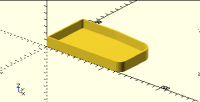
I'm not sure exactly what you're looking for, but here's a stab based on
your basePlate() module.
thickness = 2;
height = 15;

linear_extrude(height=thickness) basePlate();
linear_extrude(height=height) {
    difference() {
        basePlate();
        offset(-thickness) basePlate();
    }
}
which produces:
By the way, when you have a choice you should work with 2D objects and
then extrude them, rather than working with 3D objects. Performance is
better and there are fewer strange cases.
I could have done that by extruding the base plate to the full height,
and extruding an offset-in version, and differencing, but there would
have been a Z-fighting artifact at the top if I did it the obvious way.