

JB
Jordan Brown
Sun, Feb 28, 2021 2:01 AM
On 2/27/2021 5:00 PM, adrianv wrote:
I think you understand what I mean.
I understood what you meant... I just didn't understand how you got your
results using linear_extrude. And the answer is that you didn't.
The problem is you cannot create a square in OpenSCAD that has
vertices along its sides because collinear points are removed.
To get a model I think is good I had to use other methods. I created
my model in BOSL2 using skin(), which will accept any point list and
doesn't "simplify" away the collinear points.
Yeah, I wrote a quick-and-dirty linear_extrude replacement that consumes
a point list rather than a 2D shape, and with a 40-point square it
produces a result much like yours.
On 2/27/2021 5:00 PM, adrianv wrote:
> I think you understand what I mean.
I understood what you meant... I just didn't understand how you got your
results using linear_extrude. And the answer is that you didn't.
> The problem is you cannot create a square in OpenSCAD that has
> vertices along its sides because collinear points are removed.
So I've discovered :-)
> To get a model I think is good I had to use other methods. I created
> my model in BOSL2 using skin(), which will accept any point list and
> doesn't "simplify" away the collinear points.
Yeah, I wrote a quick-and-dirty linear_extrude replacement that consumes
a point list rather than a 2D shape, and with a 40-point square it
produces a result much like yours.
CA
Carsten Arnholm
Sun, Feb 28, 2021 10:11 AM
On 27.02.2021 19:38, adrianv wrote:
Is that in a dev version? Because when I try
intersection(){
linear_extrude(15, twist=90, convexity=8)
square(10,center=true);
translate([50/2,0,0])cube(50,center=true);
}
I get this pretty terrible result:
I get the same in OpenSCAD 2021.02.27.nightly (git c31925e) under
Kubuntu 18.04
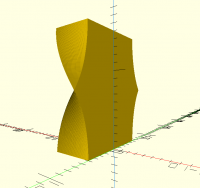
However, if you run the exact same .scad code with no modifications in
AngelCAD, you get the result shown in the attached twist2a.png file.
And, if you run the exact same code again with no modifications, but
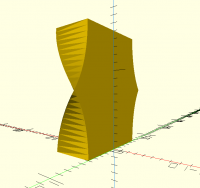
specify an external argument "secant_tolerance=0.001" to AngelCAD, you
get the result shown in the attached twist2b.png file.
Carsten Arnholm
On 27.02.2021 19:38, adrianv wrote:
> Is that in a dev version? Because when I try
>
> intersection(){
> linear_extrude(15, twist=90, convexity=8)
> square(10,center=true);
> translate([50/2,0,0])cube(50,center=true);
> }
>
> I get this pretty terrible result:
I get the same in OpenSCAD 2021.02.27.nightly (git c31925e) under
Kubuntu 18.04
However, if you run the exact same .scad code with no modifications in
AngelCAD, you get the result shown in the attached twist2a.png file.
And, if you run the exact same code again with no modifications, but
specify an external argument "secant_tolerance=0.001" to AngelCAD, you
get the result shown in the attached twist2b.png file.
Carsten Arnholm
RW
Ray West
Sun, Feb 28, 2021 11:49 AM
Interesting, in openscad, if I set $fn=10000; it looks quite nice, (much
larger value than that and my w10 pc tends towards freezing). Low
values e.g. $fn=4, could be useful too! However, using $fa or $fs can
not get to a very fine resolution before warning messages are produced.
The $fn value for this object seems to be about 4 times the number of
'slices'. $fn =1000, I would guess will most likely give the same
result as for secant_tolerance =0.001 in AngelCAD, and would give more
or less 250 'slices',
Is it the default low $fn value that gives the 'terrible result'?
On 28/02/2021 10:11, Carsten Arnholm wrote:
On 27.02.2021 19:38, adrianv wrote:
Is that in a dev version? Because when I try
intersection(){
linear_extrude(15, twist=90, convexity=8)
square(10,center=true);
translate([50/2,0,0])cube(50,center=true);
}
I get this pretty terrible result:
I get the same in OpenSCAD 2021.02.27.nightly (git c31925e) under
Kubuntu 18.04
However, if you run the exact same .scad code with no modifications in
AngelCAD, you get the result shown in the attached twist2a.png file.
And, if you run the exact same code again with no modifications, but
specify an external argument "secant_tolerance=0.001" to AngelCAD, you
get the result shown in the attached twist2b.png file.
Carsten Arnholm
OpenSCAD mailing list
Discuss@lists.openscad.org
http://lists.openscad.org/mailman/listinfo/discuss_lists.openscad.org
Interesting, in openscad, if I set $fn=10000; it looks quite nice, (much
larger value than that and my w10 pc tends towards freezing). Low
values e.g. $fn=4, could be useful too! However, using $fa or $fs can
not get to a very fine resolution before warning messages are produced.
The $fn value for this object seems to be about 4 times the number of
'slices'. $fn =1000, I would guess will most likely give the same
result as for secant_tolerance =0.001 in AngelCAD, and would give more
or less 250 'slices',
Is it the default low $fn value that gives the 'terrible result'?
On 28/02/2021 10:11, Carsten Arnholm wrote:
> On 27.02.2021 19:38, adrianv wrote:
>> Is that in a dev version? Because when I try
>>
>> intersection(){
>> linear_extrude(15, twist=90, convexity=8)
>> square(10,center=true);
>> translate([50/2,0,0])cube(50,center=true);
>> }
>>
>> I get this pretty terrible result:
>
> I get the same in OpenSCAD 2021.02.27.nightly (git c31925e) under
> Kubuntu 18.04
>
> However, if you run the exact same .scad code with no modifications in
> AngelCAD, you get the result shown in the attached twist2a.png file.
>
> And, if you run the exact same code again with no modifications, but
> specify an external argument "secant_tolerance=0.001" to AngelCAD, you
> get the result shown in the attached twist2b.png file.
>
> Carsten Arnholm
>
> _______________________________________________
> OpenSCAD mailing list
> Discuss@lists.openscad.org
> http://lists.openscad.org/mailman/listinfo/discuss_lists.openscad.org
CA
Carsten Arnholm
Sun, Feb 28, 2021 1:31 PM
On 28.02.2021 12:49, Ray West wrote:
Is it the default low $fn value that gives the 'terrible result'?
Yes, for the most part. The required discretization is a function of the
twist angle and any built-in curvature in the model. In this case it is
the wist angle alone.
Carsten Arnholm
On 28.02.2021 12:49, Ray West wrote:
> Is it the default low $fn value that gives the 'terrible result'?
Yes, for the most part. The required discretization is a function of the
twist angle and any built-in curvature in the model. In this case it is
the wist angle alone.
Carsten Arnholm
A
adrianv
Sun, Feb 28, 2021 1:39 PM
That's interesting. I didn't realize you could change the number of slices
with $fn.
But as I have been saying, really long narrow triangles are not really a
good way to model things.
I tried changing $fn to see what it took to make the model look roughly as
good as my model where I subdivide the square, and I think $fn=1000 looks
OK, where there is no longer visible oscillation of the walls. The
resulting model has 3002 halffacets and 1501 facets. (What is a halffacet?)
It also doesn't look good because it's sides are a moire pattern of tightly
clustered faces. And it's not a good way to describe the geometry, with
triangles 15/1000 wide but 10 units long.
In my model I constructed by other methods, I think the visual quality is
good when I subdivide the square into 8 vertices per side. This gives me
614 halffacets and 307 facets. So it's 1/5 the amount of geometry. And
the resulting model looks better. There's no funny moire pattern. I can
more clearly tell what the sides are doing. If I use a division of 5 I get
603 total (half)facets and the model looks only slightly worse. It's
starting to look distinctly polygonal along the edges, but the polygons are
a good approximation to the curve instead of a zig-zag approximation.
So on the one hand, yes, the default $fn is producing the terrible result.
But selecting a huge $fn gives a sort of tolerable result, not a good one.
It solves the problem in the wrong way, by using a zillion very long narrow
triangles instead of a smaller number of equilateral triangles.
I have this feeling that triangles with high aspect ratio (600 in the case
above) make for bad 3d models computationally. But I am not sure if this is
true for just printing or representing geometry. I may be mislead by past
experience in finite element analysis where the triangles need to be local
or they won't be good approximations to the spatially varying variables. In
this context, you will definitely have problems if you have very long skinny
triangles. Maybe no problems arise with very skinny triangles e.g. when
passing the model to a slicer?
mondo wrote
Interesting, in openscad, if I set $fn=10000; it looks quite nice, (much
larger value than that and my w10 pc tends towards freezing). Low
values e.g. $fn=4, could be useful too! However, using $fa or $fs can
not get to a very fine resolution before warning messages are produced.
The $fn value for this object seems to be about 4 times the number of
'slices'. $fn =1000, I would guess will most likely give the same
result as for secant_tolerance =0.001 in AngelCAD, and would give more
or less 250 'slices',
Is it the default low $fn value that gives the 'terrible result'?
On 28/02/2021 10:11, Carsten Arnholm wrote:
On 27.02.2021 19:38, adrianv wrote:
Is that in a dev version? Because when I try
intersection(){
linear_extrude(15, twist=90, convexity=8)
square(10,center=true);
translate([50/2,0,0])cube(50,center=true);
}
I get this pretty terrible result:
I get the same in OpenSCAD 2021.02.27.nightly (git c31925e) under
Kubuntu 18.04
However, if you run the exact same .scad code with no modifications in
AngelCAD, you get the result shown in the attached twist2a.png file.
And, if you run the exact same code again with no modifications, but
specify an external argument "secant_tolerance=0.001" to AngelCAD, you
get the result shown in the attached twist2b.png file.
Carsten Arnholm
OpenSCAD mailing list
That's interesting. I didn't realize you could change the number of slices
with $fn.
But as I have been saying, really long narrow triangles are not really a
good way to model things.
I tried changing $fn to see what it took to make the model look roughly as
good as my model where I subdivide the square, and I think $fn=1000 looks
OK, where there is no longer visible oscillation of the walls. The
resulting model has 3002 halffacets and 1501 facets. (What is a halffacet?)
It also doesn't look good because it's sides are a moire pattern of tightly
clustered faces. And it's not a good way to describe the geometry, with
triangles 15/1000 wide but 10 units long.
In my model I constructed by other methods, I think the visual quality is
good when I subdivide the square into 8 vertices per side. This gives me
614 halffacets and 307 facets. So it's 1/5 the amount of geometry. And
the resulting model looks better. There's no funny moire pattern. I can
more clearly tell what the sides are doing. If I use a division of 5 I get
603 total (half)facets and the model looks only slightly worse. It's
starting to look distinctly polygonal along the edges, but the polygons are
a good approximation to the curve instead of a zig-zag approximation.
So on the one hand, yes, the default $fn is producing the terrible result.
But selecting a huge $fn gives a sort of tolerable result, not a good one.
It solves the problem in the wrong way, by using a zillion very long narrow
triangles instead of a smaller number of equilateral triangles.
I have this feeling that triangles with high aspect ratio (600 in the case
above) make for bad 3d models computationally. But I am not sure if this is
true for just printing or representing geometry. I may be mislead by past
experience in finite element analysis where the triangles need to be local
or they won't be good approximations to the spatially varying variables. In
this context, you will definitely have problems if you have very long skinny
triangles. Maybe no problems arise with very skinny triangles e.g. when
passing the model to a slicer?
mondo wrote
> Interesting, in openscad, if I set $fn=10000; it looks quite nice, (much
> larger value than that and my w10 pc tends towards freezing). Low
> values e.g. $fn=4, could be useful too! However, using $fa or $fs can
> not get to a very fine resolution before warning messages are produced.
> The $fn value for this object seems to be about 4 times the number of
> 'slices'. $fn =1000, I would guess will most likely give the same
> result as for secant_tolerance =0.001 in AngelCAD, and would give more
> or less 250 'slices',
>
> Is it the default low $fn value that gives the 'terrible result'?
>
> On 28/02/2021 10:11, Carsten Arnholm wrote:
>> On 27.02.2021 19:38, adrianv wrote:
>>> Is that in a dev version? Because when I try
>>>
>>> intersection(){
>>> linear_extrude(15, twist=90, convexity=8)
>>> square(10,center=true);
>>> translate([50/2,0,0])cube(50,center=true);
>>> }
>>>
>>> I get this pretty terrible result:
>>
>> I get the same in OpenSCAD 2021.02.27.nightly (git c31925e) under
>> Kubuntu 18.04
>>
>> However, if you run the exact same .scad code with no modifications in
>> AngelCAD, you get the result shown in the attached twist2a.png file.
>>
>> And, if you run the exact same code again with no modifications, but
>> specify an external argument "secant_tolerance=0.001" to AngelCAD, you
>> get the result shown in the attached twist2b.png file.
>>
>> Carsten Arnholm
>>
>> _______________________________________________
>> OpenSCAD mailing list
>>
> Discuss@.openscad
>> http://lists.openscad.org/mailman/listinfo/discuss_lists.openscad.org
>
> _______________________________________________
> OpenSCAD mailing list
> Discuss@.openscad
> http://lists.openscad.org/mailman/listinfo/discuss_lists.openscad.org
--
Sent from: http://forum.openscad.org/
A
arnholm@arnholm.org
Sun, Feb 28, 2021 3:13 PM
On 2021-02-28 14:39, adrianv wrote:
I have this feeling that triangles with high aspect ratio (600 in the
case above) make for bad 3d models computationally. But I am not sure
if this is true for just printing or representing geometry. I may be
mislead by past experience in finite element analysis where the
triangles need to be local or they won't be good approximations to the
spatially varying variables. In this context, you will definitely
have problems if you have very long skinny triangles. Maybe no
problems arise with very skinny triangles e.g. when passing the model
to a slicer?
I have background from finite element analysis as well. For sure you
don't want long skinny triangles there. Often you don't want triangles
at all, but quadrilaterals (8 noded preferably). Finite elements with
bad aspect ratios don't behave well because the stiffness matrices
become poorly conditioned. For slicing/printing purposes however it
should not matter too much if the triangles are long and skinny, as
slicing is just a matter of computing line/plane intersections with
sufficient precision for the printer.
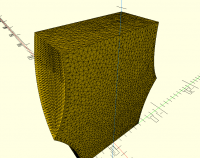
To create a finite element mesh with reasonable tetrahedron elements
from something like this, one typically first need to remesh the surface
mesh into triangles with better aspect rations, see attached example
done quickly with polyfix. Although very far from perfect, it would be a
better basis for a fem mesh.
You can do much more advanced and interesting FEM meshing with ftetWild
https://github.com/wildmeshing/fTetWild
With that software you can provide an STL with skinny triangles and it
will automagically do the surface remeshing and produce nice 3d
tetrahedron finite element meshes in .msh format, it can be visualized
using http://gmsh.info/
Carsten Arnholm
On 2021-02-28 14:39, adrianv wrote:
> I have this feeling that triangles with high aspect ratio (600 in the
> case above) make for bad 3d models computationally. But I am not sure
> if this is true for just printing or representing geometry. I may be
> mislead by past experience in finite element analysis where the
> triangles need to be local or they won't be good approximations to the
> spatially varying variables. In this context, you will definitely
> have problems if you have very long skinny triangles. Maybe no
> problems arise with very skinny triangles e.g. when passing the model
> to a slicer?
I have background from finite element analysis as well. For sure you
don't want long skinny triangles there. Often you don't want triangles
at all, but quadrilaterals (8 noded preferably). Finite elements with
bad aspect ratios don't behave well because the stiffness matrices
become poorly conditioned. For slicing/printing purposes however it
should not matter too much if the triangles are long and skinny, as
slicing is just a matter of computing line/plane intersections with
sufficient precision for the printer.
To create a finite element mesh with reasonable tetrahedron elements
from something like this, one typically first need to remesh the surface
mesh into triangles with better aspect rations, see attached example
done quickly with polyfix. Although very far from perfect, it would be a
better basis for a fem mesh.
You can do much more advanced and interesting FEM meshing with ftetWild
https://github.com/wildmeshing/fTetWild
With that software you can provide an STL with skinny triangles and it
will automagically do the surface remeshing and produce nice 3d
tetrahedron finite element meshes in .msh format, it can be visualized
using http://gmsh.info/
Carsten Arnholm
P
Parkinbot
Sun, Feb 28, 2021 11:40 PM
You can do much more advanced and interesting FEM meshing with ftetWild
https://github.com/wildmeshing/fTetWild
With that software you can provide an STL with skinny triangles and it
will automagically do the surface remeshing and produce nice 3d
tetrahedron finite element meshes in .msh format, it can be visualized
using http://gmsh.info/
Well, in the case being discussed here, remeshing skinny triags will not be
of any help. The problem is indeed the implementation of linear_extrude,
where nonplanar quads get triangulated.
in CSG a linear_extrude(10, twist=40) translates with default values to
However, when you specify the slices parameter the CSG will look like this:
Specifying the slices parameter will effect the twist operation only, while
$fn, $fa, $fs will also set a default value for the children of
linear_extrude();
As slices has only a vertical (z-axis) subdivision effect, in many cases it
could be advantageous to also introduce a (horizontal) subdivision scheme as
Adrian showed in his example.
For this, I think it might be worth to make a feature request for a new
"subdivide" parameter defaulting to 0 for backward compatibility and
allowing us to request a horizontal slicing for the twisted linear extrusion
by writing something like:
--
Sent from: http://forum.openscad.org/
cacb wrote
> You can do much more advanced and interesting FEM meshing with ftetWild
> https://github.com/wildmeshing/fTetWild
> With that software you can provide an STL with skinny triangles and it
> will automagically do the surface remeshing and produce nice 3d
> tetrahedron finite element meshes in .msh format, it can be visualized
> using http://gmsh.info/
Well, in the case being discussed here, remeshing skinny triags will not be
of any help. The problem is indeed the implementation of linear_extrude,
where nonplanar quads get triangulated.
in CSG a linear_extrude(10, twist=40) translates with default values to
However, when you specify the slices parameter the CSG will look like this:
Specifying the slices parameter will effect the twist operation only, while
$fn, $fa, $fs will also set a default value for the children of
linear_extrude();
As slices has only a vertical (z-axis) subdivision effect, in many cases it
could be advantageous to also introduce a (horizontal) subdivision scheme as
Adrian showed in his example.
For this, I think it might be worth to make a feature request for a new
"subdivide" parameter defaulting to 0 for backward compatibility and
allowing us to request a horizontal slicing for the twisted linear extrusion
by writing something like:
--
Sent from: http://forum.openscad.org/
HL
Hans L
Mon, Mar 1, 2021 1:57 AM
...
For this, I think it might be worth to make a feature request for a new
"subdivide" parameter defaulting to 0 for backward compatibility and
allowing us to request a horizontal slicing for the twisted linear
extrusion by writing something like:
linear_extrude(height = 10, convexity = 3, slices = 30, subdivision = 3) children()
There is already such an open feature request here:
https://github.com/openscad/openscad/issues/3411
The main thing needed is to come to some consensus on the API for such a
feature. The discussion went a bit off the rails towards the end, but any
fresh thoughts would be welcome.
It sounds like you've suggest to subdivide all edges by a constant factor,
but that seems like a bad idea since you could be extruding this:
square([100,1]);
or even worse something like
hull() { circle(1, fn=$30); translate([100,0]) circle(1, $fn=30) }
You wouldn't want the 1 unit sides of the square to be divided up into 100
pieces or however many times as the long side, and the circle arc segments
would be subdivided even tinier.
Personally I think the best way to do it is to specify a "max edge length",
and split any long edges into however many parts are needed to satisfy that
length.
The max edge length could be a new parameter, or the special variable $fs
could simply be re-used , but I'm not sure if that's the best idea either.
Using $fs would require a way to disable it with a bool flag if that were
done (defaulted to disabled for backwards compatibility).
Another idea I just started to consider would be to make this subdivision /
segmentation of 2D geometry into its own operation, independent of
linear_extrude. Since it might be useful in some other scenarios.
On a related note, today I finally tracked down the source of the collinear
edge merging and disabled that:
https://github.com/openscad/openscad/pull/3698
So that should at least make user workarounds a bit simpler. (nophead's
solution of perturbing vertices by small amounts would no longer be needed)
Hans
On Sun, Feb 28, 2021 at 5:41 PM Parkinbot <rudolf@digitaldocument.de> wrote:
> ...
> For this, I think it might be worth to make a feature request for a new
> "subdivide" parameter defaulting to 0 for backward compatibility and
> allowing us to request a horizontal slicing for the twisted linear
> extrusion by writing something like:
>
> linear_extrude(height = 10, convexity = 3, slices = 30, subdivision = 3) children()
>
>
There is already such an open feature request here:
https://github.com/openscad/openscad/issues/3411
The main thing needed is to come to some consensus on the API for such a
feature. The discussion went a bit off the rails towards the end, but any
fresh thoughts would be welcome.
It sounds like you've suggest to subdivide all edges by a constant factor,
but that seems like a bad idea since you could be extruding this:
square([100,1]);
or even worse something like
hull() { circle(1, fn=$30); translate([100,0]) circle(1, $fn=30) }
You wouldn't want the 1 unit sides of the square to be divided up into 100
pieces or however many times as the long side, and the circle arc segments
would be subdivided even tinier.
Personally I think the best way to do it is to specify a "max edge length",
and split any long edges into however many parts are needed to satisfy that
length.
The max edge length could be a new parameter, or the special variable $fs
could simply be re-used , but I'm not sure if that's the best idea either.
Using $fs would require a way to disable it with a bool flag if that were
done (defaulted to disabled for backwards compatibility).
Another idea I just started to consider would be to make this subdivision /
segmentation of 2D geometry into its own operation, independent of
linear_extrude. Since it might be useful in some other scenarios.
On a related note, today I finally tracked down the source of the collinear
edge merging and disabled that:
https://github.com/openscad/openscad/pull/3698
So that should at least make user workarounds a bit simpler. (nophead's
solution of perturbing vertices by small amounts would no longer be needed)
Hans
RP
Ronaldo Persiano
Mon, Mar 1, 2021 4:57 AM
Although disabling the collinear edge merging allows workarounds they may
not be so simple as happens in the case of your hulling of two circles.
The "max edge length" parameter seems to be the easiest for the users.
Em seg., 1 de mar. de 2021 às 01:58, Hans L thehans@gmail.com escreveu:
...
For this, I think it might be worth to make a feature request for a new
"subdivide" parameter defaulting to 0 for backward compatibility and
allowing us to request a horizontal slicing for the twisted linear
extrusion by writing something like:
linear_extrude(height = 10, convexity = 3, slices = 30, subdivision = 3) children()
There is already such an open feature request here:
https://github.com/openscad/openscad/issues/3411
The main thing needed is to come to some consensus on the API for such a
feature. The discussion went a bit off the rails towards the end, but any
fresh thoughts would be welcome.
It sounds like you've suggest to subdivide all edges by a constant factor,
but that seems like a bad idea since you could be extruding this:
square([100,1]);
or even worse something like
hull() { circle(1, fn=$30); translate([100,0]) circle(1, $fn=30) }
You wouldn't want the 1 unit sides of the square to be divided up into 100
pieces or however many times as the long side, and the circle arc segments
would be subdivided even tinier.
Personally I think the best way to do it is to specify a "max edge
length", and split any long edges into however many parts are needed to
satisfy that length.
The max edge length could be a new parameter, or the special variable $fs
could simply be re-used , but I'm not sure if that's the best idea either.
Using $fs would require a way to disable it with a bool flag if that were
done (defaulted to disabled for backwards compatibility).
Another idea I just started to consider would be to make this subdivision
/ segmentation of 2D geometry into its own operation, independent of
linear_extrude. Since it might be useful in some other scenarios.
On a related note, today I finally tracked down the source of the
collinear edge merging and disabled that:
https://github.com/openscad/openscad/pull/3698
So that should at least make user workarounds a bit simpler. (nophead's
solution of perturbing vertices by small amounts would no longer be needed)
Hans
OpenSCAD mailing list
Discuss@lists.openscad.org
http://lists.openscad.org/mailman/listinfo/discuss_lists.openscad.org
Although disabling the collinear edge merging allows workarounds they may
not be so simple as happens in the case of your hulling of two circles.
The "max edge length" parameter seems to be the easiest for the users.
Em seg., 1 de mar. de 2021 às 01:58, Hans L <thehans@gmail.com> escreveu:
> On Sun, Feb 28, 2021 at 5:41 PM Parkinbot <rudolf@digitaldocument.de>
> wrote:
>
>> ...
>> For this, I think it might be worth to make a feature request for a new
>> "subdivide" parameter defaulting to 0 for backward compatibility and
>> allowing us to request a horizontal slicing for the twisted linear
>> extrusion by writing something like:
>>
>> linear_extrude(height = 10, convexity = 3, slices = 30, subdivision = 3) children()
>>
>>
> There is already such an open feature request here:
> https://github.com/openscad/openscad/issues/3411
> The main thing needed is to come to some consensus on the API for such a
> feature. The discussion went a bit off the rails towards the end, but any
> fresh thoughts would be welcome.
>
> It sounds like you've suggest to subdivide all edges by a constant factor,
> but that seems like a bad idea since you could be extruding this:
> square([100,1]);
> or even worse something like
> hull() { circle(1, fn=$30); translate([100,0]) circle(1, $fn=30) }
>
> You wouldn't want the 1 unit sides of the square to be divided up into 100
> pieces or however many times as the long side, and the circle arc segments
> would be subdivided even tinier.
>
> Personally I think the best way to do it is to specify a "max edge
> length", and split any long edges into however many parts are needed to
> satisfy that length.
> The max edge length could be a new parameter, or the special variable $fs
> could simply be re-used , but I'm not sure if that's the best idea either.
> Using $fs would require a way to disable it with a bool flag if that were
> done (defaulted to disabled for backwards compatibility).
>
> Another idea I just started to consider would be to make this subdivision
> / segmentation of 2D geometry into its own operation, independent of
> linear_extrude. Since it might be useful in some other scenarios.
>
> On a related note, today I finally tracked down the source of the
> collinear edge merging and disabled that:
> https://github.com/openscad/openscad/pull/3698
> So that should at least make user workarounds a bit simpler. (nophead's
> solution of perturbing vertices by small amounts would no longer be needed)
>
> Hans
>
> _______________________________________________
> OpenSCAD mailing list
> Discuss@lists.openscad.org
> http://lists.openscad.org/mailman/listinfo/discuss_lists.openscad.org
>
P
Parkinbot
Mon, Mar 1, 2021 2:18 PM
It sounds like you've suggest to subdivide all edges by a constant factor,
but that seems like a bad idea since you could be extruding this:
square([100,1]);
or even worse something like
hull() { circle(1, fn=$30); translate([100,0]) circle(1, $fn=30) }
You wouldn't want the 1 unit sides of the square to be divided up into 100
pieces or however many times as the long side, and the circle arc segments
would be subdivided even tinier.
Well, in the moment you specify a slices parameter for this example, you
will have to defend the same argument. As the new subdivision parameter is
optional, everyone has the choice whether and how to use it (you also can't
prevent that people use $fn=800 for their designs). Indeed in most cases you
will be able to relax the number of vertical "slices" in favor of a better
horizontal "slicing". So things can only get better. I admit, there will be
pathological cases ... which then still can be solved by skin(). Currently
most designs involving some significant twist suffer from a bad
slices/subdivision ratio.
A more structure sensitive subdivision would require a sophisticated
analysis, and could lead to a granularity = "auto" parameter. I would never
expect such a revolutionary change in OpenSCAD to happen in one step, but it
wouldn't be a serious contradiction to allow for both (using a precedence
rule as it exists for $fn/$fa/$fs).
--
Sent from: http://forum.openscad.org/
thehans wrote
> It sounds like you've suggest to subdivide all edges by a constant factor,
> but that seems like a bad idea since you could be extruding this:
> square([100,1]);
> or even worse something like
> hull() { circle(1, fn=$30); translate([100,0]) circle(1, $fn=30) }
>
> You wouldn't want the 1 unit sides of the square to be divided up into 100
> pieces or however many times as the long side, and the circle arc segments
> would be subdivided even tinier.
Well, in the moment you specify a slices parameter for this example, you
will have to defend the same argument. As the new subdivision parameter is
optional, everyone has the choice whether and how to use it (you also can't
prevent that people use $fn=800 for their designs). Indeed in most cases you
will be able to relax the number of vertical "slices" in favor of a better
horizontal "slicing". So things can only get better. I admit, there will be
pathological cases ... which then still can be solved by skin(). Currently
most designs involving some significant twist suffer from a bad
slices/subdivision ratio.
A more structure sensitive subdivision would require a sophisticated
analysis, and could lead to a granularity = "auto" parameter. I would never
expect such a revolutionary change in OpenSCAD to happen in one step, but it
wouldn't be a serious contradiction to allow for both (using a precedence
rule as it exists for $fn/$fa/$fs).
--
Sent from: http://forum.openscad.org/