

discuss@lists.openscad.org

OpenSCAD general discussion Mailing-list

View all threads

Better way of creating a curved slope?

JH
Jon Hulatt
Fri, Feb 26, 2021 3:01 PM

I need to make what I can best describe as a curved slope. I can’t describe it well, but if you would care to run the following you would see.

// r1 = inner radius, r2 = outer radius, h1 = start height, h2 = end height, a = sweep angle
module curve_slope(r1, r2, h1, h2, a)
{
h_increment = (h2-h1)/a;
step=1;

union()
{
    for (i = [0:step:a])
    {
        rotate([0,0,i]) 
        rotate_extrude(angle=step)
        translate([r1,0,0])
        square([r2-r1,h1 + h_increment * i]);
    }
}

}

curve_slope(45,60,0,20,90);

This does approximate exactly what I want, but it ends up being very inefficient in terms of polygon count, and is essentially a staircase rather than a smooth surface. If you choose a step value to create a smooth slope then the polygon count shoots up and rendering is really slow.

Is there a better way?

Thanks in advance
Jon

I need to make what I can best describe as a curved slope. I can’t describe it well, but if you would care to run the following you would see. // r1 = inner radius, r2 = outer radius, h1 = start height, h2 = end height, a = sweep angle module curve_slope(r1, r2, h1, h2, a) { h_increment = (h2-h1)/a; step=1; union() { for (i = [0:step:a]) { rotate([0,0,i]) rotate_extrude(angle=step) translate([r1,0,0]) square([r2-r1,h1 + h_increment * i]); } } } curve_slope(45,60,0,20,90); This does approximate exactly what I want, but it ends up being very inefficient in terms of polygon count, and is essentially a staircase rather than a smooth surface. If you choose a step value to create a smooth slope then the polygon count shoots up and rendering is really slow. Is there a better way? Thanks in advance Jon
JB
Jordan Brown
Fri, Feb 26, 2021 4:22 PM

Build a polyhedron.

Others may have cleverer ways built on top of sweep functions - I don't
know, I've never used them - but here's an example from first
principles.  It's set up for the Customizer, so that's an easy way to
play with the parameters. 

// Curved Ramp

// Angular distance of ramp
a = 90;
// Inside radius
r1 = 45;
// Outside radius
r2 = 60;
// Height at start
h1 = 0;
// Height at end
h2 = 20;
// Number of steps
n = 100;  // [2:10000]

curved_slope(r1, r2, h1, h2, a, n);

module curved_slope(r1, r2, h1, h2, a, n) {
assert(r1 > 0);
assert(r2 > r1);
assert(h1 >= 0);
assert(h2 >= 0);
assert(h1 > 0 || h2 > 0);
assert(a > 0);
assert(a < 360);    // Likely badness if start touches end
assert(n > 1);

// All of the indexes of the steps
indexes = [0:n-1];
// The fraction represented by each step
ticks = [ for (i=indexes) i/(n-1) ];
// The angle for each step
angles = [ for (i=ticks) i*a ];
// The height at each step
heights = [ for (i=ticks) h1 + (h2-h1)*i ];
// The inner and outter 2D points at each step
inner = [ for (i = indexes) torect2([r1, angles[i]]) ];
outer = [ for (i = indexes) torect2([r2, angles[i]]) ];
// The outlines of the final shape
inner_bottom = [ for (i = indexes) [ inner[i].x, inner[i].y, 0 ] ];
inner_top = [ for (i = indexes) [ inner[i].x, inner[i].y, heights[i] ] ];
outer_bottom = [ for (i = indexes) [ outer[i].x, outer[i].y, 0 ] ];
outer_top = [ for (i = indexes) [ outer[i].x, outer[i].y, heights[i] ] ];

// Now we build the actual polyhedron data

// All of the points
points = concat(inner_bottom, inner_top, outer_bottom, outer_top);

// The base point indexes of each segment
ib = n*0;   // inside bottom
it = n*1;   // inside top
ob = n*2;   // outside bottom
ot = n*3;   // outside top

// Connect those points all up into triangles, except the ends are quads.
faces = concat(
    // bottom
    [ for (i = indexes) if (i != 0) [ ib + i, ob + i-1, ob + i ] ],
    [ for (i = indexes) if (i != 0) [ ib + i, ib + i-1, ob + i-1 ] ],
    // inside
    [ for (i = indexes) if (i != 0) [ ib + i, it + i, it + i-1 ] ],
    [ for (i = indexes) if (i != 0) [ ib + i, it + i-1, ib + i-1 ] ],
    // outside
    [ for (i = indexes) if (i != 0) [ ob + i, ot + i-1, ot + i ] ],
    [ for (i = indexes) if (i != 0) [ ob + i, ob + i-1, ot + i-1 ] ],
    // top
    [ for (i = indexes) if (i != 0) [ it + i, ot + i, ot + i-1 ] ],
    [ for (i = indexes) if (i != 0) [ it + i, ot + i-1, it + i-1 ] ],
    // h1 end
    [ if (h1 > 0) [ ib+0, it+0, ot+0, ob+0 ] ],
    // h2 end
    [ if (h2 > 0) [ ib+n-1, ob+n-1, ot+n-1, it+n-1 ] ]
);

// And build the final shape.
polyhedron(points=points, faces=faces);

}

// Given a [rho, theta], transform to an [x,y].
function torect2(p) = [
p[0] * cos(p[1]),
p[0] * sin(p[1])
];
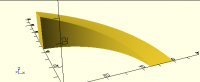
Build a polyhedron. Others may have cleverer ways built on top of sweep functions - I don't know, I've never used them - but here's an example from first principles.  It's set up for the Customizer, so that's an easy way to play with the parameters.  // Curved Ramp // Angular distance of ramp a = 90; // Inside radius r1 = 45; // Outside radius r2 = 60; // Height at start h1 = 0; // Height at end h2 = 20; // Number of steps n = 100; // [2:10000] curved_slope(r1, r2, h1, h2, a, n); module curved_slope(r1, r2, h1, h2, a, n) { assert(r1 > 0); assert(r2 > r1); assert(h1 >= 0); assert(h2 >= 0); assert(h1 > 0 || h2 > 0); assert(a > 0); assert(a < 360); // Likely badness if start touches end assert(n > 1); // All of the indexes of the steps indexes = [0:n-1]; // The fraction represented by each step ticks = [ for (i=indexes) i/(n-1) ]; // The angle for each step angles = [ for (i=ticks) i*a ]; // The height at each step heights = [ for (i=ticks) h1 + (h2-h1)*i ]; // The inner and outter 2D points at each step inner = [ for (i = indexes) torect2([r1, angles[i]]) ]; outer = [ for (i = indexes) torect2([r2, angles[i]]) ]; // The outlines of the final shape inner_bottom = [ for (i = indexes) [ inner[i].x, inner[i].y, 0 ] ]; inner_top = [ for (i = indexes) [ inner[i].x, inner[i].y, heights[i] ] ]; outer_bottom = [ for (i = indexes) [ outer[i].x, outer[i].y, 0 ] ]; outer_top = [ for (i = indexes) [ outer[i].x, outer[i].y, heights[i] ] ]; // Now we build the actual polyhedron data // All of the points points = concat(inner_bottom, inner_top, outer_bottom, outer_top); // The base point indexes of each segment ib = n*0; // inside bottom it = n*1; // inside top ob = n*2; // outside bottom ot = n*3; // outside top // Connect those points all up into triangles, except the ends are quads. faces = concat( // bottom [ for (i = indexes) if (i != 0) [ ib + i, ob + i-1, ob + i ] ], [ for (i = indexes) if (i != 0) [ ib + i, ib + i-1, ob + i-1 ] ], // inside [ for (i = indexes) if (i != 0) [ ib + i, it + i, it + i-1 ] ], [ for (i = indexes) if (i != 0) [ ib + i, it + i-1, ib + i-1 ] ], // outside [ for (i = indexes) if (i != 0) [ ob + i, ot + i-1, ot + i ] ], [ for (i = indexes) if (i != 0) [ ob + i, ob + i-1, ot + i-1 ] ], // top [ for (i = indexes) if (i != 0) [ it + i, ot + i, ot + i-1 ] ], [ for (i = indexes) if (i != 0) [ it + i, ot + i-1, it + i-1 ] ], // h1 end [ if (h1 > 0) [ ib+0, it+0, ot+0, ob+0 ] ], // h2 end [ if (h2 > 0) [ ib+n-1, ob+n-1, ot+n-1, it+n-1 ] ] ); // And build the final shape. polyhedron(points=points, faces=faces); } // Given a [rho, theta], transform to an [x,y]. function torect2(p) = [ p[0] * cos(p[1]), p[0] * sin(p[1]) ];
JH
Jon Hulatt
Fri, Feb 26, 2021 4:48 PM

On 26 Feb 2021, at 16:22, Jordan Brown openscad@jordan.maileater.net wrote:

Build a polyhedron.

Thank you. That solution looks absolutely perfect, it’s orders of magnitude more efficient than mine.
I think I must have somewhat ignored polyhedron() when I first learned openscad so despite it being right there, never really contemplated it’s utility until now.

> On 26 Feb 2021, at 16:22, Jordan Brown <openscad@jordan.maileater.net> wrote: > > Build a polyhedron. > Thank you. That solution looks absolutely perfect, it’s orders of magnitude more efficient than mine. I think I must have somewhat ignored polyhedron() when I first learned openscad so despite it being right there, never really contemplated it’s utility until now.
A
adrianv
Fri, Feb 26, 2021 9:55 PM

I say it's silly to go to that much work every time you want to use
polyhedron.  The problem with polyhedron is that you have got to do all this
book keeping.  And it's easy to botch it, sometimes in subtle ways which
make your result invalid.  To me it makes much more sense to use general
purpose polyhedron making routines like skin() and sweep() functions.
Here's the simplest change on the original code to make the shape using
skin() from BOSL2 which just links together a series of polygons and does
all the polyhedron book keeping for you.

https://github.com/revarbat/BOSL2/wiki

include <BOSL2/std.scad>
include <BOSL2/skin.scad>

// r1 = inner radius, r2 = outer radius, h1 = start height, h2 = end height,
a = sweep angle
module curve_slope(r1, r2, h1, h2, a)
{
h_increment = (h2-h1)/a;
step=1;
profiles = [for (i = [0:step:a])
rot(i,p=[[r1,0,0],
[r2,0,0],
[r2,0,h_incrementi],
[r1,0,h_increment
i]])
];
skin(profiles, slices=0);  // slices=0 means insert no extra slices
between given polygons
}

curve_slope(45,60,0,20,90);

http://forum.openscad.org/file/t2477/slope1.png

Maybe it's a quirk of mine, but I dislike long skinny triangles in my
models.  They give a kind of corrugated look to models and I think you end
up needing more of them to get a good looking model than with proper
equlateralish triangles.  So here's an adjustment the subdivides the top:

// r1 = inner radius, r2 = outer radius, h1 = start height, h2 = end height,
a = sweep angle
module curve_slope(r1, r2, h1, h2, a)
{
h_increment = (h2-h1)/a;
step=1;
profiles = [for (i = [0:step:a])
rot(i,p=[[r1,0,0],
[r2,0,0],
each
lerp([r2,0,h_incrementi],[r1,0,h_incrementi],
[for(j=[0:1:5]) j/5])
])
];
skin(profiles, slices=0);
}

http://forum.openscad.org/file/t2477/slope2.png

JordanBrown wrote

Build a polyhedron.

Others may have cleverer ways built on top of sweep functions - I don't
know, I've never used them - but here's an example from first
principles.  It's set up for the Customizer, so that's an easy way to
play with the parameters. 

I say it's silly to go to that much work every time you want to use polyhedron. The problem with polyhedron is that you have got to do all this book keeping. And it's easy to botch it, sometimes in subtle ways which make your result invalid. To me it makes much more sense to use general purpose polyhedron making routines like skin() and sweep() functions. Here's the simplest change on the original code to make the shape using skin() from BOSL2 which just links together a series of polygons and does all the polyhedron book keeping for you. https://github.com/revarbat/BOSL2/wiki include <BOSL2/std.scad> include <BOSL2/skin.scad> // r1 = inner radius, r2 = outer radius, h1 = start height, h2 = end height, a = sweep angle module curve_slope(r1, r2, h1, h2, a) { h_increment = (h2-h1)/a; step=1; profiles = [for (i = [0:step:a]) rot(i,p=[[r1,0,0], [r2,0,0], [r2,0,h_increment*i], [r1,0,h_increment*i]]) ]; skin(profiles, slices=0); // slices=0 means insert no extra slices between given polygons } curve_slope(45,60,0,20,90); <http://forum.openscad.org/file/t2477/slope1.png> Maybe it's a quirk of mine, but I dislike long skinny triangles in my models. They give a kind of corrugated look to models and I think you end up needing more of them to get a good looking model than with proper equlateralish triangles. So here's an adjustment the subdivides the top: // r1 = inner radius, r2 = outer radius, h1 = start height, h2 = end height, a = sweep angle module curve_slope(r1, r2, h1, h2, a) { h_increment = (h2-h1)/a; step=1; profiles = [for (i = [0:step:a]) rot(i,p=[[r1,0,0], [r2,0,0], each lerp([r2,0,h_increment*i],[r1,0,h_increment*i], [for(j=[0:1:5]) j/5]) ]) ]; skin(profiles, slices=0); } <http://forum.openscad.org/file/t2477/slope2.png> JordanBrown wrote > Build a polyhedron. > > Others may have cleverer ways built on top of sweep functions - I don't > know, I've never used them - but here's an example from first > principles.  It's set up for the Customizer, so that's an easy way to > play with the parameters.  -- Sent from: http://forum.openscad.org/
JB
Jordan Brown
Fri, Feb 26, 2021 10:30 PM

On 2/26/2021 1:55 PM, adrianv wrote:

I say it's silly to go to that much work every time you want to use
polyhedron.  The problem with polyhedron is that you have got to do
all this book keeping.  And it's easy to botch it, sometimes in subtle
ways which make your result invalid.  To me it makes much more sense
to use general purpose polyhedron making routines like skin() and
sweep() functions.

No argument.  I've done so very little with such shapes that it's
easier, or at least not much harder, for me to do it from first
principles than to learn how to use a library that will do it easier. 
This one really is a pretty simple shape.

And because I've done it so infrequently - I might have designed fewer
than ten polyhedra, ever - it was kind of fun.  (My major project has
11K lines of OpenSCAD, and zero polyhedra.  It originally had one, but
I found a simpler way and got rid of it.)

On 2/26/2021 1:55 PM, adrianv wrote: > I say it's silly to go to that much work every time you want to use > polyhedron.  The problem with polyhedron is that you have got to do > all this book keeping.  And it's easy to botch it, sometimes in subtle > ways which make your result invalid.  To me it makes much more sense > to use general purpose polyhedron making routines like skin() and > sweep() functions. No argument.  I've done so very little with such shapes that it's easier, or at least not much harder, for me to do it from first principles than to learn how to use a library that will do it easier.  This one really is a pretty simple shape. And because I've done it so infrequently - I might have designed fewer than ten polyhedra, ever - it was kind of fun.  (My major project has 11K lines of OpenSCAD, and *zero* polyhedra.  It originally had one, but I found a simpler way and got rid of it.)
JB
Jordan Brown
Sat, Feb 27, 2021 3:18 AM

Fun tidbit:  If you disable some of the asserts in my module, you can do
things like have negative heights, negative radii, and so on.  If you
turn on View/Thrown Together, you can see that these tend to result in
some or all of the figure being inside out.

https://www.imdb.com/title/tt0177789/quotes?item=qt0424466
https://www.youtube.com/watch?v=_wMD0ZCh2Sc

Fun tidbit:  If you disable some of the asserts in my module, you can do things like have negative heights, negative radii, and so on.  If you turn on View/Thrown Together, you can see that these tend to result in some or all of the figure being inside out. https://www.imdb.com/title/tt0177789/quotes?item=qt0424466 https://www.youtube.com/watch?v=_wMD0ZCh2Sc
P
Parkinbot
Sat, Feb 27, 2021 10:37 AM

With all that advanced stuff, we shouldn't forget that there is a simple
solution with native means for this specific problem:

--
Sent from: http://forum.openscad.org/

With all that advanced stuff, we shouldn't forget that there is a simple solution with native means for this specific problem: -- Sent from: http://forum.openscad.org/
RW
Ray West
Sat, Feb 27, 2021 3:45 PM

Sometimes, i look at what is possible using openscad, in just a few
lines I can produce something that using some other cad software, would
be tedious, to say the least. And then it can be 3D printed, giving a
'needed' functional item that would be tricky to make in some other way.
This is a feather board, if you are familiar with a table saw or router,
you will know what it is. It is clamped by an 8mm coach bolt, but it is
trivial to resize it to whatever size is required. It prints OK in Petg
(pla may be too brittle), with 4 walls or so, maybe 10% infill. It will
work with far fewer fingers, of course, but it will let you keep all
your fingers!

module arm(){
difference(){
union(){
difference(){
cylinder(15,50,50);
    translate([5,0,0])cylinder(15,40,40);
        translate([-80,0,0])cube(100);
}
translate([-43,0,0]) cylinder (15,12,12); //round end
}
translate([-43,0,0]) cube([9,9,115],true);// 9mm squarehole
}
}

//arm();

module finger(){
    rotate([0,0,-130]){
translate([-1,0,0])cube([2,30 ,15]);  //2mm thick fingers
}
}

//finger();

module fingers(){
for (i=[-90:4:70]){
rotate([0,0,i])translate([0,-48,0])finger();
}
}

$fn=100;

difference(){
union(){
arm();
fingers();
}
translate([35,-21,0])rotate([0,0,30])cube(100); // chop off end

difference(){                    //'flatten' ends
    cylinder (15,200,200);
    cylinder(15,70,70);
}
}

Sometimes, i look at what is possible using openscad, in just a few lines I can produce something that using some other cad software, would be tedious, to say the least. And then it can be 3D printed, giving a 'needed' functional item that would be tricky to make in some other way. This is a feather board, if you are familiar with a table saw or router, you will know what it is. It is clamped by an 8mm coach bolt, but it is trivial to resize it to whatever size is required. It prints OK in Petg (pla may be too brittle), with 4 walls or so, maybe 10% infill. It will work with far fewer fingers, of course, but it will let you keep all your fingers! module arm(){ difference(){ union(){ difference(){ cylinder(15,50,50);     translate([5,0,0])cylinder(15,40,40);         translate([-80,0,0])cube(100); } translate([-43,0,0]) cylinder (15,12,12); //round end } translate([-43,0,0]) cube([9,9,115],true);// 9mm squarehole } } //arm(); module finger(){     rotate([0,0,-130]){ translate([-1,0,0])cube([2,30 ,15]);  //2mm thick fingers } } //finger(); module fingers(){ for (i=[-90:4:70]){ rotate([0,0,i])translate([0,-48,0])finger(); } } $fn=100; difference(){ union(){ arm(); fingers(); } translate([35,-21,0])rotate([0,0,30])cube(100); // chop off end difference(){                    //'flatten' ends     cylinder (15,200,200);     cylinder(15,70,70); } }
A
adrianv
Sat, Feb 27, 2021 4:06 PM

That's a clever approach that I completely overlooked.  I suppose I tend to
forget about the twist parameter for linear_extrude, perhaps in part because
it usually produces a bad result with how the shape is triangulated.  But in
this case it's OK.

Parkinbot wrote

With all that advanced stuff, we shouldn't forget that there is a simple
solution with native means for this specific problem:

--
Sent from: http://forum.openscad.org/


OpenSCAD mailing list

Discuss@.openscad

That's a clever approach that I completely overlooked. I suppose I tend to forget about the twist parameter for linear_extrude, perhaps in part because it usually produces a bad result with how the shape is triangulated. But in this case it's OK. Parkinbot wrote > With all that advanced stuff, we shouldn't forget that there is a simple > solution with native means for this specific problem: > > > > > > > -- > Sent from: http://forum.openscad.org/ > _______________________________________________ > OpenSCAD mailing list > Discuss@.openscad > http://lists.openscad.org/mailman/listinfo/discuss_lists.openscad.org -- Sent from: http://forum.openscad.org/
F
fred
Sat, Feb 27, 2021 4:18 PM

That's an interesting construct. I've not seen a radial fingerboard before.How do you feel about converting it to a parametric version?

On Saturday, February 27, 2021, 10:46:07 AM EST, Ray West <raywest@raywest.com> wrote:  

Sometimes, i look at what is possible using openscad, in just a few
lines I can produce something that using some other cad software, would
be tedious, to say the least. And then it can be 3D printed, giving a
'needed' functional item that would be tricky to make in some other way.
This is a feather board, if you are familiar with a table saw or router,
you will know what it is. It is clamped by an 8mm coach bolt, but it is
trivial to resize it to whatever size is required. It prints OK in Petg
(pla may be too brittle), with 4 walls or so, maybe 10% infill. It will
work with far fewer fingers, of course, but it will let you keep all
your fingers!

module arm(){
difference(){
union(){
difference(){
cylinder(15,50,50);
    translate([5,0,0])cylinder(15,40,40);
        translate([-80,0,0])cube(100);
}
translate([-43,0,0]) cylinder (15,12,12); //round end
}
translate([-43,0,0]) cube([9,9,115],true);// 9mm squarehole
}
}

//arm();

module finger(){
    rotate([0,0,-130]){
translate([-1,0,0])cube([2,30 ,15]);  //2mm thick fingers
}
}

//finger();

module fingers(){
for (i=[-90:4:70]){
rotate([0,0,i])translate([0,-48,0])finger();
}
}

$fn=100;

difference(){
union(){
arm();
fingers();
}
translate([35,-21,0])rotate([0,0,30])cube(100); // chop off end

difference(){                    //'flatten' ends
    cylinder (15,200,200);
    cylinder(15,70,70);
}
}


OpenSCAD mailing list
Discuss@lists.openscad.org
http://lists.openscad.org/mailman/listinfo/discuss_lists.openscad.org

That's an interesting construct. I've not seen a radial fingerboard before.How do you feel about converting it to a parametric version? On Saturday, February 27, 2021, 10:46:07 AM EST, Ray West <raywest@raywest.com> wrote: Sometimes, i look at what is possible using openscad, in just a few lines I can produce something that using some other cad software, would be tedious, to say the least. And then it can be 3D printed, giving a 'needed' functional item that would be tricky to make in some other way. This is a feather board, if you are familiar with a table saw or router, you will know what it is. It is clamped by an 8mm coach bolt, but it is trivial to resize it to whatever size is required. It prints OK in Petg (pla may be too brittle), with 4 walls or so, maybe 10% infill. It will work with far fewer fingers, of course, but it will let you keep all your fingers! module arm(){ difference(){ union(){ difference(){ cylinder(15,50,50);     translate([5,0,0])cylinder(15,40,40);         translate([-80,0,0])cube(100); } translate([-43,0,0]) cylinder (15,12,12); //round end } translate([-43,0,0]) cube([9,9,115],true);// 9mm squarehole } } //arm(); module finger(){     rotate([0,0,-130]){ translate([-1,0,0])cube([2,30 ,15]);  //2mm thick fingers } } //finger(); module fingers(){ for (i=[-90:4:70]){ rotate([0,0,i])translate([0,-48,0])finger(); } } $fn=100; difference(){ union(){ arm(); fingers(); } translate([35,-21,0])rotate([0,0,30])cube(100); // chop off end difference(){                    //'flatten' ends     cylinder (15,200,200);     cylinder(15,70,70); } } _______________________________________________ OpenSCAD mailing list Discuss@lists.openscad.org http://lists.openscad.org/mailman/listinfo/discuss_lists.openscad.org