

How to create box with one side tilted

Dear all, I'm struggling trying to figure it out to accomplish the following
box, that is in irregular shape, like the following picture
http://forum.openscad.org/file/t2322/box-1.jpeg . Another view
http://forum.openscad.org/file/t2322/box-2.jpeg
Looks like the typical burger box, but with one side more tilted that the
other mirrored one.
How I can do it? I have tried with polygon, but it is quite complex task.
Any insight would be grateful!
Thanks
//Giovanni
--
Sent from: http://forum.openscad.org/

Giovanni--
A good approach for that kind of shape is to start in 2D. The top and the
bottom are rounded rectangles, and the "middle" of your box is another one
(although with different size, and maybe inclined?).
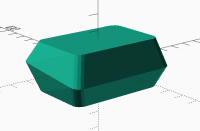
So I started with that shape in 2D:
module roundrec(size=[60, 40], radius=5, center=true)
{
offset(radius) offset(-radius) square(size, center);
}
To move it around I gave it a bit of volume: linear_extrude(height=0.001)
roundrec();
Doing it three times with some movement:
translate([0, 0, 15]) linear_extrude(height=0.001) roundrec();
translate([0, 1, 0]) rotate([5, 0, 0]) linear_extrude(height=0.001)
roundrec([70, 53]);
translate([0, 0, -15]) linear_extrude(height=0.001) roundrec();
With a hull() around that, you get this:
[image: rounded_box.png]
HTH
El mié., 15 ago. 2018 a las 0:30, gmorchio (gmorchio@gmail.com) escribió:
Dear all, I'm struggling trying to figure it out to accomplish the
following
box, that is in irregular shape, like the following picture
http://forum.openscad.org/file/t2322/box-1.jpeg . Another view
http://forum.openscad.org/file/t2322/box-2.jpeg
Looks like the typical burger box, but with one side more tilted that the
other mirrored one.
How I can do it? I have tried with polygon, but it is quite complex task.
Any insight would be grateful!
Thanks
//Giovanni
--
Sent from: http://forum.openscad.org/
OpenSCAD mailing list
Discuss@lists.openscad.org
http://lists.openscad.org/mailman/listinfo/discuss_lists.openscad.org
--
Regards,
Antonio
Antonio, great job! woah, and how can now convert it into a box, i have to
replicate, do a differrence() or something to make it as a shell?
--
Sent from: http://forum.openscad.org/
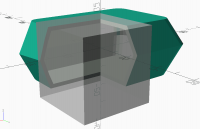
Indeed, that'd be a way to do it :-)
[image: rounded_box_2.png]
El mié., 15 ago. 2018 a las 20:21, gmorchio (gmorchio@gmail.com) escribió:
Antonio, great job! woah, and how can now convert it into a box, i have to
replicate, do a differrence() or something to make it as a shell?
--
Sent from: http://forum.openscad.org/
OpenSCAD mailing list
Discuss@lists.openscad.org
http://lists.openscad.org/mailman/listinfo/discuss_lists.openscad.org
--
Saludos,
Antonio
Thanks again Antonio. Last question, how did you create the cube to see thru
the internal? Nice!
--
Sent from: http://forum.openscad.org/
I just added a cube at the end of the box difference(). The see-through
effect is equivalent to the debug modifier
https://en.wikibooks.org/wiki/OpenSCAD_User_Manual/The_OpenSCAD_Language#Debug_Modifier
(#).
I really don't like the default pink of that modifier, so I did my own
version with this module:
module peek(alpha=0.2)
{
children();
color([0.5, 0.5, 0.5, alpha]) %children();
}
El jue., 16 ago. 2018 a las 22:45, gmorchio (gmorchio@gmail.com) escribió:
Thanks again Antonio. Last question, how did you create the cube to see
thru
the internal? Nice!
--
Sent from: http://forum.openscad.org/
OpenSCAD mailing list
Discuss@lists.openscad.org
http://lists.openscad.org/mailman/listinfo/discuss_lists.openscad.org
--
Saludos,
Antonio