

rotating an object around its center....

hello!
maybe i am too tired to understand it, i have a prism, i rotate into place,
thus doing it around the 0,0,0 and then i rotate it around its axe (by
transferring it to the center, and back...)
this would work, if later on i hadn't the need to translate the whole
thing....
i made this :
module prism(l, w, h){
polyhedron(
points=[[0,0,0], [l,0,0], [l,w,0], [0,w,0], [0,w,h], [l,w,h]],
faces=[[0,1,2,3],[5,4,3,2],[0,4,5,1],[0,3,4],[5,2,1]]
);
}
translate([0,0,8]) //translate back
{
translate([0,0,-8])//translate to center
rotate([5,0,0])//give it the recquired angle
{
rotate([180,-90,0])
translate([1.6,-3.15,0])
prism(16,3,40);
}
}
this reads stupid and cumbersome, i am sure there is a much more elegant
way to make this?
--
ciao
Bruno
---==========
http://nohkumado.eu/, http://bboett.free.frhttp://aikido.nohkumado.eu/,
http://bboett.free.fr
http://aikido.zorn.free.fr

-
it is not clear what you want;
-
the prism could be defined vertically by linear_extruding a triangle and
so avoiding the innermost rotation; -
your final object seems to be (although not exactly) a vertical
translation of the rotation of 5 degrees of a vertical prism.
Em sex, 19 de jul de 2019 às 15:16, Bruno Boettcher bboett@gmail.com
escreveu:
hello!
maybe i am too tired to understand it, i have a prism, i rotate into
place, thus doing it around the 0,0,0 and then i rotate it around its axe
(by transferring it to the center, and back...)
this would work, if later on i hadn't the need to translate the whole
thing....
i made this :
module prism(l, w, h){
polyhedron(
points=[[0,0,0], [l,0,0], [l,w,0], [0,w,0], [0,w,h], [l,w,h]],
faces=[[0,1,2,3],[5,4,3,2],[0,4,5,1],[0,3,4],[5,2,1]]
);
}
translate([0,0,8]) //translate back
{
translate([0,0,-8])//translate to center
rotate([5,0,0])//give it the recquired angle
{
rotate([180,-90,0])
translate([1.6,-3.15,0])
prism(16,3,40);
}
}
this reads stupid and cumbersome, i am sure there is a much more elegant
way to make this?
--
ciao
Bruno
---==========
http://nohkumado.eu/, http://bboett.free.frhttp://aikido.nohkumado.eu/,
http://bboett.free.fr
http://aikido.zorn.free.fr
OpenSCAD mailing list
Discuss@lists.openscad.org
http://lists.openscad.org/mailman/listinfo/discuss_lists.openscad.org

On 7/19/2019 7:15 AM, Bruno Boettcher wrote:
hello!
maybe i am too tired to understand it, i have a prism, i rotate into
place, thus doing it around the 0,0,0 and then i rotate it around its
axe (by transferring it to the center, and back...)
this would work, if later on i hadn't the need to translate the whole
thing....
i made this :
module prism(l, w, h){
polyhedron(
points=[[0,0,0], [l,0,0], [l,w,0], [0,w,0], [0,w,h], [l,w,h]],
faces=[[0,1,2,3],[5,4,3,2],[0,4,5,1],[0,3,4],[5,2,1]]
);
}
translate([0,0,8]) //translate back
{
translate([0,0,-8])//translate to center
rotate([5,0,0])//give it the recquired angle
{
rotate([180,-90,0])
translate([1.6,-3.15,0])
prism(16,3,40);
}
}
this reads stupid and cumbersome, i am sure there is a much more
elegant way to make this?
You say you're trying to rotate it around its center, but nothing in
there does that. The lines marked "translate to center" and "translate
back" cancel each other out.
I'm not sure exactly what you're trying to do, so I can't tell you the
right answer, but I can work through what you are doing...
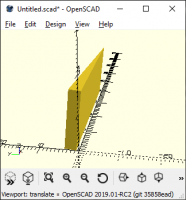
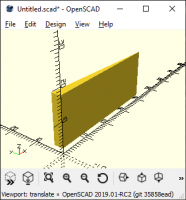
You're making a prism in positive XYZ with one corner at the origin:
You're translating it into +X and -Y so that it's 1.6 +X and 0.15 -Y
from the origin. (The -Y offset is too small to see on this picture.)
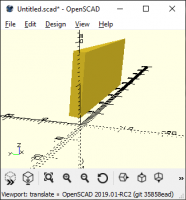
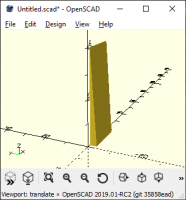
You're rotating it 180 degrees around the X axis (so it is now in +X,
+Y, and -Z) and then -90 degrees around the Y axis, so that it is once
again in +X, +Y, +Z, and now has its long axis along X. It's offset
+0.15 in Y and +1.6 in Z.
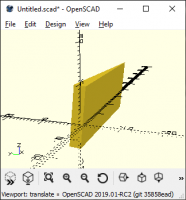
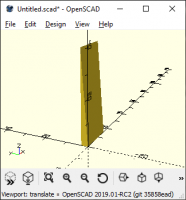
You're rotating it +5 degrees around X, so that the top edge is now
slightly into -Y.
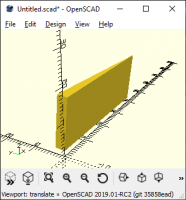
You're translating it -8 Z, taking about half of it into -Z. (But note
it was floating at +1.6 Z, so it's still a bit above centered.)
and then you're translating it +8 Z, undoing the translation you just did.
Maybe you meant this?
translate([0,0,8]) // translate back to +Z
rotate([5,0,0]) // give it the required angle
translate([0,3,-8]) // translate back to +Y, and center in Z
rotate([180,-90,0])
prism(16,3,40);
You could simplify that a bit by creating the prism in that basic
orientation in the first place:
module prism(l, w, h){
polyhedron(
points=[[0,0,0], [0,0,l], [0,w,l], [0,w,0], [h,0,0], [h,0,l]],
faces=[[0,1,2,3],[5,4,3,2],[0,4,5,1],[0,3,4],[5,2,1]]
);
}
translate([0,0,8]) // translate back to +Z
rotate([5,0,0]) // give it the required angle
translate([0,0,-8]) // Center in Z
prism(16,3,40);
Polyhedra hurt my head, so I'd do the prism as an extrusion from a triangle:
module prism(l, w, h){
points = [[0,0], [h,0], [0,w]];
linear_extrude(height=l)
polygon(points);
}
translate([0,0,8]) // translate back to +Z
rotate([5,0,0]) // give it the required angle
translate([0,0,-8]) // Center in Z
prism(16,3,40);
Is that closer to what you were looking for?

If you module has a center, define it directly. It would more convenient when
rotating and translating.
module prism(l, w, h, center = false){
p = center ? [-l / 2, -w / 2, 0] : [0, 0, 0];
translate(p)
polyhedron(
points=[[0,0,0], [l,0,0], [l,w,0], [0,w,0], [0,w,h], [l,w,h]],
faces=[[0,1,2,3],[5,4,3,2],[0,4,5,1],[0,3,4],[5,2,1]]
);
}
l = 16;
w = 3;
h = 40;
// This might be what you want.
translate([0,0,8])
rotate([5,0,0])
translate([0,0,-8]) {
rotate([180,-90,0])
translate([1.6, -3.15, 0])
prism(l, w, h);
}
// Rotate first and translate to where you want
translate([0, -w / 2 + 3.15, l / 2 + 1.6])
rotate([5, 0, 0])
rotate([180, -90, 0])
prism(16, 3, 40, center = true);
http://openhome.cc
Sent from: http://forum.openscad.org/