

discuss@lists.openscad.org

OpenSCAD general discussion Mailing-list

View all threads

How to make this parametric code?

F
fred_dot_u
Fri, Sep 9, 2016 11:49 PM

Rather than include the brute-force code I generated, it's easier to describe
it and provide the results.

http://forum.openscad.org/file/n18352/curve.jpg

The primary dimensions in this drawing are the vertical and horizontal
segments ending at the blue handles. In this specific image, the vertical is
75 mm and the horizontal is 12.7 mm.

The arc center is shown as the blue handle to the right. I used AutoCAD to
generate a circle with two points at the ends of the lines and an arbitrary
third location to provide a "pleasing" curve shown in the image. Doing so
provided a center point reference to use in OpenSCAD.

The circle was extruded as a torus using the information from the drawing.
It didn't fit perfectly for reasons unknown to me, but I then manually
adjusted the figures until I had the desired result, hence the "brute-force"
description.

In order to eyeball the dimensions, I dropped a cylinder at the top of the
curve and at the bottom and adjusted the torus diameter and location until
it looked close. That's just not good coding.

http://forum.openscad.org/file/n18352/curvedduct.png

The flange at the bottom can be ignored. A cylinder is generated at the
origin and the torus is subtracted. The curved object so created is then
subtracted from the same object scaled up in x and y creating an open duct
with a suitable curve as shown.

I performed a number of searches but lack the correct description for my
searches to locate the proper formulae. I'm not certain that a correct
formula exists but am hopeful that one can be created.

Having only the two points makes me believe that it would result in an
ambiguous solution. The other constraint is that the circle should be
tangent to the top-most point, to keep the curve to the right of the
vertical line in all cases. Perhaps that constraint reduces or removes the
ambiguity?

Given the two points, the tangent restriction and the need to know an arc's
(circle's) center, can this process be written in parametric form?

I am open to other methods of creating such a duct from two reference
points, but that seems a tough one in itself.

--
View this message in context: http://forum.openscad.org/How-to-make-this-parametric-code-tp18352.html
Sent from the OpenSCAD mailing list archive at Nabble.com.

Rather than include the brute-force code I generated, it's easier to describe it and provide the results. <http://forum.openscad.org/file/n18352/curve.jpg> The primary dimensions in this drawing are the vertical and horizontal segments ending at the blue handles. In this specific image, the vertical is 75 mm and the horizontal is 12.7 mm. The arc center is shown as the blue handle to the right. I used AutoCAD to generate a circle with two points at the ends of the lines and an arbitrary third location to provide a "pleasing" curve shown in the image. Doing so provided a center point reference to use in OpenSCAD. The circle was extruded as a torus using the information from the drawing. It didn't fit perfectly for reasons unknown to me, but I then manually adjusted the figures until I had the desired result, hence the "brute-force" description. In order to eyeball the dimensions, I dropped a cylinder at the top of the curve and at the bottom and adjusted the torus diameter and location until it looked close. That's just not good coding. <http://forum.openscad.org/file/n18352/curvedduct.png> The flange at the bottom can be ignored. A cylinder is generated at the origin and the torus is subtracted. The curved object so created is then subtracted from the same object scaled up in x and y creating an open duct with a suitable curve as shown. I performed a number of searches but lack the correct description for my searches to locate the proper formulae. I'm not certain that a correct formula exists but am hopeful that one can be created. Having only the two points makes me believe that it would result in an ambiguous solution. The other constraint is that the circle should be tangent to the top-most point, to keep the curve to the right of the vertical line in all cases. Perhaps that constraint reduces or removes the ambiguity? Given the two points, the tangent restriction and the need to know an arc's (circle's) center, can this process be written in parametric form? I am open to other methods of creating such a duct from two reference points, but that seems a tough one in itself. -- View this message in context: http://forum.openscad.org/How-to-make-this-parametric-code-tp18352.html Sent from the OpenSCAD mailing list archive at Nabble.com.
NH
nop head
Sat, Sep 10, 2016 2:26 PM

Yes the fact that it is a tangent at the top will define a unique circle
with two points. You haven't drawn it as a tangent in your 2D sketch
though. The center needs to be at the same height as your top point, i.e.
75mm, and equidistant from your top point and your bottom point. You can
then use the equation of a circle x^2 + y^2 = r^2 to find the radius, which
is also the x coordinate of the centre.

At your bottom point (r - 12.7)^2 + 75^2 = r^2. Here is code to solve for r
and draw the curve:

yc = 75;
x0 = 12.7;

function sqr(x) = x * x;
xc = (sqr(yc) + sqr(x0)) / (2 * x0);

echo(xc);

difference() {
square([x0, yc]);
translate([xc,yc]) circle(xc, $fn = 360);
}

On 10 September 2016 at 00:49, fred_dot_u fred_dot_u@yahoo.com wrote:

Rather than include the brute-force code I generated, it's easier to
describe
it and provide the results.

http://forum.openscad.org/file/n18352/curve.jpg

The primary dimensions in this drawing are the vertical and horizontal
segments ending at the blue handles. In this specific image, the vertical
is
75 mm and the horizontal is 12.7 mm.

The arc center is shown as the blue handle to the right. I used AutoCAD to
generate a circle with two points at the ends of the lines and an arbitrary
third location to provide a "pleasing" curve shown in the image. Doing so
provided a center point reference to use in OpenSCAD.

The circle was extruded as a torus using the information from the drawing.
It didn't fit perfectly for reasons unknown to me, but I then manually
adjusted the figures until I had the desired result, hence the
"brute-force"
description.

In order to eyeball the dimensions, I dropped a cylinder at the top of the
curve and at the bottom and adjusted the torus diameter and location until
it looked close. That's just not good coding.

http://forum.openscad.org/file/n18352/curvedduct.png

The flange at the bottom can be ignored. A cylinder is generated at the
origin and the torus is subtracted. The curved object so created is then
subtracted from the same object scaled up in x and y creating an open duct
with a suitable curve as shown.

I performed a number of searches but lack the correct description for my
searches to locate the proper formulae. I'm not certain that a correct
formula exists but am hopeful that one can be created.

Having only the two points makes me believe that it would result in an
ambiguous solution. The other constraint is that the circle should be
tangent to the top-most point, to keep the curve to the right of the
vertical line in all cases. Perhaps that constraint reduces or removes the
ambiguity?

Given the two points, the tangent restriction and the need to know an arc's
(circle's) center, can this process be written in parametric form?

I am open to other methods of creating such a duct from two reference
points, but that seems a tough one in itself.

--
View this message in context: http://forum.openscad.org/How-
to-make-this-parametric-code-tp18352.html
Sent from the OpenSCAD mailing list archive at Nabble.com.


OpenSCAD mailing list
Discuss@lists.openscad.org
http://lists.openscad.org/mailman/listinfo/discuss_lists.openscad.org
Yes the fact that it is a tangent at the top will define a unique circle with two points. You haven't drawn it as a tangent in your 2D sketch though. The center needs to be at the same height as your top point, i.e. 75mm, and equidistant from your top point and your bottom point. You can then use the equation of a circle x^2 + y^2 = r^2 to find the radius, which is also the x coordinate of the centre. At your bottom point (r - 12.7)^2 + 75^2 = r^2. Here is code to solve for r and draw the curve: yc = 75; x0 = 12.7; function sqr(x) = x * x; xc = (sqr(yc) + sqr(x0)) / (2 * x0); echo(xc); difference() { square([x0, yc]); translate([xc,yc]) circle(xc, $fn = 360); } On 10 September 2016 at 00:49, fred_dot_u <fred_dot_u@yahoo.com> wrote: > Rather than include the brute-force code I generated, it's easier to > describe > it and provide the results. > > <http://forum.openscad.org/file/n18352/curve.jpg> > > The primary dimensions in this drawing are the vertical and horizontal > segments ending at the blue handles. In this specific image, the vertical > is > 75 mm and the horizontal is 12.7 mm. > > The arc center is shown as the blue handle to the right. I used AutoCAD to > generate a circle with two points at the ends of the lines and an arbitrary > third location to provide a "pleasing" curve shown in the image. Doing so > provided a center point reference to use in OpenSCAD. > > The circle was extruded as a torus using the information from the drawing. > It didn't fit perfectly for reasons unknown to me, but I then manually > adjusted the figures until I had the desired result, hence the > "brute-force" > description. > > In order to eyeball the dimensions, I dropped a cylinder at the top of the > curve and at the bottom and adjusted the torus diameter and location until > it looked close. That's just not good coding. > > <http://forum.openscad.org/file/n18352/curvedduct.png> > > The flange at the bottom can be ignored. A cylinder is generated at the > origin and the torus is subtracted. The curved object so created is then > subtracted from the same object scaled up in x and y creating an open duct > with a suitable curve as shown. > > I performed a number of searches but lack the correct description for my > searches to locate the proper formulae. I'm not certain that a correct > formula exists but am hopeful that one can be created. > > Having only the two points makes me believe that it would result in an > ambiguous solution. The other constraint is that the circle should be > tangent to the top-most point, to keep the curve to the right of the > vertical line in all cases. Perhaps that constraint reduces or removes the > ambiguity? > > Given the two points, the tangent restriction and the need to know an arc's > (circle's) center, can this process be written in parametric form? > > I am open to other methods of creating such a duct from two reference > points, but that seems a tough one in itself. > > > > > -- > View this message in context: http://forum.openscad.org/How- > to-make-this-parametric-code-tp18352.html > Sent from the OpenSCAD mailing list archive at Nabble.com. > > _______________________________________________ > OpenSCAD mailing list > Discuss@lists.openscad.org > http://lists.openscad.org/mailman/listinfo/discuss_lists.openscad.org >
F
fred_dot_u
Sat, Sep 10, 2016 5:46 PM

That's a beautiful simplification. Rather than playing with a torus and
subtracting it from a cylinder, I've taken your code and rotate_extruded it
for the desired shape.

I've yet to figure out how to create a consistent wall thickness after the
rotation, or perhaps I should be doing so before?  Hmm, the "after" method
is giving me fits, but the "before" method may be a good bit simplere.

Thank you for your contribution. This will make future ducts so much easier
to create.

--
View this message in context: http://forum.openscad.org/How-to-make-this-parametric-code-tp18352p18356.html
Sent from the OpenSCAD mailing list archive at Nabble.com.

That's a beautiful simplification. Rather than playing with a torus and subtracting it from a cylinder, I've taken your code and rotate_extruded it for the desired shape. I've yet to figure out how to create a consistent wall thickness after the rotation, or perhaps I should be doing so before? Hmm, the "after" method is giving me fits, but the "before" method may be a good bit simplere. Thank you for your contribution. This will make future ducts so much easier to create. -- View this message in context: http://forum.openscad.org/How-to-make-this-parametric-code-tp18352p18356.html Sent from the OpenSCAD mailing list archive at Nabble.com.
NH
nop head
Sat, Sep 10, 2016 6:08 PM

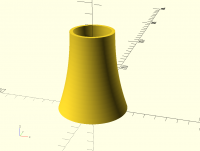
To get a consistent wall thickness the inner wall needs to be part of a
circle with the same centre as the outer wall but a bigger radius.

$fn = 360;
yc = 75;
x0 = 12.7;
wall = 3;
or = 20;
ir = or - wall;

function sqr(x) = x * x;
xc = (sqr(yc) + sqr(x0)) / (2 * x0);

rotate_extrude()
translate([ir, 0])
intersection() {
difference() {
square([x0 + wall, yc]);
translate([xc + wall, yc]) circle(xc);
}
translate([xc + wall, yc]) circle(xc + wall);
}

On 10 September 2016 at 18:46, fred_dot_u fred_dot_u@yahoo.com wrote:

That's a beautiful simplification. Rather than playing with a torus and
subtracting it from a cylinder, I've taken your code and rotate_extruded it
for the desired shape.

I've yet to figure out how to create a consistent wall thickness after the
rotation, or perhaps I should be doing so before?  Hmm, the "after" method
is giving me fits, but the "before" method may be a good bit simplere.

Thank you for your contribution. This will make future ducts so much easier
to create.

--
View this message in context: http://forum.openscad.org/How-
to-make-this-parametric-code-tp18352p18356.html
Sent from the OpenSCAD mailing list archive at Nabble.com.


OpenSCAD mailing list
Discuss@lists.openscad.org
http://lists.openscad.org/mailman/listinfo/discuss_lists.openscad.org

To get a consistent wall thickness the inner wall needs to be part of a circle with the same centre as the outer wall but a bigger radius. $fn = 360; yc = 75; x0 = 12.7; wall = 3; or = 20; ir = or - wall; function sqr(x) = x * x; xc = (sqr(yc) + sqr(x0)) / (2 * x0); rotate_extrude() translate([ir, 0]) intersection() { difference() { square([x0 + wall, yc]); translate([xc + wall, yc]) circle(xc); } translate([xc + wall, yc]) circle(xc + wall); } ​ On 10 September 2016 at 18:46, fred_dot_u <fred_dot_u@yahoo.com> wrote: > That's a beautiful simplification. Rather than playing with a torus and > subtracting it from a cylinder, I've taken your code and rotate_extruded it > for the desired shape. > > I've yet to figure out how to create a consistent wall thickness after the > rotation, or perhaps I should be doing so before? Hmm, the "after" method > is giving me fits, but the "before" method may be a good bit simplere. > > Thank you for your contribution. This will make future ducts so much easier > to create. > > > > -- > View this message in context: http://forum.openscad.org/How- > to-make-this-parametric-code-tp18352p18356.html > Sent from the OpenSCAD mailing list archive at Nabble.com. > > _______________________________________________ > OpenSCAD mailing list > Discuss@lists.openscad.org > http://lists.openscad.org/mailman/listinfo/discuss_lists.openscad.org >
F
fred_dot_u
Sat, Sep 10, 2016 7:55 PM

Not surprisingly, your code is far simpler and orders of magnitude more
elegant than mine. I used to be able to think better, but I was much younger
too.

Thanks again for your assistance.

--
View this message in context: http://forum.openscad.org/How-to-make-this-parametric-code-tp18352p18358.html
Sent from the OpenSCAD mailing list archive at Nabble.com.

Not surprisingly, your code is far simpler and orders of magnitude more elegant than mine. I used to be able to think better, but I was much younger too. Thanks again for your assistance. -- View this message in context: http://forum.openscad.org/How-to-make-this-parametric-code-tp18352p18358.html Sent from the OpenSCAD mailing list archive at Nabble.com.
GF
Greg Frost
Sat, Sep 10, 2016 10:05 PM

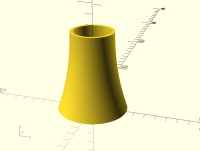
What you may want with this particular shape is to have walls with a
constant horizontal cross section designed for a set number of extruder
passes to avoid weird things with infilling tiny gaps. To do that, you
would just rotate extrude the same curve translated closer to the origin.

On Sun, Sep 11, 2016 at 3:38 AM, nop head nop.head@gmail.com wrote:

To get a consistent wall thickness the inner wall needs to be part of a
circle with the same centre as the outer wall but a bigger radius.

$fn = 360;
yc = 75;
x0 = 12.7;
wall = 3;
or = 20;
ir = or - wall;

function sqr(x) = x * x;
xc = (sqr(yc) + sqr(x0)) / (2 * x0);

rotate_extrude()
translate([ir, 0])
intersection() {
difference() {
square([x0 + wall, yc]);
translate([xc + wall, yc]) circle(xc);
}
translate([xc + wall, yc]) circle(xc + wall);
}

On 10 September 2016 at 18:46, fred_dot_u fred_dot_u@yahoo.com wrote:

That's a beautiful simplification. Rather than playing with a torus and
subtracting it from a cylinder, I've taken your code and rotate_extruded
it
for the desired shape.

I've yet to figure out how to create a consistent wall thickness after the
rotation, or perhaps I should be doing so before?  Hmm, the "after" method
is giving me fits, but the "before" method may be a good bit simplere.

Thank you for your contribution. This will make future ducts so much
easier
to create.

--
View this message in context: http://forum.openscad.org/How-
to-make-this-parametric-code-tp18352p18356.html
Sent from the OpenSCAD mailing list archive at Nabble.com.


OpenSCAD mailing list
Discuss@lists.openscad.org
http://lists.openscad.org/mailman/listinfo/discuss_lists.openscad.org
What you may want with this particular shape is to have walls with a constant horizontal cross section designed for a set number of extruder passes to avoid weird things with infilling tiny gaps. To do that, you would just rotate extrude the same curve translated closer to the origin. On Sun, Sep 11, 2016 at 3:38 AM, nop head <nop.head@gmail.com> wrote: > To get a consistent wall thickness the inner wall needs to be part of a > circle with the same centre as the outer wall but a bigger radius. > > $fn = 360; > yc = 75; > x0 = 12.7; > wall = 3; > or = 20; > ir = or - wall; > > function sqr(x) = x * x; > xc = (sqr(yc) + sqr(x0)) / (2 * x0); > > rotate_extrude() > translate([ir, 0]) > intersection() { > difference() { > square([x0 + wall, yc]); > translate([xc + wall, yc]) circle(xc); > } > translate([xc + wall, yc]) circle(xc + wall); > } > > > ​ > > On 10 September 2016 at 18:46, fred_dot_u <fred_dot_u@yahoo.com> wrote: > >> That's a beautiful simplification. Rather than playing with a torus and >> subtracting it from a cylinder, I've taken your code and rotate_extruded >> it >> for the desired shape. >> >> I've yet to figure out how to create a consistent wall thickness after the >> rotation, or perhaps I should be doing so before? Hmm, the "after" method >> is giving me fits, but the "before" method may be a good bit simplere. >> >> Thank you for your contribution. This will make future ducts so much >> easier >> to create. >> >> >> >> -- >> View this message in context: http://forum.openscad.org/How- >> to-make-this-parametric-code-tp18352p18356.html >> Sent from the OpenSCAD mailing list archive at Nabble.com. >> >> _______________________________________________ >> OpenSCAD mailing list >> Discuss@lists.openscad.org >> http://lists.openscad.org/mailman/listinfo/discuss_lists.openscad.org >> > > > _______________________________________________ > OpenSCAD mailing list > Discuss@lists.openscad.org > http://lists.openscad.org/mailman/listinfo/discuss_lists.openscad.org > >
F
fred_dot_u
Sat, Sep 10, 2016 11:34 PM

I've seen a video in which the narrator specifies exactly what you describe.
The extrusion width should be evenly divided into the wall thickness for the
best result on thin walls. Simplify3D and perhaps other slicers will "play
back" the toolpath and allow one to observe the best combination of
thickness and extrusion.

I'd expect that a well-calculated path would reduce the print time by quite
a large factor.

--
View this message in context: http://forum.openscad.org/How-to-make-this-parametric-code-tp18352p18362.html
Sent from the OpenSCAD mailing list archive at Nabble.com.

I've seen a video in which the narrator specifies exactly what you describe. The extrusion width should be evenly divided into the wall thickness for the best result on thin walls. Simplify3D and perhaps other slicers will "play back" the toolpath and allow one to observe the best combination of thickness and extrusion. I'd expect that a well-calculated path would reduce the print time by quite a large factor. -- View this message in context: http://forum.openscad.org/How-to-make-this-parametric-code-tp18352p18362.html Sent from the OpenSCAD mailing list archive at Nabble.com.
F
fred_dot_u
Sat, Sep 10, 2016 11:37 PM

Another thought appeared recently in the light bulb that popped up above my
head. What other curves can be used to create a similar profile? The
objective would be to have no constriction from the smaller ID but any
variation from that location to the larger ID is acceptable.

How would one place and calculate a parabolic curve, or is such a curve
impractical given the above restrictions? Hyperbolas? or is it hyperbolae?
Google says either one is acceptable.

--
View this message in context: http://forum.openscad.org/How-to-make-this-parametric-code-tp18352p18363.html
Sent from the OpenSCAD mailing list archive at Nabble.com.

Another thought appeared recently in the light bulb that popped up above my head. What other curves can be used to create a similar profile? The objective would be to have no constriction from the smaller ID but any variation from that location to the larger ID is acceptable. How would one place and calculate a parabolic curve, or is such a curve impractical given the above restrictions? Hyperbolas? or is it hyperbolae? Google says either one is acceptable. -- View this message in context: http://forum.openscad.org/How-to-make-this-parametric-code-tp18352p18363.html Sent from the OpenSCAD mailing list archive at Nabble.com.
R
Ronaldo
Sun, Sep 11, 2016 2:16 AM

Parabolas give a nice curve and require a very simple code:

s = 75/2; // choose any value between 0 and top_point[1]
small_radius = 30; // the radius at top
top_point = [small_radius, 75];
bottom_point = [12.7+small_radius, 0];
middle_point = [small_radius, s];
np = 10;

// this parabola will be tangent to the segment |top_point, middle_point|
at the top_point
// and to the segment |middle_point, bottom_point| at the bottom_point
function parabola(np) =
[ for(i=[0:np]) let( u=i/np )
top_point*(1-u)(1-u) +  middle_point2*(1-u)u +
bottom_point
u*u ];

rotate_extrude()
polygon(concat([ [0,top_point[1]] ], parabola(np=np), [[0,0]] ));
translate([0, 0, top_point[1]+50])
cylinder(r=small_radius, h=100, center=true);

However, I guess the offset of a parabola is not a parabola.

--
View this message in context: http://forum.openscad.org/How-to-make-this-parametric-code-tp18352p18364.html
Sent from the OpenSCAD mailing list archive at Nabble.com.

Parabolas give a nice curve and require a very simple code: > s = 75/2; // choose any value between 0 and top_point[1] > small_radius = 30; // the radius at top > top_point = [small_radius, 75]; > bottom_point = [12.7+small_radius, 0]; > middle_point = [small_radius, s]; > np = 10; > > // this parabola will be tangent to the segment |top_point, middle_point| > at the top_point > // and to the segment |middle_point, bottom_point| at the bottom_point > function parabola(np) = > [ for(i=[0:np]) let( u=i/np ) > top_point*(1-u)*(1-u) + middle_point*2*(1-u)*u + > bottom_point*u*u ]; > > rotate_extrude() > polygon(concat([ [0,top_point[1]] ], parabola(np=np), [[0,0]] )); > translate([0, 0, top_point[1]+50]) > cylinder(r=small_radius, h=100, center=true); However, I guess the offset of a parabola is not a parabola. -- View this message in context: http://forum.openscad.org/How-to-make-this-parametric-code-tp18352p18364.html Sent from the OpenSCAD mailing list archive at Nabble.com.
C
cbernhardt
Mon, Sep 12, 2016 11:54 AM

If you have AutoCad there is simple to do this.  In AutoCad create a DXF file
of the profile.  Then use the DXF import function within  OpenSCAD.  Note
that OpenSCAD only recognizes ARC and LINE entities from a DXF file.
http://forum.openscad.org/file/n18370/acad_arc.jpg
http://forum.openscad.org/file/n18370/arc3.jpg

--
View this message in context: http://forum.openscad.org/How-to-make-this-parametric-code-tp18352p18370.html
Sent from the OpenSCAD mailing list archive at Nabble.com.

If you have AutoCad there is simple to do this. In AutoCad create a DXF file of the profile. Then use the DXF import function within OpenSCAD. Note that OpenSCAD only recognizes ARC and LINE entities from a DXF file. <http://forum.openscad.org/file/n18370/acad_arc.jpg> <http://forum.openscad.org/file/n18370/arc3.jpg> -- View this message in context: http://forum.openscad.org/How-to-make-this-parametric-code-tp18352p18370.html Sent from the OpenSCAD mailing list archive at Nabble.com.