

BR
Bob Roos
Tue, Jun 16, 2026 12:58 AM
Hello OpenSCAD,
I want the smaller cube to have both left edges the same and the bottom of the parent to be meeting with the top of the child.
What am I doing wrong please?
include <BOSL2/std.scad> //or screws or threading
$fn=24;
Inch=25.4;
LHF = .28; // Layer height for faster build
LH=.25; // Layer height after 1st layer
FL=.2; // first layer
L = 7 * Inch;
L1 = 1 * Inch;
L2 = 3.5 * Inch;
W = Inch;
D = .5 * Inch;
T = 4;
cuboid([L,W,D],rounding=T/2) attach (LEFT+BOT,LEFT+TOP) // full block
cuboid([L1,W,D],rounding=T/2);
--
Best regards,
Bob mailto:roosbob@wybatap.com
Hello OpenSCAD,
I want the smaller cube to have both left edges the same and the bottom of the parent to be meeting with the top of the child.
What am I doing wrong please?
include <BOSL2/std.scad> //or screws or threading
$fn=24;
Inch=25.4;
LHF = .28; // Layer height for faster build
LH=.25; // Layer height after 1st layer
FL=.2; // first layer
L = 7 * Inch;
L1 = 1 * Inch;
L2 = 3.5 * Inch;
W = Inch;
D = .5 * Inch;
T = 4;
cuboid([L,W,D],rounding=T/2) attach (LEFT+BOT,LEFT+TOP) // full block
cuboid([L1,W,D],rounding=T/2);
--
Best regards,
Bob mailto:roosbob@wybatap.com
JB
Jordan Brown
Tue, Jun 16, 2026 2:54 AM
On 6/15/2026 5:58 PM, Bob Roos via Discuss wrote:
I want the smaller cube to have both left edges the same and the bottom of the parent to be meeting with the top of the child.
...
cuboid([L,W,D],rounding=T/2) attach (LEFT+BOT,LEFT+TOP) // full block
cuboid([L1,W,D],rounding=T/2);
I expect that Adrian will reply with a more complete answer, but maybe I
can give you something that helps in the interim.
The various anchors have directions associated with them. Use
show_anchors() to show the anchors and their directions. attach() hooks
one shape to another along the anchor's direction. It re-orients the
second object so that the specified anchor on that object is pointing
"into" the specified anchor on the first object. For instance, if you
say "attach(TOP, TOP)", it will turn the second object upside-down to
attach its top to the top of the first object. The various combinations
(e.g. LEFT+BOT) are diagonal, so you're asking to attach shapes along
their diagonals.
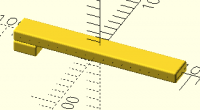
If I understand what you're asking for, either of these will do the
trick. Adrian will know better than I the advantages of one over the
other. I find the position() variant a little easier to understand, but
the "align" variant seems to be designed for what you're trying to do.
cuboid([L,W,D],rounding=T/2)
position(LEFT+BOT)
cuboid([L1,W,D],rounding=T/2, anchor=LEFT+TOP);
cuboid([L,W,D],rounding=T/2)
align(anchor=BOT, align=LEFT)
cuboid([L1,W,D],rounding=T/2);
They both produce this result:
The way that I understand the position() variant is that position() says
"make the child's origin point be the specified point on the parent",
and then the anchor parameter says where the origin point should be on
the child.
I think the align() variant says "put the child on the bottom of the
parent, and align their left sides". But I don't really understand the
magic that makes that happen.
On 6/15/2026 5:58 PM, Bob Roos via Discuss wrote:
> I want the smaller cube to have both left edges the same and the bottom of the parent to be meeting with the top of the child.
> ...
> cuboid([L,W,D],rounding=T/2) attach (LEFT+BOT,LEFT+TOP) // full block
> cuboid([L1,W,D],rounding=T/2);
I expect that Adrian will reply with a more complete answer, but maybe I
can give you something that helps in the interim.
The various anchors have directions associated with them. Use
show_anchors() to show the anchors and their directions. attach() hooks
one shape to another *along the anchor's direction*. It re-orients the
second object so that the specified anchor on that object is pointing
"into" the specified anchor on the first object. For instance, if you
say "attach(TOP, TOP)", it will turn the second object upside-down to
attach its top to the top of the first object. The various combinations
(e.g. LEFT+BOT) are diagonal, so you're asking to attach shapes along
their diagonals.
If I understand what you're asking for, either of these will do the
trick. Adrian will know better than I the advantages of one over the
other. I find the position() variant a little easier to understand, but
the "align" variant seems to be designed for what you're trying to do.
cuboid([L,W,D],rounding=T/2)
position(LEFT+BOT)
cuboid([L1,W,D],rounding=T/2, anchor=LEFT+TOP);
cuboid([L,W,D],rounding=T/2)
align(anchor=BOT, align=LEFT)
cuboid([L1,W,D],rounding=T/2);
They both produce this result:
The way that I understand the position() variant is that position() says
"make the child's origin point be the specified point on the parent",
and then the anchor parameter says where the origin point should be on
the child.
I think the align() variant says "put the child on the bottom of the
parent, and align their left sides". But I don't really understand the
magic that makes that happen.

CC
Cory Cross
Tue, Jun 16, 2026 3:29 AM
On 6/15/26 5:58 PM, Bob Roos via Discuss wrote:
Hello OpenSCAD,
I want the smaller cube to have both left edges the same and the bottom of the parent to be meeting with the top of the child.
That seems to be basically example 3 of
https://github.com/BelfrySCAD/BOSL2/wiki/Tutorial-Attachment-Align
I am still sometimes confused by align vs attach. As that link says
"Note that align() never changes the orientation of the children.".
Attach if you want the thing pointing out (or in, etc) of the surface
you're attaching to, align if you're just handling positioning, is how I
think it's intended.
Cory
On 6/15/26 5:58 PM, Bob Roos via Discuss wrote:
> Hello OpenSCAD,
>
> I want the smaller cube to have both left edges the same and the bottom of the parent to be meeting with the top of the child.
That seems to be basically example 3 of
https://github.com/BelfrySCAD/BOSL2/wiki/Tutorial-Attachment-Align
I am still sometimes confused by align vs attach. As that link says
"Note that align() never changes the orientation of the children.".
Attach if you want the thing pointing out (or in, etc) of the surface
you're attaching to, align if you're just handling positioning, is how I
think it's intended.
Cory
R
richard@milewski.org
Fri, Jun 19, 2026 11:08 PM
Jordan is right. What you’re looking for here is align().
cuboid([L,W,D],rounding=T/2)
align(BOT,LEFT) cuboid([L1,W,D],rounding=T/2);
Incidently, INCH is a BOSL2 constant, so you don’t have to re-define it.
I find align() and position() easier to use than attach().
Adrian has written some very informative tutorials in addition to the docs.
Start here: https://github.com/BelfrySCAD/BOSL2/wiki/Tutorial-Attachment-Overview
Jordan is right. What you’re looking for here is align().\
\
cuboid(\[L,W,D\],rounding=T/2)\
align(BOT,LEFT) cuboid(\[L1,W,D\],rounding=T/2);\
\
Incidently, INCH is a BOSL2 constant, so you don’t have to re-define it.\
\
I find align() and position() easier to use than attach().\
\
Adrian has written some very informative tutorials in addition to the docs.
Start here: https://github.com/BelfrySCAD/BOSL2/wiki/Tutorial-Attachment-Overview
LM
Leonard Martin Struttmann
Sat, Jun 20, 2026 1:45 AM
I played with that for over an hour, trying to get align() to work. Now, I
see that align(BOT,LEFT) is different from align(LEFT,BOT). However,
align(BOT+LEFT) is the same as align(LEFT+BOT).
This is one of the reasons I have a difficult time learning how to use
BOSL. It's great for those who can grasp it. I, apparently, cannot.
>
> I played with that for over an hour, trying to get align() to work. Now, I
> see that align(BOT,LEFT) is different from align(LEFT,BOT). However,
> align(BOT+LEFT) is the same as align(LEFT+BOT).
This is one of the reasons I have a difficult time learning how to use
BOSL. It's great for those who can grasp it. I, apparently, cannot.
>
AM
Adrian Mariano
Sat, Jun 20, 2026 4:15 AM
It should really come as no surprise to anybody that align(BOT+LEFT) is the
same as align(LEFT+BOT). How could BOT+LEFT somehow not be equal to
LEFT+BOT? Addition is commutative. A+B=B+A.
If align() is too confusing you can always start with position(), but I
personally think align() is the most useful of the three. Basically if I
tell you to put block B on the right face of block A that instruction
implies that it's the left face of B that will meet the right face of A.
The align() module works that out for you and the position() module makes
you manually specify that it's the child's left face---one more thing you
have to figure out and that you can potentially get wrong. The attach()
module is much trickier, which is why the tutorial leaves it for last.
On Fri, Jun 19, 2026 at 9:46 PM Leonard Martin Struttmann via Discuss <
discuss@lists.openscad.org> wrote:
I played with that for over an hour, trying to get align() to work. Now,
I see that align(BOT,LEFT) is different from align(LEFT,BOT). However,
align(BOT+LEFT) is the same as align(LEFT+BOT).
This is one of the reasons I have a difficult time learning how to use
BOSL. It's great for those who can grasp it. I, apparently, cannot.
It should really come as no surprise to anybody that align(BOT+LEFT) is the
same as align(LEFT+BOT). How could BOT+LEFT somehow not be equal to
LEFT+BOT? Addition is commutative. A+B=B+A.
If align() is too confusing you can always start with position(), but I
personally think align() is the most useful of the three. Basically if I
tell you to put block B on the right face of block A that instruction
implies that it's the left face of B that will meet the right face of A.
The align() module works that out for you and the position() module makes
you manually specify that it's the child's left face---one more thing you
have to figure out and that you can potentially get wrong. The attach()
module is much trickier, which is why the tutorial leaves it for last.
On Fri, Jun 19, 2026 at 9:46 PM Leonard Martin Struttmann via Discuss <
discuss@lists.openscad.org> wrote:
>
>
>> I played with that for over an hour, trying to get align() to work. Now,
>> I see that align(BOT,LEFT) is different from align(LEFT,BOT). However,
>> align(BOT+LEFT) is the same as align(LEFT+BOT).
>
>
> This is one of the reasons I have a difficult time learning how to use
> BOSL. It's great for those who can grasp it. I, apparently, cannot.
>
>
>
>
>
>>
>
> _______________________________________________
> OpenSCAD mailing list
> To unsubscribe send an email to discuss-leave@lists.openscad.org
LM
Leonard Martin Struttmann
Sat, Jun 20, 2026 12:52 PM
Oh, I agree, align(A+B) == align(B+A) did not surprise me. What threw me
was:
- There are two syntax variations, align(A,B) vs. align(A+B).
- align(A,B) != align(B,A).
The lesson to me was: If I want to use a BOSL2 feature, then I must invest
the time to completely and thoroughly read and understand the documentation
and examples, even those that seem to not apply to the particular problem
that I am trying to solve at the moment.
That's not bad. I just usually don't have the time or the patience to do
that. That's my problem, not BOLS2s.
The other aspect that makes it difficult for me is that the examples use
concepts/commands that I do not know, so I need to interrupt my learning of
one example, to learn about another. For instance, how is the BOSL2
difference() different from OpenSCAD native difference(), how is move()
different from translate()?
It's a complex system that, for me and my 71 year old brain, requires a lot
of time and patience.
Oh, I agree, align(A+B) == align(B+A) did not surprise me. What threw me
was:
1) There are two syntax variations, align(A,B) vs. align(A+B).
2) align(A,B) != align(B,A).
The lesson to me was: If I want to use a BOSL2 feature, then I must invest
the time to completely and thoroughly read and understand the documentation
and examples, even those that seem to not apply to the particular problem
that I am trying to solve at the moment.
That's not bad. I just usually don't have the time or the patience to do
that. That's my problem, not BOLS2s.
The other aspect that makes it difficult for me is that the examples use
concepts/commands that I do not know, so I need to interrupt my learning of
one example, to learn about another. For instance, how is the BOSL2
difference() different from OpenSCAD native difference(), how is move()
different from translate()?
It's a complex system that, for me and my 71 year old brain, requires a lot
of time and patience.
JB
Jon Bondy
Sat, Jun 20, 2026 1:31 PM
For the MOST part, if I can find a BOSL2 example (and there are myriad
such) then I can wrangle it into something useful for me (so long as I
don't stumble across some place where my mind grows numb, like point
lists vs polygons/hedra vs various other representations in
BOSL2-space). They have tackled some very difficult problems, and it
does not surprise me that some of their APIs are similarly complex.
On 6/20/2026 8:52 AM, Leonard Martin Struttmann via Discuss wrote:
Oh, I agree, align(A+B) == align(B+A) did not surprise me. What threw
me was:
- There are two syntax variations, align(A,B) vs. align(A+B).
- align(A,B) != align(B,A).
The lesson to me was: If I want to use a BOSL2 feature, then I must
invest the time to completely and thoroughly read and understand the
documentation and examples, even those that seem to not apply to the
particular problem that I am trying to solve at the moment.
That's not bad. I just usually don't have the time or the patience to
do that. That's my problem, not BOLS2s.
The other aspect that makes it difficult for me is that the examples
use concepts/commands that I do not know, so I need to interrupt my
learning of one example, to learn about another. For instance, how is
the BOSL2 difference() different from OpenSCAD native difference(),
how is move() different from translate()?
It's a complex system that, for me and my 71 year old brain, requires
a lot of time and patience.
OpenSCAD mailing list
To unsubscribe send an email todiscuss-leave@lists.openscad.org
--
This email has been checked for viruses by AVG antivirus software.
www.avg.com
For the MOST part, if I can find a BOSL2 example (and there are myriad
such) then I can wrangle it into something useful for me (so long as I
don't stumble across some place where my mind grows numb, like point
lists vs polygons/hedra vs various other representations in
BOSL2-space). They have tackled some very difficult problems, and it
does not surprise me that some of their APIs are similarly complex.
On 6/20/2026 8:52 AM, Leonard Martin Struttmann via Discuss wrote:
> Oh, I agree, align(A+B) == align(B+A) did not surprise me. What threw
> me was:
>
> 1) There are two syntax variations, align(A,B) vs. align(A+B).
> 2) align(A,B) != align(B,A).
>
> The lesson to me was: If I want to use a BOSL2 feature, then I must
> invest the time to completely and thoroughly read and understand the
> documentation and examples, even those that seem to not apply to the
> particular problem that I am trying to solve at the moment.
>
> That's not bad. I just usually don't have the time or the patience to
> do that. That's my problem, not BOLS2s.
>
> The other aspect that makes it difficult for me is that the examples
> use concepts/commands that I do not know, so I need to interrupt my
> learning of one example, to learn about another. For instance, how is
> the BOSL2 difference() different from OpenSCAD native difference(),
> how is move() different from translate()?
>
> It's a complex system that, for me and my 71 year old brain, requires
> a lot of time and patience.
>
> _______________________________________________
> OpenSCAD mailing list
> To unsubscribe send an email todiscuss-leave@lists.openscad.org
--
This email has been checked for viruses by AVG antivirus software.
www.avg.com
AM
Adrian Mariano
Sat, Jun 20, 2026 5:12 PM
I'm not sure that it's right to think of align has having two variations
align(A,B) vs align(A+B).
The right way to think of it is that it has two syntax variations:
align(A)
align(A,B)
That is, there is an optional second parameter, which really you can
imagine has a default of CENTER. I don't know why you would ever expect a
general function to have the commutative property, that is to have foo(A,B)
= foo(B,A). That seems like a strange expectation. I do think that
understanding how align works as a feature is the right approach to using
it. Align places the child on A while aligning it to B. This is not a
commutative operation. And actually backing up, you first need to
understand how anchors work, that is, what does LEFT+BACK mean. (Spoiler
alert: it refers to an edge. And the back left edge is the same thing as
the left back edge.) Edges are not what I'd consider the primary use case
for either align or attach. Normally you want to put a child object on a
FACE not on an edge or corner, so normally your first argument should be a
single direction, not a sum.
A historical note: when I first wrote align I actually tried to write it
with just one parameter instead of two. The result, it turned out, was
something that was terribly confusing and very hard to use in general. I
found it confusing. Part of the reason it was confusing was that it was
not possible to distinguish LEFT+BACK from BACK+LEFT, which meant that the
behavior made assumptions that were sometimes wrong about what you wanted.
With regard to examples, I don't have a good answer to that situation. It
would be tough for me to write examples that show one feature in total
isolation and also, it would mean the examples wouldn't represent BOSL2
best practices, which seems undesirable. I generally write the examples in
the way that I think.
BOSL2 difference() is a function that operates on 2d point lists.
BOSL2 move() is basically not different than translate() at this point. I
think initially it was a function and translate was a module (before we
started creating module/function pairs with the same name) and then at some
point translate() acquired a function form that is the same as move() and
move() acquired a module form that is the same as translate(). So arguably
it shouldn't exist.... I guess it's less typing.
On Sat, Jun 20, 2026 at 8:53 AM Leonard Martin Struttmann via Discuss <
discuss@lists.openscad.org> wrote:
Oh, I agree, align(A+B) == align(B+A) did not surprise me. What threw me
was:
- There are two syntax variations, align(A,B) vs. align(A+B).
- align(A,B) != align(B,A).
The lesson to me was: If I want to use a BOSL2 feature, then I must invest
the time to completely and thoroughly read and understand the documentation
and examples, even those that seem to not apply to the particular problem
that I am trying to solve at the moment.
That's not bad. I just usually don't have the time or the patience to do
that. That's my problem, not BOLS2s.
The other aspect that makes it difficult for me is that the examples use
concepts/commands that I do not know, so I need to interrupt my learning of
one example, to learn about another. For instance, how is the BOSL2
difference() different from OpenSCAD native difference(), how is move()
different from translate()?
It's a complex system that, for me and my 71 year old brain, requires a
lot of time and patience.
OpenSCAD mailing list
To unsubscribe send an email to discuss-leave@lists.openscad.org
I'm not sure that it's right to think of align has having two variations
align(A,B) vs align(A+B).
The right way to think of it is that it has two syntax variations:
align(A)
align(A,B)
That is, there is an optional second parameter, which really you can
imagine has a default of CENTER. I don't know why you would ever expect a
general function to have the commutative property, that is to have foo(A,B)
= foo(B,A). That seems like a strange expectation. I do think that
understanding how align works as a feature is the right approach to using
it. Align places the child on A while aligning it to B. This is not a
commutative operation. And actually backing up, you first need to
understand how anchors work, that is, what does LEFT+BACK mean. (Spoiler
alert: it refers to an edge. And the back left edge is the same thing as
the left back edge.) Edges are not what I'd consider the primary use case
for either align or attach. Normally you want to put a child object on a
FACE not on an edge or corner, so normally your first argument should be a
single direction, not a sum.
A historical note: when I first wrote align I actually tried to write it
with just one parameter instead of two. The result, it turned out, was
something that was terribly confusing and very hard to use in general. *I*
found it confusing. Part of the reason it was confusing was that it was
not possible to distinguish LEFT+BACK from BACK+LEFT, which meant that the
behavior made assumptions that were sometimes wrong about what you wanted.
With regard to examples, I don't have a good answer to that situation. It
would be tough for me to write examples that show one feature in total
isolation and also, it would mean the examples wouldn't represent BOSL2
best practices, which seems undesirable. I generally write the examples in
the way that I think.
BOSL2 difference() is a function that operates on 2d point lists.
BOSL2 move() is basically not different than translate() at this point. I
think initially it was a function and translate was a module (before we
started creating module/function pairs with the same name) and then at some
point translate() acquired a function form that is the same as move() and
move() acquired a module form that is the same as translate(). So arguably
it shouldn't exist.... I guess it's less typing.
On Sat, Jun 20, 2026 at 8:53 AM Leonard Martin Struttmann via Discuss <
discuss@lists.openscad.org> wrote:
> Oh, I agree, align(A+B) == align(B+A) did not surprise me. What threw me
> was:
>
> 1) There are two syntax variations, align(A,B) vs. align(A+B).
> 2) align(A,B) != align(B,A).
>
> The lesson to me was: If I want to use a BOSL2 feature, then I must invest
> the time to completely and thoroughly read and understand the documentation
> and examples, even those that seem to not apply to the particular problem
> that I am trying to solve at the moment.
>
> That's not bad. I just usually don't have the time or the patience to do
> that. That's my problem, not BOLS2s.
>
> The other aspect that makes it difficult for me is that the examples use
> concepts/commands that I do not know, so I need to interrupt my learning of
> one example, to learn about another. For instance, how is the BOSL2
> difference() different from OpenSCAD native difference(), how is move()
> different from translate()?
>
> It's a complex system that, for me and my 71 year old brain, requires a
> lot of time and patience.
> _______________________________________________
> OpenSCAD mailing list
> To unsubscribe send an email to discuss-leave@lists.openscad.org