discuss@lists.openscad.org

OpenSCAD general discussion Mailing-list

View all threads

Black text on blue buttons unreadable

HK
Hilbrand Klaver
Thu, Feb 19, 2026 10:44 AM

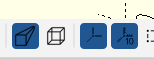
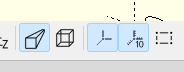
Originally the buttons in the Openscad editor (2026.01.03) were like:

At a certain moment (e.g. 2026.01.29 this changed into this

Is there a way to change it to more readable colors?

Regards

Hilbrand Klaver

--
This email has been checked for viruses by Avast antivirus software.
www.avast.com

Originally the buttons in the Openscad editor (2026.01.03) were like: At a certain moment (e.g. 2026.01.29 this changed into this Is there a way to change it to more readable colors? Regards Hilbrand Klaver -- This email has been checked for viruses by Avast antivirus software. www.avast.com

HK
Hilbrand Klaver
Thu, Feb 19, 2026 11:08 AM

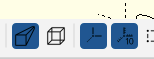
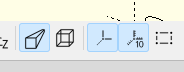
Originally the buttons in the Openscad editor (2026.01.03) were like:

At a certain moment (e.g. 2026.01.29 this changed into this

Is there a way to change it to more readable colors?

Regards

Hilbrand Klaver

--
This email has been checked for viruses by Avast antivirus software.
www.avast.com

Originally the buttons in the Openscad editor (2026.01.03) were like: At a certain moment (e.g. 2026.01.29 this changed into this Is there a way to change it to more readable colors? Regards Hilbrand Klaver -- This email has been checked for viruses by Avast antivirus software. www.avast.com
JB
Jordan Brown
Thu, Feb 19, 2026 3:22 PM

That was an effect of the switchover from Qt5 to Qt6.  It's noted at
https://github.com/openscad/openscad/issues/6569#issuecomment-3814474154 .

I agree that it's undesirable.  I don't think there's anything you can
do about it from the user side, but I think we should try to address it.

That was an effect of the switchover from Qt5 to Qt6.  It's noted at https://github.com/openscad/openscad/issues/6569#issuecomment-3814474154 . I agree that it's undesirable.  I don't think there's anything you can do about it from the user side, but I think we should try to address it.