

discuss@lists.openscad.org

OpenSCAD general discussion Mailing-list

View all threads

Joining parts

JB
Jordan Brown
Fri, Jul 19, 2019 12:37 AM

I can't say I have a lot of experience with it, but this article
describes a scheme that makes sense to me:

https://makezine.com/2015/07/22/tips-3d-printing-press-fit-parts/

I can't say I have a lot of experience with it, but this article describes a scheme that makes sense to me: https://makezine.com/2015/07/22/tips-3d-printing-press-fit-parts/
RD
Revar Desmera
Fri, Jul 19, 2019 12:39 AM

I designed and printed the world's most 3d-printable 3d printer using snap-together joiners I designed myself.  The printer is make out of a bunch of parts designed to be printed in a 150 x 150 x 150mm print volume.I added the joiners to my BOSL library if you want to use them.

https://github.com/revarbat/BOSL/wiki/joiners.scad https://github.com/revarbat/BOSL/wiki/joiners.scad
https://github.com/revarbat/BOSL https://github.com/revarbat/BOSL

  • Revar

On Jul 18, 2019, at 12:37 PM, Dan Shriver tabbydan@gmail.com wrote:

I am looking on having a discussion on joining printed parts.

Basically, I am looking to see if people have suggestions on friction fit methods for joining parts together (like legos do).  It could be something you brewed up yourself or something you found elsewhere.  Does anyone have friction fit joining mechanisms they like?

I am looking for this because if I print a whole model inside the build volume of a makerbot I'm going to end up with a tiny model that is hard for me to inspect.


OpenSCAD mailing list
Discuss@lists.openscad.org
http://lists.openscad.org/mailman/listinfo/discuss_lists.openscad.org

I designed and printed the world's most 3d-printable 3d printer using snap-together joiners I designed myself. The printer is make out of a bunch of parts designed to be printed in a 150 x 150 x 150mm print volume.I added the joiners to my BOSL library if you want to use them. https://github.com/revarbat/BOSL/wiki/joiners.scad <https://github.com/revarbat/BOSL/wiki/joiners.scad> https://github.com/revarbat/BOSL <https://github.com/revarbat/BOSL> - Revar > On Jul 18, 2019, at 12:37 PM, Dan Shriver <tabbydan@gmail.com> wrote: > > I am looking on having a discussion on joining printed parts. > > Basically, I am looking to see if people have suggestions on friction fit methods for joining parts together (like legos do). It could be something you brewed up yourself or something you found elsewhere. Does anyone have friction fit joining mechanisms they like? > > I am looking for this because if I print a whole model inside the build volume of a makerbot I'm going to end up with a tiny model that is hard for me to inspect. > _______________________________________________ > OpenSCAD mailing list > Discuss@lists.openscad.org > http://lists.openscad.org/mailman/listinfo/discuss_lists.openscad.org
DS
Dan Shriver
Fri, Jul 19, 2019 1:20 AM

"You don't indicate in your question what the geometry of your connection
is,
which might affect the types of joint that make sense.  If you can use glue
you can do a puzzle-cut type approach to divide your model into parts.  "

I didn't mention the geometry of my model for multiple reasons:

  1. I'm thinking of this as a general solution to a general problem
  2. the current model that I want to apply it to is very "odd-looking" so it
    is hard to describe

I don't want to use glue I prefer something that (like with legos) can be
snapped together and apart.  Examining parts (as well as the whole model
put together) could be useful.

On Thu, Jul 18, 2019 at 4:50 PM adrianv avm4@cornell.edu wrote:

I think I saw a design for prints to interface with LEGOS.

The one time so far that I've done this I used tapered sliding dovetails.
For my design I didn't care if the joint lined up and I figured the taper
would absorb errors in the print.  However, in my print the joint went
together a little too far, whereas some others who printed my design on
different hardware reported having to persuade it together with a hammer.
But I still think the sliding dovetail is a good idea.

We had a recent discussion here about snap hinges.

You don't indicate in your question what the geometry of your connection
is,
which might affect the types of joint that make sense.  If you can use glue
you can do a puzzle-cut type approach to divide your model into parts.

--
Sent from: http://forum.openscad.org/


OpenSCAD mailing list
Discuss@lists.openscad.org
http://lists.openscad.org/mailman/listinfo/discuss_lists.openscad.org

"You don't indicate in your question what the geometry of your connection is, which might affect the types of joint that make sense. If you can use glue you can do a puzzle-cut type approach to divide your model into parts. " I didn't mention the geometry of my model for multiple reasons: 1) I'm thinking of this as a general solution to a general problem 2) the current model that I want to apply it to is very "odd-looking" so it is hard to describe I don't want to use glue I prefer something that (like with legos) can be snapped together and apart. Examining parts (as well as the whole model put together) could be useful. On Thu, Jul 18, 2019 at 4:50 PM adrianv <avm4@cornell.edu> wrote: > I think I saw a design for prints to interface with LEGOS. > > The one time so far that I've done this I used tapered sliding dovetails. > For my design I didn't care if the joint lined up and I figured the taper > would absorb errors in the print. However, in my print the joint went > together a little too far, whereas some others who printed my design on > different hardware reported having to persuade it together with a hammer. > But I still think the sliding dovetail is a good idea. > > We had a recent discussion here about snap hinges. > > You don't indicate in your question what the geometry of your connection > is, > which might affect the types of joint that make sense. If you can use glue > you can do a puzzle-cut type approach to divide your model into parts. > > > > > -- > Sent from: http://forum.openscad.org/ > > _______________________________________________ > OpenSCAD mailing list > Discuss@lists.openscad.org > http://lists.openscad.org/mailman/listinfo/discuss_lists.openscad.org >
JC
Juan C.Cilleruelo
Fri, Jul 19, 2019 6:46 AM

I want to recommend you this book:

https://www.amazon.com/Functional-Design-3D-Printing-Designing/dp/0692883215/ref=sr_1_1?crid=2C5SQTATLJTB4&keywords=functional+design+for+3d+printing&qid=1563518323&s=gateway&sprefix=functional+design+%2Caps%2C209&sr=8-1

Inside it, you have all the necessary knowledge to make what you want.

It's not a book centred on a concrete design tool, otherwise is a
generic theoric book about 3D printing and how to design good things
that really are going to work in real work.

The book has a good part dedicated to assembling parts.

On 18/07/2019 21:37, Dan Shriver wrote:

I am looking on having a discussion on joining printed parts.

Basically, I am looking to see if people have suggestions on friction
fit methods for joining parts together (like legos do).  It could be
something you brewed up yourself or something you found elsewhere. 
Does anyone have friction fit joining mechanisms they like?

I am looking for this because if I print a whole model inside the
build volume of a makerbot I'm going to end up with a tiny model that
is hard for me to inspect.


OpenSCAD mailing list
Discuss@lists.openscad.org
http://lists.openscad.org/mailman/listinfo/discuss_lists.openscad.org

I want to recommend you this book: https://www.amazon.com/Functional-Design-3D-Printing-Designing/dp/0692883215/ref=sr_1_1?crid=2C5SQTATLJTB4&keywords=functional+design+for+3d+printing&qid=1563518323&s=gateway&sprefix=functional+design+%2Caps%2C209&sr=8-1 Inside it, you have all the necessary knowledge to make what you want. It's not a book centred on a concrete design tool, otherwise is a generic theoric book about 3D printing and how to design good things that really are going to work in real work. The book has a good part dedicated to assembling parts. On 18/07/2019 21:37, Dan Shriver wrote: > I am looking on having a discussion on joining printed parts. > > Basically, I am looking to see if people have suggestions on friction > fit methods for joining parts together (like legos do).  It could be > something you brewed up yourself or something you found elsewhere.  > Does anyone have friction fit joining mechanisms they like? > > I am looking for this because if I print a whole model inside the > build volume of a makerbot I'm going to end up with a tiny model that > is hard for me to inspect. > > _______________________________________________ > OpenSCAD mailing list > Discuss@lists.openscad.org > http://lists.openscad.org/mailman/listinfo/discuss_lists.openscad.org
FV
Frank van der Hulst
Fri, Jul 19, 2019 7:01 AM

I know you're looking for purely 3d printed solutions, but sometimes it's
just easier to glue things together.  In those circumstances I design
matching 2mm holes into the parts. Then glue short pieces of 1.75mm
filament into one set of holes to function as alignment pins for assembling
the parts.

On Fri, 19 Jul 2019, 18:47 Juan C.Cilleruelo, juanc.cilleruelo@gmail.com
wrote:

I want to recommend you this book:

https://www.amazon.com/Functional-Design-3D-Printing-Designing/dp/0692883215/ref=sr_1_1?crid=2C5SQTATLJTB4&keywords=functional+design+for+3d+printing&qid=1563518323&s=gateway&sprefix=functional+design+%2Caps%2C209&sr=8-1

Inside it, you have all the necessary knowledge to make what you want.

It's not a book centred on a concrete design tool, otherwise is a generic
theoric book about 3D printing and how to design good things that really
are going to work in real work.

The book has a good part dedicated to assembling parts.
On 18/07/2019 21:37, Dan Shriver wrote:

I am looking on having a discussion on joining printed parts.

Basically, I am looking to see if people have suggestions on friction fit
methods for joining parts together (like legos do).  It could be something
you brewed up yourself or something you found elsewhere.  Does anyone have
friction fit joining mechanisms they like?

I am looking for this because if I print a whole model inside the build
volume of a makerbot I'm going to end up with a tiny model that is hard for
me to inspect.


OpenSCAD mailing listDiscuss@lists.openscad.orghttp://lists.openscad.org/mailman/listinfo/discuss_lists.openscad.org


OpenSCAD mailing list
Discuss@lists.openscad.org
http://lists.openscad.org/mailman/listinfo/discuss_lists.openscad.org

I know you're looking for purely 3d printed solutions, but sometimes it's just easier to glue things together. In those circumstances I design matching 2mm holes into the parts. Then glue short pieces of 1.75mm filament into one set of holes to function as alignment pins for assembling the parts. On Fri, 19 Jul 2019, 18:47 Juan C.Cilleruelo, <juanc.cilleruelo@gmail.com> wrote: > I want to recommend you this book: > > > https://www.amazon.com/Functional-Design-3D-Printing-Designing/dp/0692883215/ref=sr_1_1?crid=2C5SQTATLJTB4&keywords=functional+design+for+3d+printing&qid=1563518323&s=gateway&sprefix=functional+design+%2Caps%2C209&sr=8-1 > > Inside it, you have all the necessary knowledge to make what you want. > > It's not a book centred on a concrete design tool, otherwise is a generic > theoric book about 3D printing and how to design good things that really > are going to work in real work. > > The book has a good part dedicated to assembling parts. > On 18/07/2019 21:37, Dan Shriver wrote: > > I am looking on having a discussion on joining printed parts. > > Basically, I am looking to see if people have suggestions on friction fit > methods for joining parts together (like legos do). It could be something > you brewed up yourself or something you found elsewhere. Does anyone have > friction fit joining mechanisms they like? > > I am looking for this because if I print a whole model inside the build > volume of a makerbot I'm going to end up with a tiny model that is hard for > me to inspect. > > _______________________________________________ > OpenSCAD mailing listDiscuss@lists.openscad.orghttp://lists.openscad.org/mailman/listinfo/discuss_lists.openscad.org > > _______________________________________________ > OpenSCAD mailing list > Discuss@lists.openscad.org > http://lists.openscad.org/mailman/listinfo/discuss_lists.openscad.org >
JC
Juan C.Cilleruelo
Fri, Jul 19, 2019 7:03 AM

I've discovered the next thing in OpenSCAD and I want to know if it's a
logical situation or is a limitation or if it's a bug behaviour.

1st : I can't use linear_extrude() with modules that use 3D
instructions, only with those that use exclusively 2D instructions.

2nd: I can't export to STL a drawing that uses exclusively 2D instructions.

if I want to generate an STL file with only 2D instructions, I need to
apply at least a 0.1 of linear_extrusion to the drawing.

3rd: As a consequence of the first, I can't use linear_extrude() to
extrude an imported STL, because its content is always in 3D.

Did anyone know a tip or trick to save 2D drawings into an STL and to
extrude an STL file imported?

Thank you all in advance!

I've discovered the next thing in OpenSCAD and I want to know if it's a logical situation or is a limitation or if it's a bug behaviour. 1st : I can't use linear_extrude() with modules that use 3D instructions, only with those that use exclusively 2D instructions. 2nd: I can't export to STL a drawing that uses exclusively 2D instructions. if I want to generate an STL file with only 2D instructions, I need to apply at least a 0.1 of linear_extrusion to the drawing. 3rd: As a consequence of the first, I can't use linear_extrude() to extrude an imported STL, because its content is always in 3D. Did anyone know a tip or trick to save 2D drawings into an STL and to extrude an STL file imported? Thank you all in advance!
NH
nop head
Fri, Jul 19, 2019 7:11 AM

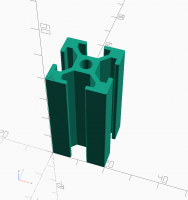
All those statements are true. To export and import 2D shapes you need to
use a 2D format like DXF or SVG.

You can convert a 3D shape to 2D with projection(), so if you have a flat
object in an STL file you can make it 2D and then linear_extrude it.

On Fri, 19 Jul 2019 at 08:04, Juan C.Cilleruelo juanc.cilleruelo@gmail.com
wrote:

I've discovered the next thing in OpenSCAD and I want to know if it's a
logical situation or is a limitation or if it's a bug behaviour.

1st : I can't use linear_extrude() with modules that use 3D
instructions, only with those that use exclusively 2D instructions.

2nd: I can't export to STL a drawing that uses exclusively 2D instructions.

if I want to generate an STL file with only 2D instructions, I need to
apply at least a 0.1 of linear_extrusion to the drawing.

3rd: As a consequence of the first, I can't use linear_extrude() to
extrude an imported STL, because its content is always in 3D.

Did anyone know a tip or trick to save 2D drawings into an STL and to
extrude an STL file imported?

Thank you all in advance!


OpenSCAD mailing list
Discuss@lists.openscad.org
http://lists.openscad.org/mailman/listinfo/discuss_lists.openscad.org
All those statements are true. To export and import 2D shapes you need to use a 2D format like DXF or SVG. You can convert a 3D shape to 2D with projection(), so if you have a flat object in an STL file you can make it 2D and then linear_extrude it. On Fri, 19 Jul 2019 at 08:04, Juan C.Cilleruelo <juanc.cilleruelo@gmail.com> wrote: > I've discovered the next thing in OpenSCAD and I want to know if it's a > logical situation or is a limitation or if it's a bug behaviour. > > 1st : I can't use linear_extrude() with modules that use 3D > instructions, only with those that use exclusively 2D instructions. > > 2nd: I can't export to STL a drawing that uses exclusively 2D instructions. > > if I want to generate an STL file with only 2D instructions, I need to > apply at least a 0.1 of linear_extrusion to the drawing. > > 3rd: As a consequence of the first, I can't use linear_extrude() to > extrude an imported STL, because its content is always in 3D. > > Did anyone know a tip or trick to save 2D drawings into an STL and to > extrude an STL file imported? > > Thank you all in advance! > > > > > > > _______________________________________________ > OpenSCAD mailing list > Discuss@lists.openscad.org > http://lists.openscad.org/mailman/listinfo/discuss_lists.openscad.org >
JC
Juan C.Cilleruelo
Fri, Jul 19, 2019 7:18 AM

Thank you very much!!!!

It's just what I looking for!!!

/----------  PROFILE 20X20 => ALUMINIUM PROFILE 20x20 ----------/
   linear_extrude(height = 40, center = false, convexity = 10, twist = 0){
      projection(){
        import("PROFILE20X20_001.stl");
      }
   }

On 19/07/2019 09:11, nop head wrote:

All those statements are true. To export and import 2D shapes you need
to use a 2D format like DXF or SVG.

You can convert a 3D shape to 2D with projection(), so if you have a
flat object in an STL file you can make it 2D and then linear_extrude it.

On Fri, 19 Jul 2019 at 08:04, Juan C.Cilleruelo
<juanc.cilleruelo@gmail.com mailto:juanc.cilleruelo@gmail.com> wrote:

 I've discovered the next thing in OpenSCAD and I want to know if
 it's a
 logical situation or is a limitation or if it's a bug behaviour.

 1st : I can't use linear_extrude() with modules that use 3D
 instructions, only with those that use exclusively 2D instructions.

 2nd: I can't export to STL a drawing that uses exclusively 2D
 instructions.

 if I want to generate an STL file with only 2D instructions, I
 need to
 apply at least a 0.1 of linear_extrusion to the drawing.

 3rd: As a consequence of the first, I can't use linear_extrude() to
 extrude an imported STL, because its content is always in 3D.

 Did anyone know a tip or trick to save 2D drawings into an STL and to
 extrude an STL file imported?

 Thank you all in advance!


 _______________________________________________
 OpenSCAD mailing list
 Discuss@lists.openscad.org <mailto:Discuss@lists.openscad.org>
 http://lists.openscad.org/mailman/listinfo/discuss_lists.openscad.org

OpenSCAD mailing list
Discuss@lists.openscad.org
http://lists.openscad.org/mailman/listinfo/discuss_lists.openscad.org

Thank you very much!!!! It's just what I looking for!!! /*----------  PROFILE 20X20 => ALUMINIUM PROFILE 20x20 ----------*/    linear_extrude(height = 40, center = false, convexity = 10, twist = 0){       projection(){         import("PROFILE20X20_001.stl");       }    } On 19/07/2019 09:11, nop head wrote: > All those statements are true. To export and import 2D shapes you need > to use a 2D format like DXF or SVG. > > You can convert a 3D shape to 2D with projection(), so if you have a > flat object in an STL file you can make it 2D and then linear_extrude it. > > On Fri, 19 Jul 2019 at 08:04, Juan C.Cilleruelo > <juanc.cilleruelo@gmail.com <mailto:juanc.cilleruelo@gmail.com>> wrote: > > I've discovered the next thing in OpenSCAD and I want to know if > it's a > logical situation or is a limitation or if it's a bug behaviour. > > 1st : I can't use linear_extrude() with modules that use 3D > instructions, only with those that use exclusively 2D instructions. > > 2nd: I can't export to STL a drawing that uses exclusively 2D > instructions. > > if I want to generate an STL file with only 2D instructions, I > need to > apply at least a 0.1 of linear_extrusion to the drawing. > > 3rd: As a consequence of the first, I can't use linear_extrude() to > extrude an imported STL, because its content is always in 3D. > > Did anyone know a tip or trick to save 2D drawings into an STL and to > extrude an STL file imported? > > Thank you all in advance! > > > > > > > _______________________________________________ > OpenSCAD mailing list > Discuss@lists.openscad.org <mailto:Discuss@lists.openscad.org> > http://lists.openscad.org/mailman/listinfo/discuss_lists.openscad.org > > > _______________________________________________ > OpenSCAD mailing list > Discuss@lists.openscad.org > http://lists.openscad.org/mailman/listinfo/discuss_lists.openscad.org
JC
Juan C.Cilleruelo
Fri, Jul 19, 2019 7:43 AM

Thank you very much!!!!

It's just what I looking for!!!

/----------  PROFILE 20X20 => ALUMINIUM PROFILE 20x20 ----------/
   linear_extrude(height = 40, center = false, convexity = 10, twist = 0){
      projection(){
        import("PROFILE20X20_001.stl");
      }
   }

On 19/07/2019 09:11, nop head wrote:

All those statements are true. To export and import 2D shapes you need
to use a 2D format like DXF or SVG.

You can convert a 3D shape to 2D with projection(), so if you have a
flat object in an STL file you can make it 2D and then linear_extrude it.

On Fri, 19 Jul 2019 at 08:04, Juan C.Cilleruelo
<juanc.cilleruelo@gmail.com mailto:juanc.cilleruelo@gmail.com> wrote:

 I've discovered the next thing in OpenSCAD and I want to know if
 it's a
 logical situation or is a limitation or if it's a bug behaviour.

 1st : I can't use linear_extrude() with modules that use 3D
 instructions, only with those that use exclusively 2D instructions.

 2nd: I can't export to STL a drawing that uses exclusively 2D
 instructions.

 if I want to generate an STL file with only 2D instructions, I
 need to
 apply at least a 0.1 of linear_extrusion to the drawing.

 3rd: As a consequence of the first, I can't use linear_extrude() to
 extrude an imported STL, because its content is always in 3D.

 Did anyone know a tip or trick to save 2D drawings into an STL and to
 extrude an STL file imported?

 Thank you all in advance!


 _______________________________________________
 OpenSCAD mailing list
 Discuss@lists.openscad.org <mailto:Discuss@lists.openscad.org>
 http://lists.openscad.org/mailman/listinfo/discuss_lists.openscad.org

OpenSCAD mailing list
Discuss@lists.openscad.org
http://lists.openscad.org/mailman/listinfo/discuss_lists.openscad.org

Thank you very much!!!! It's just what I looking for!!! /*----------  PROFILE 20X20 => ALUMINIUM PROFILE 20x20 ----------*/    linear_extrude(height = 40, center = false, convexity = 10, twist = 0){       projection(){         import("PROFILE20X20_001.stl");       }    } On 19/07/2019 09:11, nop head wrote: > All those statements are true. To export and import 2D shapes you need > to use a 2D format like DXF or SVG. > > You can convert a 3D shape to 2D with projection(), so if you have a > flat object in an STL file you can make it 2D and then linear_extrude it. > > On Fri, 19 Jul 2019 at 08:04, Juan C.Cilleruelo > <juanc.cilleruelo@gmail.com <mailto:juanc.cilleruelo@gmail.com>> wrote: > > I've discovered the next thing in OpenSCAD and I want to know if > it's a > logical situation or is a limitation or if it's a bug behaviour. > > 1st : I can't use linear_extrude() with modules that use 3D > instructions, only with those that use exclusively 2D instructions. > > 2nd: I can't export to STL a drawing that uses exclusively 2D > instructions. > > if I want to generate an STL file with only 2D instructions, I > need to > apply at least a 0.1 of linear_extrusion to the drawing. > > 3rd: As a consequence of the first, I can't use linear_extrude() to > extrude an imported STL, because its content is always in 3D. > > Did anyone know a tip or trick to save 2D drawings into an STL and to > extrude an STL file imported? > > Thank you all in advance! > > > > > > > _______________________________________________ > OpenSCAD mailing list > Discuss@lists.openscad.org <mailto:Discuss@lists.openscad.org> > http://lists.openscad.org/mailman/listinfo/discuss_lists.openscad.org > > > _______________________________________________ > OpenSCAD mailing list > Discuss@lists.openscad.org > http://lists.openscad.org/mailman/listinfo/discuss_lists.openscad.org
NH
nop head
Fri, Jul 19, 2019 7:47 AM

Glad to help!

I can see why you needed it now. Where did you get the profile STL from?

On Fri, 19 Jul 2019 at 08:43, Juan C.Cilleruelo juanc.cilleruelo@gmail.com
wrote:

Thank you very much!!!!

It's just what I looking for!!!

/----------  PROFILE 20X20 => ALUMINIUM PROFILE 20x20
----------
/
linear_extrude(height = 40, center = false, convexity = 10, twist = 0){
projection(){
import("PROFILE20X20_001.stl");
}
}
On 19/07/2019 09:11, nop head wrote:

All those statements are true. To export and import 2D shapes you need to
use a 2D format like DXF or SVG.

You can convert a 3D shape to 2D with projection(), so if you have a flat
object in an STL file you can make it 2D and then linear_extrude it.

On Fri, 19 Jul 2019 at 08:04, Juan C.Cilleruelo <
juanc.cilleruelo@gmail.com> wrote:

I've discovered the next thing in OpenSCAD and I want to know if it's a
logical situation or is a limitation or if it's a bug behaviour.

1st : I can't use linear_extrude() with modules that use 3D
instructions, only with those that use exclusively 2D instructions.

2nd: I can't export to STL a drawing that uses exclusively 2D
instructions.

if I want to generate an STL file with only 2D instructions, I need to
apply at least a 0.1 of linear_extrusion to the drawing.

3rd: As a consequence of the first, I can't use linear_extrude() to
extrude an imported STL, because its content is always in 3D.

Did anyone know a tip or trick to save 2D drawings into an STL and to
extrude an STL file imported?

Thank you all in advance!


OpenSCAD mailing list
Discuss@lists.openscad.org
http://lists.openscad.org/mailman/listinfo/discuss_lists.openscad.org


OpenSCAD mailing listDiscuss@lists.openscad.orghttp://lists.openscad.org/mailman/listinfo/discuss_lists.openscad.org

Glad to help! I can see why you needed it now. Where did you get the profile STL from? On Fri, 19 Jul 2019 at 08:43, Juan C.Cilleruelo <juanc.cilleruelo@gmail.com> wrote: > Thank you very much!!!! > > It's just what I looking for!!! > > > > /*---------- PROFILE 20X20 => ALUMINIUM PROFILE 20x20 > ----------*/ > linear_extrude(height = 40, center = false, convexity = 10, twist = 0){ > projection(){ > import("PROFILE20X20_001.stl"); > } > } > On 19/07/2019 09:11, nop head wrote: > > All those statements are true. To export and import 2D shapes you need to > use a 2D format like DXF or SVG. > > You can convert a 3D shape to 2D with projection(), so if you have a flat > object in an STL file you can make it 2D and then linear_extrude it. > > On Fri, 19 Jul 2019 at 08:04, Juan C.Cilleruelo < > juanc.cilleruelo@gmail.com> wrote: > >> I've discovered the next thing in OpenSCAD and I want to know if it's a >> logical situation or is a limitation or if it's a bug behaviour. >> >> 1st : I can't use linear_extrude() with modules that use 3D >> instructions, only with those that use exclusively 2D instructions. >> >> 2nd: I can't export to STL a drawing that uses exclusively 2D >> instructions. >> >> if I want to generate an STL file with only 2D instructions, I need to >> apply at least a 0.1 of linear_extrusion to the drawing. >> >> 3rd: As a consequence of the first, I can't use linear_extrude() to >> extrude an imported STL, because its content is always in 3D. >> >> Did anyone know a tip or trick to save 2D drawings into an STL and to >> extrude an STL file imported? >> >> Thank you all in advance! >> >> >> >> >> >> >> _______________________________________________ >> OpenSCAD mailing list >> Discuss@lists.openscad.org >> http://lists.openscad.org/mailman/listinfo/discuss_lists.openscad.org >> > > _______________________________________________ > OpenSCAD mailing listDiscuss@lists.openscad.orghttp://lists.openscad.org/mailman/listinfo/discuss_lists.openscad.org > >