

text() 2D or 3D?

cube([10,10, 0.0000001]);
square(5);
Previews correctly and shows the madness of it.
On 6 February 2017 at 08:12, Torsten Paul Torsten.Paul@gmx.de wrote:
On 02/06/2017 02:08 AM, Dave92F1 wrote:
Changing it to 0.000001 mm (1 micron) would probably be a big
improvement in obviousness.
While I don't know the details, I do suspect the reason for that
1 unit display is technical and based on limitations/behavior of
the preview display mode.
I'm pretty sure it can be improved by using 0.01 or something
similar (https://github.com/openscad/openscad/issues/1566),
setting it to a very small value might cause Z-fighting or other
issues so we'd just swap one problem with a slightly different
one.
ciao,
Torsten.
OpenSCAD mailing list
Discuss@lists.openscad.org
http://lists.openscad.org/mailman/listinfo/discuss_lists.openscad.org

On 02/06/2017 11:05 AM, nop head wrote:
cube([10,10, 0.0000001]);
square(5);
Previews correctly and shows the madness of it.
That's not really an example that could show issues.
With both sides same color, it's obviously fine as
there's nothing to interfere.
Also it might depend on the combination of OS, graphics
card and graphics driver".
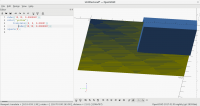
Try:
cube([10,10, 0.0000001]);
color("yellow")
translate([0, 0, 0.00001])
cube([10,10, 0.0000001]);
square(5);
The yellow "cube" is obviously totally above the other
one. Yet looking from below, I'm getting some nice
Z-Fighting artifacts. From above it's mostly fine, but
even in that direction I'm getting a very small amount
of flickering. I guess that's mostly due to order of
the rendering.
( If the attached image does not make it to the forum
post, see http://imgur.com/AUoQJ3A ).
ciao,
Torsten.

polyhedron([[0,0,0],[0,10,0],[10,10,0],[10,0,0]],[[0,1,2,3]]);
No z-fighting, zero thickness.
Any surfaces in OpenSCAD that are close cause Z fighting. But a single
surface does not, as it has nothing to fight with, as long as back faces
are culled.
So I don't think Z fighting is a reason not to make 2D objects very thin.
On 6 February 2017 at 11:25, Ronaldo Persiano rcmpersiano@gmail.com wrote:
polyhedron([[0,0,0],[0,10,0],[10,10,0],[10,0,0]],[[0,1,2,3]]);
No z-fighting, zero thickness.
OpenSCAD mailing list
Discuss@lists.openscad.org
http://lists.openscad.org/mailman/listinfo/discuss_lists.openscad.org
On 02/06/2017 12:58 PM, nop head wrote:
Any surfaces in OpenSCAD that are close cause Z fighting. But
a single surface does not, as it has nothing to fight with,
as long as back faces are culled.
So I don't think Z fighting is a reason not to make 2D objects
very thin.
I think it is a reason to not make it very thin. The current
thickness is confusing, going to the other extreme and causing
different issues seems not a good idea.
I simply suggest to see how a not-so-extreme change works out.
ciao,
Torsten.
Yes but very thin causes no problems. Very close causes problems but I
don't see how that is more likely with thin.
Anyway 0.1 would be a lot better than 1 at the scales I work with but
perhaps not for others.
On 6 February 2017 at 12:03, Torsten Paul Torsten.Paul@gmx.de wrote:
On 02/06/2017 12:58 PM, nop head wrote:
Any surfaces in OpenSCAD that are close cause Z fighting. But
a single surface does not, as it has nothing to fight with,
as long as back faces are culled.
So I don't think Z fighting is a reason not to make 2D objects
very thin.
I think it is a reason to not make it very thin. The current
thickness is confusing, going to the other extreme and causing
different issues seems not a good idea.
I simply suggest to see how a not-so-extreme change works out.
ciao,
Torsten.
OpenSCAD mailing list
Discuss@lists.openscad.org
http://lists.openscad.org/mailman/listinfo/discuss_lists.openscad.org

Could the thickness be configurable, as well as the displayed color?
On 2/6/2017 8:19 AM, nop head wrote:
Yes but very thin causes no problems. Very close causes problems but I
don't see how that is more likely with thin.
Anyway 0.1 would be a lot better than 1 at the scales I work with but
perhaps not for others.
On 6 February 2017 at 12:03, Torsten Paul <Torsten.Paul@gmx.de
mailto:Torsten.Paul@gmx.de> wrote:
On 02/06/2017 12:58 PM, nop head wrote:
Any surfaces in OpenSCAD that are close cause Z fighting. But
a single surface does not, as it has nothing to fight with,
as long as back faces are culled.
So I don't think Z fighting is a reason not to make 2D objects
very thin.
 I think it is a reason to not make it *very* thin. The current
 thickness is confusing, going to the other extreme and causing
 different issues seems not a good idea.

 I simply suggest to see how a not-so-extreme change works out.

 ciao,
   Torsten.


 _______________________________________________
 OpenSCAD mailing list
 Discuss@lists.openscad.org <mailto:Discuss@lists.openscad.org>
 http://lists.openscad.org/mailman/listinfo/discuss_lists.openscad.org
 <http://lists.openscad.org/mailman/listinfo/discuss_lists.openscad.org>
OpenSCAD mailing list
Discuss@lists.openscad.org
http://lists.openscad.org/mailman/listinfo/discuss_lists.openscad.org
No virus found in this message.
Checked by AVG - www.avg.com http://www.avg.com/email-signature
Version: 2016.0.7998 / Virus Database: 4756/13899 - Release Date: 02/06/17
nophead wrote
Any surfaces in OpenSCAD that are close cause Z fighting. But a single
surface does not, as it has nothing to fight with, as long as back faces
are culled.
So I don't think Z fighting is a reason not to make 2D objects very thin.
I don't think, either. My intention here is to show that 2D models may be
well represented without thickness.
--
View this message in context: http://forum.openscad.org/text-2D-or-3D-tp12217p20342.html
Sent from the OpenSCAD mailing list archive at Nabble.com.

I didn't mean to restart a war.
Just throwing a warning about the 1 unit rendering would be fine with me.
But silently rendering a 2D object as 3-dimensional is highly misleading to
the newbie.
--
View this message in context: http://forum.openscad.org/text-2D-or-3D-tp12217p20346.html
Sent from the OpenSCAD mailing list archive at Nabble.com.

scale should automatically set z component to 1 for 2D objects #1646
https://github.com/openscad/openscad/issues/1646 covers the scale issue
I mentioned, and shows how it is a problem. Being thinner would help, but
fixing scale would be better.
But silently rendering a 2D object as 3-dimensional is highly misleading
to the newbie.
Not just newbies, it still gets me from time to time...
I imagine the change of thinness is not overly complex, perhaps it could be
0.01 for now, then see if it trips up anyone in the future, before going to
more complex solutions?
Admin - PM me if you need anything, or if I've done something stupid...
Unless specifically shown otherwise above, my contribution is in the Public Domain; to the extent possible under law, I have waived all copyright and related or neighbouring rights to this work. Obviously inclusion of works of previous authors is not included in the above.
The TPP is no simple “trade agreement.” Fight it! http://www.ourfairdeal.org/ time is running out!
View this message in context: http://forum.openscad.org/text-2D-or-3D-tp12217p20350.html
Sent from the OpenSCAD mailing list archive at Nabble.com.