Linear extrude SVG with scale determined by math function?

I'm not sure what exactly you're doing, but if it's some kind of
extrusion based on what Jordan posted and it's taking a long time to
render you can almost certainly do much better by using a sweep method
that builds a single polyhedron instead of a union of many layers. To
do this you will need to have your base shape as a point list instead
of as geometry, though. Here's Jordan's example redone using the
BOSL2 sweep. The one gotcha with sweep is that tight bends can result
in invalid geometry.
include<BOSL2/std.scad>
T = [ for (i=[0:50])
up(i) // each layer goes up to height i
scale(sin(i/50360) + 2) // And rescaled to this scale
];
sq = [[-5,-5],[-5,5],[5,5],[5,-5]]; // Starting shape, a square
sweep(sq,T);
On Sat, Feb 5, 2022 at 6:47 PM Bob Ewart jinnicky@bobsown.net wrote:
Thank you Jordan
I've been working on making bits for my pipes. (I bite through them.) I take a series of measurements of the Y and Z axes along the X axis and smooth them using bezier curves.
I did a brute force extrusion which took 49 minutes to render. Using your variable_extrude module it takes 14 minutes.
--
Bob
On 1/31/22 11:39, Jordan Brown wrote:
On 1/31/2022 7:00 AM, Jim Witte wrote:
(I know, my question/answer ratio is low..) What would be an efficient (!) way to do a linear extrusion of an SVG with a variable scale factor determined by a math function?
I can think of doing multiple small steps, each with a different scale factor (tangent to the curve), and then (maybe) hulling each "slice pair" (hull shouldn't be needed as as each "slice pair" should already be continuous).
But that would be god-awful expensive, especially with a complicated SVG? Can anyone think of a better way to do it? maybe something that would make a single slice, and then shear it for each successive slice - or is that basically what linear_extrude with scale does do?
Here's a possible implementation. Substitute your own 2D shape (including an SVG import) for the square().
// linear extrude the children to height h, using scales a[] for each step.
module variable_extrude(h, a) {
steps = len(a)-1;
step_h = h/steps;
for (i = [0:steps-1]) {
z = i*step_h;
s0 = a[i];
s1 = a[i+1];
translate([0,0,z]) {
linear_extrude(height=step_h, scale=s1/s0, slices=1)
scale(s0)
children();
}
}
}
a = [ for (i=[0:50]) sin(i/50*360) + 2 ];
variable_extrude(50, a) square(10, center=true);
A nightly-snapshot variant that passes in a function is left as an exercise for the reader.
F5 render says 0.05s; F6 render says 5s.
OpenSCAD mailing list
To unsubscribe send an email to discuss-leave@lists.openscad.org
OpenSCAD mailing list
To unsubscribe send an email to discuss-leave@lists.openscad.org

Thanks.
I had to use xscale and yscale in calculating T since the x and y
profiles are different.
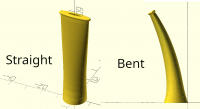
One of the other things that chews up time is bending the pipe stem.
I'm using the bend.scad routine by stuartpb
https://github.com/stuartpb/bend.scad
My original brute force code took a little over 49 minutes to render on
a i9-9900K processor at nearly 5GHz with 64GB memory.
Some timing results:
On the 2019-05 release it took 1:04 to preview and 9:07 to render (min:sec)
on 2022-02-09 nightly it took 0:23 to preview and 4:57 to render
without the bend:
On the 2019-05 release it took 0:01 to preview and 1:28 to render
on 2022-02-09 nightly it took .44 seconds to preview and 50.233
seconds to render
Another interesting note:
x = [for(i=[0:.05:1] i];
The last value of x in 2019-05 is .95, 2022-02-09 correctly gives 1.0
I should have used x=[for(i=[1:20]) i/20]; which works in both.
--
Bob
On 2/5/22 19:20, Adrian Mariano wrote:
I'm not sure what exactly you're doing, but if it's some kind of
extrusion based on what Jordan posted and it's taking a long time to
render you can almost certainly do much better by using a sweep method
that builds a single polyhedron instead of a union of many layers. To
do this you will need to have your base shape as a point list instead
of as geometry, though. Here's Jordan's example redone using the
BOSL2 sweep. The one gotcha with sweep is that tight bends can result
in invalid geometry.
include<BOSL2/std.scad>
T = [ for (i=[0:50])
up(i) // each layer goes up to height i
scale(sin(i/50360) + 2) // And rescaled to this scale
];
sq = [[-5,-5],[-5,5],[5,5],[5,-5]]; // Starting shape, a square
sweep(sq,T);
On Sat, Feb 5, 2022 at 6:47 PM Bob Ewartjinnicky@bobsown.net wrote:
Thank you Jordan
I've been working on making bits for my pipes. (I bite through them.) I take a series of measurements of the Y and Z axes along the X axis and smooth them using bezier curves.
I did a brute force extrusion which took 49 minutes to render. Using your variable_extrude module it takes 14 minutes.
--
Bob
On 1/31/22 11:39, Jordan Brown wrote:
On 1/31/2022 7:00 AM, Jim Witte wrote:
(I know, my question/answer ratio is low..) What would be an efficient (!) way to do a linear extrusion of an SVG with a variable scale factor determined by a math function?
I can think of doing multiple small steps, each with a different scale factor (tangent to the curve), and then (maybe) hulling each "slice pair" (hull shouldn't be needed as as each "slice pair" should already be continuous).
But that would be god-awful expensive, especially with a complicated SVG? Can anyone think of a better way to do it? maybe something that would make a single slice, and then shear it for each successive slice - or is that basically what linear_extrude with scale does do?
Here's a possible implementation. Substitute your own 2D shape (including an SVG import) for the square().
// linear extrude the children to height h, using scales a[] for each step.
module variable_extrude(h, a) {
steps = len(a)-1;
step_h = h/steps;
for (i = [0:steps-1]) {
z = i*step_h;
s0 = a[i];
s1 = a[i+1];
translate([0,0,z]) {
linear_extrude(height=step_h, scale=s1/s0, slices=1)
scale(s0)
children();
}
}
}
a = [ for (i=[0:50]) sin(i/50*360) + 2 ];
variable_extrude(50, a) square(10, center=true);
A nightly-snapshot variant that passes in a function is left as an exercise for the reader.
F5 render says 0.05s; F6 render says 5s.
OpenSCAD mailing list
To unsubscribe send an email todiscuss-leave@lists.openscad.org
OpenSCAD mailing list
To unsubscribe send an email todiscuss-leave@lists.openscad.org
OpenSCAD mailing list
To unsubscribe send an email todiscuss-leave@lists.openscad.org
You are being pretty vague about what you're trying to do and how
you're doing it. If you want to bend something that you're creating
with sweep you can probably add the bend to the sweep transform and it
will be just as fast with the bend as without. If you want to bend
something you created with sweep, or you just don't want to bother
computing the bend transform yourself, BOSL2 has a bend function that
operates on polyhedron data, which will be much faster than a bend
based on dissecting and unioning geometry.
A general rule is that you should never rely on an equality test with
floating point numbers. Your range [0:.05:1] relies on the outcome of
an equality test to determine whether 1 is in the result or not. So
that's just unreliable. You should instead write [0:.05:1.01] or
something like that if you want to use the original form. Of course,
turning the loop into an integer loop is a reliable solution as well,
though in your example you need [0:20] instead of [1:20] to get the
same behavior as the first case.
On Thu, Feb 10, 2022 at 5:12 PM Bob Ewart jinnicky@bobsown.net wrote:
Thanks.
I had to use xscale and yscale in calculating T since the x and y profiles are different.
One of the other things that chews up time is bending the pipe stem. I'm using the bend.scad routine by stuartpb
My original brute force code took a little over 49 minutes to render on a i9-9900K processor at nearly 5GHz with 64GB memory.
Some timing results:
On the 2019-05 release it took 1:04 to preview and 9:07 to render (min:sec)
on 2022-02-09 nightly it took 0:23 to preview and 4:57 to render
without the bend:
On the 2019-05 release it took 0:01 to preview and 1:28 to render
on 2022-02-09 nightly it took .44 seconds to preview and 50.233 seconds to render
Another interesting note:
x = [for(i=[0:.05:1] i];
The last value of x in 2019-05 is .95, 2022-02-09 correctly gives 1.0
I should have used x=[for(i=[1:20]) i/20]; which works in both.
--
Bob
On 2/5/22 19:20, Adrian Mariano wrote:
I'm not sure what exactly you're doing, but if it's some kind of
extrusion based on what Jordan posted and it's taking a long time to
render you can almost certainly do much better by using a sweep method
that builds a single polyhedron instead of a union of many layers. To
do this you will need to have your base shape as a point list instead
of as geometry, though. Here's Jordan's example redone using the
BOSL2 sweep. The one gotcha with sweep is that tight bends can result
in invalid geometry.
include<BOSL2/std.scad>
T = [ for (i=[0:50])
up(i) // each layer goes up to height i
scale(sin(i/50360) + 2) // And rescaled to this scale
];
sq = [[-5,-5],[-5,5],[5,5],[5,-5]]; // Starting shape, a square
sweep(sq,T);
On Sat, Feb 5, 2022 at 6:47 PM Bob Ewart jinnicky@bobsown.net wrote:
Thank you Jordan
I've been working on making bits for my pipes. (I bite through them.) I take a series of measurements of the Y and Z axes along the X axis and smooth them using bezier curves.
I did a brute force extrusion which took 49 minutes to render. Using your variable_extrude module it takes 14 minutes.
--
Bob
On 1/31/22 11:39, Jordan Brown wrote:
On 1/31/2022 7:00 AM, Jim Witte wrote:
(I know, my question/answer ratio is low..) What would be an efficient (!) way to do a linear extrusion of an SVG with a variable scale factor determined by a math function?
I can think of doing multiple small steps, each with a different scale factor (tangent to the curve), and then (maybe) hulling each "slice pair" (hull shouldn't be needed as as each "slice pair" should already be continuous).
But that would be god-awful expensive, especially with a complicated SVG? Can anyone think of a better way to do it? maybe something that would make a single slice, and then shear it for each successive slice - or is that basically what linear_extrude with scale does do?
Here's a possible implementation. Substitute your own 2D shape (including an SVG import) for the square().
// linear extrude the children to height h, using scales a[] for each step.
module variable_extrude(h, a) {
steps = len(a)-1;
step_h = h/steps;
for (i = [0:steps-1]) {
z = i*step_h;
s0 = a[i];
s1 = a[i+1];
translate([0,0,z]) {
linear_extrude(height=step_h, scale=s1/s0, slices=1)
scale(s0)
children();
}
}
}
a = [ for (i=[0:50]) sin(i/50*360) + 2 ];
variable_extrude(50, a) square(10, center=true);
A nightly-snapshot variant that passes in a function is left as an exercise for the reader.
F5 render says 0.05s; F6 render says 5s.
OpenSCAD mailing list
To unsubscribe send an email to discuss-leave@lists.openscad.org
OpenSCAD mailing list
To unsubscribe send an email to discuss-leave@lists.openscad.org
OpenSCAD mailing list
To unsubscribe send an email to discuss-leave@lists.openscad.org
OpenSCAD mailing list
To unsubscribe send an email to discuss-leave@lists.openscad.org
I thought I was pretty specific in my first post. I'm a pipe smoker. I
bite through the bits. So, I'm trying to print new ones.
vnf_bend works for a bend around the Y axis see the example in the wiki
https://github.com/revarbat/BOSL2/wiki/vnf.scad#function-vnf_bend
However bending around the X axis doesn't:
 vnfx0 = cube([40,10,100]);
 vnfx1 = fwd(50, p=vnfx0);
 #vnf_polyhedron(vnfx1);
 bentx1 = vnf_bend(vnfx1, axis="X");
 vnf_polyhedron(bentx1);
It complains about vnfx1 not being entirely above z=0. another floating
point problem. I get another error moving vnfx1 up by 1
The current release of BOSL2 does not work with any OpenSCAD release
before 2021.09 since it uses the "^" operator. Ubuntu has 2019.05.
I merely pointed out a change in the nightly build to my current release
in the "for" statement. I'm well aware of the problems with floating
point comparisons. That's why I have fuzz = .00005 in my standard includes.
The x=[for(i=[1:20]) i/20] was a typo. You are correct. Sorry
--
Bob
On 2/10/22 17:55, Adrian Mariano wrote:
You are being pretty vague about what you're trying to do and how
you're doing it. If you want to bend something that you're creating
with sweep you can probably add the bend to the sweep transform and it
will be just as fast with the bend as without. If you want to bend
something you created with sweep, or you just don't want to bother
computing the bend transform yourself, BOSL2 has a bend function that
operates on polyhedron data, which will be much faster than a bend
based on dissecting and unioning geometry.
A general rule is that you should never rely on an equality test with
floating point numbers. Your range [0:.05:1] relies on the outcome of
an equality test to determine whether 1 is in the result or not. So
that's just unreliable. You should instead write [0:.05:1.01] or
something like that if you want to use the original form. Of course,
turning the loop into an integer loop is a reliable solution as well,
though in your example you need [0:20] instead of [1:20] to get the
same behavior as the first case.
On Thu, Feb 10, 2022 at 5:12 PM Bob Ewartjinnicky@bobsown.net wrote:
Thanks.
I had to use xscale and yscale in calculating T since the x and y profiles are different.
One of the other things that chews up time is bending the pipe stem. I'm using the bend.scad routine by stuartpb
My original brute force code took a little over 49 minutes to render on a i9-9900K processor at nearly 5GHz with 64GB memory.
Some timing results:
On the 2019-05 release it took 1:04 to preview and 9:07 to render (min:sec)
on 2022-02-09 nightly it took 0:23 to preview and 4:57 to render
without the bend:
On the 2019-05 release it took 0:01 to preview and 1:28 to render
on 2022-02-09 nightly it took .44 seconds to preview and 50.233 seconds to render
Another interesting note:
x = [for(i=[0:.05:1] i];
The last value of x in 2019-05 is .95, 2022-02-09 correctly gives 1.0
I should have used x=[for(i=[1:20]) i/20]; which works in both.
--
Bob
On 2/5/22 19:20, Adrian Mariano wrote:
I'm not sure what exactly you're doing, but if it's some kind of
extrusion based on what Jordan posted and it's taking a long time to
render you can almost certainly do much better by using a sweep method
that builds a single polyhedron instead of a union of many layers. To
do this you will need to have your base shape as a point list instead
of as geometry, though. Here's Jordan's example redone using the
BOSL2 sweep. The one gotcha with sweep is that tight bends can result
in invalid geometry.
include<BOSL2/std.scad>
T = [ for (i=[0:50])
up(i) // each layer goes up to height i
scale(sin(i/50360) + 2) // And rescaled to this scale
];
sq = [[-5,-5],[-5,5],[5,5],[5,-5]]; // Starting shape, a square
sweep(sq,T);
On Sat, Feb 5, 2022 at 6:47 PM Bob Ewartjinnicky@bobsown.net wrote:
Thank you Jordan
I've been working on making bits for my pipes. (I bite through them.) I take a series of measurements of the Y and Z axes along the X axis and smooth them using bezier curves.
I did a brute force extrusion which took 49 minutes to render. Using your variable_extrude module it takes 14 minutes.
--
Bob
On 1/31/22 11:39, Jordan Brown wrote:
On 1/31/2022 7:00 AM, Jim Witte wrote:
(I know, my question/answer ratio is low..) What would be an efficient (!) way to do a linear extrusion of an SVG with a variable scale factor determined by a math function?
I can think of doing multiple small steps, each with a different scale factor (tangent to the curve), and then (maybe) hulling each "slice pair" (hull shouldn't be needed as as each "slice pair" should already be continuous).
But that would be god-awful expensive, especially with a complicated SVG? Can anyone think of a better way to do it? maybe something that would make a single slice, and then shear it for each successive slice - or is that basically what linear_extrude with scale does do?
Here's a possible implementation. Substitute your own 2D shape (including an SVG import) for the square().
// linear extrude the children to height h, using scales a[] for each step.
module variable_extrude(h, a) {
steps = len(a)-1;
step_h = h/steps;
for (i = [0:steps-1]) {
z = i*step_h;
s0 = a[i];
s1 = a[i+1];
translate([0,0,z]) {
linear_extrude(height=step_h, scale=s1/s0, slices=1)
scale(s0)
children();
}
}
}
a = [ for (i=[0:50]) sin(i/50*360) + 2 ];
variable_extrude(50, a) square(10, center=true);
A nightly-snapshot variant that passes in a function is left as an exercise for the reader.
F5 render says 0.05s; F6 render says 5s.
OpenSCAD mailing list
To unsubscribe send an email todiscuss-leave@lists.openscad.org
OpenSCAD mailing list
To unsubscribe send an email todiscuss-leave@lists.openscad.org
OpenSCAD mailing list
To unsubscribe send an email todiscuss-leave@lists.openscad.org
OpenSCAD mailing list
To unsubscribe send an email todiscuss-leave@lists.openscad.org
OpenSCAD mailing list
To unsubscribe send an email todiscuss-leave@lists.openscad.org
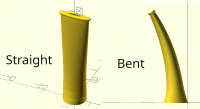
I saw a mention of pipes, but I don't think I ever saw a picture of what
you're trying to do, so I didn't really understand.
The complaint about vnfx1 not being above z=0 is not a floating point
problem. The code wants the object to be above the xy plane, not
sitting on it, which causes a bunch of stuff to map to a single line,
making it hard to generate a valid polyhedron. Even being close to the xy
plane is likely to cause problems, like your object wraps around the
cylinder 50 times and intersects itself.
The wiki you linked to shows example 4 bending around the X axis. If
you're running an old BOSL2 that could explain why the X axis bend fails.
You could try that example. I found bugs in vnf_bend a few months ago and
rewrote it. It produced the wiki examples, and it works for me and I
don't get a weird error if I raise the object by 1 unit, though your
example object to bend doesn't bend very well because of how it's
positioned and oriented. For X or Y axis bending you want the thing
stretched out in the XY direction, and of course its height above the xy
plane gives the bending radius, if you don't specify it. Of course, you
could always reposition your object and then bend it around "Y" or
whichever axis is working in your version.
Unfortunately Ubuntu lives in the past. BOSL2 assumes you will run the
current stable release, which is 2021.01. I don't know why Ubuntu is so
slow to update, but we can't be limited to Ubuntu being stuck several
releases in the past. The current stable release is over a year old.
We're not talking about living on the bleeding edge here. I suggest you
quit using the ubuntu package version and visit the OpenSCAD download page
and download the appimage version. I use Ubuntu, and that's what I do.
When I started using OpenSCAD the Ubuntu version was 4 years out of date.
I do all BOSL2 testing in the stable release, 2021.01. Note that the use
of the '^' operator makes bezier calculations faster.
On Sat, Feb 12, 2022 at 12:56 PM Bob Ewart jinnicky@bobsown.net wrote:
I thought I was pretty specific in my first post. I'm a pipe smoker. I
bite through the bits. So, I'm trying to print new ones.
vnf_bend works for a bend around the Y axis see the example in the wiki
https://github.com/revarbat/BOSL2/wiki/vnf.scad#function-vnf_bend
However bending around the X axis doesn't:
vnfx0 = cube([40,10,100]);
vnfx1 = fwd(50, p=vnfx0);
#vnf_polyhedron(vnfx1);
bentx1 = vnf_bend(vnfx1, axis="X");
vnf_polyhedron(bentx1);
It complains about vnfx1 not being entirely above z=0. another floating
point problem. I get another error moving vnfx1 up by 1
The current release of BOSL2 does not work with any OpenSCAD release
before 2021.09 since it uses the "^" operator. Ubuntu has 2019.05.
I merely pointed out a change in the nightly build to my current release
in the "for" statement. I'm well aware of the problems with floating point
comparisons. That's why I have fuzz = .00005 in my standard includes.
The x=[for(i=[1:20]) i/20] was a typo. You are correct. Sorry
--
Bob
On 2/10/22 17:55, Adrian Mariano wrote:
You are being pretty vague about what you're trying to do and how
you're doing it. If you want to bend something that you're creating
with sweep you can probably add the bend to the sweep transform and it
will be just as fast with the bend as without. If you want to bend
something you created with sweep, or you just don't want to bother
computing the bend transform yourself, BOSL2 has a bend function that
operates on polyhedron data, which will be much faster than a bend
based on dissecting and unioning geometry.
A general rule is that you should never rely on an equality test with
floating point numbers. Your range [0:.05:1] relies on the outcome of
an equality test to determine whether 1 is in the result or not. So
that's just unreliable. You should instead write [0:.05:1.01] or
something like that if you want to use the original form. Of course,
turning the loop into an integer loop is a reliable solution as well,
though in your example you need [0:20] instead of [1:20] to get the
same behavior as the first case.
On Thu, Feb 10, 2022 at 5:12 PM Bob Ewart jinnicky@bobsown.net jinnicky@bobsown.net wrote:
Thanks.
I had to use xscale and yscale in calculating T since the x and y profiles are different.
One of the other things that chews up time is bending the pipe stem. I'm using the bend.scad routine by stuartpb
My original brute force code took a little over 49 minutes to render on a i9-9900K processor at nearly 5GHz with 64GB memory.
Some timing results:
On the 2019-05 release it took 1:04 to preview and 9:07 to render (min:sec)
on 2022-02-09 nightly it took 0:23 to preview and 4:57 to render
without the bend:
On the 2019-05 release it took 0:01 to preview and 1:28 to render
on 2022-02-09 nightly it took .44 seconds to preview and 50.233 seconds to render
Another interesting note:
x = [for(i=[0:.05:1] i];
The last value of x in 2019-05 is .95, 2022-02-09 correctly gives 1.0
I should have used x=[for(i=[1:20]) i/20]; which works in both.
--
Bob
On 2/5/22 19:20, Adrian Mariano wrote:
I'm not sure what exactly you're doing, but if it's some kind of
extrusion based on what Jordan posted and it's taking a long time to
render you can almost certainly do much better by using a sweep method
that builds a single polyhedron instead of a union of many layers. To
do this you will need to have your base shape as a point list instead
of as geometry, though. Here's Jordan's example redone using the
BOSL2 sweep. The one gotcha with sweep is that tight bends can result
in invalid geometry.
include<BOSL2/std.scad>
T = [ for (i=[0:50])
up(i) // each layer goes up to height i
scale(sin(i/50360) + 2) // And rescaled to this scale
];
sq = [[-5,-5],[-5,5],[5,5],[5,-5]]; // Starting shape, a square
sweep(sq,T);
On Sat, Feb 5, 2022 at 6:47 PM Bob Ewart jinnicky@bobsown.net jinnicky@bobsown.net wrote:
Thank you Jordan
I've been working on making bits for my pipes. (I bite through them.) I take a series of measurements of the Y and Z axes along the X axis and smooth them using bezier curves.
I did a brute force extrusion which took 49 minutes to render. Using your variable_extrude module it takes 14 minutes.
--
Bob
On 1/31/22 11:39, Jordan Brown wrote:
On 1/31/2022 7:00 AM, Jim Witte wrote:
(I know, my question/answer ratio is low..) What would be an efficient (!) way to do a linear extrusion of an SVG with a variable scale factor determined by a math function?
I can think of doing multiple small steps, each with a different scale factor (tangent to the curve), and then (maybe) hulling each "slice pair" (hull shouldn't be needed as as each "slice pair" should already be continuous).
But that would be god-awful expensive, especially with a complicated SVG? Can anyone think of a better way to do it? maybe something that would make a single slice, and then shear it for each successive slice - or is that basically what linear_extrude with scale does do?
Here's a possible implementation. Substitute your own 2D shape (including an SVG import) for the square().
// linear extrude the children to height h, using scales a[] for each step.
module variable_extrude(h, a) {
steps = len(a)-1;
step_h = h/steps;
for (i = [0:steps-1]) {
z = i*step_h;
s0 = a[i];
s1 = a[i+1];
translate([0,0,z]) {
linear_extrude(height=step_h, scale=s1/s0, slices=1)
scale(s0)
children();
}
}
}
a = [ for (i=[0:50]) sin(i/50*360) + 2 ];
variable_extrude(50, a) square(10, center=true);
A nightly-snapshot variant that passes in a function is left as an exercise for the reader.
F5 render says 0.05s; F6 render says 5s.
OpenSCAD mailing list
To unsubscribe send an email to discuss-leave@lists.openscad.org
OpenSCAD mailing list
To unsubscribe send an email to discuss-leave@lists.openscad.org
OpenSCAD mailing list
To unsubscribe send an email to discuss-leave@lists.openscad.org
OpenSCAD mailing list
To unsubscribe send an email to discuss-leave@lists.openscad.org
OpenSCAD mailing list
To unsubscribe send an email to discuss-leave@lists.openscad.org
OpenSCAD mailing list
To unsubscribe send an email to discuss-leave@lists.openscad.org