

discuss@lists.openscad.org

OpenSCAD general discussion Mailing-list

View all threads

Linear extrude SVG with scale determined by math function?

JW
Jim Witte
Mon, Jan 31, 2022 3:00 PM

(I know, my question/answer ratio is low..)  What would be an efficient (!)
way to do a linear extrusion of an SVG with a variable scale factor
determined by a math function?

I can think of doing multiple small steps, each with a different scale
factor (tangent to the curve), and then (maybe) hulling each "slice pair"
(hull shouldn't be needed as as each "slice pair"  should already be
continuous).

But that would be god-awful expensive, especially with a complicated SVG?
Can anyone think of a better way to do it?  maybe something that would make
a single slice, and then shear it for each successive slice - or is that
basically what linear_extrude with scale does do?

Sort of unrelated, what is the current stay of such a thing as "3D SVG"
format?  I guess a kind of open-source B-REP?  There's COLLADA (quick web
search), and I cound a Quora post [1] that mentions why there shouldn't
be a 3d extension of SVG:

".. painter's model of SVG describes the visual layering of elements, a
concept that is unrelated to the vector data. Similarly is the presentation
markup on fill and stroke color/opacity .."

But it seems to me that things like layering and stroke/opacity do have a
place in 3D modelling - in a BREP that describes how a surface is formed
not just what it is as in STL ("stupid triangles, lots of them!").  There's
USDZ, but I don't know where the W3C is on that, or what it's open/closed
status is.

Jim

[1]
https://stackoverflow.com/questions/20840970/is-there-a-3d-format-which-is-a-3d-extension-to-svg

(I know, my question/answer ratio is low..) What would be an efficient (!) way to do a linear extrusion of an SVG with a variable scale factor determined by a math function? I can think of doing multiple small steps, each with a different scale factor (tangent to the curve), and then (maybe) hulling each "slice pair" (hull shouldn't be needed as as each "slice pair" should already *be* continuous). But that would be god-awful expensive, especially with a complicated SVG? Can anyone think of a better way to do it? maybe something that would make a single slice, and then shear it for each successive slice - or is that basically what linear_extrude with scale *does* do? Sort of unrelated, what is the current stay of such a thing as "3D SVG" format? I guess a kind of open-source B-REP? There's COLLADA (quick web search), and I cound a Quora post [1] that mentions why there *shouldn't* be a 3d extension of SVG: ".. *painter's model of SVG describes the visual layering of elements, a concept that is unrelated to the vector data. Similarly is the presentation markup on fill and stroke color/opacity .."* But it seems to me that things like layering and stroke/opacity *do* have a place in 3D modelling - in a BREP that describes *how* a surface is formed not just what it is as in STL ("stupid triangles, lots of them!"). There's USDZ, but I don't know where the W3C is on that, or what it's open/closed status is. Jim [1] https://stackoverflow.com/questions/20840970/is-there-a-3d-format-which-is-a-3d-extension-to-svg
SP
Sanjeev Prabhakar
Mon, Jan 31, 2022 4:08 PM

Not very clear of your expectation,
I wrote a sine wave pots linear extrusion (attached here)
If that is what you are referring to

On Mon, 31 Jan 2022 at 20:30, Jim Witte jim.witte@gmail.com wrote:

(I know, my question/answer ratio is low..)  What would be an efficient
(!) way to do a linear extrusion of an SVG with a variable scale factor
determined by a math function?

I can think of doing multiple small steps, each with a different scale
factor (tangent to the curve), and then (maybe) hulling each "slice pair"
(hull shouldn't be needed as as each "slice pair"  should already be
continuous).

But that would be god-awful expensive, especially with a complicated SVG?
Can anyone think of a better way to do it?  maybe something that would make
a single slice, and then shear it for each successive slice - or is that
basically what linear_extrude with scale does do?

Sort of unrelated, what is the current stay of such a thing as "3D SVG"
format?  I guess a kind of open-source B-REP?  There's COLLADA (quick web
search), and I cound a Quora post [1] that mentions why there shouldn't
be a 3d extension of SVG:

".. painter's model of SVG describes the visual layering of elements, a
concept that is unrelated to the vector data. Similarly is the presentation
markup on fill and stroke color/opacity .."

But it seems to me that things like layering and stroke/opacity do have
a place in 3D modelling - in a BREP that describes how a surface is
formed not just what it is as in STL ("stupid triangles, lots of them!").
There's USDZ, but I don't know where the W3C is on that, or what it's
open/closed status is.

Jim

[1]
https://stackoverflow.com/questions/20840970/is-there-a-3d-format-which-is-a-3d-extension-to-svg


OpenSCAD mailing list
To unsubscribe send an email to discuss-leave@lists.openscad.org

Not very clear of your expectation, I wrote a sine wave pots linear extrusion (attached here) If that is what you are referring to On Mon, 31 Jan 2022 at 20:30, Jim Witte <jim.witte@gmail.com> wrote: > (I know, my question/answer ratio is low..) What would be an efficient > (!) way to do a linear extrusion of an SVG with a variable scale factor > determined by a math function? > > I can think of doing multiple small steps, each with a different scale > factor (tangent to the curve), and then (maybe) hulling each "slice pair" > (hull shouldn't be needed as as each "slice pair" should already *be* > continuous). > > But that would be god-awful expensive, especially with a complicated SVG? > Can anyone think of a better way to do it? maybe something that would make > a single slice, and then shear it for each successive slice - or is that > basically what linear_extrude with scale *does* do? > > Sort of unrelated, what is the current stay of such a thing as "3D SVG" > format? I guess a kind of open-source B-REP? There's COLLADA (quick web > search), and I cound a Quora post [1] that mentions why there *shouldn't* > be a 3d extension of SVG: > > ".. *painter's model of SVG describes the visual layering of elements, a > concept that is unrelated to the vector data. Similarly is the presentation > markup on fill and stroke color/opacity .."* > > But it seems to me that things like layering and stroke/opacity *do* have > a place in 3D modelling - in a BREP that describes *how* a surface is > formed not just what it is as in STL ("stupid triangles, lots of them!"). > There's USDZ, but I don't know where the W3C is on that, or what it's > open/closed status is. > > Jim > > [1] > https://stackoverflow.com/questions/20840970/is-there-a-3d-format-which-is-a-3d-extension-to-svg > _______________________________________________ > OpenSCAD mailing list > To unsubscribe send an email to discuss-leave@lists.openscad.org >
DP
David Phillip Oster
Mon, Jan 31, 2022 4:38 PM

Here are sin and parabolic:

// like linear extrude, but instead of linearly

// applying the rotation, apply it sinusoidally.

module sin_extrude(height, twist, slices) {

dh = height/slices;

for(i = [0:slices - 1]) {

// dt = twist*i/slices; // <- linear_extrude

dt = twist*sin(-90*(i/slices));

translate([0, 0, i*dh]) {

  rotate([0, 0, dt]){

    linear_extrude(height=dh,twist=0,slices=1){

      children([0:$children-1]);

    }

  }

}

}

}

// like linear extrude, but instead of linearly

// applying the rotation, apply it parabolically.

module parabolic_extrude(height, twist, slices) {

dh = height/slices;

for(i = [0:slices - 1]) {

// dt = twist*i/slices; // <- linear_extrude

dt = twist * ((i/slices)*(i/slices));

translate([0, 0, i*dh]) {

  rotate([0, 0, dt]){

    linear_extrude(height=dh,twist=0,slices=1){

      children([0:$children-1]);

    }

  }

}

}

}

When I wrote them I tried to write a generic one that was like
linear_extrude but took an additional parameter for the function*  b = f(a)*,
a and b in the range 0…1. but my OpenSCAD knowledge wasn't up to it.

On Mon, Jan 31, 2022 at 7:00 AM Jim Witte jim.witte@gmail.com wrote:

(I know, my question/answer ratio is low..)  What would be an efficient
(!) way to do a linear extrusion of an SVG with a variable scale factor
determined by a math function?

I can think of doing multiple small steps, each with a different scale
factor (tangent to the curve), and then (maybe) hulling each "slice pair"
(hull shouldn't be needed as as each "slice pair"  should already be
continuous).

But that would be god-awful expensive, especially with a complicated SVG?
Can anyone think of a better way to do it?  maybe something that would make
a single slice, and then shear it for each successive slice - or is that
basically what linear_extrude with scale does do?

Sort of unrelated, what is the current stay of such a thing as "3D SVG"
format?  I guess a kind of open-source B-REP?  There's COLLADA (quick web
search), and I cound a Quora post [1] that mentions why there shouldn't
be a 3d extension of SVG:

".. painter's model of SVG describes the visual layering of elements, a
concept that is unrelated to the vector data. Similarly is the presentation
markup on fill and stroke color/opacity .."

But it seems to me that things like layering and stroke/opacity do have
a place in 3D modelling - in a BREP that describes how a surface is
formed not just what it is as in STL ("stupid triangles, lots of them!").
There's USDZ, but I don't know where the W3C is on that, or what it's
open/closed status is.

Jim

[1]
https://stackoverflow.com/questions/20840970/is-there-a-3d-format-which-is-a-3d-extension-to-svg


OpenSCAD mailing list
To unsubscribe send an email to discuss-leave@lists.openscad.org

Here are sin and parabolic: // like linear extrude, but instead of linearly // applying the rotation, apply it sinusoidally. module sin_extrude(height, twist, slices) { dh = height/slices; for(i = [0:slices - 1]) { // dt = twist*i/slices; // <- linear_extrude dt = twist*sin(-90*(i/slices)); translate([0, 0, i*dh]) { rotate([0, 0, dt]){ linear_extrude(height=dh,twist=0,slices=1){ children([0:$children-1]); } } } } } // like linear extrude, but instead of linearly // applying the rotation, apply it parabolically. module parabolic_extrude(height, twist, slices) { dh = height/slices; for(i = [0:slices - 1]) { // dt = twist*i/slices; // <- linear_extrude dt = twist * ((i/slices)*(i/slices)); translate([0, 0, i*dh]) { rotate([0, 0, dt]){ linear_extrude(height=dh,twist=0,slices=1){ children([0:$children-1]); } } } } } When I wrote them I tried to write a generic one that was like linear_extrude but took an additional parameter for the function* b = f(a)*, *a* and *b* in the range 0…1. but my OpenSCAD knowledge wasn't up to it. On Mon, Jan 31, 2022 at 7:00 AM Jim Witte <jim.witte@gmail.com> wrote: > (I know, my question/answer ratio is low..) What would be an efficient > (!) way to do a linear extrusion of an SVG with a variable scale factor > determined by a math function? > > I can think of doing multiple small steps, each with a different scale > factor (tangent to the curve), and then (maybe) hulling each "slice pair" > (hull shouldn't be needed as as each "slice pair" should already *be* > continuous). > > But that would be god-awful expensive, especially with a complicated SVG? > Can anyone think of a better way to do it? maybe something that would make > a single slice, and then shear it for each successive slice - or is that > basically what linear_extrude with scale *does* do? > > Sort of unrelated, what is the current stay of such a thing as "3D SVG" > format? I guess a kind of open-source B-REP? There's COLLADA (quick web > search), and I cound a Quora post [1] that mentions why there *shouldn't* > be a 3d extension of SVG: > > ".. *painter's model of SVG describes the visual layering of elements, a > concept that is unrelated to the vector data. Similarly is the presentation > markup on fill and stroke color/opacity .."* > > But it seems to me that things like layering and stroke/opacity *do* have > a place in 3D modelling - in a BREP that describes *how* a surface is > formed not just what it is as in STL ("stupid triangles, lots of them!"). > There's USDZ, but I don't know where the W3C is on that, or what it's > open/closed status is. > > Jim > > [1] > https://stackoverflow.com/questions/20840970/is-there-a-3d-format-which-is-a-3d-extension-to-svg > _______________________________________________ > OpenSCAD mailing list > To unsubscribe send an email to discuss-leave@lists.openscad.org >
JB
Jordan Brown
Mon, Jan 31, 2022 4:39 PM

On 1/31/2022 7:00 AM, Jim Witte wrote:

(I know, my question/answer ratio is low..)  What would be an
efficient (!) way to do a linear extrusion of an SVG with a variable
scale factor determined by a math function?

I can think of doing multiple small steps, each with a different scale
factor (tangent to the curve), and then (maybe) hulling each "slice
pair" (hull shouldn't be needed as as each "slice pair"  should
already be continuous).

But that would be god-awful expensive, especially with a complicated
SVG?  Can anyone think of a better way to do it?  maybe something that
would make a single slice, and then shear it for each successive slice

  • or is that basically what linear_extrude with scale does do?

Here's a possible implementation.  Substitute your own 2D shape
(including an SVG import) for the square().

// linear extrude the children to height h, using scales a[] for each step.
module variable_extrude(h, a) {
    steps = len(a)-1;
    step_h = h/steps;
    for (i = [0:steps-1]) {
        z = i*step_h;
        s0 = a[i];
        s1 = a[i+1];
        translate([0,0,z]) {
            linear_extrude(height=step_h, scale=s1/s0, slices=1)
                scale(s0)
                children();
        }
    }
}

a = [ for (i=[0:50]) sin(i/50*360) + 2 ];
    
variable_extrude(50, a) square(10, center=true);

A nightly-snapshot variant that passes in a function is left as an
exercise for the reader.

F5 render says 0.05s; F6 render says 5s.
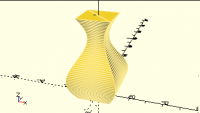
On 1/31/2022 7:00 AM, Jim Witte wrote: > (I know, my question/answer ratio is low..)  What would be an > efficient (!) way to do a linear extrusion of an SVG with a variable > scale factor determined by a math function? > > I can think of doing multiple small steps, each with a different scale > factor (tangent to the curve), and then (maybe) hulling each "slice > pair" (hull shouldn't be needed as as each "slice pair"  should > already *be* continuous). > > But that would be god-awful expensive, especially with a complicated > SVG?  Can anyone think of a better way to do it?  maybe something that > would make a single slice, and then shear it for each successive slice > - or is that basically what linear_extrude with scale *does* do? Here's a possible implementation.  Substitute your own 2D shape (including an SVG import) for the square(). // linear extrude the children to height h, using scales a[] for each step. module variable_extrude(h, a) { steps = len(a)-1; step_h = h/steps; for (i = [0:steps-1]) { z = i*step_h; s0 = a[i]; s1 = a[i+1]; translate([0,0,z]) { linear_extrude(height=step_h, scale=s1/s0, slices=1) scale(s0) children(); } } } a = [ for (i=[0:50]) sin(i/50*360) + 2 ]; variable_extrude(50, a) square(10, center=true); A nightly-snapshot variant that passes in a function is left as an exercise for the reader. F5 render says 0.05s; F6 render says 5s.
A
arnholm@arnholm.org
Mon, Jan 31, 2022 5:14 PM

On 2022-01-31 17:39, Jordan Brown wrote:

On 1/31/2022 7:00 AM, Jim Witte wrote:

(I know, my question/answer ratio is low..)  What would be an
efficient (!) way to do a linear extrusion of an SVG with a variable
scale factor determined by a math function?

I think in OpenSCAD you will have to approximate it in slices with
linear extrusion as was demonstrated. If you ask about linear extrusion,
the answer is linear extrusion. But what you want is some kind of sweep,
e.g. like this https://www.thingiverse.com/thing:2335400

Carsten Arnholm

On 2022-01-31 17:39, Jordan Brown wrote: > On 1/31/2022 7:00 AM, Jim Witte wrote: > >> (I know, my question/answer ratio is low..) What would be an >> efficient (!) way to do a linear extrusion of an SVG with a variable >> scale factor determined by a math function? I think in OpenSCAD you will have to approximate it in slices with linear extrusion as was demonstrated. If you ask about linear extrusion, the answer is linear extrusion. But what you want is some kind of sweep, e.g. like this https://www.thingiverse.com/thing:2335400 Carsten Arnholm
RW
Rogier Wolff
Tue, Feb 1, 2022 9:04 AM

On Mon, Jan 31, 2022 at 04:39:59PM +0000, Jordan Brown wrote:

Here's a possible implementation.  Substitute your own 2D shape
(including an SVG import) for the square().

 // linear extrude the children to height h, using scales a[] for each step.
 module variable_extrude(h, a) {
     steps = len(a)-1;
     step_h = h/steps;
     for (i = [0:steps-1]) {
         z = i*step_h;
         s0 = a[i];
         s1 = a[i+1];
         translate([0,0,z]) {
             linear_extrude(height=step_h, scale=s1/s0, slices=1)
                 scale(s0)
                 children();
         }
     }
 }

This places many 3D objects with touching faces. I remember from the
past that this would often lead to problems.

In this case, the top surface is calculated as
i*step_h + step_h

and the bottom surface is calculated as:

(i+1) * step_h

Mathematically those would be the same, but floatingpoint-wise this is
not always the case! These infinitessimal differences can make a big
difference, say when 3D printing.

Suppose the bottom surface that is to be printed was intended as the box
square (4,1);

But because the join at (2,0) was not perfect we end up with a polygon:
(0,0), (1.999,0), (2,1), (2.001,0), (4,0), (4,1), (0,1)

Now the slicer will trace that actual outline when depositing the bottom
layer!

Roger. 

--
** R.E.Wolff@BitWizard.nl ** https://www.BitWizard.nl/ ** +31-15-2049110 **
**    Delftechpark 11 2628 XJ  Delft, The Netherlands.  KVK: 27239233    **
f equals m times a. When your f is steady, and your m is going down
your a is going up.  -- Chris Hadfield about flying up the space shuttle.

On Mon, Jan 31, 2022 at 04:39:59PM +0000, Jordan Brown wrote: > Here's a possible implementation.  Substitute your own 2D shape > (including an SVG import) for the square(). > > // linear extrude the children to height h, using scales a[] for each step. > module variable_extrude(h, a) { > steps = len(a)-1; > step_h = h/steps; > for (i = [0:steps-1]) { > z = i*step_h; > s0 = a[i]; > s1 = a[i+1]; > translate([0,0,z]) { > linear_extrude(height=step_h, scale=s1/s0, slices=1) > scale(s0) > children(); > } > } > } This places many 3D objects with touching faces. I remember from the past that this would often lead to problems. In this case, the top surface is calculated as i*step_h + step_h and the bottom surface is calculated as: (i+1) * step_h Mathematically those would be the same, but floatingpoint-wise this is not always the case! These infinitessimal differences can make a big difference, say when 3D printing. Suppose the bottom surface that is to be printed was intended as the box square (4,1); But because the join at (2,0) was not perfect we end up with a polygon: (0,0), (1.999,0), (2,1), (2.001,0), (4,0), (4,1), (0,1) Now the slicer will trace that actual outline when depositing the bottom layer! Roger. -- ** R.E.Wolff@BitWizard.nl ** https://www.BitWizard.nl/ ** +31-15-2049110 ** ** Delftechpark 11 2628 XJ Delft, The Netherlands. KVK: 27239233 ** f equals m times a. When your f is steady, and your m is going down your a is going up. -- Chris Hadfield about flying up the space shuttle.
JB
Jordan Brown
Tue, Feb 1, 2022 5:59 PM

[ Practical stuff ]

You might be right.

If you have access to the coordinates of the points - which in the
problem given you don't, since they come from an SVG - then as Carsten
says a sweep or equivalent DIY construction is a better answer, because
you can ensure that points that are supposed to be the same are the same.

Alternatively, you could use linear extrusion and slightly overlap the
layers.  Make the height of each layer be step_h+0.0001.  That's well
bigger than the grid (see below), but still smaller than any practical
impact on the printing process.

[ Theoretical stuff ]

You might be right.  I do think that floating point numbers get a bad
rap, that mostly the errors are so tiny that they do not matter.  In
fact, from a physical-object perspective I'm sure of it.  For the size
of object we're dealing with, floating point errors are down in the
general neighborhood of the size of a proton.

I think there are two ways that they can be a problem.

The first, and most common, is that values that are mathematically the
same might end up infinitesimally different, and the result can be
objects that are not manifold, or not closed.  These imperfections make
the geometry calculators unhappy.

Second, as you say, you could end up with an outline that's not quite
what you expect, and the slicer might trace it in a way you didn't
expect.  The result would still be geometrically correct - the errors
involved are much smaller than the errors in other parts of the process

  • but the extrusion pattern might not be what you want from an aesthetic
    or structural perspective.  I don't think I've seen this, but I can't
    say that I've looked - and most slicers make much more serious errors. 
    (PrusaSlicer monotonic fill for the win!).

OpenSCAD tries to compensate for some of this by, as I understand it,
snapping vertices to a grid with about 10^-6 steps.  (I should note that
I have not looked at the implementation or done serious experiments.)
I'm not clear on whether this fixes problems or causes them.  On the one
hand, it can take points that should be the same and make them be the
same.  On the other hand, it can take points that should not be the
same, and make them be the same.  It introduces the possibility of
generating degenerate triangles, where two of the vertices are at the
same point.  I think the grid is several orders of magnitude too large,
that at 10^-6 you are far more likely to have points inappropriately
merged than to miss points that should be merged.  Of course features
at 10^-6 are too small to care about in real life, but they can arise in
the corners of geometry calculations and can then turn into manifold
problems.  (My house model is perfectly fine at its normal 1:25.4 scale,
but when I scale it down again by that same scale to create the
model-in-a-model, it has geometry problems.)  I think we'd likely be
better off with a grid at, say, 10^-10, still several orders of
magnitude larger than the floating point errors.  But also:  grid snap
can never truly work to combine "nearby" points.  It always has to draw
a line between two grid points, and that line might not be where you
would want it to be.  If you've got 1.0, 1.25, 1.5, 1.75, and 2.0, and
you're snapping to a 1-unit grid, which points snap to 1 and which snap
to 2?  Why?  The goal is to coalesce "nearby" points, and those are all
equally near their neighbors.  No snap algorithm can solve that
problem, no matter how clever it is.  I suspect that the snap algorithms
involved are simple rounding schemes, where points less than 1.5 snap to
1 and points greater than or equal to 1.5 snap to 2.  A simple scheme
like that will then fail on 1.0, 1.49, 1.50, 1.51, 2.0, where the three
points in the center that straddle the line should clearly be snapped
into one point... but won't be.  Net, I'd be interested in experimenting
with changing or disabling the grid snap to see if the results get
better or worse.

[ Practical stuff ] You might be right. If you have access to the coordinates of the points - which in the problem given you don't, since they come from an SVG - then as Carsten says a sweep or equivalent DIY construction is a better answer, because you can ensure that points that are supposed to be the same *are* the same. Alternatively, you could use linear extrusion and slightly overlap the layers.  Make the height of each layer be step_h+0.0001.  That's well bigger than the grid (see below), but still smaller than any practical impact on the printing process. [ Theoretical stuff ] You might be right.  I do think that floating point numbers get a bad rap, that mostly the errors are so tiny that they do not matter.  In fact, from a physical-object perspective I'm sure of it.  For the size of object we're dealing with, floating point errors are down in the general neighborhood of the size of a proton. I think there are two ways that they can be a problem. The first, and most common, is that values that are mathematically the same might end up infinitesimally different, and the result can be objects that are not manifold, or not closed.  These imperfections make the geometry calculators unhappy. Second, as you say, you could end up with an outline that's not quite what you expect, and the slicer might trace it in a way you didn't expect.  The result would still be geometrically correct - the errors involved are much smaller than the errors in other parts of the process - but the extrusion pattern might not be what you want from an aesthetic or structural perspective.  I don't think I've seen this, but I can't say that I've looked - and most slicers make much more serious errors.  (PrusaSlicer monotonic fill for the win!). OpenSCAD tries to compensate for some of this by, as I understand it, snapping vertices to a grid with about 10^-6 steps.  (I should note that I have not looked at the implementation or done serious experiments.) I'm not clear on whether this fixes problems or causes them.  On the one hand, it can take points that *should* be the same and make them be the same.  On the other hand, it can take points that *should not* be the same, and make them be the same.  It introduces the possibility of generating degenerate triangles, where two of the vertices are at the same point.  I think the grid is several orders of magnitude too large, that at 10^-6 you are far more likely to have points inappropriately merged than to miss points that *should* be merged.  Of course features at 10^-6 are too small to care about in real life, but they can arise in the corners of geometry calculations and can then turn into manifold problems.  (My house model is perfectly fine at its normal 1:25.4 scale, but when I scale it down again by that same scale to create the model-in-a-model, it has geometry problems.)  I think we'd likely be better off with a grid at, say, 10^-10, still several orders of magnitude larger than the floating point errors.  But also:  grid snap can never truly work to combine "nearby" points.  It always has to draw a line between two grid points, and that line might not be where you would want it to be.  If you've got 1.0, 1.25, 1.5, 1.75, and 2.0, and you're snapping to a 1-unit grid, which points snap to 1 and which snap to 2?  Why?  The goal is to coalesce "nearby" points, and those are all equally near their neighbors.  *No* snap algorithm can solve that problem, no matter how clever it is.  I suspect that the snap algorithms involved are simple rounding schemes, where points less than 1.5 snap to 1 and points greater than or equal to 1.5 snap to 2.  A simple scheme like that will then fail on 1.0, 1.49, 1.50, 1.51, 2.0, where the three points in the center that straddle the line should clearly be snapped into one point... but won't be.  Net, I'd be interested in experimenting with changing or disabling the grid snap to see if the results get better or worse.
M
MichaelAtOz
Tue, Feb 1, 2022 11:34 PM

From: Jordan Brown [mailto:openscad@jordan.maileater.net]

OpenSCAD tries to compensate for some of this by, as I understand it, snapping vertices to a grid with about 10^-6 steps.

(I should note that I have not looked at the implementation or done serious experiments.)

I tried a while ago, failed to get a clear understanding, it is not as simple as you suggest, not just rounding, and it does it in 3D of course.

I do note IIRC that one of the parallel render initiatives got rid of the grid initially but had to put it back after geometry had holes all over the place.

--
This email has been checked for viruses by AVG.
https://www.avg.com

_____ From: Jordan Brown [mailto:openscad@jordan.maileater.net] > OpenSCAD tries to compensate for some of this by, as I understand it, snapping vertices to a grid with about 10^-6 steps. > (I should note that I have not looked at the implementation or done serious experiments.) I tried a while ago, failed to get a clear understanding, it is not as simple as you suggest, not just rounding, and it does it in 3D of course. I do note IIRC that one of the parallel render initiatives got rid of the grid initially but had to put it back after geometry had holes all over the place. -- This email has been checked for viruses by AVG. https://www.avg.com
RW
Rogier Wolff
Wed, Feb 2, 2022 9:16 AM

On Wed, Feb 02, 2022 at 10:34:54AM +1100, MichaelAtOz wrote:


From: Jordan Brown [mailto:openscad@jordan.maileater.net]

OpenSCAD tries to compensate for some of this by, as I understand
it, snapping vertices to a grid with about 10^-6 steps.

Yeah, That can help a lot, but there is no guarantee.

(I should note that I have not looked at the implementation or done serious experiments.)

I tried a while ago, failed to get a clear understanding, it is not
as simple as you suggest, not just rounding, and it does it in 3D of
course.

Lets simplify things first and get an understanding.

For understanding the math, we'll use an integer grid, the actual
openscad grid is just lots smaller (scaled).

First consider a 1 dimensional space, Snapping to the integer grid is
the same as rounding, right?

OK, now consider the 2D case. What is the area that you'd want to snap
to say 1,1 ? After a little thought, I hope that you'll see that the
area that needs to snap to 1,1 is the square starting at 0.5, 0.5
extending to 1.5, 1.5. So just rounding both coordinates will do the
trick. The same holds for 3D. If you have a square grid just rounding
each of the coordinates separately is the optimal strategy.

If you want to prove it mathematically, consider what should be the
edge where you'd flip a coin to decide which way to snap-to-grid.
That should be the line where the distance to both points is the same.

So the area that snaps to 1,1 is delineated by the line at y=0.5 to
the neighbor at 1,0. Similar for the other four neighbors and thus we
get the square and the rounding separate coordinates works.

Roger. 

--
** R.E.Wolff@BitWizard.nl ** https://www.BitWizard.nl/ ** +31-15-2049110 **
**    Delftechpark 11 2628 XJ  Delft, The Netherlands.  KVK: 27239233    **
f equals m times a. When your f is steady, and your m is going down
your a is going up.  -- Chris Hadfield about flying up the space shuttle.

On Wed, Feb 02, 2022 at 10:34:54AM +1100, MichaelAtOz wrote: > _____ > > From: Jordan Brown [mailto:openscad@jordan.maileater.net] > > OpenSCAD tries to compensate for some of this by, as I understand > > it, snapping vertices to a grid with about 10^-6 steps. Yeah, That can help a lot, but there is no guarantee. > > (I should note that I have not looked at the implementation or done serious experiments.) > I tried a while ago, failed to get a clear understanding, it is not > as simple as you suggest, not just rounding, and it does it in 3D of > course. Lets simplify things first and get an understanding. For understanding the math, we'll use an integer grid, the actual openscad grid is just lots smaller (scaled). First consider a 1 dimensional space, Snapping to the integer grid is the same as rounding, right? OK, now consider the 2D case. What is the area that you'd want to snap to say 1,1 ? After a little thought, I hope that you'll see that the area that needs to snap to 1,1 is the square starting at 0.5, 0.5 extending to 1.5, 1.5. So just rounding both coordinates will do the trick. The same holds for 3D. If you have a square grid just rounding each of the coordinates separately is the optimal strategy. If you want to prove it mathematically, consider what should be the edge where you'd flip a coin to decide which way to snap-to-grid. That should be the line where the distance to both points is the same. So the area that snaps to 1,1 is delineated by the line at y=0.5 to the neighbor at 1,0. Similar for the other four neighbors and thus we get the square and the rounding separate coordinates works. Roger. -- ** R.E.Wolff@BitWizard.nl ** https://www.BitWizard.nl/ ** +31-15-2049110 ** ** Delftechpark 11 2628 XJ Delft, The Netherlands. KVK: 27239233 ** f equals m times a. When your f is steady, and your m is going down your a is going up. -- Chris Hadfield about flying up the space shuttle.
RW
Rogier Wolff
Wed, Feb 2, 2022 9:44 AM

On Tue, Feb 01, 2022 at 05:59:51PM +0000, Jordan Brown wrote:

� I think the grid is several orders of magnitude too large,
that at 10^-6 you are far more likely to have points inappropriately

The thing is that if the grid is say one order-of-magnitude larger
than the LSB of floating point numbers, then WHEN there is an
off-by-one-LSB error, there is a 1:10 chance they will be snapped to
different points. To reduce the chances of that happening, there must
be at least several orders-of-magnitude between the floating point
resolution and the grid.

merged than to miss points that should be merged.  Of course features
at 10^-6 are too small to care about in real life,

Real-life for you seems to mean: 3D-printable with the 3Dprinter that
you have.

Research groups are working on miniaturizing stuff and finding ways to
produce them. What if they want to make a miniature pump at micrometer
scale? I actually think they should be able to keep openscad units as
"1mm" and then design their pump. That will fail if there is an
invisible grid at the micrometers. Oh, are you saying 10^-6 mm ? Then
the grid would be at the nanometer scale. There is also research going
on to make things at that scale.

You've mentioned your house-model at 25.4:1 modeled in
openscad. Openscad is actually unaware of what size 1 unit is. So are
STLs. It is the slicers that assume (until told otherwise) 1 unit in
the STL = 1mm.

So actually you have a 1:1 scale model as long as you think of
openscad units as 1" for that file.

Roger. 

--
** R.E.Wolff@BitWizard.nl ** https://www.BitWizard.nl/ ** +31-15-2049110 **
**    Delftechpark 11 2628 XJ  Delft, The Netherlands.  KVK: 27239233    **
f equals m times a. When your f is steady, and your m is going down
your a is going up.  -- Chris Hadfield about flying up the space shuttle.

On Tue, Feb 01, 2022 at 05:59:51PM +0000, Jordan Brown wrote: >� I think the grid is several orders of magnitude too large, > that at 10^-6 you are far more likely to have points inappropriately The thing is that if the grid is say one order-of-magnitude larger than the LSB of floating point numbers, then WHEN there is an off-by-one-LSB error, there is a 1:10 chance they will be snapped to different points. To reduce the chances of that happening, there must be at least several orders-of-magnitude between the floating point resolution and the grid. > merged than to miss points that *should* be merged.  Of course features > at 10^-6 are too small to care about in real life, Real-life for you seems to mean: 3D-printable with the 3Dprinter that you have. Research groups are working on miniaturizing stuff and finding ways to produce them. What if they want to make a miniature pump at micrometer scale? I actually think they should be able to keep openscad units as "1mm" and then design their pump. That will fail if there is an invisible grid at the micrometers. Oh, are you saying 10^-6 mm ? Then the grid would be at the nanometer scale. There is also research going on to make things at that scale. You've mentioned your house-model at 25.4:1 modeled in openscad. Openscad is actually unaware of what size 1 unit is. So are STLs. It is the slicers that assume (until told otherwise) 1 unit in the STL = 1mm. So actually you have a 1:1 scale model as long as you think of openscad units as 1" for that file. Roger. -- ** R.E.Wolff@BitWizard.nl ** https://www.BitWizard.nl/ ** +31-15-2049110 ** ** Delftechpark 11 2628 XJ Delft, The Netherlands. KVK: 27239233 ** f equals m times a. When your f is steady, and your m is going down your a is going up. -- Chris Hadfield about flying up the space shuttle.