

discuss@lists.openscad.org

OpenSCAD general discussion Mailing-list

View all threads

How to separate a geometry having distinct objects ?

GD
Gilbert Duval
Sat, Jan 23, 2021 9:04 AM

Hello, this is my first post here as I'm using OpenSCAD again after years.
I'm trying to code a 2 axis slicer and there is a step that seems
impossible to do, but maybe is it because I'm not aware enough of
functional programming techniques.

Here is what I do :

  • I have a volume
  • make several cuts along 1st axis (intersection of volume and a cube)
  • make several cuts along 2nd axis (intersection ...)
  • gather intersection of those cuts

Then, there is the step that I cannot do : access each of the gathered
intersections, and split each of them in half (top and bottom).

Next steps will be :

  • subtract union of top halves to each cuts along 1st axis
  • subtract union of bottom halves to each cuts along 2nd axis
  • produce a projection of each cuts

This is something I'm doing with OpenJSCAD for years now and I needed to
write my own 3d split code to be able to do so. The main problem is that
sometimes an intersection returns two or more separated object into the
same geometry and my process need to split each of them separately in order
to make correct cross pieces.

Is it possible to split a geometry having separated objects so that each
can be processed separately ?

my code : (I need inter() to have several children instead of only 1)

w= 0.6;

inter();
translate([20,0,0])tranchesX();
translate([-20,0,0])tranchesY();
translate([0,0,30])volume();

module tranchesX() { for(i = [2:3:12])trancheX(i); }

module tranchesY() { for(i = [0:4:20-1])trancheY(i); }

module inter(){
intersection(){
union(){tranchesX();}
union(){tranchesY();}
}
}

module trancheY(dec) {
intersection() {
translate([-1, dec, -1])cube([14, w, 22]);
volume();
}
}

module trancheX(dec) {
intersection() {
translate([dec, -1, -1])cube([w, 12, 22]);
volume();
}
}

module volume() {
difference(){
cube([12,10,20]);
scale([1,2,1])translate([6,2.5,6])sphere(r=5);
}
}
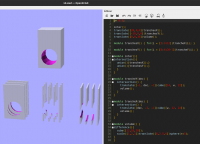
Hello, this is my first post here as I'm using OpenSCAD again after years. I'm trying to code a 2 axis slicer and there is a step that seems impossible to do, but maybe is it because I'm not aware enough of functional programming techniques. Here is what I do : - I have a volume - make several cuts along 1st axis (intersection of volume and a cube) - make several cuts along 2nd axis (intersection ...) - gather intersection of those cuts Then, there is the step that I cannot do : access each of the gathered intersections, and split each of them in half (top and bottom). Next steps will be : - subtract union of top halves to each cuts along 1st axis - subtract union of bottom halves to each cuts along 2nd axis - produce a projection of each cuts This is something I'm doing with OpenJSCAD for years now and I needed to write my own 3d split code to be able to do so. The main problem is that sometimes an intersection returns two or more separated object into the same geometry and my process need to split each of them separately in order to make correct cross pieces. Is it possible to split a geometry having separated objects so that each can be processed separately ? my code : (I need inter() to have several children instead of only 1) w= 0.6; inter(); translate([20,0,0])tranchesX(); translate([-20,0,0])tranchesY(); translate([0,0,30])volume(); module tranchesX() { for(i = [2:3:12])trancheX(i); } module tranchesY() { for(i = [0:4:20-1])trancheY(i); } module inter(){ intersection(){ union(){tranchesX();} union(){tranchesY();} } } module trancheY(dec) { intersection() { translate([-1, dec, -1])cube([14, w, 22]); volume(); } } module trancheX(dec) { intersection() { translate([dec, -1, -1])cube([w, 12, 22]); volume(); } } module volume() { difference(){ cube([12,10,20]); scale([1,2,1])translate([6,2.5,6])sphere(r=5); } }
CA
Carsten Arnholm
Sat, Jan 23, 2021 10:02 AM

On 23.01.2021 10:04, Gilbert Duval wrote:

The main problem is that
sometimes an intersection returns two or more separated object into the
same geometry and my process need to split each of them separately in
order to make correct cross pieces.

Is it possible to split a geometry having separated objects so that each
can be processed separately ?

Hello Gilbert,

You cannot automatically split it into separate objects using OpenSCAD,
but you can save the output from OpenSCAD and automatically split it
into separate objects using polyfix ( polyfix is a console application,
it comes with AngelCAD https://github.com/arnholm/angelcad/releases/ )

Using your example, let us call it 'separate.scad', you can save it to
e.g. 'separate.stl' containing everything. Then you run polyfix with the
-lumps option to extract separated objects (lump=separate object):

$ polyfix -lumps separate.stl -out=*.off

( You must select an output format different from STL, because polyfix
does not support -lumps in combination with STL output )

In this case the result is 32 files, each containing a separated object
from your original:

separate_0.off
.
.
.
separate_30.off
separate_31.off

Carsten Arnholm

On 23.01.2021 10:04, Gilbert Duval wrote: > The main problem is that > sometimes an intersection returns two or more separated object into the > same geometry and my process need to split each of them separately in > order to make correct cross pieces. > > Is it possible to split a geometry having separated objects so that each > can be processed separately ? Hello Gilbert, You cannot automatically split it into separate objects using OpenSCAD, but you can save the output from OpenSCAD and automatically split it into separate objects using polyfix ( polyfix is a console application, it comes with AngelCAD https://github.com/arnholm/angelcad/releases/ ) Using your example, let us call it 'separate.scad', you can save it to e.g. 'separate.stl' containing everything. Then you run polyfix with the -lumps option to extract separated objects (lump=separate object): $ polyfix -lumps separate.stl -out=*.off ( You must select an output format different from STL, because polyfix does not support -lumps in combination with STL output ) In this case the result is 32 files, each containing a separated object from your original: separate_0.off . . . separate_30.off separate_31.off Carsten Arnholm
JB
Jordan Brown
Sat, Jan 23, 2021 3:21 PM

As Carsten said, there's no way to "split" geometry.

If, for instance, you wanted to take a sphere, cut the top half from the
bottom half, and separate the two halves, the only way to do it is to
create two spheres, cut away the top half of one, and cut away the
bottom half of the other.

Now, because OpenSCAD is after all a programming environment, that
doesn't mean that you have to type out both models.

Start with this module:

big = 1000;
module cut(d) {
	// First:  top half
	translate([0,0,d/2]) intersection() {
		children();
		translate([-big,-big,0]) cube([big*2,big*2,big]);
	}

	// Second:  bottom half
	translate([0,0,-d/2]) intersection() {
		children();
		translate([-big,-big,-big]) cube([big*2,big*2,big]);
	}
}

and here's how you use it:

cut(10) sphere(10);

and here's what you get:

The same principle applies to any other kind of cut:  for each
"segment", generate the model and cut away what you don't want in that
segment.
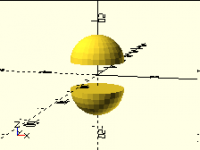
As Carsten said, there's no way to "split" geometry. If, for instance, you wanted to take a sphere, cut the top half from the bottom half, and separate the two halves, the only way to do it is to create *two* spheres, cut away the top half of one, and cut away the bottom half of the other. Now, because OpenSCAD is after all a programming environment, that doesn't mean that you have to type out both models. Start with this module: big = 1000; module cut(d) { // First: top half translate([0,0,d/2]) intersection() { children(); translate([-big,-big,0]) cube([big*2,big*2,big]); } // Second: bottom half translate([0,0,-d/2]) intersection() { children(); translate([-big,-big,-big]) cube([big*2,big*2,big]); } } and here's how you use it: cut(10) sphere(10); and here's what you get: The same principle applies to any other kind of cut:  for each "segment", generate the model and cut away what you don't want in that segment.
A
adrianv
Sat, Jan 23, 2021 3:33 PM

I got the impression that he wanted to have a way to perform an intersection
and automatically get all the connected components of the intersection as
separate children.  This can't be done by your method because you don't know
what the connected components are in advance.  And there's no limit to how
many components there are.

I don't understand what he's trying to do and why he needs the connected
components to be separate.

JordanBrown wrote

As Carsten said, there's no way to "split" geometry.

If, for instance, you wanted to take a sphere, cut the top half from the
bottom half, and separate the two halves, the only way to do it is to
create two spheres, cut away the top half of one, and cut away the
bottom half of the other.

Now, because OpenSCAD is after all a programming environment, that
doesn't mean that you have to type out both models.

Start with this module:

 big = 1000;
 module cut(d) {
 	// First:  top half
 	translate([0,0,d/2]) intersection() {
 		children();
 		translate([-big,-big,0]) cube([big*2,big*2,big]);
 	}

 	// Second:  bottom half
 	translate([0,0,-d/2]) intersection() {
 		children();
 		translate([-big,-big,-big]) cube([big*2,big*2,big]);
 	}
 }

and here's how you use it:

 cut(10) sphere(10);

and here's what you get:

The same principle applies to any other kind of cut:  for each
"segment", generate the model and cut away what you don't want in that
segment.


OpenSCAD mailing list

Discuss@.openscad

http://lists.openscad.org/mailman/listinfo/discuss_lists.openscad.org

oobpgooekkgmbfan.png (4K)
<http://forum.openscad.org/attachment/31692/0/oobpgooekkgmbfan.png>

I got the impression that he wanted to have a way to perform an intersection and automatically get all the connected components of the intersection as separate children. This can't be done by your method because you don't know what the connected components are in advance. And there's no limit to how many components there are. I don't understand what he's trying to do and *why* he needs the connected components to be separate. JordanBrown wrote > As Carsten said, there's no way to "split" geometry. > > If, for instance, you wanted to take a sphere, cut the top half from the > bottom half, and separate the two halves, the only way to do it is to > create *two* spheres, cut away the top half of one, and cut away the > bottom half of the other. > > Now, because OpenSCAD is after all a programming environment, that > doesn't mean that you have to type out both models. > > Start with this module: > > big = 1000; > module cut(d) { > // First: top half > translate([0,0,d/2]) intersection() { > children(); > translate([-big,-big,0]) cube([big*2,big*2,big]); > } > > // Second: bottom half > translate([0,0,-d/2]) intersection() { > children(); > translate([-big,-big,-big]) cube([big*2,big*2,big]); > } > } > > and here's how you use it: > > cut(10) sphere(10); > > and here's what you get: > > The same principle applies to any other kind of cut:  for each > "segment", generate the model and cut away what you don't want in that > segment. > > > _______________________________________________ > OpenSCAD mailing list > Discuss@.openscad > http://lists.openscad.org/mailman/listinfo/discuss_lists.openscad.org > > > oobpgooekkgmbfan.png (4K) > &lt;http://forum.openscad.org/attachment/31692/0/oobpgooekkgmbfan.png&gt; -- Sent from: http://forum.openscad.org/
JB
Jordan Brown
Sat, Jan 23, 2021 3:43 PM

On 1/23/2021 7:33 AM, adrianv wrote:

I got the impression that he wanted to have a way to perform an intersection
and automatically get all the connected components of the intersection as
separate children.  This can't be done by your method because you don't know
what the connected components are in advance.  And there's no limit to how
many components there are.

Right.  If, for instance, the model was a human body, and you wanted to
cut it at the knees and end up with two separate legs, your cut
processing would have to "just know" that there are two legs and to cut
between them.  There's no way to derive that from an arbitrary model.

On 1/23/2021 7:33 AM, adrianv wrote: > I got the impression that he wanted to have a way to perform an intersection > and automatically get all the connected components of the intersection as > separate children. This can't be done by your method because you don't know > what the connected components are in advance. And there's no limit to how > many components there are. Right.  If, for instance, the model was a human body, and you wanted to cut it at the knees and end up with two separate legs, your cut processing would have to "just know" that there are two legs and to cut between them.  There's no way to derive that from an arbitrary model.
G
gilboonet
Sun, Jan 24, 2021 9:35 AM

I want to produce this kind of output :
http://forum.openscad.org/file/t3103/Capture_d%E2%80%99%C3%A9cran_de_2020-12-01_15-28-26.png

Making the x and y slices was easy, their intersection also. But then I was
unable to access those intersections one by one (because I need to split
each of them in one top half and one bottom half).
With OpenJSCAD I needed to write my own Split3d to split them, but such
function needs to read a polyhedron vertices and sort them and there's
nothing to do that in OpenSCAD.

here what I have for the moment :
http://forum.openscad.org/file/t3103/Capture_d%E2%80%99%C3%A9cran_de_2021-01-23_09-23-41.png

--
Sent from: http://forum.openscad.org/

I want to produce this kind of output : <http://forum.openscad.org/file/t3103/Capture_d%E2%80%99%C3%A9cran_de_2020-12-01_15-28-26.png> Making the x and y slices was easy, their intersection also. But then I was unable to access those intersections one by one (because I need to split each of them in one top half and one bottom half). With OpenJSCAD I needed to write my own Split3d to split them, but such function needs to read a polyhedron vertices and sort them and there's nothing to do that in OpenSCAD. here what I have for the moment : <http://forum.openscad.org/file/t3103/Capture_d%E2%80%99%C3%A9cran_de_2021-01-23_09-23-41.png> -- Sent from: http://forum.openscad.org/
NH
nop head
Sun, Jan 24, 2021 10:44 AM

I don't really understand the issue. If you write a module that creates a
slice using an intersection, why can't you use that slice as a new object
any number of times in any way you want?

On Sun, 24 Jan 2021 at 09:36, gilboonet gilbertfd@gmail.com wrote:

I want to produce this kind of output :
<
http://forum.openscad.org/file/t3103/Capture_d%E2%80%99%C3%A9cran_de_2020-12-01_15-28-26.png>

Making the x and y slices was easy, their intersection also. But then I was
unable to access those intersections one by one (because I need to split
each of them in one top half and one bottom half).
With OpenJSCAD I needed to write my own Split3d to split them, but such
function needs to read a polyhedron vertices and sort them and there's
nothing to do that in OpenSCAD.

here what I have for the moment :
<
http://forum.openscad.org/file/t3103/Capture_d%E2%80%99%C3%A9cran_de_2021-01-23_09-23-41.png>

--
Sent from: http://forum.openscad.org/


OpenSCAD mailing list
Discuss@lists.openscad.org
http://lists.openscad.org/mailman/listinfo/discuss_lists.openscad.org

I don't really understand the issue. If you write a module that creates a slice using an intersection, why can't you use that slice as a new object any number of times in any way you want? On Sun, 24 Jan 2021 at 09:36, gilboonet <gilbertfd@gmail.com> wrote: > I want to produce this kind of output : > < > http://forum.openscad.org/file/t3103/Capture_d%E2%80%99%C3%A9cran_de_2020-12-01_15-28-26.png> > > > Making the x and y slices was easy, their intersection also. But then I was > unable to access those intersections one by one (because I need to split > each of them in one top half and one bottom half). > With OpenJSCAD I needed to write my own Split3d to split them, but such > function needs to read a polyhedron vertices and sort them and there's > nothing to do that in OpenSCAD. > > here what I have for the moment : > < > http://forum.openscad.org/file/t3103/Capture_d%E2%80%99%C3%A9cran_de_2021-01-23_09-23-41.png> > > > > > -- > Sent from: http://forum.openscad.org/ > > _______________________________________________ > OpenSCAD mailing list > Discuss@lists.openscad.org > http://lists.openscad.org/mailman/listinfo/discuss_lists.openscad.org >
G
gilboonet
Sun, Jan 24, 2021 12:23 PM

Yes, it can be done by specifying manually each time an intersection contains
more than one piece, but it would make the script very unpractical as it is
intended to be used from customizer to create skeleton of whatever volume
the user want.

Here is the original OpenJSCAD script : see  here
https://raw.githubusercontent.com/gilboonet/gilboonet.github.io/master/sq_edit/slice_2axis_example.js
http://forum.openscad.org/file/t3103/Capture_d%E2%80%99%C3%A9cran_de_2021-01-24_13-13-26.png

--
Sent from: http://forum.openscad.org/

Yes, it can be done by specifying manually each time an intersection contains more than one piece, but it would make the script very unpractical as it is intended to be used from customizer to create skeleton of whatever volume the user want. Here is the original OpenJSCAD script : see here <https://raw.githubusercontent.com/gilboonet/gilboonet.github.io/master/sq_edit/slice_2axis_example.js> <http://forum.openscad.org/file/t3103/Capture_d%E2%80%99%C3%A9cran_de_2021-01-24_13-13-26.png> -- Sent from: http://forum.openscad.org/
NH
nop head
Sun, Jan 24, 2021 12:39 PM

I still don't understand. You start with a solid object and slice it two
ways to get some sticks and then you want to cut those in half?

You could write a nested for loop that produces the intersection of x slice
i and y slice j and then do whatever you want with the stick result based
on i and j.

On Sun, 24 Jan 2021 at 12:24, gilboonet gilbertfd@gmail.com wrote:

Yes, it can be done by specifying manually each time an intersection
contains
more than one piece, but it would make the script very unpractical as it is
intended to be used from customizer to create skeleton of whatever volume
the user want.

Here is the original OpenJSCAD script : see  here
<
https://raw.githubusercontent.com/gilboonet/gilboonet.github.io/master/sq_edit/slice_2axis_example.js>

<
http://forum.openscad.org/file/t3103/Capture_d%E2%80%99%C3%A9cran_de_2021-01-24_13-13-26.png>

--
Sent from: http://forum.openscad.org/


OpenSCAD mailing list
Discuss@lists.openscad.org
http://lists.openscad.org/mailman/listinfo/discuss_lists.openscad.org

I still don't understand. You start with a solid object and slice it two ways to get some sticks and then you want to cut those in half? You could write a nested for loop that produces the intersection of x slice i and y slice j and then do whatever you want with the stick result based on i and j. On Sun, 24 Jan 2021 at 12:24, gilboonet <gilbertfd@gmail.com> wrote: > Yes, it can be done by specifying manually each time an intersection > contains > more than one piece, but it would make the script very unpractical as it is > intended to be used from customizer to create skeleton of whatever volume > the user want. > > Here is the original OpenJSCAD script : see here > < > https://raw.githubusercontent.com/gilboonet/gilboonet.github.io/master/sq_edit/slice_2axis_example.js> > > < > http://forum.openscad.org/file/t3103/Capture_d%E2%80%99%C3%A9cran_de_2021-01-24_13-13-26.png> > > > > > > > > -- > Sent from: http://forum.openscad.org/ > > _______________________________________________ > OpenSCAD mailing list > Discuss@lists.openscad.org > http://lists.openscad.org/mailman/listinfo/discuss_lists.openscad.org >
G
gilboonet
Sun, Jan 24, 2021 1:25 PM

Here is a part of my process
http://forum.openscad.org/file/t3103/Capture_d%E2%80%99%C3%A9cran_de_2021-01-24_13-59-06.png
I design a volume (save it as 3d file)
Then make its skeleton, here with 3 X slices and 3 Y slices
The skeleton is made by interlocking those slices.
When an intersection returns more than one geometry, each of those
geometries must be considered as one intersection

The interlocking is made by splitting  each intersection in 2 (top and
bottom)
And subtract all top to X slices and all bottom to Y slices.
This way one's have slices that interlock perfectly

I'm making a collection of designs to be built from cardboard and I'm using
part vanilla js and jscad 2 scripts to generate my plans. I was wondering
whether it could be possible to do the same with OpenSCAD.

--
Sent from: http://forum.openscad.org/

Here is a part of my process <http://forum.openscad.org/file/t3103/Capture_d%E2%80%99%C3%A9cran_de_2021-01-24_13-59-06.png> I design a volume (save it as 3d file) Then make its skeleton, here with 3 X slices and 3 Y slices The skeleton is made by interlocking those slices. When an intersection returns more than one geometry, each of those geometries must be considered as one intersection The interlocking is made by splitting each intersection in 2 (top and bottom) And subtract all top to X slices and all bottom to Y slices. This way one's have slices that interlock perfectly I'm making a collection of designs to be built from cardboard and I'm using part vanilla js and jscad 2 scripts to generate my plans. I was wondering whether it could be possible to do the same with OpenSCAD. -- Sent from: http://forum.openscad.org/