discuss@lists.openscad.org

OpenSCAD general discussion Mailing-list

View all threads

isogrids wrapping complex shapes

BL
Bryan Lee
Sun, Jan 3, 2021 9:35 AM

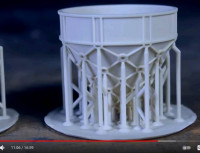
Thin parts can be stengthened by wrapping them in isogrids.  Essentially,
I-beams that wrap around the outside that add to their rigidity.

For a better explanation, I've cued up this video:
https://www.youtube.com/watch?t=645&v=Qu79vUbcXCU

Does anyone have a suggestion on how to wrap this kind of grid around a
cylindrical, conical, or dome-like shape using OpenSCAD?

Thin parts can be stengthened by wrapping them in isogrids. Essentially, I-beams that wrap around the outside that add to their rigidity. For a better explanation, I've cued up this video: https://www.youtube.com/watch?t=645&v=Qu79vUbcXCU Does anyone have a suggestion on how to wrap this kind of grid around a cylindrical, conical, or dome-like shape using OpenSCAD?
A
arnholm@arnholm.org
Sun, Jan 3, 2021 10:14 AM

On 2021-01-03 10:35, Bryan Lee wrote:

Thin parts can be stengthened by wrapping them in isogrids.
Essentially,
I-beams that wrap around the outside that add to their rigidity.

For a better explanation, I've cued up this video:
https://www.youtube.com/watch?t=645&v=Qu79vUbcXCU

Does anyone have a suggestion on how to wrap this kind of grid around a
cylindrical, conical, or dome-like shape using OpenSCAD?

Depending on the shape, I guess it is sometimes possible to do directly
in 3d, but if not:

Start by mathematically unwrapping the surface to receive the grid into
a flat surface area and design the grid in that flat area. Export the
flat grid to 3d STL or another format (preferred). Be sure to have good
control of the transformation from 3d to flat and back again. Then
remesh the still flat model to have uniform small rectangles (you can
use AngelCADs polyfix for this purpose). Apply coordinate
transformations to deform the dense grid back to the 3d shape as shown
for example here
https://gist.github.com/arnholm/af72c7d0790bb3d72e6bdf29c7aac1ed
Finally union the grid with your part.

This idea applied for text on a cylinder surface:
https://www.thingiverse.com/thing:2054654

Carsten Arnholm

On 2021-01-03 10:35, Bryan Lee wrote: > Thin parts can be stengthened by wrapping them in isogrids. > Essentially, > I-beams that wrap around the outside that add to their rigidity. > > For a better explanation, I've cued up this video: > https://www.youtube.com/watch?t=645&v=Qu79vUbcXCU > > Does anyone have a suggestion on how to wrap this kind of grid around a > cylindrical, conical, or dome-like shape using OpenSCAD? Depending on the shape, I guess it is sometimes possible to do directly in 3d, but if not: Start by mathematically unwrapping the surface to receive the grid into a flat surface area and design the grid in that flat area. Export the flat grid to 3d STL or another format (preferred). Be sure to have good control of the transformation from 3d to flat and back again. Then remesh the still flat model to have uniform small rectangles (you can use AngelCADs polyfix for this purpose). Apply coordinate transformations to deform the dense grid back to the 3d shape as shown for example here https://gist.github.com/arnholm/af72c7d0790bb3d72e6bdf29c7aac1ed Finally union the grid with your part. This idea applied for text on a cylinder surface: https://www.thingiverse.com/thing:2054654 Carsten Arnholm
A
adrianv
Sun, Jan 3, 2021 3:43 PM

Basically the approach I thought of is to construct continuous paths that
form the desired grid and then use a sweep function to draw the grid.
Here's an example for a cylinder.  It would be I think be not too much
trouble to adapt this approach to other mathematically defined shapes
(sphere, cone, torus).  This code relies on BOSL2, which actually has in
several places examples of a torus with a knot on its surface, demonstrating
basically a grid type structure on the torus.  Now you did say "complex
shape" in your title.  I don't know what you mean, because spheres, cones
and cylinders are all simple shapes.  If the shape doesn't have a simple
mathematical representation this approach is probably going to be difficult.
But the whole idea is probably pretty hard in that case.  You'd need to
triangulate your complex shape and project the grid onto the shape from the
triangulation.  Or downsample a fine triangulation into a coarse one while
keeping the curvature.

include <BOSL2/std.scad>

r = 10;
h = 30;

pitch = 30;

helix1 = [for(theta=[0:5:360h/pitch]) [rcos(theta), rsin(theta),
theta/360
pitch]];
helix2 = [for(theta=[0:5:360h/pitch]) [rcos(-theta), rsin(-theta),
theta/360
pitch]];

profile = right(.1,p=rect([2,1],anchor=RIGHT));  // Could use a triangle for
3d printability

zrot_copies(n=3){
path_sweep(profile, helix1, method="natural");
path_sweep(profile, helix2, method="natural");
}

zrot_copies(n=6,r=-r)
linear_extrude(height=h) polygon(profile);

cylinder(r=r,h=h,$fn=128);

http://forum.openscad.org/file/t2477/isogrid.png

leebc wrote

Thin parts can be stengthened by wrapping them in isogrids.  Essentially,
I-beams that wrap around the outside that add to their rigidity.

For a better explanation, I've cued up this video:
https://www.youtube.com/watch?t=645&v=Qu79vUbcXCU

Does anyone have a suggestion on how to wrap this kind of grid around a
cylindrical, conical, or dome-like shape using OpenSCAD?


OpenSCAD mailing list

Discuss@.openscad

Basically the approach I thought of is to construct continuous paths that form the desired grid and then use a sweep function to draw the grid. Here's an example for a cylinder. It would be I think be not too much trouble to adapt this approach to other mathematically defined shapes (sphere, cone, torus). This code relies on BOSL2, which actually has in several places examples of a torus with a knot on its surface, demonstrating basically a grid type structure on the torus. Now you did say "complex shape" in your title. I don't know what you mean, because spheres, cones and cylinders are all simple shapes. If the shape doesn't have a simple mathematical representation this approach is probably going to be difficult. But the whole idea is probably pretty hard in that case. You'd need to triangulate your complex shape and project the grid onto the shape from the triangulation. Or downsample a fine triangulation into a coarse one while keeping the curvature. include <BOSL2/std.scad> r = 10; h = 30; pitch = 30; helix1 = [for(theta=[0:5:360*h/pitch]) [r*cos(theta), r*sin(theta), theta/360*pitch]]; helix2 = [for(theta=[0:5:360*h/pitch]) [r*cos(-theta), r*sin(-theta), theta/360*pitch]]; profile = right(.1,p=rect([2,1],anchor=RIGHT)); // Could use a triangle for 3d printability zrot_copies(n=3){ path_sweep(profile, helix1, method="natural"); path_sweep(profile, helix2, method="natural"); } zrot_copies(n=6,r=-r) linear_extrude(height=h) polygon(profile); cylinder(r=r,h=h,$fn=128); <http://forum.openscad.org/file/t2477/isogrid.png> leebc wrote > Thin parts can be stengthened by wrapping them in isogrids. Essentially, > I-beams that wrap around the outside that add to their rigidity. > > For a better explanation, I've cued up this video: > https://www.youtube.com/watch?t=645&v=Qu79vUbcXCU > > Does anyone have a suggestion on how to wrap this kind of grid around a > cylindrical, conical, or dome-like shape using OpenSCAD? > > _______________________________________________ > OpenSCAD mailing list > Discuss@.openscad > http://lists.openscad.org/mailman/listinfo/discuss_lists.openscad.org -- Sent from: http://forum.openscad.org/
DS
Daniel Shriver
Sun, Jan 3, 2021 11:06 PM

Could there be some extension to "sweep"/"skin" to "decorate" (either add
on or subtract off) the outer surface of something generated via
"sweep"/"skin"?

Even if that were easy to do, a complication would be that people would
probably want it in various different ways (in 'lines' around the object,
as a 'grid' around the object, as a 'helix' around the object...)

On Sun, Jan 3, 2021 at 10:44 AM adrianv avm4@cornell.edu wrote:

Basically the approach I thought of is to construct continuous paths that
form the desired grid and then use a sweep function to draw the grid.
Here's an example for a cylinder.  It would be I think be not too much
trouble to adapt this approach to other mathematically defined shapes
(sphere, cone, torus).  This code relies on BOSL2, which actually has in
several places examples of a torus with a knot on its surface,
demonstrating
basically a grid type structure on the torus.  Now you did say "complex
shape" in your title.  I don't know what you mean, because spheres, cones
and cylinders are all simple shapes.  If the shape doesn't have a simple
mathematical representation this approach is probably going to be
difficult.
But the whole idea is probably pretty hard in that case.  You'd need to
triangulate your complex shape and project the grid onto the shape from the
triangulation.  Or downsample a fine triangulation into a coarse one while
keeping the curvature.

include <BOSL2/std.scad>

r = 10;
h = 30;

pitch = 30;

helix1 = [for(theta=[0:5:360h/pitch]) [rcos(theta), rsin(theta),
theta/360
pitch]];
helix2 = [for(theta=[0:5:360h/pitch]) [rcos(-theta), rsin(-theta),
theta/360
pitch]];

profile = right(.1,p=rect([2,1],anchor=RIGHT));  // Could use a triangle
for
3d printability

zrot_copies(n=3){
path_sweep(profile, helix1, method="natural");
path_sweep(profile, helix2, method="natural");
}

zrot_copies(n=6,r=-r)
linear_extrude(height=h) polygon(profile);

cylinder(r=r,h=h,$fn=128);

http://forum.openscad.org/file/t2477/isogrid.png

leebc wrote

Thin parts can be stengthened by wrapping them in isogrids.

Essentially,

I-beams that wrap around the outside that add to their rigidity.

For a better explanation, I've cued up this video:
https://www.youtube.com/watch?t=645&v=Qu79vUbcXCU

Does anyone have a suggestion on how to wrap this kind of grid around a
cylindrical, conical, or dome-like shape using OpenSCAD?


OpenSCAD mailing list

Discuss@.openscad

Could there be some extension to "sweep"/"skin" to "decorate" (either add on or subtract off) the outer surface of something generated via "sweep"/"skin"? Even if that were easy to do, a complication would be that people would probably want it in various different ways (in 'lines' around the object, as a 'grid' around the object, as a 'helix' around the object...) On Sun, Jan 3, 2021 at 10:44 AM adrianv <avm4@cornell.edu> wrote: > Basically the approach I thought of is to construct continuous paths that > form the desired grid and then use a sweep function to draw the grid. > Here's an example for a cylinder. It would be I think be not too much > trouble to adapt this approach to other mathematically defined shapes > (sphere, cone, torus). This code relies on BOSL2, which actually has in > several places examples of a torus with a knot on its surface, > demonstrating > basically a grid type structure on the torus. Now you did say "complex > shape" in your title. I don't know what you mean, because spheres, cones > and cylinders are all simple shapes. If the shape doesn't have a simple > mathematical representation this approach is probably going to be > difficult. > But the whole idea is probably pretty hard in that case. You'd need to > triangulate your complex shape and project the grid onto the shape from the > triangulation. Or downsample a fine triangulation into a coarse one while > keeping the curvature. > > include <BOSL2/std.scad> > > r = 10; > h = 30; > > pitch = 30; > > helix1 = [for(theta=[0:5:360*h/pitch]) [r*cos(theta), r*sin(theta), > theta/360*pitch]]; > helix2 = [for(theta=[0:5:360*h/pitch]) [r*cos(-theta), r*sin(-theta), > theta/360*pitch]]; > > profile = right(.1,p=rect([2,1],anchor=RIGHT)); // Could use a triangle > for > 3d printability > > zrot_copies(n=3){ > path_sweep(profile, helix1, method="natural"); > path_sweep(profile, helix2, method="natural"); > } > > zrot_copies(n=6,r=-r) > linear_extrude(height=h) polygon(profile); > > cylinder(r=r,h=h,$fn=128); > > > <http://forum.openscad.org/file/t2477/isogrid.png> > > > > leebc wrote > > Thin parts can be stengthened by wrapping them in isogrids. > Essentially, > > I-beams that wrap around the outside that add to their rigidity. > > > > For a better explanation, I've cued up this video: > > https://www.youtube.com/watch?t=645&v=Qu79vUbcXCU > > > > Does anyone have a suggestion on how to wrap this kind of grid around a > > cylindrical, conical, or dome-like shape using OpenSCAD? > > > > _______________________________________________ > > OpenSCAD mailing list > > > Discuss@.openscad > > > http://lists.openscad.org/mailman/listinfo/discuss_lists.openscad.org > > > > > > -- > Sent from: http://forum.openscad.org/ > > _______________________________________________ > OpenSCAD mailing list > Discuss@lists.openscad.org > http://lists.openscad.org/mailman/listinfo/discuss_lists.openscad.org >
M
MichaelAtOz
Sun, Jan 3, 2021 11:31 PM

Also note that the circular hollow features are important in propagating stresses.

I suspect the linear parts are also filleted to the part for the same reason.


From: Discuss [mailto:discuss-bounces@lists.openscad.org] On Behalf Of Daniel Shriver
Sent: Mon, 4 Jan 2021 10:07
To: OpenSCAD general discussion
Subject: Re: [OpenSCAD] isogrids wrapping complex shapes

Could there be some extension to "sweep"/"skin" to "decorate" (either add on or subtract off) the
outer surface of something generated via "sweep"/"skin"?

Even if that were easy to do, a complication would be that people would probably want it in various
different ways (in 'lines' around the object, as a 'grid' around the object, as a 'helix' around
the object...)

On Sun, Jan 3, 2021 at 10:44 AM adrianv avm4@cornell.edu wrote:

Basically the approach I thought of is to construct continuous paths that
form the desired grid and then use a sweep function to draw the grid.
Here's an example for a cylinder.  It would be I think be not too much
trouble to adapt this approach to other mathematically defined shapes
(sphere, cone, torus).  This code relies on BOSL2, which actually has in
several places examples of a torus with a knot on its surface, demonstrating
basically a grid type structure on the torus.  Now you did say "complex
shape" in your title.  I don't know what you mean, because spheres, cones
and cylinders are all simple shapes.  If the shape doesn't have a simple
mathematical representation this approach is probably going to be difficult.
But the whole idea is probably pretty hard in that case.  You'd need to
triangulate your complex shape and project the grid onto the shape from the
triangulation.  Or downsample a fine triangulation into a coarse one while
keeping the curvature.

include <BOSL2/std.scad>

r = 10;
h = 30;

pitch = 30;

helix1 = [for(theta=[0:5:360h/pitch]) [rcos(theta), rsin(theta),
theta/360
pitch]];
helix2 = [for(theta=[0:5:360h/pitch]) [rcos(-theta), rsin(-theta),
theta/360
pitch]];

profile = right(.1,p=rect([2,1],anchor=RIGHT));  // Could use a triangle for
3d printability

zrot_copies(n=3){
path_sweep(profile, helix1, method="natural");
path_sweep(profile, helix2, method="natural");
}

zrot_copies(n=6,r=-r)
linear_extrude(height=h) polygon(profile);

cylinder(r=r,h=h,$fn=128);

http://forum.openscad.org/file/t2477/isogrid.png

leebc wrote

Thin parts can be stengthened by wrapping them in isogrids.  Essentially,
I-beams that wrap around the outside that add to their rigidity.

For a better explanation, I've cued up this video:
https://www.youtube.com/watch?t=645 https://www.youtube.com/watch?t=645&v=Qu79vUbcXCU

&v=Qu79vUbcXCU

Does anyone have a suggestion on how to wrap this kind of grid around a
cylindrical, conical, or dome-like shape using OpenSCAD?


OpenSCAD mailing list

Discuss@.openscad

Also note that the circular hollow features are important in propagating stresses. I suspect the linear parts are also filleted to the part for the same reason. _____ From: Discuss [mailto:discuss-bounces@lists.openscad.org] On Behalf Of Daniel Shriver Sent: Mon, 4 Jan 2021 10:07 To: OpenSCAD general discussion Subject: Re: [OpenSCAD] isogrids wrapping complex shapes Could there be some extension to "sweep"/"skin" to "decorate" (either add on or subtract off) the outer surface of something generated via "sweep"/"skin"? Even if that were easy to do, a complication would be that people would probably want it in various different ways (in 'lines' around the object, as a 'grid' around the object, as a 'helix' around the object...) On Sun, Jan 3, 2021 at 10:44 AM adrianv <avm4@cornell.edu> wrote: Basically the approach I thought of is to construct continuous paths that form the desired grid and then use a sweep function to draw the grid. Here's an example for a cylinder. It would be I think be not too much trouble to adapt this approach to other mathematically defined shapes (sphere, cone, torus). This code relies on BOSL2, which actually has in several places examples of a torus with a knot on its surface, demonstrating basically a grid type structure on the torus. Now you did say "complex shape" in your title. I don't know what you mean, because spheres, cones and cylinders are all simple shapes. If the shape doesn't have a simple mathematical representation this approach is probably going to be difficult. But the whole idea is probably pretty hard in that case. You'd need to triangulate your complex shape and project the grid onto the shape from the triangulation. Or downsample a fine triangulation into a coarse one while keeping the curvature. include <BOSL2/std.scad> r = 10; h = 30; pitch = 30; helix1 = [for(theta=[0:5:360*h/pitch]) [r*cos(theta), r*sin(theta), theta/360*pitch]]; helix2 = [for(theta=[0:5:360*h/pitch]) [r*cos(-theta), r*sin(-theta), theta/360*pitch]]; profile = right(.1,p=rect([2,1],anchor=RIGHT)); // Could use a triangle for 3d printability zrot_copies(n=3){ path_sweep(profile, helix1, method="natural"); path_sweep(profile, helix2, method="natural"); } zrot_copies(n=6,r=-r) linear_extrude(height=h) polygon(profile); cylinder(r=r,h=h,$fn=128); <http://forum.openscad.org/file/t2477/isogrid.png> leebc wrote > Thin parts can be stengthened by wrapping them in isogrids. Essentially, > I-beams that wrap around the outside that add to their rigidity. > > For a better explanation, I've cued up this video: > https://www.youtube.com/watch?t=645 <https://www.youtube.com/watch?t=645&v=Qu79vUbcXCU> &v=Qu79vUbcXCU > > Does anyone have a suggestion on how to wrap this kind of grid around a > cylindrical, conical, or dome-like shape using OpenSCAD? > > _______________________________________________ > OpenSCAD mailing list > Discuss@.openscad > http://lists.openscad.org/mailman/listinfo/discuss_lists.openscad.org -- Sent from: http://forum.openscad.org/ _______________________________________________ OpenSCAD mailing list Discuss@lists.openscad.org http://lists.openscad.org/mailman/listinfo/discuss_lists.openscad.org -- This email has been checked for viruses by AVG. https://www.avg.com
A
adrianv
Mon, Jan 4, 2021 12:01 AM

Well, if you are making an object described by a sweep of a circle then you
can construct the spiraling "grid" on it also using sweep by just adding
twist.

include<BOSL2/std.scad>
r = 10;
path=arc(r=75,N=125,angle=[0,90]);
profile = left(.1,p=rect([2,1],anchor=LEFT));
for(angle=[0:120:359]){
path_sweep(apply(zrot(angle)right(r),profile), path, twist=2360);
path_sweep(apply(zrot(angle)right(r),profile), path, twist=-2360);
}
for(angle=[0:60:350])
path_sweep(apply(zrot(angle)*right(r),profile), path)
path_sweep(circle(r=r,$fn=32), path);

http://forum.openscad.org/file/t2477/isogrid2.png

I think this would work also with rescaling (with sweep instead of
path_sweep) except that the size of your grid would also get scaled, so the
ribs would be thinner if the model diameter decreased.

But generalizing this to other profiles is not so easy.  You could probably
do it using skin() with a series of profiles that create one "cycle" of the
rib around the object.  That is somewhat messier, though.

Regarding limitations, filleting the joint to the object is definitely
desirable:  all joints should always be filleted if you're interested in
strength.  It's not hard to modify my approach to do that.    I do not
understand the role of the holes.  They are not included in the video where
the guy actually builds his 3d printed model.  In fact, he just uses
quadrilateral ribs, not triangular, and I don't think any filletting.
Adding the holes seems pretty hard to do, and so does filleting the joints
of the ribs to each other.

DanS wrote

Could there be some extension to "sweep"/"skin" to "decorate" (either add
on or subtract off) the outer surface of something generated via
"sweep"/"skin"?

Even if that were easy to do, a complication would be that people would
probably want it in various different ways (in 'lines' around the object,
as a 'grid' around the object, as a 'helix' around the object...)

On Sun, Jan 3, 2021 at 10:44 AM adrianv <

avm4@

> wrote:

Basically the approach I thought of is to construct continuous paths that
form the desired grid and then use a sweep function to draw the grid.
Here's an example for a cylinder.  It would be I think be not too much
trouble to adapt this approach to other mathematically defined shapes
(sphere, cone, torus).  This code relies on BOSL2, which actually has in
several places examples of a torus with a knot on its surface,
demonstrating
basically a grid type structure on the torus.  Now you did say "complex
shape" in your title.  I don't know what you mean, because spheres, cones
and cylinders are all simple shapes.  If the shape doesn't have a simple
mathematical representation this approach is probably going to be
difficult.
But the whole idea is probably pretty hard in that case.  You'd need to
triangulate your complex shape and project the grid onto the shape from
the
triangulation.  Or downsample a fine triangulation into a coarse one
while
keeping the curvature.

include <BOSL2/std.scad>

r = 10;
h = 30;

pitch = 30;

helix1 = [for(theta=[0:5:360h/pitch]) [rcos(theta), rsin(theta),
theta/360
pitch]];
helix2 = [for(theta=[0:5:360h/pitch]) [rcos(-theta), rsin(-theta),
theta/360
pitch]];

profile = right(.1,p=rect([2,1],anchor=RIGHT));  // Could use a triangle
for
3d printability

zrot_copies(n=3){
path_sweep(profile, helix1, method="natural");
path_sweep(profile, helix2, method="natural");
}

zrot_copies(n=6,r=-r)
linear_extrude(height=h) polygon(profile);

cylinder(r=r,h=h,$fn=128);

<http://forum.openscad.org/file/t2477/isogrid.png>

leebc wrote

Thin parts can be stengthened by wrapping them in isogrids.

Essentially,

I-beams that wrap around the outside that add to their rigidity.

For a better explanation, I've cued up this video:
https://www.youtube.com/watch?t=645&v=Qu79vUbcXCU

Does anyone have a suggestion on how to wrap this kind of grid around a
cylindrical, conical, or dome-like shape using OpenSCAD?


OpenSCAD mailing list

Discuss@.openscad

--
Sent from: http://forum.openscad.org/


OpenSCAD mailing list

Discuss@.openscad

Discuss@.openscad

Well, if you are making an object described by a sweep of a circle then you can construct the spiraling "grid" on it also using sweep by just adding twist. include<BOSL2/std.scad> r = 10; path=arc(r=75,N=125,angle=[0,90]); profile = left(.1,p=rect([2,1],anchor=LEFT)); for(angle=[0:120:359]){ path_sweep(apply(zrot(angle)*right(r),profile), path, twist=2*360); path_sweep(apply(zrot(angle)*right(r),profile), path, twist=-2*360); } for(angle=[0:60:350]) path_sweep(apply(zrot(angle)*right(r),profile), path) path_sweep(circle(r=r,$fn=32), path); <http://forum.openscad.org/file/t2477/isogrid2.png> I think this would work also with rescaling (with sweep instead of path_sweep) except that the size of your grid would also get scaled, so the ribs would be thinner if the model diameter decreased. But generalizing this to other profiles is not so easy. You could probably do it using skin() with a series of profiles that create one "cycle" of the rib around the object. That is somewhat messier, though. Regarding limitations, filleting the joint to the object is definitely desirable: all joints should always be filleted if you're interested in strength. It's not hard to modify my approach to do that. I do not understand the role of the holes. They are not included in the video where the guy actually builds his 3d printed model. In fact, he just uses quadrilateral ribs, not triangular, and I don't think any filletting. Adding the holes seems pretty hard to do, and so does filleting the joints of the ribs to each other. DanS wrote > Could there be some extension to "sweep"/"skin" to "decorate" (either add > on or subtract off) the outer surface of something generated via > "sweep"/"skin"? > > Even if that were easy to do, a complication would be that people would > probably want it in various different ways (in 'lines' around the object, > as a 'grid' around the object, as a 'helix' around the object...) > > On Sun, Jan 3, 2021 at 10:44 AM adrianv &lt; > avm4@ > &gt; wrote: > >> Basically the approach I thought of is to construct continuous paths that >> form the desired grid and then use a sweep function to draw the grid. >> Here's an example for a cylinder. It would be I think be not too much >> trouble to adapt this approach to other mathematically defined shapes >> (sphere, cone, torus). This code relies on BOSL2, which actually has in >> several places examples of a torus with a knot on its surface, >> demonstrating >> basically a grid type structure on the torus. Now you did say "complex >> shape" in your title. I don't know what you mean, because spheres, cones >> and cylinders are all simple shapes. If the shape doesn't have a simple >> mathematical representation this approach is probably going to be >> difficult. >> But the whole idea is probably pretty hard in that case. You'd need to >> triangulate your complex shape and project the grid onto the shape from >> the >> triangulation. Or downsample a fine triangulation into a coarse one >> while >> keeping the curvature. >> >> include &lt;BOSL2/std.scad&gt; >> >> r = 10; >> h = 30; >> >> pitch = 30; >> >> helix1 = [for(theta=[0:5:360*h/pitch]) [r*cos(theta), r*sin(theta), >> theta/360*pitch]]; >> helix2 = [for(theta=[0:5:360*h/pitch]) [r*cos(-theta), r*sin(-theta), >> theta/360*pitch]]; >> >> profile = right(.1,p=rect([2,1],anchor=RIGHT)); // Could use a triangle >> for >> 3d printability >> >> zrot_copies(n=3){ >> path_sweep(profile, helix1, method="natural"); >> path_sweep(profile, helix2, method="natural"); >> } >> >> zrot_copies(n=6,r=-r) >> linear_extrude(height=h) polygon(profile); >> >> cylinder(r=r,h=h,$fn=128); >> >> >> &lt;http://forum.openscad.org/file/t2477/isogrid.png&gt; >> >> >> >> leebc wrote >> > Thin parts can be stengthened by wrapping them in isogrids. >> Essentially, >> > I-beams that wrap around the outside that add to their rigidity. >> > >> > For a better explanation, I've cued up this video: >> > https://www.youtube.com/watch?t=645&v=Qu79vUbcXCU >> > >> > Does anyone have a suggestion on how to wrap this kind of grid around a >> > cylindrical, conical, or dome-like shape using OpenSCAD? >> > >> > _______________________________________________ >> > OpenSCAD mailing list >> >> > Discuss@.openscad >> >> > http://lists.openscad.org/mailman/listinfo/discuss_lists.openscad.org >> >> >> >> >> >> -- >> Sent from: http://forum.openscad.org/ >> >> _______________________________________________ >> OpenSCAD mailing list >> > Discuss@.openscad >> http://lists.openscad.org/mailman/listinfo/discuss_lists.openscad.org >> > > _______________________________________________ > OpenSCAD mailing list > Discuss@.openscad > http://lists.openscad.org/mailman/listinfo/discuss_lists.openscad.org -- Sent from: http://forum.openscad.org/

M
MichaelAtOz
Mon, Jan 4, 2021 4:29 AM

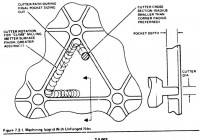
I do not understand the role of the holes.  They are not included in the video where

the guy actually builds his 3d printed model.  In fact, he just uses

quadrilateral ribs, not triangular, and I don't think any filletting.

Adding the holes seems pretty hard to do, and so does filleting the joints

of the ribs to each other.

I can't tell about fillets.

I'm just talking about the properties of isogrids https://en.wikipedia.org/wiki/Isogrid  (not so
much OpenSCAD implementability);

"The triangular pattern is very efficient because it retains rigidity while saving material and
therefore weight. The term isogrid is used because the structure acts like an isotropic material,
with equal properties measured in any direction, and grid, referring to the sheet and stiffeners
structure.

A similar variant is the Orthogrid (sometimes called a waffle grid), which uses rectangular rather
than triangular openings. This is not isotropic (has different properties from different angles),
but matches many use cases well and is easier to manufacture.

Traditionally, the equilateral triangle pattern was used because it was amenable to simplified
analysis. Since the equilateral triangle pattern has isotropic strength characteristics (no
preferential direction), it was named isogrid."

Interestingly it turns out the holes are related to the milling process

The holes are cut to save weight in the left over node. I presumed it was for stress propagation
allowing elasticity.

Also the holes can be used as attachment point.

It does specifically call for fillets at the nodes, ie in XY plane.

Diagrams do show fillets in the stringer, but I didn't see it mentioned in my cursory look.

--
This email has been checked for viruses by AVG.
https://www.avg.com
> I do not understand the role of the holes. They are not included in the video where > the guy actually builds his 3d printed model. In fact, he just uses > quadrilateral ribs, not triangular, and I don't think any filletting. > Adding the holes seems pretty hard to do, and so does filleting the joints > of the ribs to each other. > I can't tell about fillets. I'm just talking about the properties of isogrids <https://en.wikipedia.org/wiki/Isogrid> (not so much OpenSCAD implementability); "The triangular pattern is very efficient because it retains rigidity while saving material and therefore weight. The term isogrid is used because the structure acts like an isotropic material, with equal properties measured in any direction, and grid, referring to the sheet and stiffeners structure. A similar variant is the Orthogrid (sometimes called a waffle grid), which uses rectangular rather than triangular openings. This is not isotropic (has different properties from different angles), but matches many use cases well and is easier to manufacture. Traditionally, the equilateral triangle pattern was used because it was amenable to simplified analysis. Since the equilateral triangle pattern has isotropic strength characteristics (no preferential direction), it was named isogrid." Interestingly it turns out the holes are related to the milling process The holes are cut to save weight in the left over node. I presumed it was for stress propagation allowing elasticity. Also the holes can be used as attachment point. It does specifically call for fillets at the nodes, ie in XY plane. Diagrams do show fillets in the stringer, but I didn't see it mentioned in my cursory look. -- This email has been checked for viruses by AVG. https://www.avg.com
RD
Revar Desmera
Mon, Jan 4, 2021 5:21 AM

I have a cylindrical_extrude() function in BOSL2 that will take a 2D geometry and extrude it radially out from a cylinder.  It may be doable to alter it to take r1/r2 args to do cones.  With a function literal argument, or list of radii, you can have a varying radius along a profile.  You could do bell shapes for rocket nozzles.  (I think I watched the same YouTube video a few days ago.)

The necessary trapezoidal scaling of the 2D geometry may be too hard to fake cleanly, however, for a conical or bell surface.  If so, I can see a way to do it using BOSL2 Paths and Regions code, but it’s definitely more work.  However, it would let you map almost arbitrary isogrid patterns to the surface of a rotationally extruded shape:

  • Create a rectangular Region of isogrid pattern, assembled with region-wise union()/difference()/intersection()/offset().
  • Subsample the resultant Region paths, then do radial coordinates transformations around the cone/bell/cylindroid.
  • Generate a VNF (Vertices ’N’ Faces partial polyhedron structure) for the bottom of the remapped isogrid pattern.
  • Generate a VNF for the top of the remapped isogrid pattern.
  • Generate VNFs for the walls of each remapped isogrid Region path using vnf_vertex_array().
  • Merge the VNF’s together and instantiate the polyhedron for the curved isogrids with vnf_polyhedron().

The code for linear_sweep() may be alterable to do much of this.  I was thinking of implementing this, myself.

  • Revar

On Jan 3, 2021, at 8:29 PM, MichaelAtOz oz.at.michael@gmail.com wrote:

I do not understand the role of the holes.  They are not included in the video where
the guy actually builds his 3d printed model.  In fact, he just uses
quadrilateral ribs, not triangular, and I don't think any filletting.
Adding the holes seems pretty hard to do, and so does filleting the joints
of the ribs to each other.

<image002.jpg>

I can't tell about fillets.
I'm just talking about the properties of isogrids https://en.wikipedia.org/wiki/Isogrid (not so much OpenSCAD implementability);

"The triangular pattern is very efficient because it retains rigidity while saving material and therefore weight. The term isogrid is used because the structure acts like an isotropic material, with equal properties measured in any direction, and grid, referring to the sheet and stiffeners structure.

A similar variant is the Orthogrid (sometimes called a waffle grid), which uses rectangular rather than triangular openings. This is not isotropic (has different properties from different angles), but matches many use cases well and is easier to manufacture.

Traditionally, the equilateral triangle pattern was used because it was amenable to simplified analysis. Since the equilateral triangle pattern has isotropic strength characteristics (no preferential direction), it was named isogrid."

Interestingly it turns out the holes are related to the milling process
<image003.jpg>
The holes are cut to save weight in the left over node. I presumed it was for stress propagation allowing elasticity.
Also the holes can be used as attachment point.
It does specifically call for fillets at the nodes, ie in XY plane.
Diagrams do show fillets in the stringer, but I didn't see it mentioned in my cursory look.

http://www.avg.com/email-signature?utm_medium=email&utm_source=link&utm_campaign=sig-email&utm_content=emailclient Virus-free. www.avg.com http://www.avg.com/email-signature?utm_medium=email&utm_source=link&utm_campaign=sig-email&utm_content=emailclient x-msg://1/#DAB4FAD8-2DD7-40BB-A1B8-4E2AA1F9FDF2_______________________________________________
OpenSCAD mailing list
Discuss@lists.openscad.org mailto:Discuss@lists.openscad.org
http://lists.openscad.org/mailman/listinfo/discuss_lists.openscad.org http://lists.openscad.org/mailman/listinfo/discuss_lists.openscad.org

I have a cylindrical_extrude() function in BOSL2 that will take a 2D geometry and extrude it radially out from a cylinder. It may be doable to alter it to take r1/r2 args to do cones. With a function literal argument, or list of radii, you can have a varying radius along a profile. You could do bell shapes for rocket nozzles. (I think I watched the same YouTube video a few days ago.) The necessary trapezoidal scaling of the 2D geometry may be too hard to fake cleanly, however, for a conical or bell surface. If so, I can see a way to do it using BOSL2 Paths and Regions code, but it’s definitely more work. However, it would let you map almost arbitrary isogrid patterns to the surface of a rotationally extruded shape: - Create a rectangular Region of isogrid pattern, assembled with region-wise union()/difference()/intersection()/offset(). - Subsample the resultant Region paths, then do radial coordinates transformations around the cone/bell/cylindroid. - Generate a VNF (Vertices ’N’ Faces partial polyhedron structure) for the bottom of the remapped isogrid pattern. - Generate a VNF for the top of the remapped isogrid pattern. - Generate VNFs for the walls of each remapped isogrid Region path using vnf_vertex_array(). - Merge the VNF’s together and instantiate the polyhedron for the curved isogrids with vnf_polyhedron(). The code for linear_sweep() may be alterable to do much of this. I was thinking of implementing this, myself. - Revar > On Jan 3, 2021, at 8:29 PM, MichaelAtOz <oz.at.michael@gmail.com> wrote: > > > I do not understand the role of the holes. They are not included in the video where > > the guy actually builds his 3d printed model. In fact, he just uses > > quadrilateral ribs, not triangular, and I don't think any filletting. > > Adding the holes seems pretty hard to do, and so does filleting the joints > > of the ribs to each other. > > > > <image002.jpg> > > I can't tell about fillets. > I'm just talking about the properties of isogrids <https://en.wikipedia.org/wiki/Isogrid> (not so much OpenSCAD implementability); > > "The triangular pattern is very efficient because it retains rigidity while saving material and therefore weight. The term isogrid is used because the structure acts like an isotropic material, with equal properties measured in any direction, and grid, referring to the sheet and stiffeners structure. > > A similar variant is the Orthogrid (sometimes called a waffle grid), which uses rectangular rather than triangular openings. This is not isotropic (has different properties from different angles), but matches many use cases well and is easier to manufacture. > > Traditionally, the equilateral triangle pattern was used because it was amenable to simplified analysis. Since the equilateral triangle pattern has isotropic strength characteristics (no preferential direction), it was named isogrid." > > Interestingly it turns out the holes are related to the milling process > <image003.jpg> > The holes are cut to save weight in the left over node. I presumed it was for stress propagation allowing elasticity. > Also the holes can be used as attachment point. > It does specifically call for fillets at the nodes, ie in XY plane. > Diagrams do show fillets in the stringer, but I didn't see it mentioned in my cursory look. > > > > <http://www.avg.com/email-signature?utm_medium=email&utm_source=link&utm_campaign=sig-email&utm_content=emailclient> Virus-free. www.avg.com <http://www.avg.com/email-signature?utm_medium=email&utm_source=link&utm_campaign=sig-email&utm_content=emailclient> <x-msg://1/#DAB4FAD8-2DD7-40BB-A1B8-4E2AA1F9FDF2>_______________________________________________ > OpenSCAD mailing list > Discuss@lists.openscad.org <mailto:Discuss@lists.openscad.org> > http://lists.openscad.org/mailman/listinfo/discuss_lists.openscad.org <http://lists.openscad.org/mailman/listinfo/discuss_lists.openscad.org>
M
memsfactory
Mon, Jan 4, 2021 9:14 PM

My 3D airplane wing code might be helpful. I'm doing the opposite of what you
want. I'm creating the 'isogrid' on the inside of the shelled wing.
HOwever, my rib structure does not rotate like your isogrids.

https://github.com/memsfactory/ADParametricSkinnedWing

http://forum.openscad.org/file/t1814/Clipboard01.jpg

--
Sent from: http://forum.openscad.org/

My 3D airplane wing code might be helpful. I'm doing the opposite of what you want. I'm creating the 'isogrid' on the inside of the shelled wing. HOwever, my rib structure does not rotate like your isogrids. https://github.com/memsfactory/ADParametricSkinnedWing <http://forum.openscad.org/file/t1814/Clipboard01.jpg> -- Sent from: http://forum.openscad.org/
S
shadowwynd
Wed, Jan 13, 2021 4:20 AM

The holes have an advantage when 3D printing a design (in addition to saving
weight/attachment points).

A 3D printer makes a hole by building a cylinder.  The infill pattern used
attaches to the cylinder as it it built.  In my observation, this "node"
where holes are located are stronger than the surrounding material if not
using 100% infill.  I have seen large flat areas be weak and prone to
delamination, and I have fixed this by putting small holes in the flat area
because of this strengthening.

--
Sent from: http://forum.openscad.org/

The holes have an advantage when 3D printing a design (in addition to saving weight/attachment points). A 3D printer makes a hole by building a cylinder. The infill pattern used attaches to the cylinder as it it built. In my observation, this "node" where holes are located are stronger than the surrounding material if not using 100% infill. I have seen large flat areas be weak and prone to delamination, and I have fixed this by putting small holes in the flat area because of this strengthening. -- Sent from: http://forum.openscad.org/