

discuss@lists.openscad.org

OpenSCAD general discussion Mailing-list

View all threads

Converting a hollow STL file to solid ??

D
Dave
Sat, Jan 16, 2021 4:27 PM

I have a complex STL file that is hollow and I want to convert it to
solid without losing the surface detail.

What is the best way to achieve this ??

Dave

I have a complex STL file that is hollow and I want to convert it to solid without losing the surface detail. What is the best way to achieve this ?? Dave
F
fred
Sat, Jan 16, 2021 4:58 PM

I would not consider your requirements to be limited to OpenSCAD, nor would I expect it to be the best approach. I could be wrong, of course. Meshmixer (free) has a "Make Solid" feature in the edit menu, which would require some adjustment to avoid destroying details, but should accomplish the objective. There may be other approaches as well. If you can attach the STL file, it opens a few doors to the solution.

On Saturday, January 16, 2021, 11:28:05 AM EST, Dave <softfoot@hotmail.com> wrote:  

I have a complex STL file that is hollow and I want to convert it to
solid without losing the surface detail.

What is the best way to achieve this ??

Dave


OpenSCAD mailing list
Discuss@lists.openscad.org
http://lists.openscad.org/mailman/listinfo/discuss_lists.openscad.org

I would not consider your requirements to be limited to OpenSCAD, nor would I expect it to be the best approach. I could be wrong, of course. Meshmixer (free) has a "Make Solid" feature in the edit menu, which would require some adjustment to avoid destroying details, but should accomplish the objective. There may be other approaches as well. If you can attach the STL file, it opens a few doors to the solution. On Saturday, January 16, 2021, 11:28:05 AM EST, Dave <softfoot@hotmail.com> wrote: I have a complex STL file that is hollow and I want to convert it to solid without losing the surface detail. What is the best way to achieve this ?? Dave _______________________________________________ OpenSCAD mailing list Discuss@lists.openscad.org http://lists.openscad.org/mailman/listinfo/discuss_lists.openscad.org
CA
Carsten Arnholm
Sat, Jan 16, 2021 6:11 PM

It is an interesting mesh manipulation problem.

I tried the suggested Meshmixer solution. First I made a cube with an
internal spherical hole and saved it. Imported it into MeshMixer and
tried the "Make Solid" feature which created a huge model for some
reason. On export+investigation, it turned out to be a representation of
the inner sphere, with the outside cube removed, plus the sphere mesh
was modified in an undesirable way. It seems to me Meshmixer is not up
to that particular task.

Perhaps there is already some other existing solution elsewhere, but
below is how I would do it (written as C++ pseudo-code). Assume
"polyhedron" here is a datastructure with sufficient topoligical
information allowing direct traversal from a face to one of its
neighbour faces. Also assume polyhedron A is a single object with zero
or more internal voids to be removed:

polyhedron fill3d(polyhedron A)
{
while (A.has_faces()) {
face f = A.any_face();
polyhedron B;  // empty
B.vertices() = A.vertices();
while (f != null) {
face f_next = f.neighbour(); // a neighbour face
A.remove(f)
B.add(f)
f = f_next;
}
if(B.volume() > 0.0) {
B.remove_unused_vertices();
return B;
}
}
return A;
}

This should work for any single object A and would not modify the
resulting mesh in any way, other than remove inner voids as requested.

Carsten Arnholm

On 16.01.2021 17:58, fred via Discuss wrote:

I would not consider your requirements to be limited to OpenSCAD, nor
would I expect it to be the best approach. I could be wrong, of course.
Meshmixer (free) has a "Make Solid" feature in the edit menu, which
would require some adjustment to avoid destroying details, but should
accomplish the objective. There may be other approaches as well. If you
can attach the STL file, it opens a few doors to the solution.

On Saturday, January 16, 2021, 11:28:05 AM EST, Dave
softfoot@hotmail.com wrote:

I have a complex STL file that is hollow and I want to convert it to
solid without losing the surface detail.

What is the best way to achieve this ??

Dave

It is an interesting mesh manipulation problem. I tried the suggested Meshmixer solution. First I made a cube with an internal spherical hole and saved it. Imported it into MeshMixer and tried the "Make Solid" feature which created a huge model for some reason. On export+investigation, it turned out to be a representation of the inner sphere, with the outside cube removed, plus the sphere mesh was modified in an undesirable way. It seems to me Meshmixer is not up to that particular task. Perhaps there is already some other existing solution elsewhere, but below is how I would do it (written as C++ pseudo-code). Assume "polyhedron" here is a datastructure with sufficient topoligical information allowing direct traversal from a face to one of its neighbour faces. Also assume polyhedron A is a *single* object with zero or more internal voids to be removed: polyhedron fill3d(polyhedron A) { while (A.has_faces()) { face f = A.any_face(); polyhedron B; // empty B.vertices() = A.vertices(); while (f != null) { face f_next = f.neighbour(); // a neighbour face A.remove(f) B.add(f) f = f_next; } if(B.volume() > 0.0) { B.remove_unused_vertices(); return B; } } return A; } This should work for any single object A and would not modify the resulting mesh in any way, other than remove inner voids as requested. Carsten Arnholm On 16.01.2021 17:58, fred via Discuss wrote: > I would not consider your requirements to be limited to OpenSCAD, nor > would I expect it to be the best approach. I could be wrong, of course. > Meshmixer (free) has a "Make Solid" feature in the edit menu, which > would require some adjustment to avoid destroying details, but should > accomplish the objective. There may be other approaches as well. If you > can attach the STL file, it opens a few doors to the solution. > > On Saturday, January 16, 2021, 11:28:05 AM EST, Dave > <softfoot@hotmail.com> wrote: > > > > I have a complex STL file that is hollow and I want to convert it to > solid without losing the surface detail. > > What is the best way to achieve this ?? > > Dave
DM
Doug Moen
Sat, Jan 16, 2021 11:48 PM

I have done this in Meshlab. I can't quite reconstruct the procedure I used (it was an older version of Meshlab than I have now), but here's what I think works in the current release.

Edit -> Select Connected Components in a Region
click on an outside face of the model to make the selection
Filters -> Selection -> Invert Selection
Filters -> Selection -> Delete Selected Faces and Vertices

This assumes that the interior void that you want to delete is not connected to the outside surface that you want to preserve.

If your model is entirely convex then you could also use the "hull" operator in OpenSCAD.

On Sat, Jan 16, 2021, at 11:27 AM, Dave wrote:

I have a complex STL file that is hollow and I want to convert it to
solid without losing the surface detail.

What is the best way to achieve this ??

Dave


OpenSCAD mailing list
Discuss@lists.openscad.org
http://lists.openscad.org/mailman/listinfo/discuss_lists.openscad.org

I have done this in Meshlab. I can't quite reconstruct the procedure I used (it was an older version of Meshlab than I have now), but here's what I think works in the current release. Edit -> Select Connected Components in a Region click on an outside face of the model to make the selection Filters -> Selection -> Invert Selection Filters -> Selection -> Delete Selected Faces and Vertices This assumes that the interior void that you want to delete is not connected to the outside surface that you want to preserve. If your model is entirely convex then you could also use the "hull" operator in OpenSCAD. On Sat, Jan 16, 2021, at 11:27 AM, Dave wrote: > > I have a complex STL file that is hollow and I want to convert it to > solid without losing the surface detail. > > What is the best way to achieve this ?? > > Dave > > > > _______________________________________________ > OpenSCAD mailing list > Discuss@lists.openscad.org > http://lists.openscad.org/mailman/listinfo/discuss_lists.openscad.org >
C
cbernhardt
Sun, Jan 17, 2021 12:55 PM

Blender has a Solidify Modifier function that allows you to make a "shell" of
user defined thickness and direction (place the thickened section on the
inside or outside of the model).

--
Sent from: http://forum.openscad.org/

Blender has a Solidify Modifier function that allows you to make a "shell" of user defined thickness and direction (place the thickened section on the inside or outside of the model). -- Sent from: http://forum.openscad.org/
D
Dave
Sun, Jan 17, 2021 7:10 PM

Hmmm, none of these really appeal to me.

I was hoping for some devious method using scad ;-)

I cannot get on with conventional CAD/3D design tools - OpenSCAD fits
the way my mind works, yes it's a little odd!

The item I want to print would be OK on a resin printer (I use filament)
but with filament the support structure would ruin the downward face.

However, it occurred to me that if I split it in half with Slic3r's nice
cutting tool so that the inside is facing down, then I don't care about
the support as it will be inside when I glue it together.

Dave

Hmmm, none of these really appeal to me. I was hoping for some devious method using scad ;-) I cannot get on with conventional CAD/3D design tools - OpenSCAD fits the way my mind works, yes it's a little odd! The item I want to print would be OK on a resin printer (I use filament) but with filament the support structure would ruin the downward face. However, it occurred to me that if I split it in half with Slic3r's nice cutting tool so that the inside is facing down, then I don't care about the support as it will be inside when I glue it together. Dave
F
fred
Sun, Jan 17, 2021 7:33 PM

If you are comfortable with gluing parts together, as you've noted, your options expand greatly.
Disregarding the above, run your original through a boolean subtract with any suitably large primitive, then do it again to get the solid result. That can be done in OpenSCAD with a few lines, I'd think. The result would be only the "outside" of the original model.
On Sunday, January 17, 2021, 2:11:30 PM EST, Dave softfoot@hotmail.com wrote:

Hmmm, none of these really appeal to me.

I was hoping for some devious method using scad ;-)

I cannot get on with conventional CAD/3D design tools - OpenSCAD fits
the way my mind works, yes it's a little odd!

The item I want to print would be OK on a resin printer (I use filament)
but with filament the support structure would ruin the downward face.

However, it occurred to me that if I split it in half with Slic3r's nice
cutting tool so that the inside is facing down, then I don't care about
the support as it will be inside when I glue it together.

Dave


OpenSCAD mailing list
Discuss@lists.openscad.org
http://lists.openscad.org/mailman/listinfo/discuss_lists.openscad.org

If you are comfortable with gluing parts together, as you've noted, your options expand greatly. Disregarding the above, run your original through a boolean subtract with any suitably large primitive, then do it again to get the solid result. That can be done in OpenSCAD with a few lines, I'd think. The result would be only the "outside" of the original model. On Sunday, January 17, 2021, 2:11:30 PM EST, Dave <softfoot@hotmail.com> wrote: Hmmm, none of these really appeal to me. I was hoping for some devious method using scad ;-) I cannot get on with conventional CAD/3D design tools - OpenSCAD fits the way my mind works, yes it's a little odd! The item I want to print would be OK on a resin printer (I use filament) but with filament the support structure would ruin the downward face. However, it occurred to me that if I split it in half with Slic3r's nice cutting tool so that the inside is facing down, then I don't care about the support as it will be inside when I glue it together. Dave _______________________________________________ OpenSCAD mailing list Discuss@lists.openscad.org http://lists.openscad.org/mailman/listinfo/discuss_lists.openscad.org
JB
Jordan Brown
Sun, Jan 17, 2021 8:07 PM

On 1/17/2021 11:33 AM, fred via Discuss wrote:

Disregarding the above, run your original through a boolean subtract
with any suitably large primitive, then do it again to get the solid
result. That can be done in OpenSCAD with a few lines, I'd think. The
result would be only the "outside" of the original model.

Unless I totally misunderstand what you mean... no.

module hollowsphere() {
    difference() {
        sphere(10);
        sphere(6);
    }
}

Hollow sphere, right?

Confirm by chopping out a chunk:

difference() {
    hollowsphere();
    cube(20);
}

Now, you're saying that we can turn that into a filled sphere with
something like this?

difference() {
    cube(21, center=true);
    difference() {
        cube(22, center=true);
        hollowsphere();
    }
}

(Note that the 21vs 22 is to avoid Z-fighting.)

Now let's chop a chunk out of that to look inside...

difference() {
    difference() {
        cube(21, center=true);
        difference() {
            cube(22, center=true);
            hollowsphere();
        }
    }
    cube(20);
}

Nope, still hollow.

Difference doesn't mold a shape around another shape.  (If it did, then
this scheme would work.)  Rather, given a shape A and a shape B, for
every point in B that is also in A, it removes that point from A.  The
result of the initial cube-minus-hollow-sphere subtract is not a cube
with a sphere carved out of it; it's a cube with a spherical shell
carved out of it - a cube, with a gap, with a sphere inside that.

Let's look inside it:

difference() {
    difference() {
        cube(22, center=true);
        hollowsphere();
    }
    cube(20);
}

There's no way to fill a hollow shape using Boolean operations - or at
least not without destroying the shape.  Mathematically, the volume
inside the hollow shape is the same as the volume outside the hollow
shape - the entire rest of the universe.  It's just that the outside is
bigger.  Any boolean operation that would fill in the inside would also
fill in the outside.

Hope that makes sense.
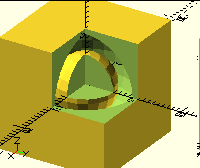
https://xkcd.com/2403/

On 1/17/2021 11:33 AM, fred via Discuss wrote: > Disregarding the above, run your original through a boolean subtract > with any suitably large primitive, then do it again to get the solid > result. That can be done in OpenSCAD with a few lines, I'd think. The > result would be only the "outside" of the original model. Unless I totally misunderstand what you mean... no. module hollowsphere() { difference() { sphere(10); sphere(6); } } Hollow sphere, right? Confirm by chopping out a chunk: difference() { hollowsphere(); cube(20); } Now, you're saying that we can turn that into a filled sphere with something like this? difference() { cube(21, center=true); difference() { cube(22, center=true); hollowsphere(); } } (Note that the 21vs 22 is to avoid Z-fighting.) Now let's chop a chunk out of that to look inside... difference() { difference() { cube(21, center=true); difference() { cube(22, center=true); hollowsphere(); } } cube(20); } Nope, still hollow. Difference doesn't mold a shape around another shape.  (If it did, then this scheme would work.)  Rather, given a shape A and a shape B, for every point in B that is also in A, it removes that point from A.  The result of the initial cube-minus-hollow-sphere subtract is not a cube with a sphere carved out of it; it's a cube with a spherical shell carved out of it - a cube, with a gap, with a sphere inside that. Let's look inside it: difference() { difference() { cube(22, center=true); hollowsphere(); } cube(20); } There's no way to fill a hollow shape using Boolean operations - or at least not without destroying the shape.  Mathematically, the volume inside the hollow shape is the same as the volume outside the hollow shape - the entire rest of the universe.  It's just that the outside is bigger.  Any boolean operation that would fill in the inside would also fill in the outside. Hope that makes sense. https://xkcd.com/2403/
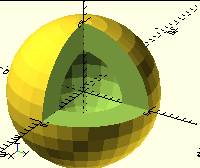
F
fred
Sun, Jan 17, 2021 8:41 PM

I must be misunderstanding the objective. I pictured the original model as one with two (or more) independent, separated surfaces, with the outer surface "encapsulating" the inner surface. To the best of my (mis)understanding, one can create an STL file with this characteristic, but I believe it would be considered non-manifold. I may be wrong; I'm often wrong.
Based on this, I also believed the objective was to remove the inner surface from the original STL file, leaving only the outer shell.
Again, based on my limited comprehension (another word for understanding), an STL file is not solid and cannot be made solid, as it is a collection of (properly) joined surfaces of zero thickness. In a manner of speaking, a properly constructed STL file is defining a solid, as long as there isn't anything else "inside" it.
In the iterative build of the previous message, I see my error. The "empty" volume of the original becomes non-empty during the difference process and is also integrated in the next difference action.
In a different way of phrasing the objective, would one accept that the goal is to remove the "stuff" inside the outer shell?

On Sunday, January 17, 2021, 3:07:11 PM EST, Jordan Brown <openscad@jordan.maileater.net> wrote:  

On 1/17/2021 11:33 AM, fred via Discuss wrote:

Disregarding the above, run your original through a boolean subtract with any suitably large primitive, then do it again to get the solid result. That can be done in OpenSCAD with a few lines, I'd think. The result would be only the "outside" of the original model.

Unless I totally misunderstand what you mean... no.

module hollowsphere() {
difference() {
sphere(10);
sphere(6);
}
}

Hollow sphere, right?

Confirm by chopping out a chunk:

difference() {
hollowsphere();
cube(20);
}

Now, you're saying that we can turn that into a filled sphere with something like this?

difference() {
cube(21, center=true);
difference() {
cube(22, center=true);
hollowsphere();
}
}

(Note that the 21vs 22 is to avoid Z-fighting.)

Now let's chop a chunk out of that to look inside...

difference() {
difference() {
cube(21, center=true);
difference() {
cube(22, center=true);
hollowsphere();
}
}
cube(20);
}

Nope, still hollow.

Difference doesn't mold a shape around another shape.  (If it did, then this scheme would work.)  Rather, given a shape A and a shape B, for every point in B that is also in A, it removes that point from A.  The result of the initial cube-minus-hollow-sphere subtract is not a cube with a sphere carved out of it; it's a cube with a spherical shell carved out of it - a cube, with a gap, with a sphere inside that.

Let's look inside it:

difference() {
difference() {
cube(22, center=true);
hollowsphere();
}
cube(20);
}

There's no way to fill a hollow shape using Boolean operations - or at least not without destroying the shape.  Mathematically, the volume inside the hollow shape is the same as the volume outside the hollow shape - the entire rest of the universe.  It's just that the outside is bigger.  Any boolean operation that would fill in the inside would also fill in the outside.

Hope that makes sense.
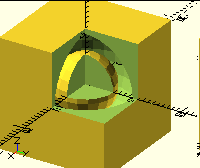
https://xkcd.com/2403/

I must be misunderstanding the objective. I pictured the original model as one with two (or more) independent, separated surfaces, with the outer surface "encapsulating" the inner surface. To the best of my (mis)understanding, one can create an STL file with this characteristic, but I believe it would be considered non-manifold. I may be wrong; I'm often wrong. Based on this, I also believed the objective was to remove the inner surface from the original STL file, leaving only the outer shell. Again, based on my limited comprehension (another word for understanding), an STL file is not solid and cannot be made solid, as it is a collection of (properly) joined surfaces of zero thickness. In a manner of speaking, a properly constructed STL file is defining a solid, as long as there isn't anything else "inside" it. In the iterative build of the previous message, I see my error. The "empty" volume of the original becomes non-empty during the difference process and is also integrated in the next difference action. In a different way of phrasing the objective, would one accept that the goal is to remove the "stuff" inside the outer shell? On Sunday, January 17, 2021, 3:07:11 PM EST, Jordan Brown <openscad@jordan.maileater.net> wrote: On 1/17/2021 11:33 AM, fred via Discuss wrote: Disregarding the above, run your original through a boolean subtract with any suitably large primitive, then do it again to get the solid result. That can be done in OpenSCAD with a few lines, I'd think. The result would be only the "outside" of the original model. Unless I totally misunderstand what you mean... no. module hollowsphere() { difference() { sphere(10); sphere(6); } } Hollow sphere, right? Confirm by chopping out a chunk: difference() { hollowsphere(); cube(20); } Now, you're saying that we can turn that into a filled sphere with something like this? difference() { cube(21, center=true); difference() { cube(22, center=true); hollowsphere(); } } (Note that the 21vs 22 is to avoid Z-fighting.) Now let's chop a chunk out of that to look inside... difference() { difference() { cube(21, center=true); difference() { cube(22, center=true); hollowsphere(); } } cube(20); } Nope, still hollow. Difference doesn't mold a shape around another shape.  (If it did, then this scheme would work.)  Rather, given a shape A and a shape B, for every point in B that is also in A, it removes that point from A.  The result of the initial cube-minus-hollow-sphere subtract is not a cube with a sphere carved out of it; it's a cube with a spherical shell carved out of it - a cube, with a gap, with a sphere inside that. Let's look inside it: difference() { difference() { cube(22, center=true); hollowsphere(); } cube(20); } There's no way to fill a hollow shape using Boolean operations - or at least not without destroying the shape.  Mathematically, the volume inside the hollow shape is the same as the volume outside the hollow shape - the entire rest of the universe.  It's just that the outside is bigger.  Any boolean operation that would fill in the inside would also fill in the outside. Hope that makes sense. https://xkcd.com/2403/
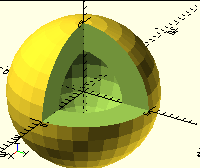
JB
Jordan Brown
Sun, Jan 17, 2021 10:18 PM

On 1/17/2021 12:41 PM, fred via Discuss wrote:

I must be misunderstanding the objective. I pictured the original
model as one with two (or more) independent, separated surfaces, with
the outer surface "encapsulating" the inner surface. To the best of my
(mis)understanding, one can create an STL file with this
characteristic, but I believe it would be considered non-manifold. I
may be wrong; I'm often wrong.

I don't know whether it has a name but no, I don't think it's
non-manifold.  I don't understand the math in the abstract, but I
believe the definition is that of a 2-manifold is that each edge is
attached to exactly two faces.  It may also be required to be
non-self-intersecting, or maybe that's a separate requirement.

As best I can tell, it would be a shape with two "boundary components". 
Ref https://en.wikipedia.org/wiki/Boundary_(topology) .

BTW, the Wikipedia articles on this stuff are remarkably poor at
explaining it if you don't already understand most of it.  I'm not a
dummy, and generally I'm lost after the second paragraph.  To be fair,
they're reference material, not tutorial material, but ... still.

In some ways the first few paragraphs of the geographically-oriented
article on Enclaves and exclaves are a simpler way of looking at it. 
(They might be a better way, too, because they map straightforwardly
to multi-material construction.)  Ref
https://en.wikipedia.org/wiki/Enclave_and_exclave .

Based on this, I also believed the objective was to remove the inner
surface from the original STL file, leaving only the outer shell.

Yes, that's my understanding too.

Again, based on my limited comprehension (another word for
understanding), an STL file is not solid and cannot be made solid, as
it is a collection of (properly) joined surfaces of zero thickness. In
a manner of speaking, a properly constructed STL file is defining a
solid, as long as there isn't anything else "inside" it.

An STL file is just a list of triangles.  For a well-formed STL file,
you can look at the triangles and how they connect to one another, and
(based on some assumptions) you can decide from that which volumes are
part of the shape and which volumes are not part of the shape.  For
simple shapes that's the same as "inside" and "outside", but more
complex shapes like hollow shapes can have volumes that are in some
sense "inside" but are not part of the shape.

In 2D, with lines instead of triangles, we can have

and the conventional interpretation is that the green section is part of
the shape, and everything else (including the white section in the
middle) is not part of the shape.

There are other interpretations of those lines.  You could say that the
shape is the center rectangle, and the entire universe outside the outer
rectangle, and not the green section.  (But that's not very useful in
most cases.)

You could say that shape is the green area plus the center white area. 
(But that would leave the inner rectangle meaningless.)

In the iterative build of the previous message, I see my error. The
"empty" volume of the original becomes non-empty during the difference
process and is also integrated in the next difference action.

Right.

There certainly could be an operation that was "remove any shape that is
completely enclosed by another shape", or something like that, but we
don't have it.

In a different way of phrasing the objective, would one accept that
the goal is to remove the "stuff" inside the outer shell?

I believe that's correct.

On 1/17/2021 12:41 PM, fred via Discuss wrote: > I must be misunderstanding the objective. I pictured the original > model as one with two (or more) independent, separated surfaces, with > the outer surface "encapsulating" the inner surface. To the best of my > (mis)understanding, one can create an STL file with this > characteristic, but I believe it would be considered non-manifold. I > may be wrong; I'm often wrong. I don't know whether it has a name but no, I don't think it's non-manifold.  I don't understand the math in the abstract, but I believe the definition is that of a 2-manifold is that each edge is attached to exactly two faces.  It may also be required to be non-self-intersecting, or maybe that's a separate requirement. As best I can tell, it would be a shape with two "boundary components".  Ref https://en.wikipedia.org/wiki/Boundary_(topology) . BTW, the Wikipedia articles on this stuff are remarkably poor at explaining it if you don't already understand most of it.  I'm not a dummy, and generally I'm lost after the second paragraph.  To be fair, they're reference material, not tutorial material, but ... still. In some ways the first few paragraphs of the geographically-oriented article on Enclaves and exclaves are a simpler way of looking at it.  (They might be a *better* way, too, because they map straightforwardly to multi-material construction.)  Ref https://en.wikipedia.org/wiki/Enclave_and_exclave . > Based on this, I also believed the objective was to remove the inner > surface from the original STL file, leaving only the outer shell. Yes, that's my understanding too. > Again, based on my limited comprehension (another word for > understanding), an STL file is not solid and cannot be made solid, as > it is a collection of (properly) joined surfaces of zero thickness. In > a manner of speaking, a properly constructed STL file is defining a > solid, as long as there isn't anything else "inside" it. An STL file is just a list of triangles.  For a well-formed STL file, you can look at the triangles and how they connect to one another, and (based on some assumptions) you can decide from that which volumes are part of the shape and which volumes are not part of the shape.  For simple shapes that's the same as "inside" and "outside", but more complex shapes like hollow shapes can have volumes that are in some sense "inside" but are not part of the shape. In 2D, with lines instead of triangles, we can have and the conventional interpretation is that the green section is part of the shape, and everything else (including the white section in the middle) is not part of the shape. There are other interpretations of those lines.  You could say that the shape is the center rectangle, and the entire universe outside the outer rectangle, and *not* the green section.  (But that's not very useful in most cases.) You could say that shape is the green area plus the center white area.  (But that would leave the inner rectangle meaningless.) > In the iterative build of the previous message, I see my error. The > "empty" volume of the original becomes non-empty during the difference > process and is also integrated in the next difference action. Right. There certainly could be an operation that was "remove any shape that is completely enclosed by another shape", or something like that, but we don't have it. > In a different way of phrasing the objective, would one accept that > the goal is to remove the "stuff" inside the outer shell? I believe that's correct.