

damaged STL file?

This file will not slice properly. NetFabb says that it has no defects,
but even after repairing it, it will not slice properly. Can any of you
find a problem with it, and if so, with what tools?
http://www.jonbondy.com/sample.stl
Thanks!
Jon
--
Sent from my desktop computer.
I do not receive emails while away from my desk,
nor do I receive texts on my main phone number
(which is a land line).
If you know that I am on the road, please text me.
If you know that I am home, please email me.

NetFabb tells me it has degenerate triangles near each eye, the nose and
the chin. It can remove them if you tell it to, it doesn't by default.
On 25 February 2018 at 16:09, jon jon@jonbondy.com wrote:
This file will not slice properly. NetFabb says that it has no defects,
but even after repairing it, it will not slice properly. Can any of you
find a problem with it, and if so, with what tools?
http://www.jonbondy.com/sample.stl
Thanks!
Jon
--
Sent from my desktop computer.
I do not receive emails while away from my desk,
nor do I receive texts on my main phone number
(which is a land line).
If you know that I am on the road, please text me.
If you know that I am home, please email me.
OpenSCAD mailing list
Discuss@lists.openscad.org
http://lists.openscad.org/mailman/listinfo/discuss_lists.openscad.org

the prusa version of sli3r seems to be able to handle it, but I think I
can see the problem areas, either side of the nostrils there are two
holes after slicing, it may help you track down the issue...
On 25/02/18 16:09, jon wrote:
This file will not slice properly. NetFabb says that it has no
defects, but even after repairing it, it will not slice properly. Can
any of you find a problem with it, and if so, with what tools?
http://www.jonbondy.com/sample.stl
Thanks!
Jon

I had no trouble rendering it with OpenSCAD or slicing it with Simplify3d.

I loaded the STL file into Meshmixer, Analysis, Inspector and had no errors.
I loaded the STL file into S3D and checked for non-manifold edges, none
found. When the second test on the list was run, Identify Self Intersecting
Surfaces, both the front and back faces of the monolith have an alert that
begins at the point of the chin, running downward to the right (referenced
from the front, protruding portion) to the intersection of the monolith and
the base.
http://forum.openscad.org/file/t824/facetestslice.jpg
I'm not sure why Meshmixer misses it.
When I run the preview in S3D, it proceeds beyond the alleged failure point
with no indication of failure, even though I did not perform the suggested
repair:
http://forum.openscad.org/file/t824/facetestslice2.jpg
Not necessarily a slicing or model error, the face gets rather thin and
becomes open above the nostrils:
http://forum.openscad.org/file/t824/facetestslice3.jpg
I'm not particularly qualified in Blender 2.75.1, but am aware there are 3D
modeling tools within. I ran the All Checks and the return was substantial.
I don't know enough to resolve them within Blender, however:
http://forum.openscad.org/file/t824/facetestslice4.jpg
--
Sent from: http://forum.openscad.org/
2018-02-25 13:34 GMT-03:00 Chris Camacho chris@bedroomcoders.co.uk:
the prusa version of sli3r seems to be able to handle it, but I think I
can see the problem areas, either side of the nostrils there are two holes
after slicing, it may help you track down the issue...
You are right but I don't see how this could be indigestible to any
reasonable slicer.
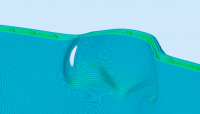
Interesting. When I look at the STL using NetFabb as a viewer, I don't
see holes (which is why I was mystified). Both IdeaMaker and CraftWare
come up with bizarre slices (IdeaMaker does worse than CraftWare). Here
is the IdeaMaker slice. I would like to keep using IdeaMaker, so what I
was looking for was a way to modify/fix the STL. The fact that I cannot
see the holes in NetFabb makes that difficult to do.
On 2/25/2018 11:34 AM, Chris Camacho wrote:
the prusa version of sli3r seems to be able to handle it, but I think
I can see the problem areas, either side of the nostrils there are two
holes after slicing, it may help you track down the issue...
On 25/02/18 16:09, jon wrote:
This file will not slice properly. NetFabb says that it has no
defects, but even after repairing it, it will not slice properly. Can
any of you find a problem with it, and if so, with what tools?
http://www.jonbondy.com/sample.stl
Thanks!
Jon
--
Sent from my desktop computer.
I do not receive emails while away from my desk,
nor do I receive texts on my main phone number
(which is a land line).
If you know that I am on the road, please text me.
If you know that I am home, please email me.
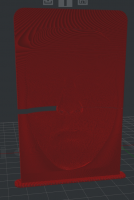
Very cool!
I can see where the slicer got confused. There is that narrow part, and
with the spiral slicing, it needs to put two beads of filament where
there is barely room for one. Still, I agree with the other comments
that a good slicer would work around the problem. The IdeaMaker slicer
is set up to support the Raise3D N2 printer, so switching slicers would
involve a different kind of adventure. Probably easier to tweak the STL.
Thanks for all of your help, and so quickly! You guys rock!
Jon
On 2/25/2018 11:44 AM, fred_dot_u wrote:
I loaded the STL file into Meshmixer, Analysis, Inspector and had no errors.
I loaded the STL file into S3D and checked for non-manifold edges, none
found. When the second test on the list was run, Identify Self Intersecting
Surfaces, both the front and back faces of the monolith have an alert that
begins at the point of the chin, running downward to the right (referenced
from the front, protruding portion) to the intersection of the monolith and
the base.
http://forum.openscad.org/file/t824/facetestslice.jpg
I'm not sure why Meshmixer misses it.
When I run the preview in S3D, it proceeds beyond the alleged failure point
with no indication of failure, even though I did not perform the suggested
repair:
http://forum.openscad.org/file/t824/facetestslice2.jpg
Not necessarily a slicing or model error, the face gets rather thin and
becomes open above the nostrils:
http://forum.openscad.org/file/t824/facetestslice3.jpg
I'm not particularly qualified in Blender 2.75.1, but am aware there are 3D
modeling tools within. I ran the All Checks and the return was substantial.
I don't know enough to resolve them within Blender, however:
http://forum.openscad.org/file/t824/facetestslice4.jpg
--
Sent from: http://forum.openscad.org/
OpenSCAD mailing list
Discuss@lists.openscad.org
http://lists.openscad.org/mailman/listinfo/discuss_lists.openscad.org
--
Sent from my desktop computer.
I do not receive emails while away from my desk,
nor do I receive texts on my main phone number
(which is a land line).
If you know that I am on the road, please text me.
If you know that I am home, please email me.

On 25. feb. 2018 17:09, jon wrote:
This file will not slice properly. NetFabb says that it has no defects,
but even after repairing it, it will not slice properly. Can any of you
find a problem with it, and if so, with what tools?
http://www.jonbondy.com/sample.stl
Thanks!
Jon
Hi Jon,
Maybe this helps. I did a quick test and my utility found and fixed some
issues:
download link (2 day expiry)
https://www.expirebox.com/download/0bcbf69f4f408349b2b48b8605957954.html
More details in the log below
abm_polyfix -zip sample.stl
Parameters:
input_file = sample.stl
zip =
polyhedron 0 ================= volume=73528.4, dtol=0.01, atol=1e-06,
maxiter=10
iteration 0: vertices=249000 faces=83000
warning: 7 zero area faces.
warning: nonmanifold edges: uc(1)=249000
merged 207669 vertices
removed 343 collapsed or zero area faces
split 1 face
total changes=208013
no warnings
iteration 1: vertices=41331 faces=82658
merged 4 vertices
removed 8 collapsed or zero area faces
total changes=12
no warnings
iteration 2: vertices=41327 faces=82650
merged 2 vertices
removed 4 collapsed or zero area faces
total changes=6
no warnings
iteration 3: vertices=41325 faces=82646
total changes=0
no warnings
Summary:
polyhedron 0: vertices=41325 faces=82646 : no warnings
Writing: sample_polyfix.zip
... abm_polyfix finished, time used: 0d 00h 00m 05s
Regards
Carsten Arnholm
I don't think Netfab or any other software will be able to repair the
"holes" in your stl because the file represents a watertight model (with
some degenerated triangles). In fact, the holes are model genus like in a
torus or in a perforated cube. To repair it manually is a very hard task
due to the high number of triangles. So, either you regenerate the model
increasing its thickness (in such a way the negative mask doesn't touch the
positive one), or give up using spiral vase.
2018-02-25 13:45 GMT-03:00 jon jon@jonbondy.com:
Interesting. When I look at the STL using NetFabb as a viewer, I don't
see holes (which is why I was mystified). Both IdeaMaker and CraftWare
come up with bizarre slices (IdeaMaker does worse than CraftWare). Here is
the IdeaMaker slice. I would like to keep using IdeaMaker, so what I was
looking for was a way to modify/fix the STL. The fact that I cannot see
the holes in NetFabb makes that difficult to do.