

Poor mans quick help lookup for openscad built-in modules

As a handy way to do a quick help lookup for openscad built-ins, you can
make use of your browser keyword bookmarks. This means you can type "scad
multmatrix" into the browser URL bar and it'll jump to the relevant section
of the language reference on wikibooks.
This is assuming you use firefox, but the equivalent is possible in Chrome
and probably other browsers.
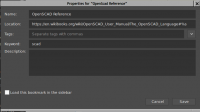
First create a bookmark using the URL
https://en.wikibooks.org/wiki/OpenSCAD_User_Manual/The_OpenSCAD_Language#%s
Then open the bookmark properties and in the Keyword field, enter "scad"
(or whatever else you want your help keyword to be).
[image: Inline images 2]
Save the bookmark and give it a go. It'll work for anything in the language
reference that has a direct link target available. We can probably tweak
the wikibook so that the few that don't currently work (e.g. text,
linear_extrude, use, include) do have an appropriate target.
Hope someone finds this useful.
Cheers,
Len.

Nice. Tried it on Chrome but Chrome doesn't seem to have places for this kind
of setup. But I might be able to come up with a bookmarklet or favelet for
this purpose, which will then applicable to any browser. Thx for the
inspiration.
$ Runsun Pan, PhD $ libs: doctest , faces ( git ), offline doc ( git ), runscad.py ( 2 , git ), synwrite ( 2 ); $ tips: Collection of tips on github
--
Sent from: http://forum.openscad.org/
Turns out you can do it in chrome (it's even a little nicer in how it
operates than firefox).
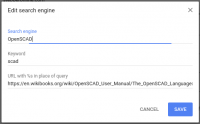
Go to Settings, and Manage Search Engines, click Add, then:
Search engine: OpenSCAD
Keyword: scad
URL:
https://en.wikibooks.org/wiki/OpenSCAD_User_Manual/The_OpenSCAD_Language#%s
Save.
[image: Inline images 1]
Now as you type "scad " in the url bar, it changes to this while you type
in your module name:
[image: Inline images 2]
Cheers,
Len.
On 13 February 2018 at 07:01, runsun runsun@gmail.com wrote:
Nice. Tried it on Chrome but Chrome doesn't seem to have places for this
kind
of setup. But I might be able to come up with a bookmarklet or favelet for
this purpose, which will then applicable to any browser. Thx for the
inspiration.
$ Runsun Pan, PhD $ libs: doctest , faces ( git ), offline doc ( git ),
runscad.py ( 2 , git ), synwrite ( 2 ); $ tips: Collection of tips
on github
--
Sent from: http://forum.openscad.org/
OpenSCAD mailing list
Discuss@lists.openscad.org
http://lists.openscad.org/mailman/listinfo/discuss_lists.openscad.org

working like a charm, Len. Thx for sharing.
$ Runsun Pan, PhD $ libs: doctest , faces ( git ), offline doc ( git ), runscad.py ( 2 , git ), synwrite ( 2 ); $ tips: Collection of tips on github
--
Sent from: http://forum.openscad.org/