

discuss@lists.openscad.org

OpenSCAD general discussion Mailing-list

View all threads

Bevelling a cylinder creates a void

RW
Ray West
Sun, Jan 17, 2021 1:16 PM

Never too old to learn - the last two evenings I've been getting an 86
year old guy started in openscad - over the phone. That's fun for him,
juggling the phone, keyboard and trying to squint at the difference
'twixt })]. Anyway, hopefully we can find a better font than the default.

Now, your chopped off tube. I redid it, the way i would do it, and the
stl is fine. In the default slicer I use (superslicer) changing the
layer height, and the nozzle size, reduced the artefacts. Also tilt it
over so slant is more horizontal may help, but it'll then need supports.

As Adrianv mentioned, the error is at the sharp edge, the bottom of the
hole at the slanting top face. Tilting the model changes the path of the
filament, but then you can get changes at the top outside edge, high
point of tube.

Depending what the final purpose of the item is, then you could print it
with a few more solid top layers and sand it off. There are also a
number of different slicers, that may handle this differently, but as
you are an ex programmer, then you could edit the resulting G-code - it
is not that complicated, just a bit tedious. It  depends if the juice is
worth the squeeze. 😁

On 16/01/2021 22:29, lleblanc wrote:

Hi,

Thanks to all for the many answers.

I'm with version 2019.05 and quite new to OpenSCAD, but as a (retired, if
one ever retires from that) programmer, I enjoy the code-like approach of
this design tool.

I didn't know about the F5/F6 commands, I always use the Render button, that
corresponds to F6.

My friend printed my STL and notes a small imperfection at the base of the
bevel (photo) - perhaps starting the cube  left of the cylinder would help,
as was suggested. It was easier to start right at the cylinder edge since I
readily know what the intercept height should be without further
computation.

Mirrycle.jpg http://forum.openscad.org/file/t3095/Mirrycle.jpg

--
Sent from: http://forum.openscad.org/


OpenSCAD mailing list
Discuss@lists.openscad.org
http://lists.openscad.org/mailman/listinfo/discuss_lists.openscad.org

Never too old to learn - the last two evenings I've been getting an 86 year old guy started in openscad - over the phone. That's fun for him, juggling the phone, keyboard and trying to squint at the difference 'twixt })]. Anyway, hopefully we can find a better font than the default. Now, your chopped off tube. I redid it, the way i would do it, and the stl is fine. In the default slicer I use (superslicer) changing the layer height, and the nozzle size, reduced the artefacts. Also tilt it over so slant is more horizontal may help, but it'll then need supports. As Adrianv mentioned, the error is at the sharp edge, the bottom of the hole at the slanting top face. Tilting the model changes the path of the filament, but then you can get changes at the top outside edge, high point of tube. Depending what the final purpose of the item is, then you could print it with a few more solid top layers and sand it off. There are also a number of different slicers, that may handle this differently, but as you are an ex programmer, then you could edit the resulting G-code - it is not that complicated, just a bit tedious. It  depends if the juice is worth the squeeze. 😁 On 16/01/2021 22:29, lleblanc wrote: > Hi, > > Thanks to all for the many answers. > > I'm with version 2019.05 and quite new to OpenSCAD, but as a (retired, if > one ever retires from that) programmer, I enjoy the code-like approach of > this design tool. > > I didn't know about the F5/F6 commands, I always use the Render button, that > corresponds to F6. > > My friend printed my STL and notes a small imperfection at the base of the > bevel (photo) - perhaps starting the cube left of the cylinder would help, > as was suggested. It was easier to start right at the cylinder edge since I > readily know what the intercept height should be without further > computation. > > Mirrycle.jpg <http://forum.openscad.org/file/t3095/Mirrycle.jpg> > > > > -- > Sent from: http://forum.openscad.org/ > > _______________________________________________ > OpenSCAD mailing list > Discuss@lists.openscad.org > http://lists.openscad.org/mailman/listinfo/discuss_lists.openscad.org
A
adrianv
Sun, Jan 17, 2021 1:37 PM

I put the model as posted here in PrusaSlicer and the slicing looks fine,
with no problems anywhere around the hole.  Sounds like PrusaSlicer and
superslicer should be pretty similar, so it seems strange that you get a
different result.  Here's how it slices with 0.2mm layer height:

http://forum.openscad.org/file/t2477/slice.png

mondo wrote

Never too old to learn - the last two evenings I've been getting an 86
year old guy started in openscad - over the phone. That's fun for him,
juggling the phone, keyboard and trying to squint at the difference
'twixt })]. Anyway, hopefully we can find a better font than the default.

Now, your chopped off tube. I redid it, the way i would do it, and the
stl is fine. In the default slicer I use (superslicer) changing the
layer height, and the nozzle size, reduced the artefacts. Also tilt it
over so slant is more horizontal may help, but it'll then need supports.

As Adrianv mentioned, the error is at the sharp edge, the bottom of the
hole at the slanting top face. Tilting the model changes the path of the
filament, but then you can get changes at the top outside edge, high
point of tube.

Depending what the final purpose of the item is, then you could print it
with a few more solid top layers and sand it off. There are also a
number of different slicers, that may handle this differently, but as
you are an ex programmer, then you could edit the resulting G-code - it
is not that complicated, just a bit tedious. It  depends if the juice is
worth the squeeze. 😁

On 16/01/2021 22:29, lleblanc wrote:

Hi,

Thanks to all for the many answers.

I'm with version 2019.05 and quite new to OpenSCAD, but as a (retired, if
one ever retires from that) programmer, I enjoy the code-like approach of
this design tool.

I didn't know about the F5/F6 commands, I always use the Render button,
that
corresponds to F6.

My friend printed my STL and notes a small imperfection at the base of
the
bevel (photo) - perhaps starting the cube  left of the cylinder would
help,
as was suggested. It was easier to start right at the cylinder edge since
I
readily know what the intercept height should be without further
computation.

Mirrycle.jpg <http://forum.openscad.org/file/t3095/Mirrycle.jpg>

--
Sent from: http://forum.openscad.org/


OpenSCAD mailing list

Discuss@.openscad

Discuss@.openscad

I put the model as posted here in PrusaSlicer and the slicing looks fine, with no problems anywhere around the hole. Sounds like PrusaSlicer and superslicer should be pretty similar, so it seems strange that you get a different result. Here's how it slices with 0.2mm layer height: <http://forum.openscad.org/file/t2477/slice.png> mondo wrote > Never too old to learn - the last two evenings I've been getting an 86 > year old guy started in openscad - over the phone. That's fun for him, > juggling the phone, keyboard and trying to squint at the difference > 'twixt })]. Anyway, hopefully we can find a better font than the default. > > Now, your chopped off tube. I redid it, the way i would do it, and the > stl is fine. In the default slicer I use (superslicer) changing the > layer height, and the nozzle size, reduced the artefacts. Also tilt it > over so slant is more horizontal may help, but it'll then need supports. > > As Adrianv mentioned, the error is at the sharp edge, the bottom of the > hole at the slanting top face. Tilting the model changes the path of the > filament, but then you can get changes at the top outside edge, high > point of tube. > > Depending what the final purpose of the item is, then you could print it > with a few more solid top layers and sand it off. There are also a > number of different slicers, that may handle this differently, but as > you are an ex programmer, then you could edit the resulting G-code - it > is not that complicated, just a bit tedious. It  depends if the juice is > worth the squeeze. 😁 > > > > > On 16/01/2021 22:29, lleblanc wrote: >> Hi, >> >> Thanks to all for the many answers. >> >> I'm with version 2019.05 and quite new to OpenSCAD, but as a (retired, if >> one ever retires from that) programmer, I enjoy the code-like approach of >> this design tool. >> >> I didn't know about the F5/F6 commands, I always use the Render button, >> that >> corresponds to F6. >> >> My friend printed my STL and notes a small imperfection at the base of >> the >> bevel (photo) - perhaps starting the cube left of the cylinder would >> help, >> as was suggested. It was easier to start right at the cylinder edge since >> I >> readily know what the intercept height should be without further >> computation. >> >> Mirrycle.jpg &lt;http://forum.openscad.org/file/t3095/Mirrycle.jpg&gt; >> >> >> >> -- >> Sent from: http://forum.openscad.org/ >> >> _______________________________________________ >> OpenSCAD mailing list >> > Discuss@.openscad >> http://lists.openscad.org/mailman/listinfo/discuss_lists.openscad.org > > _______________________________________________ > OpenSCAD mailing list > Discuss@.openscad > http://lists.openscad.org/mailman/listinfo/discuss_lists.openscad.org -- Sent from: http://forum.openscad.org/
JB
Jordan Brown
Sun, Jan 17, 2021 6:33 PM

Watch out for "thin extrusion" / "single extrusion" / "thin walls"
settings.  Playing in PrusaSlicer, I definitely get a difference at that
point in the model based on whether or not "Detect thin walls" is
checked.  (To my surprise, I like the results better when it is not
checked.)

Watch out for "thin extrusion" / "single extrusion" / "thin walls" settings.  Playing in PrusaSlicer, I definitely get a difference at that point in the model based on whether or not "Detect thin walls" is checked.  (To my surprise, I like the results better when it is *not* checked.)
MM
Michael Marx
Mon, Jan 18, 2021 7:04 AM

Convexity is to tell the renderer how 'deep' it has to look when determining

which faces are 'inside' and 'outside'.

OpenCSG does some smart things by ignoring faces depending on the CSG operation

and whether the face is in or out.

If it doesn't look deep enough it will either drop faces or show some which

shouldn't be there.

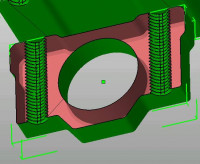
Take this bearing with threaded holes, cut to see the insides:

If you look from the right you have 8 transitions.

If you look from above the threaded holes, 'lots' as you drill through the threads.

Nophead, this is the one with self-intersections and degenerate faces

that had preview performance problems. My conjecture is the algorithm

used to determine the surface gets confused with such faults, causing it

to do more processing.

This is from a description of Goldfeather:

"There are important constraints on surfaces used for parity test-

ing. Parity logic depends on no surface being interior or exterior to

the volume it represents. Also, all boundaries of the volume should

be covered by surface. This means that the surface should be closed,

and should not contain any holes caused by an incomplete descrip-

tion, such as missing polygons. Additionally, the surface must not

self-intersect, forming folds or loops."

Link
<https://www.researchgate.net/publication/2599527_An_Improved_Z-Buffer_CSG_Rendering_Algorithm?enri
chId=rgreq-506176445cf6cac87197a0f248580328-XXX&enrichSource=Y292ZXJQYWdlOzI1OTk1Mjc7QVM6MTAxOTE3ND
YwMDA4OTY4QDE0MDEzMTA0MjQyNzY%3D&el=1_x_3&_esc=publicationC> .

The 'new' algorithm described (which I think OpenCSG non-goldfeather is using)

is more complex, with more opportunity for issues with bad geometry.

-----Original Message-----

From: Discuss [mailto:discuss-bounces@lists.openscad.org] On Behalf Of adrianv

Sent: Sun, 17 Jan 2021 08:25

Subject: Re: [OpenSCAD] Bevelling a cylinder creates a void

With lower convexity some bits are missing...but the missing bits aren't

"pixels" they are larger regions.  I don't think any conclusion can be drawn

about how many pixels are drawn.  It seems more like differing computations

are done to determine what to draw, and with lower convexity the result is

that the wrong stuff is drawn.

nophead wrote

No idea but with a lower convexity some bits are missing, so I assume

filling them in involves more drawing and that is why it is slower.

On Sat, 16 Jan 2021 at 20:25, adrianv <

avm4@

> wrote:

Why would higher convexity cause it to draw more pixels?  Where would

these

extra pixels come from?

nophead wrote

Presumably it has to draw more pixels.

On Sat, 16 Jan 2021 at 18:59, jon <

jon@

> wrote:

Excellent experiment!  Thank you!

I wonder why it gets jerky if the preview time is always the same

On 1/16/2021 1:55 PM, adrianv wrote:

I did a little experimentation using the beveled cylinder as a test

case.  It

appears to display correctly with convexity 2 but wrong with

convexity

  1. I

don't notice any difference in performance with convexity 1 vs

convexity

With convexity 100 it's still hard to identify a difference.  Maybe

a

very

slight degradation?  With convexity 1000 the model rotates jerkily

and

it is

hard to control.

I increased complexity by making a 10x10 array of beveled cylinders,

so

100

objects.  In this case a difference is very clear.  With convexity 1

it

rotates very responsively (with incorrect display).  With 2 it is

also

responsive.  With 10 there is a very noticeable lag with jerky

rotation---it's hard to rotate the model.  With 100 it's unusable.

Note that the time to produce the preview is the same regardless of

the

convexity value.


OpenSCAD mailing list

Discuss@.openscad


OpenSCAD mailing list

Discuss@.openscad

--


OpenSCAD mailing list

Discuss@.openscad


OpenSCAD mailing list

Discuss@.openscad

--


OpenSCAD mailing list

--
This email has been checked for viruses by AVG.
https://www.avg.com
Convexity is to tell the renderer how 'deep' it has to look when determining which faces are 'inside' and 'outside'. OpenCSG does some smart things by ignoring faces depending on the CSG operation and whether the face is in or out. If it doesn't look deep enough it will either drop faces or show some which shouldn't be there. Take this bearing with threaded holes, cut to see the insides: If you look from the right you have 8 transitions. If you look from above the threaded holes, 'lots' as you drill through the threads. Nophead, this is the one with self-intersections and degenerate faces that had preview performance problems. My conjecture is the algorithm used to determine the surface gets confused with such faults, causing it to do more processing. This is from a description of Goldfeather: "There are important constraints on surfaces used for parity test- ing. Parity logic depends on no surface being interior or exterior to the volume it represents. Also, all boundaries of the volume should be covered by surface. This means that the surface should be closed, and should not contain any holes caused by an incomplete descrip- tion, such as missing polygons. Additionally, the surface must not self-intersect, forming folds or loops." Link <https://www.researchgate.net/publication/2599527_An_Improved_Z-Buffer_CSG_Rendering_Algorithm?enri chId=rgreq-506176445cf6cac87197a0f248580328-XXX&enrichSource=Y292ZXJQYWdlOzI1OTk1Mjc7QVM6MTAxOTE3ND YwMDA4OTY4QDE0MDEzMTA0MjQyNzY%3D&el=1_x_3&_esc=publicationC> . The 'new' algorithm described (which I think OpenCSG non-goldfeather is using) is more complex, with more opportunity for issues with bad geometry. > -----Original Message----- > From: Discuss [mailto:discuss-bounces@lists.openscad.org] On Behalf Of adrianv > Sent: Sun, 17 Jan 2021 08:25 > To: discuss@lists.openscad.org > Subject: Re: [OpenSCAD] Bevelling a cylinder creates a void > > With lower convexity some bits are missing...but the missing bits aren't > "pixels" they are larger regions. I don't think any conclusion can be drawn > about how many pixels are drawn. It seems more like differing computations > are done to determine what to draw, and with lower convexity the result is > that the wrong stuff is drawn. > > > nophead wrote > > No idea but with a lower convexity some bits are missing, so I assume > > filling them in involves more drawing and that is why it is slower. > > > > On Sat, 16 Jan 2021 at 20:25, adrianv &lt; > > > avm4@ > > > &gt; wrote: > > > >> Why would higher convexity cause it to draw more pixels? Where would > >> these > >> extra pixels come from? > >> > >> > >> nophead wrote > >> > Presumably it has to draw more pixels. > >> > > >> > On Sat, 16 Jan 2021 at 18:59, jon &lt; > >> > >> > jon@ > >> > >> > &gt; wrote: > >> > > >> >> Excellent experiment! Thank you! > >> >> > >> >> I wonder why it gets jerky if the preview time is always the same > >> >> > >> >> On 1/16/2021 1:55 PM, adrianv wrote: > >> >> > I did a little experimentation using the beveled cylinder as a test > >> >> case. It > >> >> > appears to display correctly with convexity 2 but wrong with > >> convexity > >> >> 1. I > >> >> > don't notice any difference in performance with convexity 1 vs > >> >> convexity > >> >> 10. > >> >> > With convexity 100 it's still hard to identify a difference. Maybe > >> a > >> >> very > >> >> > slight degradation? With convexity 1000 the model rotates jerkily > >> and > >> >> it is > >> >> > hard to control. > >> >> > > >> >> > I increased complexity by making a 10x10 array of beveled cylinders, > >> so > >> >> 100 > >> >> > objects. In this case a difference is very clear. With convexity 1 > >> it > >> >> > rotates very responsively (with incorrect display). With 2 it is > >> also > >> >> > responsive. With 10 there is a very noticeable lag with jerky > >> >> > rotation---it's hard to rotate the model. With 100 it's unusable. > >> >> > > >> >> > Note that the time to produce the preview is the same regardless of > >> the > >> >> > convexity value. > >> >> > > >> >> > >> >> _______________________________________________ > >> >> OpenSCAD mailing list > >> >> > >> > >> > Discuss@.openscad > >> > >> >> http://lists.openscad.org/mailman/listinfo/discuss_lists.openscad.org > >> >> > >> > > >> > _______________________________________________ > >> > OpenSCAD mailing list > >> > >> > Discuss@.openscad > >> > >> > http://lists.openscad.org/mailman/listinfo/discuss_lists.openscad.org > >> > >> > >> > >> > >> > >> -- > >> Sent from: http://forum.openscad.org/ > >> > >> _______________________________________________ > >> OpenSCAD mailing list > >> > > > Discuss@.openscad > > >> http://lists.openscad.org/mailman/listinfo/discuss_lists.openscad.org > >> > > > > _______________________________________________ > > OpenSCAD mailing list > > > Discuss@.openscad > > > http://lists.openscad.org/mailman/listinfo/discuss_lists.openscad.org > > > > > > -- > Sent from: http://forum.openscad.org/ > > _______________________________________________ > OpenSCAD mailing list > Discuss@lists.openscad.org > http://lists.openscad.org/mailman/listinfo/discuss_lists.openscad.org -- This email has been checked for viruses by AVG. https://www.avg.com
MM
Michael Marx
Tue, Jan 19, 2021 6:10 AM

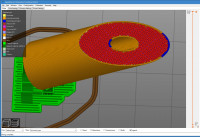
when I do that, the top of the cylinder disappears into a (green) hole

To wrap this up. Disable View/Show-edges.

-----Original Message-----
From: Discuss [mailto:discuss-bounces@lists.openscad.org] On Behalf Of Luc Le Blanc
Sent: Sun, 17 Jan 2021 03:35
To: discuss@lists.openscad.org
Subject: [OpenSCAD] Bevelling a cylinder creates a void

I'm trying to bevel a drilled cylinder, but I when I do that, the top
of the cylinder disappears into a (green) hole. I attached a
screenshot. The 3D printer-owning friend I sent my STL to says there's
a strange gap at the top.

$fn=100;

difference()
{
difference()
{
cylinder(h=39, d=13.69);

      // bevel
     translate([-6.845,-15,18])
     {
         rotate(a=[0,-56.89,0])
         {
             cube(30);
         }
     }
 }

 // bolt hole
 cylinder(h=39, d=4);

}

Of course, if I remove the bevel, the top of the cylinder is normal (yellow).

Is this a bug? Is there a better way to bevel a cylinder?

--
Luc Le Blanc
--
This email has been checked for viruses by AVG.
https://www.avg.com

> when I do that, the top of the cylinder disappears into a (green) hole To wrap this up. Disable View/Show-edges. > -----Original Message----- > From: Discuss [mailto:discuss-bounces@lists.openscad.org] On Behalf Of Luc Le Blanc > Sent: Sun, 17 Jan 2021 03:35 > To: discuss@lists.openscad.org > Subject: [OpenSCAD] Bevelling a cylinder creates a void > > I'm trying to bevel a drilled cylinder, but I when I do that, the top > of the cylinder disappears into a (green) hole. I attached a > screenshot. The 3D printer-owning friend I sent my STL to says there's > a strange gap at the top. > > $fn=100; > > difference() > { > difference() > { > cylinder(h=39, d=13.69); > > // bevel > translate([-6.845,-15,18]) > { > rotate(a=[0,-56.89,0]) > { > cube(30); > } > } > } > > // bolt hole > cylinder(h=39, d=4); > } > > Of course, if I remove the bevel, the top of the cylinder is normal (yellow). > > Is this a bug? Is there a better way to bevel a cylinder? > > > -- > Luc Le Blanc -- This email has been checked for viruses by AVG. https://www.avg.com
RW
Ray West
Tue, Jan 19, 2021 12:30 PM

Leaving out the detail, but coming more from a 3 axis machining
perspective, my approach would be different. The first thing to do would
be to drill the hole right through the centre of the cylinder. The drill
would start from outside the cylinder (cutting air) and go past the far
end of the cylinder. A few reasons for that- most drills have a pointed
end, and even if using a slot drill, or boring bar/whatever, if the
depth of the drilling is exactly the same as to the end of the material,
is there going to be a thin web at the bottom, or not? The same reason
that an exact diameter pin will not fit into an exact diameter hole,
unless there is some external influence. In order to get the exact
bevel, with a perfect finish, then the piece would be set at an angle,
and  would be milled flat. There would most likely be hand
finishing/polishing whatever required. There are slight problems to be
solved in that approach concerned with holding the cylinder at the
correct angle.

For 3d printing on a 3 axis machine, which is the final destination of
this item, I believe, then the same approach works fine, (with similar
holding problems).  In other words, you will get a better surface on
horizontal or vertical surfaces than on surfaces at an angle, and if you
are not careful, you will get fixturing marks on the surface.

I have tilted the cylinder, (in the slicer) so that the bevel is
horizontal. It will need supports, possibly more than shown, depending
on the printer settings, filament cooling, bed adhesion, etc. Flat,
horizontal surfaces can be smoothed by the printer, too, if your slicer
handles that.  But, unlike machining, your surface finish on the rest of
the item suffers, the layer lines become more obvious.

Of course, It is quite acceptable to hand finish items, exactly the same
for most individually machined parts, and that can include reaming,
tapping holes, welding bits together, polishing whatever.

If the top surface is not level, (by more than one layer height) then
the Hilbert curve top layer will show that.

Another aspect, is that unless one spends maybe ten times the price you
think that you need to, you generally expect too much from what you've
got, unless you can compensate with patience - usual practical problems.

-----Original Message-----
From: Discuss [mailto:discuss-bounces@lists.openscad.org] On Behalf Of Luc Le Blanc
Sent: Sun, 17 Jan 2021 03:35
To: discuss@lists.openscad.org
Subject: [OpenSCAD] Bevelling a cylinder creates a void

I'm trying to bevel a drilled cylinder, but I when I do that, the top
of the cylinder disappears into a (green) hole. I attached a
screenshot. The 3D printer-owning friend I sent my STL to says there's
a strange gap at the top.

$fn=100;

difference()
{
difference()
{
cylinder(h=39, d=13.69);

       // bevel
      translate([-6.845,-15,18])
      {
          rotate(a=[0,-56.89,0])
          {
              cube(30);
          }
      }
  }

  // bolt hole
  cylinder(h=39, d=4);

}

Of course, if I remove the bevel, the top of the cylinder is normal (yellow).

Is this a bug? Is there a better way to bevel a cylinder?

--
Luc Le Blanc

Leaving out the detail, but coming more from a 3 axis machining perspective, my approach would be different. The first thing to do would be to drill the hole right through the centre of the cylinder. The drill would start from outside the cylinder (cutting air) and go past the far end of the cylinder. A few reasons for that- most drills have a pointed end, and even if using a slot drill, or boring bar/whatever, if the depth of the drilling is exactly the same as to the end of the material, is there going to be a thin web at the bottom, or not? The same reason that an exact diameter pin will not fit into an exact diameter hole, unless there is some external influence. In order to get the exact bevel, with a perfect finish, then the piece would be set at an angle, and  would be milled flat. There would most likely be hand finishing/polishing whatever required. There are slight problems to be solved in that approach concerned with holding the cylinder at the correct angle. For 3d printing on a 3 axis machine, which is the final destination of this item, I believe, then the same approach works fine, (with similar holding problems).  In other words, you will get a better surface on horizontal or vertical surfaces than on surfaces at an angle, and if you are not careful, you will get fixturing marks on the surface. I have tilted the cylinder, (in the slicer) so that the bevel is horizontal. It will need supports, possibly more than shown, depending on the printer settings, filament cooling, bed adhesion, etc. Flat, horizontal surfaces can be smoothed by the printer, too, if your slicer handles that.  But, unlike machining, your surface finish on the rest of the item suffers, the layer lines become more obvious. Of course, It is quite acceptable to hand finish items, exactly the same for most individually machined parts, and that can include reaming, tapping holes, welding bits together, polishing whatever. If the top surface is not level, (by more than one layer height) then the Hilbert curve top layer will show that. Another aspect, is that unless one spends maybe ten times the price you think that you need to, you generally expect too much from what you've got, unless you can compensate with patience - usual practical problems. >> -----Original Message----- >> From: Discuss [mailto:discuss-bounces@lists.openscad.org] On Behalf Of Luc Le Blanc >> Sent: Sun, 17 Jan 2021 03:35 >> To: discuss@lists.openscad.org >> Subject: [OpenSCAD] Bevelling a cylinder creates a void >> >> I'm trying to bevel a drilled cylinder, but I when I do that, the top >> of the cylinder disappears into a (green) hole. I attached a >> screenshot. The 3D printer-owning friend I sent my STL to says there's >> a strange gap at the top. >> >> $fn=100; >> >> difference() >> { >> difference() >> { >> cylinder(h=39, d=13.69); >> >> // bevel >> translate([-6.845,-15,18]) >> { >> rotate(a=[0,-56.89,0]) >> { >> cube(30); >> } >> } >> } >> >> // bolt hole >> cylinder(h=39, d=4); >> } >> >> Of course, if I remove the bevel, the top of the cylinder is normal (yellow). >> >> Is this a bug? Is there a better way to bevel a cylinder? >> >> >> -- >> Luc Le Blanc >
A
adrianv
Tue, Jan 19, 2021 10:09 PM

I really don't understand the fuss.  This thing prints just fine as-is in the
vertical orientation.  I printed it myself just to make sure I wasn't
missing something.  I cut off the bottom to save material and printed it
with layer height 0.2 mm and default PrusaSlicer settings and there is
nothing wrong with it.  Tipping the model over to make the bevel flat is
going to be a disaster with internal supports needed.  What am I missing?

http://forum.openscad.org/file/t2477/tube.jpg

--
Sent from: http://forum.openscad.org/

I really don't understand the fuss. This thing prints just fine as-is in the vertical orientation. I printed it myself just to make sure I wasn't missing something. I cut off the bottom to save material and printed it with layer height 0.2 mm and default PrusaSlicer settings and there is nothing wrong with it. Tipping the model over to make the bevel flat is going to be a disaster with internal supports needed. What am I missing? <http://forum.openscad.org/file/t2477/tube.jpg> -- Sent from: http://forum.openscad.org/
T
TLC123
Sun, Jan 24, 2021 5:38 AM

Default convexity 1 for primitives is reasonable but wouldn't it also be
resonable to auto bump that up by at least the depth of tree? It maybe
enough by the maximum depths of difference and intersection.

Just counting convexity 1 for primitives and then add one more for each
difference or intersection.

--
Sent from: http://forum.openscad.org/

Default convexity 1 for primitives is reasonable but wouldn't it also be resonable to auto bump that up by at least the depth of tree? It maybe enough by the maximum depths of difference and intersection. Just counting convexity 1 for primitives and then add one more for each difference or intersection. -- Sent from: http://forum.openscad.org/