

Joining rectangular blocks

This seems like it should be relatively easy, and I'm only coming up
with hard ways to do it.
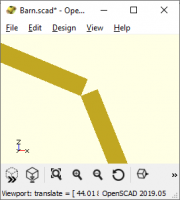
I have several rectangular prisms ("cubes", in OpenSCAD) that meet at
corners, like so:
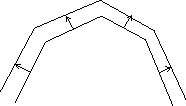
I want to extend them so that they meet at the "outside" corner instead
of the "inside" corner. (CorelDRAW calls this a "mitered" corner.)
I have as inputs the coordinates of the "inside" corners. I need the
coordinates of those "outside" corners. (Simply extending the blocks
isn't enough - I need the dimensions of the "new" blocks.)
Simplifying information: the angles between the blocks is always more
than 90 degrees. (In fact, at the moment it's always 135 degrees, but
I'd rather not assume that.) I doubt this makes the geometry much
simpler, but it means that I can just overlap cubes "inside" the line
without having their corners protrude.
Another way to look at it is that I have a list of points - not a
closed polygon - describing the "inside" corners and I want to apply an
operation a lot like offset( ) with a positive delta to them to get the
points describing the "outside" corners, kind of like so:
I'm not picky about the behavior at the ends, though moving the
endpoints directly perpendicular to the line segments would be my first
choice.
The answers that I'm coming up with involve using trig to get the angles
of each of them and then using more trig to get the "height" of the new
point "above" the current point, and then still more trig to rotate that
height into the right orientation to add to the original point to get to
the final point. It sure seems like it should be easier than that.
If you're wondering why I want to do this: the inside of the object
needs to fit up against the outside of another object, and I want to lay
down a texture on the outside so I need to know exactly where the
"outside" is - or, more precisely, when I make the cubes I want to lay
texture on top of each one before I rotate it into position. It's the
roof of a barn, and I want to put shingles on it.
Two other solutions that I've played with:
- Turn it into a closed polygon, offset it, subtract the original,
clip off the bottom, and extrude. But then I can't easily put the
shingles on. - Fill the corners with clipped cylinders, so they're rounded. But
then I'd have to bend shingles around the corner.
(It just goes to show how OCD I am that I've spent a couple of hours
messing with this, when I only need to do it for a total of maybe four
such intersections, and four degenerate cases at the ends. It would
have been much faster to just fudge the values into working. But it
wouldn't be right.)

Jordan Brown openscad@jordan.maileater.net writes:
I want to extend them so that they meet at the "outside" corner instead of
the "inside" corner. (CorelDRAW calls this a "mitered" corner.)
I have as inputs the coordinates of the "inside" corners. I need the
coordinates of those "outside" corners.
The answers that I'm coming up with involve using trig to get the angles
of each of them and then using more trig to get the "height" of the new
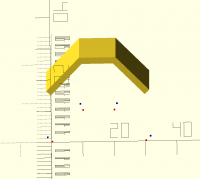
Here is one way, using equal-angled triangles. There is a function to
calculate the outer point list from the inner point list, and then some
simple stuff to render the results as points and as a polyhedron.
Not sure if this is exactly how you need it (you mentioned having separate
cubes for each part), but from the list of outer points I assume you can get
what you want.
Hope this helps,
- Kristian.
// A problem from the mailing list.
// A roof on which to put shingles.
// The inside is given py points p0, p1, p2, ...
// The outside is a given thickness away.
// Wants to compute the outside points.
//
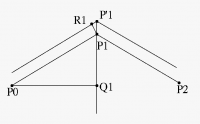
// Given P0, P1, P2, find P'1. Assume |P0-P1| = |P1-P2|.
// Introduce Q1 = (P0+P2)/2. The Point P'1 is on the line Q1-P1.
// Introduce the point R1 which is the point on the outside of the roof
// directly above P1 perpendicular to the side P0-P1.
// Triangles P0-Q1-P1 and P1-R1-P'1 have equal angles, so we get:
//
// |P1-P'1| / |P1-R1| = |P0-P1| / |P0-Q1|
// l := |P1-P'1| = T * |P0-P1| / |P0-Q1|
// P'1 = P1 + l*(P1-Q1)/|P1-Q1|
//
// where l is the length of P'1-P1 and T is the thickness of the roof.
//
// For an "end" point P0, we find a vector perpendicular to (P2-P1) and in
// the same plane as P0-P1-P2, and use that direction to offset T from P0.
thickness = 2;
dot = 0.5;
function vec_len(v) = sqrt(v.xv.x + v.yv.y + v.z*v.z);
function calc_outer_point(T, p0, p1, p2) =
// Normalise p0-p1 and p2-p1.
let (v01 = (p0-p1)/vec_len(p0-p1),
v21 = (p2-p1)/vec_len(p2-p1),
q1 = p1 + .5*(v01+v21),
l = T * 1 / vec_len(p1 + v01 - q1),
p1m = p1 + l*(p1-q1)/vec_len(p1-q1))
p1m;
function calc_outer_point_end(T, p0, p1, p2) =
let (n = cross((p1-p2), (p0-p1)),
v = cross((p0-p1), n),
l = vec_len(v))
p0 + T * v/l;
function outer_point_list(T, list) =
[calc_outer_point_end(T, list[0], list[1], list[2]),
for (i = [1 : len(list)-2])
calc_outer_point(T, list[i-1], list[i], list[i+1]),
calc_outer_point_end(T, list[len(list)-1], list[len(list)-2], list[len(list)-3])
];
function as_polyhedron(ps, v) =
let
(n = len(ps),
faces =
[
// Front
[for (i = [n/2 : 1 : n-1]) i, for (i = [n/2-1 : -1 : 0]) i],
// Sides
for (i = [0 : 1 : n/2-2]) [i, i+1, n+i+1, n+i],
[n/2-1, n-1, n+n-1, n+n/2-1],
for (i = [n-2 : -1 : n/2]) [i+1, i, n+i, n+i+1],
[n/2, 0, n, n+n/2],
// Back
[for (i = [n : 1 : n+n/2-1]) i, for (i = [2*n-1 : -1 : n+n/2]) i],
],
points = [for (i = [0 : n-1]) ps[i], for (i = [0 : n-1]) ps[i] + v]
)
[points, faces];
point_list = [[0,0,0], [10,10,0], [20,10,0], [30, 0, 0]];
outer_list = outer_point_list(thickness, point_list);
polyhedron_data = as_polyhedron(concat(point_list, outer_list), [0, 0, -50]);
for (i = [0 : len(point_list)-1]) {
color("red") {
translate(point_list[i])
cube([dot, dot, dot]);
}
}
for (i = [0 : len(outer_list)-1]) {
color("blue") {
translate(outer_list[i])
cube([dot, dot, dot]);
}
}
translate ([0, 15, 0]) {
polyhedron(points=polyhedron_data[0], faces=polyhedron_data[1]);
}

Yeah, you can use trivial vector arithmetic, esp. if it is clear that the
sequence is convex. See the following code. It constructs a barn with CiH
(use your own coords for P) and calculates the desired points with offs().
P = CiH(100, 5);
P_ = concat([undef], P, [undef]); // add boundary cases
X = [for(p = [len(P_)-3:-1:0]) (offs(P_[p], P_[p+1], P_[p+2], 10))];
polygon(concat(P, X));
function offs(A=[0,0], B=[0,1], C=undef, x=1) =
let(a = B-A, b = C-B)
let(an = a/norm(a))
let(bn = b/norm(b))
(A!=undef && C!=undef)?
B+(an-bn)/norm(an-bn)x:
(C!=undef)? // boundaries
B+x[bn[1], -bn[0]]:
B+x*[an[1], -an[0]];
function CiH(r, N) = [for(i=[0:N]) let(a=180/Ni) r[cos(a), sin(a)]];
--
Sent from: http://forum.openscad.org/

I don't think there's a way to do this that doesn't, ultimately, involve
finding the normals to the line segments so you can compute the shifted
segments and then and then computing the intersection of the line segments.
Note that this can be done without using any trig. I wrote an offset()
function that does this all and produces the offset point list. Perhaps
that does what you want? It's in BOSL2.
include<BOSL2/std.scad>
test = turtle(["move", "right", 35, "move", "right", 45, "move"]);
otest = offset(test, delta=.2);
stroke(test,width=.01);
color("red")stroke(otest, width=0.01);
http://forum.openscad.org/file/t2477/offset_ex.png
--
Sent from: http://forum.openscad.org/
Thanks, all. Good stuff to chew on.

Interesting. I used to have a great time with LOGO, and not just with the
turtle graphics.
Is there a way to get the position and angle from the state after a move or
stroke?
--
Sent from: http://forum.openscad.org/
Yes, the turtle() function can return its state if you request it. (I did
that so you could chain turtle commands if you wanted to. I'm not sure what
other benefit it would have.) If you have any thoughts on improving it I'm
open to suggestions. The documentation is here:
https://github.com/revarbat/BOSL2/wiki/shapes2d.scad#turtle
The stroke command is unrelated to turtle(). It takes any list of points
and connects the dots.
lar3ry wrote
Interesting. I used to have a great time with LOGO, and not just with the
turtle graphics.
Is there a way to get the position and angle from the state after a move
or
stroke?
--
Sent from: http://forum.openscad.org/
OpenSCAD mailing list
Discuss@.openscad
--
Sent from: http://forum.openscad.org/
adrianv wrote
Yes, the turtle() function can return its state if you request it. (I did
that so you could chain turtle commands if you wanted to. I'm not sure
what
other benefit it would have.) If you have any thoughts on improving it
I'm
open to suggestions. The documentation is here:
Thanks! Didn't notice you had a Wiki there. I guess I now need to figure out
how to extract the position and angle from the returned state. I was
thinking about this thread, and how one might go about using turtle() to
find a location for positioning and rotating an object like a rectangle, for
example.
Meanwhile, I played a bit with turtle, and found an easy way to make the
walls of a box with rounded external corners. Neat!
include<BOSL2/std.scad>
$fn = 120;
full_state = false;
path = turtle(["xmove",56, "ymove",45, "xmove",-56, "ymove",-45]);
linear_extrude(56)
stroke(path,width=2);
echo (path);
The Echo returned "ECHO: [[0, 0], [56, 0], [56, 45], [0, 45], [0, 0]]"
--
Sent from: http://forum.openscad.org/
I guess I can document the state. It didn't occur to me that people would
want to use it. It is documented in a comment in the code...so I can
remember what it is. :)
It's this: [ path, step_vector, default_angle]
path is the list of points constructed so far by the turtle. The turtle
position is the last point in the list, path[len(path)-1].
step_vector is the step vector produced by a "move" command, so it codes
both the current default scale factor and the direction. If you want an
actual angle you'll need to apply atan2 to it.
default_angle is the default angle you get with the turning commands.
How do you want to position a rectangle? It's not obvious that turtle is
the right solution to a problem like that.
lar3ry wrote
adrianv wrote
Yes, the turtle() function can return its state if you request it. (I
did
that so you could chain turtle commands if you wanted to. I'm not sure
what
other benefit it would have.) If you have any thoughts on improving it
I'm
open to suggestions. The documentation is here:
Thanks! Didn't notice you had a Wiki there. I guess I now need to figure
out
how to extract the position and angle from the returned state. I was
thinking about this thread, and how one might go about using turtle() to
find a location for positioning and rotating an object like a rectangle,
for
example.
Meanwhile, I played a bit with turtle, and found an easy way to make the
walls of a box with rounded external corners. Neat!
include<BOSL2/std.scad>
$fn = 120;
full_state = true;
path = turtle(["xmove",56, "ymove",45, "xmove",-56, "ymove",-45]);
linear_extrude(56)
stroke(path,width=2);
echo (path);
The Echo returned "ECHO: [[0, 0], [56, 0], [56, 45], [0, 45], [0, 0]]"
oops.. just realized that I just echoed the path, not the state.
Sent from: http://forum.openscad.org/
OpenSCAD mailing list
Discuss@lists.openscad.org
http://lists.openscad.org/mailman/listinfo/discuss_lists.openscad.org
--
Sent from: http://forum.openscad.org/
adrianv wrote
I guess I can document the state. It didn't occur to me that people would
want to use it. It is documented in a comment in the code...so I can
remember what it is. :)
It's this: [ path, step_vector, default_angle]
path is the list of points constructed so far by the turtle. The turtle
position is the last point in the list, path[len(path)-1].
step_vector is the step vector produced by a "move" command, so it codes
both the current default scale factor and the direction. If you want an
actual angle you'll need to apply atan2 to it.
default_angle is the default angle you get with the turning commands.
How do you want to position a rectangle? It's not obvious that turtle is
the right solution to a problem like that.
To answer your question first, I wanted to find a solution for the problem
posed in this thread. I could be all wet, but I figured I could use the
turtle to find the point where the two boards would join together. It would
go something like this:
Use the turtle to draw a partial outline of a board, starting from 0/0, the
upper left corner of the board. I would draw it clockwise, but instead of
finishing up back at the origin, I would only make the first two moves, the
second of which would be at an angle of <90 + next board angle> degrees. At
this time the last two positions of the path would contain the point at
which I want to join the next board and the point at which I would position
the lower left point of the next board.
Hmm... I just realized that I don't need the angle because I know the angle
I want for the next board. I only have to preserve state for the next path.
The next path would contain the state for position and angle, so a [right
180,move width] would take me back to the joining point, then I would do a
[right 90, move length,right 90+next angle], giving me the same information
as did the first board, returned in the path variable. I would then make the
cubes, rotate/translate them to the positions found by the turtle, and plop
them in there. The next board would be a repeat of the second one.
I know I could use math to do this, but the turtle just seems WAY easier to
me.
So I know I don't really need to see the state, because I have the path, but
just for kicks, how would I make the turtle path return the full state?
--
Sent from: http://forum.openscad.org/