

Re: [OpenSCAD] How to write a texture to a face(Solid ) in a geometric model

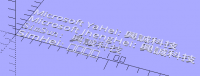
Seems to work fine on my pc (Windows 10):
http://forum.openscad.org/file/n16753/OpenSCAD_Chinese_font.png
Generated with the following code:
fonts = ["SimHei", "SimSun", "Microsoft JhengHei", "Microsoft YaHei"];
for (i=[0:len(fonts)-1])
{ t = str(fonts[i], ": 興誠科技");
translate( [0,15*i,0]) text( t, font=fonts[i]);
}
$ Runsun Pan, PhD $ libs: doctest , faces ( git ), offline doc ( git ), runscad.py( 1 , 2 , git ), synwrite( 1 , 2 ); $ tips: hash( 1 , 2 ), matrix( 1 , 2 ),sweep( 1 , 2 ), var( 1 , 2 ), lerp , animation ( gif , prodVid ), precision( 1 , 2 ), xl-control , type , rounded polygon
--
View this message in context: http://forum.openscad.org/How-to-write-a-texture-to-a-face-Solid-in-a-geometric-model-tp16718p16753.html
Sent from the OpenSCAD mailing list archive at Nabble.com.

Produced on my XUbuntu 14.4.4 LTS, which has "inherited fonts files"
from my defunct MS-XP. It looks as though I have got 3 out of the 4 by
accident rather than intentionally. I simply copied my XP Fonts folder
to my <user>/.fonts on the Linux box and the vast majority worked
straight off. However there is one caveat, as I found out with my
Arduino IDE, there can be some rogue fonts in amongst the XP font
versions that do not have all the characters, even though they share the
same font name (but not the same filename). As the font used in that
part of the IDE was not listed, it took some searching to find and
eliminate the incomplete font, and allow the native Linux version do the
right job. So probably better to copy the Chinese font files over one
by one, and check them out individually rather than do I what I did. I
do not deeply understand the complexities of font definitions, so there
maybe other explanations.
Rob
On 28/03/16 06:32, runsun wrote:
Seems to work fine on my pc (Windows 10):
http://forum.openscad.org/file/n16753/OpenSCAD_Chinese_font.png
Generated with the following code:
fonts = ["SimHei", "SimSun", "Microsoft JhengHei", "Microsoft YaHei"];
for (i=[0:len(fonts)-1])
{ t = str(fonts[i], ": 興誠科技");
translate( [0,15*i,0]) text( t, font=fonts[i]);
}
$ Runsun Pan, PhD $ libs: doctest , faces ( git ), offline doc ( git ), runscad.py( 1 , 2 , git ), synwrite( 1 , 2 ); $ tips: hash( 1 , 2 ), matrix( 1 , 2 ),sweep( 1 , 2 ), var( 1 , 2 ), lerp , animation ( gif , prodVid ), precision( 1 , 2 ), xl-control , type , rounded polygon
--
View this message in context: http://forum.openscad.org/How-to-write-a-texture-to-a-face-Solid-in-a-geometric-model-tp16718p16753.html
Sent from the OpenSCAD mailing list archive at Nabble.com.
OpenSCAD mailing list
Discuss@lists.openscad.org
http://lists.openscad.org/mailman/listinfo/discuss_lists.openscad.org

So, to sum it all up: This is your code and its result:
http://forum.openscad.org/file/n16758/Chinese.png
mode = "all";
// mode = "shape"; // uncomment to view/export shape only
// mode = "text"; // uncomment to view/export text only
textonshape(mode = mode, textcolor = "red")
{
// here is your shape
cylinder(r=10.01, 71, center = true);
// here is your texture, must fully intersect with your shape
translate([3,6,30]) // to move to the position where you want text
rotate([0,90,90]) // to align with the face of the stl
linear_extrude(height=6, convexity=9)
text( "興誠科技", font="SimHei");
}
module textonshape(mode = "view", textcolor = "green")
{
if(mode != "shape")
color(textcolor)
intersection() // just the text
{
scale([.999, .999, .999]) children([0]); children([1]);
}
if(mode != "text")
difference() // just the shape
{
children([0]); children([1]);
}
}
--
View this message in context: http://forum.openscad.org/How-to-write-a-texture-to-a-face-Solid-in-a-geometric-model-tp16718p16758.html
Sent from the OpenSCAD mailing list archive at Nabble.com.

yeah! it was working fine for me.As I mentioned in previous reply is it
possible to wrap a dxf model on solid face.Like attached picture.I would be
thankful for any help http://forum.openscad.org/file/n16779/dxfAndSTL.png
--
View this message in context: http://forum.openscad.org/How-to-write-a-texture-to-a-face-Solid-in-a-geometric-model-tp16718p16779.html
Sent from the OpenSCAD mailing list archive at Nabble.com.
Is it possible to project curves,polygons etc on to the surface.?
--
View this message in context: http://forum.openscad.org/How-to-write-a-texture-to-a-face-Solid-in-a-geometric-model-tp16718p16785.html
Sent from the OpenSCAD mailing list archive at Nabble.com.
Is there anyway to get position of text that wrapped around the cylinder. 3d
coordinates of text?
--
View this message in context: http://forum.openscad.org/How-to-write-a-texture-to-a-face-Solid-in-a-geometric-model-tp16718p16788.html
Sent from the OpenSCAD mailing list archive at Nabble.com.

I don't see any way to wrap a text or a 2D form around an object. It seems
that it would require some kind of morphing or non-linear deformation we
don't have in OpenSCAD. The best I can imagine is to stamp a form with fixed
depth like in:
engrave.PNG http://forum.openscad.org/file/n16789/engrave.PNG
The dxf I used was taken from http://www.thingiverse.com/thing:35439/#files
http://www.thingiverse.com/thing:35439/#files
engrave(depth=1) {
rotate([0,0,90])
engrave(depth=1.5) {
rotate([0,0,-90])
engrave(depth=1)
{
cylinder(r=10.01, 71, center = true);
        translate([5,0,20])
            rotate([0,90,0])
                linear_extrude(height=10, convexity=9)
                    stamp1();
     }
    translate([6,0,30])
        rotate([0,90,0])
            linear_extrude(height=6, convexity=9)
                text( "興誠科技", font="SimHei");
 }
 translate([0,0,-20])
    rotate([0,90,0])
        linear_extrude(height=12, convexity=9)
            stamp2();
}
module stamp2(){
scale(10/40)
import(file="recursive_snowflake_hexagons.dxf", convexity=20);
}
module stamp1(n=4){
if( n==1 )
polygon([ [7,0], [0,5], [0,-5] ] );
else {
translate([ 3.4, 0]) scale(1/2) stamp(n-1);
translate([ 0, 2.4]) scale(1/2) stamp(n-1);
translate([ 0,-2.4]) scale(1/2) stamp(n-1);
}
}
module engrave(depth)
{
difference()
{
children([0]);
translate([-depth,0,0])
difference()
{
translate([depth,0,0]) children([1]);
children([0]);
}
}
}
--
View this message in context: http://forum.openscad.org/How-to-write-a-texture-to-a-face-Solid-in-a-geometric-model-tp16718p16789.html
Sent from the OpenSCAD mailing list archive at Nabble.com.
Below text is created by connected points(lines,curves) on the view.
http://forum.openscad.org/file/n16790/openscad.png
--
View this message in context: http://forum.openscad.org/How-to-write-a-texture-to-a-face-Solid-in-a-geometric-model-tp16718p16790.html
Sent from the OpenSCAD mailing list archive at Nabble.com.
Your question is very general. What answer do expect? You can use the given
code pattern to linear_extrude() an imported dxf by replacing the 'extrude
text' command with
linear_extrude(height = h) import (file = "my.dxf");
Is it that what you are asking for? You can compose a 2D shape (also from a
polygon), extrude and project it. It's all the same pattern.
Why don't you post a code frame for your solid and some data (not only
images) you want to be projected.
Again: a projection to a surface is possible (and straight forward as I
have shown), but no winding of a 2D shape around some 3D surface.
--
View this message in context: http://forum.openscad.org/How-to-write-a-texture-to-a-face-Solid-in-a-geometric-model-tp16718p16793.html
Sent from the OpenSCAD mailing list archive at Nabble.com.
Hi its working perfect.
May I know how to get new vertices of polygon which is projected on
surface.3d coordinate?
What do you mean by "no winding of a 2D shape around some 3D surface" can
you please explain.
http://forum.openscad.org/file/n16805/dxfOnSurface.png
--
View this message in context: http://forum.openscad.org/How-to-write-a-texture-to-a-face-Solid-in-a-geometric-model-tp16718p16805.html
Sent from the OpenSCAD mailing list archive at Nabble.com.