
TR
Thomas Richter
Mon, Jun 8, 2026 1:16 PM
I recently started using the OpenSCAD preview plugin in VSCode and realized that the preview of some models renders partly transparent in the plugin even though the same code renders solid in OpenSCAD.
The whole issue with a code example can be found on Github: https://github.com/thijsdaniels/vscode-openscad-preview/issues/49
Thijs (the developer of the plugin) states that I gave the path in reverse order which leads to the wrong rendering. I find that reasoning understandable. Nonetheless, I'd like to know if there is any agreement or demand about the order of paths in BOSL2 / OpenSCAD. I always thought it would make sense to define the paths counterclockwise (right normal) in a right-handed coordinate system. At least the Thrown Together view doesn't consider this as wrong. On the other hand, the BOSL2 tutorial examples seem to always define paths clockwise.
I don't want to blame anybody here or force certain decisions for the plugin. I would just like to know whether I create the paths wrongly and if this could cause further problems in the future. If my current approach is wrong it would mean I had to refactor a considerable amount of code but I'd like to do this better now than later.
I recently started using the OpenSCAD preview plugin in VSCode and realized that the preview of some models renders partly transparent in the plugin even though the same code renders solid in OpenSCAD.
The whole issue with a code example can be found on Github: https://github.com/thijsdaniels/vscode-openscad-preview/issues/49
Thijs (the developer of the plugin) states that I gave the path in reverse order which leads to the wrong rendering. I find that reasoning understandable. Nonetheless, I'd like to know if there is any agreement or demand about the order of paths in BOSL2 / OpenSCAD. I always thought it would make sense to define the paths counterclockwise (right normal) in a right-handed coordinate system. At least the Thrown Together view doesn't consider this as wrong. On the other hand, the BOSL2 tutorial examples seem to always define paths clockwise.
I don't want to blame anybody here or force certain decisions for the plugin. I would just like to know whether I create the paths wrongly and if this could cause further problems in the future. If my current approach is wrong it would mean I had to refactor a considerable amount of code but I'd like to do this better now than later.

AM
Adrian Mariano
Mon, Jun 8, 2026 4:48 PM
There is no correct direction for paths on BOSL2. It all depends on what
you do with the path.
In your case you are giving the path to rounded_prism. The docs for that
function erroneously state that the path should be clockwise. I will fix
that. A clockwise path in this case produces a backwards shape. This is
evident in thrown together if you don’t color your object. You have put
color (“gold”) around your result which hides that the thrown together view
is purple.
It is easy to fix this by running reverse() on the path or you can use
vnf_reverse_faces. I would advise the vscode plugin author that all is
well as is and not to allow flipped faces.
Are there tutorial examples that use a clockwise input to rounded_prism
that should be fixed?
On Mon, Jun 8, 2026 at 09:16 Thomas Richter via Discuss <
discuss@lists.openscad.org> wrote:
I recently started using the OpenSCAD preview plugin in VSCode and
realized that the preview of some models renders partly transparent in the
plugin even though the same code renders solid in OpenSCAD.
The whole issue with a code example can be found on Github:
https://github.com/thijsdaniels/vscode-openscad-preview/issues/49
Thijs (the developer of the plugin) states that I gave the path in reverse
order which leads to the wrong rendering. I find that reasoning
understandable. Nonetheless, I'd like to know if there is any agreement or
demand about the order of paths in BOSL2 / OpenSCAD. I always thought it
would make sense to define the paths counterclockwise (right normal) in a
right-handed coordinate system. At least the Thrown Together view doesn't
consider this as wrong. On the other hand, the BOSL2 tutorial examples seem
to always define paths clockwise.
I don't want to blame anybody here or force certain decisions for the
plugin. I would just like to know whether I create the paths wrongly and if
this could cause further problems in the future. If my current approach is
wrong it would mean I had to refactor a considerable amount of code but I'd
like to do this better now than later.
OpenSCAD mailing list
To unsubscribe send an email to discuss-leave@lists.openscad.org
There is no correct direction for paths on BOSL2. It all depends on what
you do with the path.
In your case you are giving the path to rounded_prism. The docs for that
function erroneously state that the path should be clockwise. I will fix
that. A clockwise path in this case produces a backwards shape. This is
evident in thrown together if you don’t color your object. You have put
color (“gold”) around your result which hides that the thrown together view
is purple.
It is easy to fix this by running reverse() on the path or you can use
vnf_reverse_faces. I would advise the vscode plugin author that all is
well as is and not to allow flipped faces.
Are there tutorial examples that use a clockwise input to rounded_prism
that should be fixed?
On Mon, Jun 8, 2026 at 09:16 Thomas Richter via Discuss <
discuss@lists.openscad.org> wrote:
> I recently started using the OpenSCAD preview plugin in VSCode and
> realized that the preview of some models renders partly transparent in the
> plugin even though the same code renders solid in OpenSCAD.
>
> The whole issue with a code example can be found on Github:
> https://github.com/thijsdaniels/vscode-openscad-preview/issues/49
>
> Thijs (the developer of the plugin) states that I gave the path in reverse
> order which leads to the wrong rendering. I find that reasoning
> understandable. Nonetheless, I'd like to know if there is any agreement or
> demand about the order of paths in BOSL2 / OpenSCAD. I always thought it
> would make sense to define the paths counterclockwise (right normal) in a
> right-handed coordinate system. At least the Thrown Together view doesn't
> consider this as wrong. On the other hand, the BOSL2 tutorial examples seem
> to always define paths clockwise.
>
> I don't want to blame anybody here or force certain decisions for the
> plugin. I would just like to know whether I create the paths wrongly and if
> this could cause further problems in the future. If my current approach is
> wrong it would mean I had to refactor a considerable amount of code but I'd
> like to do this better now than later.
> _______________________________________________
> OpenSCAD mailing list
> To unsubscribe send an email to discuss-leave@lists.openscad.org
>

GB
Glenn Butcher
Mon, Jun 8, 2026 5:03 PM
I've been writing command line tools with Manifold, and it doesn't like
clockwise-wound triangles in its meshes. I'm not an expert in this, but
it appears some software requires CCW winding in order to correctly
interpret the boundary; is this just some sort of convention, or does
the math rely on it?
Glenn Butcher
On 6/8/2026 10:48 AM, Adrian Mariano via Discuss wrote:
There is no correct direction for paths on BOSL2. It all depends on
what you do with the path.
In your case you are giving the path to rounded_prism. The docs for
that function erroneously state that the path should be clockwise. I
will fix that. A clockwise path in this case produces a backwards
shape. This is evident in thrown together if you don’t color your
object. You have put color (“gold”) around your result which hides
that the thrown together view is purple.
It is easy to fix this by running reverse() on the path or you can use
vnf_reverse_faces. I would advise the vscode plugin author that all
is well as is and not to allow flipped faces.
Are there tutorial examples that use a clockwise input to
rounded_prism that should be fixed?
On Mon, Jun 8, 2026 at 09:16 Thomas Richter via Discuss
discuss@lists.openscad.org wrote:
 I recently started using the OpenSCAD preview plugin in VSCode and
 realized that the preview of some models renders partly
 transparent in the plugin even though the same code renders solid
 in OpenSCAD.

 The whole issue with a code example can be found on Github:
 https://github.com/thijsdaniels/vscode-openscad-preview/issues/49

 Thijs (the developer of the plugin) states that I gave the path in
 reverse order which leads to the wrong rendering. I find that
 reasoning understandable. Nonetheless, I'd like to know if there
 is any agreement or demand about the order of paths in BOSL2 /
 OpenSCAD. I always thought it would make sense to define the paths
 counterclockwise (right normal) in a right-handed coordinate
 system. At least the Thrown Together view doesn't consider this as
 wrong. On the other hand, the BOSL2 tutorial examples seem to
 always define paths clockwise.

 I don't want to blame anybody here or force certain decisions for
 the plugin. I would just like to know whether I create the paths
 wrongly and if this could cause further problems in the future. If
 my current approach is wrong it would mean I had to refactor a
 considerable amount of code but I'd like to do this better now
 than later.
 _______________________________________________
 OpenSCAD mailing list
 To unsubscribe send an email to discuss-leave@lists.openscad.org
OpenSCAD mailing list
To unsubscribe send an email todiscuss-leave@lists.openscad.org
I've been writing command line tools with Manifold, and it doesn't like
clockwise-wound triangles in its meshes. I'm not an expert in this, but
it appears some software requires CCW winding in order to correctly
interpret the boundary; is this just some sort of convention, or does
the math rely on it?
Glenn Butcher
On 6/8/2026 10:48 AM, Adrian Mariano via Discuss wrote:
> There is no correct direction for paths on BOSL2. It all depends on
> what you do with the path.
>
> In your case you are giving the path to rounded_prism. The docs for
> that function erroneously state that the path should be clockwise. I
> will fix that. A clockwise path in this case produces a backwards
> shape. This is evident in thrown together if you don’t color your
> object. You have put color (“gold”) around your result which hides
> that the thrown together view is purple.
>
> It is easy to fix this by running reverse() on the path or you can use
> vnf_reverse_faces. I would advise the vscode plugin author that all
> is well as is and not to allow flipped faces.
>
> Are there tutorial examples that use a clockwise input to
> rounded_prism that should be fixed?
>
> On Mon, Jun 8, 2026 at 09:16 Thomas Richter via Discuss
> <discuss@lists.openscad.org> wrote:
>
> I recently started using the OpenSCAD preview plugin in VSCode and
> realized that the preview of some models renders partly
> transparent in the plugin even though the same code renders solid
> in OpenSCAD.
>
> The whole issue with a code example can be found on Github:
> https://github.com/thijsdaniels/vscode-openscad-preview/issues/49
>
> Thijs (the developer of the plugin) states that I gave the path in
> reverse order which leads to the wrong rendering. I find that
> reasoning understandable. Nonetheless, I'd like to know if there
> is any agreement or demand about the order of paths in BOSL2 /
> OpenSCAD. I always thought it would make sense to define the paths
> counterclockwise (right normal) in a right-handed coordinate
> system. At least the Thrown Together view doesn't consider this as
> wrong. On the other hand, the BOSL2 tutorial examples seem to
> always define paths clockwise.
>
> I don't want to blame anybody here or force certain decisions for
> the plugin. I would just like to know whether I create the paths
> wrongly and if this could cause further problems in the future. If
> my current approach is wrong it would mean I had to refactor a
> considerable amount of code but I'd like to do this better now
> than later.
> _______________________________________________
> OpenSCAD mailing list
> To unsubscribe send an email to discuss-leave@lists.openscad.org
>
>
> _______________________________________________
> OpenSCAD mailing list
> To unsubscribe send an email todiscuss-leave@lists.openscad.org
AM
Adrian Mariano
Mon, Jun 8, 2026 5:43 PM
The winding choice is a convention. I think the math depends on having a
fixed convention either clockwise or counter clockwise. Openscad requires
counterclockwise.
In BOSL2 there is not a fixed relation between a path and 3d geometry you
make from it so I can’t say that one direction is always right. But I
would expect counter clockwise input in most cases is likely to be simpler.
On Mon, Jun 8, 2026 at 13:04 Glenn Butcher via Discuss <
discuss@lists.openscad.org> wrote:
I've been writing command line tools with Manifold, and it doesn't like
clockwise-wound triangles in its meshes. I'm not an expert in this, but it
appears some software requires CCW winding in order to correctly interpret
the boundary; is this just some sort of convention, or does the math rely
on it?
Glenn Butcher
On 6/8/2026 10:48 AM, Adrian Mariano via Discuss wrote:
There is no correct direction for paths on BOSL2. It all depends on what
you do with the path.
In your case you are giving the path to rounded_prism. The docs for that
function erroneously state that the path should be clockwise. I will fix
that. A clockwise path in this case produces a backwards shape. This is
evident in thrown together if you don’t color your object. You have put
color (“gold”) around your result which hides that the thrown together view
is purple.
It is easy to fix this by running reverse() on the path or you can use
vnf_reverse_faces. I would advise the vscode plugin author that all is
well as is and not to allow flipped faces.
Are there tutorial examples that use a clockwise input to rounded_prism
that should be fixed?
On Mon, Jun 8, 2026 at 09:16 Thomas Richter via Discuss <
discuss@lists.openscad.org> wrote:
I recently started using the OpenSCAD preview plugin in VSCode and
realized that the preview of some models renders partly transparent in the
plugin even though the same code renders solid in OpenSCAD.
The whole issue with a code example can be found on Github:
https://github.com/thijsdaniels/vscode-openscad-preview/issues/49
Thijs (the developer of the plugin) states that I gave the path in
reverse order which leads to the wrong rendering. I find that reasoning
understandable. Nonetheless, I'd like to know if there is any agreement or
demand about the order of paths in BOSL2 / OpenSCAD. I always thought it
would make sense to define the paths counterclockwise (right normal) in a
right-handed coordinate system. At least the Thrown Together view doesn't
consider this as wrong. On the other hand, the BOSL2 tutorial examples seem
to always define paths clockwise.
I don't want to blame anybody here or force certain decisions for the
plugin. I would just like to know whether I create the paths wrongly and if
this could cause further problems in the future. If my current approach is
wrong it would mean I had to refactor a considerable amount of code but I'd
like to do this better now than later.
OpenSCAD mailing list
To unsubscribe send an email to discuss-leave@lists.openscad.org
The winding choice is a convention. I think the math depends on having a
fixed convention either clockwise or counter clockwise. Openscad requires
counterclockwise.
In BOSL2 there is not a fixed relation between a path and 3d geometry you
make from it so I can’t say that one direction is always right. But I
would expect counter clockwise input in most cases is likely to be simpler.
On Mon, Jun 8, 2026 at 13:04 Glenn Butcher via Discuss <
discuss@lists.openscad.org> wrote:
> I've been writing command line tools with Manifold, and it doesn't like
> clockwise-wound triangles in its meshes. I'm not an expert in this, but it
> appears some software requires CCW winding in order to correctly interpret
> the boundary; is this just some sort of convention, or does the math rely
> on it?
>
> Glenn Butcher
> On 6/8/2026 10:48 AM, Adrian Mariano via Discuss wrote:
>
> There is no correct direction for paths on BOSL2. It all depends on what
> you do with the path.
>
> In your case you are giving the path to rounded_prism. The docs for that
> function erroneously state that the path should be clockwise. I will fix
> that. A clockwise path in this case produces a backwards shape. This is
> evident in thrown together if you don’t color your object. You have put
> color (“gold”) around your result which hides that the thrown together view
> is purple.
>
> It is easy to fix this by running reverse() on the path or you can use
> vnf_reverse_faces. I would advise the vscode plugin author that all is
> well as is and not to allow flipped faces.
>
> Are there tutorial examples that use a clockwise input to rounded_prism
> that should be fixed?
>
> On Mon, Jun 8, 2026 at 09:16 Thomas Richter via Discuss <
> discuss@lists.openscad.org> wrote:
>
>> I recently started using the OpenSCAD preview plugin in VSCode and
>> realized that the preview of some models renders partly transparent in the
>> plugin even though the same code renders solid in OpenSCAD.
>>
>> The whole issue with a code example can be found on Github:
>> https://github.com/thijsdaniels/vscode-openscad-preview/issues/49
>>
>> Thijs (the developer of the plugin) states that I gave the path in
>> reverse order which leads to the wrong rendering. I find that reasoning
>> understandable. Nonetheless, I'd like to know if there is any agreement or
>> demand about the order of paths in BOSL2 / OpenSCAD. I always thought it
>> would make sense to define the paths counterclockwise (right normal) in a
>> right-handed coordinate system. At least the Thrown Together view doesn't
>> consider this as wrong. On the other hand, the BOSL2 tutorial examples seem
>> to always define paths clockwise.
>>
>> I don't want to blame anybody here or force certain decisions for the
>> plugin. I would just like to know whether I create the paths wrongly and if
>> this could cause further problems in the future. If my current approach is
>> wrong it would mean I had to refactor a considerable amount of code but I'd
>> like to do this better now than later.
>> _______________________________________________
>> OpenSCAD mailing list
>> To unsubscribe send an email to discuss-leave@lists.openscad.org
>>
>
> _______________________________________________
> OpenSCAD mailing list
> To unsubscribe send an email to discuss-leave@lists.openscad.org
>
> _______________________________________________
> OpenSCAD mailing list
> To unsubscribe send an email to discuss-leave@lists.openscad.org

JB
Jordan Brown
Mon, Jun 8, 2026 6:06 PM
On 6/8/2026 10:43 AM, Adrian Mariano via Discuss wrote:
Openscad requires counterclockwise.
[ Note: the following is not based on knowledge of the internals, but
rather on documentation and observed behavior. ]
OpenSCAD itself does not care about order for polygons. (Documentation
doesn't mention a requirement, and linear_extrude plus Thrown Together
doesn't show a difference.)
For polyhedra, it wants the faces wound clockwise as viewed from the
outside. (Per documentation and Thrown Together.)
(Historical note: I remember that years ago the documentation said that
winding order didn't matter. I ran into some trouble because of that,
and somebody said the documentation was wrong.)
I believe that it is theoretically possible for OpenSCAD to detect and
correct mis-wound polyhedra (including both inside-out and inconsistent
winding), and that the cost wouldn't be all that high (linear on the
number of edges, I think). I have mixed feelings about whether we
should do this - on the one hand, it would correct a common error, while
on the other hand it would be a performance penalty for every
polyhedron() and 3D import call. Since 3D imports are an important
source of problems and are not amenable to "just fix the program",
perhaps we should make fixup be an option for them.
On 6/8/2026 10:43 AM, Adrian Mariano via Discuss wrote:
> Openscad requires counterclockwise.
[ Note: the following is not based on knowledge of the internals, but
rather on documentation and observed behavior. ]
OpenSCAD itself does not care about order for polygons. (Documentation
doesn't mention a requirement, and linear_extrude plus Thrown Together
doesn't show a difference.)
For polyhedra, it wants the faces wound clockwise as viewed from the
outside. (Per documentation and Thrown Together.)
(Historical note: I remember that years ago the documentation said that
winding order didn't matter. I ran into some trouble because of that,
and somebody said the documentation was wrong.)
I believe that it is theoretically possible for OpenSCAD to detect and
correct mis-wound polyhedra (including both inside-out and inconsistent
winding), and that the cost wouldn't be all that high (linear on the
number of edges, I think). I have mixed feelings about whether we
should do this - on the one hand, it would correct a common error, while
on the other hand it would be a performance penalty for *every*
polyhedron() and 3D import call. Since 3D imports are an important
source of problems and are not amenable to "just fix the program",
perhaps we should make fixup be an option for them.

RW
Rogier Wolff
Mon, Jun 8, 2026 6:36 PM
On Mon, Jun 08, 2026 at 11:03:35AM -0600, Glenn Butcher via Discuss wrote:
I've been writing command line tools with Manifold, and it doesn't like
clockwise-wound triangles in its meshes. I'm not an expert in this, but it
appears some software requires CCW winding in order to correctly interpret
the boundary; is this just some sort of convention, or does the math rely on
it?
The triangle defines a plane. This plane has an equation:
a * x + b * y + c * z + d = 0
Then when the left part is < 0 you're on one side of the plane and
when > 0 you're on the other side. Say a "slicer" needs to know which
is "inside" and which is "outside": Plastic goes on the inside.
Now if you do the math going around one way or the other you get the
same equation, except that < 0 and > 0 are flipped. So we define a
convention on which is inside and which is outside.
So, now when you go around the triangles the wrong way, inside and
outside are flipped. Bad things happen when you mix them and when you
uniformly do it wrong, your shape is actually interpreted as
"everything minus what you intended"...
So if you're generating your triangles "by hand", you really should
look up which way they belong and follow that convention.
Humans are pretty good at seeing. Oh, that's inside out, I understand
that. Computer programs are not. They simply follow the program and
e.g. plan pastic on one side and not on the other...
Roger.
--
** R.E.Wolff@BitWizard.nl ** https://www.BitWizard.nl/ ** +31-15-2049110 **
** Verl. Spiegelmakerstraat 37 2645 LZ Delfgauw, The Netherlands.
** KVK: 27239233 **
f equals m times a. When your f is steady, and your m is going down
your a** is going up. -- Chris Hadfield about flying up the space shuttle.
** 'a' for accelleration.
On Mon, Jun 08, 2026 at 11:03:35AM -0600, Glenn Butcher via Discuss wrote:
> I've been writing command line tools with Manifold, and it doesn't like
> clockwise-wound triangles in its meshes. I'm not an expert in this, but it
> appears some software requires CCW winding in order to correctly interpret
> the boundary; is this just some sort of convention, or does the math rely on
> it?
The triangle defines a plane. This plane has an equation:
a * x + b * y + c * z + d = 0
Then when the left part is < 0 you're on one side of the plane and
when > 0 you're on the other side. Say a "slicer" needs to know which
is "inside" and which is "outside": Plastic goes on the inside.
Now if you do the math going around one way or the other you get the
same equation, except that < 0 and > 0 are flipped. So we define a
convention on which is inside and which is outside.
So, now when you go around the triangles the wrong way, inside and
outside are flipped. Bad things happen when you mix them and when you
uniformly do it wrong, your shape is actually interpreted as
"everything minus what you intended"...
So if you're generating your triangles "by hand", you really should
look up which way they belong and follow that convention.
Humans are pretty good at seeing. Oh, that's inside out, I understand
that. Computer programs are not. They simply follow the program and
e.g. plan pastic on one side and not on the other...
Roger.
--
** R.E.Wolff@BitWizard.nl ** https://www.BitWizard.nl/ ** +31-15-2049110 **
** Verl. Spiegelmakerstraat 37 2645 LZ Delfgauw, The Netherlands.
** KVK: 27239233 **
f equals m times a. When your f is steady, and your m is going down
your a** is going up. -- Chris Hadfield about flying up the space shuttle.
** 'a' for accelleration.
TR
Thomas Richter
Mon, Jun 8, 2026 7:24 PM
Now I'm totally confused.
You state that clockwise is wrong for rounded_prism AND that my path is in wrong order too. But as I understand it, my path is COUNTERCLOCKWISE when looked at it from Z+. Or should I look at it from the outside of the prism to be extruded which would be Z- ? I tried it without color and saw that the Thrown Together view is completely purple. I used color("gold") in the first place because the plugin has a dark color scheme I can't use due to bad vision and there seems to be no other way to set it to the OpenSCAD default scheme.
I knew about the rule to build faces of polyhedra counterclockwise what I always do. That is - besides the right-handed coordinate system - the reason why I chose to order the paths as I did in the example.
What am I missing here?
I only saw the clockwise paths in the paths tutorial. Didn't check the roundings tutorial.
Am 08.06.2026 um 18:48 schrieb Adrian Mariano via Discuss discuss@lists.openscad.org:
There is no correct direction for paths on BOSL2. It all depends on what you do with the path.
In your case you are giving the path to rounded_prism. The docs for that function erroneously state that the path should be clockwise. I will fix that. A clockwise path in this case produces a backwards shape. This is evident in thrown together if you don’t color your object. You have put color (“gold”) around your result which hides that the thrown together view is purple.
It is easy to fix this by running reverse() on the path or you can use vnf_reverse_faces. I would advise the vscode plugin author that all is well as is and not to allow flipped faces.
Are there tutorial examples that use a clockwise input to rounded_prism that should be fixed?
On Mon, Jun 8, 2026 at 09:16 Thomas Richter via Discuss discuss@lists.openscad.org wrote:
I recently started using the OpenSCAD preview plugin in VSCode and realized that the preview of some models renders partly transparent in the plugin even though the same code renders solid in OpenSCAD.
The whole issue with a code example can be found on Github: https://github.com/thijsdaniels/vscode-openscad-preview/issues/49
Thijs (the developer of the plugin) states that I gave the path in reverse order which leads to the wrong rendering. I find that reasoning understandable. Nonetheless, I'd like to know if there is any agreement or demand about the order of paths in BOSL2 / OpenSCAD. I always thought it would make sense to define the paths counterclockwise (right normal) in a right-handed coordinate system. At least the Thrown Together view doesn't consider this as wrong. On the other hand, the BOSL2 tutorial examples seem to always define paths clockwise.
I don't want to blame anybody here or force certain decisions for the plugin. I would just like to know whether I create the paths wrongly and if this could cause further problems in the future. If my current approach is wrong it would mean I had to refactor a considerable amount of code but I'd like to do this better now than later.
OpenSCAD mailing list
To unsubscribe send an email to discuss-leave@lists.openscad.org
Now I'm totally confused.
You state that clockwise is wrong for rounded_prism AND that my path is in wrong order too. But as I understand it, my path is COUNTERCLOCKWISE when looked at it from Z+. Or should I look at it from the outside of the prism to be extruded which would be Z- ? I tried it without color and saw that the Thrown Together view is completely purple. I used color("gold") in the first place because the plugin has a dark color scheme I can't use due to bad vision and there seems to be no other way to set it to the OpenSCAD default scheme.
I knew about the rule to build faces of polyhedra counterclockwise what I always do. That is - besides the right-handed coordinate system - the reason why I chose to order the paths as I did in the example.
What am I missing here?
I only saw the clockwise paths in the paths tutorial. Didn't check the roundings tutorial.
> Am 08.06.2026 um 18:48 schrieb Adrian Mariano via Discuss <discuss@lists.openscad.org>:
>
> There is no correct direction for paths on BOSL2. It all depends on what you do with the path.
>
> In your case you are giving the path to rounded_prism. The docs for that function erroneously state that the path should be clockwise. I will fix that. A clockwise path in this case produces a backwards shape. This is evident in thrown together if you don’t color your object. You have put color (“gold”) around your result which hides that the thrown together view is purple.
>
> It is easy to fix this by running reverse() on the path or you can use vnf_reverse_faces. I would advise the vscode plugin author that all is well as is and not to allow flipped faces.
>
> Are there tutorial examples that use a clockwise input to rounded_prism that should be fixed?
>
>> On Mon, Jun 8, 2026 at 09:16 Thomas Richter via Discuss <discuss@lists.openscad.org> wrote:
>> I recently started using the OpenSCAD preview plugin in VSCode and realized that the preview of some models renders partly transparent in the plugin even though the same code renders solid in OpenSCAD.
>>
>> The whole issue with a code example can be found on Github: https://github.com/thijsdaniels/vscode-openscad-preview/issues/49
>>
>> Thijs (the developer of the plugin) states that I gave the path in reverse order which leads to the wrong rendering. I find that reasoning understandable. Nonetheless, I'd like to know if there is any agreement or demand about the order of paths in BOSL2 / OpenSCAD. I always thought it would make sense to define the paths counterclockwise (right normal) in a right-handed coordinate system. At least the Thrown Together view doesn't consider this as wrong. On the other hand, the BOSL2 tutorial examples seem to always define paths clockwise.
>>
>> I don't want to blame anybody here or force certain decisions for the plugin. I would just like to know whether I create the paths wrongly and if this could cause further problems in the future. If my current approach is wrong it would mean I had to refactor a considerable amount of code but I'd like to do this better now than later.
>> _______________________________________________
>> OpenSCAD mailing list
>> To unsubscribe send an email to discuss-leave@lists.openscad.org
>> _______________________________________________
> OpenSCAD mailing list
> To unsubscribe send an email to discuss-leave@lists.openscad.org

JD
John David
Mon, Jun 8, 2026 8:42 PM
I do not know if OpenSCAD and friends have the following functionality, but
when I was taking graduate level comp. sci. graphics classes we developed
some tools which looked at the triangle's normal vector, and then colored
it red or blue (or whatever you want) for the inside and outside faces.
Maybe someone can whip up a function to do such coloring, and maybe pass in
the two optional colors. Being able to visualize the winding (and then
correct them), is a very useful tool when problems like this pop up. There
are other things that can be detected (like holes/gaps/overlaps), that can
be given different colors as well.
Hope that helps,
EBo --
On Mon, Jun 8, 2026 at 3:24 PM Thomas Richter via Discuss <
discuss@lists.openscad.org> wrote:
Now I'm totally confused.
You state that clockwise is wrong for rounded_prism AND that my path is in
wrong order too. But as I understand it, my path is COUNTERCLOCKWISE when
looked at it from Z+. Or should I look at it from the outside of the prism
to be extruded which would be Z- ? I tried it without color and saw that
the Thrown Together view is completely purple. I used color("gold") in the
first place because the plugin has a dark color scheme I can't use due to
bad vision and there seems to be no other way to set it to the OpenSCAD
default scheme.
I knew about the rule to build faces of polyhedra counterclockwise what I
always do. That is - besides the right-handed coordinate system - the
reason why I chose to order the paths as I did in the example.
What am I missing here?
I only saw the clockwise paths in the paths tutorial. Didn't check the
roundings tutorial.
Am 08.06.2026 um 18:48 schrieb Adrian Mariano via Discuss <
There is no correct direction for paths on BOSL2. It all depends on what
In your case you are giving the path to rounded_prism. The docs for
that function erroneously state that the path should be clockwise. I will
fix that. A clockwise path in this case produces a backwards shape. This is
evident in thrown together if you don’t color your object. You have put
color (“gold”) around your result which hides that the thrown together view
is purple.
It is easy to fix this by running reverse() on the path or you can use
vnf_reverse_faces. I would advise the vscode plugin author that all is
well as is and not to allow flipped faces.
Are there tutorial examples that use a clockwise input to rounded_prism
On Mon, Jun 8, 2026 at 09:16 Thomas Richter via Discuss <
I recently started using the OpenSCAD preview plugin in VSCode and
realized that the preview of some models renders partly transparent in the
plugin even though the same code renders solid in OpenSCAD.
The whole issue with a code example can be found on Github:
Thijs (the developer of the plugin) states that I gave the path in
reverse order which leads to the wrong rendering. I find that reasoning
understandable. Nonetheless, I'd like to know if there is any agreement or
demand about the order of paths in BOSL2 / OpenSCAD. I always thought it
would make sense to define the paths counterclockwise (right normal) in a
right-handed coordinate system. At least the Thrown Together view doesn't
consider this as wrong. On the other hand, the BOSL2 tutorial examples seem
to always define paths clockwise.
I don't want to blame anybody here or force certain decisions for the
plugin. I would just like to know whether I create the paths wrongly and if
this could cause further problems in the future. If my current approach is
wrong it would mean I had to refactor a considerable amount of code but I'd
like to do this better now than later.
I do not know if OpenSCAD and friends have the following functionality, but
when I was taking graduate level comp. sci. graphics classes we developed
some tools which looked at the triangle's normal vector, and then colored
it red or blue (or whatever you want) for the inside and outside faces.
Maybe someone can whip up a function to do such coloring, and maybe pass in
the two optional colors. Being able to visualize the winding (and then
correct them), is a very useful tool when problems like this pop up. There
are other things that can be detected (like holes/gaps/overlaps), that can
be given different colors as well.
Hope that helps,
EBo --
On Mon, Jun 8, 2026 at 3:24 PM Thomas Richter via Discuss <
discuss@lists.openscad.org> wrote:
> Now I'm totally confused.
>
> You state that clockwise is wrong for rounded_prism AND that my path is in
> wrong order too. But as I understand it, my path is COUNTERCLOCKWISE when
> looked at it from Z+. Or should I look at it from the outside of the prism
> to be extruded which would be Z- ? I tried it without color and saw that
> the Thrown Together view is completely purple. I used color("gold") in the
> first place because the plugin has a dark color scheme I can't use due to
> bad vision and there seems to be no other way to set it to the OpenSCAD
> default scheme.
>
> I knew about the rule to build faces of polyhedra counterclockwise what I
> always do. That is - besides the right-handed coordinate system - the
> reason why I chose to order the paths as I did in the example.
>
> What am I missing here?
>
> I only saw the clockwise paths in the paths tutorial. Didn't check the
> roundings tutorial.
>
>
> > Am 08.06.2026 um 18:48 schrieb Adrian Mariano via Discuss <
> discuss@lists.openscad.org>:
> >
> > There is no correct direction for paths on BOSL2. It all depends on what
> you do with the path.
> >
> > In your case you are giving the path to rounded_prism. The docs for
> that function erroneously state that the path should be clockwise. I will
> fix that. A clockwise path in this case produces a backwards shape. This is
> evident in thrown together if you don’t color your object. You have put
> color (“gold”) around your result which hides that the thrown together view
> is purple.
> >
> > It is easy to fix this by running reverse() on the path or you can use
> vnf_reverse_faces. I would advise the vscode plugin author that all is
> well as is and not to allow flipped faces.
> >
> > Are there tutorial examples that use a clockwise input to rounded_prism
> that should be fixed?
> >
> >> On Mon, Jun 8, 2026 at 09:16 Thomas Richter via Discuss <
> discuss@lists.openscad.org> wrote:
> >> I recently started using the OpenSCAD preview plugin in VSCode and
> realized that the preview of some models renders partly transparent in the
> plugin even though the same code renders solid in OpenSCAD.
> >>
> >> The whole issue with a code example can be found on Github:
> https://github.com/thijsdaniels/vscode-openscad-preview/issues/49
> >>
> >> Thijs (the developer of the plugin) states that I gave the path in
> reverse order which leads to the wrong rendering. I find that reasoning
> understandable. Nonetheless, I'd like to know if there is any agreement or
> demand about the order of paths in BOSL2 / OpenSCAD. I always thought it
> would make sense to define the paths counterclockwise (right normal) in a
> right-handed coordinate system. At least the Thrown Together view doesn't
> consider this as wrong. On the other hand, the BOSL2 tutorial examples seem
> to always define paths clockwise.
> >>
> >> I don't want to blame anybody here or force certain decisions for the
> plugin. I would just like to know whether I create the paths wrongly and if
> this could cause further problems in the future. If my current approach is
> wrong it would mean I had to refactor a considerable amount of code but I'd
> like to do this better now than later.
> >> _______________________________________________
> >> OpenSCAD mailing list
> >> To unsubscribe send an email to discuss-leave@lists.openscad.org
> >> _______________________________________________
> > OpenSCAD mailing list
> > To unsubscribe send an email to discuss-leave@lists.openscad.org
>
> _______________________________________________
> OpenSCAD mailing list
> To unsubscribe send an email to discuss-leave@lists.openscad.org
AM
Adrian Mariano
Mon, Jun 8, 2026 10:37 PM
Arg. I'm very sorry. Somehow I got clockwise and counter-clockwise mixed
up (not a typical problem I face). So the documentation is correct. When
you give a single 2d path to rounded_prism, the path should be clockwise
from above (the usual notion of clockwise for a 2d path). The
documentation says more carefully that the top path needs to be clockwise
when viewed from outside the prism, which captures the case where your top
and bottom path are 3d and perhaps not parallel to each other. (In this
case, defining "clockwise" requires some care.) Note that this does mean
that the bottom path will be counter-clockwise---when viewed from outside
the prism, meaning viewed from the bottom. Because of how the prism is
connected, one of the paths must be in the "wrong" order so that the points
correspond, but for the most basic case where you provide just one shape in
2d it should be clockwise. Suggestions for clarifying this in the docs are
welcome.
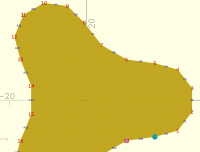
Your path is counter-clockwise as a 2d path, or as seen from above. This
can be seen by passing it to debug_polygon, which shows the sequence:
[image: image.png]
This explains why the shape is purple when viewed in "thrown together".
Note to John David, the "thrown together" functionality is precisely what
you're asking for. It colors the inside purple and the outside gold. So
you activate this feature and look at your shape and you shouldn't see any
purple if your shape is valid. This didn't work for OP because he
explicitly colored his shape "gold" so it concealed the color marking
provided by "thrown together" and made everything look valid. (It occurs
to me that they should rename "thrown together" to something like
"polyhedron check".) In BOSL2 generally if you mess up the winding it's
very obvious because the entire shape will be reversed, not sporadic
faces.
On Mon, Jun 8, 2026 at 4:42 PM John David via Discuss <
discuss@lists.openscad.org> wrote:
I do not know if OpenSCAD and friends have the following functionality,
but when I was taking graduate level comp. sci. graphics classes we
developed some tools which looked at the triangle's normal vector, and then
colored it red or blue (or whatever you want) for the inside and outside
faces. Maybe someone can whip up a function to do such coloring, and maybe
pass in the two optional colors. Being able to visualize the winding (and
then correct them), is a very useful tool when problems like this pop up.
There are other things that can be detected (like holes/gaps/overlaps),
that can be given different colors as well.
Hope that helps,
EBo --
On Mon, Jun 8, 2026 at 3:24 PM Thomas Richter via Discuss <
discuss@lists.openscad.org> wrote:
Now I'm totally confused.
You state that clockwise is wrong for rounded_prism AND that my path is
in wrong order too. But as I understand it, my path is COUNTERCLOCKWISE
when looked at it from Z+. Or should I look at it from the outside of the
prism to be extruded which would be Z- ? I tried it without color and saw
that the Thrown Together view is completely purple. I used color("gold") in
the first place because the plugin has a dark color scheme I can't use due
to bad vision and there seems to be no other way to set it to the OpenSCAD
default scheme.
I knew about the rule to build faces of polyhedra counterclockwise what I
always do. That is - besides the right-handed coordinate system - the
reason why I chose to order the paths as I did in the example.
What am I missing here?
I only saw the clockwise paths in the paths tutorial. Didn't check the
roundings tutorial.
Am 08.06.2026 um 18:48 schrieb Adrian Mariano via Discuss <
There is no correct direction for paths on BOSL2. It all depends on
what you do with the path.
In your case you are giving the path to rounded_prism. The docs for
that function erroneously state that the path should be clockwise. I will
fix that. A clockwise path in this case produces a backwards shape. This is
evident in thrown together if you don’t color your object. You have put
color (“gold”) around your result which hides that the thrown together view
is purple.
It is easy to fix this by running reverse() on the path or you can use
vnf_reverse_faces. I would advise the vscode plugin author that all is
well as is and not to allow flipped faces.
Are there tutorial examples that use a clockwise input to rounded_prism
On Mon, Jun 8, 2026 at 09:16 Thomas Richter via Discuss <
I recently started using the OpenSCAD preview plugin in VSCode and
realized that the preview of some models renders partly transparent in the
plugin even though the same code renders solid in OpenSCAD.
The whole issue with a code example can be found on Github:
Thijs (the developer of the plugin) states that I gave the path in
reverse order which leads to the wrong rendering. I find that reasoning
understandable. Nonetheless, I'd like to know if there is any agreement or
demand about the order of paths in BOSL2 / OpenSCAD. I always thought it
would make sense to define the paths counterclockwise (right normal) in a
right-handed coordinate system. At least the Thrown Together view doesn't
consider this as wrong. On the other hand, the BOSL2 tutorial examples seem
to always define paths clockwise.
I don't want to blame anybody here or force certain decisions for the
plugin. I would just like to know whether I create the paths wrongly and if
this could cause further problems in the future. If my current approach is
wrong it would mean I had to refactor a considerable amount of code but I'd
like to do this better now than later.
Arg. I'm very sorry. Somehow I got clockwise and counter-clockwise mixed
up (not a typical problem I face). So the documentation is correct. When
you give a single 2d path to rounded_prism, the path should be clockwise
from above (the usual notion of clockwise for a 2d path). The
documentation says more carefully that the top path needs to be clockwise
when viewed from outside the prism, which captures the case where your top
and bottom path are 3d and perhaps not parallel to each other. (In this
case, defining "clockwise" requires some care.) Note that this does mean
that the bottom path will be counter-clockwise---when viewed from outside
the prism, meaning viewed from the bottom. Because of how the prism is
connected, one of the paths must be in the "wrong" order so that the points
correspond, but for the most basic case where you provide just one shape in
2d it should be clockwise. Suggestions for clarifying this in the docs are
welcome.
Your path is counter-clockwise as a 2d path, or as seen from above. This
can be seen by passing it to debug_polygon, which shows the sequence:
[image: image.png]
This explains why the shape is purple when viewed in "thrown together".
Note to John David, the "thrown together" functionality is precisely what
you're asking for. It colors the inside purple and the outside gold. So
you activate this feature and look at your shape and you shouldn't see any
purple if your shape is valid. This didn't work for OP because he
explicitly colored his shape "gold" so it concealed the color marking
provided by "thrown together" and made everything look valid. (It occurs
to me that they should rename "thrown together" to something like
"polyhedron check".) In BOSL2 generally if you mess up the winding it's
very obvious because the entire shape will be reversed, not sporadic
faces.
On Mon, Jun 8, 2026 at 4:42 PM John David via Discuss <
discuss@lists.openscad.org> wrote:
> I do not know if OpenSCAD and friends have the following functionality,
> but when I was taking graduate level comp. sci. graphics classes we
> developed some tools which looked at the triangle's normal vector, and then
> colored it red or blue (or whatever you want) for the inside and outside
> faces. Maybe someone can whip up a function to do such coloring, and maybe
> pass in the two optional colors. Being able to visualize the winding (and
> then correct them), is a very useful tool when problems like this pop up.
> There are other things that can be detected (like holes/gaps/overlaps),
> that can be given different colors as well.
>
> Hope that helps,
>
> EBo --
>
> On Mon, Jun 8, 2026 at 3:24 PM Thomas Richter via Discuss <
> discuss@lists.openscad.org> wrote:
>
>> Now I'm totally confused.
>>
>> You state that clockwise is wrong for rounded_prism AND that my path is
>> in wrong order too. But as I understand it, my path is COUNTERCLOCKWISE
>> when looked at it from Z+. Or should I look at it from the outside of the
>> prism to be extruded which would be Z- ? I tried it without color and saw
>> that the Thrown Together view is completely purple. I used color("gold") in
>> the first place because the plugin has a dark color scheme I can't use due
>> to bad vision and there seems to be no other way to set it to the OpenSCAD
>> default scheme.
>>
>> I knew about the rule to build faces of polyhedra counterclockwise what I
>> always do. That is - besides the right-handed coordinate system - the
>> reason why I chose to order the paths as I did in the example.
>>
>> What am I missing here?
>>
>> I only saw the clockwise paths in the paths tutorial. Didn't check the
>> roundings tutorial.
>>
>>
>> > Am 08.06.2026 um 18:48 schrieb Adrian Mariano via Discuss <
>> discuss@lists.openscad.org>:
>> >
>> > There is no correct direction for paths on BOSL2. It all depends on
>> what you do with the path.
>> >
>> > In your case you are giving the path to rounded_prism. The docs for
>> that function erroneously state that the path should be clockwise. I will
>> fix that. A clockwise path in this case produces a backwards shape. This is
>> evident in thrown together if you don’t color your object. You have put
>> color (“gold”) around your result which hides that the thrown together view
>> is purple.
>> >
>> > It is easy to fix this by running reverse() on the path or you can use
>> vnf_reverse_faces. I would advise the vscode plugin author that all is
>> well as is and not to allow flipped faces.
>> >
>> > Are there tutorial examples that use a clockwise input to rounded_prism
>> that should be fixed?
>> >
>> >> On Mon, Jun 8, 2026 at 09:16 Thomas Richter via Discuss <
>> discuss@lists.openscad.org> wrote:
>> >> I recently started using the OpenSCAD preview plugin in VSCode and
>> realized that the preview of some models renders partly transparent in the
>> plugin even though the same code renders solid in OpenSCAD.
>> >>
>> >> The whole issue with a code example can be found on Github:
>> https://github.com/thijsdaniels/vscode-openscad-preview/issues/49
>> >>
>> >> Thijs (the developer of the plugin) states that I gave the path in
>> reverse order which leads to the wrong rendering. I find that reasoning
>> understandable. Nonetheless, I'd like to know if there is any agreement or
>> demand about the order of paths in BOSL2 / OpenSCAD. I always thought it
>> would make sense to define the paths counterclockwise (right normal) in a
>> right-handed coordinate system. At least the Thrown Together view doesn't
>> consider this as wrong. On the other hand, the BOSL2 tutorial examples seem
>> to always define paths clockwise.
>> >>
>> >> I don't want to blame anybody here or force certain decisions for the
>> plugin. I would just like to know whether I create the paths wrongly and if
>> this could cause further problems in the future. If my current approach is
>> wrong it would mean I had to refactor a considerable amount of code but I'd
>> like to do this better now than later.
>> >> _______________________________________________
>> >> OpenSCAD mailing list
>> >> To unsubscribe send an email to discuss-leave@lists.openscad.org
>> >> _______________________________________________
>> > OpenSCAD mailing list
>> > To unsubscribe send an email to discuss-leave@lists.openscad.org
>>
>> _______________________________________________
>> OpenSCAD mailing list
>> To unsubscribe send an email to discuss-leave@lists.openscad.org
>
> _______________________________________________
> OpenSCAD mailing list
> To unsubscribe send an email to discuss-leave@lists.openscad.org
JB
Jordan Brown
Tue, Jun 9, 2026 2:32 AM
[ Sigh, something broke the automatic-send-address-picker extension in
Thunderbird, and as usual I noticed just after I hit "send". ]
On 6/8/2026 3:37 PM, Adrian Mariano via Discuss wrote:
(It occurs to me that they should rename "thrown together" to
something like "polyhedron check".)
Maybe. I agree that "thrown together" does not convey very much
information. But TT also displays negative objects and portions that
are intersected away, so it's more than just backwards faces.
(I am unclear exactly why it displays them, but presumably it was a
conscious choice. # seems like a more useful diagnostic tool, and
perhaps TT should imply # on negative objects and intersected-away
portions.)
But "Diagnostic preview" might be a better name.
[ Sigh, something broke the automatic-send-address-picker extension in
Thunderbird, and as usual I noticed just after I hit "send". ]
On 6/8/2026 3:37 PM, Adrian Mariano via Discuss wrote:
> (It occurs to me that they should rename "thrown together" to
> something like "polyhedron check".)
Maybe. I agree that "thrown together" does not convey very much
information. But TT also displays negative objects and portions that
are intersected away, so it's more than just backwards faces.
(I am unclear exactly *why* it displays them, but presumably it was a
conscious choice. # seems like a more useful diagnostic tool, and
perhaps TT should imply # on negative objects and intersected-away
portions.)
But "Diagnostic preview" might be a better name.

