discuss@lists.openscad.org

OpenSCAD general discussion Mailing-list

View all threads

Re: Build a wall for a box - here is the profile

JB
Jordan Brown
Wed, Mar 23, 2022 3:43 AM

Did I start right? (or is it better to start with a block and remove
unwanted material?)

I'm not quite following the intent of the model, but here's a few
general comments.

First, there are often multiple ways to achieve a goal, and (mostly)
none of them is right or wrong.  If you like to think of a rectangular
box as having six sides, great - build it out of six
appropriately-positioned cube()s.  If, on the other hand, you like to
think of it as a large cube() less a smaller cube()... that's OK too.

Second, be obsessive about indentation and braces.  I won't try to tell
you exactly what style to use, but pick one and be consistent.  The one
big thing is that anything inside braces should be indented further than
the stuff outside the braces.

Third, keep 2D figures on the XY plane, the Z=0 plane.  It's simpler
that way.  Although they look like they are 3D, they aren't, and some
things will not work if you move them off of the XY plane.  Once you
extrude them into being 3D, feel free to move them wherever you want.

In this particular case, I would think of drawing the shape (either the
inner wall or the outer wall) as a 2D object, then using offset() to get
the other wall, then differencing the two to get just the wall, then
extruding it.

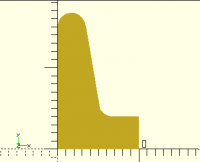
Using a slightly simplified version of your wall() module:

$fa = 12;
$fs = 0.5;

module wall(){
    b =  4;     // botten - tjocklek
    f =  6;     // Foten
    h = 15;     // Höjd
    t =  3.5;   // Top

    x = (b+(t/2) - (h - ( (-h / (f-t)) *t) )) / (-h / (f-t));

    polygon( points=[[0,0], [f,0], [t,h], [0,h]] );

    translate([t/2, h, 0])
    circle(d=t);

    square([10, b]);

    difference(){
        translate([x, b])
            square([t/2, t/2]);

        translate([x+(t/2), b+(t/2), 0])
            circle(d = t);  // Samma radie som toppen
    }
}

wall();

I would then do this:

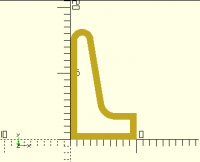
difference() {
    wall();
    offset(-1) wall();
}

to get this:

and then this:

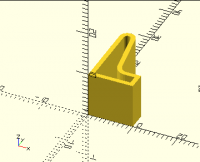
linear_extrude(height=10) {
    difference() {
        wall();
        offset(-1) wall();
    }
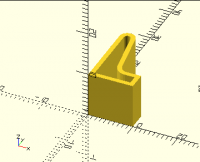
}

to get this:

Is it difficult to build a shape and make it follow a curve (eg Bezzier)

Yes and no.  The problem is that base OpenSCAD doesn't have the Bézier
function built-in.

I'd recommend that you look into a library like BOSL2, which has this
and much more.  See
https://github.com/revarbat/BOSL2/wiki

But that's a lot to swallow, and just for demonstration purposes here's
the Bézier function that I use (because I wrote it before I knew about
BOSL2):

// Bezier functions from https://www.thingiverse.com/thing:8443
// but that yielded either single points or a raft of triangles;
// this yields a vector of points that you can then concatenate
// with other pieces to form a single polygon.
// If we were really clever, I think it would be possible to
// automatically space the output points based on how linear
// the curve is at that point.  But right now I'm not that clever.
function BEZ03(u) = pow((1-u), 3);
function BEZ13(u) = 3*u*(pow((1-u),2));
function BEZ23(u) = 3*(pow(u,2))*(1-u);
function BEZ33(u) = pow(u,3);

function PointAlongBez4(p0, p1, p2, p3, u) = [
	BEZ03(u)*p0[0]+BEZ13(u)*p1[0]+BEZ23(u)*p2[0]+BEZ33(u)*p3[0],
	BEZ03(u)*p0[1]+BEZ13(u)*p1[1]+BEZ23(u)*p2[1]+BEZ33(u)*p3[1]];

// p0 - start point
// p1 - control point 1, line departs p0 headed this way
// p2 - control point 2, line arrives at p3 from this way
// p3 - end point
// segs - number of segments
function bez(p0, p1, p2, p3, segs) = [
    for (i = [0:segs]) PointAlongBez4(p0, p1, p2, p3, i/segs)
];

and here's a version of wall() that uses that:

module wall() {
    polygon(concat(
        [[0,0]],
        bez([0,15], [0,17], [3,17.6], [3.5,15], 10),
        bez([5.2,5], [5.4,4.5], [6,4], [7,4], 10),
        [[10,4],[10,0]]
    ));
}

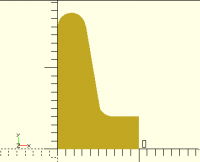
wall();

and produces this:

I derived the numbers by eyeball, first by just reading the coordinates
off of rendering yours, and then by flipping between the two and
tweaking the numbers to make the shapes match.

Note that Bézier curves cannot precisely create circles, though they can
come close.

Of course, you can take my wall() and do the same offset / difference /
linear_extrude processing that I did to yours.

If you're not familiar with the inputs to a Bézier curve function, go
play with Bézier curves in a drawing program.  In a typical drawing
program, a Bézier curve is defined as two endpoints (the first and
fourth arguments in my function) and two control points (the second and
third arguments).  The end points are pretty obvious; the control points
are usually shown as arrows that point at handles that you can move to
change the shape.  The control points control what direction the curve
leaves the first endpoint in, and what direction it arrives at the
second endpoint.
> Did I start right? (or is it better to start with a block and remove > unwanted material?) I'm not quite following the intent of the model, but here's a few general comments. First, there are often multiple ways to achieve a goal, and (mostly) none of them is right or wrong.  If you like to think of a rectangular box as having six sides, great - build it out of six appropriately-positioned cube()s.  If, on the other hand, you like to think of it as a large cube() less a smaller cube()... that's OK too. Second, be obsessive about indentation and braces.  I won't try to tell you exactly what style to use, but pick one and be consistent.  The one big thing is that anything inside braces should be indented further than the stuff outside the braces. Third, keep 2D figures on the XY plane, the Z=0 plane.  It's simpler that way.  Although they *look* like they are 3D, they aren't, and some things will not work if you move them off of the XY plane.  Once you extrude them into being 3D, feel free to move them wherever you want. In this particular case, I would think of drawing the shape (either the inner wall or the outer wall) as a 2D object, then using offset() to get the other wall, then differencing the two to get just the wall, then extruding it. Using a slightly simplified version of your wall() module: $fa = 12; $fs = 0.5; module wall(){ b = 4; // botten - tjocklek f = 6; // Foten h = 15; // Höjd t = 3.5; // Top x = (b+(t/2) - (h - ( (-h / (f-t)) *t) )) / (-h / (f-t)); polygon( points=[[0,0], [f,0], [t,h], [0,h]] ); translate([t/2, h, 0]) circle(d=t); square([10, b]); difference(){ translate([x, b]) square([t/2, t/2]); translate([x+(t/2), b+(t/2), 0]) circle(d = t); // Samma radie som toppen } } wall(); I would then do this: difference() { wall(); offset(-1) wall(); } to get this: and then this: linear_extrude(height=10) { difference() { wall(); offset(-1) wall(); } } to get this: > Is it difficult to build a shape and make it follow a curve (eg Bezzier) Yes and no.  The problem is that base OpenSCAD doesn't have the Bézier function built-in. I'd recommend that you look into a library like BOSL2, which has this and much more.  See https://github.com/revarbat/BOSL2/wiki But that's a lot to swallow, and just for demonstration purposes here's the Bézier function that I use (because I wrote it before I knew about BOSL2): // Bezier functions from https://www.thingiverse.com/thing:8443 // but that yielded either single points or a raft of triangles; // this yields a vector of points that you can then concatenate // with other pieces to form a single polygon. // If we were really clever, I think it would be possible to // automatically space the output points based on how linear // the curve is at that point. But right now I'm not that clever. function BEZ03(u) = pow((1-u), 3); function BEZ13(u) = 3*u*(pow((1-u),2)); function BEZ23(u) = 3*(pow(u,2))*(1-u); function BEZ33(u) = pow(u,3); function PointAlongBez4(p0, p1, p2, p3, u) = [ BEZ03(u)*p0[0]+BEZ13(u)*p1[0]+BEZ23(u)*p2[0]+BEZ33(u)*p3[0], BEZ03(u)*p0[1]+BEZ13(u)*p1[1]+BEZ23(u)*p2[1]+BEZ33(u)*p3[1]]; // p0 - start point // p1 - control point 1, line departs p0 headed this way // p2 - control point 2, line arrives at p3 from this way // p3 - end point // segs - number of segments function bez(p0, p1, p2, p3, segs) = [ for (i = [0:segs]) PointAlongBez4(p0, p1, p2, p3, i/segs) ]; and here's a version of wall() that uses that: module wall() { polygon(concat( [[0,0]], bez([0,15], [0,17], [3,17.6], [3.5,15], 10), bez([5.2,5], [5.4,4.5], [6,4], [7,4], 10), [[10,4],[10,0]] )); } wall(); and produces this: I derived the numbers by eyeball, first by just reading the coordinates off of rendering yours, and then by flipping between the two and tweaking the numbers to make the shapes match. Note that Bézier curves cannot precisely create circles, though they can come close. Of course, you can take my wall() and do the same offset / difference / linear_extrude processing that I did to yours. If you're not familiar with the inputs to a Bézier curve function, go play with Bézier curves in a drawing program.  In a typical drawing program, a Bézier curve is defined as two endpoints (the first and fourth arguments in my function) and two control points (the second and third arguments).  The end points are pretty obvious; the control points are usually shown as arrows that point at handles that you can move to change the shape.  The control points control what direction the curve leaves the first endpoint in, and what direction it arrives at the second endpoint.
Jan Öhman
Wed, Mar 23, 2022 12:07 PM

Thank you! (very well explained)
Will use several of these tips.
I'm not very good at explaining, but gained insight into several things.

1.) Indentation openSCAD
Is there any other editor / development tool suitable for openSCAD?
I use openSCAD's editor that came with the installation.
Fails to find if number of spaces that "TAB" contains. Now TAB gives 4 spaces.Can it be changed to 2 or 3 spaces?

  • . _ . - . _ . - . _ . - . _ . - . _ . - . _ . - . _ . - . _ . - . _ . - . _ . - . _ . - . _ . - . _ . - . _ . - . _ . - . _ . - . _ . - . _ . - 
  1. The contour of the object.a) Is there a tool / aid when sketching an outline of an object?
    (or is it Paper and Pen that still apply?)
    b) Do not 2D objects have a thickness?- . _ . - . _ . - . _ . - . _ . - . _ . - . _ . - . _ . - . _ . - . _ . - . _ . - . _ . - . _ . - . _ . - . _ . - . _ . - . _ . - . _ . - . _ . - 

3) Libraries - openSCAD
Tried to do the tutorials by openSCAD. When I got to chapter 5 (and onwards)OpenSCAD Tutorial/Chapter 5 - Wikibooks, open books for an open world

|
|
|
|  |  |

|

|
|
|  |
OpenSCAD Tutorial/Chapter 5 - Wikibooks, open books for an open world

|

|

|

I managed to get some examples to work, but others did not.(An example that does not work for me)use <vehicle_parts.scad>$fa = 1;
$fs = 0.4;
module axle_wheelset(wheel_radius=10, wheel_width=6, track=35, radius=2) {
translate([0,track/2,0])
simple_wheel(wheel_radius=wheel_radius, wheel_width=wheel_width);
axle(track=track, radius=radius);
translate([0,-track/2,0])
simple_wheel(wheel_radius=wheel_radius, wheel_width=wheel_width);
}
axle_wheelset();(no idea why - right now)

wao - what an awesome library you tipped aboutHome · revarbat/BOSL2 Wiki

|
|
|
|  |  |

|

|
|
|  |
Home · revarbat/BOSL2 Wiki

The Belfry OpenScad Library, v2.0. An OpenSCAD library of shapes, masks, and manipulators to make working with ...
|

|

|

Will take a closer look at it when I understand how it can be used.

  • . _ . - . _ . - . _ . - . _ . - . _ . - . _ . - . _ . - . _ . - . _ . - . _ . - . _ . - . _ . - . _ . - . _ . - . _ . - . _ . - . _ . - . _ . - 

4) Construction methodIt may be a good idea, for me, to start with the base plate and its structure and rounded corners.
It was very nice to just get the contours on the wall. (but when printing you probably want filled walls :-))
Is it possible to print flat prints of an object on a 2D printer?

5) A curved wallIs it difficult to place "walls" around a 2D plate?(the dimensions may not fit the previous wall - but the structure is correct)
Assume a base plate with- a corner 90 degrees and- three rounded corners with one radius each and- in the middle an "offset"like this 2D modell .:

$fn = 100;  //Upplösning
// Variabler bottenradCorn1 = 10;  // Radie1radCorn2 = 20;  // Radie2radCorn3 =  5;  // Radie3offset = 5; // offsetbaseX = 120;baseY = 50;
basePlate();
module basePlate();{   hull(){    square(10);    translate([baseX, radCorn1, 0]) circle(r=radCorn1);                            // Corner1    translate([baseX-abs(radCorn1-radCorn2), baseY, 0]) circle(r=radCorn2);       // Corner2    translate([baseX/2, baseY+offset, 0]) circle(r=radCorn2);                     // Offset    translate([radCorn3, baseY+radCorn2+offset-radCorn3, 0]) circle(r=radCorn3);  // Corner3}}

Den onsdag 23 mars 2022 04:43:57 CET, Jordan Brown <openscad@jordan.maileater.net> skrev:  

Did I start right? (or is it better to start with a block and remove unwanted material?)

I'm not quite following the intent of the model, but here's a few general comments.

First, there are often multiple ways to achieve a goal, and (mostly) none of them is right or wrong.  If you like to think of a rectangular box as having six sides, great - build it out of six appropriately-positioned cube()s.  If, on the other hand, you like to think of it as a large cube() less a smaller cube()... that's OK too.

Second, be obsessive about indentation and braces.  I won't try to tell you exactly what style to use, but pick one and be consistent.  The one big thing is that anything inside braces should be indented further than the stuff outside the braces.

Third, keep 2D figures on the XY plane, the Z=0 plane.  It's simpler that way.  Although they look like they are 3D, they aren't, and some things will not work if you move them off of the XY plane.  Once you extrude them into being 3D, feel free to move them wherever you want.

In this particular case, I would think of drawing the shape (either the inner wall or the outer wall) as a 2D object, then using offset() to get the other wall, then differencing the two to get just the wall, then extruding it.

Using a slightly simplified version of your wall() module:

$fa = 12;
$fs = 0.5;

module wall(){
b =  4;    // botten - tjocklek
f =  6;    // Foten
h = 15;    // Höjd
t =  3.5;  // Top

x = (b+(t/2) - (h - ( (-h / (f-t)) *t) )) / (-h / (f-t));

polygon( points=[[0,0], [f,0], [t,h], [0,h]] );

translate([t/2, h, 0])
circle(d=t);

square([10, b]);

difference(){
    translate([x, b])
        square([t/2, t/2]);

    translate([x+(t/2), b+(t/2), 0])
        circle(d = t);  // Samma radie som toppen
}

}

wall();

I would then do this:

difference() {
wall();
offset(-1) wall();
}

to get this:

and then this:

linear_extrude(height=10) {
difference() {
wall();
offset(-1) wall();
}
}

to get this:

Is it difficult to build a shape and make it follow a curve (eg Bezzier)

Yes and no.  The problem is that base OpenSCAD doesn't have the Bézier function built-in.

I'd recommend that you look into a library like BOSL2, which has this and much more.  See
https://github.com/revarbat/BOSL2/wiki

But that's a lot to swallow, and just for demonstration purposes here's the Bézier function that I use (because I wrote it before I knew about BOSL2):

// Bezier functions from https://www.thingiverse.com/thing:8443
// but that yielded either single points or a raft of triangles;
// this yields a vector of points that you can then concatenate
// with other pieces to form a single polygon.
// If we were really clever, I think it would be possible to
// automatically space the output points based on how linear
// the curve is at that point.  But right now I'm not that clever.
function BEZ03(u) = pow((1-u), 3);
function BEZ13(u) = 3u(pow((1-u),2));
function BEZ23(u) = 3*(pow(u,2))*(1-u);
function BEZ33(u) = pow(u,3);

function PointAlongBez4(p0, p1, p2, p3, u) = [
BEZ03(u)*p0[0]+BEZ13(u)*p1[0]+BEZ23(u)*p2[0]+BEZ33(u)*p3[0],
BEZ03(u)*p0[1]+BEZ13(u)*p1[1]+BEZ23(u)*p2[1]+BEZ33(u)*p3[1]];

// p0 - start point
// p1 - control point 1, line departs p0 headed this way
// p2 - control point 2, line arrives at p3 from this way
// p3 - end point
// segs - number of segments
function bez(p0, p1, p2, p3, segs) = [
for (i = [0:segs]) PointAlongBez4(p0, p1, p2, p3, i/segs)
];

and here's a version of wall() that uses that:

module wall() {
polygon(concat(
[[0,0]],
bez([0,15], [0,17], [3,17.6], [3.5,15], 10),
bez([5.2,5], [5.4,4.5], [6,4], [7,4], 10),
[[10,4],[10,0]]
));
}

wall();

and produces this:

I derived the numbers by eyeball, first by just reading the coordinates off of rendering yours, and then by flipping between the two and tweaking the numbers to make the shapes match.

Note that Bézier curves cannot precisely create circles, though they can come close.

Of course, you can take my wall() and do the same offset / difference / linear_extrude processing that I did to yours.

If you're not familiar with the inputs to a Bézier curve function, go play with Bézier curves in a drawing program.  In a typical drawing program, a Bézier curve is defined as two endpoints (the first and fourth arguments in my function) and two control points (the second and third arguments).  The end points are pretty obvious; the control points are usually shown as arrows that point at handles that you can move to change the shape.  The control points control what direction the curve leaves the first endpoint in, and what direction it arrives at the second endpoint.


OpenSCAD mailing list
To unsubscribe send an email to discuss-leave@lists.openscad.org
Thank you! (very well explained) Will use several of these tips. I'm not very good at explaining, but gained insight into several things. 1.) Indentation openSCAD Is there any other editor / development tool suitable for openSCAD? I use openSCAD's editor that came with the installation. Fails to find if number of spaces that "TAB" contains. Now TAB gives 4 spaces.Can it be changed to 2 or 3 spaces? - . _ . - . _ . - . _ . - . _ . - . _ . - . _ . - . _ . - . _ . - . _ . - . _ . - . _ . - . _ . - . _ . - . _ . - . _ . - . _ . - . _ . - . _ . -  2) The contour of the object.a) Is there a tool / aid when sketching an outline of an object? (or is it Paper and Pen that still apply?) b) Do not 2D objects have a thickness?- . _ . - . _ . - . _ . - . _ . - . _ . - . _ . - . _ . - . _ . - . _ . - . _ . - . _ . - . _ . - . _ . - . _ . - . _ . - . _ . - . _ . - . _ . -  3) Libraries - openSCAD Tried to do the tutorials by openSCAD. When I got to chapter 5 (and onwards)OpenSCAD Tutorial/Chapter 5 - Wikibooks, open books for an open world | | | | | | | | | | | OpenSCAD Tutorial/Chapter 5 - Wikibooks, open books for an open world | | | I managed to get some examples to work, but others did not.(An example that does not work for me)use <vehicle_parts.scad>$fa = 1; $fs = 0.4; module axle_wheelset(wheel_radius=10, wheel_width=6, track=35, radius=2) { translate([0,track/2,0]) simple_wheel(wheel_radius=wheel_radius, wheel_width=wheel_width); axle(track=track, radius=radius); translate([0,-track/2,0]) simple_wheel(wheel_radius=wheel_radius, wheel_width=wheel_width); } axle_wheelset();(no idea why - right now) wao - what an awesome library you tipped aboutHome · revarbat/BOSL2 Wiki | | | | | | | | | | | Home · revarbat/BOSL2 Wiki The Belfry OpenScad Library, v2.0. An OpenSCAD library of shapes, masks, and manipulators to make working with ... | | | Will take a closer look at it when I understand how it can be used. - . _ . - . _ . - . _ . - . _ . - . _ . - . _ . - . _ . - . _ . - . _ . - . _ . - . _ . - . _ . - . _ . - . _ . - . _ . - . _ . - . _ . - . _ . -  4) Construction methodIt may be a good idea, for me, to start with the base plate and its structure and rounded corners. It was very nice to just get the contours on the wall. (but when printing you probably want filled walls :-)) Is it possible to print flat prints of an object on a 2D printer? 5) A curved wallIs it difficult to place "walls" around a 2D plate?(the dimensions may not fit the previous wall - but the structure is correct) Assume a base plate with- a corner 90 degrees and- three rounded corners with one radius each and- in the middle an "offset"like this 2D modell .: $fn = 100;  //Upplösning // Variabler bottenradCorn1 = 10;  // Radie1radCorn2 = 20;  // Radie2radCorn3 =  5;  // Radie3offset = 5; // offsetbaseX = 120;baseY = 50; basePlate(); module basePlate();{   hull(){    square(10);    translate([baseX, radCorn1, 0]) circle(r=radCorn1);                            // Corner1    translate([baseX-abs(radCorn1-radCorn2), baseY, 0]) circle(r=radCorn2);       // Corner2    translate([baseX/2, baseY+offset, 0]) circle(r=radCorn2);                     // Offset    translate([radCorn3, baseY+radCorn2+offset-radCorn3, 0]) circle(r=radCorn3);  // Corner3}} Den onsdag 23 mars 2022 04:43:57 CET, Jordan Brown <openscad@jordan.maileater.net> skrev: Did I start right? (or is it better to start with a block and remove unwanted material?) I'm not quite following the intent of the model, but here's a few general comments. First, there are often multiple ways to achieve a goal, and (mostly) none of them is right or wrong.  If you like to think of a rectangular box as having six sides, great - build it out of six appropriately-positioned cube()s.  If, on the other hand, you like to think of it as a large cube() less a smaller cube()... that's OK too. Second, be obsessive about indentation and braces.  I won't try to tell you exactly what style to use, but pick one and be consistent.  The one big thing is that anything inside braces should be indented further than the stuff outside the braces. Third, keep 2D figures on the XY plane, the Z=0 plane.  It's simpler that way.  Although they *look* like they are 3D, they aren't, and some things will not work if you move them off of the XY plane.  Once you extrude them into being 3D, feel free to move them wherever you want. In this particular case, I would think of drawing the shape (either the inner wall or the outer wall) as a 2D object, then using offset() to get the other wall, then differencing the two to get just the wall, then extruding it. Using a slightly simplified version of your wall() module: $fa = 12; $fs = 0.5; module wall(){ b = 4; // botten - tjocklek f = 6; // Foten h = 15; // Höjd t = 3.5; // Top x = (b+(t/2) - (h - ( (-h / (f-t)) *t) )) / (-h / (f-t)); polygon( points=[[0,0], [f,0], [t,h], [0,h]] ); translate([t/2, h, 0]) circle(d=t); square([10, b]); difference(){ translate([x, b]) square([t/2, t/2]); translate([x+(t/2), b+(t/2), 0]) circle(d = t); // Samma radie som toppen } } wall(); I would then do this: difference() { wall(); offset(-1) wall(); } to get this: and then this: linear_extrude(height=10) { difference() { wall(); offset(-1) wall(); } } to get this: Is it difficult to build a shape and make it follow a curve (eg Bezzier) Yes and no.  The problem is that base OpenSCAD doesn't have the Bézier function built-in. I'd recommend that you look into a library like BOSL2, which has this and much more.  See https://github.com/revarbat/BOSL2/wiki But that's a lot to swallow, and just for demonstration purposes here's the Bézier function that I use (because I wrote it before I knew about BOSL2): // Bezier functions from https://www.thingiverse.com/thing:8443 // but that yielded either single points or a raft of triangles; // this yields a vector of points that you can then concatenate // with other pieces to form a single polygon. // If we were really clever, I think it would be possible to // automatically space the output points based on how linear // the curve is at that point. But right now I'm not that clever. function BEZ03(u) = pow((1-u), 3); function BEZ13(u) = 3*u*(pow((1-u),2)); function BEZ23(u) = 3*(pow(u,2))*(1-u); function BEZ33(u) = pow(u,3); function PointAlongBez4(p0, p1, p2, p3, u) = [ BEZ03(u)*p0[0]+BEZ13(u)*p1[0]+BEZ23(u)*p2[0]+BEZ33(u)*p3[0], BEZ03(u)*p0[1]+BEZ13(u)*p1[1]+BEZ23(u)*p2[1]+BEZ33(u)*p3[1]]; // p0 - start point // p1 - control point 1, line departs p0 headed this way // p2 - control point 2, line arrives at p3 from this way // p3 - end point // segs - number of segments function bez(p0, p1, p2, p3, segs) = [ for (i = [0:segs]) PointAlongBez4(p0, p1, p2, p3, i/segs) ]; and here's a version of wall() that uses that: module wall() { polygon(concat( [[0,0]], bez([0,15], [0,17], [3,17.6], [3.5,15], 10), bez([5.2,5], [5.4,4.5], [6,4], [7,4], 10), [[10,4],[10,0]] )); } wall(); and produces this: I derived the numbers by eyeball, first by just reading the coordinates off of rendering yours, and then by flipping between the two and tweaking the numbers to make the shapes match. Note that Bézier curves cannot precisely create circles, though they can come close. Of course, you can take my wall() and do the same offset / difference / linear_extrude processing that I did to yours. If you're not familiar with the inputs to a Bézier curve function, go play with Bézier curves in a drawing program.  In a typical drawing program, a Bézier curve is defined as two endpoints (the first and fourth arguments in my function) and two control points (the second and third arguments).  The end points are pretty obvious; the control points are usually shown as arrows that point at handles that you can move to change the shape.  The control points control what direction the curve leaves the first endpoint in, and what direction it arrives at the second endpoint. _______________________________________________ OpenSCAD mailing list To unsubscribe send an email to discuss-leave@lists.openscad.org