

discuss@lists.openscad.org

OpenSCAD general discussion Mailing-list

View all threads

Need help creating a hole in a solid

TT
Timur Tabi
Sun, Jun 28, 2020 2:48 PM

I'm new to OpenSCAD so I've just been learning by following examples.
I've attached a scad file that demonstrates a problem I'm having.

I'm trying to create a round indent/hole in the top corner of the box.
The intent is, after this box is 3d-printed, to glue a small disc magnet
into the hole.

However, when I view the model in the 3d viewer, it's obvious that the
prism into which the hole is inserted is not solid.  Am I creating the
polyhedron wrong?  Should I be using a union somewhere?

I'm new to OpenSCAD so I've just been learning by following examples. I've attached a scad file that demonstrates a problem I'm having. I'm trying to create a round indent/hole in the top corner of the box. The intent is, after this box is 3d-printed, to glue a small disc magnet into the hole. However, when I view the model in the 3d viewer, it's obvious that the prism into which the hole is inserted is not solid. Am I creating the polyhedron wrong? Should I be using a union somewhere?
D
dpa
Sun, Jun 28, 2020 3:22 PM

I'm not a professional, I never got into 'polyhedroning', but polygon is
easy and works in this case pretty well (see attachment)

Am So., 28. Juni 2020 um 16:53 Uhr schrieb Timur Tabi timur@tabi.org:

I'm new to OpenSCAD so I've just been learning by following examples.
I've attached a scad file that demonstrates a problem I'm having.

I'm trying to create a round indent/hole in the top corner of the box.
The intent is, after this box is 3d-printed, to glue a small disc magnet
into the hole.

However, when I view the model in the 3d viewer, it's obvious that the
prism into which the hole is inserted is not solid.  Am I creating the
polyhedron wrong?  Should I be using a union somewhere?


OpenSCAD mailing list
Discuss@lists.openscad.org
http://lists.openscad.org/mailman/listinfo/discuss_lists.openscad.org

I'm not a professional, I never got into 'polyhedroning', but polygon is easy and works in this case pretty well (see attachment) Am So., 28. Juni 2020 um 16:53 Uhr schrieb Timur Tabi <timur@tabi.org>: > I'm new to OpenSCAD so I've just been learning by following examples. > I've attached a scad file that demonstrates a problem I'm having. > > I'm trying to create a round indent/hole in the top corner of the box. > The intent is, after this box is 3d-printed, to glue a small disc magnet > into the hole. > > However, when I view the model in the 3d viewer, it's obvious that the > prism into which the hole is inserted is not solid. Am I creating the > polyhedron wrong? Should I be using a union somewhere? > _______________________________________________ > OpenSCAD mailing list > Discuss@lists.openscad.org > http://lists.openscad.org/mailman/listinfo/discuss_lists.openscad.org >
JW
Jan Wieck
Sun, Jun 28, 2020 3:56 PM

Hi Timur,

yes, you are creating the polyhedron wrong. The faces need to be created as
"lists of points as looked at from the outside in clockwise order". Try:

        faces = [
             [1, 4, 5, 2],
             [3, 5, 4],
             [0, 1, 2],
             [0, 3, 4, 1],
             [0, 2, 5, 3]
         ]);

In addition you are dealing with a problem that CSG had forever. That is
"coincident surfaces". I ran into it in the early 90s with rayshade and it
hasn't improved since. For example if you subtract one cube from a larger
cube (to make a cube shaped cup), the inner one needs to be a tiny bit
taller, or stick out. Otherwise the algorithms have trouble deciding if a
point is inside the final object or not.

Hope this helps, Jan

On Sun, Jun 28, 2020 at 10:48 AM Timur Tabi timur@tabi.org wrote:

I'm new to OpenSCAD so I've just been learning by following examples.
I've attached a scad file that demonstrates a problem I'm having.

I'm trying to create a round indent/hole in the top corner of the box.
The intent is, after this box is 3d-printed, to glue a small disc magnet
into the hole.

However, when I view the model in the 3d viewer, it's obvious that the
prism into which the hole is inserted is not solid.  Am I creating the
polyhedron wrong?  Should I be using a union somewhere?


OpenSCAD mailing list
Discuss@lists.openscad.org
http://lists.openscad.org/mailman/listinfo/discuss_lists.openscad.org

--
Jan Wieck
Principal Database Engineer

Hi Timur, yes, you are creating the polyhedron wrong. The faces need to be created as "lists of points as looked at from the outside in clockwise order". Try: faces = [ > [1, 4, 5, 2], > [3, 5, 4], > [0, 1, 2], > [0, 3, 4, 1], > [0, 2, 5, 3] > ]); In addition you are dealing with a problem that CSG had forever. That is "coincident surfaces". I ran into it in the early 90s with rayshade and it hasn't improved since. For example if you subtract one cube from a larger cube (to make a cube shaped cup), the inner one needs to be a tiny bit taller, or stick out. Otherwise the algorithms have trouble deciding if a point is inside the final object or not. Hope this helps, Jan On Sun, Jun 28, 2020 at 10:48 AM Timur Tabi <timur@tabi.org> wrote: > I'm new to OpenSCAD so I've just been learning by following examples. > I've attached a scad file that demonstrates a problem I'm having. > > I'm trying to create a round indent/hole in the top corner of the box. > The intent is, after this box is 3d-printed, to glue a small disc magnet > into the hole. > > However, when I view the model in the 3d viewer, it's obvious that the > prism into which the hole is inserted is not solid. Am I creating the > polyhedron wrong? Should I be using a union somewhere? > _______________________________________________ > OpenSCAD mailing list > Discuss@lists.openscad.org > http://lists.openscad.org/mailman/listinfo/discuss_lists.openscad.org > -- Jan Wieck Principal Database Engineer
T
trygve@totallytrygve.com
Sun, Jun 28, 2020 5:49 PM

On 28 June 2020 at 17:56:28 +02:00, Jan Wieck jan@wi3ck.info wrote:

In addition you are dealing with a problem that CSG had forever. That is "coincident surfaces". I ran into it in the early 90s with rayshade and it hasn't improved since. For example if you subtract one cube from a larger cube (to make a cube shaped cup), the inner one needs to be a tiny bit taller, or stick out. Otherwise the algorithms have trouble deciding if a point is inside the final object or not.

It's not an 'issue' with OpenSCAD, it's an issue with the code.

Imagine this code:

difference()
{cylinder(r=10, h=100);
cylinder(r=8, h=100];
}

Considering that a lot of the parameters in our code is derived using mathematical operations, OpenSCAD has no way of knowing if you intended to make a 100mm long cylinder with 2mm thick walls, if it should have incredibly thin endwalls, or possibly one endwall.

Remember that a wall that's 0.0001mm is still a valid wall, even if most CNC can't reproduce it.

The way to secure the correct operation is to always offset the 'cutting' part of the code;

translate([0,0,-1])
cylinder(r=8, h=102);

Change h=102 to 100 if you want to experiment and learn.

Also, in this example, try commenting out the difference command by writing '//' in front of it.

I often do this when doing such operations so that I can verify that all the 'cutters' are correctly placed.

Incidentally, when you get rid of these zero walls you'll find that renders and even previews run much faster.
;-)

Trygve

On 28 June 2020 at 17:56:28 +02:00, Jan Wieck <jan@wi3ck.info> wrote: > > In addition you are dealing with a problem that CSG had forever. That is "coincident surfaces". I ran into it in the early 90s with rayshade and it hasn't improved since. For example if you subtract one cube from a larger cube (to make a cube shaped cup), the inner one needs to be a tiny bit taller, or stick out. Otherwise the algorithms have trouble deciding if a point is inside the final object or not. > > It's not an 'issue' with OpenSCAD, it's an issue with the code. Imagine this code: difference() {cylinder(r=10, h=100); cylinder(r=8, h=100]; } Considering that a lot of the parameters in our code is derived using mathematical operations, OpenSCAD has no way of knowing if you intended to make a 100mm long cylinder with 2mm thick walls, if it should have incredibly thin endwalls, or possibly one endwall. Remember that a wall that's 0.0001mm is still a valid wall, even if most CNC can't reproduce it. The way to secure the correct operation is to always offset the 'cutting' part of the code; translate([0,0,-1]) cylinder(r=8, h=102); Change h=102 to 100 if you want to experiment and learn. Also, in this example, try commenting out the difference command by writing '//' in front of it. I often do this when doing such operations so that I can verify that all the 'cutters' are correctly placed. Incidentally, when you get rid of these zero walls you'll find that renders and even previews run much faster. ;-) Trygve
A
adrianv
Sun, Jun 28, 2020 6:05 PM

In the code example you supply:

difference()
{cylinder(r=10, h=100);
cylinder(r=8, h=100];
}

We have two cylinders that sit on the xy plane that have the same length.
There is no .0001 offset, or difference in length.  User intent is
completely clear: this unambiguously describes a tube without end walls of
any kind.  The fact that it doesn't (or may not) actually work that way is
an artifact.  If you work in floating point you can't expect things like
this to work, because equality testing is not well-defined.  To make this
work reliably, in fact, you'd need to track exact representations of solids
even after rotations (which are transcendental, and hard to represent
exactly in calculation).  If you think OpenSCAD is slow now this would be a
lot worse.

Gadgetman! wrote

On 28 June 2020 at 17:56:28 +02:00, Jan Wieck <

jan@

> wrote:

In addition you are dealing with a problem that CSG had forever. That is
"coincident surfaces". I ran into it in the early 90s with rayshade and
it hasn't improved since. For example if you subtract one cube from a
larger cube (to make a cube shaped cup), the inner one needs to be a tiny
bit taller, or stick out. Otherwise the algorithms have trouble deciding
if a point is inside the final object or not.

It's not an 'issue' with OpenSCAD, it's an issue with the code.

Imagine this code:

difference()
{cylinder(r=10, h=100);
cylinder(r=8, h=100];
}

Considering that a lot of the parameters in our code is derived using
mathematical operations, OpenSCAD has no way of knowing if you intended to
make a 100mm long cylinder with 2mm thick walls, if it should have
incredibly thin endwalls, or possibly one endwall.

Remember that a wall that's 0.0001mm is still a valid wall, even if most
CNC can't reproduce it.

In the code example you supply: difference() {cylinder(r=10, h=100); cylinder(r=8, h=100]; } We have two cylinders that sit on the xy plane that have the same length. There is no .0001 offset, or difference in length. User intent is completely clear: this unambiguously describes a tube without end walls of any kind. The fact that it doesn't (or may not) actually work that way is an artifact. If you work in floating point you can't expect things like this to work, because equality testing is not well-defined. To make this work reliably, in fact, you'd need to track exact representations of solids even after rotations (which are transcendental, and hard to represent exactly in calculation). If you think OpenSCAD is slow now this would be a lot worse. Gadgetman! wrote > On 28 June 2020 at 17:56:28 +02:00, Jan Wieck &lt; > jan@ > &gt; wrote: > >> >> In addition you are dealing with a problem that CSG had forever. That is >> "coincident surfaces". I ran into it in the early 90s with rayshade and >> it hasn't improved since. For example if you subtract one cube from a >> larger cube (to make a cube shaped cup), the inner one needs to be a tiny >> bit taller, or stick out. Otherwise the algorithms have trouble deciding >> if a point is inside the final object or not. >> >> > It's not an 'issue' with OpenSCAD, it's an issue with the code. > > Imagine this code: > > difference() > {cylinder(r=10, h=100); > cylinder(r=8, h=100]; > } > > Considering that a lot of the parameters in our code is derived using > mathematical operations, OpenSCAD has no way of knowing if you intended to > make a 100mm long cylinder with 2mm thick walls, if it should have > incredibly thin endwalls, or possibly one endwall. > > Remember that a wall that's 0.0001mm is still a valid wall, even if most > CNC can't reproduce it. -- Sent from: http://forum.openscad.org/
JB
Jordan Brown
Sun, Jun 28, 2020 6:28 PM

On 6/28/2020 10:49 AM, trygve@totallytrygve.com wrote:

Also, in this example, try commenting out the difference command by
writing '//' in front of it. 

I often do this when doing such operations so that I can verify that
all the 'cutters' are correctly placed. 

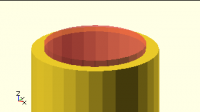
Use the # modifier to easily show these otherwise invisible "cutters". 
(And intersectors, and just to highlight some particular piece.)

difference() {
h = 100;
cylinder(r=10, h=h);
#translate([0,0,-1]) cylinder(r=8, h=h+2);
}

Another trick for through holes is to observe that the "cutter" doesn't
have to be any particular length, as long as it's longer than the thing
it's cutting.  With the simple +1/+2 style you have to align the cutter
appropriately, but if you just make the cutter be 3x as long as the
thing being cut, and center it, it will always be long enough - no
matter whether it's aligned at one end, the other, or the center.

difference() {
h = 100;
cylinder(r=10, h=h);
#cylinder(r=8, h=h*3, center=true);
}
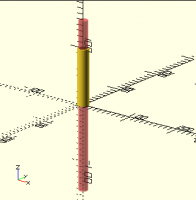
On 6/28/2020 10:49 AM, trygve@totallytrygve.com wrote: > Also, in this example, try commenting out the difference command by > writing '//' in front of it.  > > I often do this when doing such operations so that I can verify that > all the 'cutters' are correctly placed.  > Use the # modifier to easily show these otherwise invisible "cutters".  (And intersectors, and just to highlight some particular piece.) difference() { h = 100; cylinder(r=10, h=h); #translate([0,0,-1]) cylinder(r=8, h=h+2); } Another trick for through holes is to observe that the "cutter" doesn't have to be any particular length, as long as it's longer than the thing it's cutting.  With the simple +1/+2 style you have to align the cutter appropriately, but if you just make the cutter be 3x as long as the thing being cut, and center it, it will always be long enough - no matter whether it's aligned at one end, the other, or the center. difference() { h = 100; cylinder(r=10, h=h); #cylinder(r=8, h=h*3, center=true); }
NH
nop head
Sun, Jun 28, 2020 7:05 PM

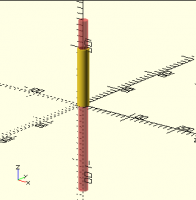
CGAL will handle exact differences fine as long as they are exact, which
the height is. F6 gives this.

[image: image.png]

What doesn't work is the OpenCSG preview for F5.

[image: image.png]

That is simply because the Z buffer doesn't work when the depths are equal.
It flickers because the polygon fills pixels have rounding errors when the
plane is not flat. I.e. when it draws two different inclined  coincident
planes the pixels are not guaranteed to have exactly the same z coordinate.
It needs the inner cylinder to be a bit longer to ensure all its pixels win
the fight with the outer cylinders pixels in the Z buffer. I.e. they are
all nearer the camera when the Z value is converted to the Z buffer
resolution.

On Sun, 28 Jun 2020 at 19:29, Jordan Brown openscad@jordan.maileater.net
wrote:

On 6/28/2020 10:49 AM, trygve@totallytrygve.com wrote:

Also, in this example, try commenting out the difference command by
writing '//' in front of it.

I often do this when doing such operations so that I can verify that all
the 'cutters' are correctly placed.

Use the # modifier to easily show these otherwise invisible "cutters".
(And intersectors, and just to highlight some particular piece.)

difference() {
h = 100;
cylinder(r=10, h=h);
#translate([0,0,-1]) cylinder(r=8, h=h+2);
}

Another trick for through holes is to observe that the "cutter" doesn't
have to be any particular length, as long as it's longer than the thing
it's cutting.  With the simple +1/+2 style you have to align the cutter
appropriately, but if you just make the cutter be 3x as long as the thing
being cut, and center it, it will always be long enough - no matter whether
it's aligned at one end, the other, or the center.

difference() {
h = 100;
cylinder(r=10, h=h);
#cylinder(r=8, h=h*3, center=true);
}


OpenSCAD mailing list
Discuss@lists.openscad.org
http://lists.openscad.org/mailman/listinfo/discuss_lists.openscad.org
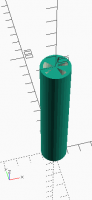
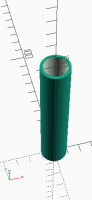
CGAL will handle exact differences fine as long as they are exact, which the height is. F6 gives this. [image: image.png] What doesn't work is the OpenCSG preview for F5. [image: image.png] That is simply because the Z buffer doesn't work when the depths are equal. It flickers because the polygon fills pixels have rounding errors when the plane is not flat. I.e. when it draws two different inclined coincident planes the pixels are not guaranteed to have exactly the same z coordinate. It needs the inner cylinder to be a bit longer to ensure all its pixels win the fight with the outer cylinders pixels in the Z buffer. I.e. they are all nearer the camera when the Z value is converted to the Z buffer resolution. On Sun, 28 Jun 2020 at 19:29, Jordan Brown <openscad@jordan.maileater.net> wrote: > On 6/28/2020 10:49 AM, trygve@totallytrygve.com wrote: > > Also, in this example, try commenting out the difference command by > writing '//' in front of it. > > I often do this when doing such operations so that I can verify that all > the 'cutters' are correctly placed. > > > Use the # modifier to easily show these otherwise invisible "cutters". > (And intersectors, and just to highlight some particular piece.) > > difference() { > h = 100; > cylinder(r=10, h=h); > #translate([0,0,-1]) cylinder(r=8, h=h+2); > } > > > > Another trick for through holes is to observe that the "cutter" doesn't > have to be any particular length, as long as it's longer than the thing > it's cutting. With the simple +1/+2 style you have to align the cutter > appropriately, but if you just make the cutter be 3x as long as the thing > being cut, and center it, it will always be long enough - no matter whether > it's aligned at one end, the other, or the center. > > difference() { > h = 100; > cylinder(r=10, h=h); > #cylinder(r=8, h=h*3, center=true); > } > > > _______________________________________________ > OpenSCAD mailing list > Discuss@lists.openscad.org > http://lists.openscad.org/mailman/listinfo/discuss_lists.openscad.org >
JW
Jan Wieck
Sun, Jun 28, 2020 9:25 PM

On Sun, Jun 28, 2020 at 1:50 PM trygve@totallytrygve.com wrote:

On 28 June 2020 at 17:56:28 +02:00, Jan Wieck jan@wi3ck.info wrote:

In addition you are dealing with a problem that CSG had forever. That is
"coincident surfaces". I ran into it in the early 90s with rayshade and it
hasn't improved since. For example if you subtract one cube from a larger
cube (to make a cube shaped cup), the inner one needs to be a tiny bit
taller, or stick out. Otherwise the algorithms have trouble deciding if a
point is inside the final object or not.

It's not an 'issue' with OpenSCAD, it's an issue with the code.

I didn't say it is an issue with OpenSCAD. I said it is an issue with CSG.
But you are right, even that is inaccurate because it is an issue with
rounding errors inherent in floating point representation of scalar values
that CSG is suffering from. The problems aren't new as this rayshade
related post from 1994 shows:
https://graphics.stanford.edu/~cek/rayshade/doc/guide/subsection2_7_4_2.html

Cheers, Jan

Imagine this code:

difference()
{cylinder(r=10, h=100);
cylinder(r=8, h=100];
}

Considering that a lot of the parameters in our code is derived using
mathematical operations, OpenSCAD has no way of knowing if you intended to
make a 100mm long cylinder with 2mm thick walls, if it should have
incredibly thin endwalls, or possibly one endwall.

Remember that a wall that's 0.0001mm is still a valid wall, even if most
CNC can't reproduce it.

The way to secure the correct operation is to always offset the 'cutting'
part of the code;

translate([0,0,-1])
cylinder(r=8, h=102);

Change h=102 to 100 if you want to experiment and learn.

Also, in this example, try commenting out the difference command by
writing '//' in front of it.

I often do this when doing such operations so that I can verify that all
the 'cutters' are correctly placed.

Incidentally, when you get rid of these zero walls you'll find that
renders and even previews run much faster.

;-)
Trygve


OpenSCAD mailing list
Discuss@lists.openscad.org
http://lists.openscad.org/mailman/listinfo/discuss_lists.openscad.org
--
Jan Wieck
Principal Database Engineer

On Sun, Jun 28, 2020 at 1:50 PM <trygve@totallytrygve.com> wrote: > > > On 28 June 2020 at 17:56:28 +02:00, Jan Wieck <jan@wi3ck.info> wrote: > > > In addition you are dealing with a problem that CSG had forever. That is > "coincident surfaces". I ran into it in the early 90s with rayshade and it > hasn't improved since. For example if you subtract one cube from a larger > cube (to make a cube shaped cup), the inner one needs to be a tiny bit > taller, or stick out. Otherwise the algorithms have trouble deciding if a > point is inside the final object or not. > > > It's not an 'issue' with OpenSCAD, it's an issue with the code. > I didn't say it is an issue with OpenSCAD. I said it is an issue with CSG. But you are right, even that is inaccurate because it is an issue with rounding errors inherent in floating point representation of scalar values that CSG is suffering from. The problems aren't new as this rayshade related post from 1994 shows: https://graphics.stanford.edu/~cek/rayshade/doc/guide/subsection2_7_4_2.html Cheers, Jan > > Imagine this code: > > difference() > {cylinder(r=10, h=100); > cylinder(r=8, h=100]; > } > > Considering that a lot of the parameters in our code is derived using > mathematical operations, OpenSCAD has no way of knowing if you intended to > make a 100mm long cylinder with 2mm thick walls, if it should have > incredibly thin endwalls, or possibly one endwall. > > Remember that a wall that's 0.0001mm is still a valid wall, even if most > CNC can't reproduce it. > > The way to secure the correct operation is to always offset the 'cutting' > part of the code; > > translate([0,0,-1]) > cylinder(r=8, h=102); > > Change h=102 to 100 if you want to experiment and learn. > > Also, in this example, try commenting out the difference command by > writing '//' in front of it. > > I often do this when doing such operations so that I can verify that all > the 'cutters' are correctly placed. > > Incidentally, when you get rid of these zero walls you'll find that > renders and even previews run much faster. > > ;-) > Trygve > _______________________________________________ > OpenSCAD mailing list > Discuss@lists.openscad.org > http://lists.openscad.org/mailman/listinfo/discuss_lists.openscad.org > -- Jan Wieck Principal Database Engineer
RP
Ronaldo Persiano
Tue, Jun 30, 2020 9:24 PM

nop head nop.head@gmail.com wrote:

CGAL will handle exact differences fine as long as they are exact, which
the height is. F6 gives this.

Yes, but when they aren't exact some surprises come from render:

scale([1e6,1,1])
translate([-1,0,0])
difference(){
intersection(){
cube(1);
translate([1+1e-6,0,0]) cube(1);
}
translate([1,1,1]/2) cube(100);
}

Would you expect a non void object from this?

nop head <nop.head@gmail.com> wrote: > CGAL will handle exact differences fine as long as they are exact, which > the height is. F6 gives this. > Yes, but when they aren't exact some surprises come from render: scale([1e6,1,1]) translate([-1,0,0]) difference(){ intersection(){ cube(1); translate([1+1e-6,0,0]) cube(1); } translate([1,1,1]/2) cube(100); } Would you expect a non void object from this?
NH
nop head
Wed, Jul 1, 2020 7:50 AM

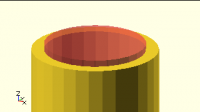
The intersection produces a void so, yes, the difference should be void and
that is what I get with F6 that uses CGAL.

With F5 I get a big cube stretched by the scale. It appears that the void
object is simply ignored and the big cube becomes the first operand of
difference. If you add sphere(50) as a third operand it gets subtracted
from the big cube.

It still goes wrong with simple integers.

difference() {
intersection() {
cube(1);
translate([2,0,0]) cube(1);
}
cube(10, center = true);
}

I am using OpenSCAD 2020.04.26.ci4968, is this a regression? I think I
would have noticed such a simple bug.

On Tue, 30 Jun 2020 at 22:25, Ronaldo Persiano rcmpersiano@gmail.com
wrote:

nop head nop.head@gmail.com wrote:

CGAL will handle exact differences fine as long as they are exact, which
the height is. F6 gives this.

Yes, but when they aren't exact some surprises come from render:

scale([1e6,1,1])
translate([-1,0,0])
difference(){
intersection(){
cube(1);
translate([1+1e-6,0,0]) cube(1);
}
translate([1,1,1]/2) cube(100);
}

Would you expect a non void object from this?


OpenSCAD mailing list
Discuss@lists.openscad.org
http://lists.openscad.org/mailman/listinfo/discuss_lists.openscad.org
The intersection produces a void so, yes, the difference should be void and that is what I get with F6 that uses CGAL. With F5 I get a big cube stretched by the scale. It appears that the void object is simply ignored and the big cube becomes the first operand of difference. If you add sphere(50) as a third operand it gets subtracted from the big cube. It still goes wrong with simple integers. difference() { intersection() { cube(1); translate([2,0,0]) cube(1); } cube(10, center = true); } I am using OpenSCAD 2020.04.26.ci4968, is this a regression? I think I would have noticed such a simple bug. On Tue, 30 Jun 2020 at 22:25, Ronaldo Persiano <rcmpersiano@gmail.com> wrote: > > > nop head <nop.head@gmail.com> wrote: > >> CGAL will handle exact differences fine as long as they are exact, which >> the height is. F6 gives this. >> > > Yes, but when they aren't exact some surprises come from render: > > scale([1e6,1,1]) > translate([-1,0,0]) > difference(){ > intersection(){ > cube(1); > translate([1+1e-6,0,0]) cube(1); > } > translate([1,1,1]/2) cube(100); > } > > Would you expect a non void object from this? > _______________________________________________ > OpenSCAD mailing list > Discuss@lists.openscad.org > http://lists.openscad.org/mailman/listinfo/discuss_lists.openscad.org >