

Import svg and use offset_sweep?

 I have an svg that was generated by projection().
 I would like to use offset_sweep with a rounding on top to generate a
 solid.

 I have only managed to find a few examples, all of which use a
 generated path. Can I use what I have to do this? If so, how do I tell
 it that it's a path?

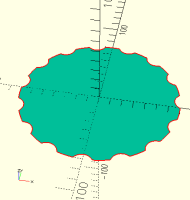
 Attached is an image of the imported svg.

As per the recent discussion here about svg imports, there's no easy way.
You can convert your svg file and use the pathbuilder library, or somehow
else convert it to numerical data and embed it in your code. When you
import the svg you get geometry and there's no way to make it a path.
On Wed, Sep 23, 2026 at 12:53 PM larry via Discuss <
discuss@lists.openscad.org> wrote:
I have an svg that was generated by projection().
I would like to use offset_sweep with a rounding on top to generate a
solid.
I have only managed to find a few examples, all of which use a
generated path. Can I use what I have to do this? If so, how do I tell
it that it's a path?
Attached is an image of the imported svg.
OpenSCAD mailing list
To unsubscribe send an email to discuss-leave@lists.openscad.org
On Wed, 2026-09-23 at 17:03 -0400, Adrian Mariano via Discuss wrote:
As per the recent discussion here about svg imports, there's no easy
way. You can convert your svg file and use the pathbuilder library,
or somehow else convert it to numerical data and embed it in your
code. When you import the svg you get geometry and there's no way to
make it a path.
Thanks. I was afraid of that.
So if I linear_extrude that is there any way to round the top edge?
Larry
On Wed, Sep 23, 2026 at 12:53 PM larry via Discuss
discuss@lists.openscad.org wrote:
I have an svg that was generated by projection().
I would like to use offset_sweep with a rounding on top to generate
a
solid.
I have only managed to find a few examples, all of which use a
generated path. Can I use what I have to do this? If so, how do I
tell
it that it's a path?
Attached is an image of the imported svg.
OpenSCAD mailing list
To unsubscribe send an email to discuss-leave@lists.openscad.org
OpenSCAD mailing list
To unsubscribe send an email to discuss-leave@lists.openscad.org

On 9/23/26 17:03, Adrian Mariano via Discuss wrote:
As per the recent discussion here about svg imports, there's no easy
way. You can convert your svg file and use the pathbuilder library,
or somehow else convert it to numerical data and embed it in your
code. When you import the svg you get geometry and there's no way to
make it a path.
On Wed, Sep 23, 2026 at 12:53 PM larry via Discuss
discuss@lists.openscad.org wrote:
I have an svg that was generated by projection().
I would like to use offset_sweep with a rounding on top to generate a
solid.
I have only managed to find a few examples, all of which use a
generated path. Can I use what I have to do this? If so, how do I tell
it that it's a path?
Attached is an image of the imported svg.
I looked at that and visualize it as a 3d difference, big circle for the
first line of the function, followed by a for loop for the second line
of the difference, interchanging the angle and distance so the for
variable of 15 functions as the angle, effectively becoming a
polar/rectangular conversion, drawing what you have with 2 or 3 lines of
code. Then wrap that in whatever is needed for a printable 3d object.
Remember that cylinder can have two diameter arguments if tapering is
needed.
Its an interesting what if.
 _______________________________________________
 OpenSCAD mailing list
 To unsubscribe send an email to discuss-leave@lists.openscad.org
OpenSCAD mailing list
To unsubscribe send an email todiscuss-leave@lists.openscad.org
On 9/23/26 18:00, larry via Discuss wrote:
On Wed, 2026-09-23 at 17:03 -0400, Adrian Mariano via Discuss wrote:
As per the recent discussion here about svg imports, there's no easy
way. You can convert your svg file and use the pathbuilder library,
or somehow else convert it to numerical data and embed it in your
code. When you import the svg you get geometry and there's no way to
make it a path.
Thanks. I was afraid of that.
So if I linear_extrude that is there any way to round the top edge?
Larry
The BOLS2 library may have something usefull, or there is "minkowski"
a bit of a bear to use and a cpu heater but it does work once you
understand it.
On Wed, Sep 23, 2026 at 12:53 PM larry via Discuss
discuss@lists.openscad.org wrote:
I have an svg that was generated by projection().
I would like to use offset_sweep with a rounding on top to generate a
solid.
I have only managed to find a few examples, all of which use a
generated path. Can I use what I have to do this? If so, how do I tell
it that it's a path?
Attached is an image of the imported svg.
OpenSCAD mailing list
To unsubscribe send an email to discuss-leave@lists.openscad.org
OpenSCAD mailing list
To unsubscribe send an email to discuss-leave@lists.openscad.org
OpenSCAD mailing list
To unsubscribe send an email todiscuss-leave@lists.openscad.org
Use minkowski? Construct a stairstep of offsets at a fine enough
resolution that you don't mind the stairsteps.
On Wed, Sep 23, 2026 at 6:01 PM larry via Discuss <
discuss@lists.openscad.org> wrote:
On Wed, 2026-09-23 at 17:03 -0400, Adrian Mariano via Discuss wrote:
As per the recent discussion here about svg imports, there's no easy way.
You can convert your svg file and use the pathbuilder library, or somehow
else convert it to numerical data and embed it in your code. When you
import the svg you get geometry and there's no way to make it a path.
Thanks. I was afraid of that.
So if I linear_extrude that is there any way to round the top edge?
Larry
On Wed, Sep 23, 2026 at 12:53 PM larry via Discuss <
discuss@lists.openscad.org> wrote:
I have an svg that was generated by projection().
I would like to use offset_sweep with a rounding on top to generate a
solid.
I have only managed to find a few examples, all of which use a
generated path. Can I use what I have to do this? If so, how do I tell
it that it's a path?
Attached is an image of the imported svg.
OpenSCAD mailing list
To unsubscribe send an email to discuss-leave@lists.openscad.org
OpenSCAD mailing list
To unsubscribe send an email to discuss-leave@lists.openscad.org
OpenSCAD mailing list
To unsubscribe send an email to discuss-leave@lists.openscad.org

So if I linear_extrude that is there any way to round the top edge?
I adapted BOSL2's convex_offset_extrude() to use roof() instead of hull()
to make offset_extrude() so it works with concave objects such as yours.
Takes the same parameters so you can specify chamfer, rounding, teardrop,
etc. independently for the bottom and top edges. Here's the code:
module conditional_zflip_z(condition, z=0) {
if (condition)
scale([1,1,-1]) translate([0,0,-z]) children();
else children();
}
module conditional_offset(condition, delta) {
if (condition)
offset(delta=delta) children();
else children();
}
// generates an extrusion from z=0 cropped at z=rise.
// extrusion tapers inward with positive run and outward with negative run
module roofrr(rise=1, run=1, s=100, convexity=10) {
assert(rise != 0, "rise can not be zero.")
assert(s != 0, "s can not be zero.")
if (run) {
conditional_zflip_z(run<0, z=rise)
difference() {
scale([1,1,rise/abs(run)]) roof(convexity=convexity)
conditional_offset(run<0, delta=-run) children();
translate([0,0,rise>0 ? rise+s0.5 : rise-s0.5]) cube([s,s,s],
center=true);
}
}
else {
conditional_zflip_z(rise<0) linear_extrude(height=abs(rise),
convexity=convexity) children();
}
}
module offset_extrude(
height,
bottom=[],
top=[],
h, l, length,
offset="round", r=0, steps=16,
extra=0,
cut=undef, chamfer_width=undef, chamfer_height=undef,
joint=undef, k=0.75, angle=45,
convexity=10, thickness = 1/1024, s=100
) {
req_children($children);
argspec = [
["for", ""],
["r",r],
["extra",extra],
["type","circle"],
["steps",steps],
["offset",offset],
["chamfer_width",chamfer_width],
["chamfer_height",chamfer_height],
["angle",angle],
["cut",cut],
["joint",joint],
["k", k],
["points", []],
];
top = struct_set(argspec, top, grow=false);
bottom = struct_set(argspec, bottom, grow=false);
offsets_bot = _rounding_offsets(bottom, -1);
offsets_top = _rounding_offsets(top, 1);

// "Extra" height enlarges the result beyond the requested height, so
subtract it
bottom_height = len(offsets_bot)==0 ? 0 : abs(last(offsets_bot)[1]) -
struct_val(bottom,"extra");
top_height = len(offsets_top)==0 ? 0 : abs(last(offsets_top)[1]) -
struct_val(top,"extra");
height = one_defined([l,h,height,length], "l,h,height,length",
dflt=u_add(bottom_height,top_height));
middle = height-bottom_height-top_height;
check =
assert(height>=0, "Height must be nonnegative")
assert(middle>=0, str(
"Specified end treatments (bottom height =
",bottom_height,
" top_height = ",top_height,") are too large
for extrusion height (",height,")"
)
);
// The entry r[i] is [radius,z] for a given layer
r = move([0,bottom_height],p=concat(
reverse(offsets_bot), [[0,0], [0,middle]],
move([0,middle], p=offsets_top)));
dochamfer = offset=="chamfer";
attachable(){
last = len(r)-2;
for(i=[0:last]) {
overlap = /* i<last ? thickness : */ 0;
for(j=[0:$children-1]) {
run = r[i][0] - r[i+1][0];
rise = r[i+1][1] - r[i][1];
up(r[i][1]) // +layers[i][0]
roofrr(rise=rise+overlap, run=run, s=s, convexity=convexity)
if (offset=="round")
offset(r=r[i][0])
children(j);
else
offset(delta=r[i][0],chamfer = dochamfer)
children(j);
}
}
union();
}
}
On Wed, Sep 23, 2026 at 5:00 PM larry via Discuss <
discuss@lists.openscad.org> wrote:
On Wed, 2026-09-23 at 17:03 -0400, Adrian Mariano via Discuss wrote:
As per the recent discussion here about svg imports, there's no easy way.
You can convert your svg file and use the pathbuilder library, or somehow
else convert it to numerical data and embed it in your code. When you
import the svg you get geometry and there's no way to make it a path.
Thanks. I was afraid of that.
So if I linear_extrude that is there any way to round the top edge?
Larry
On Wed, Sep 23, 2026 at 12:53 PM larry via Discuss <
discuss@lists.openscad.org> wrote:
I have an svg that was generated by projection().
I would like to use offset_sweep with a rounding on top to generate a
solid.
I have only managed to find a few examples, all of which use a
generated path. Can I use what I have to do this? If so, how do I tell
it that it's a path?
Attached is an image of the imported svg.
OpenSCAD mailing list
To unsubscribe send an email to discuss-leave@lists.openscad.org
OpenSCAD mailing list
To unsubscribe send an email to discuss-leave@lists.openscad.org
OpenSCAD mailing list
To unsubscribe send an email to discuss-leave@lists.openscad.org