

discuss@lists.openscad.org

OpenSCAD general discussion Mailing-list

View all threads

Chamfered 3D text

R
RayBellis
Tue, Feb 6, 2018 9:48 AM

George Hartzell wrote:

I think I just connected the dots to a big reason to work with in the
2D space: text is a 2d object and you can't mix it with 3d objects
like cubes....

Speaking of which, I haven't yet found a decent solution to produce engraved
/ embossed text where the 3D effect is chamfered rather than extruded out at
a straight perpendicular.

I can produce a base layer of 2D text, and using "offset" I can produce the
smaller (still 2D) version that sits at the other end of the "extrusion" but
what I can't do is join those two 2D objects to make a solid.

Do I have to resort to interpolating at multiple different vertical
positions and sizes to progressively dig out the text?

That does work, but produces a much higher surface count than simply joining
the two 2D polygons together vertex-by-vertex would.

For 3D printing it's kinda OK, because I can set the interpolation on the Z
axis to match the print resolution, but if I wanted proper smooth polygons
for other purposes it doesn't look great, either.

Ray

--
Sent from: http://forum.openscad.org/

George Hartzell wrote: > I think I just connected the dots to a big reason to work with in the > 2D space: text is a 2d object and you can't mix it with 3d objects > like cubes.... Speaking of which, I haven't yet found a decent solution to produce engraved / embossed text where the 3D effect is chamfered rather than extruded out at a straight perpendicular. I can produce a base layer of 2D text, and using "offset" I can produce the smaller (still 2D) version that sits at the other end of the "extrusion" but what I can't do is join those two 2D objects to make a solid. Do I have to resort to interpolating at multiple different vertical positions and sizes to progressively dig out the text? That does work, but produces a much higher surface count than simply joining the two 2D polygons together vertex-by-vertex would. For 3D printing it's kinda OK, because I can set the interpolation on the Z axis to match the print resolution, but if I wanted proper smooth polygons for other purposes it doesn't look great, either. Ray -- Sent from: http://forum.openscad.org/
RP
Ronaldo Persiano
Tue, Feb 6, 2018 12:53 PM

AFAIK, there is no neat way to do it in OpenSCAD. An approximation may be
built with minkowski: it is time-consuming, generates more vertices than
needed and rounds the character corners.

chanfer_text("Text","Liberation Sans:style=Bold", 2, 10);

module chanfer_text(text, font, h, ang) {
d = htan(ang);
minkowski(){
linear_extrude(height=h
0.0001)
offset(-d)
text(text, font=font);

linear_extrude(height=h,scale=h*0.0001)
  circle(d);

}
}

The offset may be suppressed depending on what you want.

2018-02-06 7:48 GMT-02:00 RayBellis openscad@ray.bellis.me.uk:

George Hartzell wrote:

I think I just connected the dots to a big reason to work with in the
2D space: text is a 2d object and you can't mix it with 3d objects
like cubes....

Speaking of which, I haven't yet found a decent solution to produce
engraved
/ embossed text where the 3D effect is chamfered rather than extruded out
at
a straight perpendicular.

I can produce a base layer of 2D text, and using "offset" I can produce the
smaller (still 2D) version that sits at the other end of the "extrusion"
but
what I can't do is join those two 2D objects to make a solid.

Do I have to resort to interpolating at multiple different vertical
positions and sizes to progressively dig out the text?

That does work, but produces a much higher surface count than simply
joining
the two 2D polygons together vertex-by-vertex would.

For 3D printing it's kinda OK, because I can set the interpolation on the Z
axis to match the print resolution, but if I wanted proper smooth polygons
for other purposes it doesn't look great, either.

Ray

--
Sent from: http://forum.openscad.org/


OpenSCAD mailing list
Discuss@lists.openscad.org
http://lists.openscad.org/mailman/listinfo/discuss_lists.openscad.org

AFAIK, there is no neat way to do it in OpenSCAD. An approximation may be built with minkowski: it is time-consuming, generates more vertices than needed and rounds the character corners. chanfer_text("Text","Liberation Sans:style=Bold", 2, 10); module chanfer_text(text, font, h, ang) { d = h*tan(ang); minkowski(){ linear_extrude(height=h*0.0001) offset(-d) text(text, font=font); linear_extrude(height=h,scale=h*0.0001) circle(d); } } The offset may be suppressed depending on what you want. 2018-02-06 7:48 GMT-02:00 RayBellis <openscad@ray.bellis.me.uk>: > George Hartzell wrote: > > > I think I just connected the dots to a big reason to work with in the > > 2D space: text is a 2d object and you can't mix it with 3d objects > > like cubes.... > > Speaking of which, I haven't yet found a decent solution to produce > engraved > / embossed text where the 3D effect is chamfered rather than extruded out > at > a straight perpendicular. > > I can produce a base layer of 2D text, and using "offset" I can produce the > smaller (still 2D) version that sits at the other end of the "extrusion" > but > what I can't do is join those two 2D objects to make a solid. > > Do I have to resort to interpolating at multiple different vertical > positions and sizes to progressively dig out the text? > > That does work, but produces a much higher surface count than simply > joining > the two 2D polygons together vertex-by-vertex would. > > For 3D printing it's kinda OK, because I can set the interpolation on the Z > axis to match the print resolution, but if I wanted proper smooth polygons > for other purposes it doesn't look great, either. > > Ray > > > > > > > -- > Sent from: http://forum.openscad.org/ > > _______________________________________________ > OpenSCAD mailing list > Discuss@lists.openscad.org > http://lists.openscad.org/mailman/listinfo/discuss_lists.openscad.org >
M
MathLover
Tue, Feb 6, 2018 1:15 PM

In the Topic "DXF to "3D-printable" lines with thickness", I introduced a
small Python program to convert lines and arcs into function calls. I wrote
modules to generate cylinder and torus pieces, but you can define your own
modules that extrude chamfered sections or created chamfered arcs by
combining cylinders and cones.

I used it to engrave a motto onto a sigil. I drew the motto as text in
LibreCAD, exploded the letters into lines and arcs, and used that as the
input for the Python program.

Mind you, you will still have some work defining the right modules, but at
least it is a possibility.

http://forum.openscad.org/file/t1601/afdruk.png

You can download the program from
http://www.w-p.dds.nl/dxflines2scad_py.txt
(after download, rename it to "dxflines2scad.py")

--
Sent from: http://forum.openscad.org/

In the Topic "DXF to "3D-printable" lines with thickness", I introduced a small Python program to convert lines and arcs into function calls. I wrote modules to generate cylinder and torus pieces, but you can define your own modules that extrude chamfered sections or created chamfered arcs by combining cylinders and cones. I used it to engrave a motto onto a sigil. I drew the motto as text in LibreCAD, exploded the letters into lines and arcs, and used that as the input for the Python program. Mind you, you will still have some work defining the right modules, but at least it is a possibility. <http://forum.openscad.org/file/t1601/afdruk.png> You can download the program from http://www.w-p.dds.nl/dxflines2scad_py.txt (after download, rename it to "dxflines2scad.py") -- Sent from: http://forum.openscad.org/
R
RayBellis
Tue, Feb 6, 2018 1:35 PM

This is what I came up with.  I didn't try printing with it yet, but I think
it would work:

module Embossed(step = 0.05, height = 1, grad = 0.5) {
for (z = [ 0 : step : height ]) {
translate([0, 0, z])
linear_extrude(height = step)
offset(delta = -z * grad, chamfer = true)
children();
}
};

--
Sent from: http://forum.openscad.org/

This is what I came up with. I didn't try printing with it yet, but I think it would work: module Embossed(step = 0.05, height = 1, grad = 0.5) { for (z = [ 0 : step : height ]) { translate([0, 0, z]) linear_extrude(height = step) offset(delta = -z * grad, chamfer = true) children(); } }; -- Sent from: http://forum.openscad.org/
RP
Ronaldo Persiano
Tue, Feb 6, 2018 2:59 PM

This is a standard solution. Unhappily, besides the staircase surface, it
is more time-consuming than using minkowski because of the union of many
objects. It doesn't round corners, though.

2018-02-06 11:35 GMT-02:00 RayBellis openscad@ray.bellis.me.uk:

This is what I came up with.  I didn't try printing with it yet, but I
think
it would work:

module Embossed(step = 0.05, height = 1, grad = 0.5) {
for (z = [ 0 : step : height ]) {
translate([0, 0, z])
linear_extrude(height = step)
offset(delta = -z * grad, chamfer = true)
children();
}
};

--
Sent from: http://forum.openscad.org/


OpenSCAD mailing list
Discuss@lists.openscad.org
http://lists.openscad.org/mailman/listinfo/discuss_lists.openscad.org

This is a standard solution. Unhappily, besides the staircase surface, it is more time-consuming than using minkowski because of the union of many objects. It doesn't round corners, though. 2018-02-06 11:35 GMT-02:00 RayBellis <openscad@ray.bellis.me.uk>: > This is what I came up with. I didn't try printing with it yet, but I > think > it would work: > > module Embossed(step = 0.05, height = 1, grad = 0.5) { > for (z = [ 0 : step : height ]) { > translate([0, 0, z]) > linear_extrude(height = step) > offset(delta = -z * grad, chamfer = true) > children(); > } > }; > > > > -- > Sent from: http://forum.openscad.org/ > > _______________________________________________ > OpenSCAD mailing list > Discuss@lists.openscad.org > http://lists.openscad.org/mailman/listinfo/discuss_lists.openscad.org >
FV
Frank van der Hulst
Tue, Feb 6, 2018 6:11 PM

Varying the second object in Ronaldo's code changes the effect... e.g. the
following chamfers at 45 degrees (I think) in the X direction.

chamfer_text("Text","Liberation Sans:style=Bold", 3, 10);

module chamfer_text(text, font, h, ang) {
d = htan(ang);
minkowski(){
linear_extrude(height=h
0.0001)
offset(-d)
text(text, font=font);

rotate([90,0,0])
  linear_extrude(d) polygon(points=[[-d,0], [d,0],[0,d]]);

}
}

On Wed, Feb 7, 2018 at 3:59 AM, Ronaldo Persiano rcmpersiano@gmail.com
wrote:

This is a standard solution. Unhappily, besides the staircase surface, it
is more time-consuming than using minkowski because of the union of many
objects. It doesn't round corners, though.

2018-02-06 11:35 GMT-02:00 RayBellis openscad@ray.bellis.me.uk:

This is what I came up with.  I didn't try printing with it yet, but I
think
it would work:

module Embossed(step = 0.05, height = 1, grad = 0.5) {
for (z = [ 0 : step : height ]) {
translate([0, 0, z])
linear_extrude(height = step)
offset(delta = -z * grad, chamfer = true)
children();
}
};

--
Sent from: http://forum.openscad.org/


OpenSCAD mailing list
Discuss@lists.openscad.org
http://lists.openscad.org/mailman/listinfo/discuss_lists.openscad.org

Varying the second object in Ronaldo's code changes the effect... e.g. the following chamfers at 45 degrees (I think) in the X direction. chamfer_text("Text","Liberation Sans:style=Bold", 3, 10); module chamfer_text(text, font, h, ang) { d = h*tan(ang); minkowski(){ linear_extrude(height=h*0.0001) offset(-d) text(text, font=font); rotate([90,0,0]) linear_extrude(d) polygon(points=[[-d,0], [d,0],[0,d]]); } } On Wed, Feb 7, 2018 at 3:59 AM, Ronaldo Persiano <rcmpersiano@gmail.com> wrote: > This is a standard solution. Unhappily, besides the staircase surface, it > is more time-consuming than using minkowski because of the union of many > objects. It doesn't round corners, though. > > 2018-02-06 11:35 GMT-02:00 RayBellis <openscad@ray.bellis.me.uk>: > >> This is what I came up with. I didn't try printing with it yet, but I >> think >> it would work: >> >> module Embossed(step = 0.05, height = 1, grad = 0.5) { >> for (z = [ 0 : step : height ]) { >> translate([0, 0, z]) >> linear_extrude(height = step) >> offset(delta = -z * grad, chamfer = true) >> children(); >> } >> }; >> >> >> >> -- >> Sent from: http://forum.openscad.org/ >> >> _______________________________________________ >> OpenSCAD mailing list >> Discuss@lists.openscad.org >> http://lists.openscad.org/mailman/listinfo/discuss_lists.openscad.org >> > > > _______________________________________________ > OpenSCAD mailing list > Discuss@lists.openscad.org > http://lists.openscad.org/mailman/listinfo/discuss_lists.openscad.org > >
RP
Ronaldo Persiano
Tue, Feb 6, 2018 8:19 PM

Nice; to have the specified height and angle the polygon should be:

polygon(points=[[-d,0], [d,0],[0,h]])

2018-02-06 16:11 GMT-02:00 Frank van der Hulst drifter.frank@gmail.com:

Varying the second object in Ronaldo's code changes the effect... e.g. the
following chamfers at 45 degrees (I think) in the X direction.

chamfer_text("Text","Liberation Sans:style=Bold", 3, 10);

module chamfer_text(text, font, h, ang) {
d = htan(ang);
minkowski(){
linear_extrude(height=h
0.0001)
offset(-d)
text(text, font=font);

 rotate([90,0,0])
   linear_extrude(d) polygon(points=[[-d,0], [d,0],[0,d]]);

}
}

On Wed, Feb 7, 2018 at 3:59 AM, Ronaldo Persiano rcmpersiano@gmail.com
wrote:

This is a standard solution. Unhappily, besides the staircase surface, it
is more time-consuming than using minkowski because of the union of many
objects. It doesn't round corners, though.

2018-02-06 11:35 GMT-02:00 RayBellis openscad@ray.bellis.me.uk:

This is what I came up with.  I didn't try printing with it yet, but I
think
it would work:

module Embossed(step = 0.05, height = 1, grad = 0.5) {
for (z = [ 0 : step : height ]) {
translate([0, 0, z])
linear_extrude(height = step)
offset(delta = -z * grad, chamfer = true)
children();
}
};

--
Sent from: http://forum.openscad.org/


OpenSCAD mailing list
Discuss@lists.openscad.org
http://lists.openscad.org/mailman/listinfo/discuss_lists.openscad.org
Nice; to have the specified height and angle the polygon should be: polygon(points=[[-d,0], [d,0],[0,h]]) 2018-02-06 16:11 GMT-02:00 Frank van der Hulst <drifter.frank@gmail.com>: > Varying the second object in Ronaldo's code changes the effect... e.g. the > following chamfers at 45 degrees (I think) in the X direction. > > chamfer_text("Text","Liberation Sans:style=Bold", 3, 10); > > module chamfer_text(text, font, h, ang) { > d = h*tan(ang); > minkowski(){ > linear_extrude(height=h*0.0001) > offset(-d) > text(text, font=font); > > rotate([90,0,0]) > linear_extrude(d) polygon(points=[[-d,0], [d,0],[0,d]]); > } > } > > On Wed, Feb 7, 2018 at 3:59 AM, Ronaldo Persiano <rcmpersiano@gmail.com> > wrote: > >> This is a standard solution. Unhappily, besides the staircase surface, it >> is more time-consuming than using minkowski because of the union of many >> objects. It doesn't round corners, though. >> >> 2018-02-06 11:35 GMT-02:00 RayBellis <openscad@ray.bellis.me.uk>: >> >>> This is what I came up with. I didn't try printing with it yet, but I >>> think >>> it would work: >>> >>> module Embossed(step = 0.05, height = 1, grad = 0.5) { >>> for (z = [ 0 : step : height ]) { >>> translate([0, 0, z]) >>> linear_extrude(height = step) >>> offset(delta = -z * grad, chamfer = true) >>> children(); >>> } >>> }; >>> >>> >>> >>> -- >>> Sent from: http://forum.openscad.org/ >>> >>> _______________________________________________ >>> OpenSCAD mailing list >>> Discuss@lists.openscad.org >>> http://lists.openscad.org/mailman/listinfo/discuss_lists.openscad.org >>> >> >> >> _______________________________________________ >> OpenSCAD mailing list >> Discuss@lists.openscad.org >> http://lists.openscad.org/mailman/listinfo/discuss_lists.openscad.org >> >> > > _______________________________________________ > OpenSCAD mailing list > Discuss@lists.openscad.org > http://lists.openscad.org/mailman/listinfo/discuss_lists.openscad.org > >
AG
Alex Gibson
Tue, Feb 6, 2018 11:12 PM

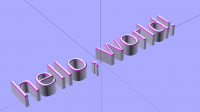
Here’s my solution to the same problem, using Minkowski…

//(c)2018-01-06 Alex Gibson: admg chamfered text module

//Licence: Creative Commons [CC BY-SA 4.0]  https://creativecommons.org/licenses/by-sa/4.0/

module admg_chamfered_text(some_text_here,text_height,text_depth,chamfer_depth,chamfer_width)

            {

            translate([0,0,text_depth-chamfer_depth])

                            difference()

                                            {

                                            translate([0,0,-(text_depth-chamfer_depth)])

                                                            linear_extrude(text_depth)

                                                                            text(some_text_here,text_height,valign="center",halign="center"); 

                                            minkowski()

                                                            {

                                                            difference()

                                                                            {

                                                                            cube([500,500,text_depth],center=true);

                                                                            translate([0,0,-text_depth])

                                                                            linear_extrude(text_depth*2)

                                                                                            text(some_text_here,text_depth*2,valign="center",halign="center"); 

                                                                            }

                                                            translate([0,0,text_depth/2])

                                                                            cylinder(chamfer_depth,0,chamfer_width);

                                                            }

                                            }

            }

admg_chamfered_text("hello, world!",20,10,0.5,0.5);

Alex Gibson

+44 7813 810 765    @alexgibson3d    37 Royal Avenue, Reading RG31 4UR

admg consulting

edumaker limited

·        Project management

·        Operations & Process improvement

·        3D Printing

From: Discuss [mailto:discuss-bounces@lists.openscad.org] On Behalf Of Ronaldo Persiano
Sent: 06 February 2018 20:20
To: OpenSCAD general discussion
Subject: Re: [OpenSCAD] Chamfered 3D text

Nice; to have the specified height and angle the polygon should be:

polygon(points=[[-d,0], [d,0],[0,h]])

2018-02-06 16:11 GMT-02:00 Frank van der Hulst drifter.frank@gmail.com:

Varying the second object in Ronaldo's code changes the effect... e.g. the following chamfers at 45 degrees (I think) in the X direction.

chamfer_text("Text","Liberation Sans:style=Bold", 3, 10);

module chamfer_text(text, font, h, ang) {
d = htan(ang);
minkowski(){
linear_extrude(height=h
0.0001)
offset(-d)
text(text, font=font);

rotate([90,0,0])
  linear_extrude(d) polygon(points=[[-d,0], [d,0],[0,d]]);

}
}

On Wed, Feb 7, 2018 at 3:59 AM, Ronaldo Persiano rcmpersiano@gmail.com wrote:

This is a standard solution. Unhappily, besides the staircase surface, it is more time-consuming than using minkowski because of the union of many objects. It doesn't round corners, though.

2018-02-06 11:35 GMT-02:00 RayBellis openscad@ray.bellis.me.uk:

This is what I came up with.  I didn't try printing with it yet, but I think
it would work:

module Embossed(step = 0.05, height = 1, grad = 0.5) {
for (z = [ 0 : step : height ]) {
translate([0, 0, z])
linear_extrude(height = step)
offset(delta = -z * grad, chamfer = true)
children();
}
};

--
Sent from: http://forum.openscad.org/


OpenSCAD mailing list
Discuss@lists.openscad.org
http://lists.openscad.org/mailman/listinfo/discuss_lists.openscad.org


OpenSCAD mailing list
Discuss@lists.openscad.org
http://lists.openscad.org/mailman/listinfo/discuss_lists.openscad.org


OpenSCAD mailing list
Discuss@lists.openscad.org
http://lists.openscad.org/mailman/listinfo/discuss_lists.openscad.org

Here’s my solution to the same problem, using Minkowski… //(c)2018-01-06 Alex Gibson: admg chamfered text module //Licence: Creative Commons [CC BY-SA 4.0] https://creativecommons.org/licenses/by-sa/4.0/ module admg_chamfered_text(some_text_here,text_height,text_depth,chamfer_depth,chamfer_width) { translate([0,0,text_depth-chamfer_depth]) difference() { translate([0,0,-(text_depth-chamfer_depth)]) linear_extrude(text_depth) text(some_text_here,text_height,valign="center",halign="center"); minkowski() { difference() { cube([500,500,text_depth],center=true); translate([0,0,-text_depth]) linear_extrude(text_depth*2) text(some_text_here,text_depth*2,valign="center",halign="center"); } translate([0,0,text_depth/2]) cylinder(chamfer_depth,0,chamfer_width); } } } admg_chamfered_text("hello, world!",20,10,0.5,0.5); Alex Gibson +44 7813 810 765 @alexgibson3d 37 Royal Avenue, Reading RG31 4UR admg consulting edumaker limited · Project management · Operations & Process improvement · 3D Printing From: Discuss [mailto:discuss-bounces@lists.openscad.org] On Behalf Of Ronaldo Persiano Sent: 06 February 2018 20:20 To: OpenSCAD general discussion Subject: Re: [OpenSCAD] Chamfered 3D text Nice; to have the specified height and angle the polygon should be: polygon(points=[[-d,0], [d,0],[0,h]]) 2018-02-06 16:11 GMT-02:00 Frank van der Hulst <drifter.frank@gmail.com>: Varying the second object in Ronaldo's code changes the effect... e.g. the following chamfers at 45 degrees (I think) in the X direction. chamfer_text("Text","Liberation Sans:style=Bold", 3, 10); module chamfer_text(text, font, h, ang) { d = h*tan(ang); minkowski(){ linear_extrude(height=h*0.0001) offset(-d) text(text, font=font); rotate([90,0,0]) linear_extrude(d) polygon(points=[[-d,0], [d,0],[0,d]]); } } On Wed, Feb 7, 2018 at 3:59 AM, Ronaldo Persiano <rcmpersiano@gmail.com> wrote: This is a standard solution. Unhappily, besides the staircase surface, it is more time-consuming than using minkowski because of the union of many objects. It doesn't round corners, though. 2018-02-06 11:35 GMT-02:00 RayBellis <openscad@ray.bellis.me.uk>: This is what I came up with. I didn't try printing with it yet, but I think it would work: module Embossed(step = 0.05, height = 1, grad = 0.5) { for (z = [ 0 : step : height ]) { translate([0, 0, z]) linear_extrude(height = step) offset(delta = -z * grad, chamfer = true) children(); } }; -- Sent from: http://forum.openscad.org/ _______________________________________________ OpenSCAD mailing list Discuss@lists.openscad.org http://lists.openscad.org/mailman/listinfo/discuss_lists.openscad.org _______________________________________________ OpenSCAD mailing list Discuss@lists.openscad.org http://lists.openscad.org/mailman/listinfo/discuss_lists.openscad.org _______________________________________________ OpenSCAD mailing list Discuss@lists.openscad.org http://lists.openscad.org/mailman/listinfo/discuss_lists.openscad.org
W
Whosawhatsis
Tue, Feb 6, 2018 11:58 PM

This brings up a point I've been meaning to address. The linear extrude
function has a "scale" parameter that can scale one end of the extrusion.
It seems like a logical and useful addition to this would be an "offset"
parameter, that would do the same thing, but offset the other end instead
of scaling. It would solve this problem and many others.

Of course, it might take some consideration, obviously, to ensure that it
correctly handles areas that become zero-thickness (or negative-thickness)
when a negative value for offset it used, as well as ensuring that the
resulting object remains manifold when areas merge or holes close up. This
makes it more complicated to implement than the existing scale parameter,
but I think it would be a worthwhile addition.

On February 6, 2018 at 15:13:47, Alex Gibson (alex@alexgibson.net) wrote:

Here’s my solution to the same problem, using Minkowski…

//(c)2018-01-06 Alex Gibson: admg chamfered text module

//Licence: Creative Commons [CC BY-SA 4.0]
https://creativecommons.org/licenses/by-sa/4.0/

module
admg_chamfered_text(some_text_here,text_height,text_depth,chamfer_depth,chamfer_width)

            {

            translate([0,0,text_depth-chamfer_depth])

                            difference()

                                            {

translate([0,0,-(text_depth-chamfer_depth)])

linear_extrude(text_depth)

text(some_text_here,text_height,valign="center",halign="center");

                                            minkowski()

                                                            {

                                                            difference()

{

cube([500,500,text_depth],center=true);

translate([0,0,-text_depth])

linear_extrude(text_depth*2)

text(some_text_here,text_depth*2,valign="center",halign="center");

}

translate([0,0,text_depth/2])

cylinder(chamfer_depth,0,chamfer_width);

                                                            }

                                            }

            }

admg_chamfered_text("hello, world!",20,10,0.5,0.5);

Alex Gibson

+44 7813 810 765    @alexgibson3d    37 Royal Avenue, Reading RG31 4UR

admg consulting

edumaker limited

·        Project management

·        Operations & Process improvement

·        3D Printing

From: Discuss [mailto:discuss-bounces@lists.openscad.org] *On Behalf
Of *Ronaldo
Persiano
Sent: 06 February 2018 20:20
To: OpenSCAD general discussion
Subject: Re: [OpenSCAD] Chamfered 3D text

Nice; to have the specified height and angle the polygon should be:

polygon(points=[[-d,0], [d,0],[0,h]])

2018-02-06 16:11 GMT-02:00 Frank van der Hulst drifter.frank@gmail.com:

Varying the second object in Ronaldo's code changes the effect... e.g. the
following chamfers at 45 degrees (I think) in the X direction.

chamfer_text("Text","Liberation Sans:style=Bold", 3, 10);

module chamfer_text(text, font, h, ang) {
d = htan(ang);
minkowski(){
linear_extrude(height=h
0.0001)
offset(-d)
text(text, font=font);

rotate([90,0,0])
  linear_extrude(d) polygon(points=[[-d,0], [d,0],[0,d]]);

}
}

On Wed, Feb 7, 2018 at 3:59 AM, Ronaldo Persiano rcmpersiano@gmail.com
wrote:

This is a standard solution. Unhappily, besides the staircase surface, it
is more time-consuming than using minkowski because of the union of many
objects. It doesn't round corners, though.

2018-02-06 11:35 GMT-02:00 RayBellis openscad@ray.bellis.me.uk:

This is what I came up with.  I didn't try printing with it yet, but I
think
it would work:

module Embossed(step = 0.05, height = 1, grad = 0.5) {
for (z = [ 0 : step : height ]) {
translate([0, 0, z])
linear_extrude(height = step)
offset(delta = -z * grad, chamfer = true)
children();
}
};

--
Sent from: http://forum.openscad.org/


OpenSCAD mailing list
Discuss@lists.openscad.org
http://lists.openscad.org/mailman/listinfo/discuss_lists.openscad.org


OpenSCAD mailing list
Discuss@lists.openscad.org
http://lists.openscad.org/mailman/listinfo/discuss_lists.openscad.org


OpenSCAD mailing list
Discuss@lists.openscad.org
http://lists.openscad.org/mailman/listinfo/discuss_lists.openscad.org


OpenSCAD mailing list
Discuss@lists.openscad.org
http://lists.openscad.org/mailman/listinfo/discuss_lists.openscad.org

This brings up a point I've been meaning to address. The linear extrude function has a "scale" parameter that can scale one end of the extrusion. It seems like a logical and useful addition to this would be an "offset" parameter, that would do the same thing, but offset the other end instead of scaling. It would solve this problem and many others. Of course, it might take some consideration, obviously, to ensure that it correctly handles areas that become zero-thickness (or negative-thickness) when a negative value for offset it used, as well as ensuring that the resulting object remains manifold when areas merge or holes close up. This makes it more complicated to implement than the existing scale parameter, but I think it would be a worthwhile addition. On February 6, 2018 at 15:13:47, Alex Gibson (alex@alexgibson.net) wrote: Here’s my solution to the same problem, using Minkowski… //(c)2018-01-06 Alex Gibson: admg chamfered text module //Licence: Creative Commons [CC BY-SA 4.0] https://creativecommons.org/licenses/by-sa/4.0/ module admg_chamfered_text(some_text_here,text_height,text_depth,chamfer_depth,chamfer_width) { translate([0,0,text_depth-chamfer_depth]) difference() { translate([0,0,-(text_depth-chamfer_depth)]) linear_extrude(text_depth) text(some_text_here,text_height,valign="center",halign="center"); minkowski() { difference() { cube([500,500,text_depth],center=true); translate([0,0,-text_depth]) linear_extrude(text_depth*2) text(some_text_here,text_depth*2,valign="center",halign="center"); } translate([0,0,text_depth/2]) cylinder(chamfer_depth,0,chamfer_width); } } } admg_chamfered_text("hello, world!",20,10,0.5,0.5); Alex Gibson +44 7813 810 765 @alexgibson3d 37 Royal Avenue, Reading RG31 4UR admg consulting edumaker limited · Project management · Operations & Process improvement · 3D Printing *From:* Discuss [mailto:discuss-bounces@lists.openscad.org] *On Behalf Of *Ronaldo Persiano *Sent:* 06 February 2018 20:20 *To:* OpenSCAD general discussion *Subject:* Re: [OpenSCAD] Chamfered 3D text Nice; to have the specified height and angle the polygon should be: polygon(points=[[-d,0], [d,0],[0,h]]) 2018-02-06 16:11 GMT-02:00 Frank van der Hulst <drifter.frank@gmail.com>: Varying the second object in Ronaldo's code changes the effect... e.g. the following chamfers at 45 degrees (I think) in the X direction. chamfer_text("Text","Liberation Sans:style=Bold", 3, 10); module chamfer_text(text, font, h, ang) { d = h*tan(ang); minkowski(){ linear_extrude(height=h*0.0001) offset(-d) text(text, font=font); rotate([90,0,0]) linear_extrude(d) polygon(points=[[-d,0], [d,0],[0,d]]); } } On Wed, Feb 7, 2018 at 3:59 AM, Ronaldo Persiano <rcmpersiano@gmail.com> wrote: This is a standard solution. Unhappily, besides the staircase surface, it is more time-consuming than using minkowski because of the union of many objects. It doesn't round corners, though. 2018-02-06 11:35 GMT-02:00 RayBellis <openscad@ray.bellis.me.uk>: This is what I came up with. I didn't try printing with it yet, but I think it would work: module Embossed(step = 0.05, height = 1, grad = 0.5) { for (z = [ 0 : step : height ]) { translate([0, 0, z]) linear_extrude(height = step) offset(delta = -z * grad, chamfer = true) children(); } }; -- Sent from: http://forum.openscad.org/ _______________________________________________ OpenSCAD mailing list Discuss@lists.openscad.org http://lists.openscad.org/mailman/listinfo/discuss_lists.openscad.org _______________________________________________ OpenSCAD mailing list Discuss@lists.openscad.org http://lists.openscad.org/mailman/listinfo/discuss_lists.openscad.org _______________________________________________ OpenSCAD mailing list Discuss@lists.openscad.org http://lists.openscad.org/mailman/listinfo/discuss_lists.openscad.org _______________________________________________ OpenSCAD mailing list Discuss@lists.openscad.org http://lists.openscad.org/mailman/listinfo/discuss_lists.openscad.org
RP
Ronaldo Persiano
Wed, Feb 7, 2018 12:28 AM

@Gibson

I guess your second text call should have the same parameters as the first
one: text_height instead of text_depth*2.

Anyway, I think you will get the same result with a simpler code:

module
admg_chamfered_text1(some_text_here,text_height,text_depth,chamfer_depth,chamfer_width){
minkowski() {
linear_extrude(text_depth*2)
text(some_text_here,text_height,valign="center",halign="center");
cylinder(chamfer_depth,r1=chamfer_width,r2=0);
}
}

2018-02-06 21:12 GMT-02:00 Alex Gibson alex@alexgibson.net:

Here’s my solution to the same problem, using Minkowski…

@Gibson I guess your second text call should have the same parameters as the first one: text_height instead of text_depth*2. Anyway, I think you will get the same result with a simpler code: module admg_chamfered_text1(some_text_here,text_height,text_depth,chamfer_depth,chamfer_width){ minkowski() { linear_extrude(text_depth*2) text(some_text_here,text_height,valign="center",halign="center"); cylinder(chamfer_depth,r1=chamfer_width,r2=0); } } 2018-02-06 21:12 GMT-02:00 Alex Gibson <alex@alexgibson.net>: > Here’s my solution to the same problem, using Minkowski… > > >