

Import Objects Get No Love

I'm working on a program that generates stone walls from images. I use
OpenCV to extract the stone contours, which I combine with textures
produced using a libnoise-based command line tool I wrote and the
Manifold mesh library to make the stones. The program saves them as
individual .3mf files.
When I import the stones to do the further work in OpenSCAD (wall
backing, window/door cutout and placement, etc.), the OpenSCAD behavior
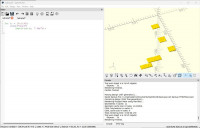
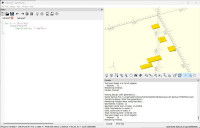
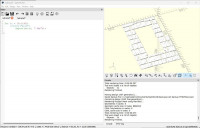
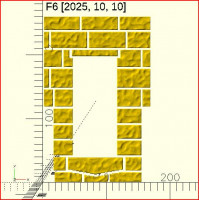
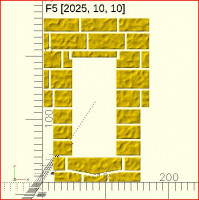
is definitely regressive. Here's what it should look like:
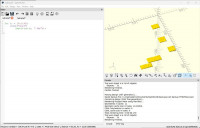
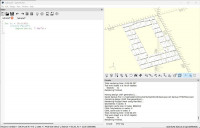
Note the script in the editor, it loops through the import command
constructing file names with str(). That goes well enough, but when I
try to do anything else with the stones, like add the color() operator,
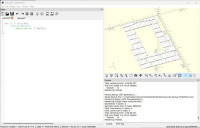
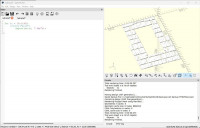
I get this:
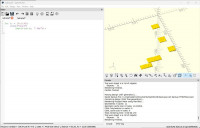
Most of the stones don't render, with no discernible pattern to which
are lucky. If I try to export this, I get what is seen. Interestingly,
I can run the same script through command-line OpenSCAD and it works fine.
This is with dev version 2025-10-10. I downloaded the 2021 release
version, and it works just fine 'cept for the gawd-awful slow CGAL...
I can open an issue at the repo, thought I'd float it here first.

Glenn, are you able to share the .3mf files?
At face value it looks like a bug.
I'm happy to have a closer look.
From: Glenn Butcher via Discuss [mailto:discuss@lists.openscad.org]
Sent: Monday, October 13, 2025 8:37 AM
To: 'OpenSCAD general discussion Mailing-list'
Cc: Glenn Butcher
Subject: [OpenSCAD] Import Objects Get No Love
I'm working on a program that generates stone walls from images. I use OpenCV to extract the stone contours, which I combine with textures produced using a libnoise-based command line tool I wrote and the Manifold mesh library to make the stones. The program saves them as individual .3mf files.
When I import the stones to do the further work in OpenSCAD (wall backing, window/door cutout and placement, etc.), the OpenSCAD behavior is definitely regressive. Here's what it should look like:
Note the script in the editor, it loops through the import command constructing file names with str(). That goes well enough, but when I try to do anything else with the stones, like add the color() operator, I get this:
Most of the stones don't render, with no discernible pattern to which are lucky. If I try to export this, I get what is seen. Interestingly, I can run the same script through command-line OpenSCAD and it works fine.
This is with dev version 2025-10-10. I downloaded the 2021 release version, and it works just fine 'cept for the gawd-awful slow CGAL...
I can open an issue at the repo, thought I'd float it here first.
.zip file attached. I also included wall.scad, which has the loop to
import the files. Comment-out the color() line to get nominal behavior.
On 10/12/2025 8:26 PM, Michael Marx (spintel) via Discuss wrote:
Glenn, are you able to share the .3mf files?
At face value it looks like a bug.
I'm happy to have a closer look.
*From:*Glenn Butcher via Discuss [mailto:discuss@lists.openscad.org]
Sent: Monday, October 13, 2025 8:37 AM
To: 'OpenSCAD general discussion Mailing-list'
Cc: Glenn Butcher
Subject: [OpenSCAD] Import Objects Get No Love
I'm working on a program that generates stone walls from images. I
use OpenCV to extract the stone contours, which I combine with
textures produced using a libnoise-based command line tool I wrote and
the Manifold mesh library to make the stones. The program saves them
as individual .3mf files.
When I import the stones to do the further work in OpenSCAD (wall
backing, window/door cutout and placement, etc.), the OpenSCAD
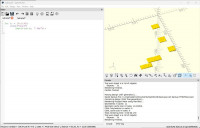
behavior is definitely regressive. Here's what it should look like:
Note the script in the editor, it loops through the import command
constructing file names with str(). That goes well enough, but when I
try to do anything else with the stones, like add the color()
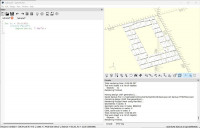
operator, I get this:
Most of the stones don't render, with no discernible pattern to which
are lucky. If I try to export this, I get what is seen. Interestingly,
I can run the same script through command-line OpenSCAD and it works fine.
This is with dev version 2025-10-10. I downloaded the 2021 release
version, and it works just fine 'cept for the gawd-awful slow CGAL...
I can open an issue at the repo, thought I'd float it here first.
OpenSCAD mailing list
To unsubscribe send an email todiscuss-leave@lists.openscad.org
I attached a .zip file to a post, but it's too big for the list
criterion. I uploaded it to my personal server, you can get it here:
http://glenn.pulpitrock.net/wall.zip
Moderator, you can ignore the approval.
Glenn Butcher
On 10/12/2025 8:26 PM, Michael Marx (spintel) via Discuss wrote:
Glenn, are you able to share the .3mf files?
At face value it looks like a bug.
I'm happy to have a closer look.
*From:*Glenn Butcher via Discuss [mailto:discuss@lists.openscad.org]
Sent: Monday, October 13, 2025 8:37 AM
To: 'OpenSCAD general discussion Mailing-list'
Cc: Glenn Butcher
Subject: [OpenSCAD] Import Objects Get No Love
I'm working on a program that generates stone walls from images. I
use OpenCV to extract the stone contours, which I combine with
textures produced using a libnoise-based command line tool I wrote and
the Manifold mesh library to make the stones. The program saves them
as individual .3mf files.
When I import the stones to do the further work in OpenSCAD (wall
backing, window/door cutout and placement, etc.), the OpenSCAD
behavior is definitely regressive. Here's what it should look like:
Note the script in the editor, it loops through the import command
constructing file names with str(). That goes well enough, but when I
try to do anything else with the stones, like add the color()
operator, I get this:
Most of the stones don't render, with no discernible pattern to which
are lucky. If I try to export this, I get what is seen. Interestingly,
I can run the same script through command-line OpenSCAD and it works fine.
This is with dev version 2025-10-10. I downloaded the 2021 release
version, and it works just fine 'cept for the gawd-awful slow CGAL...
I can open an issue at the repo, thought I'd float it here first.
OpenSCAD mailing list
To unsubscribe send an email todiscuss-leave@lists.openscad.org
Moderator, you can ignore the approval.
Too late...
Works with 2021.1 (as expected), but also 2025.10.10 (& 2025.08.31) - only ones installed ATM.
Exported a STL which looks normal.
So, thinking cap ON, what could cause it to be different on another system... hmmm....
From: Glenn Butcher via Discuss [mailto:discuss@lists.openscad.org]
Sent: Monday, October 13, 2025 1:56 PM
To: discuss@lists.openscad.org
Cc: Glenn Butcher
Subject: [OpenSCAD] Re: Import Objects Get No Love
.zip file attached. I also included wall.scad, which has the loop to import the files. Comment-out the color() line to get nominal behavior.
On 10/12/2025 8:26 PM, Michael Marx (spintel) via Discuss wrote:
Glenn, are you able to share the .3mf files?
At face value it looks like a bug.
I'm happy to have a closer look.
From: Glenn Butcher via Discuss [mailto:discuss@lists.openscad.org]
Sent: Monday, October 13, 2025 8:37 AM
To: 'OpenSCAD general discussion Mailing-list'
Cc: Glenn Butcher
Subject: [OpenSCAD] Import Objects Get No Love
I'm working on a program that generates stone walls from images. I use OpenCV to extract the stone contours, which I combine with textures produced using a libnoise-based command line tool I wrote and the Manifold mesh library to make the stones. The program saves them as individual .3mf files.
When I import the stones to do the further work in OpenSCAD (wall backing, window/door cutout and placement, etc.), the OpenSCAD behavior is definitely regressive. Here's what it should look like:
Note the script in the editor, it loops through the import command constructing file names with str(). That goes well enough, but when I try to do anything else with the stones, like add the color() operator, I get this:
Most of the stones don't render, with no discernible pattern to which are lucky. If I try to export this, I get what is seen. Interestingly, I can run the same script through command-line OpenSCAD and it works fine.
This is with dev version 2025-10-10. I downloaded the 2021 release version, and it works just fine 'cept for the gawd-awful slow CGAL...
I can open an issue at the repo, thought I'd float it here first.
OpenSCAD mailing list
To unsubscribe send an email to discuss-leave@lists.openscad.org
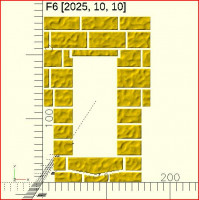
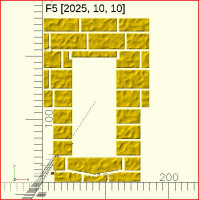
Version with text output attached, in case anyone else wants to fiddle.
From: Michael Marx (spintel) via Discuss [mailto:discuss@lists.openscad.org]
Sent: Monday, October 13, 2025 5:06 PM
To: 'OpenSCAD general discussion Mailing-list'
Cc: Michael Marx (spintel)
Subject: [OpenSCAD] Re: Import Objects Get No Love
Works with 2021.1 (as expected), but also 2025.10.10 (& 2025.08.31) - only ones installed ATM.
Exported a STL which looks normal.
So, thinking cap ON, what could cause it to be different on another system... hmmm....
From: Glenn Butcher via Discuss [mailto:discuss@lists.openscad.org]
Sent: Monday, October 13, 2025 1:56 PM
To: discuss@lists.openscad.org
Cc: Glenn Butcher
Subject: [OpenSCAD] Re: Import Objects Get No Love
.zip file attached. I also included wall.scad, which has the loop to import the files. Comment-out the color() line to get nominal behavior.
On 10/12/2025 8:26 PM, Michael Marx (spintel) via Discuss wrote:
Glenn, are you able to share the .3mf files?
At face value it looks like a bug.
I'm happy to have a closer look.
From: Glenn Butcher via Discuss [mailto:discuss@lists.openscad.org]
Sent: Monday, October 13, 2025 8:37 AM
To: 'OpenSCAD general discussion Mailing-list'
Cc: Glenn Butcher
Subject: [OpenSCAD] Import Objects Get No Love
I'm working on a program that generates stone walls from images. I use OpenCV to extract the stone contours, which I combine with textures produced using a libnoise-based command line tool I wrote and the Manifold mesh library to make the stones. The program saves them as individual .3mf files.
When I import the stones to do the further work in OpenSCAD (wall backing, window/door cutout and placement, etc.), the OpenSCAD behavior is definitely regressive. Here's what it should look like:
Note the script in the editor, it loops through the import command constructing file names with str(). That goes well enough, but when I try to do anything else with the stones, like add the color() operator, I get this:
Most of the stones don't render, with no discernible pattern to which are lucky. If I try to export this, I get what is seen. Interestingly, I can run the same script through command-line OpenSCAD and it works fine.
This is with dev version 2025-10-10. I downloaded the 2021 release version, and it works just fine 'cept for the gawd-awful slow CGAL...
I can open an issue at the repo, thought I'd float it here first.
OpenSCAD mailing list
To unsubscribe send an email to discuss-leave@lists.openscad.org
Glenn, please attach a text file with Help/Library_Info.
OpenSCAD Version: 2025.10.10 (git eb59629ad)
System information: Microsoft Windows 11 (10.0.26200) x86_64 8 CPUs 7.60
GB RAM
User Agent: OpenSCAD/2025.10.10 (git eb59629ad) (Microsoft Windows 11
(10.0.26200) x86_64)
Compiler: GCC "14.3.0" 64bit
MinGW build: MingW64
Debug build: No
Boost version: 1_85
Eigen version: 3.4.0
CGAL version, kernels: 6.0.1, Cartesian<Gmpq>, Extended_cartesian<Gmpq>
OpenCSG version: OpenCSG 1.5.0
Clipper2 version: 1.5.2
Manifold version: 3.2.1
Qt version: 5.15.17
QScintilla version: 2.11.2
InputDrivers:
GLib version: 2.85.3
lodepng version: 20230410
libzip version: 1.5.2
fontconfig version: 2.16.0
freetype version: 2.13.3
harfbuzz version: 11.4.1
cairo version: 1.18.4
lib3mf version: 1.8.1
Features: roof, input-driver-dbus, lazy-union*,
vertex-object-renderers-indexing*, textmetrics, import-function,
object-function, predictible-output
Application Path: C:/Users/glenn/Documents/OpenSCAD-2025.10.10-x86-64
Documents Path: C:\Users\glenn\Documents
User Documents Path: C:\Users\glenn\Documents
Resource Path: C:/Users/glenn/Documents/OpenSCAD-2025.10.10-x86-64
User Library Path: C:/Users/glenn/Documents/OpenSCAD/libraries
User Examples Path: C:/Users/glenn/Documents/OpenSCAD/examples
User Config Path: C:\Users\glenn\AppData\Local/OpenSCAD
Backup Path: C:/Users/glenn/Documents/OpenSCAD/backups
OPENSCADPATH: <not set>
OpenSCAD library path:
C:/Users/glenn/Documents/OpenSCAD/libraries
C:/Users/glenn/Documents/OpenSCAD-2025.10.10-x86-64\libraries
OPENSCAD_FONT_PATH: <not set>
OpenSCAD font path:
C:/WINDOWS/fonts
C:/Users/glenn/AppData/Local/Microsoft/Windows/Fonts
C:/Users/glenn/.local/share/fonts
C:/usr/local/share/fonts
C:/usr/share/fonts
C:/usr/X11/lib/X11/fonts
C:/System/Library/Fonts
C:/Library/Fonts
C:/Users/glenn/Library/Fonts
GLEW version: 2.1.0
OpenGL Version: 4.6.0 - Build 31.0.101.2130
GL Renderer: Intel(R) Iris(R) Plus Graphics
GL Vendor: Intel
RGBA(8888), depth(24), stencil(8)
GL_ARB_framebuffer_object: yes
GL_EXT_framebuffer_object: yes
GL_EXT_packed_depth_stencil: yes
Qt graphics widget: QOpenGLWidget
QSurfaceFormat: RGBA(8888), depth(24), stencil(8)
GL Extensions:
GL_3DFX_texture_compression_FXT1
GL_AMD_depth_clamp_separate
GL_AMD_vertex_shader_layer
GL_AMD_vertex_shader_viewport_index
GL_ARB_ES2_compatibility
GL_ARB_ES3_1_compatibility
GL_ARB_ES3_compatibility
GL_ARB_arrays_of_arrays
GL_ARB_base_instance
GL_ARB_bindless_texture
GL_ARB_blend_func_extended
GL_ARB_buffer_storage
GL_ARB_cl_event
GL_ARB_clear_buffer_object
GL_ARB_clear_texture
GL_ARB_clip_control
GL_ARB_color_buffer_float
GL_ARB_compatibility
GL_ARB_compressed_texture_pixel_storage
GL_ARB_compute_shader
GL_ARB_conditional_render_inverted
GL_ARB_conservative_depth
GL_ARB_copy_buffer
GL_ARB_copy_image
GL_ARB_cull_distance
GL_ARB_debug_output
GL_ARB_depth_buffer_float
GL_ARB_depth_clamp
GL_ARB_depth_texture
GL_ARB_derivative_control
GL_ARB_direct_state_access
GL_ARB_draw_buffers
GL_ARB_draw_buffers_blend
GL_ARB_draw_elements_base_vertex
GL_ARB_draw_indirect
GL_ARB_draw_instanced
GL_ARB_enhanced_layouts
GL_ARB_explicit_attrib_location
GL_ARB_explicit_uniform_location
GL_ARB_fragment_coord_conventions
GL_ARB_fragment_layer_viewport
GL_ARB_fragment_program
GL_ARB_fragment_program_shadow
GL_ARB_fragment_shader
GL_ARB_fragment_shader_interlock
GL_ARB_framebuffer_no_attachments
GL_ARB_framebuffer_object
GL_ARB_framebuffer_sRGB
GL_ARB_geometry_shader4
GL_ARB_get_program_binary
GL_ARB_get_texture_sub_image
GL_ARB_gl_spirv
GL_ARB_gpu_shader5
GL_ARB_gpu_shader_fp64
GL_ARB_half_float_pixel
GL_ARB_half_float_vertex
GL_ARB_indirect_parameters
GL_ARB_instanced_arrays
GL_ARB_internalformat_query
GL_ARB_internalformat_query2
GL_ARB_invalidate_subdata
GL_ARB_map_buffer_alignment
GL_ARB_map_buffer_range
GL_ARB_multi_bind
GL_ARB_multi_draw_indirect
GL_ARB_multisample
GL_ARB_multitexture
GL_ARB_occlusion_query
GL_ARB_occlusion_query2
GL_ARB_pipeline_statistics_query
GL_ARB_pixel_buffer_object
GL_ARB_point_parameters
GL_ARB_point_sprite
GL_ARB_polygon_offset_clamp
GL_ARB_post_depth_coverage
GL_ARB_program_interface_query
GL_ARB_provoking_vertex
GL_ARB_query_buffer_object
GL_ARB_robust_buffer_access_behavior
GL_ARB_robustness
GL_ARB_robustness_isolation
GL_ARB_sample_shading
GL_ARB_sampler_objects
GL_ARB_seamless_cube_map
GL_ARB_seamless_cubemap_per_texture
GL_ARB_separate_shader_objects
GL_ARB_shader_atomic_counter_ops
GL_ARB_shader_atomic_counters
GL_ARB_shader_bit_encoding
GL_ARB_shader_draw_parameters
GL_ARB_shader_group_vote
GL_ARB_shader_image_load_store
GL_ARB_shader_image_size
GL_ARB_shader_objects
GL_ARB_shader_precision
GL_ARB_shader_stencil_export
GL_ARB_shader_storage_buffer_object
GL_ARB_shader_subroutine
GL_ARB_shader_texture_image_samples
GL_ARB_shading_language_100
GL_ARB_shading_language_420pack
GL_ARB_shading_language_packing
GL_ARB_shadow
GL_ARB_spirv_extensions
GL_ARB_stencil_texturing
GL_ARB_sync
GL_ARB_tessellation_shader
GL_ARB_texture_barrier
GL_ARB_texture_border_clamp
GL_ARB_texture_buffer_object
GL_ARB_texture_buffer_object_rgb32
GL_ARB_texture_buffer_range
GL_ARB_texture_compression
GL_ARB_texture_compression_bptc
GL_ARB_texture_compression_rgtc
GL_ARB_texture_cube_map
GL_ARB_texture_cube_map_array
GL_ARB_texture_env_add
GL_ARB_texture_env_combine
GL_ARB_texture_env_crossbar
GL_ARB_texture_env_dot3
GL_ARB_texture_filter_anisotropic
GL_ARB_texture_float
GL_ARB_texture_gather
GL_ARB_texture_mirror_clamp_to_edge
GL_ARB_texture_mirrored_repeat
GL_ARB_texture_multisample
GL_ARB_texture_non_power_of_two
GL_ARB_texture_query_levels
GL_ARB_texture_query_lod
GL_ARB_texture_rectangle
GL_ARB_texture_rg
GL_ARB_texture_rgb10_a2ui
GL_ARB_texture_stencil8
GL_ARB_texture_storage
GL_ARB_texture_storage_multisample
GL_ARB_texture_swizzle
GL_ARB_texture_view
GL_ARB_timer_query
GL_ARB_transform_feedback2
GL_ARB_transform_feedback3
GL_ARB_transform_feedback_instanced
GL_ARB_transform_feedback_overflow_query
GL_ARB_transpose_matrix
GL_ARB_uniform_buffer_object
GL_ARB_vertex_array_bgra
GL_ARB_vertex_array_object
GL_ARB_vertex_attrib_64bit
GL_ARB_vertex_attrib_binding
GL_ARB_vertex_buffer_object
GL_ARB_vertex_program
GL_ARB_vertex_shader
GL_ARB_vertex_type_10f_11f_11f_rev
GL_ARB_vertex_type_2_10_10_10_rev
GL_ARB_viewport_array
GL_ARB_window_pos
GL_ATI_separate_stencil
GL_EXT_abgr
GL_EXT_bgra
GL_EXT_blend_color
GL_EXT_blend_equation_separate
GL_EXT_blend_func_separate
GL_EXT_blend_minmax
GL_EXT_blend_subtract
GL_EXT_clip_volume_hint
GL_EXT_compiled_vertex_array
GL_EXT_direct_state_access
GL_EXT_draw_buffers2
GL_EXT_draw_range_elements
GL_EXT_fog_coord
GL_EXT_framebuffer_blit
GL_EXT_framebuffer_multisample
GL_EXT_framebuffer_object
GL_EXT_geometry_shader4
GL_EXT_gpu_program_parameters
GL_EXT_gpu_shader4
GL_EXT_memory_object
GL_EXT_memory_object_win32
GL_EXT_multi_draw_arrays
GL_EXT_packed_depth_stencil
GL_EXT_packed_float
GL_EXT_packed_pixels
GL_EXT_polygon_offset_clamp
GL_EXT_rescale_normal
GL_EXT_secondary_color
GL_EXT_semaphore
GL_EXT_semaphore_win32
GL_EXT_separate_specular_color
GL_EXT_shader_framebuffer_fetch
GL_EXT_shader_integer_mix
GL_EXT_shadow_funcs
GL_EXT_stencil_two_side
GL_EXT_stencil_wrap
GL_EXT_texture3D
GL_EXT_texture_array
GL_EXT_texture_compression_s3tc
GL_EXT_texture_edge_clamp
GL_EXT_texture_env_add
GL_EXT_texture_env_combine
GL_EXT_texture_filter_anisotropic
GL_EXT_texture_integer
GL_EXT_texture_lod_bias
GL_EXT_texture_rectangle
GL_EXT_texture_sRGB
GL_EXT_texture_sRGB_decode
GL_EXT_texture_shared_exponent
GL_EXT_texture_snorm
GL_EXT_texture_storage
GL_EXT_texture_swizzle
GL_EXT_timer_query
GL_EXT_transform_feedback
GL_IBM_texture_mirrored_repeat
GL_INTEL_coarse_fragment_shader
GL_INTEL_conservative_rasterization
GL_INTEL_fragment_shader_ordering
GL_INTEL_framebuffer_CMAA
GL_INTEL_map_texture
GL_INTEL_multi_rate_fragment_shader
GL_INTEL_performance_query
GL_KHR_blend_equation_advanced
GL_KHR_blend_equation_advanced_coherent
GL_KHR_context_flush_control
GL_KHR_debug
GL_KHR_no_error
GL_KHR_shader_subgroup
GL_KHR_shader_subgroup_arithmetic
GL_KHR_shader_subgroup_ballot
GL_KHR_shader_subgroup_basic
GL_KHR_shader_subgroup_clustered
GL_KHR_shader_subgroup_quad
GL_KHR_shader_subgroup_shuffle
GL_KHR_shader_subgroup_shuffle_relative
GL_KHR_shader_subgroup_vote
GL_KHR_texture_compression_astc_ldr
GL_NV_blend_square
GL_NV_conditional_render
GL_NV_primitive_restart
GL_NV_texgen_reflection
GL_SGIS_generate_mipmap
GL_SGIS_texture_edge_clamp
GL_SGIS_texture_lod
GL_SUN_multi_draw_arrays
GL_WIN_swap_hint
WGL_EXT_swap_control
On 10/13/2025 12:15 AM, Michael Marx (spintel) via Discuss wrote:
Glenn, please attach a text file with Help/Library_Info.
OpenSCAD mailing list
To unsubscribe send an email todiscuss-leave@lists.openscad.org
So, your query got me thinking about cache size. I changed CGAL Cache
size and PolySet Cache size from 1000MB to 2000MB and it rendered more
stones. I then doubled those two numbers, but it wouldn't render more
stones.
My device is a Windows Surface 7 Pro with 8GB installed memory.
On 10/13/2025 12:15 AM, Michael Marx (spintel) via Discuss wrote:
Glenn, please attach a text file with Help/Library_Info.
OpenSCAD mailing list
To unsubscribe send an email todiscuss-leave@lists.openscad.org