
MM
Michael Marx (spintel)
Sun, Oct 19, 2025 3:05 AM
I was fiddling with old/example024.scad. (with 2025.10.10)
To generate some load I used n=5. That gives, on my intel-i5, ~5 minutes using Manifold. (So I
could observe multi-thread use)
After render, as expected, the preview pane performance is good.
But for F5 preview it is terrible, e.g. 8s to drag. Title bar shows Not Responding with the blue
spinner.
Not just the preview pane, but the whole GUI is less responsive. (2021.01 was totally locked)
I also noticed the time logged in the console seems wrong.
It shows sub-second, when the visual change (console & re-paint) is easily visibly measured at 11
seconds.
Often the console does not show the typical preview messages until the end of that period.
The Compiling design phase, in render is sub-second so I imagine the recursion doesn't take long.
So, Q's?
Is the console log asynchronous, such that it hits the graphics intense phase before the console is
refreshed?
Should there be a repaint inserted somewhere?
At what point is the end time measured?
When (after F5) changing View, say top to bottom (ctrl-4/5), the GUI is stuck for 6s,
when e.g. the title-bar Close-X icon turns red for some reason, then ~3s for the Preview pane to
repaint.
I presume that first 6s is OpenCSG doing it's thing? Then 3s for the graphics stack (seems long?)?
There also appears to be frequent repaints, perhaps unnecessarily so.
Could a repaint repeat limit/gate help to prevent the performance hit?
Would it be useful to measure some variations on preview performance?
I was fiddling with old/example024.scad. (with 2025.10.10)
To generate some load I used n=5. That gives, on my intel-i5, ~5 minutes using Manifold. (So I
could observe multi-thread use)
After render, as expected, the preview pane performance is good.
But for F5 preview it is terrible, e.g. 8s to drag. Title bar shows Not Responding with the blue
spinner.
Not just the preview pane, but the whole GUI is less responsive. (2021.01 was totally locked)
I also noticed the time logged in the console seems wrong.
It shows sub-second, when the visual change (console & re-paint) is easily visibly measured at 11
seconds.
Often the console does not show the typical preview messages until the end of that period.
The Compiling design phase, in render is sub-second so I imagine the recursion doesn't take long.
So, Q's?
Is the console log asynchronous, such that it hits the graphics intense phase before the console is
refreshed?
Should there be a repaint inserted somewhere?
At what point is the end time measured?
When (after F5) changing View, say top to bottom (ctrl-4/5), the GUI is stuck for 6s,
when e.g. the title-bar Close-X icon turns red for some reason, then ~3s for the Preview pane to
repaint.
I presume that first 6s is OpenCSG doing it's thing? Then 3s for the graphics stack (seems long?)?
There also appears to be frequent repaints, perhaps unnecessarily so.
Could a repaint repeat limit/gate help to prevent the performance hit?
Would it be useful to measure some variations on preview performance?

MK
Marius Kintel
Sun, Oct 19, 2025 3:42 AM
Is the console log asynchronous, such that it hits the graphics intense phase before the console is refreshed?
Should there be a repaint inserted somewhere?
Qt’s rendering loop is asynchronous, so this may happen. Forcing a repaint may help flushing the text before doing the heavy rendering work.
At what point is the end time measured?
It’s measured after all geometry processing, preview normalization etc. is done, but before the UI asks for the next rendering frame. The first rendered frame can take significant time due to OpenGL VBO creation. There is room for optimization here.
I presume that first 6s is OpenCSG doing it's thing? Then 3s for the graphics stack (seems long?)?
OpenCSG and graphics stack is the same thing in practice. And as mentioned above, it’s typically first frame buffer creation that takes time. If the subsequent FPS is slow, that’s another thing, but we’ve optimized that quite a bit since 2021.01.
There also appears to be frequent repaints, perhaps unnecessarily so.
Could a repaint repeat limit/gate help to prevent the performance hit?
Would it be useful to measure some variations on preview performance?
Yeah, it’s possible that we do some double repaints of the 3D view. But that’s probably considered a bug which should be fixed.
Any examples of bad performance is useful, but not very actionable unless somehow rolls up their sleeves and get back into working on the rendering code. Opening a performance ticket would be a good start.
-Marius
On Oct 18, 2025, at 23:05, Michael Marx (spintel) via Discuss <discuss@lists.openscad.org> wrote:
>
> Is the console log asynchronous, such that it hits the graphics intense phase before the console is refreshed?
> Should there be a repaint inserted somewhere?
Qt’s rendering loop is asynchronous, so this may happen. Forcing a repaint may help flushing the text before doing the heavy rendering work.
> At what point is the end time measured?
It’s measured after all geometry processing, preview normalization etc. is done, but before the UI asks for the next rendering frame. The first rendered frame can take significant time due to OpenGL VBO creation. There is room for optimization here.
> I presume that first 6s is OpenCSG doing it's thing? Then 3s for the graphics stack (seems long?)?
OpenCSG and graphics stack is the same thing in practice. And as mentioned above, it’s typically first frame buffer creation that takes time. If the subsequent FPS is slow, that’s another thing, but we’ve optimized that quite a bit since 2021.01.
> There also appears to be frequent repaints, perhaps unnecessarily so.
> Could a repaint repeat limit/gate help to prevent the performance hit?
> Would it be useful to measure some variations on preview performance?
Yeah, it’s possible that we do some double repaints of the 3D view. But that’s probably considered a bug which should be fixed.
Any examples of bad performance is useful, but not very actionable unless somehow rolls up their sleeves and get back into working on the rendering code. Opening a performance ticket would be a good start.
-Marius

GH
gene heskett
Sun, Oct 19, 2025 5:12 AM
On 10/18/25 23:06, Michael Marx (spintel) via Discuss wrote:
I was fiddling with old/example024.scad. (with 2025.10.10)
To generate some load I used n=5. That gives, on my intel-i5, ~5 minutes using Manifold. (So I
could observe multi-thread use)
After render, as expected, the preview pane performance is good.
But for F5 preview it is terrible, e.g. 8s to drag. Title bar shows Not Responding with the blue
spinner.
Not just the preview pane, but the whole GUI is less responsive. (2021.01 was totally locked)
I also noticed the time logged in the console seems wrong.
It shows sub-second, when the visual change (console & re-paint) is easily visibly measured at 11
seconds.
Often the console does not show the typical preview messages until the end of that period.
The Compiling design phase, in render is sub-second so I imagine the recursion doesn't take long.
I'll second this observation now that its been mentioned.
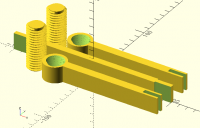
My method of creating a buttress thread starting with a
polygon for tooth shape works well but cpu loading is
considerable. My most recent build was a C clamp to
hold some parts while the sili goo cured and I needed a
C clamp deeper than I could buy locally so I designed and
printed it. .png attached. Not very strong but adequate for
the job. Could have made the screws longer but it did the
job once superglued together.
To make the nut I re-render the bolt .5mm oversize for the
nozzle diameter, then subtract this oversized render from
the nut. The console logs says it is still using CSG, not
manifold for an F5 while the video response is instant for
an F6. Is there some preference setting causing this?
The diff is maybe 1 second for an F6 and grabbing the image
to blow it up or change the viewing angle is real time, whereas
the F5 is 11 secs to render & grabbing it to move or change the
angle takes 30 or more seconds to settle and show the adjusted
view.
For the physically much bigger 2 start half nut of my vise screw,
F5's lag may run over 3 or more minutes effectively making F5 less
than useful. This is great software even a 91 yo old fart like me
can use productively, but I would appreciate it a lot if this was
addressed.
So, Q's?
Is the console log asynchronous, such that it hits the graphics intense phase before the console is
refreshed?
Should there be a repaint inserted somewhere?
At what point is the end time measured?
When (after F5) changing View, say top to bottom (ctrl-4/5), the GUI is stuck for 6s,
when e.g. the title-bar Close-X icon turns red for some reason, then ~3s for the Preview pane to
repaint.
I presume that first 6s is OpenCSG doing it's thing? Then 3s for the graphics stack (seems long?)?
There also appears to be frequent repaints, perhaps unnecessarily so.
Could a repaint repeat limit/gate help to prevent the performance hit?
Would it be useful to measure some variations on preview performance?
OpenSCAD mailing list
To unsubscribe send an email to discuss-leave@lists.openscad.org
Cheers, Gene Heskett, CET.
"There are four boxes to be used in defense of liberty:
soap, ballot, jury, and ammo. Please use in that order."
-Ed Howdershelt (Author, 1940)
If we desire respect for the law, we must first make the law respectable.
- Louis D. Brandeis
Don't poison our oceans, interdict drugs at the src.
On 10/18/25 23:06, Michael Marx (spintel) via Discuss wrote:
> I was fiddling with old/example024.scad. (with 2025.10.10)
> To generate some load I used n=5. That gives, on my intel-i5, ~5 minutes using Manifold. (So I
> could observe multi-thread use)
>
> After render, as expected, the preview pane performance is good.
>
>
>
> But for F5 preview it is terrible, e.g. 8s to drag. Title bar shows Not Responding with the blue
> spinner.
>
> Not just the preview pane, but the whole GUI is less responsive. (2021.01 was totally locked)
>
> I also noticed the time logged in the console seems wrong.
>
> It shows sub-second, when the visual change (console & re-paint) is easily visibly measured at 11
> seconds.
>
> Often the console does not show the typical preview messages until the end of that period.
>
> The Compiling design phase, in render is sub-second so I imagine the recursion doesn't take long.
I'll second this observation now that its been mentioned.
My method of creating a buttress thread starting with a
polygon for tooth shape works well but cpu loading is
considerable. My most recent build was a C clamp to
hold some parts while the sili goo cured and I needed a
C clamp deeper than I could buy locally so I designed and
printed it. .png attached. Not very strong but adequate for
the job. Could have made the screws longer but it did the
job once superglued together.
To make the nut I re-render the bolt .5mm oversize for the
nozzle diameter, then subtract this oversized render from
the nut. The console logs says it is still using CSG, not
manifold for an F5 while the video response is instant for
an F6. Is there some preference setting causing this?
The diff is maybe 1 second for an F6 and grabbing the image
to blow it up or change the viewing angle is real time, whereas
the F5 is 11 secs to render & grabbing it to move or change the
angle takes 30 or more seconds to settle and show the adjusted
view.
For the physically much bigger 2 start half nut of my vise screw,
F5's lag may run over 3 or more minutes effectively making F5 less
than useful. This is great software even a 91 yo old fart like me
can use productively, but I would appreciate it a lot if this was
addressed.
> So, Q's?
>
> Is the console log asynchronous, such that it hits the graphics intense phase before the console is
> refreshed?
>
> Should there be a repaint inserted somewhere?
> At what point is the end time measured?
>
>
> When (after F5) changing View, say top to bottom (ctrl-4/5), the GUI is stuck for 6s,
> when e.g. the title-bar Close-X icon turns red for some reason, then ~3s for the Preview pane to
> repaint.
>
> I presume that first 6s is OpenCSG doing it's thing? Then 3s for the graphics stack (seems long?)?
>
>
> There also appears to be frequent repaints, perhaps unnecessarily so.
> Could a repaint repeat limit/gate help to prevent the performance hit?
>
>
> Would it be useful to measure some variations on preview performance?
>
>
> OpenSCAD mailing list
> To unsubscribe send an email to discuss-leave@lists.openscad.org
Cheers, Gene Heskett, CET.
--
"There are four boxes to be used in defense of liberty:
soap, ballot, jury, and ammo. Please use in that order."
-Ed Howdershelt (Author, 1940)
If we desire respect for the law, we must first make the law respectable.
- Louis D. Brandeis
Don't poison our oceans, interdict drugs at the src.
MM
Michael Marx (spintel)
Sun, Oct 19, 2025 7:29 AM
-----Original Message-----
From: gene heskett via Discuss [mailto:discuss@lists.openscad.org]
The console logs says it is still using CSG, not
manifold for an F5 while the video response is instant for
an F6. Is there some preference setting causing this?
The diff is maybe 1 second for an F6 and grabbing the image
to blow it up or change the viewing angle is real time, whereas
the F5 is 11 secs to render & grabbing it to move or change the
angle takes 30 or more seconds to settle and show the adjusted
view.
For the physically much bigger 2 start half nut of my vise screw,
F5's lag may run over 3 or more minutes effectively making F5 less
than useful. This is great software even a 91 yo old fart like me
can use productively, but I would appreciate it a lot if this was
addressed.
Manifold is only for F6 Render.
Currently F5 Preview is only OpenCSG based.
Where you see:
Compiling design (CSG Products generation)...
Geometries in cache: 16
Geometry cache size in bytes: 13696
CGAL Polyhedrons in cache: 39
CGAL cache size in bytes: 0
Compiling design (CSG Products normalization)...
Normalized tree has 14045 elements!
Compile and preview finished.
If the problem is bad, just use F6 instead of F5.
F5 Preview is mainly affected by the number of faces,
(actually the Normalized tree elements).
you can use $preview to adjust the $fX values to have fewer faces in F5,
and higher nicer-looking values in F6.
> -----Original Message-----
> From: gene heskett via Discuss [mailto:discuss@lists.openscad.org]
>
> The console logs says it is still using CSG, not
> manifold for an F5 while the video response is instant for
> an F6. Is there some preference setting causing this?
>
> The diff is maybe 1 second for an F6 and grabbing the image
> to blow it up or change the viewing angle is real time, whereas
> the F5 is 11 secs to render & grabbing it to move or change the
> angle takes 30 or more seconds to settle and show the adjusted
> view.
>
> For the physically much bigger 2 start half nut of my vise screw,
> F5's lag may run over 3 or more minutes effectively making F5 less
> than useful. This is great software even a 91 yo old fart like me
> can use productively, but I would appreciate it a lot if this was
> addressed.
>
Manifold is only for F6 Render.
Currently F5 Preview is only OpenCSG based.
Where you see:
Compiling design (CSG Products generation)...
Geometries in cache: 16
Geometry cache size in bytes: 13696
CGAL Polyhedrons in cache: 39
CGAL cache size in bytes: 0
Compiling design (CSG Products normalization)...
Normalized tree has 14045 elements!
Compile and preview finished.
If the problem is bad, just use F6 instead of F5.
F5 Preview is mainly affected by the number of faces,
(actually the Normalized tree elements).
you can use $preview to adjust the $fX values to have fewer faces in F5,
and higher nicer-looking values in F6.
GH
gene heskett
Sun, Oct 19, 2025 2:37 PM
On 10/19/25 03:30, Michael Marx (spintel) via Discuss wrote:
-----Original Message-----
From: gene heskett via Discuss [mailto:discuss@lists.openscad.org]
The console logs says it is still using CSG, not
manifold for an F5 while the video response is instant for
an F6. Is there some preference setting causing this?
The diff is maybe 1 second for an F6 and grabbing the image
to blow it up or change the viewing angle is real time, whereas
the F5 is 11 secs to render & grabbing it to move or change the
angle takes 30 or more seconds to settle and show the adjusted
view.
For the physically much bigger 2 start half nut of my vise screw,
F5's lag may run over 3 or more minutes effectively making F5 less
than useful. This is great software even a 91 yo old fart like me
can use productively, but I would appreciate it a lot if this was
addressed.
Manifold is only for F6 Render.
Currently F5 Preview is only OpenCSG based.
Where you see:
Compiling design (CSG Products generation)...
Geometries in cache: 16
Geometry cache size in bytes: 13696
CGAL Polyhedrons in cache: 39
CGAL cache size in bytes: 0
Compiling design (CSG Products normalization)...
Normalized tree has 14045 elements!
Compile and preview finished.
If the problem is bad, just use F6 instead of F5.
Which I have been doing, but F6 loses the colors.
F5 Preview is mainly affected by the number of faces,
(actually the Normalized tree elements).
you can use $preview to adjust the $fX values to have fewer faces in F5,
and higher nicer-looking values in F6.
I've been doing that too.
Thanks.
Cheers, Gene Heskett, CET.
"There are four boxes to be used in defense of liberty:
soap, ballot, jury, and ammo. Please use in that order."
-Ed Howdershelt (Author, 1940)
If we desire respect for the law, we must first make the law respectable.
- Louis D. Brandeis
Don't poison our oceans, interdict drugs at the src.
On 10/19/25 03:30, Michael Marx (spintel) via Discuss wrote:
>> -----Original Message-----
>> From: gene heskett via Discuss [mailto:discuss@lists.openscad.org]
>>
>> The console logs says it is still using CSG, not
>> manifold for an F5 while the video response is instant for
>> an F6. Is there some preference setting causing this?
>>
>> The diff is maybe 1 second for an F6 and grabbing the image
>> to blow it up or change the viewing angle is real time, whereas
>> the F5 is 11 secs to render & grabbing it to move or change the
>> angle takes 30 or more seconds to settle and show the adjusted
>> view.
>>
>> For the physically much bigger 2 start half nut of my vise screw,
>> F5's lag may run over 3 or more minutes effectively making F5 less
>> than useful. This is great software even a 91 yo old fart like me
>> can use productively, but I would appreciate it a lot if this was
>> addressed.
>>
> Manifold is only for F6 Render.
> Currently F5 Preview is only OpenCSG based.
> Where you see:
> Compiling design (CSG Products generation)...
> Geometries in cache: 16
> Geometry cache size in bytes: 13696
> CGAL Polyhedrons in cache: 39
> CGAL cache size in bytes: 0
> Compiling design (CSG Products normalization)...
> Normalized tree has 14045 elements!
> Compile and preview finished.
>
> If the problem is bad, just use F6 instead of F5.
Which I have been doing, but F6 loses the colors.
> F5 Preview is mainly affected by the number of faces,
> (actually the Normalized tree elements).
> you can use $preview to adjust the $fX values to have fewer faces in F5,
> and higher nicer-looking values in F6.
I've been doing that too.
Thanks.
> _______________________________________________
> OpenSCAD mailing list
> To unsubscribe send an email to discuss-leave@lists.openscad.org
> .
Cheers, Gene Heskett, CET.
--
"There are four boxes to be used in defense of liberty:
soap, ballot, jury, and ammo. Please use in that order."
-Ed Howdershelt (Author, 1940)
If we desire respect for the law, we must first make the law respectable.
- Louis D. Brandeis
Don't poison our oceans, interdict drugs at the src.
MK
Marius Kintel
Sun, Oct 19, 2025 2:57 PM
F6 has color support by default now.
On Oct 19, 2025, at 10:37, gene heskett via Discuss discuss@lists.openscad.org wrote:
On 10/19/25 03:30, Michael Marx (spintel) via Discuss wrote:
-----Original Message-----
From: gene heskett via Discuss [mailto:discuss@lists.openscad.org]
The console logs says it is still using CSG, not
manifold for an F5 while the video response is instant for
an F6. Is there some preference setting causing this?
The diff is maybe 1 second for an F6 and grabbing the image
to blow it up or change the viewing angle is real time, whereas
the F5 is 11 secs to render & grabbing it to move or change the
angle takes 30 or more seconds to settle and show the adjusted
view.
For the physically much bigger 2 start half nut of my vise screw,
F5's lag may run over 3 or more minutes effectively making F5 less
than useful. This is great software even a 91 yo old fart like me
can use productively, but I would appreciate it a lot if this was
addressed.
Manifold is only for F6 Render.
Currently F5 Preview is only OpenCSG based.
Where you see:
Compiling design (CSG Products generation)...
Geometries in cache: 16
Geometry cache size in bytes: 13696
CGAL Polyhedrons in cache: 39
CGAL cache size in bytes: 0
Compiling design (CSG Products normalization)...
Normalized tree has 14045 elements!
Compile and preview finished.
If the problem is bad, just use F6 instead of F5.
Which I have been doing, but F6 loses the colors.
F5 Preview is mainly affected by the number of faces,
(actually the Normalized tree elements).
you can use $preview to adjust the $fX values to have fewer faces in F5,
and higher nicer-looking values in F6.
I've been doing that too.
Thanks.
OpenSCAD mailing list
To unsubscribe send an email to discuss-leave@lists.openscad.org
.
Cheers, Gene Heskett, CET.
"There are four boxes to be used in defense of liberty:
soap, ballot, jury, and ammo. Please use in that order."
-Ed Howdershelt (Author, 1940)
If we desire respect for the law, we must first make the law respectable.
- Louis D. Brandeis
Don't poison our oceans, interdict drugs at the src.
OpenSCAD mailing list
To unsubscribe send an email to discuss-leave@lists.openscad.org
F6 has color support by default now.
> On Oct 19, 2025, at 10:37, gene heskett via Discuss <discuss@lists.openscad.org> wrote:
>
> On 10/19/25 03:30, Michael Marx (spintel) via Discuss wrote:
>>> -----Original Message-----
>>> From: gene heskett via Discuss [mailto:discuss@lists.openscad.org]
>>>
>>> The console logs says it is still using CSG, not
>>> manifold for an F5 while the video response is instant for
>>> an F6. Is there some preference setting causing this?
>>>
>>> The diff is maybe 1 second for an F6 and grabbing the image
>>> to blow it up or change the viewing angle is real time, whereas
>>> the F5 is 11 secs to render & grabbing it to move or change the
>>> angle takes 30 or more seconds to settle and show the adjusted
>>> view.
>>>
>>> For the physically much bigger 2 start half nut of my vise screw,
>>> F5's lag may run over 3 or more minutes effectively making F5 less
>>> than useful. This is great software even a 91 yo old fart like me
>>> can use productively, but I would appreciate it a lot if this was
>>> addressed.
>>>
>> Manifold is only for F6 Render.
>> Currently F5 Preview is only OpenCSG based.
>> Where you see:
>> Compiling design (CSG Products generation)...
>> Geometries in cache: 16
>> Geometry cache size in bytes: 13696
>> CGAL Polyhedrons in cache: 39
>> CGAL cache size in bytes: 0
>> Compiling design (CSG Products normalization)...
>> Normalized tree has 14045 elements!
>> Compile and preview finished.
>>
>> If the problem is bad, just use F6 instead of F5.
> Which I have been doing, but F6 loses the colors.
>> F5 Preview is mainly affected by the number of faces,
>> (actually the Normalized tree elements).
>> you can use $preview to adjust the $fX values to have fewer faces in F5,
>> and higher nicer-looking values in F6.
> I've been doing that too.
> Thanks.
>> _______________________________________________
>> OpenSCAD mailing list
>> To unsubscribe send an email to discuss-leave@lists.openscad.org
>> .
>
> Cheers, Gene Heskett, CET.
> --
> "There are four boxes to be used in defense of liberty:
> soap, ballot, jury, and ammo. Please use in that order."
> -Ed Howdershelt (Author, 1940)
> If we desire respect for the law, we must first make the law respectable.
> - Louis D. Brandeis
> Don't poison our oceans, interdict drugs at the src.
>
> _______________________________________________
> OpenSCAD mailing list
> To unsubscribe send an email to discuss-leave@lists.openscad.org

JB
Jordan Brown
Sun, Oct 19, 2025 5:06 PM
It might be nice to (optionally) display actual FPS while rotating and
panning, and while animating. I wouldn't spend screen space all the time.
It might be nice to (optionally) display actual FPS while rotating and
panning, and while animating. I wouldn't spend screen space all the time.

TA
Todd Allen
Sun, Oct 19, 2025 5:15 PM
But for F5 preview it is terrible, e.g. 8s to drag. Title bar shows Not
Responding with the blue spinner.
Not just the preview pane, but the whole GUI is less responsive. (2021.01
was totally locked)
This became a big issue for me after switching to a higher resolution
monitor. Then I learned that preview speed is massively impacted by the
numbers of pixels displayed while after rendering the number of pixels
displayed has minimal impact on performance.
I disabled automatic preview and now typically render first and when I want
the features of a preview display I first expand the editor and console
windows to reduce the viewport window to a size that doesn't make the
interface unbearably unresponsive. It would be nice if the display windows
could be quickly resized with keyboard commands or if the interface could
be given higher priority than the preview display but with care the
interactive OpenSCAD app is useable.
On Sat, Oct 18, 2025 at 10:06 PM Michael Marx (spintel) via Discuss <
discuss@lists.openscad.org> wrote:
I was fiddling with old/example024.scad. (with 2025.10.10)
To generate some load I used n=5. That gives, on my intel-i5, ~5 minutes
using Manifold. (So I could observe multi-thread use)
After render, as expected, the preview pane performance is good.
But for F5 preview it is terrible, e.g. 8s to drag. Title bar shows Not
Responding with the blue spinner.
Not just the preview pane, but the whole GUI is less responsive. (2021.01
was totally locked)
I also noticed the time logged in the console seems wrong.
It shows sub-second, when the visual change (console & re-paint) is easily
visibly measured at 11 seconds.
Often the console does not show the typical preview messages until the end
of that period.
The Compiling design phase, in render is sub-second so I imagine the
recursion doesn't take long.
So, Q's?
Is the console log asynchronous, such that it hits the graphics intense
phase before the console is refreshed?
Should there be a repaint inserted somewhere?
At what point is the end time measured?
When (after F5) changing View, say top to bottom (ctrl-4/5), the GUI is
stuck for 6s,
when e.g. the title-bar Close-X icon turns red for some reason, then ~3s
for the Preview pane to repaint.
I presume that first 6s is OpenCSG doing it's thing? Then 3s for the
graphics stack (seems long?)?
There also appears to be frequent repaints, perhaps unnecessarily so.
Could a repaint repeat limit/gate help to prevent the performance hit?
Would it be useful to measure some variations on preview performance?
OpenSCAD mailing list
To unsubscribe send an email to discuss-leave@lists.openscad.org
> But for F5 preview it is terrible, e.g. 8s to drag. Title bar shows Not
Responding with the blue spinner.
Not just the preview pane, but the whole GUI is less responsive. (2021.01
was totally locked)
This became a big issue for me after switching to a higher resolution
monitor. Then I learned that preview speed is massively impacted by the
numbers of pixels displayed while after rendering the number of pixels
displayed has minimal impact on performance.
I disabled automatic preview and now typically render first and when I want
the features of a preview display I first expand the editor and console
windows to reduce the viewport window to a size that doesn't make the
interface unbearably unresponsive. It would be nice if the display windows
could be quickly resized with keyboard commands or if the interface could
be given higher priority than the preview display but with care the
interactive OpenSCAD app is useable.
On Sat, Oct 18, 2025 at 10:06 PM Michael Marx (spintel) via Discuss <
discuss@lists.openscad.org> wrote:
> I was fiddling with old/example024.scad. (with 2025.10.10)
> To generate some load I used n=5. That gives, on my intel-i5, ~5 minutes
> using Manifold. (So I could observe multi-thread use)
>
> After render, as expected, the preview pane performance is good.
>
>
>
> But for F5 preview it is terrible, e.g. 8s to drag. Title bar shows Not
> Responding with the blue spinner.
>
> Not just the preview pane, but the whole GUI is less responsive. (2021.01
> was totally locked)
>
> I also noticed the time logged in the console seems wrong.
>
> It shows sub-second, when the visual change (console & re-paint) is easily
> visibly measured at 11 seconds.
>
> Often the console does not show the typical preview messages until the end
> of that period.
>
> The Compiling design phase, in render is sub-second so I imagine the
> recursion doesn't take long.
>
>
>
> So, Q's?
>
> Is the console log asynchronous, such that it hits the graphics intense
> phase before the console is refreshed?
>
> Should there be a repaint inserted somewhere?
> At what point is the end time measured?
>
>
>
> When (after F5) changing View, say top to bottom (ctrl-4/5), the GUI is
> stuck for 6s,
> when e.g. the title-bar Close-X icon turns red for some reason, then ~3s
> for the Preview pane to repaint.
>
> I presume that first 6s is OpenCSG doing it's thing? Then 3s for the
> graphics stack (seems long?)?
>
>
>
> There also appears to be frequent repaints, perhaps unnecessarily so.
> Could a repaint repeat limit/gate help to prevent the performance hit?
>
>
>
> Would it be useful to measure some variations on preview performance?
> _______________________________________________
> OpenSCAD mailing list
> To unsubscribe send an email to discuss-leave@lists.openscad.org
>
GH
gene heskett
Sun, Oct 19, 2025 8:16 PM
On 10/19/25 11:08, Marius Kintel via Discuss wrote:
F6 has color support by default now.
That s/b helpful, thank you. You are hiding your candle under
a bushel. The cheat sheet should mention it.
My printers cannot do it, yet. . .
Looking at box turtles for that. Slicers will need "educated" also.
Klipper can grow an "M" macro to change it. Slicers will need
help in understanding when & how to use the macro. There
needs to be consensus among the makers of the box turtle
and its clones as to how the color is specified so the slicers
/can/ learn it. The present secrecy surrounding that info is very
discouraging as no one wants to offload half a kilobuck or more
with zero warranty that it will /Just Work/, including me. I can afford
it,
but most will stay up in the nosebleed seats, waiting till it does
/Just Work/. A basic Fact of Life.
Speaking about money, are you setup to handle donations? I do small
monthly stipends to 3 other "projects". Most locales require a
designated officer to handle the flow of money but I've read no hint
of that here. But the bandwidth bill needs paid. Discussion?
Thank you.
Cheers, Gene Heskett, CET.
"There are four boxes to be used in defense of liberty:
soap, ballot, jury, and ammo. Please use in that order."
-Ed Howdershelt (Author, 1940)
If we desire respect for the law, we must first make the law respectable.
- Louis D. Brandeis
Don't poison our oceans, interdict drugs at the src.
On 10/19/25 11:08, Marius Kintel via Discuss wrote:
> F6 has color support by default now.
That s/b helpful, thank you. You are hiding your candle under
a bushel. The cheat sheet should mention it.
My printers cannot do it, yet. . .
Looking at box turtles for that. Slicers will need "educated" also.
Klipper can grow an "M" macro to change it. Slicers will need
help in understanding when & how to use the macro. There
needs to be consensus among the makers of the box turtle
and its clones as to how the color is specified so the slicers
/can/ learn it. The present secrecy surrounding that info is very
discouraging as no one wants to offload half a kilobuck or more
with zero warranty that it will /Just Work/, including me. I can afford
it,
but most will stay up in the nosebleed seats, waiting till it does
/Just Work/. A basic Fact of Life.
Speaking about money, are you setup to handle donations? I do small
monthly stipends to 3 other "projects". Most locales require a
designated officer to handle the flow of money but I've read no hint
of that here. But the bandwidth bill needs paid. Discussion?
Thank you.
> OpenSCAD mailing list
> To unsubscribe send an email to discuss-leave@lists.openscad.org
Cheers, Gene Heskett, CET.
--
"There are four boxes to be used in defense of liberty:
soap, ballot, jury, and ammo. Please use in that order."
-Ed Howdershelt (Author, 1940)
If we desire respect for the law, we must first make the law respectable.
- Louis D. Brandeis
Don't poison our oceans, interdict drugs at the src.
MK
Marius Kintel
Sun, Oct 19, 2025 10:08 PM
Speaking about money, are you setup to handle donations? I do small
monthly stipends to 3 other "projects".
On Oct 19, 2025, at 16:16, gene heskett via Discuss <discuss@lists.openscad.org> wrote:
>
> Speaking about money, are you setup to handle donations? I do small
> monthly stipends to 3 other "projects".
The link on openscad.org <http://openscad.org/> is the best entry point: https://opencollective.com/openscad/donate
-Marius

